

Magic Hour AI is not trying to be a traditional video editor. It is built for creators who want to generate, animate, swap, sync, and polish visual content quickly from a browser.
The platform combines AI video generation, image-to-video, face swap, lip sync, talking photos, image editing, upscaling, voice tools, and ad-style content creation in one workspace. That sounds impressive on paper, but AI creative tools should not be judged only by how many features they list. The real test is whether the output is usable, how many tries it takes to get there, and whether the pricing still feels fair once credits start disappearing.
This Magic Hour AI review breaks down how the platform works, what the tools actually do, how the output quality feels in practice, where the limitations show up, and whether it is worth using for social media content, marketing videos, and creative experiments.
Quick Verdict
| Category | Analysis |
| Best for | Short AI videos, image-to-video clips, talking photos, lip sync videos, face swap content, social media visuals, and quick creative testing. |
| Not ideal for | Long-form video editing, frame-perfect brand work, complex product demos, legal or sensitive identity-based content, and campaigns that need full creative control. |
| Ease of use | The interface is beginner-friendly because most tools follow a simple upload, prompt, generate, and export workflow. |
| Output quality | Good for short-form content when the input is clean, but results still need human review because faces, hands, motion, and backgrounds can shift. |
| Pricing | The starting price is accessible, but the real cost depends on credits, model choice, video length, resolution, and how many retries you need. |
| Safety concern | Face swap, voice cloning, lip sync, and talking photo tools should only be used with consent and clear disclosure when needed. |
| Overall verdict | Magic Hour AI is a strong creative generation tool, but it works best as a fast production layer, not as a complete replacement for editing software. |
What Is Magic Hour AI?
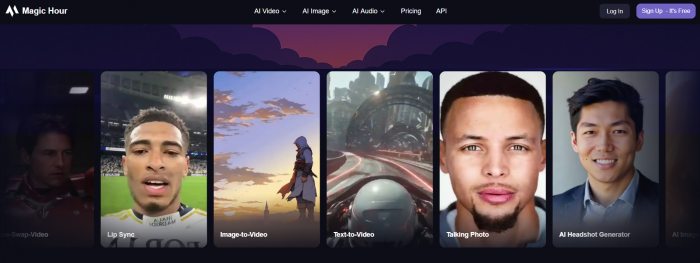
Magic Hour AI is a browser-based AI media platform that helps users create and edit videos, images, faces, and audio using generative AI. It includes tools for text-to-video, image-to-video, video-to-video, face swap, lip sync, talking photos, AI image generation, image editing, upscaling, GIF creation, and voice generation.
The platform is mainly useful for creators who need fast visual output. A YouTuber can animate a thumbnail-style image. A small business can create a short product clip. A marketer can test an ad concept before spending money on production. A social media creator can turn a still portrait into a moving clip for Reels, Shorts, or TikTok.
That is where Magic Hour AI makes the most sense. It is not built for deep timeline editing like Premiere Pro, Final Cut Pro, DaVinci Resolve, or CapCut. It is built for the earlier creative stage where you need raw visual ideas quickly.
The easiest way to understand Magic Hour AI is this: it gives you AI-generated creative material that you can use directly for casual content or refine later in another editor for more polished work.
How Magic Hour AI Works
Magic Hour AI keeps most workflows simple. The tools differ, but the process usually follows the same pattern.
Step 1: Pick the tool you want to use.
You start by choosing a tool such as image-to-video, text-to-video, face swap, lip sync, talking photo, AI image editor, or upscaler. This first choice matters because each tool needs a different input. Image-to-video needs a still image, lip sync needs a face and audio, and text-to-video starts from a written prompt.
Step 2: Upload or enter your input.
For image and video tools, you upload the source file. For prompt-based generation, you describe the scene or result you want. The quality of this input has a major effect on the final output. A sharp image with one clear subject usually works better than a crowded photo with multiple faces, text, shadows, or messy background details.
Step 3: Write a clear prompt.
This is where the output quality can change dramatically. A vague prompt produces a vague result. A better prompt describes the camera movement, lighting, subject behavior, mood, background, and what should stay stable.
For example, instead of writing “make this video cinematic,” a stronger prompt would be:
Create a short cinematic video where the subject slowly turns toward the camera, with soft natural lighting, subtle background movement, realistic facial expression, and smooth camera motion. Keep the face consistent and avoid exaggerated movement.
Step 4: Choose the settings.
Depending on the tool and plan, you may be able to choose duration, aspect ratio, resolution, model, or export quality. These settings can affect both output quality and credit usage. Longer videos, higher resolution, and premium models usually consume more credits.
Step 5: Generate and inspect the result.
After the output is created, you should watch it carefully before downloading or publishing it. AI video can look good at first glance but still include small issues such as flickering backgrounds, changing facial details, unstable hands, warped text, or slightly unnatural lip movement.
Step 6: Export or polish in another editor.
If the clip is for a casual post, you may be able to use it directly. If it is for a campaign, client, or brand page, it is better to finish the clip in CapCut, Canva, Premiere Pro, DaVinci Resolve, or another editor so you can add captions, music, cuts, overlays, and final checks.
Magic Hour AI Features
Magic Hour AI has many tools, but the most important ones are the tools that solve real creator problems. The platform is strongest when it helps turn a static asset into something moving, talking, or visually refreshed.
| Feature | What It Does | Best Use Case |
| Image-to-Video | Turns a still image into a short moving clip. | Product visuals, portraits, social posts, thumbnails, and AI reels. |
| Text-to-Video | Creates a short video from a written prompt. | Scene ideas, ad concepts, visual experiments, and social content drafts. |
| Face Swap | Replaces a face in an image, GIF, or video. | Entertainment clips, character concepts, creative testing, and personalization. |
| Lip Sync | Matches mouth movement with uploaded or generated audio. | Talking avatars, short explainers, dubbing tests, and creator videos. |
| Talking Photo | Makes a still portrait appear to speak. | Profile clips, educational content, social storytelling, and avatar-style videos. |
| AI Image Editor | Edits images through text instructions. | Background edits, visual fixes, quick transformations, and content cleanup. |
| AI Upscaler | Improves clarity and resolution. | Sharper images, cleaner exports, and better-looking thumbnails. |
| Voice Tools | Generates, clones, or changes voices. | Narration, character voice tests, and audio for AI video projects. |
The image-to-video tool is probably the most practical feature for everyday creators. Many people already have product photos, AI images, selfies, thumbnails, or brand visuals. Magic Hour AI can turn those static images into short motion clips without manual animation.
The talking photo and lip sync tools are useful when someone needs quick avatar-style content. They are not always as natural as a recorded human video, but they can work well for short explainers, social clips, and creative experiments.
Face swap is more sensitive. It can be fun and visually powerful, but it should not be treated like a casual toy when real people are involved. If the output uses someone’s likeness, consent matters.
My Hands-On Test: How I Used Magic Hour AI
For this review, I focused on Magic Hour AI’s image-to-video workflow because it is one of the most useful tools for creators. The goal was simple: take a still image and see whether Magic Hour AI could turn it into a short social-ready video without manual editing.
I started with a clean portrait-style image with a clear subject and a simple background. I avoided a crowded image because AI video tools often struggle when there are too many faces, hands, objects, or text elements in the frame.
The prompt I used was:
Create a short cinematic video where the subject slowly turns toward the camera with soft natural lighting, subtle background motion, realistic facial expression, and smooth camera movement. Keep the face consistent and avoid exaggerated motion.
I uploaded the image, added the prompt, selected the available video settings, and started the generation. The interface was easy to follow. There was no complicated timeline, no layers, and no editing panel that required technical knowledge. The main effort was choosing the right input image and writing a prompt that was specific but not overloaded.
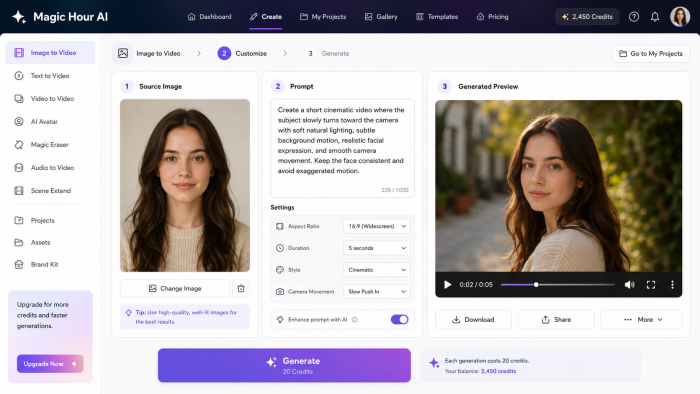
The first result was usable, but not flawless. The motion looked smooth for a short clip, and the background had a soft animated feel. The face mostly stayed consistent, although there were small changes around the eyes and mouth in some frames. This is a common issue with AI video tools. They can create convincing movement, but they may subtly alter facial details while generating new frames.
The export quality was good enough for a social media draft. It looked suitable for a Reel, Short, TikTok clip, or concept preview, especially after cropping or adding captions in another editor. However, it was not something I would publish without checking the full clip first. The background had slight flicker, and the prompt was followed more in mood than in exact movement.
What I liked most was the speed. Magic Hour AI turned a static image into a moving clip without keyframes, timeline editing, or animation knowledge. That makes it useful when you need fast visual ideas.
The limitation showed up in the details. The AI understood the general style, but it did not follow every instruction perfectly. Like most AI video tools, it performed best when the movement was simple and the scene was not too demanding.
Output Quality: What the Results Actually Look Like
Magic Hour AI can create strong short-form visuals, but the quality depends on the task. Image-to-video is usually more controlled because the system starts with a real image. Text-to-video is more unpredictable because the AI has to create the full scene from a prompt.
In image-to-video tests, the platform works best with simple motion. Slow camera movement, subtle expression changes, background animation, and product-style motion are more realistic than fast action or complicated body movement. If the prompt asks for too much, the result may become unstable.
Face-based tools are impressive when they work, but they require close inspection. A face can look consistent in one frame and slightly different in another. Lip sync can match the audio well enough for short clips, but mouth movement may still feel artificial if the image, audio, or expression does not fit naturally.
Magic Hour AI is strongest when used for:
● Short visual clips where mood and motion matter more than perfect frame-level accuracy.
● Social content where the viewer watches quickly and the clip does not need cinematic precision.
● Creative testing where the goal is to compare ideas before making a final version.
● Product or portrait animations where the subject is clear and the movement is controlled.
It is weaker when used for:
● Long scenes where character consistency must remain perfect across many seconds.
● Product videos where logos, labels, text, or small details must stay exact.
● Complex human motion involving hands, walking, dancing, or fast camera movement.
● Sensitive content where a small visual error could damage trust.
The best way to describe the output is practical rather than hype-driven. Magic Hour AI can create usable clips, but it is not a one-click guarantee. The better your input and prompt, the better your result.
Output strength by category (0 to 100)
| Feature | Score |
| Image generation | 85 |
| Photo face swap | 82 |
| Headshots | 80 |
| Lip sync | 72 |
| Video face swap | 64 |
| Image to video motion | 55 |
| Long-form coherence | 38 |
Magic Hour AI Pricing and Credits
Magic Hour AI uses a credit-based pricing system. That means the monthly subscription is only one part of the cost. The real value depends on how many credits you receive and how quickly your workflow uses them.
| Plan | Price | Credits | Best For |
| Free | $0 | 400 credits | Testing the platform before paying. |
| Creator | $10/month annually or $15/month monthly | 120,000 credits per year | Solo creators making regular short-form visuals. |
| Pro | $25/month annually or $39/month monthly | 300,000 credits per year | Frequent creators, marketers, and users testing many variations. |
| Business | $66/month annually or $99/month monthly | 840,000 credits per year | Teams, agencies, higher output needs, and heavier production workflows. |
The Free plan is useful for trying the platform, but it is not enough to judge every feature deeply. AI video usually needs testing. A first generation may be good, but a better result often comes from adjusting the prompt and running another version.
The Creator plan is the most reasonable starting point for individual creators. It gives enough room for regular use, but users still need to watch credit usage. A creator who generates several versions of every clip may reach limits faster than expected.
The Pro plan makes more sense for marketers and content teams that test creative variations. If you are generating ad ideas, multiple hooks, product clips, or different visual styles, a higher credit allowance is useful.
The Business plan is for teams that need more output, larger exports, and a more serious production workflow. It is not necessary for casual users, but it may be relevant for agencies or brands using AI video often.
The important thing is this: Magic Hour AI may look inexpensive at the entry level, but video credits can disappear quickly when you generate several versions, use longer durations, choose higher resolution, or test premium models.
What Real Users Say About Magic Hour AI
Public user feedback around Magic Hour AI is positive, but still limited. That distinction matters. The platform has encouraging reviews, but it does not yet have the huge review footprint of older design or video platforms.
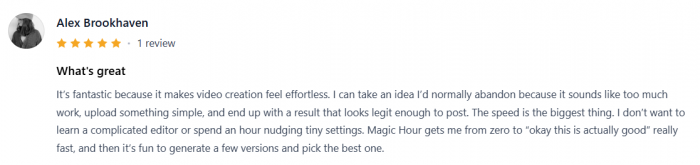
On review platforms such as G2 and Product Hunt, users generally praise the simple interface, fast generation process, face swap tools, video creation features, and the ability to create AI visuals without technical setup. The positive comments usually focus on speed and ease of use.

The criticism is more practical. Some users mention rendering time, free-plan limits, watermark or export concerns, and the need to review outputs carefully. These are not unusual complaints for AI video platforms, but they are important for buyers.
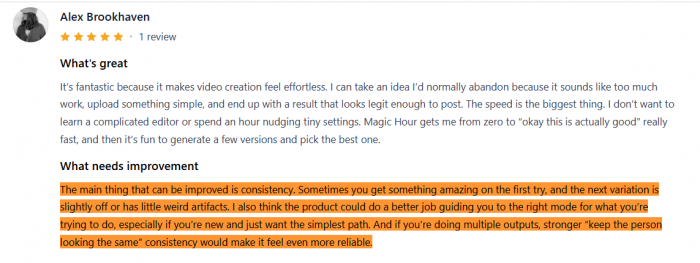
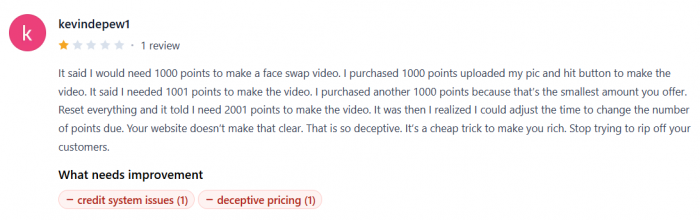
The fair reading is this: early users like Magic Hour AI because it makes AI media creation easy, but the public review base is still small enough that users should test the platform themselves before committing to a larger plan.
What Magic Hour AI Does Well
Magic Hour AI’s biggest strength is that it removes friction from AI media creation. You do not need to install software, learn a professional timeline, or understand advanced model settings before making something visual.
It is especially useful when speed matters. A creator can test a video idea quickly. A marketer can create visual variations before deciding which direction deserves more production effort. A small business can turn existing images into short clips without hiring an editor for every small post.
The platform also benefits from its range of tools. Image-to-video, face swap, lip sync, talking photo, AI image editing, and upscaling are all different workflows, but Magic Hour AI puts them close together. That makes it easier for creators who do not want to maintain separate subscriptions for every AI task.
Its strongest use case is short-form content. AI video works best when the clip is short, the subject is clear, and the creative goal is focused. Magic Hour AI fits that style well.
Where Magic Hour AI Falls Short
Magic Hour AI’s main weakness is not the lack of features. It is the unpredictability that comes with AI video.
Some outputs will look good immediately. Others may need several attempts. Faces can shift slightly, backgrounds can flicker, hands can look unnatural, and text inside images or videos may not stay stable. This is why the tool should not be used blindly for professional publishing.
The second limitation is the credit system. Credits are normal in AI video tools, but they make pricing harder to judge. A user may think a plan is affordable, then realize that repeated generations use credits quickly.
The third limitation is editing control. Magic Hour AI can generate media, but it does not replace a full editor. If you need precise cuts, captions, sound design, brand overlays, transitions, or multi-scene control, you will still need another tool.
The fourth limitation is risk around identity-based content. Face swap, talking photo, lip sync, and voice tools can create realistic-looking media. That is powerful, but it also means users have to think about consent, disclosure, and misuse.
Safety, Transparency and Content Rights
Magic Hour AI should be used with more care than a normal design tool because some of its features involve faces, voices, and likenesses. These are not just creative assets. They can represent real people.
Before publishing content made with face swap, voice cloning, lip sync, or talking photo tools, users should ask a few basic questions. Do I have permission to use this person’s face or voice? Could this clip mislead someone? Does the viewer need to know that AI was used? Is this content being used in an ad, endorsement, political message, or sensitive topic?
A responsible publishing workflow should include:
● Use only faces, voices, logos, images, and videos that you have permission to use.
● Avoid fake endorsements, fake testimonials, political impersonations, and misleading identity-based content.
● Review generated videos closely before publishing because realistic-looking clips can still contain visual errors.
● Add disclosure when AI alteration could change how viewers understand the content.
● Check commercial rights before using outputs in client work, paid ads, or brand campaigns.
Magic Hour AI is not unsafe by default. The risk depends on how people use it. For normal creative experiments, social visuals, and non-misleading content, it can be a useful tool. For identity-based media, users need to be much more careful.
Magic Hour AI Alternatives
Magic Hour AI competes with different tools depending on the use case. It is not only competing with AI video generators because it also includes face, voice, image, and editing-style features.
For AI video generation, alternatives include Runway, Pika, Luma, Kling, and Sora-based workflows. These tools may be better for users focused only on advanced AI video creation.
For talking avatars and lip sync, alternatives include HeyGen, Synthesia, D-ID, and Akool. These platforms may be better for presenter-style business videos, training content, and avatar workflows.
For social video editing, CapCut, Canva, VEED, and InVideo AI are stronger when users need captions, timeline editing, templates, and final publishing polish.
For image editing, Adobe Firefly, Canva, Leonardo AI, Fotor, and Pixlr are more direct alternatives.
Magic Hour AI’s advantage is convenience. It gives creators many creative tools in one place. Its disadvantage is that a dedicated tool may be stronger for one specific job.
Who Should Use Magic Hour AI?
Magic Hour AI is a good fit for creators who want to create short visual assets quickly and are willing to review the result before publishing. Social media creators, YouTubers, marketers, meme pages, small businesses, and agencies testing creative ideas will get the most value.
It is also useful for people who already create AI images and want to animate them. If you regularly make blog covers, thumbnails, product mockups, or character images, Magic Hour AI can turn those static visuals into short videos.
It is not the best choice for users who need strict accuracy, full editing control, long-form production, or sensitive identity-based content. If your work involves legal, medical, political, financial, or high-trust brand communication, Magic Hour AI should be used carefully and reviewed by a human before publishing.
Final Verdict
Magic Hour AI is one of the more practical AI creative platforms for users who want fast video and image generation without learning professional software. Its strongest tools are image-to-video, talking photo, lip sync, face swap, and AI-powered visual editing.
The platform is easy to use, flexible, and useful for short-form content. It can help creators move from idea to draft quickly, which is valuable in social media and marketing workflows.
However, it is not perfect. AI video still has consistency problems, credits can run out faster than expected, and identity-based features require responsible use. Magic Hour AI works best when users treat it as a creative generation tool, not a finished production studio.
The final recommendation is simple: Magic Hour AI is worth trying if you create short-form visuals, social media clips, animated images, or AI video experiments. It is less suitable if you need frame-perfect editing, long-form control, or guaranteed professional output from a single generation.
Comments