

MotionMuse AI is a specialized image-to-video generator built for one very specific job: taking a still image and turning it into a short animated clip with minimal setup. That focus makes it easier to understand than many broader AI video tools, but it also means the product reaches its limits quickly if the goal is longer storytelling, deeper editing, or broader creative control.
What makes MotionMuse interesting is not that it is the most advanced tool in the category, but that it is one of the more direct ones. The platform is built around speed, short outputs, simple prompting, and a browser-only workflow, with its branding aimed clearly at adult-oriented image animation rather than general-purpose video creation.
That combination creates a product with a very clear pitch and a more complicated reality. MotionMuse is easy to test, capable of producing usable short clips, and priced in a way that looks accessible at first glance, but questions around feature depth, trust, and credit reliability make it harder to recommend without context.
At a glance
| Category | Verdict |
| Best for | Short image-to-video generation from a single still image |
| Main strength | Fast, simple workflow with low setup friction |
| Biggest limitation | Very short output length and limited creative depth |
| Platform type | Browser-based AI image-to-video tool |
| Positioning | Explicitly adult-oriented, not a general-purpose creative suite |
| Overall takeaway | Useful in a narrow lane, but not strong enough to replace a fuller video workflow |
What MotionMuse actually does
At its core, MotionMuse takes an uploaded image and applies AI-generated motion to it, usually in the form of subtle camera movement, depth animation, atmospheric motion, or character movement across a short clip. The output length sits around 4 to 6 seconds, which tells a lot about the product philosophy: this is a quick-generation tool for short-form visual impact, not a system built for long-form creation.
That distinction matters because many AI video products get judged by the wrong benchmark. MotionMuse is not trying to be a full cinematic platform, and it does not appear to support full text-to-video generation from scratch without an image input. It also is not a real editor in the conventional sense, because the workflow is centered on generating clips rather than refining them through a timeline, layered composition, or shot-by-shot control.
In practical terms, MotionMuse works best when used as a lightweight creative utility. For creators who already have a strong still image and simply want to add movement, that is a legitimate use case. For users who need scene construction, long outputs, or polished editing flexibility, the product feels narrow almost immediately.
Why the workflow feels easy
The strongest part of MotionMuse is how little explanation it needs. A typical session follows a simple pattern:
● Upload a still image.
● Choose a template or describe the motion in a prompt.
● Generate a short clip and review the output.
● Regenerate if needed rather than deeply edit the result.

That structure reduces friction, and that matters more than it may seem. Many AI video tools lose users before the first generation because the setup feels too technical or too open-ended. MotionMuse lowers that barrier by narrowing the decision set. In other words, the product feels simple partly because it truly is simple, and partly because it deliberately avoids giving the user too many knobs to turn.
The benefit of that design is speed. The drawback is that it pushes users toward regeneration instead of refinement. If a clip is close but not quite right, there is no deep editing layer waiting to rescue it. The practical workflow becomes test, regenerate, test again, which is efficient for volume but limiting for precision-focused work.
Output quality: good enough, not deep enough
MotionMuse can produce visually appealing clips when the input image is already strong and the requested motion stays within the product's comfort zone. Subtle camera pushes, depth effects, and restrained motion tend to work better than ambitious scene changes or highly complex animation requests.
This is where the platform needs to be judged honestly. The output can be effective for short social posts, looping previews, attention-grabbing thumbnails, and lightweight promotional content. That does not automatically make it high-end. The short duration helps the model hide some of its weaknesses, but it also keeps the tool from feeling like a serious storytelling engine.
A fair way to describe the output is this: MotionMuse is built for quick visual lift, not for cinematic depth. It can improve the perceived energy of a still image, but it does not offer the layered control, duration range, or editing flexibility that more mature video systems provide.
Feature set: where it helps and where it stops
The platform does include a useful mix of core capabilities, but almost every feature points back to the same central idea of short image-based motion generation.
| Capability | Status | What it means in practice |
| Animate a still image | Yes | This is the core product and the main reason to use it. |
| Custom text-described motion | Yes | Prompts can guide movement, especially when the instruction is specific. |
| Template library | Yes | Helpful for speed and consistency, especially for beginners. |
| Custom style training | Paid tiers | Suggests room for deeper personalization, though still within the same narrow workflow. |
| Text-to-video from scratch | No clear support | The tool appears to require an existing image as the starting point. |
| Clips longer than 6 seconds | No clear support | Output remains short, which limits narrative use. |
| Editing existing footage | No clear support | This is generation-first, not editor-first software. |
| Browser-only use | Yes | Convenient for access, but also a sign of its lightweight positioning. |
What stands out is not the absence of every advanced feature, but the consistency of the product vision. MotionMuse does not really pretend to be more than it is. The problem is that once the first few successful generations are done, the missing depth becomes much harder to ignore.
Pricing: simple on paper, more complicated in practice
MotionMuse uses a freemium, credit-based pricing model with monthly and discounted annual billing. That structure is easy to explain and easy to compare, which is good for readers trying to judge value quickly.
| Plan | Monthly price | Annual price (per month) | Monthly credits | Built for |
| Free | $0 | $0 | 20 one-time credits | Testing only |
| Basic | $9.99 | $4.99 | 300 | Light, occasional use |
| Pro | $29.99 | $14.99 | 1,500 | Regular content output |
| Premium | $49.99 | $24.99 | 3,000 | Studios, high-volume use |
On the surface, the pricing looks reasonable for a niche creation tool. The annual discounts are significant, and the paid tiers map cleanly to different usage levels. If the product is judged only by pricing page logic, MotionMuse comes across as accessible.
The deeper issue is that credit systems only feel user-friendly when users trust the platform behind them. Public complaints around credits being reduced or disappearing create a different reading of the pricing model. That does not invalidate the tiers themselves, but it does change how comfortable a serious user should feel about loading larger balances or committing to a longer subscription too quickly.
User sentiment and trust
The most honest way to describe user feedback is mixed, with a visible split between functional satisfaction and platform-level skepticism. Some users appear comfortable with the outputs and continue using the service. reddit
Others focus on support quality, testimonial credibility, and especially credit-related issues rather than the generation engine itself. reddit 2
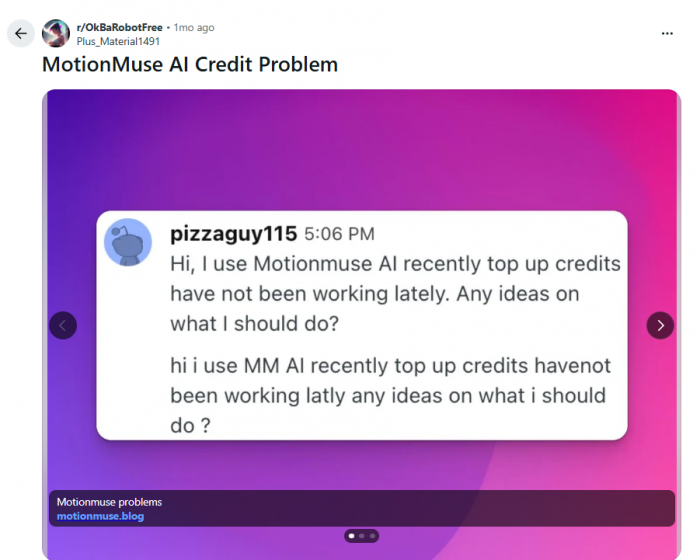
That distinction matters because it suggests MotionMuse is not failing at its core promise as much as it is struggling to inspire long-term confidence. A creator may believe the tool can generate motion and still hesitate to spend more money on it. That is a very specific kind of product problem, and it affects review scores just as much as rendering speed or clip quality.
A balanced reading of trust signals looks like this:
● The platform appears technically operational and is not uniformly described as fake.
● Some domain and reputation checkers classify it as likely legitimate at a basic site level.
● At the same time, caution flags remain around adult content, platform transparency, and user-reported credit issues.
For a creator deciding whether to test the platform, the practical takeaway is straightforward: experiment with small commitments first. MotionMuse may be usable, but it has not earned the kind of trust that removes the need for caution.
The NSFW positioning matters more than most reviews admit
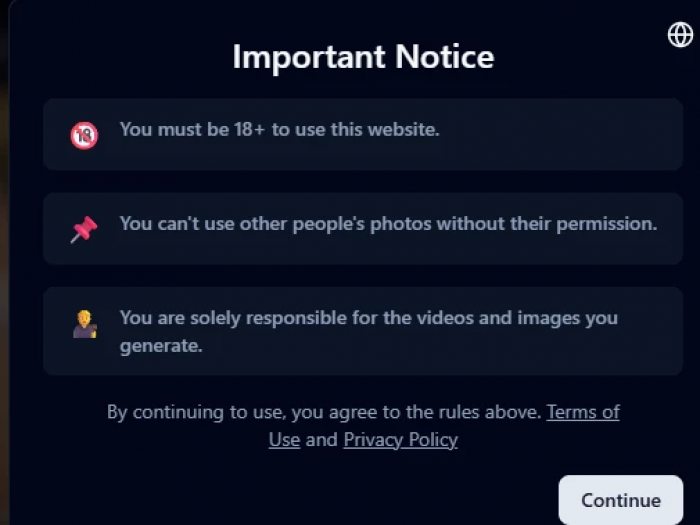
MotionMuse is explicitly positioned around adult-oriented content generation, and that changes how the platform should be evaluated. A mainstream image-to-video app can often be reviewed mostly through the lens of speed, quality, and usability. An adult-focused AI tool brings privacy, consent, and reputational risk into the center of the evaluation.
That does not automatically make MotionMuse worse than a general-purpose tool. In fact, for users specifically seeking an adult-oriented image animation product, that specialization may be the main attraction. But specialization also raises the bar. A niche service working with sensitive content should feel especially clear about transparency, account safety, and platform reliability. That is exactly where MotionMuse still feels less mature than it needs to be.
This is also why the platform is not an easy recommendation for everyone. Even users with no issue with adult content may still prefer a broader, more established tool if privacy, trust, or long-term workflow stability matter more than niche targeting.
Alternatives: where MotionMuse fits
The easiest way to understand MotionMuse is to compare it with tools that are either more powerful overall or closer in still-image animation use case.
| Tool | Strongest at | Trade-off versus MotionMuse |
| Runway | Longer clips, finer control, more professional workflows | Broader and more capable, but pricier and less beginner-simple |
| Kling AI | Realism and stronger physical coherence in motion | Higher quality ceiling, but slower and more resource-hungry |
| Luma Dream Machine | Flexible image and text-to-video creation | Wider input options, but less template-guided simplicity |
| Pika | Fast, playful social-style video generation | Similar quick appeal, but with a broader creative toolkit |
| Immersity AI | Depth and parallax animation from still photos | Closer like-for-like alternative for the still-image motion use case |
MotionMuse's advantage is not absolute power. It is clarity of use case. A creator who only wants a simple still-image animation workflow may appreciate how quickly the platform gets to a result. The problem is that this advantage is fragile. If a competing tool offers similar ease with stronger trust, broader outputs, or better quality consistency, MotionMuse becomes much easier to replace.
Personal Scorecard
| Metric | Score | Why it lands there |
| Ease of use | 8.5/10 | Simple workflow, low setup friction, easy first result. |
| Speed | 8.0/10 | Short clips help keep generation fast. |
| Value for money | 7.0/10 | Pricing looks fair, but trust concerns reduce comfort. |
| Output quality | 6.5/10 | Can be effective, but not especially deep or premium. |
| Feature depth | 5.5/10 | Limited beyond basic image-to-video generation. |
| Trust and track record | 5.0/10 | Mixed user sentiment and credit-related caution hold it back. |
The scorecard reflects the central tension of the product. MotionMuse is easier and faster than its trust profile would ideally justify, and more useful than its feature depth might suggest at first glance. That mix makes it viable as a niche tool, but not yet convincing as a dependable long-term platform.
Final Assessment
MotionMuse is best understood as a specialist, not a generalist. It does one job well enough to matter: animating a still image into a short clip with very little friction. For creators who want exactly that, especially in an adult-oriented use case, the product can be effective and surprisingly approachable.
At the same time, the platform has clear limits that a serious review should not soften. The output is short, the feature set is narrow, the workflow relies heavily on regeneration rather than precise editing, and trust signals remain mixed enough to affect buying confidence. That combination does not make MotionMuse a bad tool. It makes it a tool that should be used with clear expectations and careful spending habits.
For the right creator, MotionMuse can be a practical shortcut. For anyone looking for deeper control, broader use cases, longer clips, or stronger confidence in the platform itself, it still feels more like a tactical experiment than a core creative stack.
Comments