

Frosting AI looks simple at first, but it is not a tool you can judge after one prompt. It can create quick, attractive visuals for anime, fantasy, character art, and casual creative work. But once I tested it more seriously, the bigger questions became clear: how reliable are the results, how much control does it give, and is it useful beyond early-stage image ideas?
I used Frosting AI like a normal creator would. I tested prompts, styles, negative prompts, blog cover concepts, realistic images, text inside images, pricing, and the overall workflow. The experience was useful, but not perfect. Frosting AI works best when you treat it as a fast creative drafting tool rather than a complete professional design system.
What exactly Is Frosting AI?
Frosting AI is a browser-based AI image generator that creates visuals from text prompts. You describe the image you want, choose a style or format if available, add a negative prompt to reduce unwanted details, and generate the result directly in the browser.
It feels closer to a Stable Diffusion-style image generator than a full design platform like Canva or Adobe Firefly. The workflow is mainly prompt-based, so you are not working with deep layout tools, brand kits, typography controls, or advanced editing panels.
That simplicity is the appeal. Frosting AI is easy to start with, especially for beginners who do not want to install software or learn technical AI art workflows. But the same simplicity also limits it. Advanced users may find it lighter than Leonardo AI, Tensor.Art, or Midjourney.
During my first few tests, a few things became clear:
● Frosting AI is better for fast visual drafts than detailed production design.
● The prompt box drives the whole experience, which makes the tool simple but less controlled.
● Beginners can start quickly without understanding model settings or local AI tools.
● The tool is more useful for creative testing than for final client-ready assets.
How I Tested Frosting AI
I tested Frosting AI across the areas most users are likely to care about: realistic portraits, anime characters, fantasy scenes, blog cover images, social media visuals, negative prompts, aspect ratios, and text inside images.
I also looked at pricing, public feedback, privacy concerns, NSFW flexibility, and commercial-use questions. That matters because Frosting AI should not be judged only by how nice the first image looks.
The testing focused on practical questions:
● I checked whether the tool feels easy enough for a first-time user.
● I tested whether detailed prompts produced better results than short prompts.
● I compared how it handled anime, fantasy, realistic, and editorial-style visuals.
● I used negative prompts to see whether they improved messy details.
● I tested whether generated text was usable for covers or social graphics.
● I reviewed whether the pricing and plan limits were clear enough before paying.
First Impression: Simple and Fast, But Not Deep
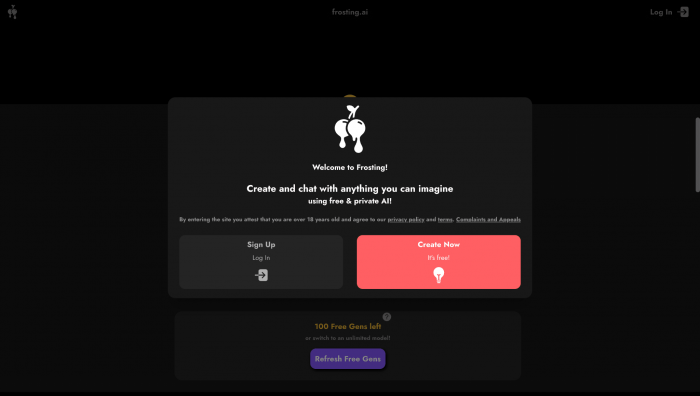
Frosting AI feels direct. You write a prompt, adjust a few settings if needed, and generate. That makes it beginner-friendly and fast. There is no heavy setup, no technical interface, and no need to understand complex Stable Diffusion workflows.
This works well for casual testing. You can move from an idea to an image quickly, which is useful if you need visual inspiration, character concepts, or blog image backgrounds.
The limitation appears when you want deeper control. Frosting AI does not feel as advanced as tools built for serious image production. If you need strong editing tools, model control, consistent characters, or brand-safe workflow features, it may feel limited.
The interface is best suited for users who want quick images, not users who need a full creative suite.
Realistic Portrait Test
For the realistic portrait test, I used a prompt designed to create a clean editorial-style human image. The first result looked good from a distance. The lighting was polished, the subject was clear, and the image had a professional AI-generated look.
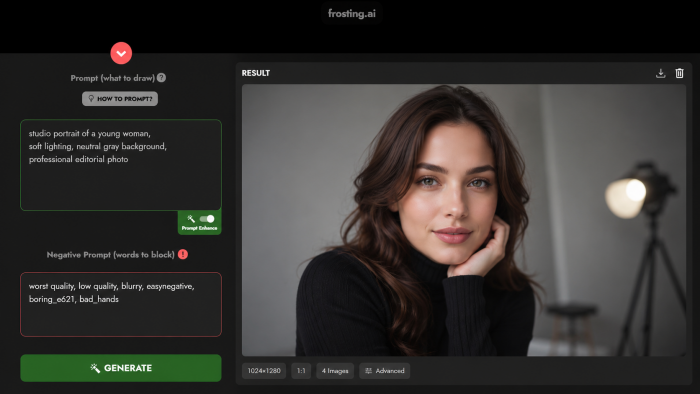
But closer inspection showed the usual AI issues. Some skin details looked too smooth, facial features needed checking, and background objects had a slightly artificial softness. If the image included hands, teeth, jewelry, or detailed clothing, I would inspect it even more carefully.
The portrait test showed that Frosting AI can create attractive human visuals, but realistic images should not be used blindly. They may work for casual concepts, fictional portraits, or rough visuals. For identity-based, brand, or client use, I would be careful.
Anime Character Test
The anime character test was stronger. Frosting AI felt more comfortable with stylized prompts than strict realism. The results had stronger colors, cleaner visual energy, and a more forgiving art style.
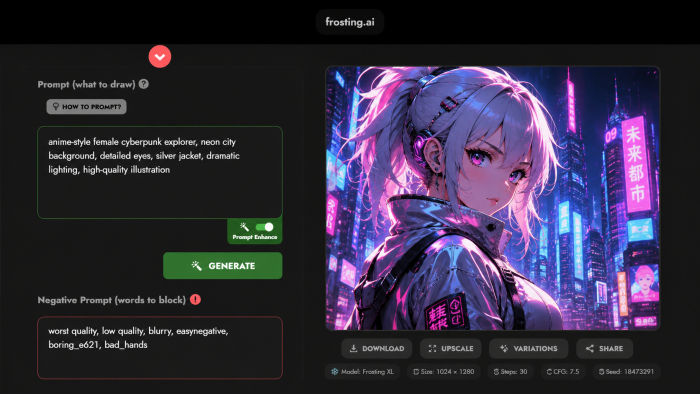
This is where the tool makes more sense. Anime and stylized images can hide small imperfections that would look obvious in realistic photography. A dramatic eye shape, exaggerated lighting, or stylized costume detail can still feel natural in this format.
Frosting AI worked well for anime-style profile images, character concepts, fantasy personas, roleplay visuals, and story references. Some clothing details and accessories still needed checking, but the overall output felt more usable than the realistic portrait test.
Fantasy Scene Test
Fantasy scenes were another strong area. I tested prompts around castles, glowing environments, dramatic skies, floating islands, and cinematic lighting. Frosting AI handled these better than precision-heavy prompts.
The tool was good at creating mood, color, atmosphere, and scale. That makes it useful for writers, gamers, roleplay users, and creators building visual references. You can turn a rough idea into a usable moodboard direction very quickly.
The weakness appeared in the fine details. Some buildings, textures, and background elements became messy when viewed closely. For early concept work, that is fine. For polished production art, the image would still need editing or a stronger tool.
Blog Cover Image Test
Frosting AI was useful for blog cover concepts, but only when I used it correctly. It performed better when I asked for a clean visual background or editorial-style image, not a finished cover with text.
The tool can create colorful abstract scenes, AI-themed visuals, minimal backgrounds, and creative image concepts that work well as a base. But typography was not reliable enough. If I asked Frosting AI to include readable words, the result usually needed fixing.
The better workflow is simple:
● Generate the main image in Frosting AI without asking it to add exact words.
● Leave enough empty space if the final image needs a title or overlay.
● Add the headline manually in Canva, Photoshop, Photopea, or another editor.
● Review the final image for spacing, contrast, and readability before publishing.
For bloggers, Frosting AI can be useful as a background generator. It should not replace proper cover design.
Text Inside Images Test
Text inside images was one of the weakest areas. Some outputs looked visually nice, but the words were not dependable. Letters could appear warped, misspelled, uneven, or almost readable but still wrong.
This is not unique to Frosting AI. Many AI image generators still struggle with exact typography. But it matters because creators often want to make thumbnails, posters, covers, and social graphics.
My recommendation is clear: use Frosting AI to generate the image, not the final text. Create the visual without words, then add clean typography manually in a design editor. This one step makes the output much more publishable.
Negative Prompt Test
Negative prompts were useful, but they were not a magic fix. I tested similar prompts with and without negative prompts to see whether the results improved.
A prompt like “blurry, low quality, extra fingers, bad anatomy, distorted face, bad eyes, watermark, unreadable text” helped clean up some outputs. It reduced obvious blur and some low-quality details.
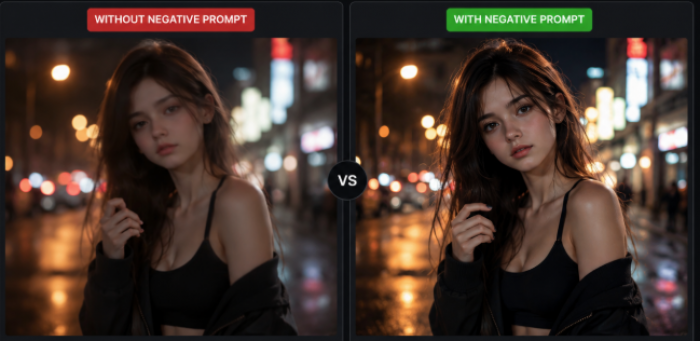
But it did not solve everything. Hands could still look strange, faces still needed review, and generated text still failed. Negative prompts are best used as part of a refinement process, not as a guarantee of perfect output.
They are helpful because:
● Negative prompts can reduce blur and make images look cleaner.
● They can remove some unwanted details from messy outputs.
● They can improve consistency when testing multiple generations.
● They still cannot guarantee perfect anatomy, typography, or product accuracy.
Style and Aspect Ratio Testing
Frosting AI becomes more useful when you match the prompt to the format. Square images worked better for profile-style visuals. Portrait images worked better for characters. Landscape images worked better for blog covers, banners, thumbnails, and environment scenes.
The tool handled different aspect ratios reasonably well, but composition still needed guidance. A character prompt in a wide format can feel awkward if you do not describe the layout. A fantasy scene in portrait format can feel cropped if the prompt is too wide in concept.
A good rule is to write the prompt for the format you actually need. If it is a blog cover, mention empty space and wide composition. If it is a character image, mention pose, framing, outfit, and lighting.
Advanced Features and Practical Value
Frosting AI is mainly a text-to-image tool, but third-party feature listings mention options such as upscaling, batch generation, reference image support, inpainting, and higher-tier creative tools. These features sound useful, but their real value depends on the plan and how often you use the platform.
Upscaling matters if the image is good but needs more sharpness. Batch generation matters because AI image creation often needs multiple attempts. Reference image support can help guide the output, but users should be careful when uploading personal photos, client assets, or private material.
Before upgrading, users should check whether the plan includes higher generation limits, faster processing, upscaling, batch generation, reference images, inpainting, commercial rights, and clear privacy rules.
Product Outcome: What Kind of Results Can You Expect?
The best Frosting AI outputs came from stylized and creative prompts. Anime characters, fantasy scenes, moodboards, abstract visuals, and blog backgrounds felt more natural than strict realistic prompts.
The weaker results appeared when the task required precision. Text inside images was unreliable. Realistic human details needed checking. Some images looked strong from a distance but had small errors when viewed closely.
Frosting AI is strongest when the output is creative, flexible, and later edited. It is weaker when the image needs exact text, accurate hands, real-person likeness, brand safety, product accuracy, or client-ready polish.
That makes it a good idea-generation tool, not always a final asset generator.
Frosting AI Pricing
Frosting AI appears to use a freemium pricing model. The free plan is useful for testing, while reported paid plans start at $7 per month and go up to around $120 per month. The exact limits should be checked on the live pricing page before subscribing because AI tool pricing can change.
| Plan | Price | Reported Credits or Limit | What It Is Best For |
| Free | $0/month | Around 100 daily credits or generations, depending on source | Testing the tool, basic image generation, and casual creative experiments |
| Planet | $7/month | Around 500 daily credits | Casual users who want more regular generation without spending much |
| Star | $25/month | Around 1,500 daily credits | Regular creators who need more output volume and better generation access |
| Nebula | $55/month | Around 4,000 daily credits | Heavy creators who may need advanced features and higher limits |
| Galaxy | $120/month | Around 10,000 daily credits | High-volume users, agencies, and users who need broader access or priority generation |
The Planet plan looks affordable for casual use, but the Star plan may make more sense for regular creators because image generation often requires multiple attempts. The Nebula and Galaxy plans should be compared carefully with Leonardo AI, Midjourney, Canva, Tensor.Art, Ideogram, and Adobe Firefly before paying.
Before choosing a plan, users should check how many credits they actually receive, whether credits reset or roll over, whether outputs have watermarks, which models and styles are included, whether commercial use is allowed, and what privacy protections apply to uploaded images.
Privacy, Safety and NSFW Concerns
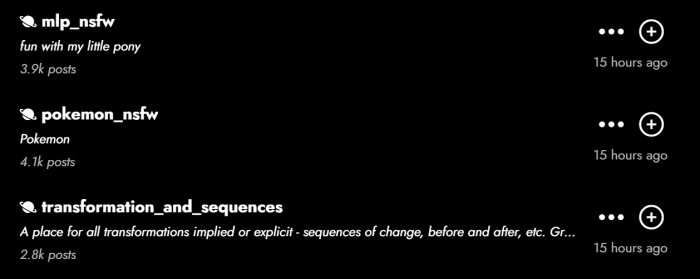
This is one of the areas where Frosting AI needs careful attention. Some public descriptions connect the tool with broad creative freedom, including adult-style or NSFW-adjacent generation. That does not automatically make Frosting AI bad, but it does change how users should think about safety.
AI image tools with flexible content rules need clear boundaries around real-person images, consent, deepfake misuse, private uploads, and commercial rights. Users should not upload sensitive images without reading the privacy policy and terms.
The risk becomes higher when the image involves a real person, private material, adult-style content, copyrighted characters, brand assets, or commercial campaigns. In those situations, privacy and usage rights matter more than speed.
Frosting AI may be fine for casual fictional art. For professional or sensitive use, users should verify the rules first.
Real User Reviews and Public Feedback
Frosting AI does not appear to have the same large review footprint as bigger AI image platforms. That makes it harder to judge long-term reliability, billing experience, support quality, and user satisfaction.
The available feedback is limited. Tool directories often describe Frosting AI as simple, fast, and accessible. Community discussions point to common AI image problems like distorted text, inconsistent details, and repeated prompt attempts.
The issue is not that Frosting AI has terrible public feedback. The issue is that there is not enough verified review volume to make strong claims about what most users think. That makes the free plan important. Users should test the tool themselves before paying.
Where Frosting AI Worked Best
Frosting AI worked best when I used it for creative visual drafts. Anime-style images felt more natural than strict realistic portraits. Fantasy prompts worked well because the tool could create atmosphere, lighting, and scale quickly. Blog cover backgrounds were useful when I avoided text and planned to add the title manually later.
It is strongest for users who need visual ideas quickly. It works well for anime-style characters, fantasy environments, moodboards, blog backgrounds, social media concepts, fictional references, and prompt experimentation.
Where Frosting AI Felt Weak
Frosting AI felt weaker when the task required accuracy. Text inside images was not dependable enough for blog covers, ads, posters, or thumbnails. Realistic human details needed close inspection. Product accuracy and brand-safe consistency were not strong enough for serious commercial work.
The tool also needs stronger public clarity around pricing, privacy, feature access, commercial use, and user reviews. That does not make it unusable. It simply means users should verify more before trusting it for serious projects.
Best Use Cases for Frosting AI
Frosting AI is best for users who care about speed and experimentation more than precision. It can help create anime-style profile images, fantasy scenes, character concepts, blog cover backgrounds, social media ideas, moodboards, fictional art references, and early prompt experiments.
It is less useful when the final image must be exact, legally sensitive, brand-approved, or ready for commercial publishing without changes.
Who Should Use and Avoid Frosting AI?
Frosting AI is best suited for casual creators, bloggers, anime art fans, fantasy writers, social media users, and beginners who want a simple browser-based AI image generator. It works well for fast image drafts, anime or fantasy visuals, blog image concepts, moodboards, and testing visual ideas without learning a full Stable Diffusion workflow.
However, it may not be the right choice for agencies, professional design teams, schools, family-safe environments, or brands with strict content policies. Users who need accurate typography, exact product visuals, consistent real-person imagery, advanced editing tools, clear commercial-use terms, or private/client-safe workflows should be careful before relying on it.
Best Frosting AI Alternatives
| Alternative | Better For | Why It May Be a Better Choice |
| Midjourney | Premium artistic visuals | It usually offers stronger composition, lighting, and cinematic polish. |
| Leonardo AI | Creative control and production workflow | It is better for model options, canvas tools, and advanced image work. |
| SeaArt AI | Anime and character generation | It offers more community-driven style and model options. |
| Tensor.Art | Stable Diffusion-style control | It is stronger for LoRAs, model variety, and advanced settings. |
| Ideogram | Text inside images | It is more reliable when readable typography matters. |
| Canva AI | Blog covers and social graphics | It is better for final layouts, templates, typography, and social post design. |
| Adobe Firefly | Brand-safe commercial visuals | It is a stronger option for professional and Adobe ecosystem users. |
| Playground AI | Casual creation and editing | It offers an easier editing workflow with broader creative use. |
The best alternative depends on what you need. If Frosting AI feels too casual, Leonardo AI or Midjourney are stronger. If text is the issue, Ideogram is a better fit. If you need a finished blog cover or social post, Canva is more practical. If commercial safety matters most, Adobe Firefly is the safer option.
Final Verdict
Frosting AI is not a tool I would dismiss, but it is also not one I would overhype. After testing it across different image types, it feels best for quick creative drafts, anime visuals, fantasy scenes, character ideas, social media concepts, and blog image backgrounds.
My personal rating: 3.7 out of 5.
Its strengths are simplicity, speed, and creative flexibility. You can open it in the browser, write a prompt, test a few versions, and get useful visual ideas without dealing with a complex setup.
The weak points are important. Text inside images is unreliable. Realistic details need checking. Public review data is limited. Pricing and feature access should be verified before paying. Privacy, NSFW content, and real-person image use require extra caution.
Frosting AI is best understood as a fast AI art generator for early-stage creative work. Use it for ideas, drafts, anime-style visuals, fantasy concepts, and casual content creation. For professional branding, client work, sensitive images, or final commercial assets, compare it with stronger alternatives before committing.
Comments