

What Is Hotpot.ai?
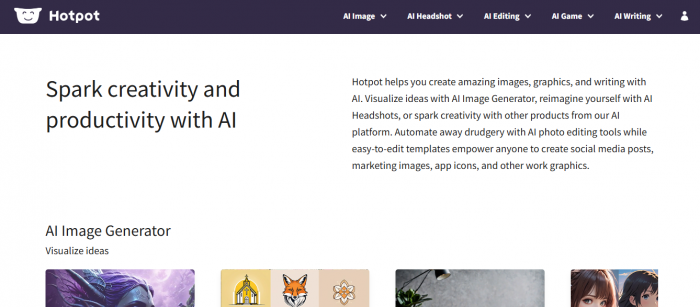
Hotpot.ai is an online platform that leverages artificial intelligence to help users generate, edit, and enhance both visual and written content. From crafting professional headshots to generating imaginative artwork or designing social media banners, Hotpot.ai brings a suite of tools that make creative tasks faster, easier, and more enjoyable. Its web-based interface ensures that you don’t need advanced technical skills, just your imagination.
Explore the Key Features
AI-Powered Image and Art Generation
One of Hotpot.ai’s standout features is its ability to generate high-quality images from simple text prompts. You can create artworks in various styles, including realistic, fantasy, anime, and even professional stock photos. This feature is perfect for designers seeking inspiration, content creators in need of eye-catching visuals, or anyone looking to bring their ideas to life with minimal effort.
Headshots and Avatar Creation
Hotpot.ai also offers specialized tools for generating professional headshots and avatars. Whether you need a polished image for LinkedIn, a creative avatar for social media, or themed profile pictures for gaming, the platform provides customizable options that suit both professional and casual needs.
Photo Editing and Enhancement
Beyond generation, Hotpot.ai equips users with intuitive photo editing tools. You can remove backgrounds, upscale low-resolution images, retouch portraits, colorize old photographs, and enhance details effortlessly. These features are ideal for transforming ordinary images into professional-quality visuals without relying on complex software.
Templates and Social Media Assets
For marketers, business owners, and social media enthusiasts, Hotpot.ai provides ready-made templates. These include banners, ads, app icons, and social media posts, enabling users to create polished content in minutes. This eliminates the hassle of starting from scratch while maintaining high visual standards.
AI Writing and Creative Ideation
Hotpot.ai isn’t limited to visuals. Its AI writing tools assist in brainstorming content, drafting articles, generating product descriptions, and even creating ad copy. By combining visual and textual creativity in one platform, Hotpot.ai empowers users to handle multiple aspects of content creation seamlessly.
User Experience: A Seamless Blend of Simplicity, Speed, and Intuition
One of Hotpot.ai’s strongest attributes is its focus on making AI creativity approachable and productive for users of all backgrounds from complete beginners to seasoned creators. Unlike traditional design software that demands training or technical expertise, Hotpot.ai’s workflow is refined to keep things simple, intuitive, and delightfully fast.
A Clean and Clear Interface
Hotpot.ai welcomes users with a clean, well‑organized dashboard where tools and options are clearly labeled and easy to explore. Large icons and straightforward navigation help eliminate confusion you don’t need design experience to start creating. Tools like AI Image Generator, Headshots, Photo Editing, and Writing Assistant are grouped logically, making it easy to locate what you need and begin instantly.
This intuitive layout ensures that even first‑time visitors can start generating content without tutorials or steep learning curves, a major plus for casual users, students, social media managers, and small business owners alike.
Visit Hotpot.ai tools page to see the full lineup: https://hotpot.ai/tools
Step‑by‑Step Workflow That Just Works
Most creative tasks on Hotpot.ai follow a simple, five‑step pattern that anyone can master quickly:
1. Select the tool you want to use such as AI image generation, headshot creation, or background removal.
2. Enter your text prompt or upload an image.
3. Adjust settings if needed (e.g., style, aspect ratio).
4. Generate with one click.
5. Review, download, or refine the result.
Because the platform structures every workflow this way, it’s easy to jump between creative tasks without losing context or getting overwhelmed. Whether you’re designing a marketing graphic or polishing a photo, the process feels consistent and familiar across tools.
Fast Results Keep the Creative Flow Alive
Speed plays an essential role in the user experience. Hotpot.ai’s cloud‑based AI performs most operations from background removal to image generation in just a few seconds, helping users iterate quickly and explore variations without long wait times. This sense of responsiveness encourages experimentation, which is crucial for creative workflows.
For example, when using the AI Image Generator, Hotpot.ai can deliver generated visuals within seconds, allowing users to test different prompts and refine ideas on the fly.
Accessible to Virtually Anyone
Hotpot.ai’s web‑based platform means you don’t have to install bulky software or worry about device specs you can create from any browser on a desktop, laptop, or even a tablet, keeping the experience flexible and accessible wherever you are.
This accessibility is especially valuable for small businesses, social media teams, and freelancers who often need to produce content rapidly and on the go.
Balanced Simplicity With Powerful Features
What makes Hotpot.ai truly appealing is how it balances simplicity with capability. Tools are powerful enough to generate professional results, yet packaged in a way that doesn’t overwhelm. Each feature is introduced with clear prompts and minimal setup. You don’t have to be an expert in design principles or AI commands to get started.
Because of this, users can jump straight into creative work without getting bogged down by complicated settings or confusing menus, a key reason many users find the experience both productive and enjoyable.
Pricing and Accessibility: Flexible, Scalable, and Designed for All Users
Hotpot.ai’s pricing model is built around accessibility and flexibility, catering to a wide range of needs from casual users and hobbyists to creators, small businesses, and larger teams. Instead of rigid subscription tiers with locked features, Hotpot.ai uses a credit‑based system that lets you pay only for what you use, making it both budget‑friendly and scalable.
1. Free Tier: Dip Your Toes In Without Spending a Dime
Hotpot.ai offers a free tier that newcomers can use to explore the platform’s core tools without any payment. This level gives you a limited number of credits that let you test basic features such as simple image editing or low‑resolution image generation so you can see how the platform works before committing financially.
While the free credits are relatively modest and may produce watermarked or low‑resolution outputs, they’re a valuable way to experiment and decide whether the tool fits your creative needs.
Think of the free tier as a try‑before‑you‑buy option perfect for students, hobbyists, social media enthusiasts, or anyone curious about AI design tools without budget pressure.
2. Credit Packs: Pay‑As‑You‑Go With Full Control
Rather than forcing a subscription, Hotpot.ai lets you purchase packages of credits that you can spend on any tool you choose. These credits do not expire, so you can buy a large pack and use it over time, ideal for project‑based or occasional use.
Typical one‑time credit pack pricing (varies slightly by offer and tool):
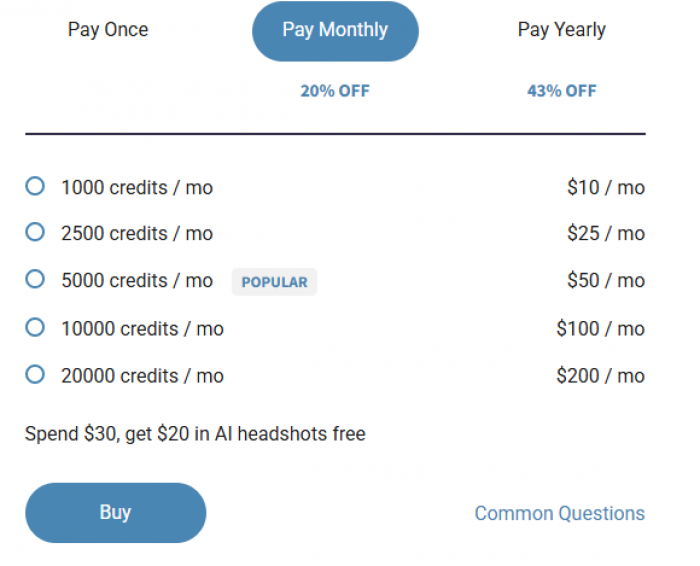
Different tasks like generating images, editing photos, or creating headshots consume different amounts of credits, which you will see when you configure each tool.
This flexible approach means you’re not locked into monthly payments and can scale your usage based on your project needs.
3. Subscription Plans: For Regular Users and Businesses
If you plan to use Hotpot.ai frequently, the platform also offers monthly and yearly subscription plans. These re‑charge your credit balance automatically and generally offer a better per‑credit value compared to one‑time purchases.
Annual plans can provide even deeper savings often discounted by up to ~40% compared to monthly billing which makes them a great choice for creators, content teams, and marketing professionals who rely on constant output.
4. Extra Discounts and Special Offers
Beyond the standard pricing, Hotpot.ai sometimes runs discounts or bonus programs:
● Credits may cost less per unit when bought in bulk.
● Spending a certain amount can unlock bonus features like free AI headshot credits.
● Special pricing may be available for educators, influencers, startups, or teams.
These opportunities make the platform more accessible to users who want professional‑level tools at a more affordable price.
5. Accessibility: Designed for All Skill Levels
Another strength of Hotpot.ai’s pricing model is its broad accessibility:
● No software installation, everything runs in your browser.
● Pay only for what you use, no confusing hidden tiers or locked tools.
● Free credits let you learn at your own pace before committing.
● Even the free tier provides exposure to core features, helping beginners gain confidence and experiment creatively.
This makes Hotpot.ai appealing to a range of users from someone producing occasional social media images to professionals creating design assets regularly.
Real-World Applications
Hotpot.ai caters to a wide variety of practical use cases:
● Marketing and Social Media: Quickly generate posts, ads, and banners that capture attention.
● Freelancing and Business: Design logos, app icons, and promotional materials without hiring a professional designer.
● Creative Projects: Generate artwork for games, stories, or personal projects with ease.
● Professional Branding: Create polished headshots or avatars for LinkedIn, portfolios, or personal websites.
Pros and Limitations
| Pros | Limitations |
| Wide range of AI tools covering images, templates, and writing | Some advanced features require a paid plan |
| User-friendly interface suitable for beginners | AI-generated images may need minor adjustments |
| Fast content generation and editing | Internet connection required |
| Templates for social media, marketing, and design | AI writing outputs can sometimes be generic |
Why Hotpot.ai Matters
The platform’s biggest appeal lies in its ability to democratize creativity. Hotpot.ai removes barriers such as technical skills, expensive software, and time constraints, allowing anyone to create professional-quality content in minutes. For businesses, it accelerates marketing efforts; for creators, it transforms ideas into visual realities; and for casual users, it turns creativity into a fun, accessible experience.
Hotpot.ai vs. Top Alternatives: In‑Depth Comparison
| Tool / Platform | Primary Focus | Key Features | Ideal For | Pricing / Access Notes |
| Hotpot.ai | All‑in‑one AI creative toolkit | Text‑to‑image AI, photo editing (background removal/upscale), headshot generator, templates, AI writing tools | Social media creators, small businesses, marketers, beginners | Free tier with limited credits; pay‑as‑you‑go credit packs and subscription plans available |
| Adobe Firefly | Integrated generative AI | AI image/text generation, upscaling, editing, generative templates; integrated with Adobe Creative Cloud | Creative professionals, designers needing commercial‑safe assets | Free tier; Standard/Pro plans with shared Creative Cloud credits; integrates with Photoshop/Express |
| Pixlr | Web‑based image editing & AI tools | Background removal, AI art generation, filters, template editing; beginner & advanced editor modes | On‑the‑go editors, quick photo enhancements | Free basic features; Premium from ~$4.90/mo with enhanced tools |
| Magic Studio | AI image creation & editing | AI‑powered image creations, automated edits, design tools without complex skills | Casual creators, small business visuals | Free tier available but with limited resolution/capabilities |
| X‑Design | Brand identity & visual assets | Turns descriptions into logos, visual branding, full identity systems | Small businesses, startups needing cohesive branding | Starts ~ $9.99/mo for full branding suite |
| NightCafe Creator | Community‑focused AI art | Text‑to‑image art generation with various AI models, social sharing | Artists, enthusiasts, hobby creators | Tiered credits/subscriptions with increasing AI point limits |
| Fotor | AI photo editing & enhancements | AI photo enhancer, backgrounds removal, portrait retouching, collage maker | Casual users needing photo improvement + simple AI art | Free tier; Pro from ~$8.99/mo |
| Playground AI | Dedicated image generation | Text‑to‑image with multiple models, edit tools (paint/erase), community gallery | Beginners, casual creators focused on image generation | Free with generous daily use; some paid upgrades |
| Artguru AI | Text‑to‑image art & avatar creation | Text‑generated images, avatar transformation, style transfer | Artistic creators wanting diverse output styles | Free basic tier; varying paid add‑ons |
| starryai | AI art generation | Custom styles & models, free daily generations, ownership of outputs | Art hobbyists, small creators wanting output control | Free daily credits with paid options |
Who Should Choose What?
| User Profile | Best Fit Tools |
| Beginners & Casual Creators | Hotpot.ai, Playground AI, NightCafe Creator |
| Small Businesses & Marketers | Hotpot.ai, X‑Design, Adobe Firefly |
| Professional Designers | Adobe Firefly, Pixlr (premium), Fotor |
| Dedicated AI Art Fans | Playground AI, starryai, Artguru AI |
| Brand Builders & Startups | X‑Design, Magic Studio |
Tips for Getting the Best Results
● Use clear and descriptive prompts when generating images.
● Experiment with multiple styles to discover what best suits your needs.
● Combine tools for instance, generate an image and then enhance it with editing features.
● Leverage templates to save time and maintain a consistent aesthetic.
Conclusion
Hotpot.ai stands out as a versatile, user-friendly platform that bridges the gap between imagination and reality. Whether you’re creating artwork, editing photos, generating professional headshots, or drafting content, Hotpot.ai equips you with powerful AI tools to bring your ideas to life effortlessly. By making AI-powered creativity accessible to everyone, it redefines how we approach design, content creation, and visual storytelling.
Frequently Asked Questions (FAQs)
1. Can I use Hotpot.ai for commercial purposes?
Yes, most outputs generated can be used commercially, depending on the plan and licensing terms.
2. Is Hotpot.ai beginner-friendly?
Absolutely. The platform’s intuitive design makes it easy for beginners, while still offering advanced options for experienced users.
3. How fast is content generation?
Most images or edits are generated within seconds, though processing time can vary depending on complexity.
4. Can I edit AI-generated images further?
Yes. Hotpot.ai provides robust editing tools for refining and enhancing outputs.
Hotpot.ai is more than just a design tool; it's a creative companion that helps users explore, experiment, and express their ideas in ways that were previously time-consuming or technically challenging. Whether you’re a professional, hobbyist, or someone just curious about AI-driven creativity, Hotpot.ai is a platform worth exploring.
Comments