

Facebook Professional Mode is one of the most useful settings on the platform, and one of the most misunderstood. It gives a personal profile the reach and earning tools that used to belong only to Pages, while letting you keep the account your friends and family already follow. That combination is what makes it worth attention, and also what makes people get it wrong, because turning it on changes more than it first appears.
This guide walks through what Professional Mode gives you, what it costs, how the monetization works in practice, and who it suits. By the end you should know whether to turn it on today, wait until your content is ready, or leave it off.
What Facebook Professional Mode Is
Professional Mode is a setting you switch on for your personal profile. It adds creator tools, audience features, and monetization options to the profile you already have, without converting it into a Page or making you start a second account. It is free, you can switch it off again, and it is available to profiles worldwide, on both the app and desktop.
Most of the confusion comes from mixing it up with other things. It is not a business Page, it is not the old Creator Studio, and it does not turn your account into a “business” one. Your profile stays a profile. What changes is the tools attached to it, the audience those tools reach, and your ability to earn from what you post.
What Changes on Your Profile When You Turn It On
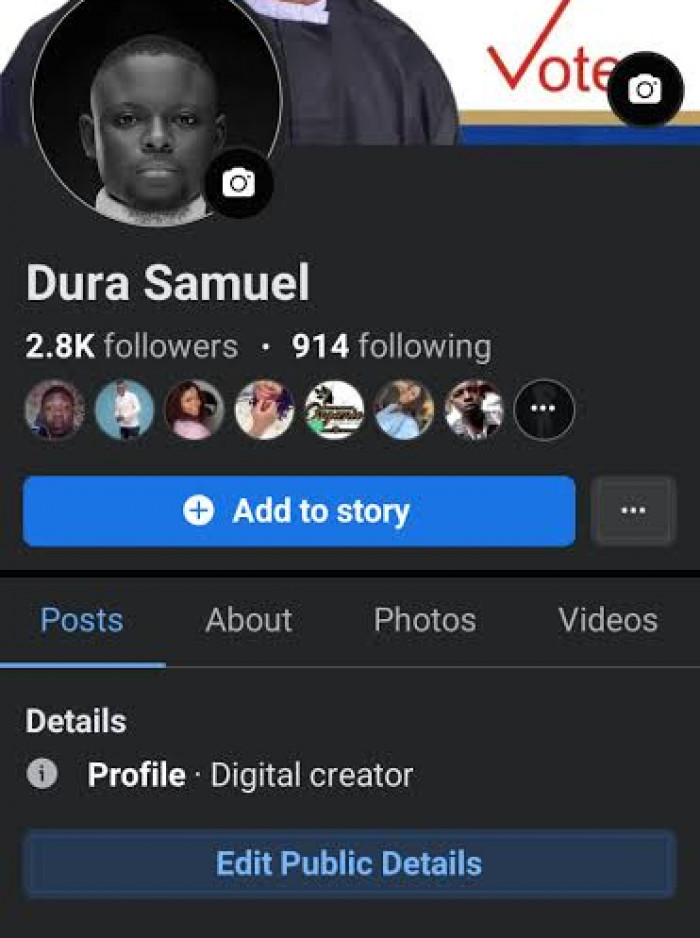
The simplest way to understand Professional Mode is to look at what is different the moment it is active. The friend limit stops being a ceiling. A normal profile caps out at 5,000 friends, but with Professional Mode people can follow you without a friend request, so your audience can keep growing. Your existing friends stay friends, and everyone else becomes a follower who sees the posts you make public. You also get a Follow button on your profile and start appearing in places like “suggested for you,” which a private profile never does.
You also get the Professional Dashboard, which reports your reach, follower growth, watch time, and the performance of each post, along with basic audience data such as age range, location, and when your followers are online. For anyone who has been posting without a clear idea of what lands, this is the part that changes how you work.
What stays the same matters too. Private posts stay private, your friends list and settings stay where they were, and the profile still works normally for the people who already know you. Professional Mode adds a public layer on top; it does not rebuild the account underneath.
Why Facebook Built Professional Mode
Facebook did not add Professional Mode to do creators a favor. It added it to stop them leaving.
For most of its history the platform ran on the friend connection, a two-way link between people who know each other. That model is weak for creators, who need a one-way audience of followers, not a mutual list capped at 5,000. Anyone who wanted to grow had to run a Page, which felt corporate and generally reached fewer people, so many creators moved their effort to TikTok, Instagram, and YouTube, where the follow model and short video were built in.
Professional Mode is Facebook's way of closing that gap. It attaches the follower model and the earning tools to the personal profile, so an individual can build a public audience without giving up the account their friends and family already follow. Keep the creators, and you keep the attention and ad inventory they bring.
Professional Mode vs. a Facebook Page
Both can be monetized and both come with a dashboard, so the two get treated as interchangeable. They are not, and the differences affect how you work day to day.
| Factor | Profile in Professional Mode | Facebook Page |
| Identity | Tied to you as a person | A separate brand entity |
| Audience | Friends plus public followers | Followers only |
| Team access | One login, no admin roles | Multiple admins and roles |
| Best suited to | Solo creators, personal brands | Businesses and organizations |
| Personal and public | Mixed in one profile | Kept fully separate |
The rule of thumb: if you are the brand, such as a writer, coach, consultant, or local figure, Professional Mode usually fits better, because a real person tends to pull more trust and engagement than a logo. If the brand is bigger than one person, or more than one person needs to run it, a Page is the safer structure, mainly for the admin roles and the clean separation it gives you. Plenty of creators keep both, using the profile for reach and the Page for the business.
The Tools Professional Mode Gives You
The features sort into three groups.
● Audience tools. The follower system is the core of it. Dropping the friend-request step lets anyone subscribe to your public posts, and those posts can then be pushed to people who have never heard of you through feed and Reels recommendations. The Follow button, the public-post option, and the discovery surfaces all come from this.
● Insight tools. The Professional Dashboard is where the word “professional” earns its place. It tracks reach, watch time, follower gains and losses, and per-post performance over rolling windows, plus a breakdown of who your audience is. It will not show everything, individual follower identities and some granular data stay hidden, but it is enough to see which formats and topics move and to stop guessing.
● Monetization tools. Once you clear the requirements, you can apply for Stars, in-stream ads, subscriptions where they are offered, and the Content Monetization Program. None are on by default, and qualifying for one does not qualify you for the rest.
Monetization: What You Can Actually Earn
This is the section where accuracy matters most, because the gap between what people expect and what they earn is wide. Switching on Professional Mode earns you nothing on its own. It lets you apply to each program once you meet its thresholds, and Facebook revises those thresholds and merges programs often, so treat the numbers below as the current picture, not permanent rules.
| Tool | Rough requirement | What it pays on |
| Stars | ~500 followers held 30+ consecutive days | Fans buy Stars and send them on Reels, Live, and video |
| In-stream ads | ~10,000 followers and ~600,000 watch minutes in 60 days | A share of ads shown in your longer videos |
| Content Monetization Program | Invitation / beta access | Combines in-stream ads, Reels ads, and bonuses into one payout |
| Subscriptions | Small, loyal audience | A fixed monthly fee from your subscribers |
A few things sit behind that table. Stars are the lowest rung and where most people begin. In-stream ads demand real watch time, which is why a feed of short clips will not qualify.
The Content Monetization Program is the newer, consolidated route that folds in-stream ads, Reels ads, and the old performance bonus into one application and payout. Availability is also tied to your country, and you must be eighteen, in good standing, and posting original content to qualify at all.
My own view is that monetization is best treated as the result of doing everything else well, not the reason to start. The people who actually earn are almost always the ones who built an audience and watch time first and let the income follow. Your Professional Dashboard is the only place that shows your real status, program by program.
How It Affects Your Reach and the Algorithm
Professional Mode changes how far your posts travel, and not in the same direction for everyone. Once your content is public, it can enter the surfaces Facebook uses to recommend posts to strangers: feed suggestions, the Reels tab, and video recommendations.
For creators making something useful or shareable, that is where the growth comes from, because distribution is no longer limited to the people who already follow you. A clear Facebook content strategy can help creators make better use of that wider visibility, but the results still depend on content being built to travel.
The same change can work against you. When the audience widens, Facebook judges your posts on watch time, shares, and engagement rather than on the fact that your friends know you. Personal updates that did fine inside a friend group often do worse once measured against that harder standard.
The system also leans toward consistency and watch time, so an account that posts rarely, or posts short filler, tends to lose reach rather than gain it. Professional Mode rewards a deliberate posting habit and penalizes a casual one.
How to Turn On Professional Mode
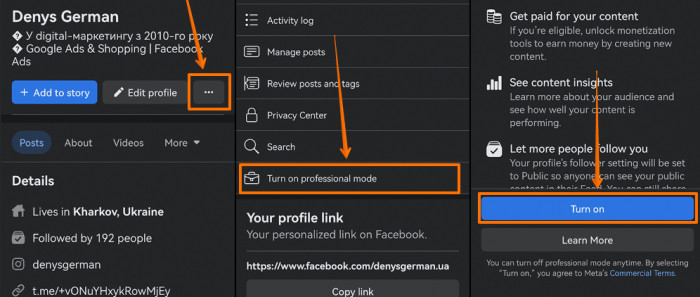
Switching it on takes under a minute.
1. Open your Facebook profile.
2. Tap the three-dot menu near your name, or go into settings.
3. Select "Turn on Professional Mode" and confirm.
4. Open the Professional Dashboard to see your tools and check which monetization programs you qualify for.
You can turn it off from the same menu, so the switch itself carries little risk. The part that takes thought is what comes after: whether you start posting public content, how often, and whether you actually read the dashboard. Enabling the mode and then posting friends-only, which a lot of people do, changes nothing.
Who Should Use It and Who Shouldn't
Professional Mode is not a default-yes for every account. Matching it to your situation is what stops you from turning it on and regretting it.
It suits:
• Creators and aspiring creators who want reach beyond their friends, honest performance data, and a route to earning from the profile their audience already follows.
• People whose own name is the brand such as writers, coaches, consultants, and commentators, who gain from followers connecting with them as a person rather than a company.
• Local businesses and solo operators who want public visibility and discovery without building and maintaining a separate Page.
It does not suit:
• Anyone who treats Facebook as a private space for friends and family, because the mode exists to push content outward.
• People expecting quick money since the earning tools stay locked until the content and audience justify them.
• Larger brands or teams that need several admins and a clean line between the business and any one individual, which only a Page provides.
The Limitations You Should Know Before Switching
Professional Mode gives you reach and tools, but it carries costs that get far less attention than the benefits. The first is privacy: public followers and public posts mean people you do not know can see your content, comment on it, and message you, and parts of your profile become visible more widely. For a creator that exposure is the trade you want; for someone used to a closed profile it is a real shift, and it brings a moderation load, more comments and messages from strangers, that nobody warns you about.
The limitation I would weigh most heavily is the single login. A profile in Professional Mode has no second admin to fall back on, so if you lose access to the account, you lose the audience with it. A Page can share admin roles; a profile cannot, and that gap matters more the bigger your following gets.
A few smaller limits round it out:
• Personal and public content share one profile, so your family posts and your monetized posts reach the same audience unless you manage them carefully.
• You can switch the mode off, but followers, momentum, and some tool access do not come back cleanly once you do.
• Some advanced Page features and ad placements are simply not available to a profile, whatever size it reaches.
None of these alone is a reason to avoid it. Together they explain why the same feature suits one creator and frustrates another.
Common Mistakes That Hurt Creators
Most of the trouble people run into comes from using Professional Mode as if it were something it is not. Many common Facebook content mistakes also carry over to professional profiles, particularly when creators focus on posting more instead of understanding what actually earns engagement.
• Treating the profile like a Page. Expecting separate branding, multiple admins, or a clean business-versus-personal split leads straight to frustration, because a profile was never built to do that.
• Turning it on and ignoring the dashboard. The data is the most valuable thing you get, yet plenty of people enable the mode and never look at it. Posting without checking what works throws away the main advantage.
• Posting the wrong format for the goal. Clips under a minute will not build the watch time that ad revenue needs, and plain status updates will not pull public reach. The content has to match the outcome you are after.
• Going public and dropping the friends audience. Existing connections are usually your most reliable viewers and your earliest engagement. Chasing strangers while neglecting them weakens the early signals that decide how far a post spreads.
Should You Turn It On? The Verdict
Professional Mode is the most direct way to turn an ordinary Facebook profile into a creator account. It is free, reversible, and takes a minute, so the cost of trying it is low.
Whether it is worth keeping depends on what you want from Facebook. If you plan to post publicly, track your numbers, and build toward an audience and eventually income, turn it on and use the dashboard properly. If you want a private profile for the people you know, or you expect earnings before the audience exists, it mainly adds exposure you did not ask for. If you want a one-line answer from me: switch it on if you are serious about posting publicly, and leave it off if you are not.
Comments