
Your in-room TVs already shape the guest experience, and you do not need to replace every screen to improve it. A clear plan is needed to align new TV solutions with your existing systems and hardware. By assessing your current setup, choosing compatible hospitality platforms, and integrating them with property systems, you can improve the guest experience without major disruption. Standard TVs can be converted into hospitality TVs using set-top box (STB) devices, enabling modern TV platforms and guest-facing services without hardware replacement. Strong integration with your PMS, secure data handling, staff training, and clear budget planning are also crucial.
Assessing the Current Television Infrastructure
Before selecting a new solution, you need a clear view of your existing TVs, network setup, and screen features. Focusing on model compatibility, bandwidth limits, and display performance helps you avoid costly upgrades later.
Identifying Compatible TV Models
List every TV model, recording its brand, model number, screen size, and firmware version. Check for support of IPTV/Ethernet, built-in casting, hospitality mode, and HDMI-CEC control. Hospitality-grade TVs allow remote management and PMS integration, which consumer-grade models may lack. Outdated firmware can block streaming and security features, so confirm the manufacturer still provides updates.
Auditing Network Connectivity
Confirm your existing Ethernet network's cabling and switches can handle video traffic without disrupting guest Wi-Fi. Review cable type, available switch ports, TV traffic VLAN setup, and internet bandwidth per room. Test real-world speeds during peak hours, as weak infrastructure can cause buffering for high-definition and 4K streams. If your property uses coaxial cable, decide on a full IPTV upgrade or a hybrid system based on cost and future service plans.
Understanding Display Capabilities
Check each TV’s resolution, brightness, panel type, and input ports. Consider HD versus 4K resolution and screen size relative to room layout, noting that a 4K content system is useless if most rooms are 1080p. Matching the TV solution to the hardware's actual display capability prevents overspending.
Selecting Suitable Hospitality TV Solution
The platform you choose must work with your current TVs, network, and brand standards. Focus on interface design, content control, and system setup before committing to a vendor.
Evaluating Interface Requirements
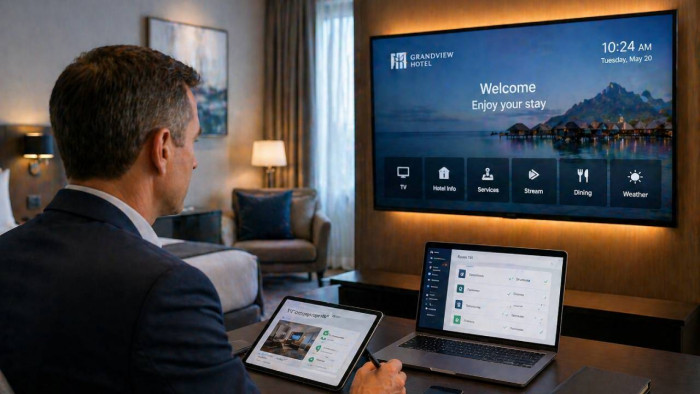
The guest interface should be simple and familiar, supporting streaming app access, secure casting, clear menus, and custom branding. If your TVs already run systems like LG Pro:Centric or Android TV, confirm platform support. Slow menus frustrate guests, so test navigation speed and ask vendors for a live demo on your room TV model.
Comparing Content Management Systems
Your Content Management System (CMS) should allow centralized control over all screen content, including updating welcome messages, promoting offers, adding emergency alerts, and scheduling. Central control for updates is essential for large properties, as manual updates on each TV waste labor. Review reporting tools to measure feature usage.
Choosing Between Cloud and On-Premises Solutions
Cloud-based platforms reduce on-site hardware and scale easily but require stable internet. On-premises systems offer more direct control and work offline but demand higher upfront costs and ongoing maintenance. Match the platform to your IT support level, network strength, and long-term expansion plans.
Integration With Existing Systems
The hotel TV solution must integrate with your daily operational systems to link guest data, content delivery, and device control into a single, clear workflow.
Synchronizing With Property Management Systems
Connecting your TV solution directly to your PMS allows real-time recognition of guest status. The TV can then display a personalized welcome message and automatically reset settings at checkout. Choose a system that supports secure data exchange, works with your PMS vendor, and handles folio integration for direct billing.
Ensuring Seamless Guest Experience
Align your TV solution with your existing network, Wi‑Fi, and room technology to prevent login issues or delays. Modern platforms can use built-in smart TV systems or add-on devices like set-top boxes to upgrade features without screen replacement. The system must integrate with the Wi‑Fi network to isolate guest traffic and protect privacy.
Implementing Remote Device Management
Centralized control is necessary for monitoring, updating, and troubleshooting all TVs without entering guest rooms. Look for platforms with remote dashboards that support firmware and app updates, allowing property-wide changes in minutes. Strong remote management reduces maintenance costs and ensures a consistent TV experience.
Content Personalization Strategies
Matching TV content to guest data, location, and property goals increases guest satisfaction and revenue.
Customizing Guest Welcome Screens
Use your PMS to automatically pull and display the guest’s name, loyalty status, and stay details on a simple home screen. Include Wi‑Fi details, check-out time, weather, and key hotel services. If casting is supported, place instructions on the first screen.
Curating Localized Entertainment Options
Improve engagement by offering content tailored to your location, starting with a balanced channel lineup and using a local information tile for nearby attractions and events.
Promoting On-Site Amenities
Turn the TV into a direct sales tool by placing clear amenity promotions in high-traffic areas of the interface. Use calls to action and connect the system to property systems so guests can confirm services with a few clicks. Track usage data to increase upsell success.
Security and Data Privacy Measures
Protecting guest data at every touchpoint requires strong controls and clear processes.
Protecting Guest Information
Secure your setup by placing TVs and other IoT devices on a separate VLAN from core systems to limit damage. Use encryption, secure APIs, and require HTTPS. Automate data deletion at checkout to erase app logins and personal settings, rather than relying on manual staff resets.
Maintaining Compliance With Industry Regulations
Align your TV solution with data protection laws like GDPR and local privacy rules to avoid fines. Work with vendors who support privacy-by-design features, including automatic data wipes and audit logs. Schedule regular security assessments for weak passwords and outdated firmware.
Scalability and Future-Proofing Considerations
Protect your TV investment by planning for upgrades and shifting guest habits simultaneously, ensuring the setup lets you expand features and services without full screen replacement.
A future-proof system supports IPTV, casting, and software updates over the network, allowing new features via software instead of full hardware swaps. Modular or cloud-based platforms scale faster and cost less to upgrade. Modern hospitality TVs function as service hubs, enabling guests to stream content securely with automatic logout, access hotel services, and perform actions like room service ordering or checkout from one interface.
Training and Support for Hotel Staff
Training staff to manage, maintain, and troubleshoot the system protects your TV investment and reduces guest complaints.
Onboarding Technical Teams
Provide hands-on training during installation on how the TV solution connects to your network, IPTV, and casting server. Train staff to configure TVs, test features, reset devices, and push updates. Create a simple internal checklist and document network settings securely to ensure consistency.
Evaluating Performance and Guest Feedback
Clear data is necessary to confirm your TV solution supports guest satisfaction and daily operations.
Measuring Engagement Metrics
Track metrics that reflect real guest behavior, such as TV activation rate, average viewing time, streaming app logins/casting sessions, and error rates. Monitor uptime closely and set clear service-level targets with your vendor, as downtime hurts reviews.
Cost Management and Budgeting
Control costs by reviewing your existing TV inventory to decide between upgrading software, adding casting devices, or replacement. Upgrading through a hospitality TV platform often costs less than full hardware replacement. Use a phased budget plan, upgrading high-occupancy rooms first, to reduce financial strain.
| **Option** | **Upfront Cost** | **Long-Term Cost** | **Best For** |
| Add Casting Devices | Low to Moderate | Low | Newer TVs |
| Install TV Software Platform | Moderate | Moderate | Smart TVs |
| Full TV Replacement | High | Moderate | Outdated TVs |
Conclusion
You do not need to replace every TV to improve the guest experience; instead, align your TV solution with the TVs, network, and operations you already have. This approach protects your technology investment and ensures consistency and simple management for both guests and staff.
Comments