

YouTubers don’t choose tools for the sake of “AI features” you choose them because you need to publish faster, look professional, and still feel in control of your content. Pictory and InVideo both promise to streamline that journey, but they approach YouTube video creation from very different angles: one is automation‑first, the other is control‑first. Understanding that difference is the key to picking the right platform for your channel.
Pictory: Turn your blog posts, webinars, and long videos into YouTube-ready clips without touching a timeline.
Best for: Content repurposers, faceless channels, podcast-to-video creators
InVideo AI: Describe your video in a sentence. Get a complete draft script, footage, voiceover, captions in minutes.
Best for: Prompt-driven creators, storytellers, voice-clone YouTubers
The Scoreboard
| Category | Pictory | InVideo AI | Winner |
| Ease of use | Upload text, done | Prompt‑based, still simple | Pictory |
| AI script generation | Limited — works from your content | Full GPT‑powered script from a prompt | InVideo |
| Stock media library | 18M+ (Getty + Storyblocks) | 16M+ standard assets | Pictory |
| Timeline editing | Not available | Full timeline editor | InVideo |
| Voice cloning | Not available | 30‑second sample clone | InVideo |
| AI voiceovers | ElevenLabs (Pro+) + standard | 30+ AI voices, 50+ languages | Tie |
| Auto captions | All plans, highly accurate | Yes, on all plans | Tie |
| Long‑form repurposing | Core feature — blog/webinar to video | Possible but not the focus | Pictory |
| Video minutes/month | Up to 1,800 min (Team plan) | Max 200 min (Max plan) | Pictory |
| Generative AI video models | Not integrated | Sora 2 + Google VEO 3.1 | InVideo |
| Starting price | $19/mo (annual) | $20/mo (annual) | Tie |
| Free plan quality | 3 projects trial, no card needed | 10 min/week, watermarked | Tie |
Ease of Use & Learning Curve
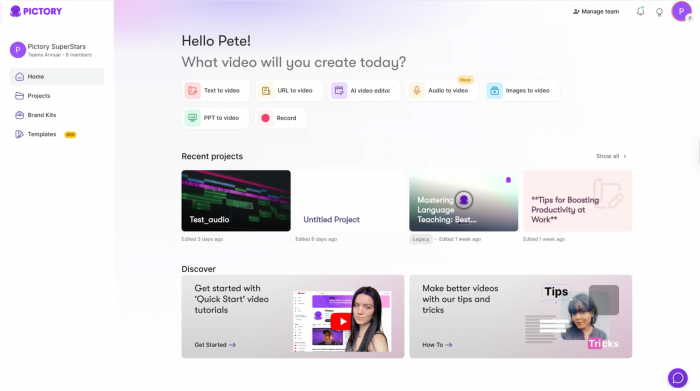
Pictory's entire design philosophy is: get out of the way. You paste a URL, drop a script, or upload a video and the AI builds something watchable. There's no timeline to learn, no layer system to navigate. For YouTubers who came from blogging or podcasting, this is transformative.
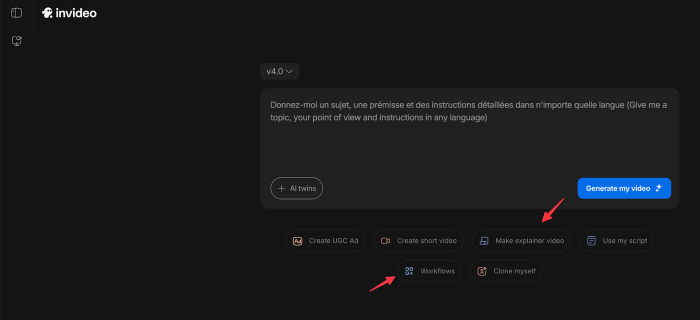
InVideo AI takes a different approach. You describe what you want in a text prompt "a 5-minute explainer on the Roman Empire for history enthusiasts" and the AI writes the script, finds footage, records a voiceover, and adds captions. It's still genuinely easy, but there's more to review and tweak. The Magic Box feature lets you edit via text commands, which means you're essentially chatting with your editor.
Pictory wins for zero-learning-curve speed. InVideo AI wins for creators who want directional control over what gets made and are willing to spend 10 extra minutes per video to get it.
Content Creation Workflow: Where These Tools Are Fundamentally Different
This is the most important section. These two tools are built around opposite assumptions about where your content starts.
Pictory starts from content you already have. A 3,000-word blog post becomes a narrated video in 15 minutes. A 90-minute webinar becomes five short clips ready for YouTube. A Zoom recording gets transcribed, and you delete sentences in the text to cut the video. No scrubbing required.
InVideo starts from an idea. You don't need a script, a blog post, or any existing asset. A one-sentence prompt generates a complete draft. This is powerful for faceless channels where the creator ideates but doesn't write or record anything themselves.
“Pictory is a repurposing machine. InVideo is a creation machine. Knowing which you need is 80% of the decision.”
AI Capabilities Compared
Both tools use AI heavily, but in starkly different ways.
● Pictory's AI specializes in summarization, extracting key moments, auto-matching visuals to sentences, and generating highlight clips from long recordings. It doesn't write original scripts.
● InVideo's AI uses GPT-4.1 to generate full scripts from prompts, selects footage intelligently, and has direct integrations with OpenAI Sora 2 and Google VEO 3.1 meaning cinematic, physics-accurate AI-generated clips can appear inside your video.
For YouTubers who want to push visual quality forward using generative AI video, InVideo's integration of Sora 2 and VEO 3.1 under a single subscription is genuinely significant; accessing those models separately would cost over $450/month.
Voice & Audio
For faceless YouTube channels, the voice is everything. A bad voiceover tanks retention no matter how good the footage is.
● Pictory's Starter plan uses standard TTS voices, functional but noticeably synthetic. The Professional plan ($39/mo annual) unlocks ElevenLabs hyper-realistic voices with natural breathing and emotional inflection, which is a meaningful quality jump.
● InVideo offers 30+ AI voices across 50+ languages on all paid plans and critically, voice cloning from a 30-second audio sample. Plus plan gives 2 clones; Max plan gives 5.
If you want your videos narrated in your own voice without recording every episode, InVideo's voice clone feature is one of the most practical tools in this space. It takes five minutes to set up and is genuinely convincing for casual viewing.
Pictory matches InVideo on voice quality at the Professional tier but InVideo wins on versatility and cloning. If your channel identity lives in your voice, InVideo is the better platform.
Editing Flexibility
Pictory makes a deliberate trade-off: no timeline, no effects, no transitions. What you gain is speed. What you lose is creative control. You can swap scenes, change text, and adjust music but you can't trim individual frames, layer animations, or add custom motion graphics.
InVideo Studio (the manual version of InVideo) offers a full timeline editor with 6,000+ templates, transitions, motion graphics, and branding tools. InVideo AI adds text-command editing on top. For creators who've outgrown template-only workflows but don't want to learn Premiere Pro, this hits a real sweet spot.
Pricing - What You Actually Get
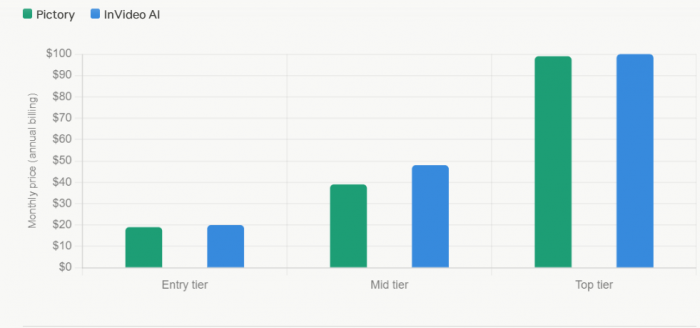
Both tools are priced within striking distance of each other at entry level, but the value proposition diverges sharply at scale.
| Tool | Plan | Price (Annual) | Key Limits / Quotas | Voices / Audio | Stock & Assets | Branding / Storage | Other Notes |
| Pictory | Starter | $19 /mo | 30 videos / month | Standard AI voices | 3M+ stock assets | No brand kit | 10 hrs/mo transcription |
| InVideo AI | Plus | $20 /mo | 50 AI minutes / month | 2 voice clones | 80 iStock credits | Unlimited exports | No watermark |
| Pictory | Professional (Most Popular) | $39 /mo | 60 videos / month | ElevenLabs voices (51 voices) | 10M+ premium assets | Brand kit included | 20 hrs/mo transcription |
| InVideo AI | Max | $48 /mo | 200 AI minutes / month | 5 voice clones | 320 iStock credits | 400GB storage | Priority support |
One hidden cost worth flagging on InVideo: unused AI generation minutes don't roll over. If you pay for 200 minutes and use 60, the remaining 140 disappear. Plan your production cadence accordingly, especially on the Max plan.
On Pictory's side, the jump from Starter to Professional is primarily justified by ElevenLabs voices and the brand kit. If you're publishing publicly-facing content, the Professional tier is essentially the minimum viable setup for audio quality that doesn't feel amateur.
YouTube-Specific Features
A comparison article that doesn't acknowledge the YouTube-specific context isn't particularly useful. Here's what actually matters on the platform.
| YouTube Use Case | Pictory | InVideo AI |
| Repurposing podcast episodes | Excellent — transcript editing removes words and cuts video simultaneously | Possible via prompt, but requires more manual oversight |
| YouTube Shorts from long videos | Core feature — auto‑generates highlight clips | Can create Shorts, better suited for original short content |
| Faceless channels (no recording) | Strong — AI visuals + voiceover, no camera required | Strongest — voice clone + AI footage = zero on‑camera time |
| Auto‑captions for SEO | All plans, accurate and editable | All plans, style‑adjustable |
| Copyright‑safe music | Royalty‑free included (some reports of YouTube flags — verify tracks) | Royalty‑free included, similar caveats apply |
| Multi‑format export (16:9 / 9:16 / 1:1) | Yes — all aspect ratios | Yes — all aspect ratios |
| Brand consistency (logo, colors, fonts) | Professional plan and above only | Available on paid plans |
One real-world note on music: user reviews for both platforms mention occasional tracks that trigger YouTube copyright claims rather than just monetization claims which can result in strikes, not just revenue splits. Always run your exported videos through YouTube Studio's content check before publishing, regardless of which tool you use.
Video Output Volume & Scalability
This is where Pictory has a structural advantage that rarely gets highlighted in comparison articles. At the Team plan ($99/mo), Pictory allows up to 1,800 video minutes per month. InVideo's Max plan caps at 200 AI minutes. For agencies, course creators, or YouTube channels posting daily, this gap is significant.
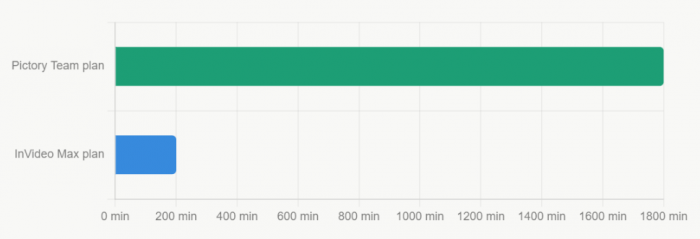
That said, "AI minutes" for InVideo measures generative compute, not final video duration. A 10-minute video might consume only 4–5 AI minutes. The comparison isn't perfectly apples-to-apples, but the directional advantage still belongs to Pictory for high-volume operations.
Weaknesses - No Tool Is Perfect
Pictory's real limitations:
● No timeline editor — you get what the AI gives you, or you swap scenes manually
● No voice cloning — your brand voice is limited to AI selections
● No custom visual effects, transitions, or text animations
● Brand kit locked to the Professional plan — Starter videos can't carry your logo or colors
● No lifetime deal; subscription only
InVideo's real limitations:
● AI generation minutes don't roll over — unused credits are forfeit each cycle
● Generic AI scripts often require heavy rewriting before they match your voice
● AI footage frequently misaligns with niche or highly specific topics
● Approximately 25% of text editing commands need a retry or manual correction
● iStock credits are a separate quota from AI minutes — you can exhaust one without exhausting the other
Who Should Choose What
Choose Pictory if you
● Repurpose blogs, podcasts, or webinars into YouTube videos
● Want the fastest possible workflow with minimal decisions
● Run a high-volume channel and need 60+ videos per month
● Edit by transcript — cutting words, not timelines
● Want accurate auto-captions without extra setup
● Are a solo creator without video production background
Choose InVideo AI if you -
● Build videos from prompts rather than existing content
● Run a faceless channel and want your cloned voice on every video
● Want access to Sora 2 and VEO 3.1 generative footage
● Need timeline-level editing control without full software
● Produce videos in multiple languages for international audiences
● Want one tool that handles both AI generation and manual editing
Bottom Line
If your YouTube strategy is built around converting written or recorded content into video, Pictory is the more efficient machine. If you're building a channel from ideas alone, no camera, no script, no existing assets InVideo's end-to-end pipeline is the stronger choice. The good news: both offer meaningful free trials. Test your actual workflow before committing to a subscription.
Comments