

Most reels don’t die in the edit. They die in a decision that was never made, the hook that got figured out on set, the ending nobody planned for, the three missing B-roll shots that would have carried the middle. By the time footage lands in the editing app, the ceiling for that reel is already set.
Storyboarding is how that ceiling gets raised before the camera ever turns on. Here’s the full system, block by block.
What Storyboarding Actually Means for a Reel

Borrow the word from film and it drags a lot of baggage with its pencil sketches, camera arrows, continuity across a six-minute scene. A reel storyboard isn’t that. Film storyboards exist to protect continuity. Reel storyboards exist to protect retention.
The difference matters because it changes the unit of planning. A film is built in scenes. A reel is built in beats, small, deliberate shifts that each answer one question in the viewer’s head: do I keep watching or do I flick away? A 20-second reel might contain seven or eight of those beats. Each one is a place where attention can leak.
So a reel storyboard is really a map of that attention curve. It plots what happens, in what order, on what timing and it treats the first second as a completely different problem from the last. No drawing talent required. Boxes, arrows, and a few words per frame do the job.
The Real Reason Unplanned Reels Underperform
“Just film it and fix it later” feels faster. It rarely is. The cost shows up in ways that are easy to miss because they happen quietly, spread across the whole process rather than in one obvious failure.
• Decisions pile up on set, where judgment is worst. Standing in front of a camera, half-remembering the point, is the worst possible moment to invent a hook or decide on framing. Fatigue makes those calls lazy, and lazy calls compound.
• The hook gets discovered too late. Plenty of creators find the actual strong opening line buried at the 15-second mark after filming and now the reel is built backwards from a weak start that can’t be salvaged without a reshoot.
• The middle goes thin because nothing was planned to fill it. Without pre-planned cutaways and B-roll, the edit becomes one static talking shot, and static reels sag right where retention is most fragile.
• Takes multiply. No plan means more takes, more storage, more footage to sift, and a longer, more painful edit that often ends in “good enough” out of sheer exhaustion.
Planning doesn’t restrict the creative part. It moves the hard thinking to a calmer moment, so the shoot becomes execution instead of invention.
You don’t storyboard to control creativity. You storyboard to protect it from the pressure of the moment.
Start With the Payoff, Not the Hook
Nearly every guide opens with “nail your hook.” Good advice, wrong order. The hook can’t be written honestly until the payoff exists, because the hook is a promise and a promise only works if there’s something at the end to redeem it.That relationship between the opening and everything that follows is why the Reel hook matters so much: once it makes a promise, every later beat has to move toward fulfilling it.
Work backwards. Decide what the viewer walks away with first: the punchline, the transformation, the one useful thing, the “oh, that’s clever” moment. That ending sets the terms for everything before it. A hook that promises more than the payoff delivers reads as clickbait, and viewers punish that with a fast swipe and a mental note not to trust the next one.
Once the payoff is locked, the hook almost writes itself; it becomes the sharpest possible tease of a destination that actually exists. Reverse-engineering also kills filler automatically. Any beat that doesn’t move the viewer toward that ending is dead weight, and in a 20-second window there’s no room for dead weight.
The Anatomy of a Reel Storyboard
Almost every reel that holds attention moves through the same five structural blocks. They aren’t a rigid template so much as a set of jobs that need doing, in roughly this order. Timings below assume a 20–30 second reel scale them to the length.
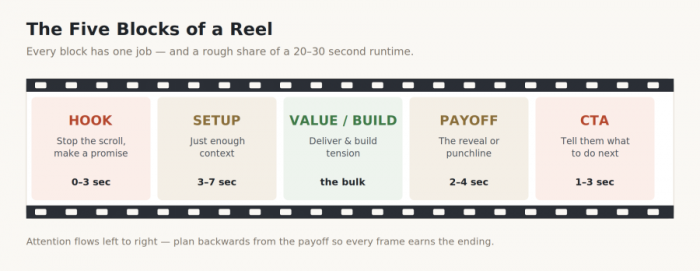
| Block | Its one job | Rough timing |
| Hook | Stop the scroll and make a promise worth staying for | 0–3 sec |
| Setup | Give just enough context so the payoff will land | 3–7 sec |
| Value / Build | Deliver the substance and build tension toward the turn | the bulk |
| Payoff | Pay off the promise the reveal, punchline, or result | 2–4 sec |
| CTA | Tell the now-convinced viewer exactly what to do next | 1–3 sec |
The most common structural mistake is an overgrown setup. Context feels necessary while writing, but every second spent explaining before the value starts is a second where viewers leave. When a reel underperforms, the setup is usually the first place to cut.
Write the Script Before You Draw a Single Frame
Script and storyboard are two layers, and they belong in order. The script decides what is said and in what sequence. The storyboard decides what is seen while it’s said. Trying to plan visuals before the words exist is like blocking a scene with no dialogue; there's nothing to hang the shots on.
This is exactly where the blank page tends to win. Staring at an empty script, most people default to whatever opening they’ve used ten times before, which is how feeds fill up with identical hooks. A reel script generator breaks that loop by producing a spread of options fast, several hook angles, a few CTA phrasings, a couple of ways to frame the same idea so the choosing happens from a menu instead of from nothing.
The tools built specifically for short-form tend to earn their place here, because they already understand reel pacing, hook structure, and the tight word budget of a 30-to-60-second script. A few worth trying are covered in the next section. Whatever the tool, treat its output as raw clay, not the finished pot the generator clears the hardest twenty minutes, and the human edit gives it a voice.
| PRO TIP Prompt these tools with the payoff, not just the topic. “Write a reel script about meal prep” gets generic. “Write a reel hook for a meal-prep reel whose payoff is that most people waste time chopping batch-freeze instead” gets something usable, because the tool now knows where the reel is going. |
5 Reel Script Generators Worth Using
The market moves fast and features shift often, so treat this as a map of what each tool is good for rather than a fixed spec sheet. These are built around short-form scripting rather than general writing, which is what makes them useful for reels specifically.
| Tool | Best for |
| SmartPostly reel script generator | Purpose-built for social-first scripting. Strong at hook variations, tone control, and script skeletons that already respect reel pacing the recommended default for this workflow. |
| ReelsBot | A free, no-signup generator that outputs a full hook–body–CTA structure for TikTok, Reels, or Shorts, with length presets and text-overlay suggestions. Ideal for a fast first draft. |
| Kapwing AI Script Generator | Turns a one-line topic into a platform-ready script with control over tone, format, and length and sits inside a full editor if the plan is to build the video in the same place. |
| Canva AI Script Generator | Convenient for creators already designing captions and thumbnails in Canva who want the script to live beside the rest of their assets. |
| Writesonic | Quick, one-click short-form script outlines are handy when the idea is already clear and the need is speed rather than deep customization. |
Whichever tool ends up in the rotation, the skill is in the editing. Generated scripts share a certain smoothness that audiences learn to tune out. Rewriting even a third of the lines in a real speaking voice is what separates a script that sounds like a person from one that sounds like a prompt.
Mapping Shots to Script Lines
With a script in hand, the storyboard becomes almost mechanical. Run down the script and, next to each line, note the single visual that carries it. The working rule is simple: one line, one visual beat. When a line has no distinct visual, that’s a signal either the line is filler, or a cutaway is needed to keep the frame alive.
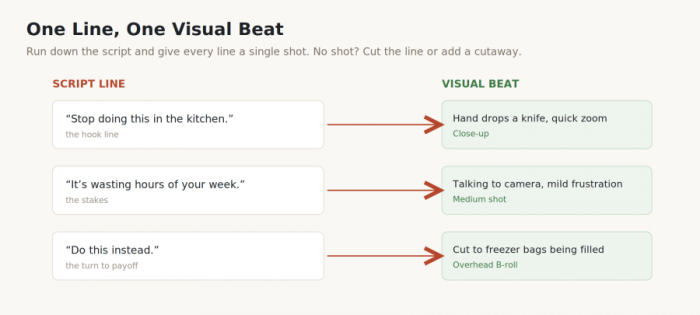
Each storyboard cell needs surprisingly little. A rough sketch or even a text description, the shot type, and any on-screen text is enough to shoot confidently and gaps become obvious before anything is filmed, not two hours into an edit that suddenly needs a shot that no longer exists.
Planning the Hook Visually : the First 3 Seconds
The opening frames deserve their own planning pass because they carry a disproportionate share of the outcome. A viewer decides to stay or leave in roughly a second, and that decision is mostly visual; it happens before a single word is fully processed.
A strong opening frame usually does at least one of these, deliberately, from frame one:
• It moves. A static, quiet first frame reads as “skippable.” Motion in the very first frame a gesture, a whip, an object entering signals that something is happening and buys a moment of curiosity.
• It shows a face with an expression. Human faces pull the eye, and an expression that hints at tension, surprise, or a strong opinion creates an open loop the viewer wants closed.
• It breaks the expected pattern. An unusual angle, an odd object, a mid-action freeze anything that doesn’t look like the ten reels before it earns a second look purely by being different.
Plan the hook’s on-screen text at this stage too, and place it in the upper-middle of the frame. The bottom third gets swallowed by captions and interface buttons, and a hook nobody can read is a hook that isn’t working.
Choosing Angles, Framing and Movement Intentionally
Shot variety is what keeps a reel from feeling like a static monologue. Even a simple talking-to-camera reel comes alive when the storyboard plans two or three angle changes and a few cutaways rather than locking on one flat wide shot for the whole run.
The practical move is to plan B-roll as its own layer. Alongside the main footage, a storyboard should list the supporting shots, hands doing the thing, the product in use, the environment, a detail close-up. These are the shots most likely to be forgotten on set and most missed in the edit, because they’re what an editor reaches for to cover a cut or hold a beat. Deciding them in advance is far easier than trying to recreate the moment later.
Timing, Pacing and the Rhythm of Cuts
A storyboard should plan duration, not just content. Two reels with identical footage can perform completely differently depending on how long each shot holds. Pacing is a design choice, and it deserves a column of its own.
The general instinct for short-form is to cut a beat sooner than feels comfortable. Lingering shots bleed attention; frequent changes keep the eye busy and the swipe at bay. That said, pace should match the content: a slow, satisfying reveal earns a held shot, while a rapid tips reel wants quick cuts throughout.
One pattern worth designing against on purpose: the mid-reel dip. Attention tends to sag somewhere around the middle, once the hook’s novelty has worn off but the payoff hasn’t arrived. That’s the spot to place a deliberate re-hook, a new visual, a text callout, a small twist to carry viewers across the gap toward the ending.
Text, Captions and On-Screen Elements
On-screen text is part of the storyboard, not an afterthought bolted on in editing. Reels are largely watched on mute, which makes text a primary channel rather than decoration and text planned late tends to fight the footage instead of supporting it.
Marking captions, key callouts, and graphics at the storyboard stage prevents two common problems: text landing where the composition has no room for it, and important words colliding with the interface. When the plan already says this line, this timing, this position, the edit becomes assembly instead of guesswork.
Tools and Methods to Actually Build Your Storyboard
The medium barely matters, the discipline does. Pick whatever gets used consistently and abandon anything too fussy to keep up with.
• Paper or sticky notes. The fastest option and easy to rearrange, since a sticky note per shot can be shuffled into a better order in seconds. Ideal for people who think with their hands.
• Notion, Canva, or a simple table. A three-column layout line, visual, notes covers everything most reels need, and it’s easy to duplicate as a reusable template for the next one.
• The phone’s notes app. Unglamorous but effective, and it lives on the same device used to shoot, so the plan is always within reach on set.
• Dedicated storyboard apps. Worth it for creators producing at volume or collaborating with a team, though usually overkill for a solo weekly reel.
Worth repeating: drawing skill is not the point. Stick figures, boxes, and a few words communicate a shot perfectly well. The storyboard is a thinking tool, not a portfolio piece.
Pre-Shoot Checklist : From Storyboard to “Action”
The storyboard’s final job is to convert into a shoot plan. Before rolling, the plan should already have answered the practical questions, so the shoot stays focused on performance rather than logistics.
☐ Every script line has a matching shot noted on the storyboard.
☐ B-roll and cutaway shots are listed separately so none get forgotten.
☐ Location and background are chosen and clear of clutter or distractions.
☐ Props, products, and wardrobe are staged and within reach.
☐ Lighting is set, and the hook’s on-screen text position is planned around it.
☐ The full shot list is exported or open on the phone for reference on set.
Common Storyboarding Mistakes That Quietly Kill Reels
Planning has its own failure modes, and most come from overdoing it or misplacing the effort.
• Over-planning into stiffness. A storyboard scripted down to the blink leaves no room for the natural energy that makes a reel feel alive. The plan is a skeleton, not a cage to leave space to react in the moment.
• Too many shots for the runtime. Cramming twelve shots into a 15-second reel makes it frantic and unreadable. Fewer, stronger beats almost always outperform a blur of quick cuts.
• Forgetting the CTA. Reels routinely nail the value and then just… stop, leaving a warmed-up viewer with nowhere to go. The next step should be planned as deliberately as the hook.
• Storyboarding the visuals before the script. Planning shots with no words to anchor them produces pretty footage that says nothing. Words first, always.
Bottom Line
Storyboarding isn’t extra work bolted onto the front of filming, it's the same work, done at a calmer moment when the thinking is clearer. It moves the hard decisions off the set and out of the edit, which is exactly where those decisions go wrong most often.
The payoff is double: shoots get faster because there’s nothing left to invent on the spot, and the reels get better because every beat was chosen on purpose. The lowest-effort place to begin is the script: pick a generator, feed it the payoff, and build the storyboard from the lines that come back. Plan a little before the camera rolls, and the finished reel stops being a gamble.
Comments