

A good photo doesn't always need another photoshoot. With the right ChatGPT photo editing prompts, an ordinary picture can become a professional portrait, cinematic scene, fashion editorial, or creative social media image.
The difference often comes down to how clearly the edit is described. Lighting, clothing, background, composition, and facial details all matter. Here are 20 detailed, ready-to-use prompts for transforming your pictures while keeping the results natural, visually appealing, and consistent with your intended style.
How to Edit Photos Using ChatGPT
ChatGPT allows you to upload existing photographs and request specific visual changes. You can modify backgrounds, adjust lighting, change outfits, or create an entirely different photographic setting using written instructions.
The basic process is straightforward:
1. Upload your photograph: Open ChatGPT and attach a clear photograph using the image upload option. Choose an image with visible facial features and sufficient lighting if you're editing a portrait.
2. Choose an editing prompt: Copy a relevant prompt from the examples below. Adjust details such as clothing, location, colors, or desired photographic style.
3. Specify what stays unchanged: Mention the facial features, expression, pose, or important objects that should remain consistent with the original.
4. Generate and review: Examine the edited image for facial accuracy, realistic shadows, clothing details, and background consistency.
5. Refine the result: Request specific corrections instead of repeating the entire transformation. Once satisfied, save the image.
ChatGPT also provides an image editor that supports selecting specific areas for changes. This is useful for correcting clothing, backgrounds, or individual objects without requesting a completely different composition.
20 Best ChatGPT Photo Editing Prompts
These prompts are organized into five categories covering professional portraits, fashion, travel, special occasions, and practical photo improvements.
Each prompt is written for an uploaded photograph rather than generating a completely unrelated image. You can copy it directly or replace individual details to suit your preferences.
Professional Portrait Transformations
Professional portraits depend on balanced lighting, believable skin texture, and careful framing. These prompts are particularly useful for profile photographs, portfolios, and personal branding.
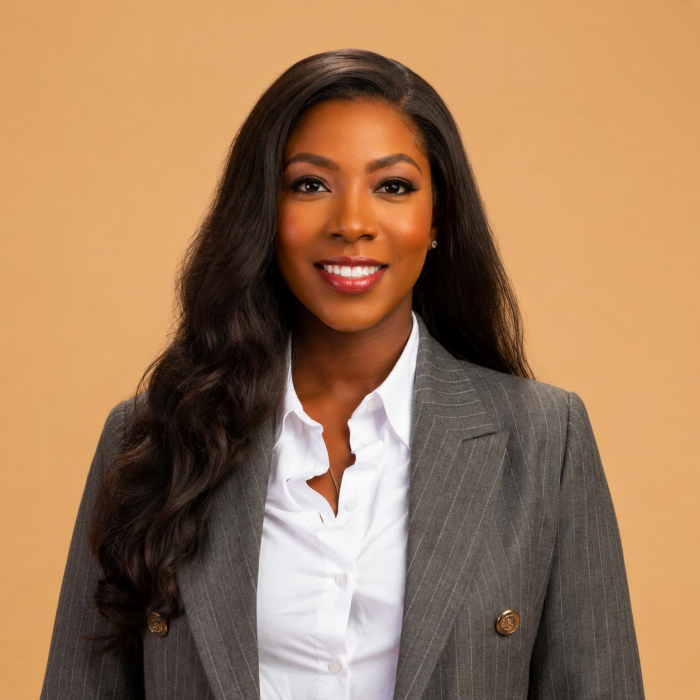
1. Professional Studio Headshot
Best for: LinkedIn profiles, professional biographies, business websites, and portfolios.
Copy-ready prompt:
Transform my uploaded photograph into a realistic professional studio headshot. Preserve my facial features, identity, natural skin tone, hairstyle, and expression as closely as possible. Dress me in a tailored charcoal blazer over a plain white shirt. Replace the background with a neutral warm-gray studio backdrop. Use soft frontal lighting, gentle shadows, realistic skin texture, and sharp eye details. Frame the image from the chest upward, keeping my face centered and naturally proportioned. Avoid excessive retouching, artificial skin smoothing, or changes to facial structure. The final result should resemble a professional portrait captured using an 85mm camera lens.
This prompt works best with a front-facing or slightly angled portrait where the face is clearly visible. A simple original pose usually produces a more convincing professional headshot.
2. Cinematic Portrait
Best for: Creative profiles, personal branding, and dramatic social media photographs.
Copy-ready prompt:
Edit my uploaded photograph into a realistic cinematic portrait while preserving my identity, facial structure, hairstyle, and natural expression. Replace the background with a dark, softly blurred studio environment. Introduce directional lighting from one side of my face, creating controlled shadows and subtle highlights along the jawline. Use deep charcoal tones, muted colors, natural skin texture, and restrained film-style contrast. Keep the composition close to the original photograph and maintain realistic proportions. Add gentle depth of field and a sophisticated cinematic color grade without making the image look like digital artwork.
The strongest cinematic portraits usually have a clear light source rather than excessive darkness. Keep enough facial detail visible to avoid losing the original expression.
3. Golden Hour Portrait
Best for: Instagram photographs, outdoor portraits, and lifestyle content.
Copy-ready prompt:
Transform my uploaded photograph into a natural golden-hour portrait taken shortly before sunset. Preserve my face, hairstyle, expression, and body proportions. Place me in a softly blurred outdoor environment with warm evening sunlight entering from one side. Create gentle golden highlights on my hair and shoulders, realistic shadows, and natural skin tones. Use subtle background bokeh, soft atmospheric depth, and balanced exposure. Maintain the original pose and avoid exaggerated orange filters or artificial-looking sun flares. The image should feel like an authentic outdoor photograph captured during a beautiful evening.
For better results, choose a source image with reasonably soft lighting. Strong flash shadows or harsh overhead light may require additional corrections.
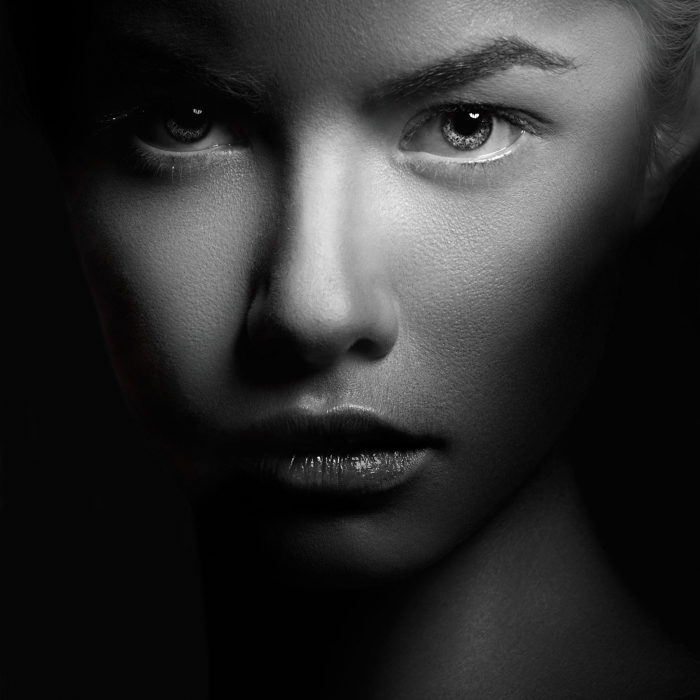
4. Black-and-White Editorial Portrait
Best for: Artistic portfolios, classic profile photographs, and editorial content.
Copy-ready prompt:
Convert my uploaded photograph into a professional black-and-white editorial portrait. Preserve my facial details, hairstyle, pose, and natural expression. Remove the original colors and create rich monochrome tones with balanced contrast, detailed midtones, and controlled highlights. Use soft directional lighting to define facial features without creating overly dark shadows. Add subtle fine-grain texture resembling traditional black-and-white film photography. Keep skin texture realistic and avoid aggressive sharpening or beauty filters. The finished photograph should look elegant, timeless, and suitable for a professional photography portfolio.
Black-and-white edits benefit from clear separation between the subject and background. Contrast should reveal facial details rather than flatten them.
Fashion and Aesthetic Edits
Fashion-oriented edits can change clothing, locations, and styling while retaining the original subject. The most convincing results match wardrobe details with lighting and surroundings.
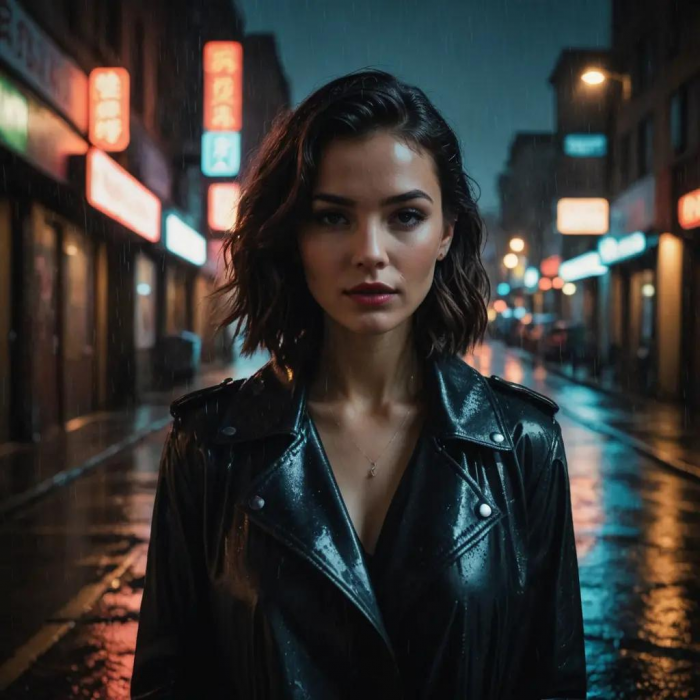
5. Urban Streetwear Makeover
Best for: Fashion profiles, Instagram posts, and street-style photographs.
Copy-ready prompt:
Transform my uploaded photograph into a realistic urban streetwear editorial. Keep my face, hairstyle, body proportions, and natural expression consistent with the original. Change my outfit to an oversized black leather jacket, a plain white T-shirt, relaxed dark jeans, and minimal accessories. Place me beside a modern city street with softly blurred buildings and subtle evening lights. Use natural urban lighting, realistic clothing folds, and gentle shadows. Maintain a casual, confident pose and create a professional street-photography appearance. Avoid exaggerated fashion styling, distorted hands, or artificial skin smoothing.
The background and outfit should appear to belong to the same photograph. Matching the light direction is particularly important around the shoulders and hair.
6. Luxury Fashion Editorial
Best for: Fashion portfolios, premium-looking portraits, and personal branding.
Copy-ready prompt:
Turn my uploaded photograph into a high-end fashion editorial while preserving my recognizable face, natural proportions, and expression. Dress me in an elegant, tailored outfit in neutral black, cream, or beige tones. Place me inside a minimalist photography studio with a warm neutral background and soft directional lighting. Create realistic fabric textures, natural shadows, refined styling, and a balanced full-body or three-quarter composition based on the original framing. Use subtle editorial color grading with sharp details and realistic skin texture. The image should resemble a professionally photographed fashion magazine feature rather than an AI illustration.
Luxury styling usually works better with a restrained color palette. Too many decorative elements can make the result look artificial.
7. Vintage Film Photography
Best for: Retro-themed Instagram content, lifestyle photography, and nostalgic portraits.
Copy-ready prompt:
Edit my uploaded photograph to resemble an authentic photograph captured on a 1990s color-film camera. Preserve my face, expression, pose, and important background details. Apply subtle film grain, slightly faded colors, warm skin tones, gentle highlight roll-off, and natural shadow softness. Introduce a mild vintage color cast without making the image excessively yellow or washed out. Keep realistic photographic imperfections, including delicate texture and restrained contrast. Avoid artificial scratches, oversized date stamps, heavy blur, or exaggerated retro filters. The finished image should feel like a genuine printed photograph from a personal photo album.
A convincing vintage edit relies on subtle color and texture changes rather than obvious decorative effects.
8. Minimalist Aesthetic Portrait
Best for: Creator profiles, clean Instagram feeds, and modern personal branding.
Copy-ready prompt:
Transform my uploaded portrait into a minimal, modern aesthetic photograph. Preserve my identity, facial features, hairstyle, and natural expression. Replace the background with a smooth pastel sage-green studio backdrop. Style my clothing in a simple cream-colored shirt with no visible logos or distracting patterns. Use soft diffused daylight, delicate shadows, natural skin tones, and a clean composition with generous negative space. Maintain realistic hair details and avoid excessive retouching. Create a calm, polished photograph with subtle color grading and a professional editorial appearance.
Minimalist portraits work best when the subject remains the clear focal point. Avoid adding unnecessary objects or decorative graphics.
Travel and Lifestyle Scenes
Travel-inspired edits can recreate the atmosphere of a location without requiring a new photograph. Realistic backgrounds, shadows, and perspective are essential for believable results.
9. European Street Photography
Best for: Travel-themed portraits, lifestyle content, and creative photo edits.
Copy-ready prompt:
Transform my uploaded photograph into a realistic lifestyle portrait taken on a charming Paris street. Keep my face, hairstyle, body proportions, and expression consistent with the original. Place me near a traditional outdoor café with elegant European architecture, cobblestone pavement, and softly blurred pedestrians in the distance. Dress me in a casual beige trench coat with simple accessories. Use natural late-afternoon lighting, believable shadows, accurate perspective, and subtle photographic depth of field. Maintain an authentic travel-photography appearance without exaggerated landmarks, artificial textures, or unrealistic background details.
Avoid placing famous landmarks directly behind the subject unless the composition supports their scale and perspective.
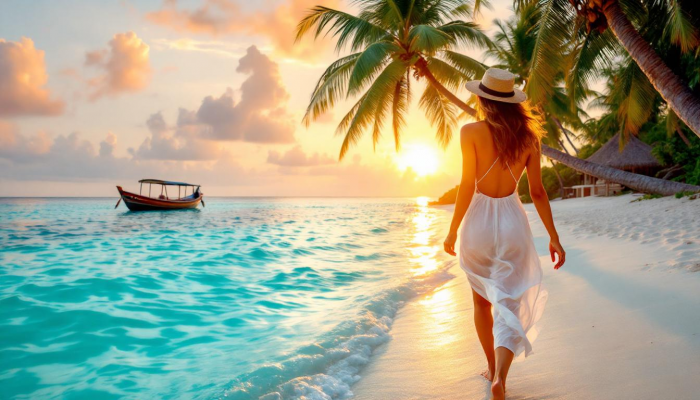
10. Tropical Beach Transformation
Best for: Vacation-inspired portraits, summer content, and social media posts.
Copy-ready prompt:
Turn my uploaded photograph into a realistic tropical beach portrait while preserving my facial features, hairstyle, expression, and natural body proportions. Replace the background with a peaceful sandy beach, turquoise ocean, distant palm trees, and a clear afternoon sky. Change my clothing to a simple, tasteful linen summer outfit that matches the setting. Use natural sunlight, soft shadows, realistic skin tones, and subtle reflections from the surrounding sand and water. Maintain the original pose wherever possible. Avoid exaggerated tropical colors, unrealistic waves, artificial skin smoothing, or distorted body details.
The subject's lighting should match the beach environment, particularly around the face, clothing, and feet.
11. Cozy Café Lifestyle Photo
Best for: Lifestyle blogs, casual portraits, and social media storytelling.
Copy-ready prompt:
Edit my uploaded photograph into a natural lifestyle scene inside a cozy independent café. Preserve my face, hairstyle, expression, and body proportions. Position me near a large window with warm morning sunlight illuminating one side of my face. Add a wooden table, a ceramic coffee cup, comfortable seating, and a softly blurred café interior. Keep my outfit casual and coordinated with neutral colors. Use realistic indoor lighting, natural reflections, and subtle background depth. Avoid crowded decorations, exaggerated coffee-shop aesthetics, or changes to my recognizable facial features.
This style benefits from an everyday photographic appearance rather than dramatic cinematic effects.
12. Rainy Neon City Portrait
Best for: Cinematic social media photographs and moody urban portraits.
Copy-ready prompt:
Transform my uploaded photograph into a realistic nighttime street portrait in a modern city during light rain. Preserve my face, hairstyle, expression, and natural proportions. Dress me in a dark jacket and place me near a street illuminated by blue, pink, and violet neon signs. Add realistic wet-pavement reflections, subtle atmospheric mist, and softly blurred city lights. Use believable colored highlights on my clothing and face while keeping skin texture natural. Maintain sharp facial focus, controlled contrast, and realistic shadows. Avoid excessive neon saturation, distorted architecture, or an artificial video-game appearance.
The most convincing neon edits use colored light as part of the environment rather than applying strong filters across the entire photograph.
Occasions and Fantasy Themes
Special occasions allow more creative transformations, including outfits, decorative settings, and dramatic backgrounds. These prompts focus on making themed photographs attractive without losing the subject's identity.
13. Birthday Photoshoot
Best for: Birthday posts, creative Instagram Story ideas, and personalized celebration pictures.
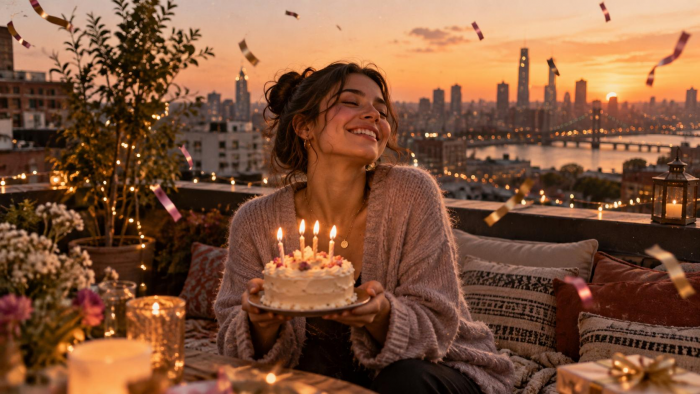
Copy-ready prompt:
Transform my uploaded photograph into an elegant birthday photoshoot while preserving my facial identity, hairstyle, body proportions, and expression. Place me on a beautifully decorated rooftop during the evening, holding a small birthday cake with glowing candles. Add pastel pink and champagne-gold balloons, warm fairy lights, and softly blurred city lights in the background. Dress me in a stylish outfit appropriate for a birthday celebration. Use warm flattering lighting, realistic candle reflections, natural skin texture, and gentle background bokeh. Create a polished vertical 9:16 portrait suitable for an Instagram Story.
Check the hands and cake carefully, since small decorative objects and finger positions can sometimes require refinement.
14. Traditional Festive Portrait
Best for: Festival greetings, traditional portraits, and cultural celebrations.
Copy-ready prompt:
Transform my uploaded photograph into a realistic traditional Indian festive portrait while preserving my recognizable facial features, skin tone, hairstyle, and natural expression. Dress me in an elegantly embroidered red-and-gold traditional outfit with tasteful jewelry and realistic fabric textures. Place me in a softly illuminated courtyard decorated with marigold garlands, traditional clay lamps, and subtle festive decorations. Use warm evening light, gentle shadows, and natural skin details. Maintain an authentic photographic appearance with balanced colors and realistic accessories. Avoid excessive ornamentation, distorted jewelry, or artificial facial changes.
For greater accuracy, specify the preferred clothing style, such as a saree, kurta, sherwani, or lehenga.
15. Fantasy Forest Portrait
Best for: Creative artwork, fantasy-inspired portraits, and themed social media content.
Copy-ready prompt:
Transform my uploaded photograph into a cinematic fantasy portrait set in a peaceful enchanted forest. Preserve my face, hairstyle, expression, and natural body proportions. Surround me with tall trees, delicate floating fireflies, soft atmospheric mist, and gentle light filtering through the leaves. Dress me in an elegant earth-toned outfit with natural fabric textures. Use realistic woodland lighting, soft shadows, subtle green and golden color grading, and believable environmental details. Maintain photographic realism while introducing restrained fantasy elements. Avoid cartoon-style rendering, exaggerated glowing effects, or changes to my facial structure.
The fantasy setting should support the subject rather than overwhelm the photograph with visual effects.
16. Royal Palace Portrait
Best for: Regal portraits, historical themes, and creative personal photographs.
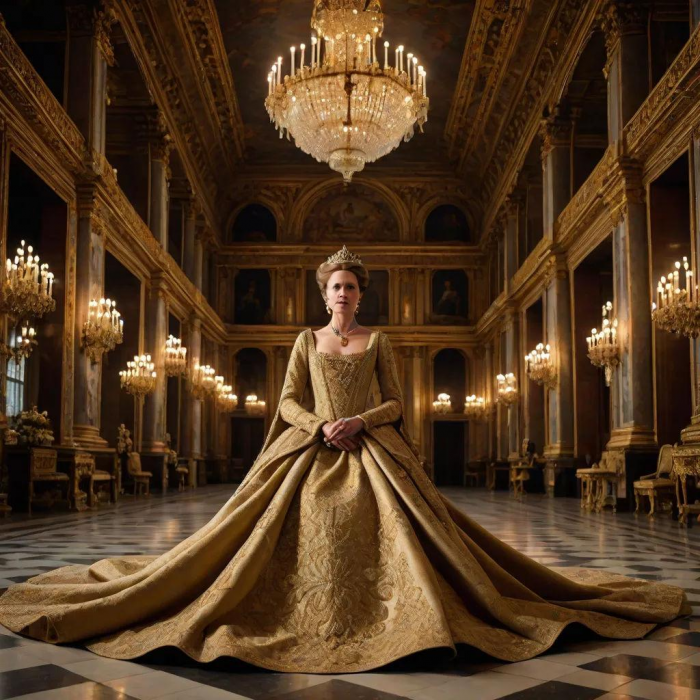
Copy-ready prompt:
Transform my uploaded photograph into an elegant royal portrait inside a grand historical palace. Preserve my facial identity, hairstyle, expression, and realistic proportions. Dress me in a richly detailed formal outfit inspired by traditional royal fashion, featuring tasteful embroidery and authentic-looking fabric. Position me inside a magnificent palace hall with carved pillars, warm chandeliers, and subtle architectural details. Use cinematic yet natural lighting, soft directional shadows, and a sophisticated color palette of gold, burgundy, and cream. Maintain realistic skin texture and photographic detail. Avoid exaggerated crowns, excessive jewelry, or an artificial fantasy illustration style.
A restrained historical setting generally produces a more convincing portrait than excessive royal accessories.
Practical Photo Improvements
Not every photograph needs an entirely new appearance. Sometimes better lighting, a cleaner background, or careful restoration can produce a more useful result.
17. Clean Background Replacement
Best for: Profile pictures, professional photographs, and distracting backgrounds.
Copy-ready prompt:
Edit my uploaded photograph by replacing only the existing background with a clean, softly blurred neutral environment. Preserve the original subject, facial features, hairstyle, clothing, body proportions, expression, and pose. Maintain the existing camera angle and framing. Match the new background lighting to the original subject, creating believable shadows and natural separation around the hair and shoulders. Avoid altering facial details, removing accessories, or changing clothing textures. Keep the final photograph realistic, with no visible cutout edges, artificial halos, or inconsistent lighting.
For this type of edit, choosing a background with lighting similar to the original usually produces more natural results.
18. Natural Photo Enhancement
Best for: Everyday portraits, family photographs, and underexposed images.
Copy-ready prompt:
Improve the overall quality of my uploaded photograph while preserving its original composition, subject, facial features, clothing, and background. Correct exposure, white balance, contrast, and color accuracy to produce a natural photographic appearance. Reduce visible digital noise and improve clarity without introducing artificial sharpness. Maintain realistic skin texture, natural facial details, and authentic colors. Gently balance highlights and shadows while avoiding excessive brightness, HDR effects, or beauty filters. Do not add or remove objects. The final image should resemble a carefully edited version of the original photograph rather than a newly generated scene.
This prompt is useful when the original picture is already good but needs technical improvements rather than creative changes.
19. Product Photography Makeover
Best for: E-commerce listings, product promotions, and small business marketing.
Copy-ready prompt:
Transform my uploaded product photograph into a clean, professional commercial product image. Preserve the product's original shape, proportions, colors, branding, labels, and visible design details. Replace the background with a minimal warm-beige studio setting and place the product on a simple matte surface. Use soft directional lighting, realistic contact shadows, subtle reflections, and sharp product details. Maintain accurate material textures, whether glass, fabric, metal, or plastic. Avoid adding imaginary product features, changing packaging information, or altering brand text. Frame the product centrally with balanced negative space in a square 1:1 composition.
Product photographs require particular care because changes to labels, packaging, or physical details can misrepresent the item being sold.
20. Old Photo Restoration
Best for: Family albums, archival photographs, and damaged personal pictures.
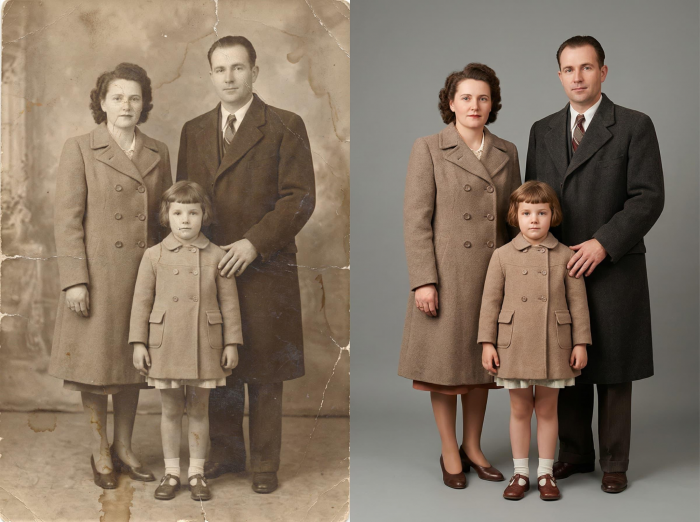
Copy-ready prompt:
Restore my uploaded old photograph while preserving the original people, facial characteristics, clothing, poses, and historical setting. Carefully reduce visible scratches, dust marks, fading, discoloration, and minor damage. Improve contrast, tonal balance, and image clarity without removing authentic photographic texture. Reconstruct damaged areas conservatively and avoid inventing facial features or background objects where details are unclear. If the photograph is black and white, preserve its original monochrome appearance unless I specifically request colorization. Maintain natural expressions and historically appropriate details. The final image should look like a carefully restored archival photograph.
For important family photographs, compare the edited result with the original. Missing facial details cannot always be reconstructed accurately, even when the restored image looks convincing.
How to Get Better Editing Results
A detailed prompt improves the chances of a convincing result, but the source image remains important. A sharp, properly exposed photograph gives ChatGPT clearer facial information, clothing details, and environmental context to work with.
A few practical adjustments can make a noticeable difference:
● Describe what must remain unchanged: Instead of only requesting a new background, identify facial features, clothing, pose, or objects that should be preserved.
● Keep lighting consistent: If the replacement background has sunlight coming from the right, the subject should have compatible highlights and shadows.
● Specify the composition: Use 1:1 for square profile images, 4:5 for vertical feed posts, 9:16 for Stories, or 16:9 for landscape visuals.
● Make corrections individually: If the first result has distorted hands or unrealistic hair, request a targeted correction rather than rewriting the entire prompt.
It also helps to avoid combining several unrelated editing styles. A photograph requested to look vintage, cinematic, luxurious, and futuristic simultaneously may lack a consistent visual direction.
Common Photo Editing Mistakes
Some AI-generated edits look polished initially but reveal problems when examined closely. Faces may change slightly, shadows may appear inconsistent, or the new background may not match the subject's perspective.
| Common Problem | Better Approach |
| Face looks different | Specify the facial characteristics that must remain unchanged |
| Skin appears artificial | Request natural pores, texture, and restrained retouching |
| Background looks pasted on | Ask for consistent lighting, perspective, and contact shadows |
| Hands or jewelry appear distorted | Request a correction limited to the affected area |
| Colors look exaggerated | Ask for natural exposure and restrained color grading |
| Incorrect image dimensions | Specify the intended aspect ratio before generating |
For edits involving multiple people, describe which individuals should remain unchanged and where each person should appear. This reduces ambiguity when adjusting clothing, background elements, or group composition.
Can ChatGPT Preserve Your Original Face?
ChatGPT can maintain recognizable facial features while changing clothing, backgrounds, and lighting. However, complex transformations may still introduce subtle differences in facial proportions, expressions, hair, or small details.
Instructions such as "keep my face exactly the same" communicate the intended outcome but do not guarantee pixel-perfect preservation.
For portraits where identity consistency matters, use a clear original image and avoid changing too many facial or lighting characteristics simultaneously. Compare the result with the source photograph, particularly around the eyes, nose, mouth, and jawline.
It is also worth distinguishing between creative editing and authentic documentation. A photograph showing someone in an invented location or occasion should not be presented as evidence that the event actually happened.
Final Perspective
ChatGPT photo editing prompts can turn everyday pictures into professional portraits, aesthetic social media posts, themed celebrations, and polished product photographs. The most useful prompts are those that define the intended changes while protecting important details from the original image.
Personally, I find realistic portrait enhancements and background transformations more useful for everyday editing, while fashion, travel, and fantasy prompts offer greater creative freedom.
The key is to treat the first result as a starting point rather than automatically accepting it as final. Clear instructions, realistic lighting, and targeted corrections can make the difference between an obviously AI-generated picture and a convincing edited photograph.
Comments