

Most people never watch a ten-minute video from start to finish. They arrive looking for one specific thing: the fix, the recipe step, the moment you finally get to the point and if they can't find it in a few seconds, they leave.
Chapters solve exactly this. They turn one unbroken timeline into a labelled map a viewer can read at a glance. This guide walks through how chapters work, how to add them without tripping over YouTube's rules, and how to place them so they earn you watch time instead of just sitting in your description.
What YouTube Chapters Actually Are
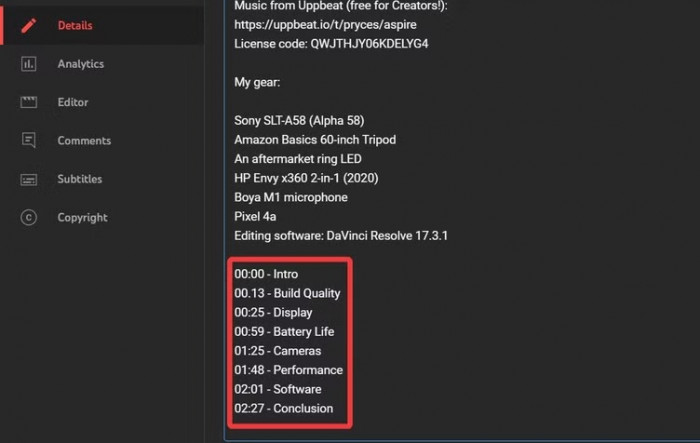
A chapter is a named segment of your video. When chapters are active, the progress bar under the player stops being one smooth line and splits into blocks, each with its own label. Hover over any block and YouTube shows a small preview thumbnail of that moment. The same breakpoints also appear as clickable links in your description, so a viewer can jump straight to the part they want.
Here's the distinction most guides skip: a timestamp and a chapter are not the same thing. A timestamp is just a time written in your description, like 2:40. It only becomes a chapter when your list of timestamps meets YouTube's formatting rules. Get one rule wrong and the timestamps stay as plain text clickable, but with no segmented bar and no previews.
Why Chapters Matter More Than Creators Think
Most creators treat chapters as a tidy-up job, something you add at the end if you have five spare minutes. That underrates them. Chapters pull real weight in three different places:
● Navigation and trust. A viewer who can see exactly what your video contains feels respected, not trapped. Even when they skip ahead, they're skipping ahead inside your video instead of leaving it for a shorter one. You're competing with the back button, and a clear map wins that fight more often than a good intro does.
● Retention. When someone jumps to the section they want and finds it useful, they tend to keep watching from there. Scattered, honest chapters often lift your audience-retention curve, because people stop bailing out of the parts they never wanted in the first place.
● Discoverability. Google and YouTube can read your chapter labels and surface individual segments as "Key Moments" in search results. One good chapter title can pull in viewers who were never searching for your video only for the thing inside it.
Look closely and you'll notice chapters aren't really a formatting task at all. Writing them forces you to name what each part of your video is for. That's a content-structure decision wearing a formatting costume, and it's why sloppy chapters almost always sit on top of a sloppy edit.
Manual Chapters vs. Automatic Chapters
YouTube gives you two ways to get chapters, and they behave differently.
Manual chapters are the ones you write yourself by listing timestamps in the description. You control the breakpoints and the wording.
Automatic chapters are generated by YouTube's AI when you haven't supplied your own and your video is eligible it watches for topic changes and labels them for you.
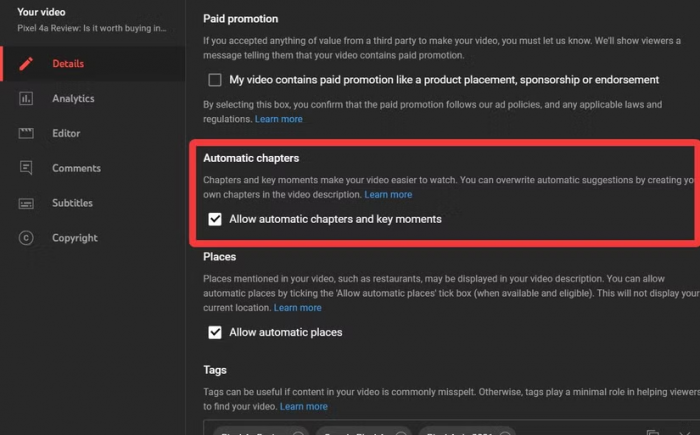
The key rule: manual always wins. The moment you add a valid set of timestamps, YouTube drops its automatic version and uses yours. So the two aren't really competing automatic chapters are the fallback for videos where the creator did nothing.
| Manual chapters | Automatic chapters | |
| Who decides the breaks | You | YouTube's AI |
| Wording control | Full | None |
| Best for | Tutorials, podcasts, anything structured | Casual uploads, back-catalogue cleanup |
| Reliability | Appears whenever rules are met | Only on eligible videos, not guaranteed |
| SEO value of labels | High you write searchable titles | Lower descriptive, not intentional |
For anything you care about, write manual chapters. Reach for automatic only when you're bulk-enabling them across old videos you'll never go back and edit by hand.
The Rules That Decide Whether Chapters Appear
Chapters aren't a switch you flip. YouTube reads your description and only creates them when every one of these conditions is true:
● Your first timestamp must be 0:00. This is the one people miss most. If your list starts at 1:15 because that's where the "real" content begins, YouTube ignores the whole list.
● You need at least three timestamps. Two won't trigger anything.
● They must run in order, earliest to latest. A timestamp out of sequence breaks the set.
● Each chapter must be at least 10 seconds long. Two timestamps six seconds apart won't hold.
● Use colons, never commas. It's 0:45, not 0,45.
Miss any single rule and the timestamps don't error out; they just quietly stay as plain text. That silent failure is why so many creators conclude "chapters don't work on my channel."
Here's a valid block you can model yours on:
0:00 Intro - what we're building
0:48 The one setting to change first
3:12 Walking through the full setup
7:30 Common errors and fixes
10:05 Final checks before you publish
Start at zero, keep them in order, give each section real breathing room, and the segmented bar shows up within a few minutes of saving.
How to Add Chapters in YouTube Studio
The actual process takes a couple of minutes. On desktop:
1. Sign in to YouTube Studio and open Content from the left menu.
2. Click the video you want to edit to open its details page.
3. In the Description box, paste your list of timestamps and titles, each on its own line.
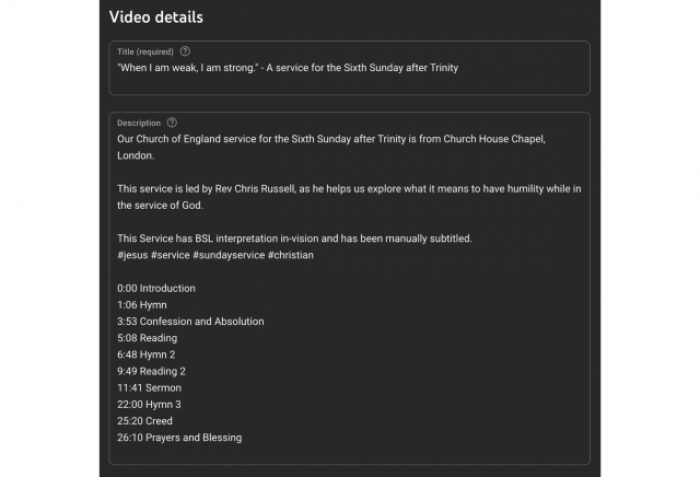
4. Click Save.
5. Give YouTube a few minutes to process, then refresh the watch page. The progress bar should now be segmented.
You can do the same from the YouTube Studio mobile app: open Content, tap the video, edit the description, and save. The formatting rules are identical phones don't get a free pass on the 0:00 start or the three-timestamp minimum.
One detail worth knowing: you don't have to wait until a video is live. If you add a correctly formatted timestamp list to the description during upload, the chapters are ready the moment the video publishes.
Writing Chapter Titles That Actually Pull Viewers
A chapter title does two jobs at once: it helps a viewer scan, and it feeds search. Weak titles fail both. While AI tools for YouTube video creation can help generate and refine titles, specificity still matters. "White balance" tells YouTube and your viewer almost nothing. "How to white balance your camera" matches how people actually search and reads clearly in the description.
A few habits that separate titles that work from titles that fill space:
● Write the phrase someone would type. Think of each title as a mini search query, not a filing label.
● Be specific over clever. "The mistake everyone makes" is a tease; "Why your audio sounds muffled" is a promise a viewer can act on.
● Keep them short and scannable. A reader should take in the whole list in a glance, so aim for a handful of words, not a sentence.
● Match the title to a real shift in content. If the video doesn't change direction there, the chapter shouldn't exist.
Compare these:
| Weak title | Stronger title |
| Intro | What this guide covers |
| Settings | The 3 settings to change first |
| Tips | Fixing blurry exports |
| Outro | What to do next |
The stronger column isn't longer for the sake of it; each one tells the viewer precisely what they'll get if they click.
Where to Place Chapters Not Where You Think
Most creators space chapters evenly, roughly one every couple of minutes, as if they're chopping the video into equal slices. That's the wrong instinct. A chapter should mark where your content genuinely shifts a new step, a new argument, a change of location or topic. If two "chapters" cover the same idea, they shouldn't be two chapters.
Uneven is normal and good. A tutorial might run 0:00, 0:40, then nothing until 6:00 because the middle is one continuous demonstration. Forcing a break into the middle of that demo just to keep the spacing tidy only confuses the viewer.
Here's the tactic that turns placement from guesswork into something measurable. Open your audience-retention graph in YouTube Studio and look at where the line dips the moments people drop off or skip. Line your chapter breaks up against those dips. Often the drop-off is people hunting for the next section and giving up; a clearly labelled chapter right there catches them instead of losing them. You're not decorating the timeline, you're patching the leaks in it.
Chapters and Search: The Quiet SEO Layer
Chapters do something your title and thumbnail can't: they let individual moments of your video get found on their own.
When your chapters are labelled well, Google can pull a specific one into search results as a "Key Moment" a link that drops the searcher at that exact timestamp. YouTube's own search does something similar, surfacing relevant segments rather than only whole videos. In practice this means a single well-named chapter can bring in viewers who were never looking for your video at all, only for the thing buried inside it.
It's worth being honest about the size of this. Chapters are not a ranking button, and adding them won't rocket a weak video up the results. They're one part of long-form video SEO, giving search systems clear, structured labels for what your video contains. Treat the SEO benefit as a bonus on top of good content, not a substitute for it.
When Chapters Don't Show Up and How to Fix It
Almost every "my chapters aren't working" problem comes down to a formatting slip. Run through this before assuming anything's broken:
| What went wrong | The fix |
| List doesn't start at 0:00 | Add a 0:00 line as your first timestamp |
| Fewer than three timestamps | Add timestamps until you have at least three |
| A section under 10 seconds | Merge it into the chapter next to it |
| Timestamps out of order | Re-sort them earliest to latest |
| Commas instead of colons | Rewrite every time as 0:00, not 0,00 |
| List starts where "real" content begins | Always lead with 0:00, even for the intro |
If your formatting is clean and chapters still refuse to appear, the issue may be account-level. In YouTube Studio on desktop, open Settings > Channel > Feature eligibility and check your access. Some features ask you to verify your account first. Once verified, save the description again and refresh.
And a reminder that saves a lot of frustration: changes aren't instant. Give YouTube a few minutes to process before you decide something's wrong.
Final Take
Chapters look like a small cosmetic feature, but the creators who use them well get something bigger out of the deal. The mechanics are easy once you know them: start at 0:00, list at least three timestamps in order, keep each section over ten seconds, use colons, and let manual chapters override the automatic ones.
The real value shows up a level above the rules. To write good chapters you have to decide what each part of your video is actually for, name it in words a viewer would search, and place the breaks where attention really shifts. That's just good structural thinking, the same discipline that makes the whole video better, chapters or not.
So don't bolt chapters on at the end as an afterthought. Pull up your next video's retention graph, mark where viewers hunt and drop off, and label those moments clearly. You'll make a video that's easier to watch, easier to find, and easier to come back to which is the whole point.
Comments