

Here's an uncomfortable place to start about hashtags: on LinkedIn, hashtags stopped being a growth lever a while ago, and a lot of people are still optimizing something the platform quietly unplugged. You came here for a list of the best ones, and you'll get it. But if all you take away is a block of tags to paste under every post, you'll have missed the part that actually moves the numbers. So we'll do both the list, and the reasoning that makes the list worth anything.
How LinkedIn hashtags actually work now
Rewind to 2019 and the mechanics were simple. You followed a hashtag, and posts carrying that tag showed up in your feed. That meant a well-tagged post could travel far past your own connections strangers who followed #Leadership saw your leadership post whether they knew you or not. Hashtags were, functionally, a distribution pipe.
That pipe is gone. In late 2024 LinkedIn removed the ability to follow hashtags and shut down the hashtag feed pages those follows fed into. On desktop, tags aren't even clickable anymore. The tidy little community that used to sit behind each hashtag no longer exists, which means the old promise to tag it and reach the people who follow that topic no longer has anything behind it.
What replaced it is subtler and, honestly, smarter. LinkedIn's algorithm reads the words in your post directly. It doesn't need you to append #Marketing to work out that you wrote about marketing; the text already told it. Hashtags shifted from telling the platform what your post is about to being one more signal among many a categorization and search label rather than a delivery mechanism. LinkedIn even renamed the hashtags on Company Pages to “Specialisms,” which tells you how the platform now thinks about them: less like megaphones, more like filing tabs.
The practical consequence is a change in expectations. A hashtag today does two modest jobs. It helps your post surface when someone deliberately searches that term, and it reinforces the topic signal the algorithm has already picked up from your writing. Neither of those is nothing. But neither is the reach engine hashtags used to be, and pretending otherwise is where most advice falls down.
What the data actually says about reach
This is the section most “best hashtags” pieces skip, because the numbers are inconvenient. When you separate reach from engagement two things that get lumped together constantly the picture gets honest fast.
The uncomfortable numbers
Across large-scale analyses of LinkedIn posts, adding relevant hashtags tends to lift engagement by somewhere around 12–13%, while the effect on reach lands closer to 9%. Some studies report higher engagement figures under ideal conditions, but the repeatable, conservative version sits in the low double digits.
Read that again, because the framing matters. A 9% reach bump is real, and it's free, and over hundreds of posts it compounds into something. But it is not the difference between a post that flops and one that takes off. If a post is going to travel, the hashtags aren't why. They're a light tailwind, not the engine.
There's also a ceiling you can crash straight through. Piling on tags doesn't scale the benefit, it inverts it. Somewhere past five or six hashtags the returns flatten, and at ten or more you start tripping the same signals that flag spam. Some analyses of very large post samples have found that heavily tagged posts actually underperform ones with a couple of clean, relevant tags, and that stuffing fifteen or more can suppress distribution meaningfully. The instinct to add “just a few more to be safe” is the exact instinct that hurts you.
So the data leaves you with a strange but freeing conclusion: hashtags are worth a few seconds of thought and no more than that. Treat them like the meta tags on a web page quietly useful, worth getting right, not worth agonizing over.
The anatomy of a good hashtag: the three tiers
If the specific tags matter less than everyone assumes, what still matters is which kind you choose. The single most useful mental model is to stop thinking about individual hashtags and start thinking about tiers, sorted by how many people are attached to them.
| Tier | Rough size | What it does | The catch |
| Broad | 1M+ followers | Signals the general topic; makes your post legible at the category level. | Enormous competition in your post is one drop in a flood, so relevance is thin. |
| Mid-range | ~50K–500K | The workhorse tier: big enough to have a real audience, small enough that you're not instantly buried. | Requires you to actually know your niche's vocabulary. |
| Niche | Under ~50K | Best reach-to-relevance ratio; the people searching it genuinely care about the exact thing. | Small pool, so it works alongside broader tags, not instead of them. |
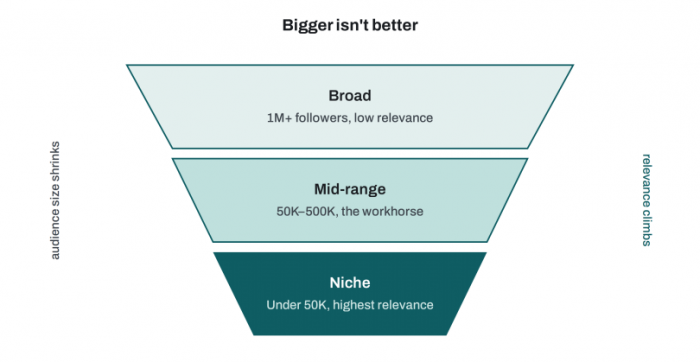
The counterintuitive part is that bigger is usually worse. A tag like #Business, with millions attached, sounds like a wide net but everyone casts into it, so your post surfaces to almost no one in particular. A sharper tag like #RevenueOperations reaches fewer people, and that's the point: the ones it reaches are the ones you wanted. Niche tags have been shown to drive noticeably higher engagement than broad ones, roughly a quarter more in some measurements, precisely because the audience is self-selected.
The workable default that most of the current data converges on is a mix of three to five tags: one broad tag to establish the category, one or two mid-range tags for a real audience, and one or two niche tags for the people who'll actually care. You're covering territory without diluting the signal.
The best hashtags, by field
Here's the list you came for but read it as a starting kit, not gospel. Follower counts drift month to month, tags fall in and out of use, and what fits a founder's post won't fit a recruiter's. Each row below gives you the tier structure to copy, not a fixed block to paste forever.
| Field | Broad | Mid-range | Niche |
| Marketing | #Marketing | #ContentMarketing, #DigitalMarketing | #B2BContent, #DemandGeneration |
| Tech & software | #Technology | #SoftwareDevelopment, #SaaS | #DeveloperExperience, #PlatformEngineering |
| Finance | #Finance | #FinTech, #Investing | #CorporateFinance, #FPandA |
| HR & recruiting | #HumanResources | #TalentAcquisition, #Recruiting | #EmployerBranding, #PeopleOps |
| Sales | #Sales | #SalesStrategy, #B2BSales | #SalesEnablement, #Prospecting |
| Leadership & career | #Leadership | #CareerDevelopment, #Management | #FirstTimeManager, #CareerPivot |
| Entrepreneurship | #Entrepreneurship | #StartupLife, #SmallBusiness | #BootstrappedStartup, #FounderJourney |
| Design & creative | #Design | #UXDesign, #GraphicDesign | #DesignSystems, #ProductDesign |
Notice the shape of every row. The broad tag is there for context, not for reach it's the one doing the least work. The niche tags on the right are the ones a real human might deliberately search, and those are the ones earning their place. If you only remember one thing from this table, make it the direction of value: it climbs as you move rightward, toward the specific.
Do not skip this
Follower numbers on LinkedIn shift, and a tag that's healthy today can go quiet in a quarter. Treat the list above as a template for the tiers, then spend two minutes confirming the actual sizes in search before you rely on any single tag. A list you never re-check is a list going stale.
How to find your own a repeatable method
Borrowed lists have a short shelf life. The skill worth building is the one that keeps working after this article is out of date, and it takes about ten minutes to set up once.
• Search your keyword inside LinkedIn first. Type the topic into the search bar, filter to posts, and look at what's actually being tagged by people already getting traction. You'll see both the vocabulary your niche uses and the rough size of the audience behind each tag.
• Study three or four people who are already winning in your space. Not the celebrity accounts the practitioners a rung or two ahead of you, whose audience is the audience you want. The tags they reuse are tags that have survived their own testing.
• Sort your candidates into the three tiers as you go. Keep a running note of broad, mid-range, and niche options so you're never staring at a blank post trying to remember what to use.
• Build a small library of fifteen to twenty tags and rotate through it. A single hard-coded block on every post trains nothing and looks lazy to the algorithm; a rotating set matched to each post's actual subject keeps your topic signal varied and honest.
A plain spreadsheet is enough: three columns for the tiers, a column for the topic each set belongs to, and a habit of updating it monthly based on what performed rather than what you assumed would. The point isn't the spreadsheet. It's that you stop guessing and start choosing tags that describe what you already wrote.
Placement, count and the mistakes that cost you
The mechanical questions have boringly clear answers, which is a relief given how much debate they attract.
How many: three to five, full stop. Fewer and you've left a little discoverability on the table; more and you look like you're gaming something. Where: at the end of the post, after the body. Since tags now serve categorization and search rather than a clickable feed, whether they sit in the post or the first comment barely matters for performance but putting them at the end keeps your opening lines clean, and your opening lines are what decide whether anyone keeps reading. Case: capitalize each word #ContentStrategy, not #contentstrategy so screen readers and human eyes can both parse it.
The mistakes are where people quietly sabotage themselves:
• Reusing one identical hashtag block on every post. It signals nothing useful and reads as automation. Match the tags to the actual content each time, even if that means swapping just one or two.
• Leaning entirely on mega-tags. A post tagged only #Business competes with millions and surfaces to no one specific. Big tags are seasoning, not the meal.
• Inventing clever tags no one uses. A witty hashtag with zero following is invisible. The only exception is a branded tag you're actively promoting across a campaign, where the point is ownership rather than discovery.
• Treating “more” as “safer.” Ten-plus tags don't hedge your bets; they read as spam to both the algorithm and the person scrolling past, and they can actively suppress how far the post travels.
Where reach actually comes from
If hashtags account for something like 9% of the reach story, the honest question is what accounts for the other 91%. This is the part worth pinning above your desk, because it's where your energy should go once the tags are sorted.
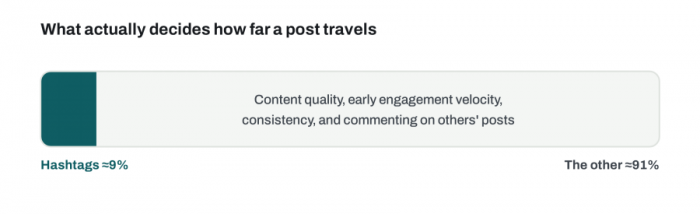
Early engagement velocity does the heavy lifting. LinkedIn watches how fast a fresh post earns comments and reactions in its first hour or so, and uses that to decide how widely to push it. A post that sparks quick conversation gets shown to more people; a post that lands quietly stays quiet. This is why your first line and your timing matter more than any tag ever will.
The content itself is the actual lever. The algorithm reading your words directly cuts both ways; it means a post that's genuinely specific, useful, or worth arguing with gets categorized and distributed on its merits, tags or no tags. Vague posts don't get rescued by good hashtags.
Consistency compounds. Showing up on a steady rhythm trains both the algorithm and your audience to expect you, and steady beats sporadic-but-brilliant almost every time.
And here's the one that surprises people: commenting on other people's posts in your niche often does more for your reach than your own hashtags do. A thoughtful comment puts your name in front of someone else's audience and reinforces to the algorithm what topics you belong to. That visibility matters more when your LinkedIn bio gives new profile visitors a clear reason to connect or reach out. Ten real comments a day is a growth strategy. A perfect hashtag block is a rounding error next to it.
The verdict
So should you use hashtags on LinkedIn? Yes, three to five of them, tiered from broad to niche, matched to what you actually wrote, tucked at the end of the post. That takes thirty seconds and gives you a small, free, real advantage. Do it, and stop there.
What you shouldn't do is mistake that thirty seconds for a strategy. The “best hashtags” question is seductive because it feels like a lever you can pull pick the right magic words and the reach appears. But LinkedIn moved the levers years ago, and they're behind the things that are harder to fake: writing worth reading, showing up consistently, and engaging like a person rather than a broadcaster. Get those right and your modest hashtag tailwind has something to push. Get them wrong and no list on earth will save the post. The tags are the last thing you should touch, not the first.
Quick answers
Q. Do LinkedIn hashtags still work at all?
Yes, but in a reduced role. They no longer feed a followable stream, and they don't drive reach on their own. They help your post surface in search and reinforce the topic signal the algorithm already reads from your text.
Q. How many should I use per post?
Three to five. Fewer limits discoverability slightly; more looks spammy and, past ten, can actively suppress distribution.
Q. In the post or the first comment?
Either works now, since tags are a categorization signal rather than a clickable feed. Placing them at the end of the post keeps your opening lines clean, which matters more.
Q. Are branded or invented hashtags worth it?
Only for a campaign you're actively promoting, where you want to own and track a term. As a discovery tactic, a tag no one searches is invisible.
Q. Can I just reuse the same set every time?
Better not to. A rotating library matched to each post's real subject keeps your topic signal varied and reads as human rather than automated.
Comments