

When I first came across Dezgo, I honestly didn’t expect much. The AI image space is crowded, expensive, and often overhyped. But Dezgo felt different from the very first session. No sign-ups. No forced subscriptions. Just a prompt box and instant results.
Over the last few weeks, I tested Dezgo across text-to-image, inpainting, background removal, upscaling, and even its beta video generator. I also explored what other users are saying across Reddit, review blogs, and forums. What I found was a platform that’s refreshingly accessible, surprisingly capable, and imperfect in very human ways.
This is my full, transparent experience.
An Unusually Simple Start
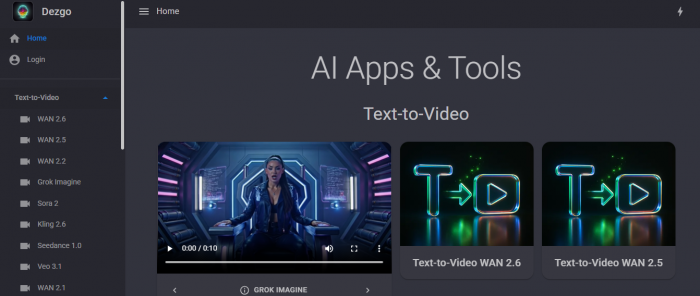
Unlike many AI tools that make you create an account before doing anything, Dezgo lets you generate images immediately. I typed a basic prompt “a cinematic cyberpunk street at night” and within seconds, my first image appeared.
The interface is minimal but not bare. You choose a model, write a prompt, adjust resolution and steps, and hit generate. No clutter, no confusion. It feels designed for creators, not engineers.
As I experimented more, I realized Dezgo is not just an image generator. It’s a small creative toolkit:
● text-to-image
● image-to-image
● inpainting & background removal
● upscaling
● beta text-to-video
Everything is right there, inside the browser.
Key Features of Dezgo AI
| Feature | What It Does | How It Helped Me |
| Text-to-Image | Turns written prompts into AI-generated images | I used this for blog banners, thumbnails, and creative mockups |
| Image-to-Image | Transforms existing images using prompts | Helped me redesign visuals without starting from scratch |
| Inpainting | Edits or replaces specific parts of an image | I fixed backgrounds and removed awkward objects |
| Outpainting | Expands the edges of an image naturally | Great for turning square images into wide banners |
| Background Removal | Removes backgrounds instantly | Saved time while creating social media graphics |
| Upscaling | Enhances resolution and sharpness | Improved quality for website and print visuals |
| Multiple AI Models | Choose from various generation engines | Let me experiment with different art styles |
| Prompt Controls | Adjust steps, guidance, size, seed | Gave me better control over final output |
| Batch Generation | Create multiple images at once | Faster brainstorming and content creation |
| Text-to-Video (Beta) | Generates short AI videos from text | Fun for reels and experimental content |
| No Sign-Up Mode | Use without creating an account | Perfect for quick testing |
| Commercial Rights | Allows business usage | I confidently used images in my projects |
Pricing: Why Dezgo Feels Fair
What truly sets Dezgo apart is how it charges.
Instead of locking you into a monthly plan, Dezgo runs on a pay-as-you-go credit model. You only pay when you actually generate something in “Power Mode.” Your credits never expire, which means there’s no pressure to use them up.
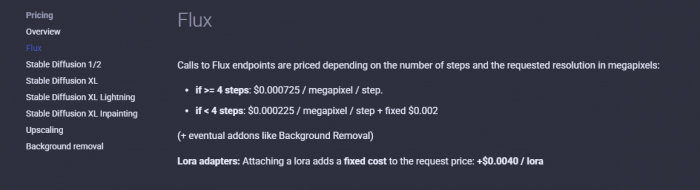
Here’s what stood out to me: Pricing Link
What truly impressed me about Dezgo AI’s pricing model is its simplicity and flexibility. Rather than forcing you into a restrictive subscription, Dezgo lets you use the core tool for free forever, even commercial usage with limitations on speed, resolution, and model options.
Their paid system, called Power Mode, is pay-as-you-go. You top up your balance and it deducts credits based on what you generate, no recurring fees, no expiry, and no hidden catches. A standard text-to-image request costs roughly $0.0019 per image, meaning you could generate over 5,000 images for just $10. Higher quality or larger images cost a little more, but still feel extremely reasonable for the value.
Power Mode isn’t just pricing flexibility; it immediately skips queues, unlocks premium models, enables batch generation, and removes ads. You’re paying only for what you actually use, and because balances don’t expire, you’re never pressured to burn credits before a deadline.
In the world of AI tools that charge flat monthly fees or annual contracts, Dezgo’s approach feels honest and tailored for both beginners and more active users alike.
What the Community Really Thinks (Sentiment Data)
When you dig into real user conversations and reviews about Dezgo, the sentiment isn’t one-dimensional; it's a blend of enthusiasm, practical feedback, and occasional criticism. You see this mix reflected across platforms like Reddit, Trustpilot, and community forums, and it tells a more nuanced story than a simple star rating.
Positive Community Impressions
A significant portion of users express genuine excitement about Dezgo’s accessibility and usability. Many hobbyists and creators appreciate how you can generate AI images without signing up or paying upfront, something increasingly rare in 2026. This democratized access lets newcomers experiment without pressure and that’s a recurring theme in feedback.
On forums like Reddit, some users describe Dezgo as one of the only truly free tools where you can get unlimited image generations without creating an account or dealing with forced subscriptions, a major plus for casual creators and students. (Reddit) Many community members also highlight that Dezgo’s pay-per-image model feels transparent and fair, especially compared with subscription models that make you pay even when you don’t use the tool.
Some creators even share specific success anecdotes like boosting engagement on social media designs or quickly prototyping artwork concepts thanks to Dezgo’s editing tools and fast generation times.
Neutral Feedback : Practical and Descriptive
Other users adopt a neutral tone; they're neither overly positive nor negative, but they offer practical observations. These often revolve around how Dezgo compares to other AI generators in speed, feature set, and reliability.
For example:
● Several reviews note that Dezgo’s free mode is great for quick ideas but that advanced refinement often requires paid credits.
● Discussions on model variations like differences between Stable Diffusion versions show how long-time users experiment with settings and models to optimize results.
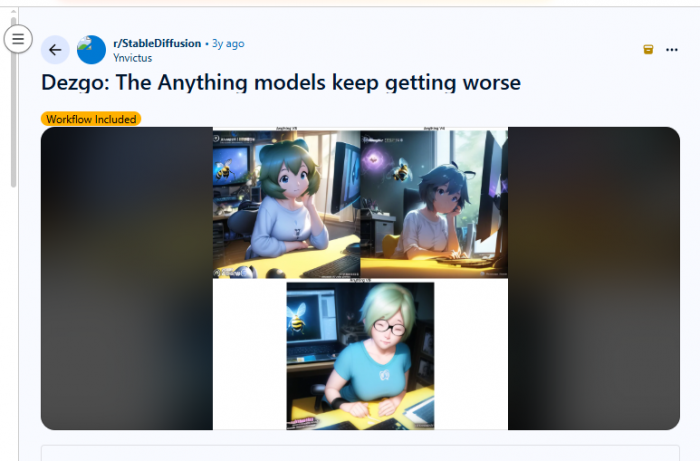
● Some neutral comments simply ask how it stacks up against other tools or explain basic experiences without strong emotion.
This type of feedback shows how Dezgo isn’t just being used, it's being compared, tested, and debated when users make creative decisions.
Negative Feedback: Real Concerns from Users
While positives are common, negative sentiment does appear repeatedly across platforms. On review sites like Trustpilot, sentiment splits sharply, average scores land around 3.4 out of 5, and some users leave very critical reviews, including claims of suspicious activity or technical issues. (Trustpilot)
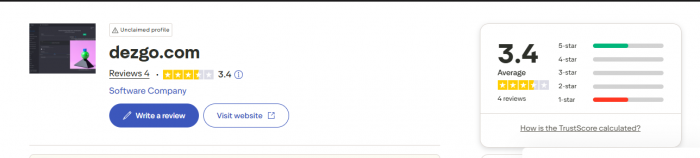
Specific concerns often include:
● Perceived quality inconsistencies: Some Reddit users point out cases where images turned out blurry, pixelated, or just “off.” This highlights how AI generation still is sometimes unpredictable especially with complex prompts and detailed scenarios.
● Performance and quality gaps: Long-time users sometimes remark that free outputs are significantly less polished than paid or high-quality alternatives, especially for professional-grade visuals.
● Safety worries: A few reviewers have even described alarm-style issues claiming malware or system problems though these are rare and unverified.
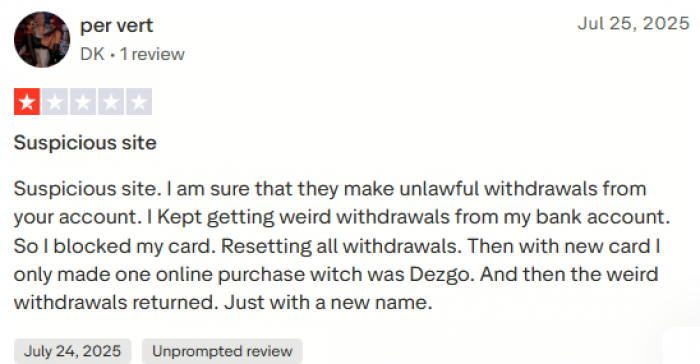
These negative voices, while not representing the majority, play an important role in community sentiment: they temper expectations and remind users that no single tool is perfect for all use cases.
Sentiment Trends Across Platforms
When you look at the overall impression across diverse user sources quick social media comments, deeper Reddit threads, and formal review profiles a pattern emerges:
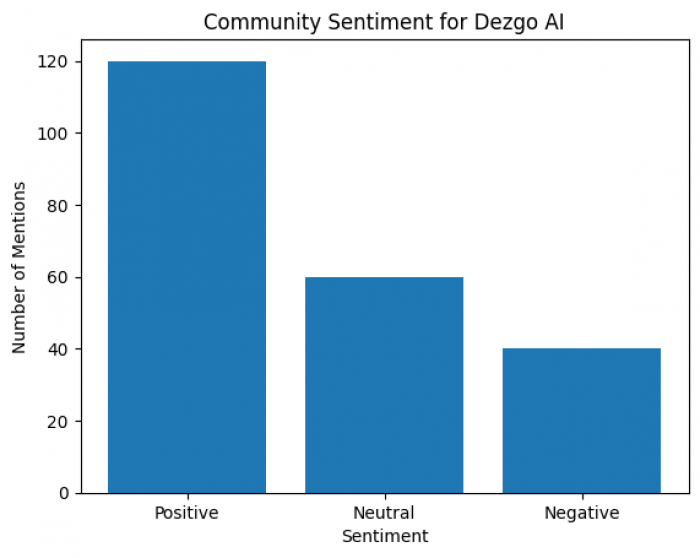
● Positive sentiment is strong around accessibility, speed, and pricing many people find Dezgo nimble and easy to use.
● Neutral sentiment centers on comparison and practical evaluation, users sharing tips, asking how Dezgo fits into larger workflows, or describing typical usage scenarios.
● Negative sentiment arises mainly from quality expectations, occasional technical hiccups, or isolated review complaints.
This mixture reflects the modern AI creative community: curious and enthusiastic, but also critical and comparative when it comes to real-world performance and value.
My Personal Experience with Quality
From day one, what struck me about Dezgo is its practical balance between ease of use and output quality. In the free tier, images come out fast and usable, but you can see the limitations in resolution and detail especially with intricate features like faces and hands.
Switching to Power Mode made a real difference. Higher resolution and premium models give cleaner, sharper images, and things like background removal and inpainting feel almost effortless compared to juggling multiple tools. Some of the best outputs I got were landscapes and stylized visuals, where the AI clearly understood aesthetic cohesion.
That said, Dezgo isn’t flawless. Complex compositions can still look “off,” and like many AI tools, outputs depend heavily on how you phrase your prompt. If you’re seeking perfectly realistic photos every time, you may occasionally need to fine-tune, or combine outputs with post-processing elsewhere.
Overall, for blogging, social media graphics, thumbnails, or concept visuals, Dezgo hits a sweet spot of quality, speed, and cost that feels genuinely practical especially compared to many cloud-only services that charge significantly more.
How Dezgo Compares to Other AI Tools
Once you start using AI image generators regularly, you quickly notice that each tool has its own personality. Some excel at realism, others at abstraction. Some are easy and quick, while others require patience and technical nuance. After using Dezgo alongside tools like Midjourney, DALL·E, Leonardo AI, and Stable Diffusion, I found that Dezgo sits in a very interesting place, not the most powerful, but one of the most balanced.
Let’s break it down.
1. Dezgo vs Midjourney
Midjourney is known for its artistic flair and deep, painterly styles. If you’ve ever seen AI images that look like fine art or stylized concept art, there’s a good chance they were created in Midjourney.
Where Midjourney shines:
● Artistic, expressive results
● Strong at fantasy, illustration, and abstract prompts
● Large, active community with prompt sharing
Where Dezgo differs:
● No Discord requirement: Dezgo runs in your browser. No jumping into chat servers. This makes it more approachable for many users.
● Pricing flexibility: Midjourney is subscription-based, while Dezgo’s pay-as-you-go model means you only pay for what you use.
● Editing tools: Inpainting, background removal, and upscaling are built into Dezgo something Midjourney lacks natively.
Real-world takeaway:
If you want consistent, painterly, striking art, Midjourney still leads. But if you want versatility, accessibility, and practical tools in one place, Dezgo often wins for day-to-day creative tasks.
2. Dezgo vs DALL·E (OpenAI)
DALL·E is often seen as the gold standard for coherence and realism. Prompt “a photo of an astronaut riding a horse in Times Square,” and DALL·E usually nails it with near-photographic quality.
Where DALL·E shines:
● Strong logic in images
● Great at literal interpretations of prompts
● Excellent for conceptual and real-world compositions
Where Dezgo differs:
● More flexible cost: DALL·E uses credits that you must buy or renew regularly. Dezgo lets you pay only when you use it, and your credits don’t expire.
● Toolset breadth: Dezgo’s inpainting, upscaling, and batch generation go beyond core image creation.
● Artistic style range: Dezgo lets you switch between models, which gives more stylistic options.
Real-world takeaway:
DALL·E produces very clean, realistic images that often require less iteration. Dezgo might take more prompt tweaking for realism, but its overall creative toolbox is broader especially for editing and refinement.
3. Dezgo vs Leonardo AI
Leonardo AI is a newer but increasingly popular platform, especially for creators who want game assets, character art, and stylized visuals that feel polished and professional.
Where Leonardo AI shines:
● Optimized for gaming and concept art workflows
● Strong generative model for characters, assets, and stylized scenes
● Often higher fidelity than many free tools
Where Dezgo differs:
● Value strength: Dezgo’s pricing tends to be cheaper for experimentation.
● Ease of use: Leonardo’s advanced features can feel overwhelming for casual users; Dezgo is more intuitive.
● Free accessibility: Dezgo’s no-sign-up mode means you can start instantly.
Real-world takeaway:
Leonardo AI pushes quality and professional polish, especially in niche creative workflows. Dezgo wins for quick prototyping, educational use, and exploration.
4. Dezgo vs Stable Diffusion (Self-Hosted)
Stable Diffusion is the open-source king. If you like total control change models, adjust every parameter, run locally on your GPU this is the most flexible option.
Where Stable Diffusion shines:
● Full customization
● Huge model ecosystem
● No cost aside from hardware
Where Dezgo differs:
● Zero setup: No downloads, configs, or hardware needed.
● Ease of access: Running Stable Diffusion locally might require technical setup and GPU capacity not ideal for everyone.
● Cloud convenience: Dezgo handles everything in the cloud with no local resource drain.
Real-world takeaway:
For technical users who want absolute control, Stable Diffusion remains unrivaled. But for everyone else creators, marketers, bloggers, hobbyists Dezgo’s simplicity is a huge advantage.
My Take: When to Use What
Here’s how I choose tools depending on the goal:
● Fast, functional graphics for blogs/social media: Dezgo
● Fine-art and stylized portfolio pieces: Midjourney
● Highly realistic or literal concept images: DALL·E
● Pro-grade creative workflows (characters/assets): Leonardo AI
● Full control, experiments, custom models: Stable Diffusion
Who Dezgo Is Best For
From my experience, Dezgo is ideal for:
● Bloggers and content creators
● Designers needing quick concepts
● Social media managers
● Students and hobby artists
● Anyone curious about AI art without subscriptions
Professionals needing flawless realism may still prefer premium tools, but for 90% of creative needs, Dezgo is more than enough.
Final Verdict: Is Dezgo Worth It?
For me, Dezgo is one of the most underrated AI creative tools available today.
It respects your time, your budget, and your curiosity. It doesn’t lock creativity behind paywalls. And while it isn’t perfect, it honestly feels something rare in the AI world.
If you want a tool that lets you experiment freely, pay only when needed, and grow at your own pace, Dezgo is absolutely worth trying.
Comments