

Remaker AI positions itself as a browser-based creative platform that eliminates the learning curve associated with professional editing software while delivering AI-powered transformations in seconds. Launched in 2024, the platform has evolved into a comprehensive suite of 20+ tools spanning face manipulation, image enhancement, video generation, and audio creation all accessible without downloads or complex installations.
What's actually inside the platform
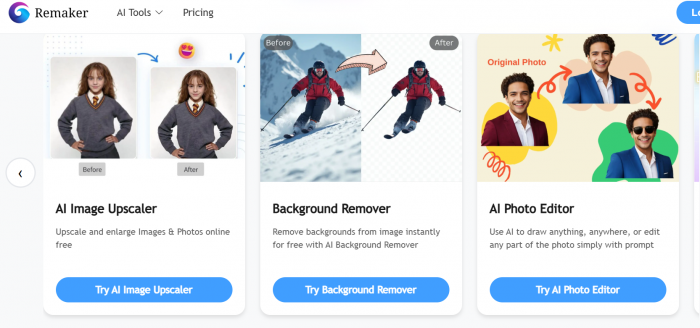
Remaker AI organises its toolkit into three broad capability pillars: image intelligence, video transformation, and generative creation. Here's the complete map of what each pillar contains, and how mature each area actually is in practice.
Pillar 1: Image Intelligence
AI Face Swap : Single-image, multi-face, and batch swap modes. Maps bone structure, skin tone, and lighting from source to target. Results are typically watermark-free even on free credits.
Background Removal : Semantic segmentation to isolate people, animals, products, and vehicles. Widely praised as one of the platform's most reliable tools, especially for e-commerce product shots.
AI Image Upscaler : Uses deep learning to enlarge images up to 2× the original resolution by inferring missing pixel data. Clean for web use; can over-smooth fine textures at extreme scales.
Watermark Remover : Seamless erasure of watermarks without compromising image integrity. Works best on simple, non-overlapping watermarks against consistent backgrounds.
AI Portrait Generator : Upload a photo, choose from themed styles corporate headshot, artistic, anime, fantasy and receive a transformed portrait in seconds.
Talking Photo : Animates still images to appear as if they're speaking, singing, or emoting. Used for social content, educational explainers, and branded presentations.
Pillar 2: Video Transformation
Video Face Swap : Swap faces in video at 1 credit per second of footage. Supports MP4, AVI, and MOV. Processing time scales with video length and server load.
Video Enhancer : Transforms low-quality footage up to 4K resolution. Improves color balance, stabilises shaky footage, and recovers facial detail from portrait-heavy clips.
Video BG Remover : Removes or replaces backgrounds in video in real time. Particularly useful for social content creators building consistent visual identities.
Pillar 3: Generative Creation
Text-to-Image Generator : Seven model styles including Realistic, Anime, Ink, Cartoonish, SDXL, MidJourney-style, and Disney aesthetic. Supports negative prompting, inpainting, and outpainting.
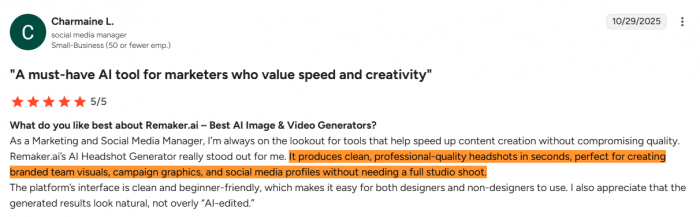
AI Headshot Generator : Converts casual selfies into polished professional headshots with virtual attire and enhanced lighting. A hit with LinkedIn-optimising professionals.
Voice Cloning : Upload a voice sample or record speech directly. Creates a synthetic voice profile usable for narration, dubbed content, and talking-photo animations.
Pricing Architecture : The credit model
Most AI tools trap you in subscriptions monthly fees that keep charging whether you're in a creative sprint or a quiet week. Remaker AI took the opposite approach: a pay-as-you-go credit system where credits never expire, recurring charges don't exist, and new users get 30 free credits just for signing up (no credit card required). Additionally, daily check-ins reward five free credits each day, making the platform genuinely testable before any money changes hands.
Credit Package Breakdown
| Credits | Price | Cost per Credit |
| 200 | $5.99 | $0.02995 |
| 530 | $9.99 | $0.01885 |
| 1,100 | $19.99 | $0.01817 |
| 3,000 | $49.99 | $0.01666 |
| 5,000 | $79.99 | $0.01600 |
| 10,000 | $149.99 | $0.01500 |
| 20,000 | $299.00 | $0.01495 |
The economics work in favour of moderate-to-heavy users. A casual creator buying the entry-level pack of 530 credits for $9.99 can execute approximately 500 face swaps or background removals enough for weeks of content. At the top tier, 20,000 credits for $299 drops the per-operation cost to a fraction of a cent. Payments are processed entirely through Stripe; Remaker stores no card data.
● No subscription traps: One-time purchases only no recurring monthly billing
● Credits never expire: Buy in bulk, use at your own pace, no "use it or lose it" anxiety
● Free tier is genuinely functional: 30 sign-up credits plus 5 daily check-in credits; no watermarks on free outputs
● Cross-device access: Works seamlessly across Windows, Mac, iOS, and Android via browser
● Multi-language support: Content generation supported in English, Chinese, Japanese, German, and more
Traffic, ratings, and where users spend credits
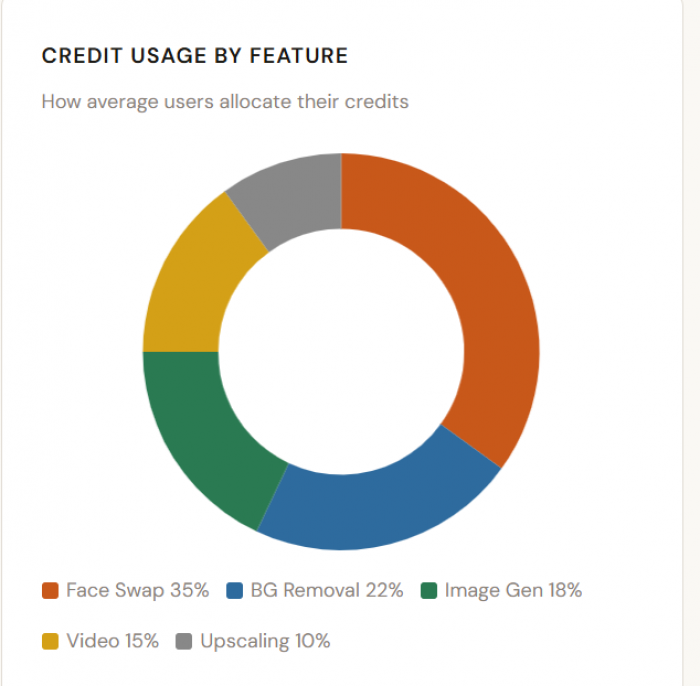
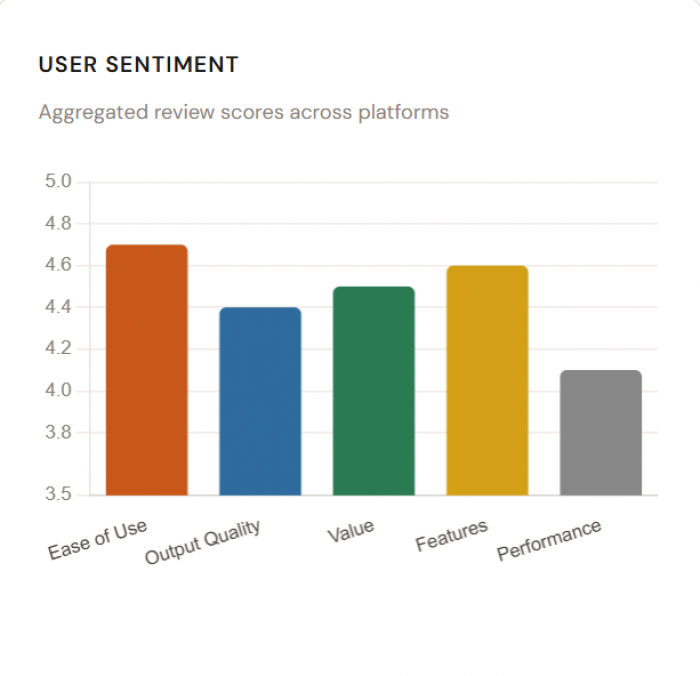
Who's Actually Using It
Remaker AI's design brief didn't target a single persona. Its feature set spans casual entertainment to lightweight professional production. Understanding which user type maps to which set of tools clarifies whether the platform is right for you before you spend your first credit.
| Casual Creators | Content Creators (Sweet Spot) | E-commerce Businesses |
| Face swap for social media memes | Batch video face swaps for Reels | Batch background removal for product photos |
| Fun portrait transformations | Background removal for consistent visuals | Image upscaling for catalogue quality |
| Talking photo animations | AI headshots for professional profiles | Watermark removal on sourced assets |
| Works entirely on free credits | Voice cloning for dubbed content | Cost-effective at bulk credit tiers |
User conversations and key numbers
Remaker AI’s real user voice is sharply split: G2 reviewers largely love its speed, simplicity, and output quality, while Trustpilot users complain about reliability, “free” limitations, and poor support.
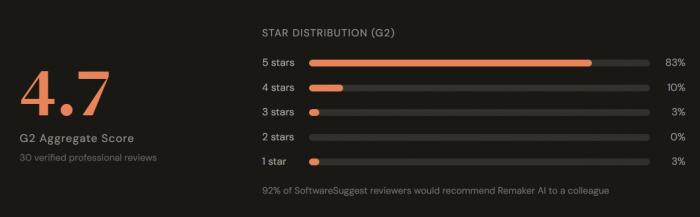
Snapshot of user sentiment
Across G2 and Trustpilot, Remaker AI comes across as a fast, easy, but fragile visual editing platform.
● On G2, most reviewers rate it highly for quick image and video generation, intuitive UI, and marketing-ready outputs.
● On Trustpilot, the small pool of reviews is predominantly negative, calling out site outages, broken features, and unresponsive customer support.
Platform sentiment at a glance
| Source | Typical rating (approx.) | What users like most | What users dislike most |
| G2 | Around 4.7/5 from ~30 reviews | Ease of use, fast AI generation, clean interface, pro-looking results | Limited customization, credit limits, occasional inconsistent quality |
| Trustpilot | Around 2.5–2.6/5 from a handful of reviews | Initially good functionality before issues began | Site not working, failed generations, “free” limits, no support |
What customers like about Remaker AI
From G2 and other aggregated review sites, three positive themes show up repeatedly.
Speed and ease of use
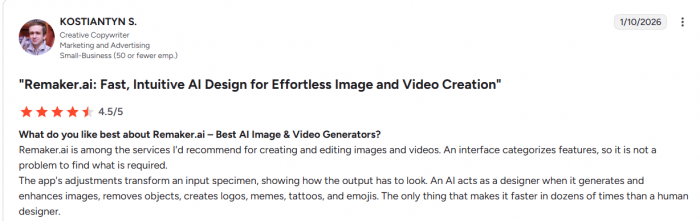
Users highlight that Remaker AI processes images and videos in seconds and “doesn’t require a steep learning curve.” The interface is described as clean, intuitive, and not “bloated,” making it easy for beginners and busy marketers to jump between tools like face swap, background remover, and headshot generator.
Versatile visual tools in one place
G2 reviewers praise the variety of AI-powered editing features: background removal, face swap, AI image generation, upscaling, and lightweight video generation for reels and ads. Creators and marketers say it’s ideal for quick e‑commerce images, social creatives, promo visuals, and internal marketing assets because they can avoid heavier software.
Good “everyday” quality and workflow fit
● Many users state that results look professional enough for campaigns and client-facing work, especially for background removal, headshots, and simple AI visuals. Small teams appreciate that plans and credits can work well for typical marketing workloads when volumes are moderate.
What customers dislike
The criticism clusters into two very different layers: day‑to‑day product limitations (G2) and trust/reliability issues (Trustpilot).
Limited advanced control and customization
Power users on G2 feel constrained by shallow controls: limited fine‑tuning of edges, lighting, or facial details, and not enough advanced sliders for complex edits. Several reviewers mention that while the AI is fast, some results can look artificial, especially in tricky lighting or complex group photos, and they want more precise refinement tools.

Credits, pricing, and “free” friction
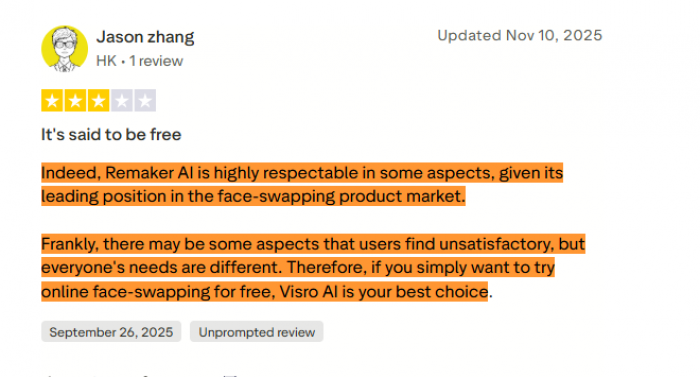
Users note that video credits are limited, making longer clips or heavier usage hard to scale without bumping into cost constraints. Outside G2, some reviewers feel the “free” positioning is misleading because meaningful use quickly runs into paywalls or tight limits.
Reliability, downtime, and support gaps
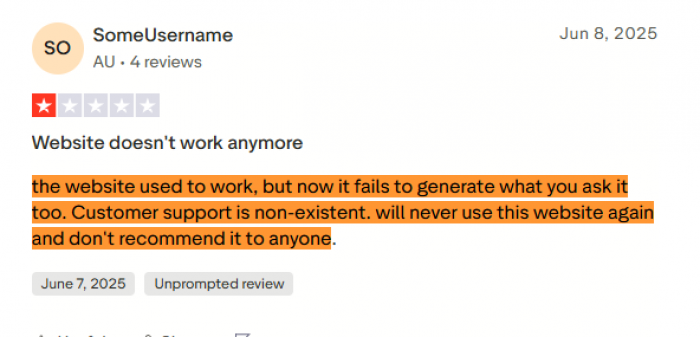
Trustpilot reviews repeatedly complain that the website stops working, fails to generate requested outputs, or experiences outages lasting hours or days. Several users explicitly call out “non-existent” or unresponsive customer support, especially during billing or technical problems, and some say they would never return or recommend it.
Performance Analysis
| Feature | Score (/10) |
| Face Swap Quality | 8.8 |
| Background Removal | 9.1 |
| Video Enhancement | 8.2 |
| Image Upscaling | 7.9 |
| Text-to-Image | 7.5 |
| Processing Speed | 8.0 |
Background removal is where Remaker AI consistently punches above its price point. The semantic segmentation is robust enough to handle complex edges including hair strands on patterned backgrounds without requiring manual correction in the majority of cases. Face swapping is equally mature: lighting, skin tone, and expression carry over convincingly across a wide range of subjects. The technology behind this maps bone structure, not just surface appearance, which is why the results hold up in difficult scenarios like side-profile shots or moderate lighting variations.
The weaker areas are more niche: the text-to-image generator lacks the fine-grained prompt control that dedicated tools offer, and the video enhancement pipeline can struggle with very long clips, creating extended wait times. The image upscaler produces clean results for web use but occasionally over-smooths fine textures, a known limitation of inference-based super-resolution that isn't unique to Remaker.
How Remaker AI stacks up against the field
| Platform | Face Swap | BG Remove | Video Tools | Text-to-Image | Voice Clone | No Subscription | Free Tier |
| Remaker AI | ✓ Batch + Video | ✓ Advanced | ✓ Up to 4K | ✓ 7 models | ✓ | ✓ Credits | ✓ 30 credits |
| Clipfly AI | ✓ | ✓ | ✓ | ✓ | ✗ | ✗ Monthly | ~ Limited |
| Pica AI | ✓ | ~ | ✓ Faster | ✓ | ✗ | ✗ Monthly | ~ |
| FaceMod | ✓ Advanced | ~ | ✓ | ✗ | ✗ | ✗ | ✓ |
| Segmind | ✓ Real-time preview | ~ | ✗ | ✓ | ✗ | ~ | ✓ |
The competitive picture is clear: Remaker AI's breadth of features under a single credit-based roof is genuinely unusual. Competitors like Clipfly and Pica have faster video processing pipelines, which matters to high-volume creators. Segmind offers a real-time preview mode for face swaps that Remaker doesn't match. But neither offers the combination of voice cloning, portrait generation, video enhancement, and text-to-image in a single no-subscription package. For anyone seeking an all-in-one creative AI environment rather than a best-in-class specialist tool, Remaker is the most complete option in the segment.
Privacy & Security
This is the question most platforms bury in legal small print. Remaker's stated policy is straightforward: uploaded images and generated outputs are automatically deleted from its servers within 48 hours. The platform does not share user photos with third parties. Payments are processed exclusively through Stripe with bank-level encryption. Remaker never stores card information directly. User data is protected under stringent security protocols, though the specific certifications (SOC 2, GDPR compliance) are not publicly advertised on the platform.
The 48-hour deletion window is a material privacy feature for users handling sensitive personal images headshots, family photos, or proprietary brand assets who need assurance that their content doesn't linger in a data pipeline indefinitely. For enterprise use cases requiring longer-term image storage or data processing agreements, the current policy would need to be supplemented by a direct contractual arrangement with the platform's team.
● 48-hour auto-deletion: All uploaded media and AI-generated outputs removed automatically
● No third-party data sharing: Images are not passed to advertising or analytics partners
● Stripe payments: Card data handled entirely by Stripe Remaker stores no payment credentials
● Multi-language privacy: Platform operates in compliance with data rules across English, Chinese, Japanese, and German-speaking markets
The limitations worth knowing before you commit
No platform review is complete without a candid look at where the product falls short. Remaker AI is genuinely impressive in several areas, but the limitations below are real not edge cases buried in fine print, but consistent friction points that users across multiple review platforms flag repeatedly.
The free tier, while generous in principle, runs out quickly when testing multiple variations of the same asset. Five credits per day means a content creator batch-testing background removal styles will hit the paywall within 15 minutes. The video face swap feature is technically available on a free account but requires VIP credits to unlock in practice a marketing framing that some users describe as misleading.
On the performance side, complex group photos with unusual lighting conditions still challenge the face-swapping engine. Hair detail at the boundary between subject and background occasionally needs manual correction after background removal. And the text-to-image generator, while solid, lacks the prompt granularity of dedicated tools like Midjourney or SDXL deployments, which matters to users who want fine-grained compositional control.
The traffic data adds useful context: visits peaked at 6.8 million in early 2025 before declining approximately 21% to 5.35 million by October 2025. Competitors offering faster processing and more flexible plans have taken share, suggesting the platform is in a competitive battle where resting on its features alone isn't sufficient.
The Verdict
Remaker AI is the most complete AI creative toolkit at its price point, and its no-subscription credit model is one of the most user-friendly pricing structures in the generative AI space. For casual creators, social media professionals, and small businesses processing visual content at moderate volume, it delivers genuine value within its first hour of use.
The platform earns its reputation most clearly in background removal, face swapping, and video enhancement, three tools that are mature, reliable, and produce results that would cost multiples more in professional editing time. The free tier is honest, the privacy policy is clear, and the cross-platform availability makes it accessible regardless of what device you're working from.
It is not the right tool for high-volume professionals who need unlimited processing, nor for advanced prompt engineers seeking fine-grained control over generative outputs. Those users will outgrow the platform quickly. But for the broad middle of the creative market, the content creator, the small team, the entrepreneur who needs professional-looking visuals without a professional budget, Remaker AI is, right now, one of the most compelling options available.
Comments