

Question AI positions itself as a no‑friction homework ally: point your camera at a problem, or paste a prompt, and it tries to return a step‑by‑step answer with citations in seconds. Under the hood, though, it behaves less like a simple “calculator” and more like an agentic research assistant that decomposes questions, runs multiple web lookups and stitches the findings together which makes it powerful, but also exposes clear limits and trade‑offs.
What Question AI Actually Is And Isn't
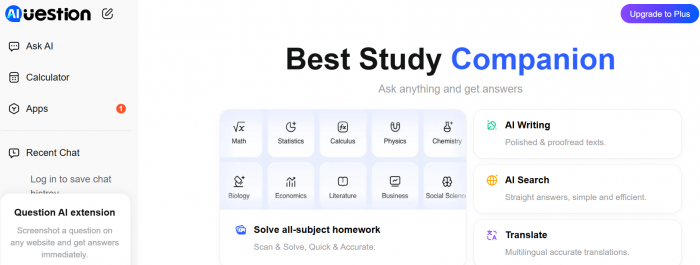
At its core, Question AI is an AI-powered homework assistant. It accepts typed questions, uploaded images (including handwritten notes), and PDF documents, then returns structured answers ideally with step-by-step reasoning rather than a raw answer dump. It covers math, science, literature, history, social studies, and business. You can access it through a browser, iOS app, Android app, or a Chrome extension that lets you screenshot questions directly from digital documents.
What it is not is a tutor in the traditional sense. It has no memory of past sessions, no ability to track your progress across weeks, and no genuine adaptive learning mechanism that calibrates to your comprehension level. It answers; it does not teach. That distinction matters enormously when evaluating whether this tool is a study aid or a shortcut generator.
The app's real value proposition isn't intelligence, it's availability. When it's midnight and your textbook is useless, something that gives you a structured breakdown of a quadratic equation at zero cost has genuine utility.
Feature Landscape: A Thorough Inventory
The feature set is genuinely broad for a free-tier app. Here's where the platform earns its reputation and where the gaps start to show.
1. Snap & Solve (Image-Based Input)
The signature feature. You photograph or upload a question printed or handwritten and the AI attempts to parse the visual content and return a solution. It works impressively well on clean, printed text and standard mathematical notation. The cracks appear fast with handwriting: lighting, pen quality, and page angle all meaningfully affect accuracy. Multiple independent testers found handwritten photo recognition to be the single most unreliable component of the experience.
2. PDF Solver
Users can upload PDF documents and extract step-by-step answers from embedded questions. Professors love PDFs; students get trapped by them. This feature positions Question AI as a genuine workflow tool rather than just a chat interface. The limitation: it only handles PDFs. No Word documents, no image batches, no slide decks.
3. Multilingual Support
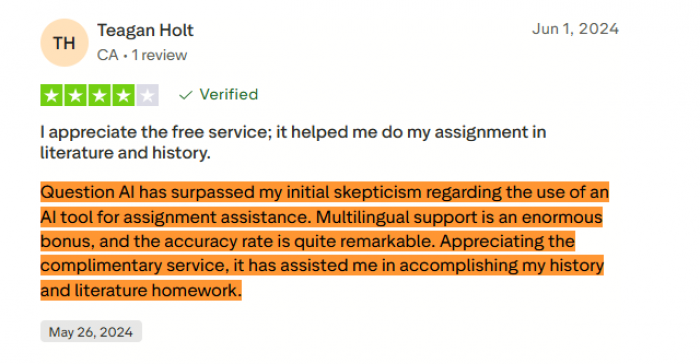
One of the product's strongest differentiators. Supporting over 140 languages makes it meaningfully useful for non-native English speakers navigating curricula in their second or third language, a demographic chronically underserved by Western edtech. Users in India, Indonesia, Latin America, and across Africa have noted this as a decisive factor in choosing the app.
4. AI Chatbot (Virtual Tutor Mode)
Available in the premium tier, this conversational interface mimics a tutoring interaction. It can rephrase explanations, adjust answer length on request, and walk through reasoning across multiple exchanges. Premium users report this as the feature most worth paying for.
| Feature | Free Tier | Premium | Notable Limitation |
| Snap & Solve (photo input) | Available | Available | Struggles with handwriting; needs good lighting |
| PDF Solver | Limited | Full access | PDF-only; no Word/image batch support |
| AI Chatbot / Virtual Tutor | Basic | Full access | No session memory across conversations |
| Multilingual support (140+ languages) | Available | Available | Quality varies by language |
| Step-by-step explanations | Available | Available | Depth is inconsistent across subjects |
| Browser extension | Available | Available | Not compatible with all browsers |
| Voice explanation mode | Not available | Available | Quality varies; not a replacement for audio tutoring |
| Ad-free experience | No | Yes | Ads in free tier are persistently flagged in reviews |
| Daily question limit | Restricted | Unlimited | Free cap creates friction during heavy study sessions |
The Pricing Architecture : Generous Entry, Aggressive Exit
Question AI uses a classic freemium model permissive enough to hook users, restrictive enough to create genuine pressure toward the paid tier. Here's how it breaks down:
| Plan | Price | Effective Monthly Rate | What You Actually Get |
| Free | $0 | — | Limited daily questions, ads between queries, basic explanation depth, core features accessible |
| Monthly Premium | $9.90/month | $9.90 | Increased daily limits, ad-free experience, more detailed explanations, virtual tutor mode |
| Annual Premium | $59.00/year | ~$4.90 | Unlimited questions, all premium features, best per-question value for regular users |
At $4.90/month annualized, the premium tier is competitive, comfortably cheaper than platforms like Chegg or paid tutoring, and positioned well against the student wallet. The catch is that even premium subscribers report occasional accuracy inconsistencies. You're paying primarily for the removal of ads and the lifting of daily limits, not for a guaranteed improvement in answer quality.
Worth noting : Subscriptions are currently only manageable through the mobile app there's no web-based subscription portal. Desktop-primary users who want to subscribe need to do so via the app, which is a minor but real friction point for students working on laptops.
The Accuracy Question : Where It Delivers and Where It Guesses
This is the most consequential section of any honest review of Question AI, because it's also the most polarized. The platform's marketing claims a 98% accuracy rate. Independent testing paints a considerably different picture depending on subject matter and complexity level.
Accuracy by subject area
(Based on independent testing and aggregated user reports across platforms)
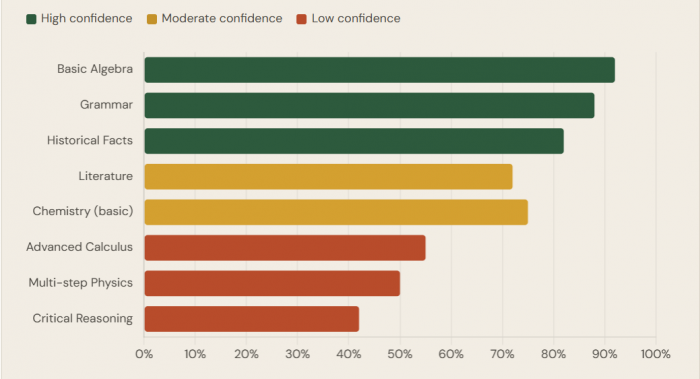
Basic algebra, grammar correction, factual recall (historical dates, definitions, geographic data), and standard chemistry balancing all perform strongly. The AI's step-by-step math output for linear equations is consistently praised not just for giving the answer, but for showing the method legibly. This is genuinely useful for a student who needs to understand how a solution was reached, not merely copy it.
The performance cliff appears at complexity: multi-step calculus problems, inference-heavy history analysis, nuanced literary interpretation, and physics problems involving multiple interacting variables all see accuracy drop meaningfully. One tester running 200+ questions across 60 days found the tool reliable for basic to intermediate work but consistently shaky on anything requiring extended logical chains or subjective judgment.
Critical caveat : The 98% accuracy figure on the platform's website is self-reported and untransparent in methodology. Real-world performance, confirmed across multiple third-party tests, sits closer to 70–80% on standard academic content and drops further on advanced topics. Always verify before submitting.
What Real Users Are Saying
Synthesizing reviews across the App Store, Google Play, and Trustpilot reveals a strikingly consistent pattern: satisfaction is high among students using the free tier for basic homework help, and frustration is concentrated among two groups heavy free users frustrated by ads and limits, and advanced students who were burned by inaccurate answers on high-stakes work.
| Source | Rating | Stars | Volume / Notes |
| Google Play | 4.6 | ★★★★☆ | 10M+ downloads |
| App Store | 4.4 | ★★★★☆ | Thousands of ratings |
| Trustpilot | 3.4 | ★★★½☆ | Mixed; limited volume |
| Ind. Tests | 3.8 | ★★★¾☆ | Multiple 2025 reviewers |
Google Play - The Ad Problem
I wouldn't mind watching the ads, it's just they pop up every single second. Anytime you ask it a question, there's a 95% chance that an ad will pop up. Not to mention, it's the same ads, over and over again. - Google Play Review · March 2025 · 195 people found helpful
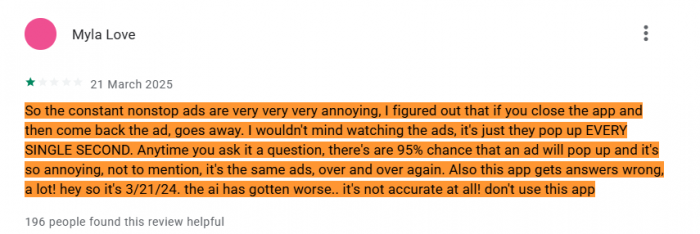
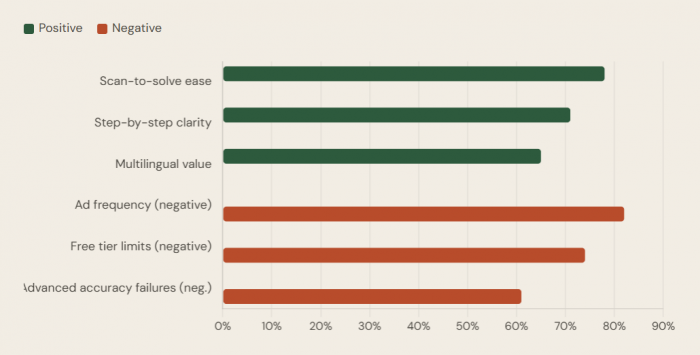
The most consistent theme in negative Google Play reviews by a wide margin is ad frequency in the free tier. This is not incidental friction; it is the primary mechanism pushing users toward the paid subscription. The reviews are blunt: the ads are disruptive, repetitive, and appear between nearly every query. For a student trying to work through a problem set, constant interruptions aren't just annoying they actively break the reasoning flow that makes the tool valuable in the first place.
App Store - Appreciation With Caveats
I love how I can just scan my question and it gives me an explanation and an example plus the answer. Even when I have word questions they still give me an answer. And if a have a too much of a long or short answer, all I have to do is give the AI a message and it will give me a longer or shorter answer. - App Store Review · 2025 · Positive
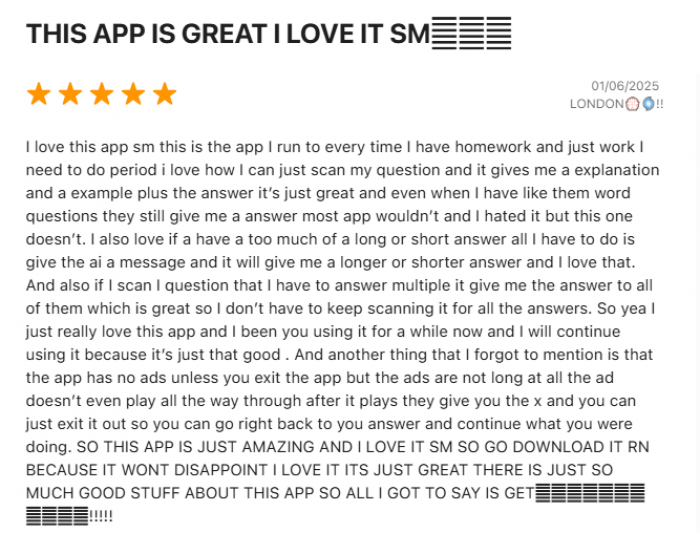
iOS users skew more positive, likely reflecting a premium-leaning demographic more comfortable with subscriptions. The response-length adjustment feature asking the AI to make answers shorter or longer receives repeated positive mentions and is a genuinely thoughtful UX detail. App Store criticism focuses more on accuracy failures during high-stakes test preparation than on the ad experience.
Trustpilot - The Translation Gap
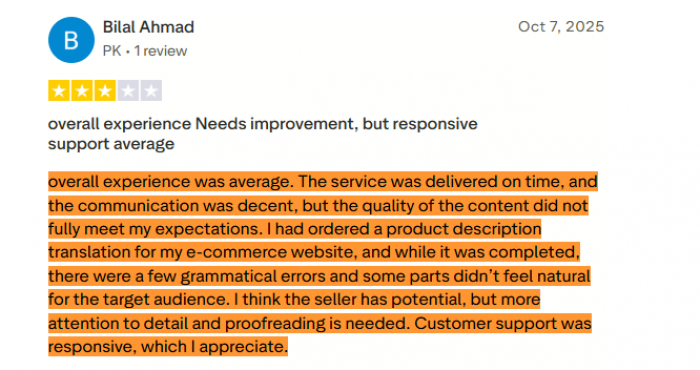
Trustpilot reviews expose a use case that doesn't get enough coverage: professional translation and content work. Several reviewers used Question AI's multilingual capabilities for business document translation, and the results were mixed serviceable on straightforward product descriptions, but prone to grammatical errors and unnatural phrasing that would embarrass a business in a professional context. The tool works for academic multilingual support; it has a longer way to go for professional-grade translation.
The service was delivered on time, and the communication was decent, but the quality of the content did not fully meet my expectations. There were a few grammatical errors and some parts didn't feel natural for the target audience. - Trustpilot Review · October 2025 · E-commerce use case
User sentiment breakdown (consolidated cross-platform)
Aggregated themes from App Store, Google Play & Trustpilot reviews
Subject-by-Subject: Where to Trust It, Where to Double-Check
| Subject Area | Reliability | Notes |
| Basic & Intermediate Algebra | High | Strong step-by-step output; linear equations solved reliably |
| Grammar & Writing Correction | High | Catches errors, adjusts tone and length on request |
| Historical Fact Recall | High | Good for dates, events, definitions; weaker on interpretation |
| Basic Chemistry (Balancing) | Moderate–High | Standard equations fine; complex organic chemistry struggles |
| Literature Analysis | Moderate | Summaries are good; thematic analysis is generic |
| Business & Economics | Moderate | Better than most homework apps; macro concepts solid |
| Advanced Calculus / Differential Equations | Low | Multi-step reasoning fails; verify everything here |
| Multi-variable Physics | Low | Frequently wrong; do not use for exam preparation unchecked |
| Critical & Argumentative Writing | Low | Produces generic, formulaic output; lacks genuine reasoning |
How It Stacks Up : The Competitive Reality
Question AI exists in a crowded field, and positioning matters. The honest framing: it occupies a specific and legitimate niche free, accessible, multilingual homework support for secondary and early undergraduate students but overreaches when it implies it can replace deeper learning tools for advanced content.
vs. ChatGPT (free tier): ChatGPT handles harder questions more reliably and has no message throttling in the same aggressive way. But it's a general-purpose tool Question AI's scan-to-solve and academic-specific framing creates a lower barrier for students who don't know how to prompt effectively.
vs. Photomath: Photomath is the specialist; its math scanning and step-by-step breakdowns are sharper and more reliable for STEM subjects. Question AI's advantage is breadth: literature, history, and language support that Photomath simply doesn't offer.
vs. Socratic (Google): Socratic has the advantage of Google's infrastructure and is trusted for its visual, concept-based explanations. Question AI beats it on multilingual accessibility and PDF support.
vs. Chegg: Chegg integrates human expertise and verified textbook answers. It's more reliable but significantly more expensive. Question AI is the budget alternative acceptable for general homework help, not a replacement when you need high-confidence, subject-specific accuracy.
The Academic Integrity Elephant in the Room
No honest review of Question AI can avoid this. The app is explicitly designed to provide answers to homework questions. The ethical distinction between "I used this to understand the method" and "I copied this answer directly" exists only in the student's head and that line is blurring across higher education globally.
By 2025, AI-related academic misconduct had grown to represent 60–64% of all cheating cases in higher education globally, a dramatic structural shift from traditional plagiarism. In UK universities alone, there were nearly 7,000 reported AI-related cheating cases in the 2023–24 academic year, three times the prior year's figure. A 2024 survey found that over 55% of US students admitted to using AI tools in ways that violated their institution's ethical policies.
The hard truth : Question AI's core UX snap, get answer, move on is structurally optimized for answer extraction rather than concept internalization. The platform includes step-by-step explanations, which helps, but it places zero friction between a student and submitting an AI-generated answer as their own original work. The responsibility rests entirely with the user.
Interestingly, research from major US universities found that students' ethical beliefs not institutional policies are the strongest predictors of responsible AI use. Policy awareness alone doesn't change behavior. This places tools like Question AI in a genuinely complicated position: they build the capability; the rest is culture.
Nearly 80% of students say using a language model is "somewhat" or "definitely" cheating yet many still do it. The app doesn't create this tension. It just makes the temptation faster to act on.
User Experience: Clean Design, Rough Edges
The interface is refreshingly uncluttered for a free product. The sidebar gives immediate access to Ask AI, PDF Solver, and Calculator without requiring menu navigation. Load times are fast, the mobile app is stable, and the cross-platform consistency between web and mobile is better than most competitors at this price point.
Where the UX breaks down:
● Ad interruptions in the free tier disrupt the cognitive flow that makes a study tool actually useful. Positioning ads between every query rather than after session milestones feels deliberately aggressive, and users notice.
● The handwriting recognition pipeline needs significant improvement. Requiring good lighting, neat penmanship, and flat image angles to function reliably adds unpredictability to what should be a seamless feature.
● Explanation depth is inconsistent without an obvious pattern; some simple questions get over-explained, some complex ones receive surface-level treatments, and users can't reliably predict which they'll get.
● There's no session memory. Each conversation is a cold start. For a tool that markets itself as a study companion, the inability to build context over an hour of working through a problem set is a material limitation.
Privacy: What the App Knows About You
Question AI collects standard app usage data device identifiers, usage patterns, and the content of your queries to serve targeted advertising in the free tier. This is normal for ad-supported software but worth acknowledging when the user base skews heavily toward minors. Younger students asking homework questions may not consider that those queries are processed, stored, and potentially used to train or refine AI models.
The platform's privacy posture is not exceptional; it's industry-standard for a free AI app but parents using this for their children should read the privacy policy before installation. Schools deploying or permitting the tool should assess it against their student data protection obligations, which vary significantly by jurisdiction.
Who This Is Actually For and Who It Isn't
| User Type | Verdict | Recommended Tier |
| Middle & high school students, basic subjects | Strong fit | Free is sufficient for light use |
| Non-native English speakers needing multilingual support | Strong fit | Free or premium based on volume |
| Budget-conscious students needing homework help | Good fit | Annual plan at ~$4.90/month is good value |
| University students- STEM advanced coursework | Partial fit | Use as first-pass only; verify independently |
| Professionals needing translation/content | Poor fit | Use specialist translation tools instead |
| Students preparing for high-stakes exams (AP, finals) | Poor fit | Reliability gap too large for exam-critical use |
Final Assessment
Question AI fills a real gap: fast, free, multilingual homework assistance that doesn't require sophisticated prompting. For a student stuck at 11 p.m. on a linear algebra problem or struggling to phrase a concept in a second language, it works. The scan-to-solve feature when it works is genuinely impressive and saves meaningful time.
But the platform's weaknesses are structural, not cosmetic. The aggressive ad experience in the free tier actively undermines the very focus it's supposed to support. Accuracy degrades sharply on advanced content and the platform's own 98% accuracy marketing invites students to trust it in situations where that trust isn't warranted. The lack of session memory, the handwriting recognition inconsistency, and the absence of any real learning-progression framework all confirm that this is an answer machine, not a learning partner.
Personal Rating
| Metric | Score |
| Ease of Use | 8.8 / 10 |
| Accuracy (Basic) | 7.8 / 10 |
| Accuracy (Advanced) | 4.5 / 10 |
| Value for Money | 8.2 / 10 |
| Free Tier Experience | 5.2 / 10 |
| Multilingual Support | 8.5 / 10 |
Use it as a starting point, a sanity check, or a midnight lifeline on standard coursework. Treat it as your only academic resource at your own considerable risk.
Comments