

PromeAI is the kind of AI tool that makes the strongest impression when you stop treating it like a normal text-to-image generator. Its real value is not in typing a random prompt and hoping for a beautiful image. It becomes more useful when you already have something rough: a sketch, a room photo, a product shot, a model view, or a half-formed visual idea that needs to look presentable quickly.
After working through its rendering, editing, and concept-generation flow, PromeAI feels less like a toy for AI art and more like a visual accelerator for early design work. It can help turn rough creative inputs into polished concepts, but it also exposes the same problem many AI design tools still have: the output can look professional before it is actually accurate.
That makes PromeAI useful, but not risk-free. It can speed up ideation, moodboards, client previews, product mockups, and social visuals. It should not be treated as a replacement for design judgment, technical rendering, brand review, or manual cleanup.
Quick Verdict
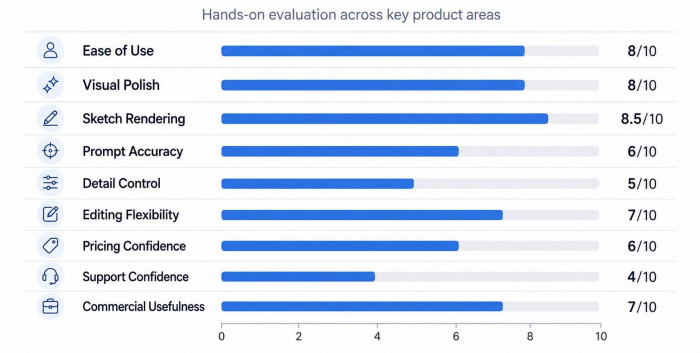
| Category | Rating |
| Sketch rendering | 8.5/10 |
| Interior concept quality | 8/10 |
| Product visualization | 7.5/10 |
| Prompt control | 6/10 |
| Editing tools | 7/10 |
| Pricing value | 6.5/10 |
| Commercial usefulness | 7.5/10 |
| Overall score | 7.2/10 |
PromeAI is best for creators who work visually and need fast concept directions. It is not ideal for users who need exact control, unlimited generations, or final production accuracy.
The Real Promise
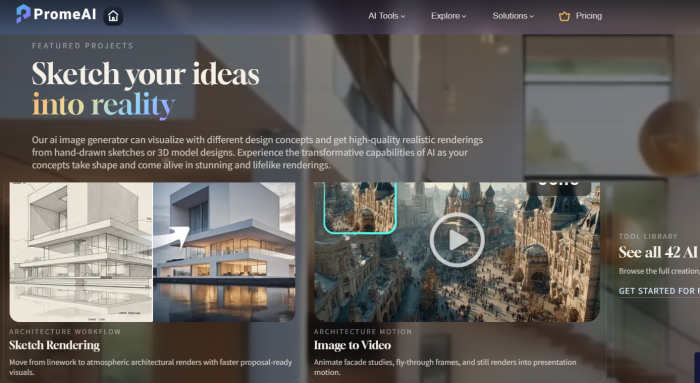
PromeAI’s biggest promise is simple: take an unfinished visual and make it look closer to a finished concept. That sounds small, but for designers, architects, interior creators, product teams, and e-commerce sellers, this can save a lot of early-stage effort.
The platform works best when there is already a visual base. A rough room sketch, a product image, a 3D model screenshot, or an architectural outline gives the AI something to follow. When the input is clear, PromeAI can produce attractive, polished images that are useful for exploration.
This is where it separates itself from tools like Midjourney or Leonardo AI. Those tools are often stronger for pure imagination and artistic image quality. PromeAI is more practical when the task starts with structure. It tries to translate an existing idea into a more polished visual.
That difference matters. PromeAI is not only asking, “What image should I create?” It is also asking, “What can I do with the image you already have?”
Where It Clicks
The best part of PromeAI is how quickly it moves from rough to presentable. A plain sketch can become a realistic-looking room. A model screenshot can become an architectural mood render. A product image can get a cleaner background. A still visual can become a short motion clip.
The platform feels strongest in these moments:
● When the input image has clear structure
● When the goal is visual direction, not technical accuracy
● When multiple style options are needed quickly
● When the user is preparing a moodboard or early concept deck
● When a rough idea needs to look more polished for discussion
This is why PromeAI makes sense for early-stage work. It helps users compare possibilities before committing to one direction. Instead of spending hours building a polished mockup, a designer can test several moods first.
The tool is especially useful for visual decision-making. It helps answer questions like: Should this room feel warmer? Should this product be shown in a studio scene or lifestyle setup? Should this building concept feel modern, organic, industrial, or luxury? These are not final-production questions. They are direction-setting questions, and PromeAI handles that type of work well.
The Main Workflow
PromeAI becomes much more effective when used as a layered workflow rather than a single-click generator.
| Stage | What You Do | What PromeAI Adds |
| Input | Upload sketch, room photo, product shot, or model view | Gives the AI visual structure |
| Direction | Add prompt, style, lighting, or material instruction | Controls mood and category |
| Generation | Create multiple versions | Shows different creative options |
| Selection | Pick the closest output | Reduces wasted refinement |
| Repair | Use edit, region render, relight, or upscale | Fixes weak areas |
| Export | Download image or animate it | Turns concept into usable content |
Workflow map
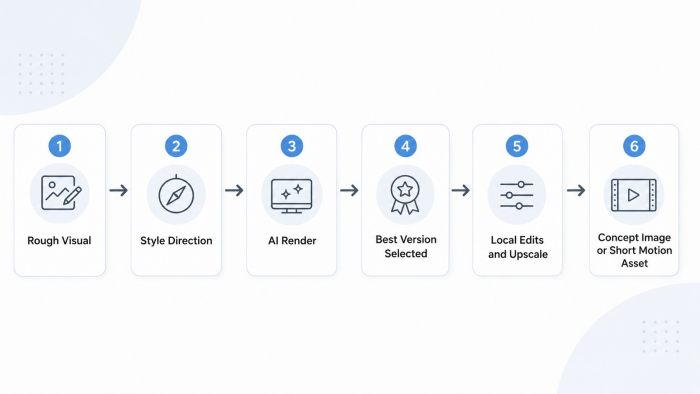
This process is important because PromeAI rarely gives the best output in one attempt. The better results usually come after testing variations, adjusting the prompt, and cleaning up specific areas. Users who expect instant perfection may feel disappointed. Users who treat it as a fast concept studio will get more value from it.
Sketch Rendering Is the Star
Sketch Rendering is the feature that gives PromeAI its strongest identity. This is the tool that turns drawings, photos, and model-like images into more realistic render-style outputs.
When it works well, the result can be surprisingly useful. A loose sketch can become a convincing interior scene. A rough building form can turn into a polished exterior concept. A simple product outline can become a more complete visual mockup. The output often has better lighting, cleaner material treatment, and stronger presentation quality than the original input.
But this is also where users need to pay attention. PromeAI can improve the look of an image while changing details that matter. It may shift proportions, replace design elements, alter scale, or introduce objects that were not intended.
That means Sketch Rendering is excellent for mood and direction. It is weaker for accuracy.
| What It Does Well | Where It Needs Review |
| Adds realism quickly | May change structure |
| Improves lighting and mood | Can distort proportions |
| Creates multiple design styles | May ignore small details |
| Helps with client concept visuals | Needs manual checking |
| Saves early rendering time | Not reliable for technical decisions |
For architects and interior designers, this distinction is critical. A render can look beautiful and still be wrong. PromeAI is useful for presenting possibilities, not for confirming design accuracy.
Image Editing Feels Useful, Not Perfect
PromeAI includes several editing tools that make the platform more practical than a basic generator. Erase and Replace, Outpainting, Region Rendering, Relight, Background Remover, and HD Upscaler all help extend the workflow beyond the first generation.
The editing tools are most useful when the output is close but not finished. For example, if a room render looks good but one object feels wrong, Region Rendering can help target that area. If an image needs a wider banner format, Outpainting can extend it. If the image is usable but slightly soft, HD Upscaler can improve final clarity.
Still, the editing tools are not as precise as professional software. They work best for broad visual corrections, not pixel-perfect control.
| Editing Tool | Best Use | Limitation |
| Erase and Replace | Removing or changing objects | Can create unnatural replacements |
| Region Rendering | Editing one part of an image | May affect nearby areas |
| Outpainting | Expanding image size | Edges may feel artificial |
| Relight | Changing mood and lighting | Can flatten details |
| HD Upscaler | Improving resolution | Cannot fix bad composition |
| Background Remover | Product and e-commerce visuals | Complex edges may need cleanup |
The editing suite is good enough to keep users inside PromeAI for basic fixes. It is not strong enough to fully replace Photoshop, Lightroom, Canva, or professional design software.
Output Personality
PromeAI has a recognizable output style. It tends to produce clean, polished, presentation-ready visuals. Interiors often look styled and cinematic. Architecture outputs often lean atmospheric. Product visuals often look like digital mockups or promotional images.
This visual polish is useful, but it can also be misleading. The images often feel finished at first glance. On closer inspection, small issues may appear: strange textures, awkward object placement, inconsistent shadows, incorrect scale, or details that do not match the original input.
| Output Type | Quality | Best Use |
| Interior renders | Strong | Style concepts, room moodboards |
| Architecture visuals | Good | Facade ideas, early presentation renders |
| Product mockups | Good | Marketing drafts, visual testing |
| E-commerce images | Good | Backgrounds and lifestyle-style scenes |
| Concept art | Good | Game scenes, characters, environment ideas |
| AI video | Moderate | Short social clips, motion experiments |
The output is strongest when judged as concept work. It becomes weaker when judged as final work.
That is the fairest way to evaluate PromeAI. It is not bad because it needs review. It is useful because it gives a strong starting point. The problem only begins when users treat that starting point as the final answer.
The Pricing Trap
PromeAI uses a coin-based pricing model. The free plan is enough to test the interface, but not enough for serious work. Paid plans increase monthly coins and unlock more practical usage limits.
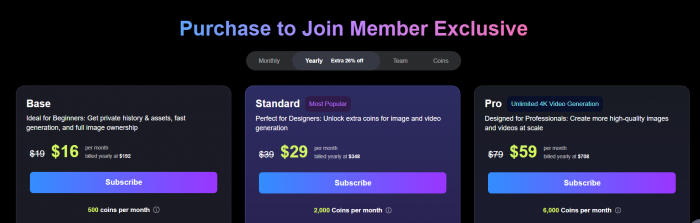
The most important pricing detail is commercial usage. The Base plan may look like the affordable option, but it is not the right choice for client work or public commercial assets if commercial rights are required. For most serious creators, Standard is the practical starting point.
The coin system is where the pricing becomes tricky. One successful image may feel affordable. Five failed attempts before one usable image changes the equation. This is especially true for design work, where users often need many variations before reaching something useful.
Value chart
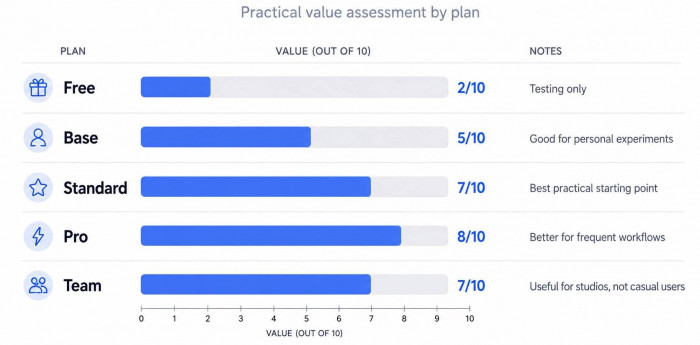
PromeAI is not overpriced for professional use, but it can become expensive if the user needs frequent retries. The platform rewards users who know how to write clear prompts, upload clean references, and refine efficiently.
What Users Are Saying
Public reviews around PromeAI are not completely consistent. That actually matches the product experience. Users who focus on visual speed and creative exploration tend to be more positive. Users who care about support, billing, moderation, or perfect control are more cautious.
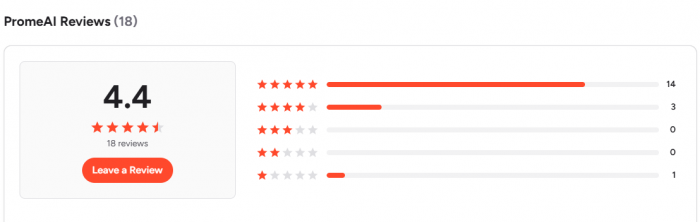
| Review Area | Sentiment | Main Pattern |
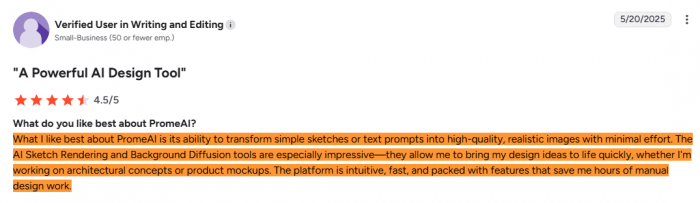
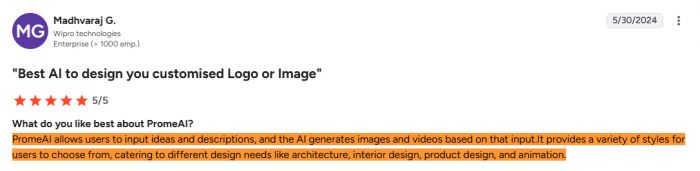
| G2 | Mostly positive | Users like the visuals, ease of use, and sketch-to-render workflow |
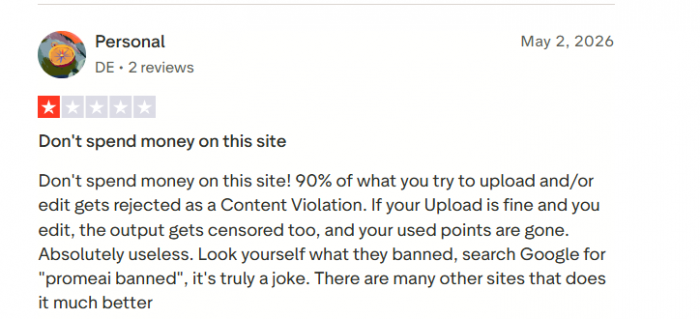
| Trustpilot | Negative to mixed | Complaints around moderation, points, support, and paid experience |
| Reddit discussions | Practical and mixed | Useful for quick renders, not a replacement for professional design |
The stronger reviews usually mention speed, creativity, and the ability to generate polished images from rough inputs.
The weaker reviews point toward frustration with rejected generations, coin usage, customer support, or the gap between expected control and actual results.

Reddit-style discussions are especially useful because they are more practical than polished review blurbs. Designers and architecture users often frame PromeAI as a quick rendering assistant. They see value in turning sketches or model views into atmospheric visuals, but they also point out that the result depends heavily on the input and still needs professional judgment.
That is the most accurate reading of PromeAI’s reputation: impressive for visual exploration, less dependable for exact execution.
Sentiment Snapshot
The product is stronger creatively than operationally. That is the main story behind PromeAI.
Best Use Cases
PromeAI is most valuable when the output does not need to be perfect on the first try. It is built for fast exploration.
| User | Best Use Case |
| Architects | Early facade concepts, mood renders, massing studies |
| Interior designers | Room styling, lighting ideas, material exploration |
| Product designers | Mockups, concept visuals, product-background testing |
| E-commerce sellers | Product images, model shots, promotional visuals |
| Game artists | Character ideas, environments, scene concepts |
| Content creators | Posters, thumbnails, social graphics, short clips |
| Agencies | Pitch visuals, moodboards, campaign concepting |
The common thread is speed. PromeAI works when the goal is to create options. It is less reliable when the goal is to create one final, precise, approved asset.
Where It Falls Short
The biggest weakness is not image quality. The biggest weakness is reliability. PromeAI can create a polished output that still needs correction. It can follow the broad idea while missing the specific detail. That creates extra checking work.
There are three areas where users should be careful.
First, structure can drift. If a sketch or model view has design details that must be preserved, PromeAI may not always keep them intact.
Second, repeated generation can increase cost. The coin model feels reasonable until multiple attempts fail or miss the brief.
Third, public reviews show some trust friction. Complaints around support, points, moderation, and paid usage should not be ignored, especially by users planning to rely on the platform commercially.
Better Than PromeAI?
PromeAI is not the only option. The better tool depends on what the user actually needs.
| Alternative | Best For | Why Pick It |
| Midjourney | High-end image aesthetics | Better for artistic, cinematic, editorial visuals |
| Adobe Firefly | Brand-safe commercial graphics | Better for Adobe users and safer commercial design workflows |
| Leonardo AI | Concept art and game assets | Stronger for model control and visual asset creation |
| Runway | AI video | Better for motion, video generation, and creative editing |
| Stable Diffusion | Custom control | Better for advanced users who want deeper technical control |
PromeAI’s advantage is not that it beats all of these tools. It wins in a specific lane: turning visual inputs into polished concepts. If the job starts from a sketch, photo, room, product, or model view, PromeAI becomes more relevant. If the job starts from pure imagination, Midjourney or Leonardo may be better. If the job is video-first, Runway is stronger. If the job needs commercial ecosystem safety, Adobe Firefly is easier to justify.
Final Verdict
PromeAI is a strong AI rendering assistant for early-stage creative work. Its best feature is not just image generation. It is visual translation. It takes rough inputs and helps turn them into cleaner, more polished concepts that can support faster creative decisions.
That makes it useful for architects, interior designers, product creators, e-commerce sellers, agencies, and visual creators who need quick concept visuals. It is especially helpful when the goal is to compare directions, build a moodboard, prepare a pitch, or test a visual idea before investing more time.
But PromeAI should not be treated as a final design engine. It can make an image look finished while still changing important details. It can produce strong visuals, but those visuals need review. It can save time, but it can also use coins quickly if the first results miss the mark.
The best way to use PromeAI is as a fast visual draft room. Let it generate possibilities, not final decisions.
| Final Question | Answer |
| Is PromeAI good? | Yes, for concept rendering and visual exploration |
| Is it accurate? | Sometimes, but not enough for technical reliance |
| Is the free plan enough? | Only for testing |
| Best paid plan? | Standard for commercial users |
| Biggest strength? | Sketch-to-render workflow |
| Biggest weakness? | Fine detail control |
| Best alternative? | Depends on use case, but Midjourney, Firefly, Leonardo AI, Runway, and Stable Diffusion are the strongest options |
Final rating: 7.2/10
PromeAI is worth trying if your workflow starts with rough visuals and you need faster creative direction. It is less suitable if you expect perfect prompt control, exact design fidelity, or low-cost unlimited experimentation.
Comments