

The rapid evolution of artificial intelligence has significantly transformed digital content creation, particularly in the field of short-form video. Among the growing number of AI-driven platforms entering this space, PixVerse AI positions itself as an accessible solution for users who want to create visually engaging videos without the technical complexity traditionally associated with video editing software.
PixVerse AI is primarily designed for speed, creativity, and ease of use. Its onboarding experience immediately signals that the platform is aimed not at professional filmmakers, but at everyday creators, social media users, marketers, and small businesses who want to turn ideas, text prompts, or images into animated video content within minutes.
Understanding What PixVerse AI Offers
At its core, PixVerse AI is a generative video platform that converts simple user inputs into short, stylized videos. Users can begin with a text description, such as a scene or action, or upload an image that the system then animates using predefined motion models and visual effects.
Rather than offering deep, manual editing controls, PixVerse AI relies on its underlying AI models to interpret user intent and automatically generate motion, transitions, and effects. This design choice reflects the platform’s focus on accessibility and instant creativity rather than granular customization.
The onboarding page introduces users to these capabilities in a streamlined manner, minimizing friction and encouraging experimentation from the very first session.
The Onboarding Experience and First Impressions
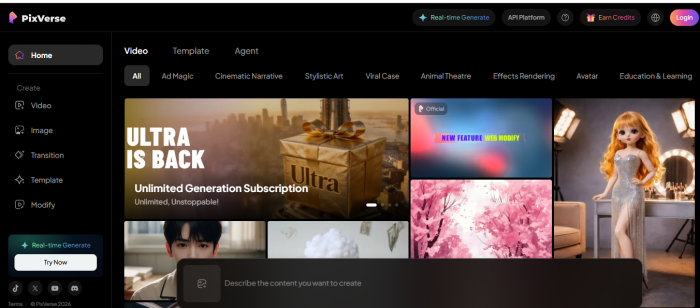
PixVerse AI’s onboarding flow plays a central role in shaping user perception. New users are guided through account creation and quickly introduced to the main creation interface. The layout is clean, visually intuitive, and intentionally minimal, ensuring that even first-time users of AI tools can navigate the platform comfortably.
The platform typically offers introductory credits, allowing users to test video generation without immediate financial commitment. This trial-based approach lowers hesitation and gives users a practical understanding of output quality before deciding whether to subscribe.
Importantly, PixVerse AI avoids overwhelming users with advanced settings during onboarding. Instead, it emphasizes speed and visual appeal, reinforcing the idea that compelling video content does not require technical expertise.
Core Features Explained in Practical Terms
● Text-to-video generation
Users can describe a scene, emotion, or action in plain language, and the system automatically converts that prompt into a short animated video. This eliminates the need for manual animation or editing knowledge and makes ideation-to-output extremely fast.
● Image-to-video animation
Static images can be uploaded and animated using AI-driven motion effects. This feature is particularly useful for breathing life into portraits, product images, or illustrations without recreating visuals from scratch.
● Predefined visual styles and effects
The platform offers a range of built-in animation styles designed around popular social media trends. These presets allow users to achieve visually appealing results quickly, even if they are unfamiliar with design principles.
● Short-form video optimization
Videos generated through PixVerse AI are optimized for short durations, making them suitable for platforms such as Instagram Reels, TikTok, and YouTube Shorts, where quick engagement is essential.
● Automated motion and transitions
The AI automatically handles motion dynamics, transitions, and pacing. This reduces creative friction and ensures that outputs remain visually coherent without requiring manual adjustments.
● Fast generation and preview workflow
Once a prompt or image is submitted, videos are generated within a short timeframe, allowing users to preview results quickly and iterate if needed.
● Regular model improvements
The platform continues to update its underlying AI models to enhance animation smoothness, facial consistency, and overall output quality, helping maintain relevance in a rapidly evolving AI video space.
User Experience and Interface Design: A Detailed Exploration
One of the most defining aspects of PixVerse AI is how it bridges the complexity of AI video generation with a user interface that feels surprisingly approachable—even to complete beginners. From the moment users land on the onboarding page to generating their first animated video, the platform’s design philosophy centers on clarity, accessibility, and visual guidance.
At its heart, the interface leans toward an intuitive, streamlined experience rather than overwhelming users with technical jargon or dense controls. Instead of confronting creators with timelines, keyframes, and endless parameters, PixVerse presents a guided, workflow-oriented design that takes users from idea to output with clear visual steps.
Clean and Minimal Navigation
Unlike professional video editing tools that are often intimidating with complex menus and countless settings, PixVerse AI embraces a minimal navigation layout. The main workspace usually consists of a prompt entry area, visual style selectors, and a preview window where users can observe how their videos evolve. This simplicity helps minimize the cognitive load especially for those unfamiliar with video tools.
For example, many reviewers note that the platform’s template previews and effect galleries are visually rich and descriptive, enabling users to choose a style or effect even before they understand exactly how it works. This lowers the barrier to experimentation and encourages creative play without fear of making mistakes.
Seamless Onboarding and Real-Time Feedback
The first step for most users is signing up and accessing the creation workspace. PixVerse AI doesn’t require a credit card or complex setup for new users, allowing immediate interaction with the tool. Once a prompt is entered or an image uploaded, the interface provides real-time progress feedback and estimated completion times, reducing uncertainty during video generation.
Progress indicators and notification banners help users understand what’s happening behind the scenes, which is crucial for maintaining engagement during the generation process. Many users have reported that this feedback loop makes the creation flow feel responsive and engaging rather than static and opaque.
Inspiration-First Home Screen
Rather than presenting users with blank fields or intimidating options, PixVerse often greets them with a gallery of community creations and trending effects. This inspirational approach immediately communicates what’s possible, motivating users to try similar effects or remix templates they find appealing. This “show not tell” strategy greatly accelerates creative ideation.

Some implementations even allow users to click a community post and instantly load the same settings into their editor, which significantly shortens the learning curve and fosters exploration.
Consolidated Creation Panels
Once a user begins crafting a video, the interface intelligently consolidates relevant controls such as style, motion options, and audio settings into a single, contextual panel. Instead of multiple pop-ups or buried menus, every essential function remains accessible at a glance, helping users maintain creative flow without unnecessary disruption. (ScreensDesign)
For mobile users, this design translates well with touch-optimized controls, ensuring that the transition from desktop to phone doesn’t degrade the experience. Such cross-platform consistency broadens PixVerse’s appeal to content creators on the go.
Guided Remixes, Feedback, and Tutorials
PixVerse goes beyond just presenting tools; it integrates help resources and in-context guidance directly into the interface. From beginner tips to usage examples, this embedded support helps users understand options like lip sync, fusion mode, or prompt tweaks without leaving the app for external documentation.
Interactive validation during signup, contextual tooltips during creation, and direct links to tutorials all contribute to an experience that’s both supportive and empowering.
Monetization Within the Interface
It’s worth noting that the interface also weaves in monetization cues in a way that aligns with user intent. For example, banners may appear when credits run low precisely when a user has just completed a generation and is most engaged. While this push toward subscriptions is a business design choice, the placement and timing aim to feel less disruptive and more contextual.
Final Thoughts on UX
In essence, PixVerse AI’s user experience and interface design reflect a deliberate philosophy: reduce friction, provide inspiration, and make advanced AI accessible to everyday creators. The platform accomplishes this by combining a clean layout, guided workflows, and interactive elements that help users discover features naturally. While advanced creators may find the interface simplistic compared to professional editing suites, its strength lies in its ability to make AI-powered video creation accessible, fast, and creatively stimulating for a broad audience.
Pricing Structure and Accessibility of PixVerse AI
Unlike traditional software that charges a flat monthly or annual fee for full access, PixVerse AI uses a flexible credit-based pricing model. This approach allows the platform to cater to a wide range of users from casual hobbyists to professional creators and enterprise teams by tying usage (video generation) directly to credits that are consumed based on complexity, resolution, and video length. (Pixverse AI)

How the Credit System Works
At the heart of PixVerse AI’s pricing is the credit economy. Instead of unlimited usage once you subscribe, you receive a set number of credits that you can spend on generating videos. Each video creation task whether it’s text-to-video or image-to-video costs a certain number of credits. The exact cost depends on factors like resolution, duration, and the complexity of effects.
This model gives users a predictable sense of consumption: simple, short videos use fewer credits, while high-definition or longer animations consume more. For example, under many plans, generating a standard video might cost a moderate number of credits, whereas high-resolution or more complex effects demand more.
Free and Entry-Level Access
PixVerse AI provides a free tier that is ideal for beginners or those who simply want to experiment with AI video creation. This tier usually includes initial credits and daily renewal credits, allowing users to create a number of videos every day without any subscription fee. However, outputs from the free tier may have limitations such as watermarked videos or fewer available effects.
The free plan is particularly helpful for users who want a risk-free introduction to the platform they can explore core features and understand the credit system before committing financially.
Standard, Pro, and Premium Subscription Plans
For users who need more consistent access and greater creative freedom, PixVerse AI offers tiered subscription plans, each with its own set of monthly credits and additional perks:
● Standard Plan (~$9.99/month)
Users receive a modest monthly credit allowance, HD video resolution (up to ~720p), and the ability to create multiple videos without watermarks. This tier suits casual creators and small-scale projects.
● Pro Plan (~$29.99/month)
A significant jump in monthly credits provides more room for frequent creations. Pro subscribers also enjoy higher resolution (up to 1080p), more concurrent video generations, and access to a broader suite of effects and faster rendering times. This is ideal for social media creators or small businesses generating regular content.
● Premium Plan (~$59.99/month)
At this level, monthly credits increase substantially, offering up to tens of thousands of credits. Premium users benefit from faster generation speeds, higher concurrency, and priority access. This plan is best suited for high-volume creators, marketing teams, or brands with consistent output needs.
These plans progressively add value by increasing credits, improving output quality, and enhancing performance, giving users flexibility to choose based on their content goals and usage intensity.
Enterprise and API-Level Plans
Beyond individual subscription tiers, PixVerse AI also offers enterprise-grade plans and API plans targeted at businesses, teams, and developers who want to integrate video generation into workflows or platforms. These plans are typically priced higher and come with large blocks of credits, increased concurrency limits, API access, and customization options making them suitable for agencies, platforms, and high-throughput environments. (FirmSuggest)
Such enterprise offerings reflect the platform’s scalability, extending the utility of PixVerse AI from individual content creation to professional and corporate use cases.
Buying Additional Credits
Aside from subscription plans, many users supplement their monthly allotment by purchasing additional credits. This “top-up” model allows continued video creation even after exhausting regular credits, without needing to upgrade the entire plan. Some platforms bundle bonus credits or discounts for larger purchases, giving creators flexibility while managing cost efficiency.
Intended Audience and Use Cases: Understanding Who Benefits Most from PixVerse AI
PixVerse AI is not simply another app that converts text or images into moving pictures. Its design philosophy, feature set, and pricing structure point to a specific set of users and real-world use cases that benefit most from what it offers. Instead of trying to be a one-size-fits-all video editor, PixVerse AI is strategically positioned to serve creators, small teams, and casual users who are looking to leverage AI to enhance storytelling, marketing, and social engagement.
Social Media Content Creators
At the heart of PixVerse AI’s user base are social media creators who generate short-form content for platforms like Instagram Reels, TikTok, Snapchat, and YouTube Shorts. These platforms demand visually engaging, emotionally compelling video content that captures attention within the first few seconds. For creators who must constantly deliver fresh content, PixVerse AI’s ability to quickly turn ideas into polished videos is invaluable.
Instead of spending hours learning video editing software or outsourcing production, creators can simply type a prompt, upload an image, and let the AI do the heavy lifting. This makes PixVerse AI especially appealing for:
● Influencers aim to grow their audience with frequent posts.
● Short-form video storytellers who rely on visual impact over technical precision.
● Everyday users who want slick video effects without the complexity of traditional editing tools.
As online engagement metrics increasingly prioritize visual storytelling, tools like PixVerse AI reduce barriers and accelerate creative output.
Small Businesses and Solopreneurs
For small business owners and independent professionals, the challenge often lies in producing quality marketing material without a marketing team or professional budget. PixVerse AI enables these users to generate short promotional videos, ads, and product highlights without hiring video editors.
Examples of practical use cases include:
● Product Announcements: Animating product images with motion and visual effects to showcase features in promotional posts.
● Brand Storytelling: Creating short brand intros or customer spotlights to strengthen brand identity.
● Seasonal Campaigns: Producing themed clips for events, holidays, or sales initiatives.
This capacity to transform still images or text descriptions into engaging videos allows businesses to maintain consistent visual communication across digital channels.
Educators and Trainers
Although PixVerse AI is not designed as an educational video tool in the traditional sense, it has utility for educators, trainers, and presenters who want to enhance learning materials with dynamic visuals. Instead of relying on static slides or text, teachers can use PixVerse AI to animate educational concepts or storytelling visuals that make lessons more engaging.
For example:
● An English teacher could animate a scene from literature to support class discussion.
● A language instructor might illustrate conversational scenarios visually.
● A history teacher could bring historical figures or scenes to life for younger learners.
By lowering the technical threshold for video creation, PixVerse AI can help educators make learning experiences more interactive and memorable.
Marketing and Creative Teams
Creative and marketing teams in startups or midsize companies often face the dual pressures of producing high-quality visuals while meeting tight deadlines. PixVerse AI can serve as a supplementary tool in their creative toolkit, especially in situations where quick turnaround is more important than full cinematic precision.
Marketing teams might use the platform to:
● Produce rapid prototype videos during brainstorming.
● Generate social teasers for campaigns before final assets are fully developed.
● Populate content calendars with engaging animated visuals to keep audiences engaged.
While these teams may still rely on professional editors for high-stakes productions, PixVerse AI’s efficiencies shine in early-stage ideation, concept tests, and social engagement workflows.
Casual Users and Hobbyists
Beyond professionals and businesses, a broad segment of casual users and hobbyists find value in PixVerse AI. These users are motivated by creativity, curiosity, or personal storytelling rather than commercial goals. Whether it’s animating a favorite photo, creating personalized e-cards, or just experimenting with AI creativity for fun, the platform’s simplicity makes it accessible to anyone with an idea.
This category includes:
● People documenting personal events or memories.
● Hobbyists exploring AI-generated art and animation.
● Fans create visual tributes to interests, fandoms, or personalities.
For these users, the joy comes from simply engaging with the creative process without barriers.
Limitations and Who Might Not Benefit as Much
While PixVerse AI excels in many contexts, it may not meet the needs of users who require professional-grade editing control and precision. For example:
● Filmmakers producing long-form films with detailed editing timelines.
● Animators who need frame-by-frame control or advanced compositing tools.
● Video professionals require advanced color grading, audio mixing, or multi-track editing.
For these audiences, traditional editing suites (like Adobe Premiere Pro, DaVinci Resolve, or After Effects) remain essential. PixVerse AI, by contrast, is best seen as a tool that complements professional workflows rather than replacing them.
Strengths and Limitations in Perspective
| Aspect | Strengths | Limitations |
| Ease of Use | The platform is highly beginner-friendly, with a clean interface and guided workflow that allows users to generate videos without prior editing or AI experience. | The simplicity also means fewer advanced controls, which may frustrate users looking for detailed customization or manual fine-tuning. |
| Speed of Creation | Videos can be generated within minutes, making PixVerse AI ideal for fast-paced content needs such as social media posts and quick promotional clips. | Rapid generation sometimes comes at the cost of nuanced storytelling or precise control over pacing and motion. |
| Accessibility | A free tier with introductory credits allows users to experiment without upfront payment, lowering the barrier to entry. | Free plans may include limitations such as watermarks, restricted features, or daily usage caps, which can affect usability for regular creators. |
| Visual Appeal | Outputs are visually engaging, with effects and styles designed to align with current social media trends and audience preferences. | The visual style may feel repetitive over time, as outputs rely heavily on preset templates and predefined effects. |
| Automation | AI handles motion, transitions, and animation automatically, reducing creative friction and technical workload. | Heavy reliance on automation means users have limited influence over specific animation behaviors or scene details. |
| Short-Form Optimization | The platform is well-suited for short-form videos optimized for platforms like TikTok, Instagram Reels, and YouTube Shorts. | It is less effective for long-form content, cinematic storytelling, or multi-scene narrative videos. |
| Pricing Flexibility | Credit-based and tiered subscription models allow users to scale usage according to needs and budget. | Credit consumption can be confusing for new users, and high-volume usage may become costly over time. |
| Creative Experimentation | Encourages exploration and creative play, making it appealing to hobbyists and casual users. | Lack of deep editing tools limits its suitability for professional filmmakers or advanced animators. |
| Platform Learning Curve | Minimal learning curve enables users to start creating almost immediately after onboarding. | Advanced users may feel constrained due to the absence of professional-grade editing features. |
| Use Case Fit | Excellent for social media creators, small businesses, educators, and marketers needing quick visual content. | Not a replacement for full-scale video editing software used in professional production environments. |
| Scalability | Offers higher-tier plans and enterprise options for teams and businesses with larger content demands. | Scaling up usage requires careful monitoring of credit consumption and subscription terms. |
| Trust and Transparency | Uses standard security practices and account-based access typical of SaaS platforms. | Publicly available information on data handling, model training, and long-term content usage policies may be limited. |
Safety, Privacy, and Trust Considerations for PixVerse AI
As AI-powered content creation platforms gain popularity, safety and privacy have become critical considerations for both casual users and professionals. PixVerse AI, which enables users to generate videos from text or images, requires users to upload content that could be sensitive or personal. Understanding how the platform handles data, ensures security, and builds trust is essential before extensive use.
1. Account and Access Security
PixVerse AI uses standard account-based authentication, typically offering sign-in options via email, Google, or Discord. All account credentials are encrypted during transmission using industry-standard protocols (TLS/SSL), which helps protect login information from unauthorized access.
● Users are encouraged to enable strong passwords and, if possible, two-factor authentication (2FA) for enhanced security.
● Access tokens for API or subscription plans are also managed securely to prevent misuse.
2. Data Privacy and Content Handling
One of the most important concerns for users is how the platform handles uploaded images, text prompts, and generated videos. PixVerse AI’s approach generally includes:
● Content Processing: Uploaded images and text prompts are temporarily processed by AI models to generate videos.
● Retention Policies: According to the platform’s privacy statement, content may be stored temporarily for processing or troubleshooting but is not sold to third parties.
● User Rights: Users typically retain ownership of their generated content, although they should review terms regarding AI training use, as some platforms may anonymize content to improve AI models.
Despite these measures, transparency about long-term storage or training use of user-generated videos may be limited, which is common across AI video generation platforms. Users should avoid uploading highly sensitive or confidential images unless they are comfortable with potential AI processing practices. PixVerse AI Privacy Policy
3. AI Model Output and Ethical Considerations
AI-generated content introduces unique safety considerations:
● Bias and Misrepresentation: The AI models may inadvertently create outputs that include stereotypical or unintended representations, especially with human faces or culturally sensitive imagery. Users should review outputs carefully before sharing publicly.
● Misinformation Risk: Generated videos could be misused to create misleading content. Responsible use is critical to avoid reputational or legal issues.
● Content Moderation: PixVerse AI likely implements content moderation measures to prevent inappropriate content generation, but no automated system is perfect. Users remain partially responsible for ensuring their content complies with ethical and legal standards.
4. Payment Security and Subscription Trust
For paid plans, PixVerse AI uses secure payment gateways that comply with industry standards such as PCI-DSS, ensuring that credit card or billing information is protected. Subscription transparency, including credit usage, renewal dates, and plan details, is critical for building trust:
● Users should monitor credit consumption carefully, especially in high-volume generation scenarios.
● Clear cancellation and refund policies should be reviewed before subscribing.
5. User Awareness and Best Practices
To ensure safety and maintain trust while using PixVerse AI, users should adopt a few best practices:
● Avoid uploading confidential, sensitive, or personal identifiable information (PII) unless necessary.
● Review privacy policies and terms of service periodically to stay informed of any updates in data usage.
● Monitor AI outputs for accuracy and appropriateness before sharing publicly.
● For organizations, consider whether an enterprise plan or dedicated API setup ensures better control over content and security.
6. Trustworthiness and Platform Reputation

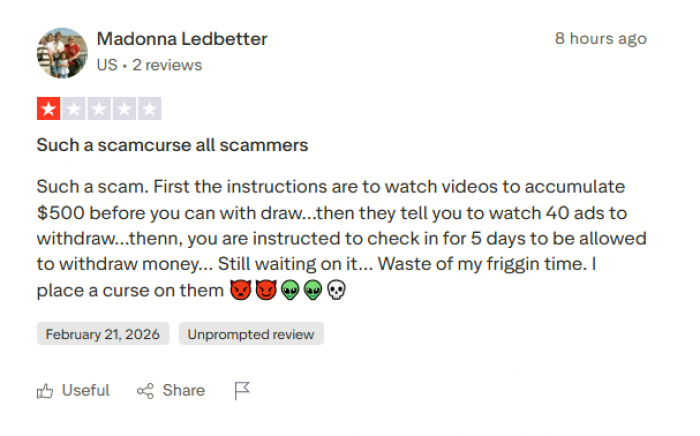
PixVerse AI has a growing user base, and most reviews indicate that it is legitimate and functional, with standard SaaS security practices in place. However, as with many AI platforms:
● Publicly available information on data retention, AI training usage, or third-party collaborations may be limited.
● Users should exercise caution when integrating the tool into sensitive business or high-stakes projects.
● Online reviews suggest that customer support and billing transparency can vary, which is another factor affecting trust.

How PixVerse AI Fits Into the Broader AI Video Landscape
The rise of AI-powered video creation has transformed the way content is conceptualized, produced, and distributed. Platforms now exist to serve a range of users from professional filmmakers to social media enthusiasts. Within this rapidly evolving landscape, PixVerse AI occupies a specific niche that differentiates it from competitors, balancing accessibility, speed, and trend-oriented visual outputs.
1. Focus on Short-Form, Social Media-Oriented Content
Unlike AI tools such as Runway ML or Synthesia, which often prioritize professional-grade video production, PixVerse AI emphasizes short-form, social-media-ready content. Its design caters to creators who need fast, visually appealing videos optimized for platforms like TikTok, Instagram Reels, or YouTube Shorts.
● Trend alignment: Pre-built templates and stylized effects are specifically tuned to current viral trends, helping creators produce engaging content without extensive design knowledge.
● Rapid output: Video generation takes minutes, enabling content creators to maintain consistent posting schedules, a crucial factor in social media growth.
This focus positions PixVerse AI as a tool for rapid creative ideation and production, rather than deep cinematic storytelling.
2. Accessibility Over Technical Complexity
Many AI video platforms offer extensive customization options that require technical skill. For instance, tools like Adobe Firefly Video or Runway Gen-2 provide high control over editing parameters, compositing, and frame-level adjustments. While these platforms are powerful, they also introduce steep learning curves.
PixVerse AI distinguishes itself by minimizing complexity:
● Users can input a text prompt or upload an image and immediately generate content.
● Automated motion, transitions, and visual effects reduce the need for manual intervention.
● Onboarding and free credits encourage experimentation, making AI video creation accessible even for casual users.
This focus on simplicity and approachability makes PixVerse AI particularly appealing to non-technical users and those prioritizing speed over precision.
3. Credit-Based Flexibility and Subscription Model
PixVerse AI’s credit-based system is another differentiator in the landscape. While some platforms operate on flat subscription fees with unlimited usage, PixVerse AI ties video generation to consumable credits. This approach:
● Allows users to scale usage according to needs and budget.
● Provides flexibility for beginners and casual creators who may generate content sporadically.
● Caters to professional users who require predictable resource allocation for high-volume production.
By aligning costs with actual output, PixVerse AI situates itself as both accessible and scalable, bridging the gap between casual experimentation and more consistent content creation.
4. Integration of AI Trends and Community Inspiration
In the broader AI video landscape, community-driven inspiration and pre-configured templates have become a competitive advantage. PixVerse AI leverages:
● Community showcases: Users can explore trending effects and templates to spark creative ideas.
● Template remixing: Popular community videos can be used as starting points for new creations, reducing creative friction.
This community-centric approach is similar to platforms like Kaiber or Lumen5, but PixVerse AI differentiates itself by emphasizing short, highly shareable videos rather than long-form or marketing-heavy content.
5. Niche Positioning vs Professional Tools
PixVerse AI is not intended to replace professional video editing suites such as Adobe Premiere Pro, DaVinci Resolve, or After Effects. These tools offer extensive creative freedom, complex compositing, and high-resolution outputs suitable for films or TV. Instead, PixVerse AI fits a complementary role:
● For professionals, it serves as a rapid prototyping or ideation tool for short clips and social media previews.
● For businesses and creators, it acts as a time-saving solution to produce engaging content without outsourcing or investing in full-scale production software.
In this sense, PixVerse AI occupies a mid-tier niche: more capable than beginner hobbyist apps, but more accessible and faster than full professional editing software.
6. Comparative Advantages in the AI Video Ecosystem
Key advantages that set PixVerse AI apart in the AI video ecosystem include:
● Speed: Immediate results suitable for platforms demanding frequent posting.
● Ease of use: Minimal learning curve and guided workflows.
● Trend alignment: Built-in visual effects and templates targeting viral content.
● Flexible pricing: Credit-based system supports both low-volume hobbyists and higher-volume creators.
At the same time, users seeking frame-level precision, cinematic output, or extensive audio-video integration may prefer competing platforms, underscoring the importance of matching the tool to specific needs.
7. Outlook and Role in the Future of AI Video
As AI video generation continues to grow, PixVerse AI is well-positioned to capture a segment of creators prioritizing speed, engagement, and social reach over technical mastery. Its combination of AI-driven automation, trend-based templates, and flexible access makes it a valuable option for a rapidly expanding class of digital content creators.
In the broader AI video landscape, PixVerse AI is thus a bridge between casual experimentation and semi-professional content creation, reflecting a shift toward democratized video production where anyone can transform ideas into shareable visual media.
Final Assessment: Is PixVerse AI Worth Exploring?
PixVerse AI succeeds in delivering what it promises: a simple, visually engaging, and beginner-friendly approach to AI video generation. It lowers the technical barriers to creativity and enables users to transform ideas into shareable videos with minimal effort.
While it may not satisfy users seeking full creative control or professional-grade editing capabilities, it remains a compelling option for social media creators, small businesses, and anyone curious about AI-powered video creation.
For those willing to experiment and explore within its creative boundaries, PixVerse AI offers a practical and approachable entry point into the rapidly expanding world of AI-generated video content.
Comments