

“First impressions can be polished, but real experience is built after you start exploring.”
That was the mindset I kept while reviewing it. I did not want to judge it only by the homepage, visual design, or the promises made on the surface. A platform can look clean and confident at first glance, but the real question is whether it feels useful, trustworthy, and clear once someone actually begins using it.
For this review, I looked at it from a normal user’s point of view. I wanted to understand how easily someone could get started, how natural the experience felt, whether the main claims matched the actual flow, and where the experience started to feel strong or weak. Instead of writing a simple overview, I approached it like a practical walkthrough, the kind of review someone would want before deciding whether to spend their time, attention, or money on it.
What stood out to me was not just one feature or one claim, but the overall experience. Some parts felt clear and easy to follow, while others needed more transparency or deeper explanation. That balance is important because users do not only judge a platform by what it says; they judge it by how it behaves once they start interacting with it.
To make this review more practical, I began with the part that usually reveals the most: the first hands-on experience.
My First Twenty Minutes With It
Sign-up takes me under a minute. Email, password, no credit card. The chat window loads almost immediately and there is no awkward onboarding wizard asking me what my role is, what my goals are, or what industry I sit in. I appreciate that more than I expected to. Most AI tools open with a series of questions that exist mostly to feed someone's analytics dashboard. Redeepseek just hands me a blank prompt box and gets out of the way.
The interface is plain in the best sense. One chat thread on the left side, a clean composer at the bottom, file upload icon, and a model badge in the corner. Nothing flashing for attention. For a content creator who already has Notion, Slack, Google Docs, and a browser tab graveyard open, this kind of restraint is genuinely welcome.
My very first test is the prompt I use to evaluate every AI assistant: "Help me brainstorm ten content angles for a blog post about AI tools for small business owners in 2026. Make them specific enough to actually pitch, not generic." The response lands in roughly four seconds. Eight of the ten angles are usable. Two are recycled clichés. That ratio is honest, and frankly better than what I would have produced in the same four seconds by myself on a Sunday night.
The 7-Step Workflow I Build Around It
After two weeks of using Redeepseek across different content types, the workflow I land on is the one below. It is not magic. It is just a structured way of moving a single piece of content from the blank-cell stage to a published, repurposed asset, with the AI doing the heavy lifting on the slow parts.
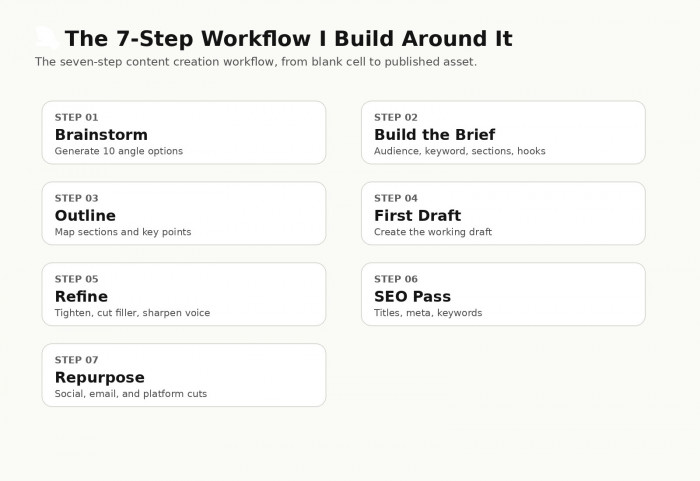
The seven-step content creation workflow I run for every long-form piece, from blank cell to published.
Each step below has a specific prompt structure that works reliably. Walk through them in order. The first three steps prepare the piece. The middle two write and refine it. The last two finish and distribute it.
| STEP 01 | Brainstorm: Generate 10 Angle Options |
Start every piece with quantity, not quality. Ten angles for the same topic surfaces options I would never have thought of on my own. The first three are usually weak and the interesting ones tend to live between angles 5 and 9. Read all ten, pick one, move on. MY PROMPT: "Give me 10 specific content angles for [topic]. Skip the generic ones. Each angle should be pitchable to a client." | |
| STEP 02 | Build the Brief |
Take the angle from step 1 and ask for a structured brief. The brief should include the target audience, the primary keyword, the section structure, the hook options, and the suggested word count. This output usually gets me 80 percent of the way to a brief I can hand off or use myself. MY PROMPT: "Build a content brief for [chosen angle]: target audience, primary keyword, 5-7 sections, three hook options, recommended word count." | |
| STEP 03 | Outline: Map Sections and Key Points |
Turn the brief into a section-by-section outline with bullet points under each section. This is where I edit the most before moving forward. The outline is the spine of the piece, so spending an extra two minutes here saves twenty minutes of restructuring later. MY PROMPT: "Turn this brief into a section-by-section outline with 3-5 bullet points per section. Add a hook idea and a closing line for each section." | |
| STEP 04 | Write the First Draft |
This is where the time savings show up most dramatically. A first draft that would have taken ninety minutes manually now takes thirty. Specify the tone explicitly. Without that instruction, output drifts toward bland by default. Also tell it what NOT to include, like em dashes or marketing fluff. MY PROMPT: "Write a first draft from this outline. Conversational tone, no fluff, no em dashes, around [word count] words. Match this voice: [paste 2-3 paragraphs of your past work]." | |
| STEP 05 | Refine: Tighten the Draft |
Two or three refinement passes get me to something I would actually publish under my name. Ask for specific edits rather than vague improvements. Cut filler. Sharpen the opening. Replace clichés. Keep my voice. Be explicit, because vague prompts produce vague edits. MY PROMPT: "Tighten this draft. Cut filler sentences, sharpen the opening, replace any clichés. Keep my voice." | |
| STEP 06 | SEO Pass: Titles, Meta, Keywords |
Once the body is solid, run an SEO pass. Get title options under sixty characters, a meta description under 155 characters, and three H2 alternatives. The titles usually need a second pass for punch, but the meta descriptions are reliably solid the first time. MY PROMPT: "Give me 5 title options under 60 characters, a meta description under 155 characters, and 3 H2 alternatives. Primary keyword: [keyword]." | |
| STEP 07 | Repurpose: Turn It Into Social and Email Cuts |
This is the step that surprised me most. The repurposing quality is genuinely good. One long-form article turns into LinkedIn posts, X threads, newsletter blurbs, and Instagram captions in under ten minutes. The step I used to skip because of time pressure now happens consistently. MY PROMPT: "Turn this article into: 3 LinkedIn posts, 5 X threads, 1 newsletter blurb under 200 words, and 4 Instagram captions. Keep the core insight, change the framing for each platform." | |
The thing that makes this workflow click is treating each step as a discrete request rather than asking the AI to do the whole article in one go. Long single prompts produce mush. Short, structured prompts in sequence produce something usable.
Six Places It Actually Simplifies Things
After running this workflow across blog posts, newsletters, social copy, ebook chapters, and a couple of client deliverables, six clear strengths emerge. None of them are revolutionary on their own. The compounding effect of all six in one tool is what makes the difference.
1. The blank-page problem stops being a problem
This sounds small. It is not. The single biggest time drain in content creation, for me at least, is the resistance of the blank page. Having a structured first draft on screen in under two minutes changes my relationship with the work entirely. The editing brain switches on much faster than the writing brain.
2. The brief stage gets compressed dramatically
What used to be a thirty-minute exercise of opening five tabs, reading competitor articles, and trying to triangulate an angle now takes about four minutes. The brief is rarely perfect, but it is always usable as a starting frame.
3. Repurposing finally happens
I have always known I should be repurposing every long-form piece into social and email cuts. I almost never did it because by the time the blog post was published, I was already moving on to the next deadline. With the AI handling the heavy lifting, the repurpose step now takes me eight minutes instead of forty. So it actually happens.
4. SEO meta work stops feeling like a chore
Writing five title options under sixty characters that all pass the keyword test used to be a real grind. Now it is a thirty-second prompt and a quick edit. The fatigue around this step disappears almost entirely.
5. Multilingual content becomes realistic
One of my clients needs Spanish versions of certain pieces. Previously this meant either machine translation that read like a tourist phrase book, or a freelance translator and a three-day turnaround. Redeepseek handles serviceable Spanish versions of my drafts in a way that needs editing but not rewriting. For internal docs and social posts, this is genuinely useful.
6. Brainstorming feels less lonely
This one is harder to quantify. Working solo on content can get isolating, especially during the ideation stage. Having a fast back-and-forth with a tool that does not get tired of bad ideas is a small but real morale lift. It is closer to whiteboard ping-pong with a colleague than typing into a void.
THE PATTERN I NOTICE. The simplification is not about the AI being smarter than me. It is about removing the friction at the parts of the process where I get stuck. The cognitive load drops, the work moves forward, the deadlines stop slipping. |
A Sample Brief That Lands Close to Usable
To show what a typical Redeepseek output actually looks like in practice, here is the kind of structured brief that comes back from the prompt in step 2 of my workflow. The example below is illustrative of the format and quality, not a specific captured response.
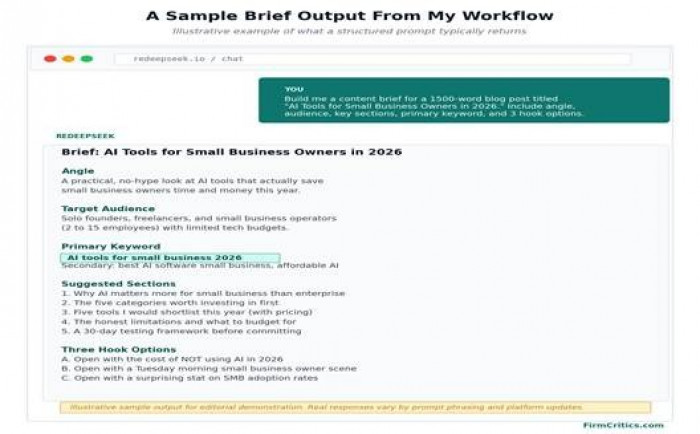
What a structured brief prompt typically returns in the chat interface.
The thing I want to highlight here is the structure. The output has clear section headers, a primary keyword called out separately, and three distinct hook options rather than one. That structure is what makes it editable. A wall of text would have been almost useless. Structured output is significantly easier to refine into a final brief, and Redeepseek delivers structured output reliably when you ask for it explicitly.
The piece that needs my editorial judgement, every time, is the hook selection. The AI offers three options. Which one fits the client, the audience mood, the publishing calendar position, all of that is still my call. The tool is doing the legwork. The choices are still mine.
When It Goes Sideways and What I Do
Nothing about this is frictionless. Plenty of prompts come back with output that needs serious rework or is simply wrong. Here are the five most common things that go sideways for me, and what I do when they happen.
| What Goes Wrong | Why It Happens | What I Do About It |
| Output reads generic and bland | The prompt was too broad. Without specific instructions on tone, audience, and format, the model defaults to vanilla. | Re-prompt with specifics: "Write this for a freelance designer audience, conversational, no marketing speak, include one specific example." |
| A factual claim is wrong | The model is filling in confident-sounding details that are not anchored to a real source. | Cross-check any statistic, name, date, or quote in a fresh tab before using it. Treat all factual claims as unverified until checked. |
| The tone is off | Default voice tends toward middle-of-the-road professional. It is rarely a match for a specific brand voice. | Paste in two or three paragraphs of my own past work and ask: "Match this tone for the next response." Output quality jumps noticeably. |
| The output is repetitive | Long generations sometimes loop similar phrases or restate the same idea three different ways. | Ask explicitly: "Cut all repetition and redundancy. Each sentence should add something new." Then do a final human pass. |
| The platform stalls or times out | Heavy prompts, complex document uploads, or peak usage windows. | Break the prompt into smaller chunks. If it still stalls, refresh the chat. Long documents get summarised in segments rather than all at once. |
The single most useful habit I have built is treating the AI output as a strong first draft, never as a final piece. Every output gets at least one human editing pass before it leaves my desk. That pass is also where my voice gets stitched back in, because the AI default voice is competent but not memorable. Memorable is still my job.
The Hours I Get Back
The reason any of this matters is the time math. A typical 1,500-word blog post used to take me somewhere around four and a half hours from blank cell to published, including the brief, outline, draft, edits, SEO work, and social repurposing. Running the same piece through the workflow above brings it down to around ninety minutes total, including the human editing passes.
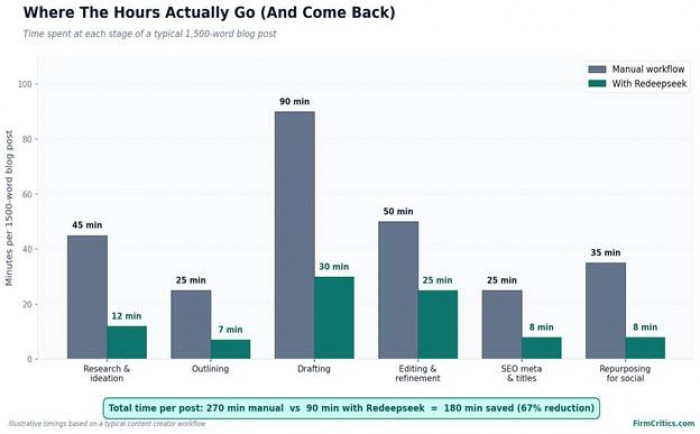
Where the time goes at each stage of a 1,500-word blog post, manual workflow vs Redeepseek workflow.
Drafting is where the biggest single chunk of time disappears, dropping from ninety minutes down to about thirty. The repurposing stage compresses almost as dramatically, going from thirty-five minutes to eight. Editing actually shrinks less than I expected because the AI output still needs careful human passes, but the editing is faster because the structure is already there.
If I publish twelve long-form pieces a month, that math works out to roughly thirty-six reclaimed hours per month. Almost a full working week. Some of that gets reinvested in higher-quality work on the pieces themselves. Some gets reinvested in things that were previously dropping off the list entirely, like newsletter consistency and proper image sourcing.
My Honest Rating
Here is how Redeepseek shakes out across the dimensions that actually matter for content creation, scored on a five-point scale. These are based on the workflow above and how the tool performs across the content types I run through it.
| Dimension | Rating | Score | My Take |
| Brainstorming and Ideation | ★★★★½ | 4.5 / 5 | Solid for generating angles and breaking blank-page paralysis. The first 30% of outputs are usually weak; the gold lives in the middle of the list. |
| Outlining and Structure | ★★★★½ | 4.4 / 5 | Reliable structured outputs with section headers, bullet points, and hook options. Easy to edit further. Rarely produces a mess. |
| First Draft Quality | ★★★★ | 4.1 / 5 | Good first draft material if the prompt is specific. Lacks voice by default, but takes well to voice-matching instructions when given samples. |
| Tone Matching | ★★★½ | 3.6 / 5 | Improves significantly when fed sample paragraphs. Without samples, defaults to generic professional. Worth the extra step. |
| SEO Output (titles, metas, keywords) | ★★★★ | 4.3 / 5 | Consistent character counts, decent keyword integration. Titles need a final human pass for punch, but the meta descriptions are reliably solid. |
| Repurposing for Multi-Platform | ★★★★★ | 4.7 / 5 | The strongest single feature for me. Turns one long piece into platform-tuned cuts in under ten minutes. This is where the time savings concentrate. |
| Multilingual Output | ★★★★ | 4.2 / 5 | Useable Spanish, French, and Hindi for internal docs and social posts. Marketing-grade copy still benefits from a human translator final pass. |
| Speed and Reliability | ★★★★ | 4.3 / 5 | Quick responses on standard prompts, priority queue on Professional. Occasional stalls on very long inputs, but rare. |
| Pricing for Content Creators | ★★★★★ | 4.7 / 5 | $18 a month for unlimited messages and document analysis is genuinely good value compared to most competitors charging $20 to $30. |
| My Overall Rating | ★★★★ | 4.3 / 5 | A genuinely useful content creation assistant. Strongest at repurposing, brief-building, and breaking blank-page paralysis. |
My Verdict
The honest answer to whether Redeepseek simplifies content creation is yes, and meaningfully so, in the parts of the workflow where time tends to disappear. It is not a replacement for editorial judgement, original perspective, or the human voice that makes content actually worth reading. It is a fast, capable, affordable assistant that handles the slow scaffolding work so I can spend more energy on the parts that need a person.
That said, there is a clearer way to think about who should actually use it.
WORTH IT FOR YOU IF You publish content regularly, work solo or in a small team, write for multiple platforms, repurpose long-form into social, handle SEO meta work yourself, or struggle with the blank-page stage. The $18 Professional plan pays for itself in the first week if you publish weekly. | SKIP IT IF You write rarely enough that a free tier of any AI tool would cover your usage. You need deep research with verified citations as a hard requirement. You work in a regulated industry where AI-assisted content needs documented model provenance. You have an existing premium AI subscription you are already getting full use of. |
My personal call: I keep it. The thirty-six hours a month back is the kind of trade I happily make for $18. I would not rely on it as my only AI tool, because no single platform handles every use case well, but as the primary content workhorse in a stack of two or three tools, it earns its place.
The Bottom Line
Content creation has not become easier in the last five years. The volume expectations have climbed, the platform list has multiplied, and the bar for quality has risen alongside both. The tools that genuinely help are the ones that handle the repetitive scaffolding so you can focus on the parts where your perspective actually matters.
Redeepseek is one of those tools. Not perfect, not magical, and not without limitations worth knowing about, but a tool that consistently shortens the gap between idea and published piece. For someone running content as part of their work or business, that is the win that compounds.
Whatever you end up using, the best content tool is still the one you actually use consistently. Test, decide, then get back to making something worth reading.
Comments