

If you came here looking for a switch buried in your settings that hides your following list, you can stop searching. It doesn’t exist. Instagram has never shipped one, and nothing in the 2026 app changes that.
What you can do is control who is allowed to see that list in the first place. That’s a different thing, and the gap between those two ideas is the whole reason this guide exists. Below is every method that genuinely limits who sees your follows, exactly what each one costs you, and the “tricks” going around online that quietly do nothing.
First, know who can actually see your list right now
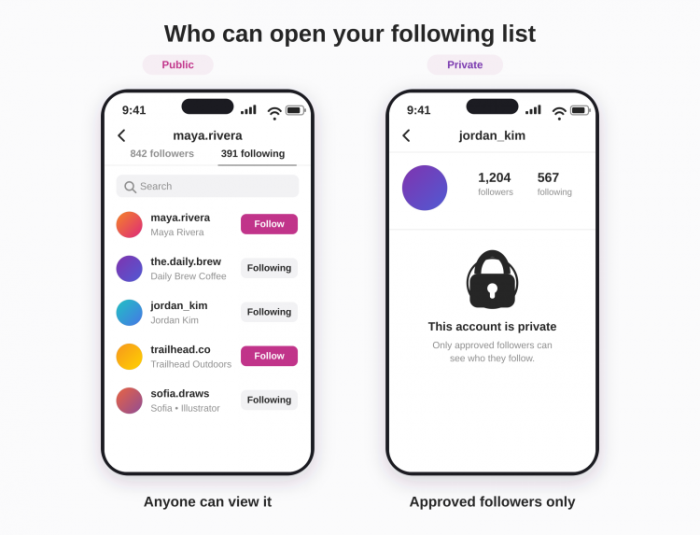
Before you change anything, it helps to understand what’s currently exposed, because the answer depends entirely on one setting: whether your account is public or private. Most people never think about it until they realise a coworker or an ex has been scrolling through who they follow.
| Account type | Who can see your following & followers |
| Public | Anyone. That includes people who don’t follow you, people who aren’t logged in at all, and in some cases search engines that index public profiles. Your list is effectively open to the world. |
| Private | Only the followers you’ve personally approved. Everyone else sees your follower and following counts, but tapping the number gets them nothing. |
Here’s the catch that trips people up: going private does not hide your following list from people who already follow you. Once someone is an approved follower, they can see every account you follow until you actively remove or block them. Keep that in mind, because it changes which method you’ll want.
There’s a flip side worth flagging too, and it matters if you’re the one trying to view a list rather than hide one: a public account’s list doesn’t always load, even when nobody has blocked you. That happens for a few specific reasons, and one of them is a genuine new privacy feature. There’s a full section on it further down.
The methods that actually work
There are exactly three legitimate levers Instagram gives you. Each one hides your list from a different group of people, and each one has a real trade-off. Pick based on who you’re trying to keep out, not on which sounds easiest.
1. Switch your account to private
This is the closest thing to a real “hide” button, because it shuts your following list off from the entire public in one move. New follow requests have to be approved by you, which means you decide who ever gets to see the list again.
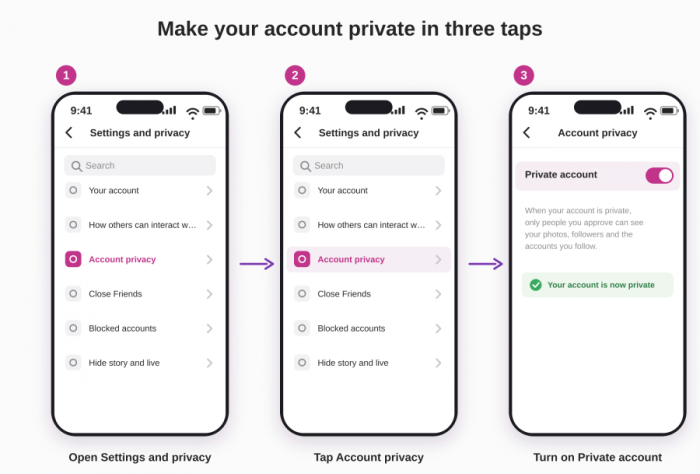
1. Open your profile and tap the menu (the three lines in the top-right corner).
2. Go to Settings and privacy, then Account privacy.
3. Turn on the Private account toggle and confirm.
Best for: anyone who wants the cleanest, most complete fix and doesn’t rely on public reach. The cost is real, though: you lose discoverability, hashtags stop surfacing your posts to strangers, and brand or creator growth slows to a crawl.Creators concerned about that trade-off may also want to understand how Instagram search visibility affects discovery beyond existing followers.
2. Remove a specific follower
If your problem is one particular person who already follows you, going private won’t help, since they’re already inside. Removing them as a follower quietly cuts their access. They aren’t notified with an alert, but a sharp-eyed person may notice they’ve been dropped if they go looking.
1. Go to your profile and tap your Followers count.
2. Find the person, tap Remove next to their name, and confirm.
Best for: keeping a public account while shutting out one or two specific people. It’s surgical, but nothing stops them from following you again or viewing a public profile from a logged-out browser.
3. Block someone outright
Blocking is the heavy option, and it’s the only one that reliably locks a person out for good. A blocked user can’t see your profile, posts, stories, or following list, and Instagram also attempts to block accounts it recognises as belonging to the same person, which frustrates the classic “I’ll just look from my other account” move.
1. Open the person’s profile and tap the menu (three dots, top-right).
2. Tap Block, then confirm. You’ll get the option to block their existing and future accounts.
Best for: someone you genuinely don’t want anywhere near your account. It’s the strongest tool, but it’s also the most obvious, since the person will notice they can no longer find you.
What does NOT hide your following list (the common myths)
This is where most advice online falls apart. A handful of Instagram features get recommended as ways to “hide your follows,” and they do genuinely useful things, just not the thing you’re here for. Knowing the difference saves you from thinking you’re protected when you aren’t.
| Feature | What it actually does | Hides your list? |
| Restrict | Filters a person’s comments so only they see them and routes their messages to your requests folder. | No |
| Mute | Hides someone’s posts and stories from your feed. It affects what you see, not what others see about you. | No |
| Close Friends | Controls who sees a particular story. It touches stories only and never affects your profile lists. | No |
| Limits | Temporarily dials down comments and DM requests from people who don’t follow you or only recently did. | No |
The pattern is worth spelling out: all four of these manage interaction and content, not profile visibility. If your goal is stopping someone from reading your following list, none of them move the needle. They’re the wrong tool, even though they’re often handed out as the answer.
Skip the third-party apps promising to hide your followers
Search this topic and you’ll trip over apps and websites claiming they can hide your list for you. Treat every one of them as a red flag. There’s no private door into Instagram’s system that these tools have and the app itself doesn’t, so what they’re really selling is one of a few bad outcomes:
• They ask for your Instagram login and harvest your credentials, which is how accounts get hijacked and resold. No legitimate tool ever needs your password handed to a third party.
• They violate Instagram’s terms of use, which can get your account flagged, restricted, or banned outright, sometimes with no warning and no appeal.
• They simply don’t work and exist to serve ads or push you into a subscription for a feature that is technically impossible in the first place.
If a tool promises something Instagram itself refuses to offer, that’s not a clever workaround. It’s a tell that the “solution” is the problem.
When a public account’s list still won’t show (and no one blocked anyone)
This is the part almost every guide skips. You’d expect a public account to hand over its following list the moment you tap the number, but plenty of people get a blank sheet, an endless spinner, or a “No users found” message instead, with no block anywhere in the picture. It usually comes down to one of the causes below, and only the first is actually about privacy.
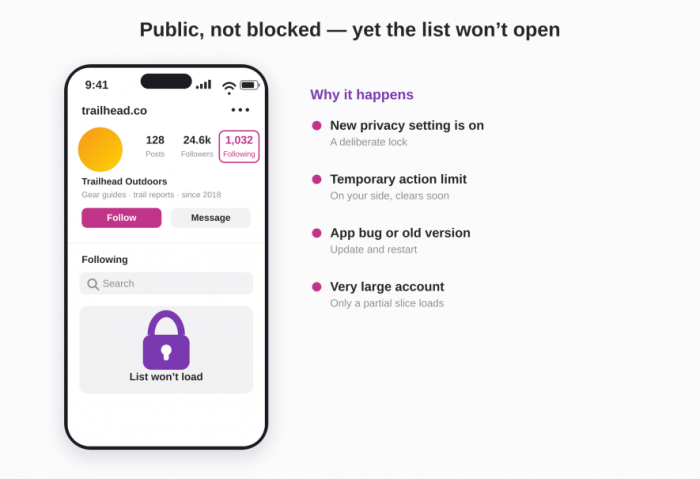
• The account has Instagram’s new list-privacy setting switched on. Through 2026 Instagram has been testing an option that lets even public accounts hide their follower and following lists while the counts stay visible. It hasn’t reached everyone, so you can absolutely land on a public profile where the number is there but the list simply won’t open. This is the one reason here that’s a deliberate choice rather than a hiccup.
• You’ve quietly hit a temporary action limit. If you’ve been opening a stack of profiles and lists in a short stretch, or your own account is brand new, Instagram throttles you and lists stop loading. The account you’re viewing is public and hasn’t done anything to you; the restriction sits on your side, and it usually lifts on its own within a few hours to a day.
• The app is glitching or out of date. A list that refuses to load is often just a client bug: an old app version, a corrupted cache, or a stale session. Updating Instagram, force-closing and reopening it, logging out and back in, or checking the same profile in a mobile browser clears it most of the time.
• The account is simply enormous. On profiles with very large followings, Instagram doesn’t let you scroll the entire list. It loads a ranked, partial slice and stops, so you’ll see some of who they follow but never the complete set, no matter how long you scroll.
There’s a subtler limit even when the list does open: what you see is ordered by Instagram’s own ranking, weighted toward accounts it thinks you’ll recognise, not by the date each follow happened. So there’s no built-in way to tell who someone followed most recently. A list being visible and a list being genuinely useful are two different things, and the app only ever gives you the first.
| What you see | Most likely reason | What to try |
| Count is visible, but the list won’t open at all | The account turned on the new list-privacy setting | Nothing to do; it’s a deliberate lock |
| “No users found,” or a list that loads then empties | A temporary action limit on your own account | Wait a few hours; slow your browsing |
| Endless spinner or an instant error | App bug, outdated version, or cache issue | Update and restart, or use a browser |
| List loads but stops partway and won’t scroll on | Very large account served as a partial slice | No fix; the full list isn’t retrievable |
Why Instagram won’t just let you hide it
It’s worth stepping back and asking why this feature is missing at all, because the answer says something about how the platform sees you. On Instagram, the network of who follows whom isn’t treated as your private business. It’s treated as public signal, the raw material the recommendation engine uses to decide what to show, who to suggest, and how content spreads. A list you could switch off is a list the algorithm can’t fully lean on.
The contrast with TikTok makes it obvious. TikTok lets you hide your following list with a single toggle while keeping your account public. Instagram, under Meta, has resisted doing the same for years despite steady demand. That’s not an oversight. It’s a design philosophy: your connections are considered part of the open graph, and the historic default has been that the only way to close them off is to shut the whole account down to private. The limited test now creeping out to some public accounts is the first real dent in that stance, but until it reaches everyone, the default still holds.
So the discomfort a lot of people feel here is real, and it isn’t paranoia. Wanting to follow a fitness coach, an ex’s new partner, a political account, or a guilty-pleasure meme page without broadcasting it to every coworker and acquaintance is a perfectly ordinary wish. Instagram’s structure just doesn’t grant it at the granularity people actually want.
Match the method to your goal
Strip away the noise and the decision is simple once you name who you’re hiding from:
• You want to hide from strangers and the public while accepting less reach. Go private. It’s the only move that closes the list off to everyone you haven’t personally approved.
• You want to stay public but keep one specific person out. Remove them as a follower, and block them if they’re persistent. Going private would be overkill and wouldn’t even fix it if they already follow you.
• You want someone gone with no way back in. Block them, and block their linked accounts when prompted. It’s the only method that survives the alt-account trick.
• You just want less drama in your comments or DMs, not real list privacy. That’s what Restrict, Mute, and Limits are for. Use them for peace, not for hiding.
Frequently asked questions
1. Can I hide my following list while keeping my account public?
Not for everyone at once. A public account exposes your list to anyone by design. The only way to close it to a specific person on a public account is to remove or block that individual.
2. Does going private hide my list from people who already follow me?
No. Existing approved followers keep full access to your following list even after you switch to private. To cut off a current follower you have to remove or block them specifically.
3. Will someone be notified if I remove or block them?
Neither action sends a direct alert. That said, both are noticeable if the person goes looking, since a removed follower loses access and a blocked user can no longer find your profile at all.
4. Is there a “ghost mode” that hides my list or count?
No. “Ghost mode” usually refers to turning off your activity status or to sketchy third-party apps. There is no official setting that hides your follower count or list on a public profile.
5. Do restricting or muting someone hide my follows from them?
No. Restrict manages their comments and messages; mute hides their content from your feed. Neither one touches what they can see on your profile.
The verdict
Total invisibility isn’t on the table, and any guide that tells you otherwise is either out of date or selling something. Instagram still has no list-hiding button for most accounts, and the limited test now trickling out to a slice of public profiles is nowhere near a global feature yet.
What you get instead is meaningful control: go private to shut the public out completely, or remove and block to handle specific people on a public account. Everything else, the Restricts and Mutes and third-party “hiders,” is either the wrong tool or an outright risk. For most people the honest answer is the simplest one, which is to decide who you’re actually hiding from, then use the one method built for exactly that group.
Comments