

Instagram search is no longer used only to find usernames. People use it to discover local businesses, compare products, learn skills, collect ideas and solve specific problems.
That shift creates a different challenge for creators. A post may be useful, attractive and well produced, yet remain difficult to find because Instagram cannot confidently determine which searches it answers. Search visibility improves when the profile, caption, visuals and wider content pattern all describe the same subject clearly.
A Query Is More Than a Keyword
An Instagram search query is the phrase someone enters into the search bar. It could be broad, such as “running shoes,” or highly specific, such as “affordable running shoes for flat feet.” Those queries may concern the same product, but they do not represent the same need.
A broad search could lead to brands, stores, styling videos or product photography. The more specific version suggests that the person wants recommendations that meet both a budget and a physical requirement.
Before creating content around a query, identify:
● The exact subject the person is searching for and the details that narrow the request.
● The likely outcome the person expects after opening a post, Reel or profile.
● The content format that can provide the answer without unnecessary explanation.
● The connection between the query and the account’s established topic or service.
This changes the task from inserting keywords into captions to creating content that satisfies a recognisable search intention.
How Instagram Reads Search Content
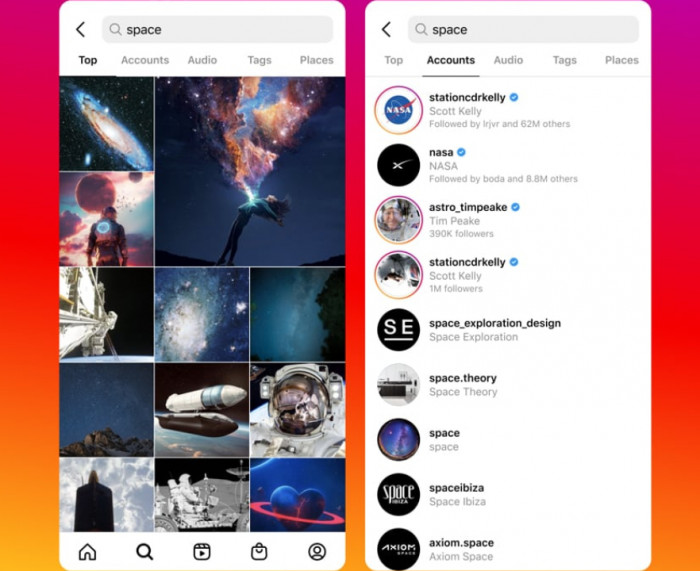
Instagram search begins with the words entered by the user, but those words are not the only information available.
The platform can compare a query with account names, usernames, bios, captions, locations and other information connected with the content. Previous user activity may also shape the results, which is why two people can search for the same phrase and see different accounts or posts.
Search visibility can be understood through three layers.
1. Relevance: Instagram first needs a clear relationship between the query and the result. A Reel captioned “This trick changed everything” provides little searchable context. A caption such as “This phone camera setting reduces motion blur in low-light product photos” identifies the device, problem and use case.
2. Personal fit: Instagram can use a person’s previous activity to estimate which relevant result is most suitable. Someone who regularly interacts with local food pages may receive different results for “best cafés” than a user who follows international travel creators.
3. Performance confidence : When several results are relevant, Instagram can consider how people respond to them. Strong watch time, saves, shares, profile visits and continued engagement may indicate that the content satisfies the audience it reaches.
Popularity cannot make unrelated content relevant. It becomes useful only after Instagram understands where the content belongs.
Match the Search Surface
Instagram search can return profiles, Reels, posts, places, audio and hashtags. Each surface solves a different problem.
| Search surface | Typical user intention | Information that must be clear |
| Profiles | Find a creator, business, professional or topic expert | Profile name, bio, category, location and consistent content subject |
| Reels | Watch a demonstration, tutorial, review or quick explanation | Opening line, spoken topic, on-screen text, visuals and caption |
| Posts | Save an example, comparison, checklist or detailed reference | Carousel cover, slide headings, caption and visual context |
| Places | Locate a nearby venue, attraction, shop or service | Accurate location, service area, business details and local content |
| Hashtags | Browse posts grouped around a shared subject | Relevant and specific labels supported by the actual content |
A local salon and a global design educator should not use the same search strategy. The salon needs geographical clarity and service information. The educator needs consistent topic language and complete answers to informational queries.
Break Queries Into Parts
The words inside a query often reveal what the post must deliver. Consider the phrase “Easy Instagram Reel ideas for small businesses.” Each part adds a specific requirement.
“Easy” suggests that the ideas should be practical and achievable without expensive equipment, advanced editing skills or a large amount of time. “Instagram Reel” identifies the exact content format the user wants to create, while “ideas” shows that examples and usable concepts will be more valuable than a general explanation of how Reels work. The phrase “small businesses” further narrows the audience, meaning the suggestions should be relevant to shops, service providers, independent brands and other smaller commercial accounts.
A post explaining the Instagram Reels algorithm may be related to the topic, but it does not answer the query. A better post would show several Reel concepts, explain how to record each one and demonstrate how the ideas could work for different business types.
| Query modifier | Example | What the content must address |
| Audience | “For photographers” | Examples should reflect a photographer’s work and potential customers |
| Location | “In Mumbai” | The result should have genuine geographical relevance |
| Budget | “Under ₹2,000” | Every recommendation should remain within the price limit |
| Skill level | “For beginners” | The explanation should avoid unexplained advanced steps |
| Constraint | “Without showing your face” | The proposed method must work without personal on-camera footage |
| Comparison | “Canva vs Adobe Express” | Both options should be judged using the same practical criteria |
The more specific the query becomes, the less room there is for a general answer.
Build a Query Bank Around Problems
A useful query bank is not a list of broad words such as “Instagram,” “marketing,” “Reels” and “engagement.” Those terms are too wide to guide individual posts.
Instead, organise queries around the problems people are trying to solve. For an Instagram marketing account, the query bank might include:
1. Discovery problems: “How to appear in Instagram search,” “why my Reels do not reach non-followers” and “how to make Instagram understand my niche.”
2. Production problems: “Reel ideas without showing your face,” “carousel ideas for coaches” and “how to film product Reels using a phone.”
3. Conversion problems: “Instagram bio for a service business,” “how to write calls to action in captions” and “which Highlights should a local business create.”
4. Measurement problems: “How to read Instagram Insights,” “which Reel metrics matter” and “why a post gets saves but no profile visits.”
This creates connected content clusters instead of isolated posts based on whichever topic appears popular that week.
Research Queries Inside Instagram
Instagram itself is the most useful starting point because it shows both how people phrase searches and what types of results are already associated with them.
Begin with a broad term and record the suggested variations. Add an audience, problem, location or limitation to discover narrower versions.
For example, “product photography” could become Product photography with phone, Product photography for jewellery, “Product photography lighting setup and Product photography for small business.
Next, inspect the visible results. Check whether Reels, carousels or profiles dominate. Review how leading accounts describe the topic, whether the content is current and what information repeatedly appears. The objective is not to copy the results. Look for what they fail to provide.
A high-ranking tutorial may skip Android instructions. A product comparison may ignore pricing. A local business post may show finished work without explaining availability or service areas.
Comments are particularly valuable because they reveal the language people use when the original post is incomplete. Questions such as “Can this be done without Canva Pro?” or “Will this work on an older phone?” can become stronger follow-up queries.
Choose Queries Worth Targeting
Not every related query deserves a post. A query should fit the account, reveal a clear need and support a useful business or audience goal.
Before creating content, ask:
● Can the account answer the query with real examples, experience or a practical demonstration?
● Does the subject fit the account closely enough that the post will not appear disconnected from everything around it?
● Is the query specific enough to reveal a clear need without becoming too narrow to matter?
● Can the selected format answer it properly rather than compressing or stretching the information?
● Will the query attract people who are likely to value the account’s future content, products or services?
A freelance designer may receive large reach from general client memes. A smaller post about “restaurant menu design mistakes” could attract fewer viewers but more relevant business owners. The better query is not always the one with the largest potential audience.
Make the Profile Easy to Classify
A search-led post sits inside a wider account. If the profile sends mixed signals, the post has less supporting context.
Consider this profile:
Name: Creative Soul
Bio: Helping you become your best self.
The account might publish a useful carousel about Instagram design, but neither the name nor bio explains that subject.
A clearer version would be:
Name: Aisha | Instagram Designer
Bio: Carousel design and visual branding for coaches and service businesses. Templates, audits and layout breakdowns.
The improved version identifies the speciality, audience and type of content. Pinned posts, Highlights and recent publications should support the same positioning. A person arriving through search should be able to understand the account within a few seconds.
This does not mean every post must be identical. It means the variation should exist inside a recognisable subject boundary.
Convert Queries Into Content Briefs
A search query is not a complete content idea. It needs to be developed into a clear brief that explains what the audience expects and how the post should deliver it.
For the query “Instagram bio ideas for photographers,” the brief should recognise that the searcher wants examples but may also need guidance on what a photography bio should include. The post should therefore cover details such as photography speciality, location, credibility, availability and a clear contact method. Instead of using one universal template, the examples should be adapted for different niches, including wedding, product, fashion and event photography.
A carousel would suit this topic better than a single image because it allows space for both explanation and multiple examples. The final post could show a weak bio beside an improved version, introduce a reusable bio formula and provide several niche-specific examples. This would be far more useful than publishing ten decorative one-liners under the title “Best Instagram Bios.”
Select the Right Format
The format should match the information burden of the query.
1. Reels for visible processes
Reels work best when movement, timing or transformation helps explain the answer. Queries such as “how to photograph jewellery with a phone” or “how to create a smooth Reel transition” benefit from a visual demonstration.
State the problem early. Someone arriving through search does not need a long suspense-based introduction.
2. Carousels for structured answers
Carousels suit comparisons, step-by-step explanations, mistakes, formulas and checklists. A post targeting “Canva vs Adobe Express for Instagram” should compare templates, editing control, collaboration, pricing and exports using the same criteria.
Each slide should add a new part of the answer. A carousel should not divide one shallow observation into ten slides simply to create more swipes.
3. Single images for immediate references
A single image can work when the answer is primarily visual, such as a colour combination, room layout or finished design example. The caption should explain why the image is relevant. A small-kitchen photograph becomes more useful when the caption identifies which features save space and which are purely decorative.
Write Captions That Remove Confusion
Search-friendly captions should clarify the content, not repeat keywords unnaturally.
Compare these openings:
Weak: “Here are a few tips you need to know.”
Improved: “These Instagram carousel design mistakes make educational posts harder to scan on smaller phone screens.”
The second version identifies the format, problem and consequence. A strong caption normally does four jobs:
1. It names the subject in the opening lines.
2. It explains why the problem occurs.
3. It provides examples, steps or comparisons that answer the query.
4. It ends with an action connected to the content.
For a post about blurry Reels, the caption might cover export resolution, compression, source footage and upload settings. A useful closing would be, “Save this export checklist before uploading your next Reel.” A generic request such as “Comment yes if you agree” does not support the searcher’s goal.
Make Reels Understandable
A Reel should not rely entirely on its caption to communicate the topic. The spoken opening, on-screen text, visuals and caption should all point to the same subject and support the same search intent.
For the query “how to photograph jewellery with a phone,” a strong Reel could begin by showing a poorly lit jewellery image and briefly identifying the lighting problem. It could then demonstrate how to reposition the light and phone before comparing the original image with the improved result. The caption can be used to explain camera settings, equipment limitations or additional details that could not fit naturally into the video.
A polished montage set to trending audio may look attractive, but it will not satisfy an instructional query unless it clearly explains how the result was achieved.
Use Hashtags as Labels
Hashtags can support classification, but they should not carry the entire strategy. A post about jewellery photography might use a broad product photography tag, a specific jewellery photography tag and a local service tag when location is relevant.
The caption and content should already make the subject clear. Adding a long list of loosely related hashtags does not repair vague messaging. Very broad hashtags often contain millions of unrelated posts. Extremely narrow invented tags may have no useful discovery history. Choose a small set that accurately reflects the post.
Handle Local Search Properly
Local queries often carry stronger commercial intent. Someone searching for “wedding photographer in Pune” may be comparing location, style, availability and credibility before making contact.
A local profile should therefore:
● Name the genuine city or service area clearly instead of listing unrelated locations for additional exposure.
● Publish real work connected with the area, particularly when local venues or conditions affect the service.
● Use neighbourhood or venue names naturally when they are relevant to the project being shown.
● Keep contact information and the next enquiry step easy to find.
Local wording may include abbreviations, landmarks or mixed language. A Delhi user might search “best café near CP” rather than entering the full place name. Query research should reflect how customers speak, not only how the business formally describes itself.
Measure Search-Led Content
Instagram does not always provide a complete list of every internal search phrase that generated a view. Performance therefore needs to be evaluated through several signals.
| Metric | What it can reveal |
| Non-follower reach | Whether the content travelled beyond the existing audience |
| Saves | Whether people considered the information useful enough to revisit |
| Shares | Whether the post was valuable enough to send to someone else |
| Watch time | Whether a Reel held attention after its opening |
| Profile visits | Whether the post created interest in the wider account |
| Follows | Whether the topic attracted people who wanted related content |
| Website or contact actions | Whether discovery continued toward a commercial outcome |
A narrow query may produce less total reach but better-quality actions. A Reel targeting “meal preparation” could attract a large mixed audience. A post targeting “high-protein office lunches” might receive fewer views but more saves and relevant followers. Judge the result according to the query’s purpose, not reach alone.
Test Queries Instead of Guessing
Search optimization should be treated as a content test. Suppose a skincare account publishes a broad Reel about a morning skincare routine, a carousel about a morning routine for oily skin and a Reel explaining how to prevent sunscreen from pilling on oily skin.
The first post may achieve the highest reach. The carousel may receive the most saves. The problem-specific Reel may generate the strongest watch time and most useful questions.
None of those outcomes is automatically better. The correct result depends on whether the account wants awareness, authority, followers or product interest.
Maintain a simple record of the query, format, publication date, reach, saves, watch time, profile visits and follow-up questions. Patterns become clearer after several related posts.
Diagnose Poor Results
When a query-led post performs weakly, keyword placement is not always the problem. The query may be too broad, the content may answer a different question or the format may not suit the subject. The account may also lack enough topical consistency to support the post.
Review these common problems:
● The title promises one answer while the content discusses a related but different subject.
● The opening delays the useful information with an unnecessary story or mystery hook.
● The current results already provide newer, clearer or more complete answers.
● The query attracts attention but does not fit the audience the account wants to build.
● The post is relevant, but the explanation lacks examples, evidence or practical detail.
Search users usually arrive with a defined need. They are less likely to tolerate an introduction that postpones the answer.
A Practical Query Workflow
A repeatable process can keep search optimization focused.
1. Define the account’s subject boundary so unrelated popular queries can be rejected early.
2. Collect complete search phrases from Instagram suggestions, comments, customer questions and competitor gaps.
3. Identify whether the user wants information, comparison, inspiration, a local service or a solution to a problem.
4. Inspect current results and document what they explain poorly or leave unanswered.
5. Write one clear promise describing what the user will learn or achieve after viewing the post.
6. Choose the format according to the depth and type of explanation required.
7. Reinforce the topic through the opening, visuals, spoken words, on-screen text and caption without repeating it unnaturally.
8. Measure the outcome that matches the query, then use comments and performance data to plan the next post.
Final thoughts : Build Around the Need
Instagram search optimization is not the practice of inserting the same phrase into the bio, caption and hashtags. That may make the intended keyword obvious, but it does not make the content useful.
A strong search-led post begins with the need behind the words. It identifies the audience, limitation and expected outcome, then uses the right format to provide a complete answer.
“Instagram bio” is a topic. “Instagram bio for a local wedding photographer” is a usable content brief. “Home workout” is broad. “Quiet apartment workout without jumping” identifies an environment, physical limitation and practical need. Creators who understand those differences produce content that is easier for Instagram to classify and more valuable to the people who find it.
Comments