

Most people meet Vanish Mode by accident. A stray upward swipe in a DM, the screen dims, a small label says the chat is now in vanish mode, and a flicker of panic follows: did that last message send? Is it already gone? Who can see it?
The feature is simpler than the panic suggests and stranger than its reputation. It gets called Instagram’s “private mode,” which is only half true and the half that’s wrong is the half that matters most.
Quick answer Vanish Mode is an optional setting inside a one-on-one Instagram DM that makes whatever gets sent text, photos, voice notes, reactions disappear once it has been seen and both people leave the chat. Swipe up in a conversation to turn it on, swipe up again to turn it off. The catch almost everyone misses: it is one of the only places on Instagram where taking a screenshot quietly alerts the other person. |
What Vanish Mode actually is
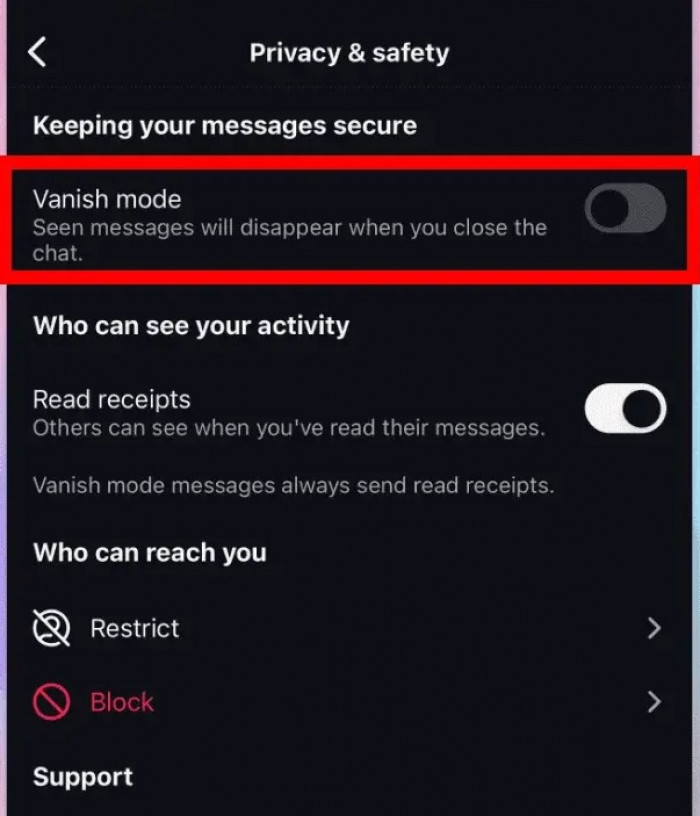
Vanish Mode is an opt-in setting inside a Direct Message thread. Switch it on and everything sent from that point forward becomes temporary: it appears normally while the chat is open, then disappears once the other person has seen it and the conversation is closed.
The mental model that trips people up is picturing a separate, hidden inbox a secret room tucked away somewhere in the app. It is nothing of the sort. It is a mode flipped on and off inside an ordinary chat, a bit like turning a normal conversation into one written in disappearing ink, then turning it back again.
Vanish Mode at a glance
| Where it works | One-on-one Instagram DMs only (no group chats) |
| Launched | 2020 (Instagram; Messenger has since dropped it) |
| Turning it on/off | Swipe up in the chat; both notified; per-chat only, no master switch |
| What vanishes | Everything sent while it’s on, once seen and the chat is closed |
| Screenshot / screen-record alert | Yes shown to both people inside the chat |
| Recoverable later? | No gone from both sides, and not in your data export |
| Reportable after it vanishes? | Yes, for about 14 days |
| Encrypted? | No ephemeral, not end-to-end encrypted |
| Best for | Throwaway, in-the-moment messages |
| Not for | Anything needed later, business chats, or true secrecy |
A short history: where it came from
Vanish Mode arrived in 2020, rolled out across both Instagram and Facebook Messenger as part of Meta’s wider push into disappearing messages, a direct answer to the throwaway, of-the-moment chatter Snapchat had made normal. The pitch was to give a conversation an off switch for permanence without anyone having to leave the app to get it.
The two apps have since drifted apart on this. Messenger dropped its version and folded the disappearing idea into its end-to-end encrypted chats instead, while Instagram kept vanish mode more or less as it launched. That history is part of why the feature can feel like a survivor that now lives in only one half of Meta’s messaging world.
Where it lives and what it isn’t
Vanish Mode sits inside Instagram’s regular DMs, part of the same messaging system that ties Instagram and Messenger together under Meta. There is nothing extra to install and no separate app to open.
Two limits are worth knowing up front. It works only in one-on-one conversations; the swipe-up gesture does nothing in a group chat. And it is a per-conversation toggle rather than an account-wide switch, so turning it on in one thread has no effect on any other.
It also gets muddled with a few neighbouring features it has nothing to do with:
• Close Friends. That controls who can see a Story, not whether messages disappear.
• View Once. A separate tool for sending a single photo or video that self-destructs after one look.
• Unsending a message. That pulls one message you already sent out of a normal, permanent chat.
Vanish Mode is narrower than all of these: a temporary state for a whole back-and-forth, not a setting attached to a single post or message.
How to turn it on and off
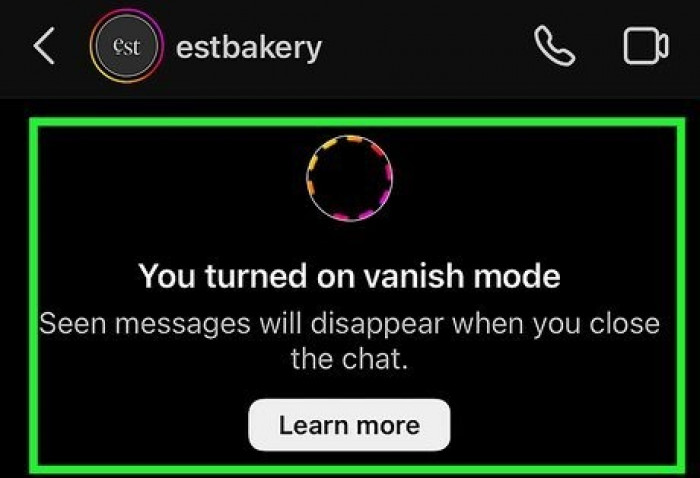
Turning it on takes one gesture. Open a one-on-one DM and swipe up firmly from the bottom of the chat until a “release to turn on vanish mode” prompt appears, then let go. The background darkens and a note confirms the conversation has switched. The same upward swipe turns it back off, and the chat returns to normal. The steps are identical on iPhone and Android, since the feature lives in the app rather than the phone.
Spotting an active vanish-mode chat is easy once the signs are familiar: a darker background, a marker on the conversation, and the disappearing behaviour itself. What catches people out are two quirks. There is no master switch that disables vanish mode everywhere at once it has to be turned off thread by thread. And either person can turn it back on, so a chat that keeps returning to vanish mode usually means the other side is re-enabling it, not a glitch.
One detail matters more than it first appears: both people are told when vanish mode switches on and when it switches off. Nobody can quietly enable it in the background and that single fact ends up shaping how the feature actually gets used.
What disappears and exactly when
Almost everything sendable disappears: text, photos, videos, GIFs, stickers, voice notes, even the little emoji reactions. Where people go wrong is the timing.
Messages don’t vanish the instant they’re sent, and they don’t vanish simply because time has passed. The trigger is two-part: the other person has to have seen the message, and one of the two has to leave or close the chat. While the conversation stays open, everything sits there as normal, and reopening that thread later shows it blank, as though the exchange never happened.
Two smaller limits are worth knowing. Vanish-mode messages can’t be copied or forwarded the way normal ones can, which is part of how the mode discourages saving. And because nothing disappears until it’s been seen, a message fired off in a moment of regret can still be read if the other person opens the chat before it closes sending it and instantly leaving doesn’t unsee it. It also touches only the messages sent while the mode was active; the ordinary history from before stays exactly where it was.
The screenshot truth
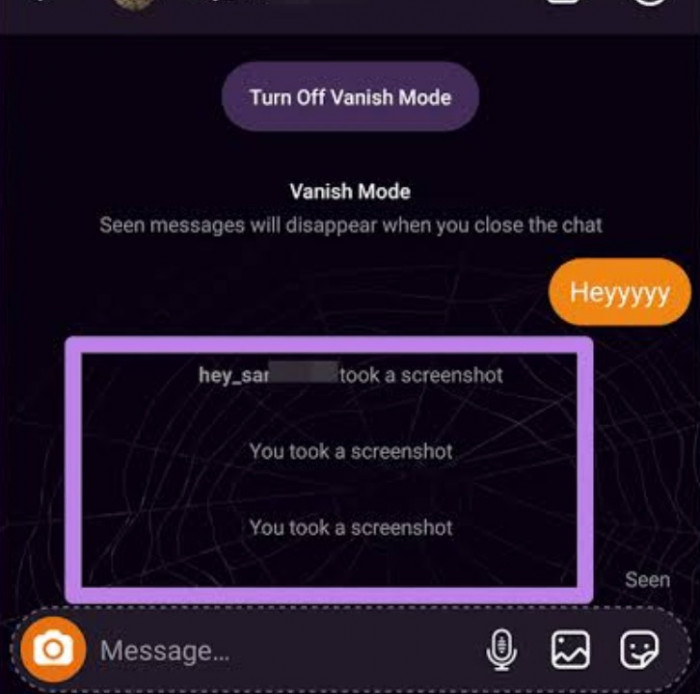
Here is the part that catches almost everyone off guard. On the rest of Instagram, screenshots are silent. A Story, a post, a Reel, a profile, a regular DM capture any of them and the other person is none the wiser.
Vanish Mode is the exception. Take a screenshot or screen-record while a chat is in vanish mode and Instagram drops an alert straight into the conversation, visible to both people, noting that a capture was made. It falls into the same small bucket as View Once photos and videos, which behave the same way.
That one fact quietly dismantles the feature’s reputation as the place for sneaky, off-the-record chatter. The mode people reach for when they want to be discreet is the mode that tells on them.
Ephemeral is not the same as secure
It’s worth being precise about what that alert does and doesn’t do. It is a notice, not a lock. Nothing about vanish mode physically stops a screenshot, it just announces one after the fact.
And a determined person has easy ways around even that. A second phone photographing the screen leaves no trace in the app at all. The safe way to hold it in mind is that vanish mode makes messages disappear from Instagram, not that it makes them impossible to keep.
So the feature guards against some things well and others not at all. It is good at stopping a conversation from hardening into a permanent record, keeping an inbox uncluttered, and making casual re-reading impossible. It does nothing to protect a message from someone who genuinely wants to save it.
Does it really vanish everywhere?
“Disappeared” and “deleted from existence” aren’t the same claim, and the gap between them matters. For the two people in the chat, a vanished message is genuinely gone and unrecoverable it won’t reappear, and it won’t show up in Instagram’s “Download Your Information” export either, because by then there’s nothing left on that end to include.
What happens on Meta’s side is fuzzier. Like most platforms, Meta can hold some data for a period for safety, abuse-handling, and legal reasons, and it is careful never to promise that no copy ever existed. The honest framing is that vanish mode is an ephemeral layer over an ordinary messaging system, not a cryptographic guarantee that the content was never stored.
For a normal user the practical upshot is simple. The people in the conversation can’t get a vanished message back, and neither can a curious third party through ordinary means. That’s real, and it’s enough for the everyday uses vanish mode is good for it just isn’t the same as the content having never touched a server.
Reporting, blocking and the 14-day window
A disappearing message isn’t beyond reach the instant it vanishes. Instagram keeps vanish-mode content on its side for a short window around fourteen days specifically so that abusive or harmful messages can still be reported after they’ve gone from the chat.
That window is a quiet but important safety valve. Someone who receives something threatening, harassing, or otherwise against the rules can report it even though the message has already disappeared from view, and blocking the other person works exactly as it does in a normal chat.
It is a narrow protection, not a broad one. The window is short, it exists for safety reporting rather than personal recovery, and it doesn’t hand the content back to the user. But it does mean “it vanished, so nothing can be done” is not quite true when a message crosses a line.
Vanish Mode vs. the other disappearing tools
Instagram has quietly accumulated several ways to make things disappear, and they’re easy to confuse. They differ in what they apply to, what sets off the disappearance, and most tellingly whether a screenshot gets flagged.
| Feature | What it applies to | What disappears | Screenshot alert? |
| Vanish Mode | A whole one-on-one chat, temporarily | Everything sent while it’s on, once seen and the chat is closed | Yes |
| View Once | A single photo or video in a DM | That one item, after a single view | Yes |
| Disappearing camera media | A photo or video shot in the DM camera | The media, based on its view setting | Yes |
| Unsend / Delete | One message in a normal chat | Just that message, removed for both sides | No |
| Regular DMs | The standing conversation | Nothing, until manually deleted | No |
The pattern down the last column is the real takeaway. Anything Instagram built to disappear is also something it will flag if you screenshot it, and Instagram keeps adding new disappearing options over time. Permanence and privacy move together here: the more temporary the content, the more closely the app watches how it gets captured.
Vanish Mode vs. real privacy tools
For anything that genuinely needs to stay private, it helps to know what vanish mode is not competing with. It isn’t end-to-end encryption, and the two solve different problems. Encryption is about who can read a message in transit; vanish mode is about how long it sticks around in the app afterward. Instagram’s profile privacy controls are similarly specific, including separate ways to limit who can see a following list.
A conversation can be ephemeral without being encrypted, and encrypted without being ephemeral. Vanish mode delivers the first and says nothing about the second. For material with real stakes if it leaked, a dedicated end-to-end encrypted messenger is the tool built for the job, with disappearing options layered on top where they’re offered.
None of this makes vanish mode useless. It just marks the edge of what it’s for: thinning out the traces of casual conversation, not shielding secrets from a determined or technical adversary.
Both people always know
Because switching vanish mode on, switching it off, and screenshotting inside it are all announced, the feature is unusually transparent for something sold as private. There is no version of it that runs silently.
That changes the social meaning of turning it on. It is less a neutral setting than a small signal, a way of saying “let’s keep this one off the record” that the other person sees plainly. With the wrong person, or at the wrong moment, flipping it on can read as loaded, and it’s worth knowing that before making the move.
Why people actually use it
Stripped of the mystique, the real reasons are mundane and reasonable:
• Firing off a throwaway link or a “did you see this” that nobody wants sitting in their DMs a month later.
• Reacting or venting in the moment about something, without leaving a paper trail of a passing bad mood.
• Keeping a spontaneous or flirty exchange light, where a permanent transcript would feel heavier than the conversation actually was.
• Plain tidiness some people simply dislike a cluttered message history and prefer certain chats to clean up after themselves.
None of this requires secrecy. Most of it is about impermanence for its own sake, which is a different and more honest motive than hiding something.
When not to use it
The flip side is a short list of moments where vanish mode works against the person using it. Anything that might be needed later is the obvious one: plans, an address, order details, a message someone’s keeping as a receipt. Once it’s gone, it’s gone from both ends, with no way to bring it back.
Business and professional messaging belongs in normal DMs too. The whole value of a work conversation is the record it leaves behind, so a mode built to erase that record is the wrong tool for the job. Vanish Mode is personal-chat territory, and it’s happiest staying there.
The safety and parenting angle
For parents, vanish mode deserves a clear-eyed look rather than either panic or a shrug. The concern is straightforward: a mode that makes messages, images, voice notes, and reactions disappear after a single viewing can also erase the evidence of conversations a parent would want to know about.
That blind spot is made sharper by two things. There are currently no parental controls that specifically govern vanish mode Instagram’s family supervision tools don’t include an off switch for it. And a teenager can flip it on and back off in a second or two, so a glance at the screen after hearing footsteps in the hallway isn’t a reliable check; the chat can be back to looking normal before anyone reaches the door.
For risks like unwanted sexual messages, grooming, or pressure to open a dodgy link, the disappearing nature is exactly what makes them harder to spot after the fact. The one partial counterweight is the reporting window genuinely harmful messages can still be reported for a short time after they vanish but that depends on someone knowing to act quickly.
The useful response isn’t surveillance theatre. It’s understanding the feature well enough to talk about it plainly, what it does, why a teen might switch it on, and the honest limit that no monitoring setup reliably captures a message built to vanish. A calm, specific conversation tends to do more than any app promising to catch everything.
Myths and misconceptions
A handful of beliefs about vanish mode are both common and wrong, and they’re worth clearing up head-on:
• “It’s completely private and secure.” It’s temporary, not secure and it flags screenshots, which is the opposite of what most people assume.
• “Nobody can tell if I screenshot in vanish mode.” They can, right away, inside the chat, and screen recording triggers the same alert. This is the single most misunderstood thing about the feature.
• “It hides my whole conversation forever.” It only affects messages sent while it’s active; the rest of the thread is untouched, and there’s no permanent hidden archive.
• “Once it vanishes, nothing can ever be done about it.” A harmful message can still be reported for roughly two weeks after it disappears so it’s not entirely beyond reach.
• “It works in group chats.” It doesn’t one-on-one DMs only.
• “An app can tell me who screenshotted my content.” No app can. Instagram doesn’t hand that data to outside developers, so any service claiming to reveal it is guessing at best and, at worst, phishing for login details. Those are the ones to steer well clear of.
Troubleshooting and common questions
A few situations come up again and again:
• Turned it on by accident? Swipe up once more to switch it off. Only the messages sent while it was active are affected; the normal conversation is fine.
• Can’t find it, or the swipe does nothing? The usual reason is being in a group chat, where it doesn’t exist at all. It also needs a reasonably current version of the app; if it still won’t budge, logging out and back in tends to clear a stuck toggle.
• Is there a way to turn it off for every chat at once? No. There’s no master switch vanish mode is handled one conversation at a time.
• Can I copy, forward, or save a vanish-mode message? No. Copying and forwarding are disabled, and a screenshot or screen recording alerts the other person.
• Can business accounts use it? Yes, it works the same on business and personal accounts though the record-keeping reasons to avoid it for work still apply.
• Does the other person get notified? Yes when it turns on, when it turns off, and if either side takes a screenshot or screen recording.
• Can vanished messages be recovered? No. Once they’ve been seen and the chat closed, they’re gone from both accounts and won’t appear in a data export. That permanence is the whole point, and it applies to the sender just as much as the recipient.
How Instagram compares to other apps
Screenshot behaviour varies a lot from app to app, which is part of why vanish mode surprises people; it doesn't match Instagram’s own norm, let alone everyone else’s.
| App | Notifies the sender of screenshots? |
| Only for disappearing DM content Vanish Mode and View Once | |
| Snapchat | Yes, broadly snaps, chats, and Stories |
| No (though View Once media can’t be screenshotted on newer versions) | |
| TikTok | No |
| X (Twitter) | No |
Instagram sits in the middle of the pack. It leaves all its public-facing content unwatched, the way most apps do, then switches on alerts specifically for the disappearing stuff, a narrow, deliberate exception rather than a blanket policy.
Bottom Line
Vanish Mode is best understood by what it isn’t. It isn’t a vault, it isn’t a secret inbox, and it isn’t a way to say something that can’t be traced. It’s an ephemerality tool with a social signal attached, a way to keep in-the-moment chatter from hardening into a permanent record.
Used for that, it’s genuinely handy. Used as a shield for anything that truly needs to stay private, it fails in the most public way possible: by announcing the screenshot as it happens, while quietly leaving a short-lived trail on Meta’s side for safety.
The rule that keeps people out of trouble is short. Reach for vanish mode when a message simply shouldn’t last, and never when it must stay secret. Those are two different jobs, and it only does the first one.
Key takeaways • Vanish Mode makes a one-on-one DM temporary, not secret. • It launched in 2020 across Instagram and Messenger; Messenger later dropped it, Instagram kept it. • It’s one of the only places on Instagram where a screenshot or screen recording is flagged to the other person. • Vanished messages can’t be recovered by either side and won’t show in a data export but Meta may hold content briefly for safety. • Harmful messages can still be reported for roughly two weeks after they disappear. • It’s ephemeral, not encrypted; for truly sensitive material it isn’t the right tool. • Match it to the message: fine for things that shouldn’t last, wrong for things that must stay private. |
Comments