

In today’s data-driven economy, businesses generate more information than ever before. Marketing campaigns, customer interactions, website behavior, sales performance everything leaves a digital footprint. Yet for many organizations, the real challenge is not collecting data; it’s understanding it.
Spreadsheets grow complicated. Dashboards become overwhelming. Hiring data scientists can be expensive. And often, valuable insights remain hidden in raw numbers.
This is where Akkio positions itself as a transformative solution. Designed to make artificial intelligence accessible to everyday business users, Akkio enables companies, particularly marketing teams and agencies to analyze, predict, and act on their data without writing a single line of code.
This article explores Akkio in depth: what it is, how it works, who it serves, and why it is increasingly relevant in the modern analytics landscape.
What Is Akkio?
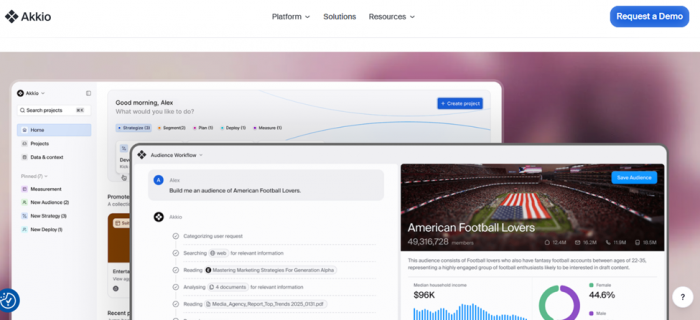
At its core, Akkio, is a no-code AI analytics platform built to help businesses turn raw data into meaningful, actionable insights. Unlike traditional analytics tools that require technical expertise, Akkio emphasizes simplicity and usability.
The platform integrates with existing data sources and allows users to interact with their datasets in intuitive ways. Instead of manually building complex models or formulas, users can leverage artificial intelligence to automate data analysis, forecasting, and segmentation.
What distinguishes Akkio is its focus on accessibility. It removes the traditional barriers associated with machine learning and predictive analytics, making advanced data capabilities available to marketing professionals, strategists, and business leaders, not just data scientists.
How Akkio Works
Here is a clear, structured breakdown of how Akkio works from start to finish:
Step 1: Connect Your Data Sources
The first step is integrating your data into the platform. Akkio allows users to connect data from sources such as:
● CRM systems
● Marketing platforms
● Advertising accounts
● Spreadsheets (CSV files)
● Cloud storage or databases
The goal here is to centralize your data so it can be analyzed in one unified workspace.
Step 2: Prepare and Clean the Data
Once data is uploaded, Akkio automatically helps structure and organize it.
This includes:
● Identifying data types (numbers, dates, categories)
● Handling missing values
● Standardizing formats
Unlike traditional tools, you don’t need to manually write formulas or scripts. The platform simplifies data preparation so it’s ready for analysis.
Step 3: Define Your Objective
Next, you tell Akkio what you want to achieve. For example:
● Predict which leads will convert
● Forecast sales for the next quarter
● Identify customers likely to churn
● Determine which campaign will perform best
You choose your “target variable” (the outcome you want to predict), and the system takes over from there.
Step 4: Automatic Model Building
Akkio automatically builds and trains machine learning models using your historical data.
Behind the scenes, it:
● Tests multiple algorithms
● Optimizes model performance
● Evaluates prediction accuracy
This process typically requires data science expertise, but Akkio handles it automatically.
Step 5: Generate Predictions & Insights
Once the model is trained, Akkio generates predictions based on patterns in your data.
For example:
● Probability that a customer will make a purchase
● Expected revenue from a campaign
● Likelihood of customer churn
These predictions are presented in an easy-to-understand format with visual dashboards and confidence scores.
Step 6: Explore Data Through Natural Language
One of Akkio’s standout features is conversational analytics.
Users can:
● Ask questions in plain English
● Request summaries
● Generate reports instantly
Instead of building complex dashboards, you can simply interact with your data like a conversation.
Step 7: Segment and Act
Akkio allows you to create actionable segments based on AI predictions.
For instance:
● High-value customers
● High-risk churn users
● High-converting leads
These segments can then be exported or integrated back into marketing platforms for targeted campaigns.
Step 8: Monitor and Optimize
Finally, Akkio enables continuous monitoring.
As new data flows in:
● Models update
● Predictions improve
● Performance can be tracked over time
This ensures your insights remain current and aligned with real-world trends.
Key Features Explained in Depth
Conversational Data Exploration
One of Akkio’s most compelling features is its natural-language interaction. Rather than navigating complex dashboards or writing SQL queries, users can type questions in plain English.
This conversational capability dramatically lowers the learning curve. Business teams can extract insights quickly, without waiting for technical teams to generate reports. It transforms data analysis from a specialized task into an everyday workflow.
Predictive Analytics Without Complexity
Predictive analytics has long been associated with advanced data science. Akkio simplifies this process.
The platform can forecast outcomes such as customer churn, sales performance, campaign conversions, and revenue trends. It does this by identifying historical patterns and applying them to future projections.
For example, a marketing agency could use Akkio to predict which audience segment is most likely to engage with a new campaign. An eCommerce brand could forecast repeat purchases. These predictive capabilities help businesses move from reactive decision-making to proactive strategy.
Intelligent Audience Segmentation
Modern marketing relies heavily on targeting the right audience. Akkio uses AI to segment customers based on behavior, demographics, and performance metrics.
Instead of manually filtering lists or relying on assumptions, businesses can identify high-value customers or at-risk accounts using data-driven models. This improves personalization, increases campaign effectiveness, and reduces wasted ad spend.
Automated Reporting and Visualization
Reporting often consumes significant time and effort. Akkio streamlines this by generating automated reports and visual dashboards.
Teams can quickly share insights with stakeholders, leadership, or clients without spending hours preparing presentations. This not only saves time but also ensures consistency and accuracy in reporting.
Who Is Akkio Designed For?
While Akkio can serve a range of industries, it is particularly well-suited for:
● Marketing agencies managing multiple client campaigns
● Growth teams focused on performance optimization
● Media buyers seeking data-backed targeting strategies
● Business analysts who need rapid insights
● Organizations without dedicated data science teams
The platform’s emphasis on no-code functionality makes it accessible to non-technical professionals who still require sophisticated analytics capabilities.
Real-World Applications
| Industry / Function | Business Challenge | How Akkio Is Used | Practical Outcome |
| Digital Marketing Agencies | Difficulty predicting campaign performance before spending budget | Uses historical campaign data to forecast ROI, conversions, and engagement | Smarter budget allocation and improved campaign profitability |
| eCommerce Businesses | Identifying customers likely to make repeat purchases | Builds predictive models based on purchase history and browsing behavior | Higher retention rates and better-targeted email campaigns |
| SaaS Companies | Customer churn affecting recurring revenue | Analyzes user activity data to predict churn risk | Early intervention strategies that improve customer retention |
| Media Buying Teams | Optimizing ad targeting and audience selection | Segments audiences based on performance probability scores | Reduced ad spend waste and higher conversion rates |
| Sales Teams | Low lead conversion efficiency | Scores leads based on likelihood to convert | Prioritized outreach and improved close rates |
| Financial Planning Teams | Inaccurate revenue forecasting | Applies predictive analytics to historical revenue data | More accurate financial projections and budgeting decisions |
| Customer Success Teams | Identifying at-risk accounts too late | Detects behavioral warning signals using AI models | Proactive engagement and stronger client relationships |
| Retail Businesses | Stock mismanagement due to unpredictable demand | Forecasts product demand using sales trends | Optimized inventory and reduced overstock/shortage issues |
| Startups & Growth Teams | Limited resources for data science expertise | Uses no-code AI to generate insights without technical teams | Faster data-driven decisions without hiring additional specialists |
Why These Applications Matter
Across these scenarios, the core value remains consistent:
· Turning raw data into forward-looking insights
· Reducing guesswork in decision-making
· Automating complex analytics processes
· Empowering non-technical teams to leverage AI
Rather than being confined to a single industry, Akkio’s predictive and conversational analytics capabilities make it adaptable to multiple business environments.
Benefits and Potential Limitations of Akkio
Below is a clear side-by-side comparison table outlining both the strengths and considerations of using Akkio.
| Category | Benefits of Using Akkio | Potential Limitations |
| Ease of Use | No-code interface makes AI accessible to non-technical users. | Users still need basic data literacy to interpret results correctly. |
| Speed & Efficiency | Automates data preparation, model building, and reporting, saving significant time. | Initial setup and data integration may require careful configuration. |
| Predictive Capabilities | Enables forecasting, lead scoring, churn prediction, and revenue estimation without data science expertise. | Prediction accuracy depends heavily on the quality and volume of historical data. |
| Cost Efficiency | Reduces the need to hire dedicated data scientists for routine modeling tasks. | Enterprise-level features and pricing may not be ideal for very small businesses. |
| Marketing Optimization | Improves campaign targeting, segmentation, and ROI through AI-driven insights. | Primarily optimized for marketing and growth use cases; may be less tailored for highly technical industries. |
| Automation | Automatically updates models as new data flows in, ensuring up-to-date insights. | Over-reliance on automation may reduce deeper manual analytical exploration. |
| Collaboration & Reporting | Easy-to-share dashboards and reports enhance team collaboration. | Customization options may not match highly advanced BI platforms. |
| Scalability | Suitable for growing teams that want scalable AI-powered analytics. | Organizations with extremely complex data ecosystems may require additional integrations. |
How Akkio Compares to Traditional Tools
When evaluating Akkio, it’s helpful to compare it not just with “traditional tools” in general, but with specific alternatives businesses commonly consider. These alternatives fall into three main categories:
1. Business Intelligence (BI) platforms
2. No-code machine learning platforms
3. Enterprise AI / data science platforms
Akkio vs Tableau
Core Focus Tableau
Tableau is primarily a data visualization and dashboarding tool. It excels at transforming complex datasets into interactive charts and reports.
Akkio, on the other hand, focuses more on predictive analytics and automated AI modeling rather than just visualization.
Key Differences
Tableau Strengths
● Highly customizable dashboards
● Deep drill-down capabilities
● Strong enterprise adoption
● Advanced visual storytelling
Tableau Limitations
● Requires technical setup (data modeling, joins, calculated fields)
● Predictive analytics is limited unless integrated with external tools
● Often requires trained analysts
Where Akkio Stands Out
● Automatically builds predictive models
● No-code AI forecasting
● Natural language queries
● Faster setup for marketing teams
Best For
● Tableau: Enterprises needing complex dashboards
● Akkio: Marketing and growth teams seeking predictive insights quickly
Akkio vs Microsoft Power BI
Core Focus Microsoft
Power BI is a Microsoft ecosystem BI tool designed for reporting and dashboarding with strong Excel and Azure integration.
Akkio prioritizes AI-driven forecasting and automation over manual dashboard construction.
Key Differences
Power BI Strengths
● Cost-effective licensing (especially within Microsoft ecosystem)
● Strong integration with Excel, Azure, SQL Server
● Custom reports and enterprise governance
Power BI Limitations
● Requires knowledge of DAX formulas and data modeling
● Predictive modeling often requires Azure ML or external tools
● Setup complexity for large datasets
Where Akkio Stands Out
● Built-in machine learning
● Automated churn, lead scoring, revenue predictions
● No need for DAX or technical modeling
Best For
● Power BI: Organizations already invested in Microsoft stack
● Akkio: Teams wanting AI capabilities without technical barriers
Akkio vs Looker

Core Focus Looker
Looker (now part of Google Cloud) is a powerful enterprise BI platform that emphasizes centralized data modeling and governance.
Akkio focuses more on ease of use and predictive modeling rather than centralized data architecture.
Key Differences
Looker Strengths
● Strong enterprise governance
● Centralized data modeling layer
● Designed for large-scale cloud data warehouses
Looker Limitations
● Requires technical setup and modeling (LookML)
● Implementation may require engineering resources
● Not primarily built for predictive AI
Where Akkio Stands Out
● Quick implementation
● Marketing-focused predictive insights
● Conversational analytics
Best For
● Looker: Large enterprises with complex cloud data warehouses
● Akkio: Mid-sized businesses seeking quick AI insights
Akkio vs DataRobot
Core Focus Datarobot
DataRobot is a full-scale enterprise AI platform designed for data scientists and machine learning professionals.
Akkio is a no-code AI tool built for business users.
Key Differences
DataRobot Strengths
● Advanced machine learning customization
● Extensive algorithm selection
● Deep enterprise-level AI governance
DataRobot Limitations
● Expensive enterprise pricing
● Designed primarily for technical teams
● Longer implementation cycle
Where Akkio Stands Out
● No coding required
● Faster deployment
● More accessible for marketing and growth teams
Best For
● DataRobot: Large enterprises with data science teams
● Akkio: Teams without ML engineers
Akkio vs Google Analytics
Core Focus Google Analytics
Google Analytics is a web analytics tool for tracking website traffic and user behavior.
Akkio goes beyond tracking by applying predictive AI to broader business datasets.
Key Differences
Google Analytics Strengths
● Free (basic version)
● Excellent web traffic tracking
● Real-time behavior insights
Google Analytics Limitations
● Limited predictive capabilities
● Focused mainly on website data
● Not built for advanced forecasting or churn prediction
Where Akkio Stands Out
● Cross-platform predictive modeling
● Customer segmentation and scoring
● Revenue and conversion forecasting
Best For
● Google Analytics: Website performance tracking
● Akkio: Predictive business intelligence across multiple datasets
Overall Positioning of Akkio Among Alternatives
Akkio occupies a middle ground between traditional BI and enterprise AI platforms:
● Less technical than DataRobot
● More predictive than Tableau or Power BI
● Faster to deploy than Looker
● Broader forecasting capability than Google Analytics
It is particularly strong in:
● Marketing analytics
● Growth optimization
● Lead scoring
● Campaign forecasting
● Churn prediction
Final Verdict
As organizations continue to prioritize data-driven strategies, the demand for accessible AI solutions will only grow. Akkio represents a meaningful shift in how businesses approach analytics moving from complexity and specialization toward simplicity and empowerment.
By eliminating technical barriers, automating predictive modeling, and enabling conversational data interaction, Akkio makes advanced analytics attainable for everyday business users.
For companies seeking to unlock the value hidden within their data without investing heavily in technical infrastructure Akkio is a platform worth serious consideration.
Frequently Asked Questions (FAQs) About Akkio
Below are additional questions readers often ask when evaluating Akkio. These points expand on areas not typically covered in general feature or comparison discussions.
Does Akkio require installation or is it cloud-based?
Akkio is a cloud-based platform. Users do not need to install software locally or manage servers. Access is provided through a web interface, making it convenient for distributed teams and remote collaboration.
What types of data formats does Akkio support?
Akkio supports structured data formats such as CSV files and integrations from common business platforms. It is designed to work with tabular datasets that include measurable variables like dates, numeric values, and categorical attributes. Extremely unstructured data (e.g., raw text without formatting) may require preprocessing before upload.
How much historical data is required for accurate predictions?
While there is no strict minimum, predictive accuracy improves with more high-quality historical data. Generally, datasets with consistent historical patterns and sufficient records produce more reliable forecasts. Sparse or inconsistent datasets may limit model performance.
Can Akkio be used by small businesses or startups?
Yes, startups and small businesses can benefit from Akkio, particularly if they rely heavily on marketing performance and customer analytics. However, the value depends on the amount of usable data available. Businesses with very limited data may not fully leverage its predictive capabilities.
Is Akkio suitable for industries outside marketing?
Although Akkio is particularly strong in marketing and growth analytics, it can also be applied to other industries such as SaaS, retail, finance, and customer success operations provided the use case involves structured, measurable data suitable for predictive modeling.
How secure is data stored within Akkio?
As a professional AI analytics platform, Akkio follows industry-standard security practices, including secure data transmission and enterprise-level safeguards. Organizations handling sensitive data should review compliance certifications and internal policies to ensure alignment with their regulatory requirements.
Does Akkio replace a data analyst or data science team?
Akkio does not necessarily replace data professionals but can reduce dependency on them for routine predictive tasks. It empowers business users to perform advanced analysis independently, while data experts may still oversee governance, strategy, and complex modeling.
Can Akkio integrate with existing BI tools?
In many cases, Akkio can complement existing BI ecosystems. Businesses may use traditional dashboard tools for reporting and leverage Akkio specifically for predictive insights and segmentation, creating a layered analytics approach.
How steep is the learning curve?
Compared to traditional analytics platforms, Akkio has a relatively gentle learning curve due to its no-code and conversational interface. However, understanding basic data concepts such as variables, targets, and historical trends remains beneficial for maximizing results.
How quickly can businesses see results?
Depending on data readiness, organizations can often generate predictive models within hours or days of connecting datasets. The speed largely depends on data quality, integration setup, and clarity of objectives.
Comments