

Getimg.ai has emerged as a powerful and flexible solution for generating and editing images using artificial intelligence.
Getimg.ai is designed to simplify the creative process by allowing users to generate high-quality visuals directly from text descriptions. Instead of manually designing graphics, users simply describe the image they want, and the platform produces multiple AI-generated results within seconds. Beyond basic image generation, the platform also offers a variety of advanced tools such as AI image editing, custom model training, and creative canvas features that allow users to refine and expand their ideas visually.
Because of its wide range of capabilities, Getimg.ai has become popular among digital artists, marketers, designers, content creators, and even developers who want to integrate AI-generated visuals into their projects. The platform combines powerful AI models with a user-friendly interface, making it accessible to beginners while still offering advanced functionality for experienced users.
This article provides a comprehensive overview of Getimg.ai, exploring its features, workflow, pricing, advantages, limitations, and practical applications.
What is Getimg.ai?
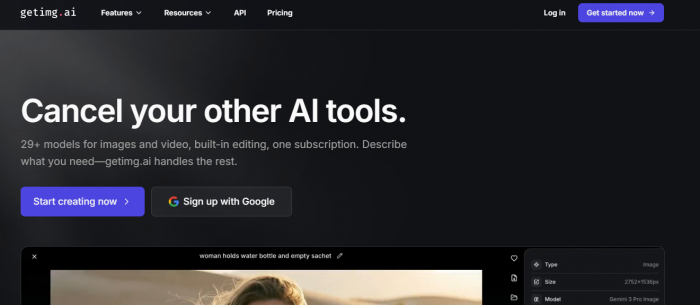
Getimg.ai is an AI-powered creative platform that enables users to generate, modify, and enhance images using advanced machine learning models. At its core, the platform is built around modern generative AI technologies that can interpret written prompts and convert them into detailed visual outputs.
The primary function of Getimg.ai is text-to-image generation, which allows users to describe an image using natural language and have the AI generate a visual interpretation of that description. For example, a prompt such as “a futuristic city skyline at sunset with neon lights and flying vehicles” can produce several visually rich variations within seconds.
However, the platform goes far beyond simple image generation. It also offers tools for editing existing images, expanding image compositions, and training custom AI models that can replicate specific visual styles or subjects. This combination of generation and editing tools transforms Getimg.ai into a comprehensive visual creation suite.
One of the key technologies behind the platform is the widely known open-source AI model Stable Diffusion, which has become a cornerstone of many modern AI art tools. By building on such powerful models and providing a streamlined interface, Getimg.ai allows users to experiment with AI creativity without needing technical expertise.
Key Features of Getimg.ai
A major reason for the growing popularity of Getimg.ai lies in the range of creative features it provides. The platform integrates several AI-driven tools that enable users to generate images, edit visuals, and customize outputs according to their needs.
Text-to-Image Generation
The most prominent feature of Getimg.ai is its ability to generate images directly from textual descriptions. Users simply enter a prompt describing the desired scene, object, or style, and the AI produces multiple visual interpretations.
This capability is particularly useful for artists and content creators who want to quickly transform ideas into visual concepts. It can generate everything from realistic photographs to stylized illustrations, fantasy scenes, product images, and conceptual artwork.
Image-to-Image Transformation
In addition to generating images from scratch, Getimg.ai allows users to upload an existing image and transform it using AI. This feature enables users to apply new artistic styles, modify elements, or enhance the visual appearance of an image while preserving the original composition.
For instance, a basic sketch can be converted into a detailed digital painting, or a photograph can be stylized into an anime or cinematic aesthetic.
AI Canvas for Creative Editing
The platform includes an interactive AI Canvas, which serves as a workspace for editing and expanding images. This tool allows users to manipulate visuals in a more flexible way, enabling them to extend images beyond their original borders or replace certain elements.
The canvas supports techniques such as inpainting, where specific areas of an image can be modified or regenerated, and outpainting, which allows the AI to expand an image into new areas while maintaining visual consistency. These features are particularly useful for creative experimentation and storytelling.
Custom AI Model Training
One of the more advanced capabilities of Getimg.ai is the ability to train custom AI models. Through technologies such as DreamBooth, users can teach the AI to recognize a specific subject, character, or style.
For example, a brand could train the AI using product images so that it can generate marketing visuals featuring the same product in different settings. Similarly, artists can train the model to replicate their own artistic style.
Access to Multiple AI Models
The platform offers access to a variety of AI models, allowing users to choose the one that best suits their creative needs. Some models focus on photorealistic images, while others specialize in artistic or stylized outputs.
This flexibility ensures that users are not limited to a single visual style and can experiment with different approaches to image creation.
How Getimg.ai Works
Using Getimg.ai is relatively straightforward, even for beginners who have never used AI image generation tools before. The platform is designed to streamline the creative workflow so that users can focus on their ideas rather than technical complexities.
The process usually begins with creating an account on the platform and accessing the image generation dashboard. Users then enter a text prompt describing the image they want to create. The AI processes this prompt and generates several visual variations based on the description.
Once the images are generated, users can refine them further by adjusting parameters such as resolution, style, or creativity level. If needed, the generated images can also be edited using the AI canvas or transformed using image-to-image features.
This iterative workflow allows users to gradually refine their ideas until they achieve the desired visual outcome.
User Experience and Interface
The overall user experience of Getimg.ai is often described as a balance between simplicity for beginners and flexibility for advanced users. Feedback from software review platforms such as G2, Trustpilot, and Reddit discussions reveals a range of perspectives, highlighting both the strengths and limitations of the platform’s interface.
Interface Design and Ease of Navigation
One of the most frequently mentioned advantages of Getimg.ai is its clean and relatively intuitive interface. On platforms like G2, verified users often emphasize how the dashboard consolidates several creative tools in one place. Instead of switching between multiple applications for image generation, editing, and enhancement, the platform provides a unified environment where users can generate images, upscale them, and edit them within the same workspace. (G2)
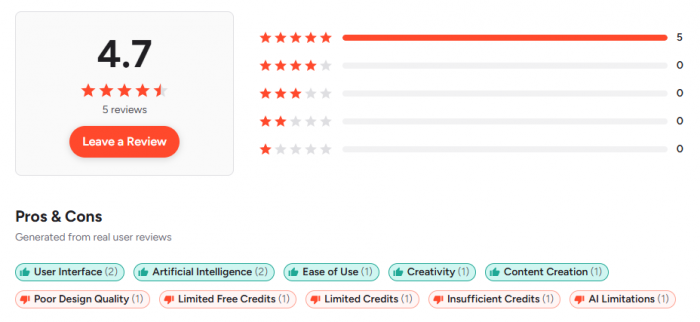
This integration significantly improves workflow efficiency. According to one G2 reviewer, the ability to generate images and immediately adjust them with built-in editing tools makes the tool feel more like a creative assistant rather than just a prompt-based generator. The reviewer also noted that watching images appear in real time while adjusting prompts can make the creative process more interactive and iterative.
Another aspect frequently praised by users is the minimal learning curve. Even individuals without technical expertise or experience in AI art tools can quickly understand how the platform works. Reviews mention that image generation often takes only a few seconds, and the editing tools are directly accessible from the main interface, which reduces complexity for beginners.
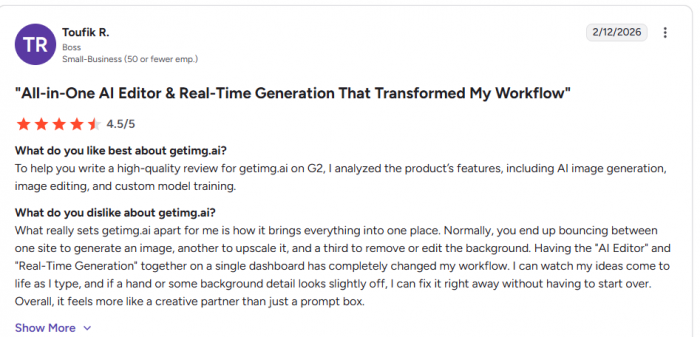
Community discussions on Reddit also echo this perspective. In one review shared by a user after several weeks of testing the tool, the interface was described as “intuitive” and easy to navigate, particularly when using the AI Canvas for editing and inpainting.
Workflow and Creative Interaction
Another important component of user experience is the platform’s workflow design. Getimg.ai allows users to move smoothly from one stage of the creative process to another. The process typically begins with writing a prompt, selecting a model or style, generating images, and then refining those results through editing tools.
This workflow is especially helpful for designers and marketers who need to generate multiple visual variations quickly. According to reviews on G2, the integrated AI editor enables users to fix details such as backgrounds or distorted elements without restarting the entire generation process.
Reddit users have also highlighted the usefulness of the AI Canvas, which allows creators to extend images or modify specific regions through techniques such as inpainting and outpainting. These tools make the platform more interactive compared to basic AI image generators that only produce static outputs.
Speed and Responsiveness
Speed plays a major role in user satisfaction, and many users report that the platform generates images very quickly, often within seconds. Fast generation speeds help maintain creative momentum, especially when experimenting with multiple prompts or visual styles.
However, community feedback suggests that performance may occasionally fluctuate depending on server load or request volume. Some Reddit discussions mention temporary slowdowns when generating many images simultaneously, although such issues appear to be intermittent rather than constant.
Flexibility and Customization
The interface also provides a degree of customization that appeals to more experienced users. Advanced options allow users to modify generation parameters such as image resolution, sampling methods, and prompt weighting.
For users familiar with AI art tools, these controls provide deeper creative flexibility. At the same time, beginners can ignore these advanced settings and rely on the default options, which keeps the platform accessible.
The presence of multiple AI models and editing features within the same interface further expands creative possibilities. Users can experiment with different styles, refine details, and adjust results without leaving the platform.
Limitations and User Criticism
Despite many positive aspects, some users have raised concerns about the interface and overall user experience. Reviews on Trustpilot indicate that certain users found aspects of the interface confusing or poorly explained. One reviewer reported that the default model settings were unclear and caused credits to be consumed unexpectedly, which led to frustration during the initial user experience. (Trustpilot)
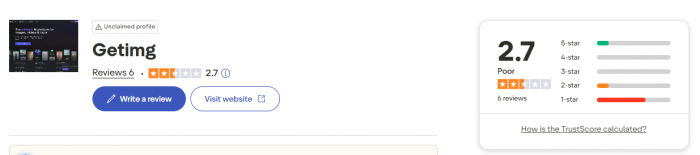
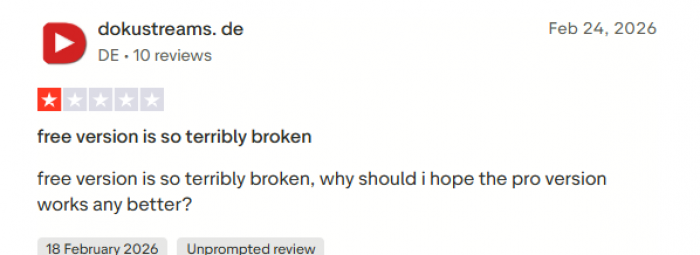
Other criticisms focus on customer support and the credit-based system. Some users felt that credits could be used up quickly when experimenting with high-resolution images or advanced features.
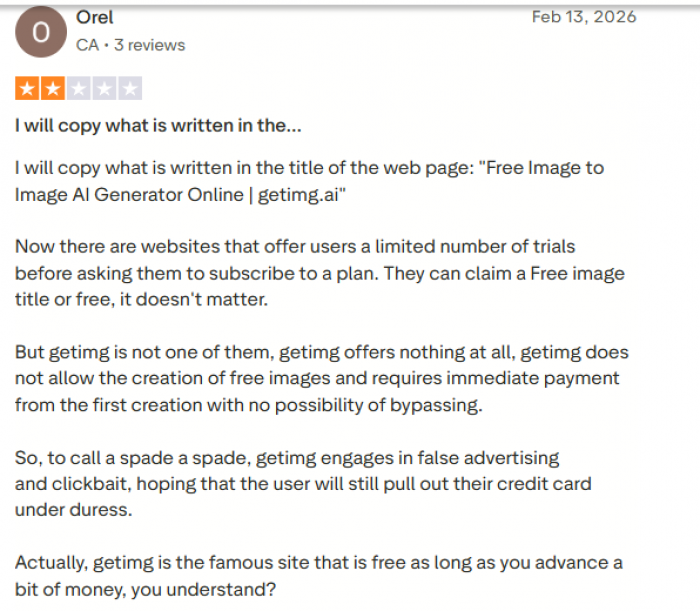
Community discussions also mention occasional glitches in features like outpainting, where the AI may generate slightly distorted results when expanding images beyond their original borders.
Overall User Experience
When evaluating the overall interface and usability of Getimg.ai, most feedback suggests that the platform offers a smooth and accessible experience, especially for users who are new to AI-generated visuals. Its combination of prompt-based generation, integrated editing tools, and customizable settings creates a workflow that supports both experimentation and productivity.
While the platform is not without its limitations particularly regarding credits and occasional interface confusion the majority of user feedback indicates that it provides a practical and efficient environment for generating and editing AI-powered imagery.
For many creators, the interface strikes a useful balance between simplicity and creative control, making Getimg.ai a compelling option in the growing ecosystem of AI image generation tools.
Practical Use Cases
The versatility of Getimg.ai allows it to be used in a wide variety of creative and professional scenarios. Digital artists often use the platform to generate concept art or explore new visual styles. By experimenting with prompts, they can quickly generate ideas for illustrations, characters, or environments.
Marketing professionals frequently rely on AI image generators to produce promotional graphics, advertising visuals, and social media content. Instead of relying solely on stock photos, marketers can create unique visuals tailored specifically to their campaigns.
Game developers and filmmakers also benefit from the platform’s ability to generate concept art and visual references. AI-generated imagery can serve as a starting point for designing characters, landscapes, and storyboards.
Even bloggers and website owners can use the tool to create custom illustrations that enhance their content and improve visual storytelling.
Pricing and Plans
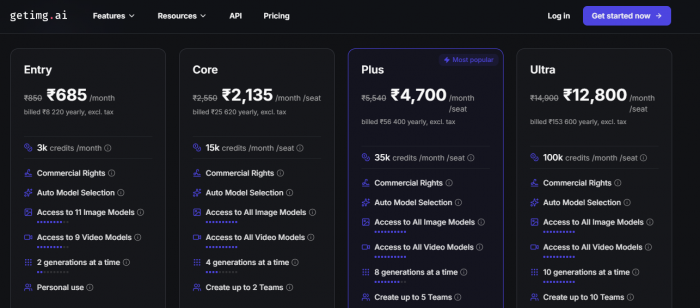
The pricing structure of Getimg.ai is designed around a credit-based subscription model, allowing users to generate AI images, videos, and edits depending on the number of credits included in their plan. Each time a user generates or edits visual content, a certain number of credits is consumed. The platform offers a free tier for beginners and several paid plans for creators, professionals, and teams, making it scalable for different levels of usage.
A key advantage of this system is flexibility. Casual users can experiment with a limited number of credits, while professionals who need large volumes of AI-generated visuals can subscribe to higher-tier plans with significantly more monthly credits.
Free Plan
The free plan is intended for users who want to explore the platform before purchasing a subscription. It typically provides around 120 credits per day for generating AI images and experimenting with basic editing tools. However, the plan includes several limitations. For instance, users can usually run only one generation at a time, and generated content is stored for a limited period of about 30 days.
While the free version does not provide the full range of features, it still allows beginners to test AI image generation and understand how the prompt-based workflow functions. For bloggers, students, and hobbyists experimenting with AI art, this plan provides a useful starting point.
Entry Plan
The Entry plan is the first paid tier and costs $10 per month (or around $8 per month when billed annually). It includes 3,000 credits per month, which significantly expands the number of images users can generate.
Subscribers gain several additional benefits, including commercial usage rights, meaning the generated images can be used in marketing campaigns, websites, and other professional projects. The plan also provides access to 11 AI image models and 9 video models, allowing users to experiment with different styles and outputs. Another advantage is the ability to run two image generations simultaneously, which improves productivity when testing multiple prompts or creating variations.
Because of its affordability and expanded features, the Entry plan is often suitable for freelancers, bloggers, and small content creators who regularly need AI-generated visuals.
Core Plan
The Core plan, priced at $30 per month per seat (or $25 monthly when billed annually), is designed for users who generate AI content more frequently. This plan includes 15,000 credits per month, offering a substantial increase in generation capacity.
Unlike the Entry plan, the Core plan provides access to all available AI image and video models, giving users greater creative flexibility. It also supports four simultaneous generations, which allows creators to generate multiple visual variations at the same time.
Another important feature of this plan is team collaboration. Users can create up to two teams, enabling small creative groups or marketing teams to work together on shared projects. This makes the Core plan particularly useful for design teams, digital agencies, and professional creators who need a collaborative environment.
Plus Plan
The Plus plan, which costs $65 per month per seat (or about $55 per month when billed annually), is considered the most popular option on the platform. It includes 35,000 monthly credits, making it ideal for users who need high-volume AI content generation.
In addition to full access to all image and video models, the plan allows users to run eight generations simultaneously, dramatically increasing productivity during large creative projects. It also expands team functionality by allowing users to create up to five collaborative teams.
Another key benefit of the Plus plan is the ability to purchase additional credits, known as credit top-ups. This ensures that users can continue generating images even if they exceed their monthly credit allocation.
Ultra Plan
For organizations and high-volume users, the Ultra plan offers the highest level of performance. It costs $175 per month per seat (or approximately $150 per month when billed annually) and provides 100,000 credits per month.
This plan allows up to ten simultaneous generations, making it suitable for production-level workloads such as large marketing campaigns, creative studios, or content platforms that require thousands of images each month.
The Ultra plan also supports larger collaborative teams, enabling up to ten teams to work together on projects within the same platform. Like the Plus plan, it also includes the ability to purchase additional credits if needed.
Understanding the Credit System
Credits serve as the central unit of usage on the platform. Each generated image, video, or editing operation consumes a certain number of credits depending on the model, resolution, and complexity of the task. Higher-quality images or advanced models typically require more credits than basic generations.
Because credits reset each month with the subscription cycle, users must plan their usage accordingly. Heavy users who require more credits can either upgrade to a higher plan or purchase additional credits.
Comparison with Similar AI Tools
The AI image generation market has grown rapidly, with several platforms offering tools for creating visuals from text prompts. While Getimg.ai provides a comprehensive suite for generating and editing images, other platforms such as Midjourney, DALL-E, Leonardo AI, and Stable Diffusion also play significant roles in the AI creative ecosystem.
Each of these tools offers different strengths in terms of image quality, pricing structure, customization options, and user accessibility. The table below provides a detailed comparison to help readers understand how Getimg.ai stands against other leading AI image generators.
| Feature / Platform | Getimg.ai | Midjourney | DALL-E | Leonardo AI | Stable Diffusion |
| Platform Type | Web-based AI image generator and editor | AI art generator focused on artistic visuals | AI image generator integrated with OpenAI tools | AI art generation platform for creative assets | Open-source AI image generation model |
| Core Functionality | Text-to-image generation, AI editing, model training | Text-to-image artistic generation | Text-to-image and image editing | Image generation, game assets, custom models | Text-to-image generation with customizable models |
| Editing Tools | AI canvas with inpainting and outpainting | Limited editing (variations and upscaling) | Image editing and variations supported | Advanced canvas and editing tools | Editing possible through external tools |
| Custom Model Training | Supported through DreamBooth models | Not available | Not available | Available for characters and styles | Fully customizable since it is open-source |
| Ease of Use | Beginner-friendly web interface | Requires Discord or web interface workflow | Very easy through integrated UI | Simple dashboard with presets | Requires technical setup for many users |
| Free Plan Availability | Yes, limited credits | No free plan currently available | Limited free generations via ChatGPT | Free tier with daily tokens | Free if run locally |
| Starting Price | Around $10/month for entry plan | Around $10/month for Basic plan | ~$20/month via ChatGPT Plus | Around $12/month | Free (self-hosted) |
| Best Known For | Integrated generation and editing tools | High-quality artistic images | Strong prompt interpretation and integration with AI ecosystem | Game assets and creative concept art | Flexibility and open-source customization |
| Commercial Use | Available on paid plans | Available with subscription plans | Commercial use allowed | Available on paid tiers | Depends on implementation |
| Ideal Users | Designers, marketers, creators | Digital artists and illustrators | Businesses and developers | Game designers and creative professionals | Developers and AI enthusiasts |
Safety, Privacy, and Ethical Considerations
As with many AI-powered creative platforms, users should consider the ethical implications of AI-generated content. Questions surrounding ownership and copyright can arise when images are generated using machine learning models trained on large datasets.
Responsible usage involves ensuring that generated content does not violate intellectual property rights or misrepresent real individuals. Many AI platforms, including Getimg.ai, continue to refine their policies to address these concerns.
Final Verdict
Overall, Getimg.ai represents a powerful and versatile platform in the rapidly evolving field of AI-driven creativity. By combining text-to-image generation, advanced editing tools, and custom model training capabilities, it offers a comprehensive solution for creating AI-generated visuals.
Its intuitive interface makes it accessible to beginners, while its advanced features provide enough depth for professional designers and digital artists. Although the credit-based pricing system and prompt experimentation may require some adjustment, the platform’s capabilities make it a valuable tool for anyone interested in exploring AI-generated imagery.
As artificial intelligence continues to reshape the creative landscape, platforms like Getimg.ai demonstrate how technology can empower users to transform ideas into visual reality with remarkable speed and flexibility.
Comments