

An AI-assisted draft may be accurate but still sound generic, repetitive, or overly predictable. That can make useful writing feel flat and may cause AI detectors to flag it, even when a person has reviewed the content. In this article, avoiding AI detection means making the draft clearer and more genuinely human through real editing–not using deceptive tricks or hiding AI use where it is prohibited.
You will learn how to check the original draft, improve its meaning and style, humanize AI-generated text to avoid detection, and test it again. The goal is stronger, more natural writing, not a guaranteed undetectable result or a zero score.
Why AI-Generated Writing Gets Detected
AI detectors do not prove who wrote a passage. They estimate whether its language matches statistical patterns often found in machine-generated text. Tools that detect ai in writing usually weigh several signals at once:
- Predictable sentence construction can make each thought unfold in the same expected order.
- Sentences and paragraphs may have overly uniform lengths, giving the text a steady, mechanical rhythm.
- The same ideas, transitions, or wording appear again, even when repetition adds little.
- Broad claims lack specific details, real examples, or clear judgment about what matters and why.
These patterns can raise a score, but they are not proof of authorship. Polished human writing can sometimes be flagged, while AI-generated text can sometimes pass an ai writing detector. Results also vary between tools and can change after small edits. Treat any score as a signal to review the writing more closely, not as final proof of who wrote it.
How to Humanize AI-Generated Text to Avoid Detection
Step 1. Check the Original Draft
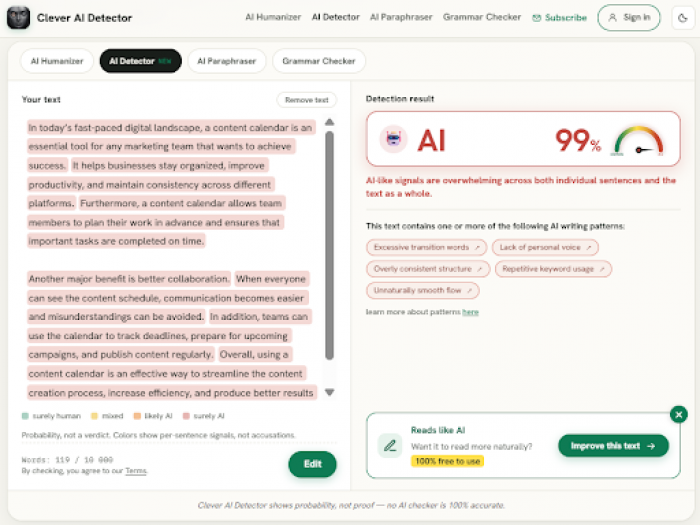
AI checkers use different signals to flag patterns in a draft; none can prove authorship on its own. For this walkthrough, we use Clever AI Detector because it shows an overall result alongside confidence and sentence-level signals in one report. To get a baseline, open the tool, paste the draft into the input field, or choose Upload file and add a supported document. Its ai detection tool accepts samples from 80 to 10,000 words, but connected text gives it more context than a few isolated lines. Make sure the draft is complete enough to produce a useful result.
When you are ready, click “Check for AI.” If you are learning how to check for AI, focus on the full report. Review the probability score, verdict, confidence level, and sentence-level signals. You can use Clever AI Detector to detect AI-generated content, then note the result for comparison with the final check in Step 6.
Treat this first result as a starting point, not proof that every highlighted sentence was written by AI. Read each flagged passage in context before changing it. The score can guide your review, but it is not completely accurate.
Step 2. Fix the Meaning Before the Style
Fix the substance before using a humanizer or paraphrasing tool. Such tools can change wording, but they cannot reliably repair weak logic, unsupported claims, repeated ideas, or advice that does not help the reader. Smoother sentences will not make weak content useful.
Start by confirming the text’s purpose and intended reader. Check every factual claim and remove anything you cannot support. Cut repeated points and explanations that add no value. Next, arrange the remaining ideas in a clear order, with each paragraph doing one distinct job. Replace vague statements with practical details, conditions, or examples. Ask whether each point helps the reader understand a choice, avoid a mistake, or take the next step.
Original: “AI tools can improve productivity in many ways.” Improved: “A copywriter can use AI to outline product pages, compare source notes, and draft headline options before checking every claim.”
Keep AI in a supporting role from the first draft. Start with your own brief, research, notes, and point of view; use a tool to brainstorm or revise rather than asking it to produce the whole piece without review. Some universities, employers, and publishers restrict or prohibit AI assistance for certain work, so check the applicable policy before using it or submitting the draft.
Step 3. Use an AI Humanizer as an Editing Aid
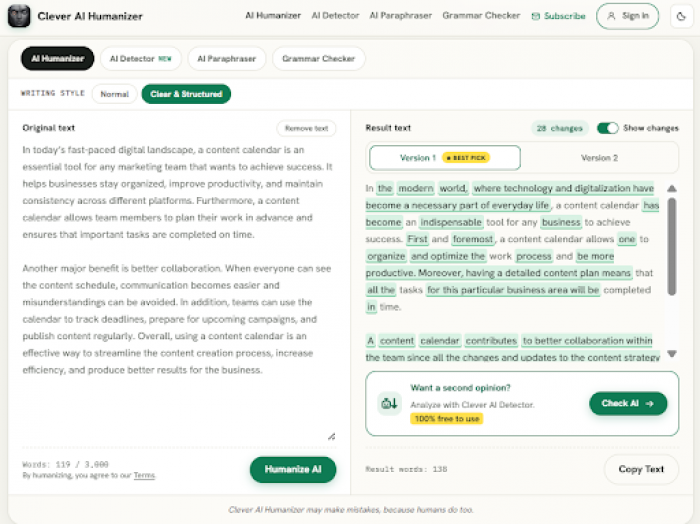
AI humanizers can help rework a draft after you have checked its meaning. Clever AI Humanizer is one option for this workflow because it lets you compare the original and revised versions before deciding what to keep. To use it, open the tool, paste the revised draft into the Original text field, or upload a supported file. Choose the draft’s language and a writing style. Normal can suit friendly blog posts, social content, and product descriptions. Clear & Structured can suit reports, summaries, or copy that needs an orderly flow. Use it to humanize AI-generated text to avoid AI detection while keeping the core message under your control.
Click “Humanize AI,” then compare the original with the result. If Show changes is available, turn it on to see what was altered instead of judging only the finished version. You can humanize AI to avoid AI detection, but review the output carefully before using Copy Text.
Treat the result as an editable draft, not a final version. Confirm that facts, meaning, brand terminology, links, and intended tone remain intact. Restore any important detail that the tool removed or changed.
Step 4. Rephrase Only the Passages That Still Sound Mechanical
Do not rewrite the entire draft when a few passages still feel stiff, repetitive, or unlike the intended voice. Select them and use Clever AI Paraphraser for focused revisions. Paste one selection into the Original text field, choose a style, and set Rewrite Strength to Minimal or Medium to keep meaning and voice close to the original. This approach lets you humanize text to avoid AI detection without disturbing sections that already work.
Set the target length to Same or Shorter. Add names, brands, SEO keywords, and technical terms to Freeze Words. When needed, add a short custom instruction such as “make the sentences shorter.” Click “Paraphrase” and review the highlighted changes. You can rephrase text to avoid AI detection, but revert or replace wording that changes the message or sounds wrong.
If one sentence still needs work, open its sentence alternatives and compare the three options. Choose the best fit only after reading it in context.
Step 5. Add Your Own Voice and Final Edits
This pass depends on your judgment, not another automatic rewrite. The goal is to sound like a knowledgeable person speaking to a real reader. If your goal is to avoid AI detectors and humanize text, make each choice deliberately.
- Read the draft aloud, then rewrite any phrase you would not naturally say.
- Replace stock expressions and generic transitions with direct connections between the ideas.
- Add details or examples only when they are true, relevant, and useful.
- Where the rhythm feels too uniform, combine short sentences or split long ones.
- Finish by checking names, numbers, grammar, punctuation, and formatting for errors.
Do not invent personal experiences, add mistakes on purpose, or make clear writing awkward just to influence a score. Natural writing should still be honest, accurate, and easy to understand.
Step 6. Run a Final AI Check
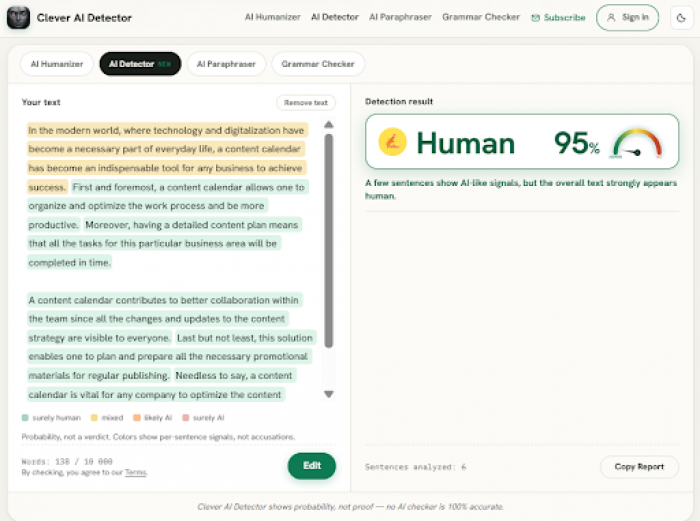
Return to Clever AI Detector and paste the exact final version, not an earlier copy. To check if something is AI-generated, use the same tool and roughly the same amount of text you tested in Step 1. Keep the text boundaries similar so the comparison remains reasonably consistent. Run the check, then compare the new probability score, verdict, confidence level, and sentence-level signals with the original result.
Review any passages that are still flagged in context. A tool that claims to detect ai text can react unevenly to small edits, so its score is not a precise measure of writing quality. A lower result can be useful feedback, but accuracy, clarity, usefulness, and consistency with your voice matter more.
Do not keep rewriting a clear sentence just to reach zero or satisfy one ai content detector tool. If a passage remains heavily flagged, inspect it manually for repetition, vague wording, or an overly uniform structure.
What Makes AI-Assisted Writing Sound More Human?
Use Specific Details and Real Examples
Generic AI-assisted writing often says something is useful, important, effective, or convenient without showing what that claim means in practice. Replace those broad statements with details that answer real questions: Who is affected, what exactly happens, under which conditions does it happen, and what limitation or tradeoff matters? For example, “A content calendar makes marketing more effective” is too broad. A better version is: “A weekly content calendar lets a two-person marketing team assign drafts, track approval dates, and spot gaps before campaigns launch.”
Useful detail must also be accurate and relevant to the reader’s decision. Do not invent statistics, test results, customer experiences, or personal stories to make writing seem more human. If you cannot verify a detail, remove it or state the limit honestly.
Vary the Rhythm Without Forcing It
Natural rhythm follows the meaning and purpose of each sentence.
When several short sentences break one connected thought into pieces, combine them. Split a long sentence if it carries too many ideas at once. Vary openings so each line does not begin with the same grammatical pattern, and let an important point stand alone when a short sentence gives it more impact. Use commas, dashes, colons, and other punctuation only when they make the meaning easier to follow.
Do not deliberately add sentence fragments, grammar errors, unnecessary punctuation, or awkward wording just to seem less predictable. The finished text should remain clear, correct, and comfortable to read.
Add Judgment, Not Just Information
Useful judgment goes beyond listing facts. It tells the reader what matters, explains why it matters, and shows when a recommendation applies. Good advice also names tradeoffs and acknowledges uncertainty instead of pretending every choice has one correct answer. For example, a copywriter might use a short headline for a mobile ad because space and speed matter, but choose a longer headline for a landing page when the audience needs context before clicking. Neither approach is always better; the right choice depends on the channel, reader, and goal.
Judgment must be grounded in evidence, testing, or clearly explained reasoning. Use data, sources, user feedback, or a logical comparison to support it. If evidence is limited, say so and describe what could change the conclusion. Unsupported opinion may sound confident, but it is not useful.
Methods You Should Avoid
A humanizer to avoid AI detection should support careful editing, not replace the writer’s responsibility. Use any tool only when it makes the draft clearer and more useful.
- Add spelling mistakes, broken grammar, random sentence fragments, or never awkward punctuation on purpose.
- Hidden characters, look-alike letters, invisible text, and similar technical tricks are designed to confuse a detector, not improve writing.
- Do not invent personal experiences, statistics, sources, quotes, or test results.
- Stop repeated rewrites before they damage the original meaning, facts, or intended tone.
Passing a detector does not make text accurate, original, ethical, or acceptable under a school, workplace, publisher, or client policy, so always follow the rules that apply to AI assistance and disclosure.
FAQ
Can Humanized Text Still Be Detected as AI?
Yes, humanized or manually edited text can still receive an AI-generated result. Detectors estimate statistical patterns; they do not know who wrote the passage. Some patterns may remain after editing, while polished human prose may trigger a false positive. Tools built to detect AI-generated writing can also disagree, so the same passage may receive different results.
A humanizer cannot guarantee a particular score. Review any result alongside the text’s accuracy, clarity, sources, and editing history before drawing a conclusion.
Should You Keep Rewriting Until the AI Score Reaches Zero?
No, a zero AI score should not be the goal. Systems built to detect ai writing can return different results and may flag polished human text. Rewriting a clear passage again and again can remove useful details, change its meaning, introduce factual errors, or weaken your voice.
Stop when the text is accurate, clear, useful, natural for its audience, and compliant with any applicable AI policy. A detector result may prompt another review, but it should never override writing quality.
What Should Copywriters Check Before Publishing AI-Assisted Content?
An ai checker for copywriters can support a final review, but it cannot replace editorial judgment or prove who wrote the text. Before publishing, complete these practical checks on the exact version that will go live:
- Verify every fact, number, name, quotation, and source against reliable material.
- Confirm the draft follows the brief, serves audience needs, and matches the brand voice.
- Check required keywords, hyperlinks, calls to action, and approved product terminology.
- Proofread grammar, punctuation, formatting, and readability across the finished page.
- Follow the client’s, publisher’s, school’s, or workplace’s rules for AI use and disclosure.
Publish only when the content is accurate, useful, consistent, and ready for a real reader.
Comments