

A simple change in lettering can make an Instagram bio, gaming username, or social media caption look completely different. Fancy text generators make this possible without downloading fonts or learning graphic design. Enter a phrase, explore decorative variations, and copy the one that fits.
However, not every generator offers the same experience. Some prioritize hundreds of styles, while others focus on readable lettering, unusual symbols, or social media customization. Here are seven fancy text generators worth exploring in 2026, including what each does well and where it falls short.
What Makes a Good Fancy Text Generator?
A fancy text generator replaces ordinary letters with decorative Unicode characters that resemble different font styles. Unlike traditional fonts, these characters can often be copied directly into apps that do not provide built-in formatting options.
The best generators offer more than an extensive collection of designs. They make styles easy to find, preserve the original message, and produce text that remains reasonably readable after pasting.
Four factors matter when comparing these tools:
● Useful style variety: A strong generator provides recognizable options such as cursive, bold, Gothic, bubble, and small caps instead of hundreds of nearly identical variations.
● Convenient text conversion: Live previews and one-click copying make comparing several designs faster, especially when editing longer names or captions.
● Practical compatibility: Decorative characters should work in commonly used text fields, although specific platforms may reject unusual symbols or restrict username characters.
● Readable results: Good styling should enhance a phrase without making it difficult to identify names, understand messages, or recognize important information.
With these factors in mind, the following seven tools offer different approaches to creating fancy text.
7 Best Fancy Text Generators
1. YayText: Best for Familiar Text Styles
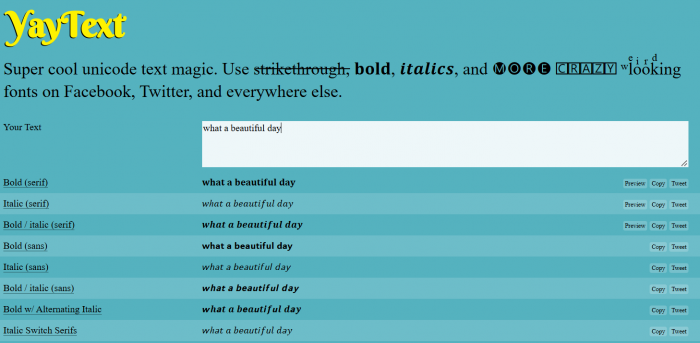
YayText is a straightforward text styling tool offering more than 60 Unicode variations, including bold, italic, cursive, strikethrough, bubble, upside-down, and superscript lettering. It is particularly useful when ordinary social media text needs simple visual emphasis rather than elaborate decoration.
The generator presents labeled styles that users can compare after entering their text. Its relatively familiar formatting options make it practical for short announcements, social media descriptions, and headings where readability matters.
What stands out
● Recognizable text styles: Find common formatting effects without sorting through excessive decorative symbols.
● Separate copying options: Copy a preferred text variation instead of manually selecting characters from a preview.
● Useful formatting choices: Superscript, strikethrough, and small caps provide alternatives to ordinary bold and cursive lettering.
See the difference
| Style | Example |
| Original | Stay Creative |
| Bold | �������� ���������������� |
| Small caps | ꜱᴛᴀʏ ᴄʀᴇᴀᴛɪᴠᴇ |
The trade-off: YayText is better suited to familiar Unicode formatting than elaborate text decorations. Users looking for complex frames, themed symbols, or highly ornamental lettering may find its selection comparatively restrained.
Cost and access: Its core text styling features are available free through a web browser. Creating and copying ordinary text variations does not require installing software.
Who should try it? A good option for content creators, students, and everyday social media users who want readable alternatives to plain lettering without spending time exploring highly decorative styles.
2. LingoJam: Best for Playful Text Effects
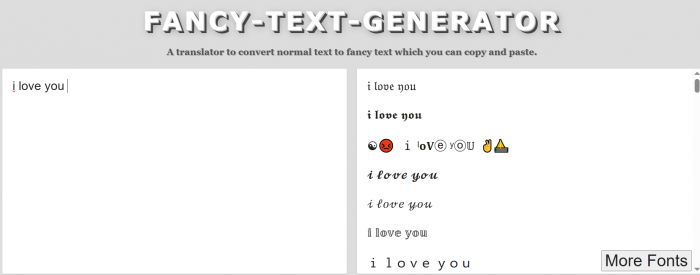
LingoJam takes a playful approach to fancy text generation. Its fancy text converter transforms ordinary writing into unusual Unicode combinations, including stylized lettering, inverted characters, and decorative effects. Rather than concentrating exclusively on polished typography, it gives users room to experiment with unconventional appearances.
The tool belongs to LingoJam's broader collection of text translators, and its fancy text generator is particularly suited to informal online communication. Users can enter a phrase, examine the generated variations, and reuse interesting results in supported text fields.
What stands out
● Unusual text combinations: Explore lettering styles that go beyond traditional bold, italic, or cursive formatting.
● Playful visual effects: Create distinctive phrases for humorous messages, online identities, or decorative comments.
● Direct text conversion: Enter ordinary words and receive copyable alternatives without configuring typography settings.
See the difference
| Style | Example |
| Original | Dream Big |
| Gothic | ���������� ������ |
| Double-struck | ���������� ������ |
The trade-off: Some generated combinations can look inconsistent because different Unicode symbols do not always share the same height or spacing. This matters when creating polished brand names or professional-looking profile descriptions.
Cost and access: LingoJam's fancy text converter is free to access online. Users can generate text through the website without downloading a separate application.
Who should try it? Suitable for gamers, casual social media users, and people who enjoy experimenting with unusual lettering for nicknames, short messages, or creative online identities.
3. SmartPostly Fancy Text Generator: Creative Styles Made Simple
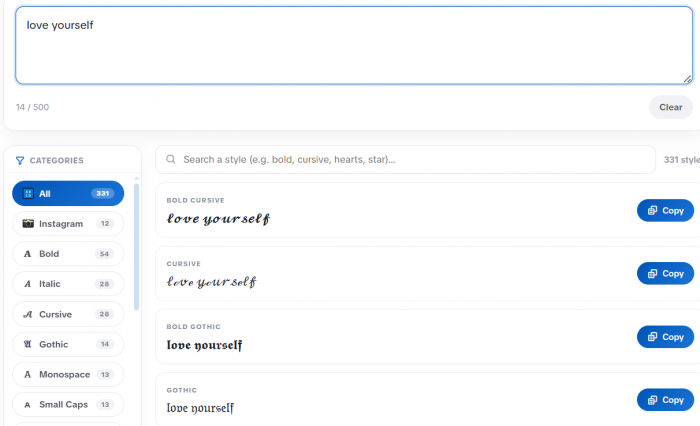
SmartPostly Fancy Text Generator turns ordinary text into stylish Unicode characters for social media bios, display names, captions, and personal messages. It offers more than 300 variations, including cursive, Gothic, bubble, bold, and symbol-decorated lettering that users can copy into compatible platforms.
Its category-based browsing makes finding suitable styles easier. Instead of scrolling through hundreds of unrelated options, users can explore specific categories or search for a preferred effect. The generator also supports text input up to 500 characters, making it useful for both short names and longer profile phrases.
What stands out
● Instant text conversion: Multiple styled variations appear as users type, removing the need to submit the same phrase repeatedly.
● Easy copy-and-paste: Each generated variation includes a copying option for transferring the finished text into supported apps.
● Convenient style selection: Category filters and search functionality help narrow the collection to specific lettering or decorative effects.
See the difference
| Style | Example |
| Original | Creative Mind |
| Cursive | ���������������� �������� |
| Bold | ���������������� �������� |
| Bubble | Ⓒⓡⓔⓐⓣⓘⓥⓔ Ⓜⓘⓝⓓ |
The trade-off: Decorative Unicode characters may display inconsistently across older devices or unsupported platforms. Heavily styled text can also be difficult for screen readers to interpret, particularly in longer descriptions.
Cost and access: SmartPostly is free to use, with no registration or subscription required. Users can generate and copy text directly from their browser without stated usage limits.
Who should try it? Ideal for social media creators, students, and casual users looking to personalize bios, display names, captions, and short messages. It works particularly well for quick styling without complicated editing tools.
4. IGFonts.io: Best for Instagram Profile Styling
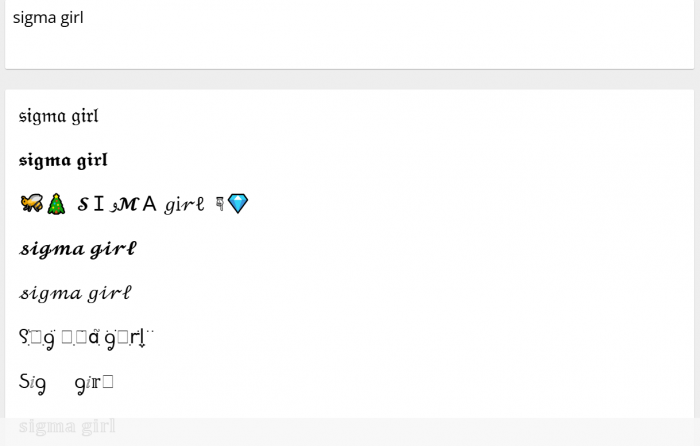
IGFonts.io focuses on producing decorative Unicode lettering for Instagram bios and profile descriptions. The generator allows users to type ordinary text and browse different visual interpretations, including script lettering, aesthetic characters, and stylized alphabets.
One distinctive feature is its option to show additional generated variations. This makes it useful for exploring alternative looks when the first collection feels too familiar. The website also distinguishes more consistent lettering from experimental styles, which can help users choose text that remains visually balanced.
What stands out
● Instagram-oriented results: The generator is built around text styles commonly used in bios, profile names, and social media descriptions.
● Expandable style selection: Users can request additional font variations instead of relying entirely on the first displayed results.
● Flexible creative choices: Explore both relatively neat alphabets and more unusual decorative combinations.
See the difference
| Style | Example |
| Original | Digital Creator |
| Script | �������������� ����ℯ����ℴ�� |
| Aesthetic | Digital Creator |
The trade-off: Its Instagram-focused interface provides fewer specialized organization features than generators with extensive named categories. Unusual results may also need to be tested in the intended profile field before publishing.
Cost and access: The core Instagram text generator is available free through the website. Users can explore and copy styles without installing fonts or creating an account.
Who should try it? Particularly suitable for Instagram users, influencers, and small business accounts wanting to distinguish a profile name, short tagline, or selected words within a bio.
5. CoolSymbol: Best for Decorative Symbols and Lettering
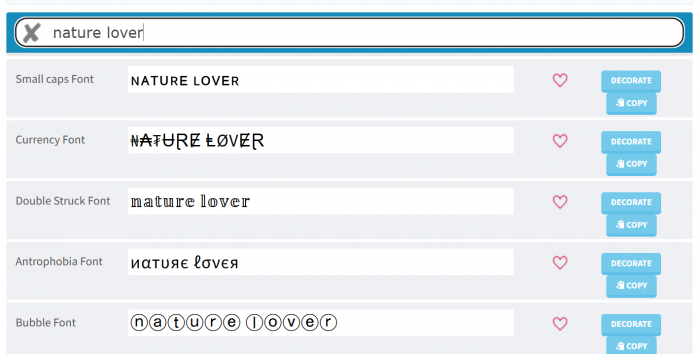
CoolSymbol combines fancy text generation with a broader collection of decorative character effects. Its font generator includes styles inspired by calligraphy, handwriting, Old English lettering, and more experimental designs that alter how characters appear.
The main attraction is the ability to move beyond ordinary text styling and create visually expressive phrases. Its decoration options are especially relevant for gaming identities, themed messages, and informal profile descriptions where symbols are part of the intended appearance.
What stands out
● Decorative font effects: Explore alternatives featuring marks, unusual character combinations, and visually distinctive lettering.
● Symbol-oriented creativity: Combine decorative text with symbols to create personalized names or short expressive phrases.
● Multiple visual directions: Choose from handwriting-inspired designs, ornamental alphabets, and more experimental styles.
See the difference
| Style | Example |
| Original | Star Girl |
| Decorated | ★彡 Star Girl 彡★ |
| Stylized | ꧁༺Star Girl༻꧂ |
The trade-off: More elaborate decorative combinations can occupy considerable space and may be rejected by platforms with strict display-name limits. Highly ornamental text is also less practical when clear communication is the priority.
Cost and access: The online fancy text generator is available for free. Text decoration and copying can be performed in a browser without a paid design application.
Who should try it? A useful option for gamers, creative communities, and users who prefer symbol-heavy names or expressive text decorations rather than conventional font variations.
6. FancyText.io: Best for Organized Font Browsing
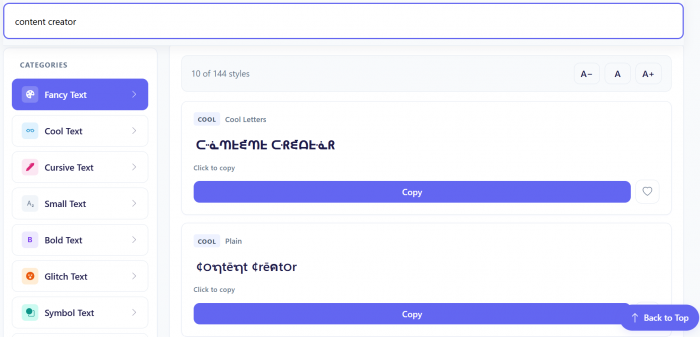
FancyText.io offers more than 144 named Unicode text styles arranged into eight categories. Its collection covers fancy, cool, cursive, bold, small, glitch, symbol-based, and decorative text, allowing users to explore designs according to a particular visual preference.
What distinguishes the website is its organization. Rather than presenting an undifferentiated list, it provides category filters, dedicated generator pages, and a favorites feature for returning to preferred styles. These features are useful for anyone who regularly creates styled profile text or uses consistent lettering across several accounts.
What stands out
● Organized style categories: Quickly narrow down the collection to bold, cursive, decorative, or glitch-inspired lettering.
● Favorites functionality: Save preferred styles in the browser to make repeated text formatting more convenient.
● Dedicated text generators: Explore specialized pages while retaining the entered text when switching categories.
See the difference
| Style | Example |
| Original | Next Level |
| Monospace | �������� ���������� |
| Bold italic | �������� ���������� |
The trade-off: FancyText.io emphasizes Unicode text styling rather than full typography customization. Users cannot treat generated output like an editable design font with adjustable kerning, font weights, or downloadable font files.
Cost and access: Completely free, with no account required for the generator. Favorites and style preferences are handled within the browser.
Who should try it? Well suited to content creators, community managers, and frequent social media users who want an organized collection of styles they can return to regularly.
7. CursiveKit: Best for Cursive and Script Lettering
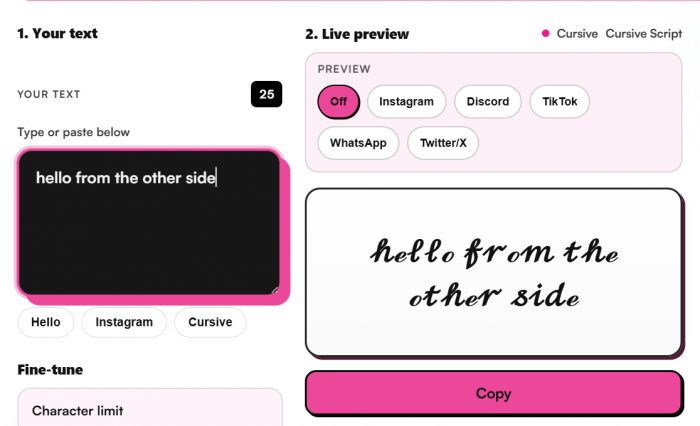
CursiveKit is a more specialized option for users who prefer handwriting-inspired text. Its cursive generator focuses on script-style Unicode lettering, offering 64 variations for names, bios, captions, and short decorative phrases.
Instead of covering every possible text effect, the generator concentrates on elegant, flowing character styles. Live previews help users compare different forms of script lettering, making the tool particularly relevant for personal names, aesthetic descriptions, and short quotes.
What stands out
● Focused script collection: Explore cursive variations without searching through unrelated Gothic, glitch, or symbol-heavy designs.
● Live text previews: See how words appear in different script styles before deciding which variation to copy.
● Convenient copying options: Copy individual cursive results or use the available option to copy the generated styles together.
See the difference
| Style | Example |
| Original | Sweet Moments |
| Script | ����ℯℯ�� ℳℴ��ℯ������ |
| Bold cursive | ���������� �������������� |
The trade-off: Its script-focused collection offers less flexibility for users who want bubble letters, Gothic text, or elaborate symbol decorations. Unicode cursive also does not behave like actual connected handwriting in a design editor.
Cost and access: The cursive generator is free and runs directly in a browser. No font installation is required to create or copy the available script styles.
Who should try it? Ideal for users creating elegant bios, decorative names, short quotes, invitations, or aesthetic captions where cursive lettering is the preferred visual style.
Fancy Text Generators Compared
Although all seven generators produce copyable decorative text, their differences become clearer when comparing their primary strengths and intended use cases.
| Tool | Main strength | Best use | Free access |
| YayText | Familiar Unicode formatting | Posts and short headings | Yes |
| LingoJam | Playful character effects | Nicknames and casual messages | Yes |
| SmartPostly | 300+ styles with filtering | Bios and captions | Yes |
| IGFonts.io | Instagram-oriented lettering | Profile customization | Yes |
| CoolSymbol | Symbols and decorative effects | Gaming and themed names | Yes |
| FancyText.io | Categories and favorites | Repeated styling tasks | Yes |
| CursiveKit | Script-style lettering | Elegant names and quotes | Yes |
The number of available variations should not be the only deciding factor. A generator with fewer options may be more convenient when someone already knows the style they want, while a larger collection becomes useful when exploring different creative directions.
For regular social media styling, browsing controls and reliable copying may matter more than the total number of decorative designs.
Where Fancy Text Works Best
Fancy text can add visual identity to digital content, but the best results usually come from selective use. Decorating every word in a profile often makes it harder to read, while styling a short phrase can establish a recognizable appearance without overwhelming the message.
Different platforms also impose different restrictions on special characters. A style that works in an Instagram bio may not be accepted in a username field or online game.
Some practical applications include:
● Instagram and TikTok bios: Use decorative lettering for a personal tagline, creator category, or short introductory phrase while keeping contact details and important information readable.
● Gaming and Discord profiles: Experiment with Gothic, bold, or symbol-based names to establish a distinctive identity, provided the platform accepts the characters.
● WhatsApp and personal messages: Add cursive or small-cap lettering to greetings, short status updates, and personal messages without requiring recipients to install special fonts.
● Social media captions: Style a short opening phrase to create visual separation from the remaining caption rather than converting the entire post.
● Community names and headings: Use simple bold or decorative lettering for informal online groups, channel labels, or announcements where built-in formatting is limited.
One technical point deserves attention: fancy text generators do not normally create conventional font files. They substitute standard characters with Unicode symbols that resemble other lettering styles. This makes copying possible, but visual support depends on the destination application and its available fonts.
For example, mathematical bold characters may display clearly on a modern smartphone but appear differently in older software. Certain styles can also cause difficulties for screen readers or search functions. Unsupported characters may appear as boxes or replacement symbols.
The practical approach is to preview the finished text in the intended application before publishing, especially when it contains accented characters, numbers, or unusual symbols.
How to Choose the Right Generator
Choosing a fancy text generator becomes easier when the intended use is clear. Someone formatting an Instagram bio has different requirements from a gamer designing a decorative nickname or a creator establishing a consistent profile identity.
For occasional text formatting, simple generators such as YayText and LingoJam can handle most basic requirements. Their direct approach suits users who want to enter a short phrase, choose an interesting variation, and move on.
Users who prefer exploring larger collections may find SmartPostly or FancyText.io more convenient because both offer ways to narrow the selection. CoolSymbol is more suitable for ornamental effects, while IGFonts.io and CursiveKit serve more specific visual preferences.
Before committing to a style, check three things: whether it remains readable at a small size, whether the receiving platform accepts the characters, and whether the chosen lettering is appropriate for the message. Fancy text works best when it adds personality without interfering with communication.
Bottom Line
The best fancy text generator depends less on how many styles it advertises and more on how easily users can find lettering that suits their purpose.
YayText offers a practical collection of familiar styles, while LingoJam makes experimenting with unusual text effects accessible. SmartPostly provides one of the broader collections on this list, with category filters that help manage its 300-plus variations. IGFonts.io is useful for Instagram-oriented styling, CoolSymbol suits decorative names, and FancyText.io provides an organized browsing experience. CursiveKit remains an appealing choice for users primarily interested in cursive lettering.
For everyday styling, a readable Unicode variation is often more effective than the most elaborate design available. A distinctive profile name or highlighted phrase can establish a visual identity, but the original words still need to communicate something meaningful. Ultimately, a useful fancy text generator should make customization quick, provide enough choice without unnecessary complexity, and produce text that works where readers actually intend to use it.
Comments