

Free social media tools have become oddly hard to compare. One site hands you twenty AI generators. Another gives you fewer writing tools but wires them into planning, scheduling and publishing.
Both can call themselves "creator toolkits," yet they often solve completely different problems. That became obvious the moment I put SmartPostly and Hopper HQ side by side and tried to actually make content with each.
SmartPostly is built around helping me create the words and ideas behind a post. Hopper HQ's free tools increasingly work as the front door to a much larger planning-and-publishing system. Neither is automatically better; the right fit depends entirely on where your work keeps stalling.
They Solve Different Problems
My first mistake was trying to compare them tool for tool. There is overlap both offer free generators for captions, hashtags and bios but their shape is very different.
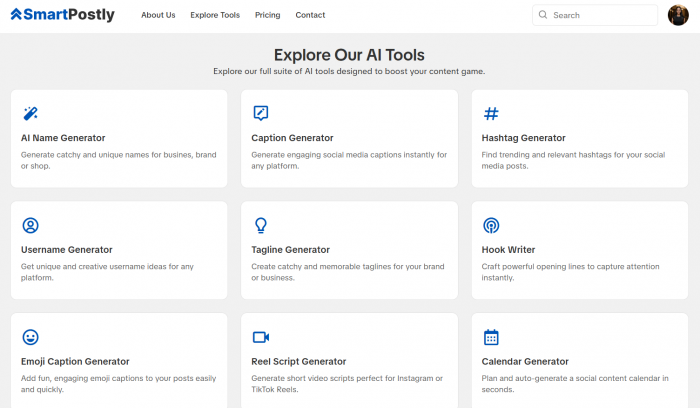
SmartPostly concentrates almost everything around turning an idea into usable copy: captions, hooks, Reel scripts, taglines, poll questions, story ideas, usernames and platform bios. You arrive without content and leave with it.
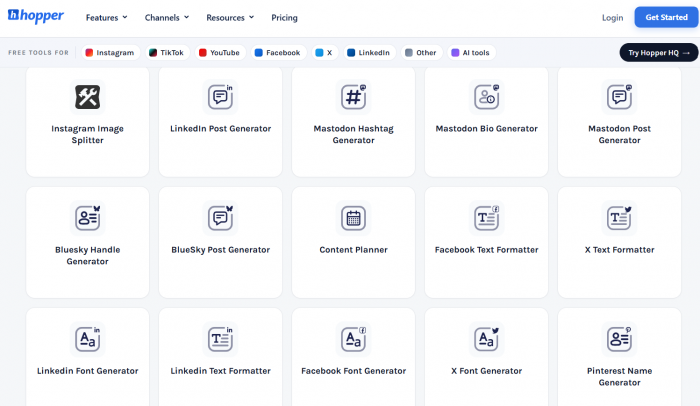
Hopper HQ spreads wider. Its free directory mixes generators with mechanical utilities, an Instagram grid planner, image splitter, character counter, font and text formatters, name checkers and behind them sits a full scheduler with a calendar, cross-posting, auto-publishing and analytics.
| Area | SmartPostly | Hopper HQ |
| Main free-tool focus | Content generation | Utilities + planning |
| Captions & writing | Strong emphasis | Strong, but part of a system |
| Hooks & scripts | Dedicated tools | Less central |
| Formatting utilities | Limited | Much broader |
| Planning | Light AI calendar | Detailed 2-week planner |
| Publishing | Not the free-tool purpose | Full scheduler (via trial) |
| Best opening question | "What should I create?" | "How do I organize & publish it?" |
That distinction stayed with me the whole way through. A creator with ten finished posts in a folder does not need another hook generator as urgently as someone staring at an empty calendar.
How I Tested Them
Instead of counting features, I ran both through one imaginary creator: a fitness account posting short beginner home workouts to Instagram and TikTok, three times a week.
That creator needs ideas, captions, hashtags, profile copy and enough structure to avoid deciding everything from scratch every Monday. I judged both toolkits against six questions.
● How much context can I give it? "Fitness post" is a weak brief; the tool should let me be specific.
● Does it understand the platform? A TikTok caption shouldn't be an Instagram paragraph with a new label.
● How much work happens after generation? Fast output that needs ten minutes of rewriting hasn't saved much.
● Does one task lead into the next? A caption is useful; a caption inside a real workflow is more useful.
● Is the free version genuinely usable? "Free" means little if the good controls vanish behind an upgrade screen.
● Does it remove decisions? This mattered most. Creator fatigue comes from hundreds of tiny choices, not the typing.
Captions: The Setup Reveals the Priority
Both have dedicated caption generators, but their inputs already hint at what each product cares about.
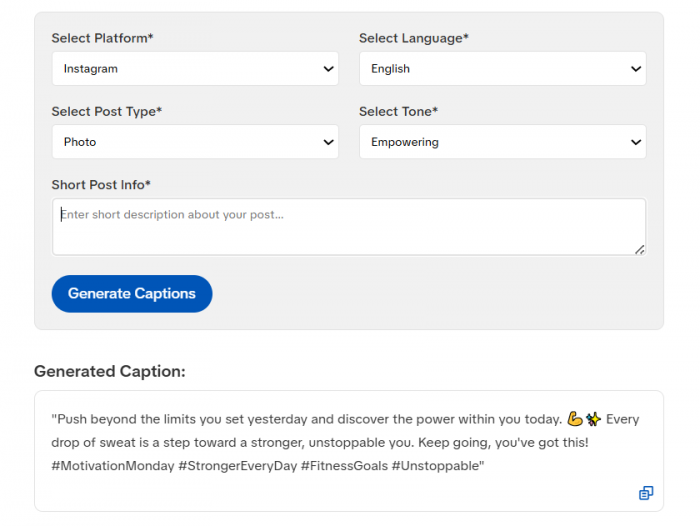
SmartPostly asks me to pick a platform, language, post type and tone before I describe the post. Its Pro tier adds niche-based captioning, richer tone options, hooks and save/edit tools. I like that it forces a little thinking first "Instagram + educational + conversational" beats “write something about workouts.”
Hopper HQ takes a cleaner route. I give a description, platform and tone, request up to ten captions at once, copy them individually or download the batch, and regenerate without an account across all the major networks.
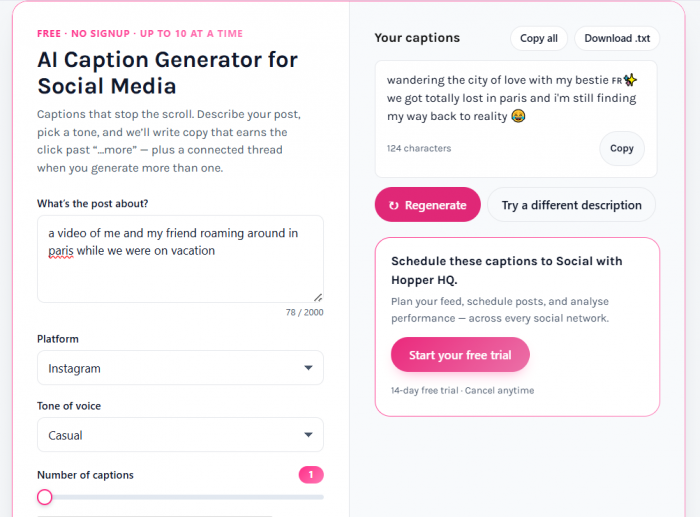
The real difference isn't the number of options. SmartPostly feels like sitting down with a focused writing utility; Hopper HQ keeps nudging the finished caption toward the next step drop it in the calendar, then schedule it.
Output Quality Depends on Your Brief
Neither tool escapes an old truth: generic input produces generic output. I saw the same flat results from both whenever I fed them lazy prompts.
Typing "fitness creator, workouts and tips" gets you filler from any AI. The difference in quality lived in the brief, not the brand.
A stronger input "beginner fitness creator sharing 15-minute apartment workouts for people with no equipment and little time, focused on realistic routines, free weekly plan in bio" gave both tools something specific to protect. The lesson for creators is uncomfortable but useful: most "AI sounds generic" complaints are really generic-brief complaints.
Hashtags: Relevance Over Volume
Hashtag tools are easy to make look impressive just hand over thirty tags instead of ten. That's not how I judged them.
SmartPostly asks for platform, language and topic or niche, positioning its free version as quick idea generation with trend and engagement features held for Pro. Hopper HQ's multi-platform tool takes a description, platform and tag count, regenerates without sign-in, and its Instagram version adds copy-and-paste hashtag packs.
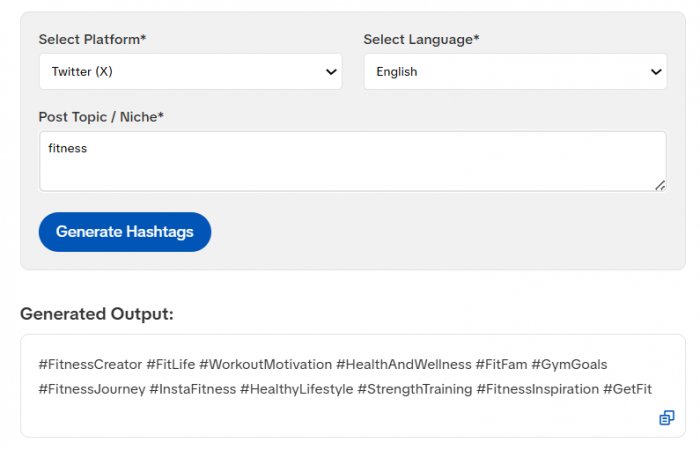
Smartpostly Hashtag Generator Output
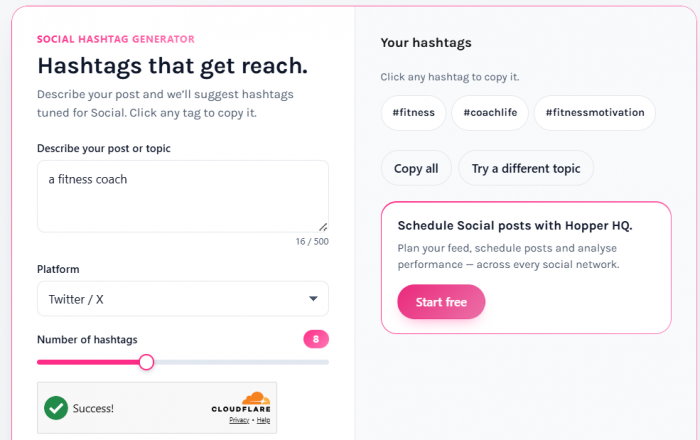
Hopper Hashtag Generator Output
For the fitness creator, I wasn't hunting for the longest list. A useful result mixes tags around home training, beginner fitness and no-equipment workouts not a wall of #viral, #love and #motivation.
Both are best treated as a discovery starting point, not real competitive research. Generate a set, delete the weak ones, keep only tags that actually describe the post.
Bios: Where Generic Writing Has Nowhere to Hide
Bios are more revealing than they look. A caption can ramble; a bio has to land identity, subject and value in a couple of lines.
SmartPostly splits bios by platform and, for Instagram Bio Generator, asks for language, tone, occupation and an optional personal touch several structured levers before it writes. Hopper HQ offers platform-specific tools plus a cross-platform generator that takes an account description and tone, then auto-fits the network's character limit.
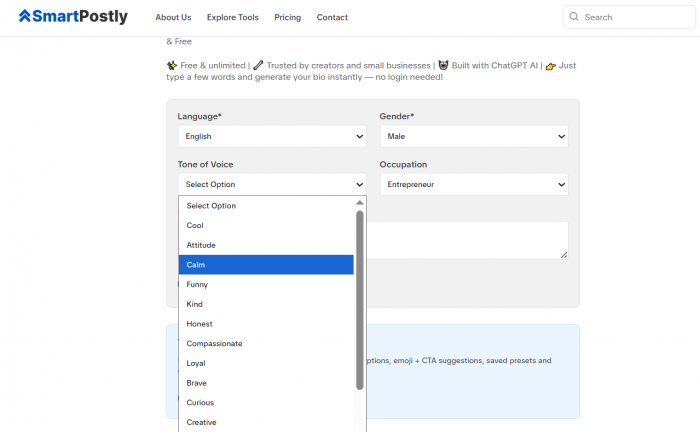
Smartpostly Bio Generator
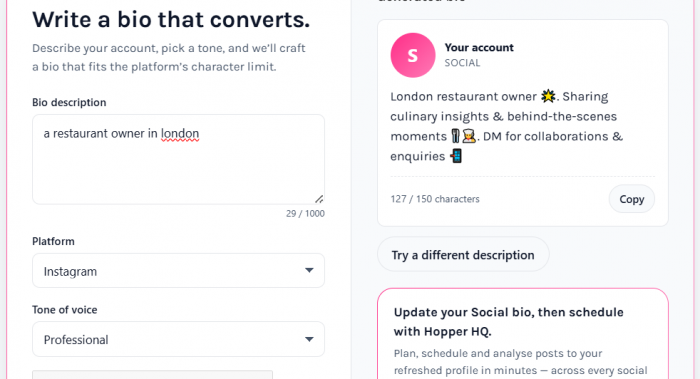
Hopper Bio Generator
The split is really about input philosophy: SmartPostly asks structured questions about you, Hopper HQ hands you a description box and expects a proper explanation. Neither removes the need for a real brief feed either. workouts and tips" and you'll get exactly that back.
Content Ideas Matter More Than Copy
The hardest part of running an account often isn't writing. It's the blank page one step earlier: what are we even going to post?
SmartPostly attacks this from several angles with a Hook Writer, Reel Script Generator, Poll Question Generator, Story Idea Generator, Tagline Generator and Calendar Generator. When my problem is specific to a weak Reel opener I can go straight to the hook tool instead of translating the request into a long chatbot prompt.
The trade-off is fragmentation. Bouncing between a hook tool, caption tool, hashtag tool and grammar tool is fine for the occasional post, but for high-volume work it can become its own tiring workflow.
Planning Is Where They Split Hardest
This is where the gap between the two products became impossible to ignore.
SmartPostly's calendar generator starts from a topic and a duration, then produces platform-oriented ideas, captions, content types and hashtags you can copy or export. It's fast and light with very little setup before you get something.
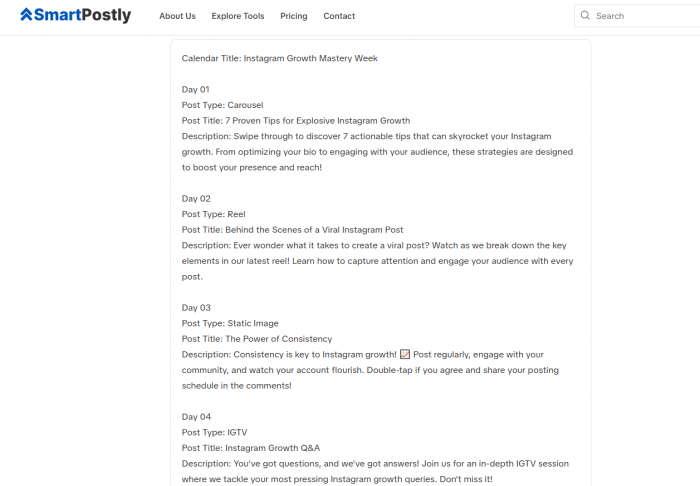
Smartpostly Calendar Generator Output
Hopper HQ's free Content Planner asks far more first: creator or business, brand name, category, description, up to five prioritized goals, target platforms and the formats you can realistically produce. It then builds a roughly two-week plan of six to ten posts with themes, descriptions and tactics, exportable to a CSV template.
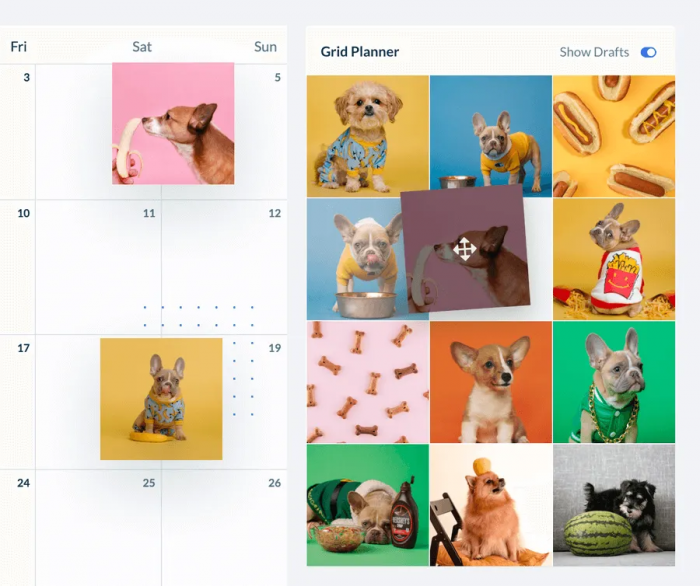
Hopper Calendar Generator Output
That extra friction earns its keep. If I can only film twice a week, a plan of seven elaborate Reels isn't a good plan and Hopper HQ asking what I can actually produce, and what my goals are, makes its output feel closer to a mini strategy session than a list.
The trade-off in one line: SmartPostly gives you a fast, low-effort idea calendar. Hopper HQ asks more of you upfront and returns a plan that's tied to your goals and your production limits. Speed versus depth.
A Calendar Should Remove Decisions, Not Add Rows
I think creators judge calendars by the wrong number. Fourteen filled rows aren't automatically useful; what matters is whether those rows stop you re-deciding the same things later.
A genuinely useful plan answers a few questions in advance.
| Planning question | Why it matters |
| What is the post about? | Removes the blank-page problem |
| Which platform gets it? | Prevents accidental copy-paste strategy |
| What format should it use? | Connects the idea to production |
| What purpose does it serve? | Stops every post becoming generic promotion |
| What happens next? | Turns the row into an actionable task |
Hopper HQ's themes, descriptions and tactical notes map onto this well. SmartPostly still wins if you want a quick idea calendar without a setup form it just asks for less and, in return, plans less.
Platform Intelligence and Multi-Network Work
One area I wanted to test more than the original comparisons do: how well each handles the reality of posting to several networks at once.
Hopper HQ's utilities are noticeably platform-aware: a grid planner and image splitter for Instagram, a character counter and text formatter for X, name checkers across networks. If your day involves formatting text, previewing a grid and prepping posts for different platforms, that collection does real, if unglamorous, work.
SmartPostly is platform-aware in a different way. It tailors the language per network but leaves the mechanical jobs splitting, formatting, previewing to whatever else you already use. For a single-platform creator that's fine; for a multi-network operator it's a gap Hopper quietly fills.
More Tools Isn't Automatically Better
Hopper HQ advertises a library of more than thirty free tools; SmartPostly's set is smaller but tightly clustered around the language of social media.
This changed how I read "tool count." If I'm stuck writing three Reel hooks, three relevant writing generators beat twenty utilities. If I'm already producing content and constantly formatting, checking and previewing it, Hopper's breadth suddenly matters more.
Tool count tells you almost nothing until you know what kind of work the creator actually does each week.
"Free" Means Two Different Things Here
This deserves care, because the word is doing separate jobs on each platform.
SmartPostly runs a genuine free tier inside its generation product: a Starter plan at $0/month with 50 requests, where each generation a caption, bio, tagline or idea counts as one request. Paid tiers scale that up: Creator at $9/month for 500 requests, Professional at $16/month for 5,000. Many tool pages also allow free, no-signup use with Pro features shown alongside.
Hopper HQ's standalone generators lean the other way; several are presented as permanently free and account-free, with the caption tool advertising no credits or usage limits. But its full platform scheduling, auto-publishing, analytics, collaboration sits behind a 14-day free trial, then a subscription starting around $16/month on annual billing, priced by the number of connected accounts.
So read "free" carefully. SmartPostly offers a free tier of a content-generation tool. Hopper HQ offers a big set of free standalone utilities wrapped around a paid management platform. Both are "free"; they're not free at the same thing.
The End-to-End Workflow Test
Individual tools look similar until you make one real post from start to finish. That's when the center of gravity shows.
With SmartPostly, my flow was: find a direction with the Story Idea or Calendar tool, sharpen the opener in the Hook Writer, structure it with the Reel Script Generator, write the caption with tone and post type set, generate hashtags, tidy the copy with the Grammar Fixer then move the finished assets into whatever I use to publish.
With Hopper HQ, the flow bent toward operations: build a two-week plan around goals and formats, prepare each post's caption and hashtags, apply formatting or grid utilities, then step into the main product to organize the calendar, auto-publish and review analytics.
The first workflow is trying to help me make the content. The second is trying to help me run the account. That's the single most important distinction in this whole comparison.
What Neither Tool Fully Solves
Being honest about the gaps matters, because neither replaces a full stack.
SmartPostly handles a surprising amount of the writing layer, but you still need somewhere to design graphics, edit video and since it isn't a multi-network auto-publisher actually schedule and post. Its calendar organizes ideas; it doesn't push them live.
Hopper HQ is stronger at the publishing end, yet many of its free utilities still live as separate webpages. A creator who only wants AI writing can end up opening several tabs where one conversational workspace might have done the drafting in a single place.
Where SmartPostly Feels Stronger
SmartPostly made the most sense to me when the biggest problem happens before the content exists.
● Its tools map to real creator problems "better Reel hook," "fix this caption" instead of a blank chatbot box.
● Structured controls (platform, tone, occupation, post type) help people who aren't confident prompt writers.
● It works beautifully as a companion to a scheduler you already own, filling the creation gap without trying to replace your publishing stack.
Its limitation is the flip side of its focus: once the caption, script and hashtags exist, the work leaves SmartPostly and you're back in your own tools.
Where Hopper HQ Feels Stronger
Hopper HQ gets more compelling as the question shifts from "what should I write?" to "how do I run this content operation?"
● Planning is tied to goals and production capacity, not just idea generation.
● The free utility library covers the small, repetitive platform jobs creators hit constantly.
● There's a clear path from planning to publishing for anyone willing to move into the full product.
The obvious catch: that full workflow isn't permanently free. The standalone utilities are one thing; scheduling and analytics sit behind the subscription once the trial ends.
Which Creators Fit Each
I wouldn't split creators into "beginners" and "professionals." The sharper line is the bottleneck.
| Your situation | Leans toward | Why |
| Always short on caption & Reel ideas | SmartPostly | More dedicated writing and ideation tools |
| Needs hooks, scripts, bios regularly | SmartPostly | Each task has its own generator |
| Has content but can't organize it | Hopper HQ | Planning and calendar structure win |
| Works across several platforms | Hopper HQ | More platform utilities and publishing |
| Wants free tools, no account | Both | Each offers no-signup generators |
| Needs automated publishing | Hopper HQ | Scheduler and auto-post are core |
| Already owns a scheduler | SmartPostly (as a companion) | Fills the creation gap without overlap |
A creator posting three times a week may never need a full management system. A social media manager preparing dozens of posts across four networks has a different problem entirely at that volume, organization becomes part of content quality, because missed posts and rushed publishing quietly degrade the work.
Verdict: Choose the Bottleneck
After living in both, I don't think the useful question is which site has the longer tool directory. It's where you keep losing time.
If your frustration is "what do I post, and how do I say it?", SmartPostly's focused creation toolkit plus a free Starter tier you can genuinely start on is the more natural home.
If your frustration is "I already have content; how do I plan, organize and publish all of it without living inside five apps?", Hopper HQ's wider planning-and-publishing workflow is the better fit, as long as you're prepared to pay once the trial closes.
And that's the real lesson from comparing them: the best creator toolkit isn't the one that does the most things. It's the one that removes the part of the job that keeps getting in your way.
Comments