

Coming up with fresh social media Stories every day can be surprisingly difficult. A product announcement, quick tip, or behind-the-scenes update needs an interesting angle before it can capture anyone's attention. Repeating the same formats eventually makes even useful content feel predictable.
Story generators can help with different parts of this process, from discovering content ideas and writing hooks to creating graphics and short videos. Here are eight tools worth exploring, including what each creates, where it works well, and the limitations to consider.
What Story Generators Actually Do
Social media Story generators help us when we don't know what to post on story and generally help into three categories. Idea generators suggest topics, questions, and storytelling angles. Visual Story makers turn existing content into images and animated layouts. AI content generators go further by producing written copy, visuals, or video content from a prompt.
The distinction matters because an attractive Story template cannot compensate for a weak topic, while a useful idea still needs a suitable presentation. Some creators need help deciding what to say. Others already have the message and want to make it visually appealing.
For instance, a bakery announcing a weekend special might need a Story idea that encourages customers to participate in a poll, followed by a branded graphic introducing the winning flavor. Different tools can handle those two tasks.
Best Story Generators for Social Media
The following eight tools cover different stages of Story creation. The list begins with content ideation tools and includes platforms for visual design, branded campaigns, and short-form videos.
1. SmartPostly : For Fresh Social Media Story Ideas
Best for: Creators, influencers, and small businesses looking for original Story concepts without spending hours brainstorming.
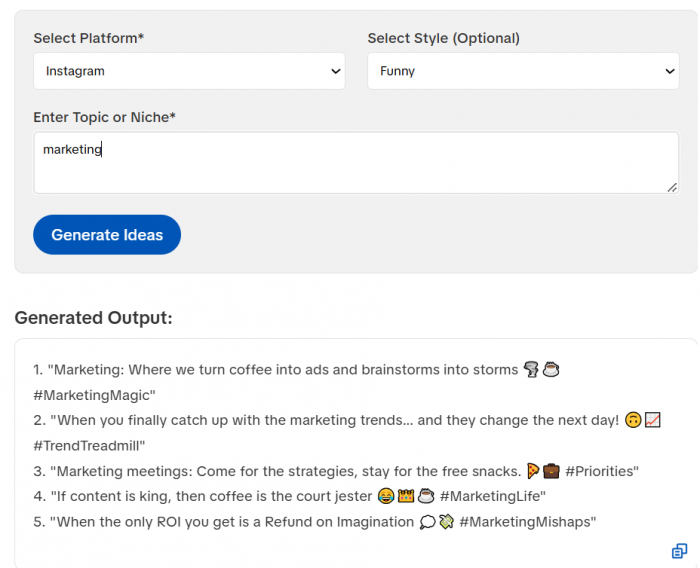
SmartPostly Story Generator takes a content-first approach to social media Stories. Its AI Story Idea Generator helps users develop topics and creative directions before moving into design. Rather than providing a finished graphic, it concentrates on deciding what the Story should communicate.
The generator allows users to select a platform, choose an optional style, and enter a topic or niche. This makes it possible to develop ideas with a specific audience and publishing format in mind. It is particularly useful for accounts that need regular updates but do not have a new product, event, or announcement every day.
What can you create?
● Educational Story concepts: Develop ideas around practical tips, common questions, and explanations that can be presented in short, digestible frames.
● Interactive content angles: Explore discussion topics that can become audience polls, opinion questions, or preference-based Stories.
● Brand-focused updates: Find different ways to introduce products, discuss industry topics, or highlight services without repeating the same promotional message.
Where it becomes useful
Consider a skincare brand planning a week of Instagram Stories around sunscreen. Instead of repeatedly showing product photographs, the brand could explore topics such as SPF misconceptions, application habits, or frequently asked questions. Each angle offers a different reason for followers to pay attention.
SmartPostly also offers separate hook, caption, and poll-question generators, making it convenient to develop supporting written content.
What to consider: The generated concepts still require suitable photographs, videos, or graphic layouts. It is primarily an ideation tool rather than a complete visual Story designer.
Pricing: Free access to its Story Idea Generator and other basic tools.
2. Canva : For Visually Consistent Stories
Best for: Social media managers and small brands that want polished Story graphics without advanced design experience.
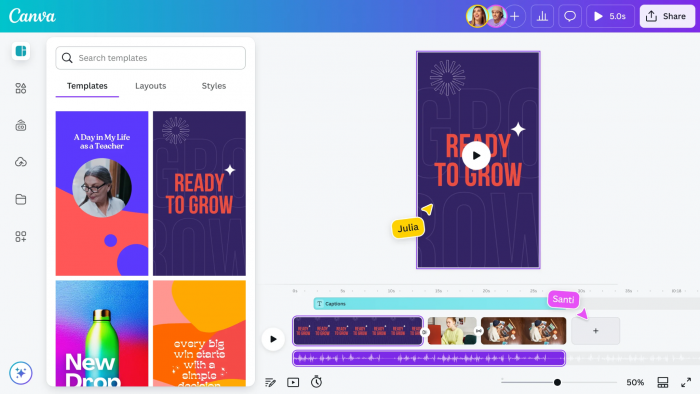
Canva approaches Story creation through visual design. Its Instagram Story maker provides ready-made vertical layouts that users can customize with their own images, text, brand colors, and illustrations.
The editor is particularly useful when Stories need to look connected across several frames. A business can maintain the same typography and design style while changing photographs, headlines, and announcements. Canva also provides AI-assisted tools for generating media and developing visual elements.
What can you create?
● Multi-frame announcements: Build connected Story slides for launches, events, product introductions, and educational sequences.
● Animated visual Stories: Add movement, video clips, graphics, and music to make static content more expressive.
● Reusable branded layouts: Create recognizable designs that can be updated for weekly promotions, tips, or recurring content series.
Where it becomes useful
A fitness coach introducing a four-week training program could create separate frames explaining the program's purpose, weekly structure, and registration details. Rather than designing every frame individually, a consistent template would keep the sequence visually connected.
This also helps smaller businesses maintain recognizable content without commissioning new graphics for every update.
What to consider: Templates make design faster, but popular layouts can look familiar. Strong customization is necessary to avoid creating Stories that resemble those of unrelated accounts.
Pricing: Free plan available. Canva Pro starts at approximately $12 per user per month when billed annually, with regional pricing varying.
3. Predis.ai : For AI-Generated Branded Stories
Best for: Businesses and marketers producing promotional Stories from short content briefs.
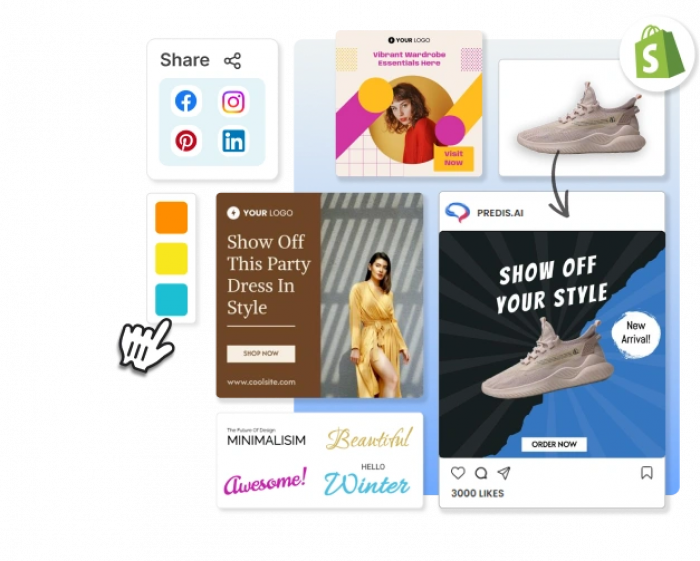
Predis.ai offers a more automated approach to visual content creation. Its AI Instagram Story Maker can turn a short written description into a vertical Story containing on-screen copy, selected visuals, and music.
The platform supports brand colors and logos, helping businesses prepare promotional creatives without assembling every element manually. The generated material remains editable, so users can adjust individual frames before publishing.
What can you create?
● Product launch Stories: Generate promotional creatives from a product announcement or campaign description.
● Sales and offer updates: Prepare branded visuals around discounts, limited-time offers, or seasonal campaigns.
● Business activity Stories: Turn event announcements and behind-the-scenes subjects into formatted social media content.
Where it becomes useful
An online clothing store preparing a weekend clearance campaign could provide a short description of the offer and generate a Story draft. The marketing team could then replace generic visuals with actual merchandise photographs, correct the offer details, and adjust the final message.
This is more convenient than beginning with an empty design, especially when several campaign variations are required.
What to consider: Automated designs still need editorial review. Product photographs, prices, discount conditions, and brand messaging must be checked before publishing.
Pricing: A three-day free trial is available, with a payment card required for the trial described on its site. Paid plans start at $19 per month when billed annually.
4. Adobe Express : For Customized Stories and Motion
Best for: Creators and businesses that want detailed control over typography, graphics, and animated Story designs.
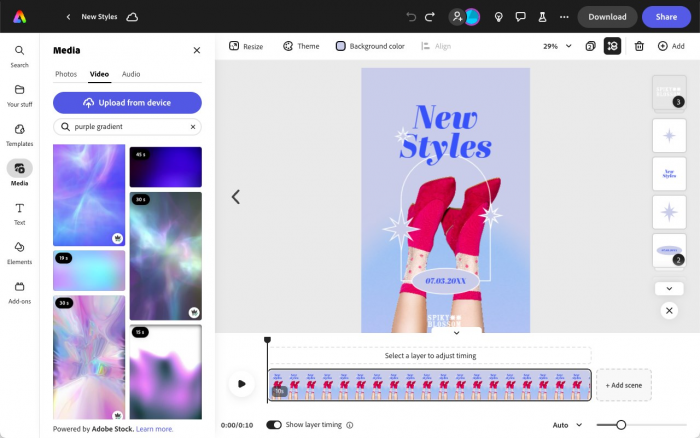
Adobe Express combines template-based design with image editing and generative AI features. Users can begin with an existing Story layout, upload their own media, or create certain visual elements using text prompts.
Its strength lies in the level of customization available after choosing a design. Text effects, graphics, animation, and image adjustments can help transform straightforward information into a visually engaging presentation.
What can you create?
● Animated announcements: Add movement and transitions to launch messages, event promotions, or business updates.
● Graphic-led explainers: Combine text, icons, photographs, and illustrations to communicate information across multiple slides.
● Custom promotional creatives: Use generated images and design effects to create visual concepts that differ from standard templates.
Where it becomes useful
A travel agency introducing a new destination package could combine landscape photographs, a short itinerary, and animated headings across several Story frames. Each frame could focus on a different part of the trip, keeping information readable rather than forcing everything into one image.
Adobe Express is particularly useful when visual presentation is central to the message.
What to consider: More advanced effects and creative options may take additional editing time. Certain premium templates, assets, and AI capabilities require a subscription.
Pricing: Free plan available. Adobe Express Premium costs $9.99 per month.
5. StoryLab.ai : For Storytelling Angles and Copy
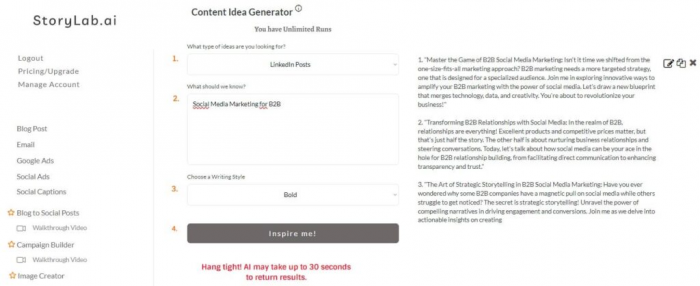
Best for: Content marketers and creators who need help shaping social media messages before designing visuals.
StoryLab.ai focuses on AI-assisted writing and marketing content. Its generators help develop social media ideas, post copy, and related campaign material, making it more relevant to the storytelling side of content production than to finished Instagram Story graphics.
One useful application is exploring different ways to present the same subject. A product announcement, for example, could be approached through a customer problem, an educational explanation, or an unexpected question. Choosing the angle first makes it easier to decide how the visual Story should be structured.
What can you create?
● Storytelling hooks: Develop opening statements and questions that introduce a subject with a clearer purpose.
● Educational content drafts: Explore explanations and short written ideas that can be divided into multiple Story frames.
● Campaign messaging: Prepare alternative marketing messages for promotions, announcements, and audience communication.
Where it becomes useful
Imagine a financial educator explaining why emergency savings matter. One Story could begin with an unexpected household expense, while another could challenge a common assumption about saving money. These approaches address the same topic but encourage different audience responses.
StoryLab.ai can support this early writing process before the content moves to a design editor.
What to consider: Its writing tools are not a replacement for an Instagram Story design platform. Generated copy also needs shortening and fact-checking before being placed on small mobile screens.
Pricing: Free plan includes three generator runs per month. Pro costs $15 per month, while Unlimited costs $19 per month.
6. VistaCreate : For Template-Based Story Designs
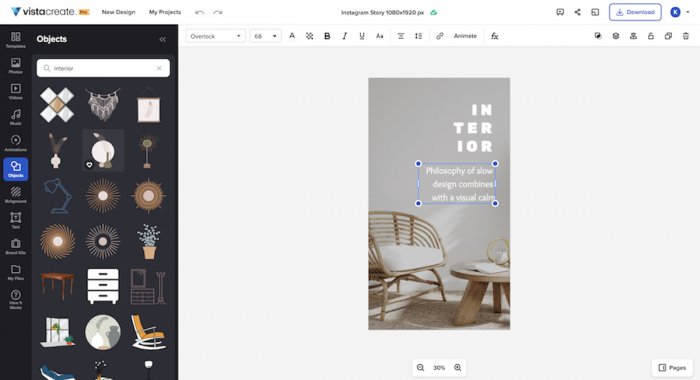
Best for: Small businesses and marketing teams that frequently create branded visual updates.
VistaCreate is an online graphic design platform with templates for Instagram Stories and other social media formats. Users can select an existing design, replace its visual elements, and adapt the layout to their message.
Its template library is useful for accounts that regularly publish announcements, seasonal content, or customer-facing updates. Rather than developing a new design system each week, businesses can maintain a collection of layouts for different purposes.
What can you create?
● Seasonal promotional Stories: Adapt templates for holiday offers, limited-time campaigns, and special occasions.
● Informational visual updates: Present opening hours, event details, menus, or service announcements using readable layouts.
● Branded Story collections: Maintain consistent fonts, colors, and graphics across several related posts.
Where it becomes useful
A neighborhood restaurant could prepare reusable designs for daily specials, chef recommendations, and weekend reservations. The team would only need to change photographs, prices, and descriptions while keeping the overall presentation consistent.
VistaCreate also supports social media scheduling, which can be useful when preparing several updates together.
What to consider: The platform is primarily design-oriented. Users still need to decide the content direction, and some advanced editing tools and premium assets are unavailable on the free plan.
Pricing: Free Starter plan available. Pro costs approximately $10 per month on annual billing.
7. Kapwing : For Video-Based Social Media Stories
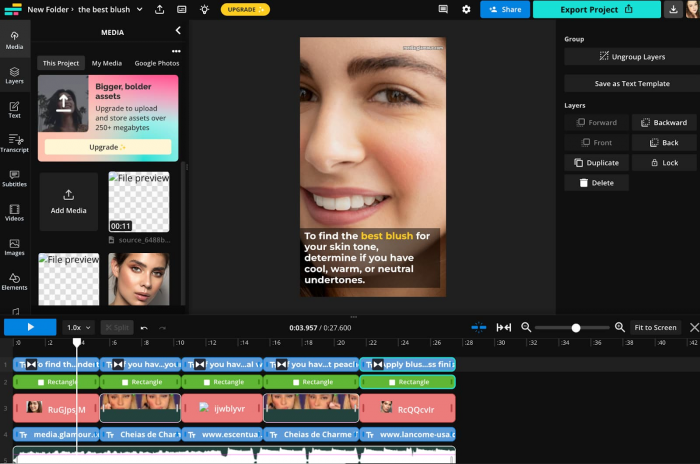
Best for: Video creators, educators, and social media teams turning existing footage into short vertical Stories.
Kapwing focuses on browser-based video and multimedia editing. It provides customizable Instagram Story templates alongside tools for resizing footage, adding text, preparing subtitles, and editing visual sequences.
Its value becomes clearer when the source material already exists. Instead of filming something new, creators can rework a longer recording into a shorter format suitable for Stories. This is particularly relevant for businesses that regularly capture tutorials, interviews, demonstrations, or events.
What can you create?
● Short video explainers: Extract useful moments from longer footage and combine them with readable on-screen text.
● Behind-the-scenes updates: Edit informal workplace or event clips into vertical social media Stories.
● Interactive video templates: Prepare question-based formats, comparison visuals, and other audience participation concepts.
Where it becomes useful
A cooking creator might record a complete recipe tutorial but only need a brief Instagram Story showing the most interesting preparation step. Kapwing can help trim the footage, resize it to a vertical format, and add a short explanation.
The resulting Story can direct interested viewers toward the full recipe without reproducing the entire tutorial.
What to consider: The free plan includes watermarked exports and lower-resolution video output. More demanding video workflows may also use paid editing features or AI credits.
Pricing: Free plan available. Pro starts at $16 per member per month when billed annually, or $24 with monthly billing.
8. Simplified : For Coordinated Marketing Stories
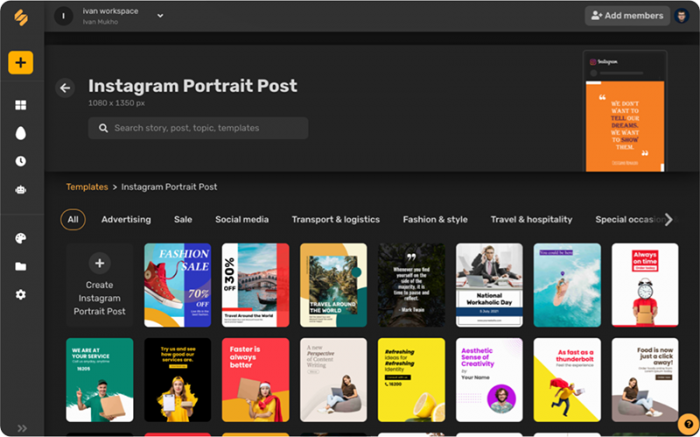
Best for: Marketing teams that want Story designs alongside broader campaign content and publishing workflows.
Simplified provides an Instagram Stories Maker built around customizable templates. Users can choose a layout, edit the contents, and download the finished creative.
The broader Simplified platform has moved toward AI-assisted marketing workflows that combine campaign copy, design, and scheduling. This makes it different from a standalone Story editor, particularly for businesses preparing several types of content around one campaign.
What can you create?
● Campaign announcement Stories: Prepare visual updates that match wider product launches or marketing activities.
● Event promotion designs: Develop graphics for workshops, live sessions, and scheduled brand activities.
● Coordinated social content: Create Story assets that share a visual direction with other campaign posts.
Where it becomes useful
A small marketing team launching a webinar might need an announcement, speaker introduction, registration reminder, and final-day promotion. Instead of treating these as unrelated designs, the team could prepare them around one campaign message.
Simplified's broader workflow tools may be useful when the same campaign also requires feed posts, advertising material, and scheduling.
What to consider: Its current paid offering is oriented toward complete marketing campaigns, which may be unnecessary for someone who only wants occasional Instagram Story templates. The availability of features in the Story maker and paid AI-agent plans should be checked separately.
Pricing: The Instagram Stories Maker advertises free access. Current AI marketing plans start at $79 per month, with trial access available.
Story Generators Compared
Although all eight platforms can contribute to social media Stories, their outputs vary considerably. Some help develop the message, while others prepare the graphic or video that audiences eventually see.
| Tool | Main output | Free access | Starting paid price |
| SmartPostly | Story concepts and ideas | Yes | Pro price varies |
| Canva | Visual Story designs | Yes | $12/mo annually |
| Predis.ai | AI-generated branded Stories | Trial | $19/mo annually |
| Adobe Express | Graphics and animations | Yes | $9.99/mo |
| StoryLab.ai | Storytelling ideas and copy | Yes | $15/mo |
| VistaCreate | Template-based visuals | Yes | $10/mo annually |
| Kapwing | Edited video Stories | Yes | $16/mo annually |
| Simplified | Story designs and campaigns | Story maker advertised free | $79/mo for AI marketing |
* Note : Prices are in USD and reflect publicly advertised plans in October 2026. Annual billing conditions, regional charges, trial restrictions, and feature availability may differ.
The comparison shows why choosing a Story generator based only on the number of features can be misleading. A creator who needs ten fresh content topics may gain little from a sophisticated video editor, while a business already equipped with campaign copy may have no reason to use another writing generator.
The most useful choice depends on which part of the Story production process currently takes the most time.
Which Story Generator Should You Choose?
For someone who repeatedly struggles with what to publish, SmartPostly is a practical starting point. Its platform and style inputs help give Story ideation some direction, and the related writing tools can support the content planning process.
Canva and VistaCreate are suitable for turning established ideas into reusable visual layouts. Adobe Express provides additional creative flexibility for more customized graphics and animation.
Businesses looking to generate promotional creatives directly from a short brief may prefer Predis.ai, while Kapwing makes more sense for accounts that regularly work with recorded video. StoryLab.ai is useful for developing written angles, whereas Simplified is more appropriate when Story production is part of a wider marketing workflow.
One practical approach is to combine an idea generator with a visual design tool. A useful Story concept can be developed first, followed by a graphic or video that presents it clearly.
Final Perspective
The best social media Story generator is not necessarily the one with the most templates or AI features. It is the tool that addresses the actual obstacle between having something to communicate and publishing a Story worth watching.
SmartPostly offers a straightforward starting point for developing fresh Story ideas, especially for creators and small businesses that need content regularly. Canva, Adobe Express, and VistaCreate are stronger choices for visual production, while Predis.ai, Kapwing, and Simplified serve more specialized content workflows.
Whichever tool is chosen, generated content benefits from a final human edit. A specific observation, authentic photograph, useful answer, or relevant audience question often contributes more to a Story than an elaborate template. Good tools make preparation easier, but the message still gives people a reason to pay attention.
Comments