

AnonyIG is a free Instagram viewer that lets users access public Stories, Reels, posts, and Highlights without logging into Instagram. It also offers options to download photos and videos without installing an application.
I explored AnonyIG to understand the complete process, from searching for an Instagram profile to viewing available media and using its download features. I examined the interface, followed its documented workflow, and checked the other tools it offers. The search process is simple, but there are some differences between what AnonyIG promises and what I could independently verify.
What Is AnonyIG?
AnonyIG is an online Instagram viewer and downloader. It is designed to retrieve publicly accessible Instagram media without requiring users to sign into their Instagram accounts.
Its main feature is anonymous Story viewing. Normally, watching a Story through Instagram while logged in adds your account to the creator's viewer list. AnonyIG claims to avoid this by fetching public content through its own servers.
Besides Stories, it supports viewing and downloading Instagram Reels, Highlights, posts, and profile pictures. All these functions are available through a web browser.
| Detail | What I Found |
| Primary function | Anonymous Instagram Story viewing |
| Registration | Not required |
| Instagram login | Not required |
| Supported content | Stories, Reels, Highlights, posts, profile pictures |
| Download formats | JPG for photos, MP4 for videos |
| Pricing | Free, according to AnonyIG |
| Private profiles | Not supported |
Opening AnonyIG for the First Time
I started by checking AnonyIG's homepage. The main interface contains a search field where users can enter an Instagram username or a complete profile link. I didn't encounter a requirement to register before accessing the public search page.
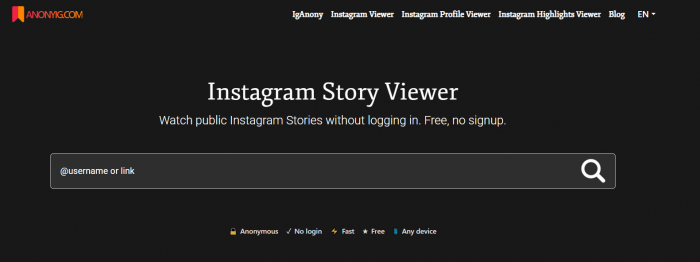
The search field is the starting point for the tool. There isn't a workspace where you create projects, connect social accounts, or manage a list of saved profiles.
I also looked through the website's navigation. Alongside the main Instagram Story Viewer, AnonyIG provides links to its Instagram Viewer, Profile Viewer, and Highlights Viewer. Each is designed for a slightly different type of media, although the username-search process remains similar.
What I liked about the layout was that it made the primary action clear. I didn't need to read a long tutorial to understand where a username should go. However, understanding the interface is only one part of testing a viewer. The more important question is whether the requested media actually appears.
Searching for Instagram Stories
I examined the Story Viewer first because it is the main reason to use AnonyIG. The tool accepts a public Instagram username with or without the @ symbol, as well as a complete profile URL.
For example, the search format allows entries such as @natgeo or instagram.com/natgeo/. The website then attempts to retrieve public media associated with that account.
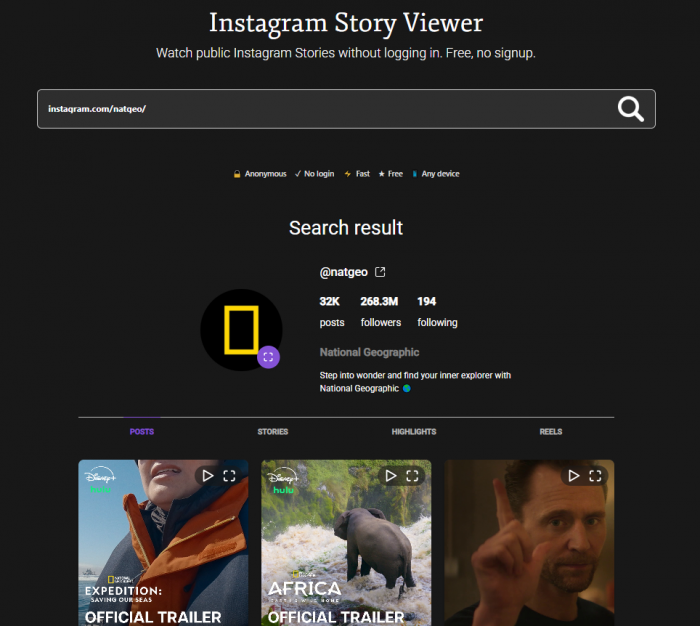
Here is the complete search process I followed through AnonyIG's instructions:
1. Open the Story Viewer. I located the username search box on the website rather than using Instagram's own Story interface.
2. Prepare the profile input. AnonyIG supports a username or Instagram profile URL, so either format can be used without further setup.
3. Submit the username. The search button sends the lookup request to AnonyIG's retrieval service.
4. Check the returned media. When a public account has retrievable Stories, AnonyIG is supposed to display them as images or playable videos.
5. Open the content. The returned media can be viewed through AnonyIG, with a download option available for supported files.
The website says that Stories typically appear within one or two seconds. That is AnonyIG's own performance claim, not a loading time I measured.
What Output Did I Get?
I could verify the search interface and the steps required to request Stories. However, I couldn't complete a live media lookup that produced playable Instagram content, so I didn't obtain a verified set of Story thumbnails, photos, or videos.
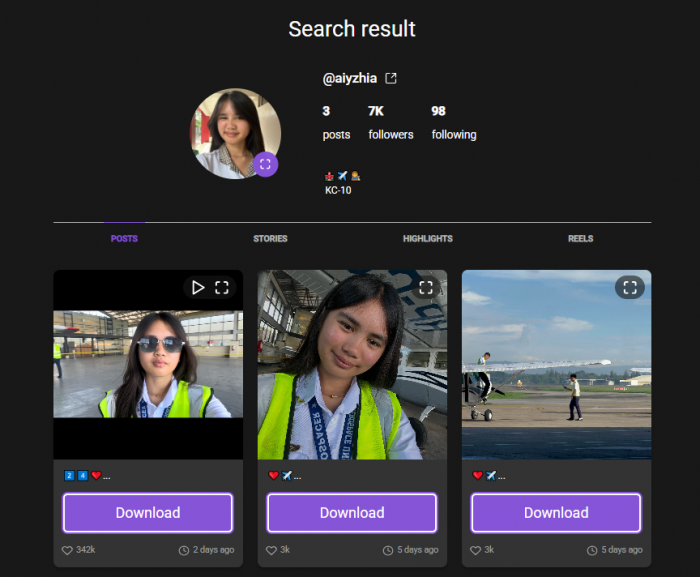
According to AnonyIG's documentation, a successful search returns publicly available Story media with viewing and downloading controls. A search may also return no content if the account is private, has no available Stories, or cannot be retrieved.
This is an important practical limitation. Entering a valid public username doesn't automatically mean the tool will return every Story. Its effectiveness depends on Instagram's accessibility and AnonyIG's retrieval system.
Checking the Download Feature
After examining the Story Viewer, I moved to AnonyIG's downloading instructions. The website advertises downloads for public Stories, Reels, Highlights, and posts.
The download function is intended to work directly from the retrieved media. After opening an available photo or video, users can select the relevant download control rather than taking screenshots or using screen recording software.
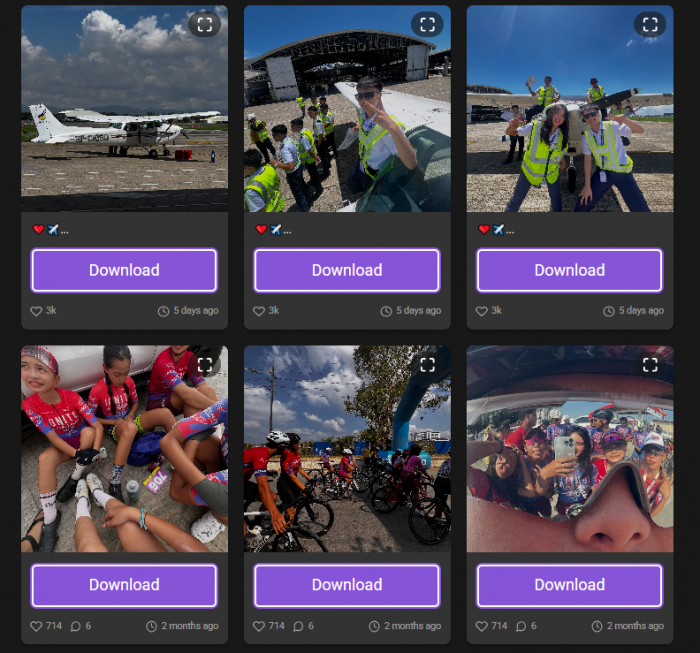
AnonyIG specifies two output formats: JPG for images and MP4 for videos. These are standard formats, so downloaded files should open using ordinary photo viewers and media players.
The website also claims to preserve the quality of the source media without adding a watermark. I examined these claims but couldn't complete a media download to inspect the actual output. There was therefore no verified file size, video resolution, or audio track to compare with the Instagram original.
If I were using AnonyIG regularly, I would pay particular attention to the following:
● Download quality: Whether saved photos retain sufficient resolution and whether videos show visible compression compared with their Instagram versions.
● Audio preservation: Whether video Stories and Reels download with their original sound intact.
● File accessibility: Whether clicking Download produces an actual JPG or MP4 file instead of another web page or an error.
● Consistent results: Whether multiple files from the same public profile download successfully, rather than working for only some content.
The downloading feature adds practical value to AnonyIG, but its actual reliability needs to be judged from completed downloads rather than its feature description alone.
Trying the Other Viewers
I then examined AnonyIG's other viewing tools. These use a similar search approach, but the content they retrieve differs.
Instagram Reels Viewer
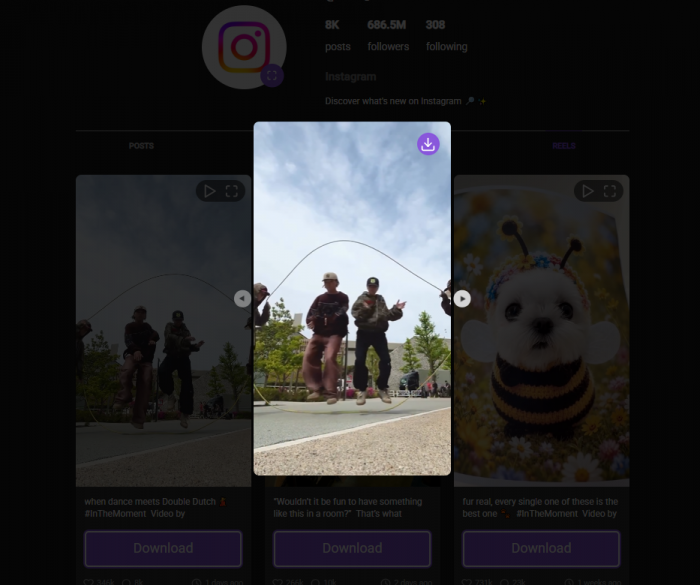
The Reels function is designed to display publicly available short videos without requiring an Instagram session.
AnonyIG advertises video playback and MP4 downloading. This makes the feature relevant for viewing individual public Reels or saving reference videos for offline use.
I found that its purpose is narrower than Instagram's regular Reels section. AnonyIG doesn't offer the same recommendation feed, comment interactions, or personalized video discovery. It is primarily a retrieval tool for content associated with public accounts.
I couldn't verify the playback quality or download output of a specific Reel during this examination.
Instagram Highlights Viewer
Next, I checked the dedicated Highlights Viewer. This feature retrieves Story collections that account owners have saved to their profiles.
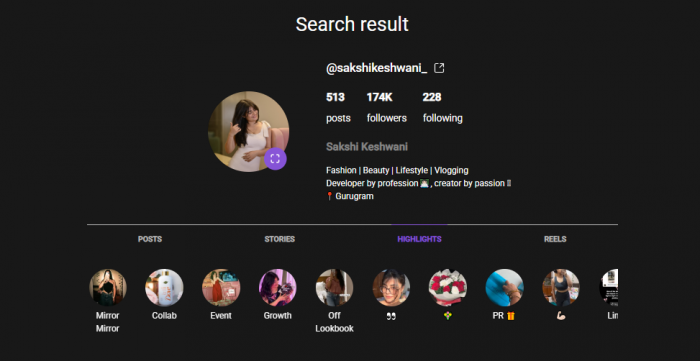
Unlike regular Stories, Highlights can remain visible after the original 24-hour period. That makes them useful for examining older public content such as product demonstrations, tutorials, announcements, and campaign collections.
AnonyIG's Highlights page describes a process where users enter a public username, access available collections, and select photos or videos to view or download.
What stood out was that Highlights give the tool a purpose beyond checking current Stories. However, deleted Highlights and private content remain inaccessible.
Instagram Posts and Profile Pictures
AnonyIG also advertises access to public feed posts and profile pictures. The Post Viewer is intended to display available photos and videos, while the Profile Viewer focuses on retrieving larger versions of public profile images.
I found these additions useful because they cover content types outside the Story format. Someone interested in a creator's public visual content can use the same service for different kinds of media.
However, I couldn't establish whether the tool retrieves every slide of a carousel post or consistently returns the highest available profile-picture resolution.
Checking the Anonymity Claim
After reviewing the viewing functions, I checked how AnonyIG says it protects a visitor's identity. The website explains that its servers retrieve public Instagram content rather than requesting the visitor to authenticate with Instagram. As a result, AnonyIG claims the visitor's username doesn't appear in the Story owner's viewer list.
That is the main technical difference between watching a Story through a logged-in Instagram account and using AnonyIG.
I couldn't confirm the claim through a controlled test involving a newly published Instagram Story and its viewer list. So I wouldn't describe the anonymity feature as independently proven.
I also checked AnonyIG's privacy policy. The website promotes no-login browsing and states that it doesn't retain certain user information, but its policy describes cookies, analytics, and advertising-related data processing.
That distinction matters. Hiding an Instagram username from a Story owner is different from preventing a website from processing browser or device information. Based on the available information, AnonyIG is designed to keep the visitor's personal Instagram account separate from Story viewing. I wouldn't interpret that as a guarantee of complete anonymity across the internet.
What Didn't Work and the Limitations
The biggest gap in my examination was the inability to verify an end-to-end retrieval. Although I could inspect the website's interface and documented workflow, I couldn't obtain a completed media result to measure reliability.
I also found several restrictions that users should understand before trying the service.
● Private profiles cannot be viewed. AnonyIG only works with content that is publicly accessible. It cannot bypass an Instagram account's follower approval settings.
● Expired Stories may be unavailable. AnonyIG advertises temporary caching for some Stories, but this doesn't guarantee that an expired or deleted Story can be recovered.
● Not all media is guaranteed to load. Instagram can restrict access or change its content delivery methods, which may affect third-party viewers.
● There are no account interaction features. Users cannot like posts, reply to Stories, send messages, or follow accounts through AnonyIG.
● It doesn't provide professional analytics. Features such as audience demographics, reach, impressions, and campaign performance aren't part of the service.
One improvement I would like is clearer feedback when content cannot be retrieved. A missing Story could have several explanations, and a useful error message should tell visitors whether the problem concerns account privacy, expired media, or a failed request.
Is AnonyIG Free?
I checked the website's pricing information and couldn't find a required subscription for its main viewing functions. AnonyIG advertises free access to Stories, Highlights, Reels, and downloads, without a credit card or registration.
It also claims not to impose daily viewing or downloading limits. I couldn't verify that claim through repeated downloads, so I would treat unlimited access as an advertised policy rather than a measured finding.
For occasional public-content viewing, the free access model is attractive. There is no upfront account setup, and users can start with a profile search instead of selecting a subscription plan.
Is AnonyIG Safe?
I checked two aspects of safety: account security and website privacy. On the account-security side, AnonyIG's advertised process is reassuring because it doesn't require an Instagram password or verification code. The website also uses HTTPS for browser communication.
However, avoiding an Instagram login doesn't automatically mean all browsing activity is private. AnonyIG's privacy policy allows certain analytics and advertising-related processing, so its broad privacy claims need careful interpretation.
I would also verify the website address before using it. Several similarly named Instagram viewer websites exist, and they shouldn't automatically be assumed to have identical ownership or privacy practices.
For downloads, I would only open files in the expected media formats and avoid unexpected browser extensions or executable installers. AnonyIG's normal workflow doesn't require installing additional software.
What I Liked and Disliked
After examining the interface and available tools, I found that AnonyIG's main strength is convenience. It combines multiple public Instagram viewers within one browser-based service and doesn't require an Instagram account to begin searching.
Its main weakness is the uncertainty around media retrieval and privacy claims.
| What I Liked | What I Disliked |
| Search begins without registration | Successful retrieval wasn't independently verified |
| Supports usernames and profile links | Cannot access private profiles |
| Multiple media viewers in one place | No detailed account analytics |
| Free viewing and downloading advertised | Actual download quality remains unverified |
| No Instagram credentials required | Privacy disclosures need closer attention |
For someone collecting references from public Instagram accounts, the feature selection is relevant. The service is less suitable when complete media availability or advanced Instagram data is required.
My Final Verdict
AnonyIG offers a simple way to request public Instagram Stories, Reels, Highlights, posts, and profile pictures without logging into Instagram. I found its website easy to understand, particularly the username-based search process and separate media viewer pages.
The main advantages are the lack of registration, browser-based access, and multiple viewing and downloading functions. Its limitations include private-account restrictions, uncertain retrieval availability, and privacy claims that require more scrutiny.
My examination confirmed what the website offers and how its workflow is designed, but it didn't establish successful media playback, download quality, or viewer-list anonymity through a completed live test. I would consider AnonyIG for occasional public Instagram viewing, provided the specific media can be retrieved successfully. Its usefulness ultimately depends on whether the search returns the expected content, not simply on how many features the homepage advertises.
Comments