

I needed a voiceover for a short explainer, but I didn't want to spend time recording, removing background noise, or repeating sentences. That brought me to TTSMaker, a free AI voice generator that promises to turn written text into downloadable speech.
I started with a simple script, then moved to longer narration, voice adjustments, pronunciation corrections, and different audio formats. The process revealed how much control TTSMaker provides, where its free version is useful, and what still requires manual editing.
What Exactly Is TTSMaker?
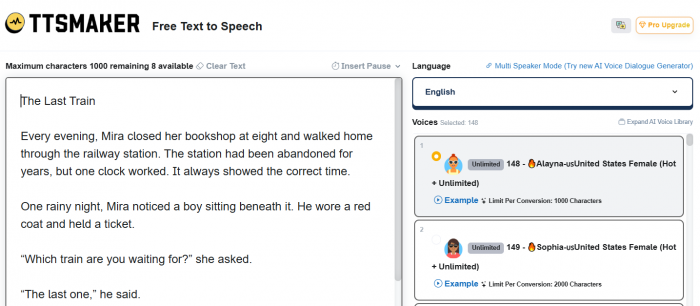
TTSMaker is an online text-to-speech tool that converts written content into AI-generated audio. It runs inside a browser, so there is no separate recording application to install.
The platform advertises more than 600 AI voices across over 100 languages. It supports voice adjustments, audio downloads, subtitles, and commercial usage under its licensing terms.
| Feature | Details |
| Languages and voices | 100+ languages, 600+ voices |
| Free allowance | 20,000 characters weekly |
| Voice controls | Speed, pitch, volume, pauses |
| Audio formats | MP3, WAV, OGG, AAC, OPUS |
| Commercial use | Permitted under licensing terms |
What caught my attention was the free allowance. I could start with short scripts without committing to a subscription, and some voices were marked for unlimited free usage.
The interface was also more focused than I expected. Instead of opening a complicated audio workspace, the main controls were arranged around a text box, voice selection, and conversion settings. I only needed a script to get started.
My First Voiceover With TTSMaker
I began with a short explainer because I wanted something that would be easy to judge. A complicated script would have made it difficult to separate problems with the writing from problems with the synthetic voice.
I wrote this paragraph:
“Most people spend more time organizing their daily tasks than completing them. A simple planning system can reduce unnecessary decisions and make it easier to focus on important work.”
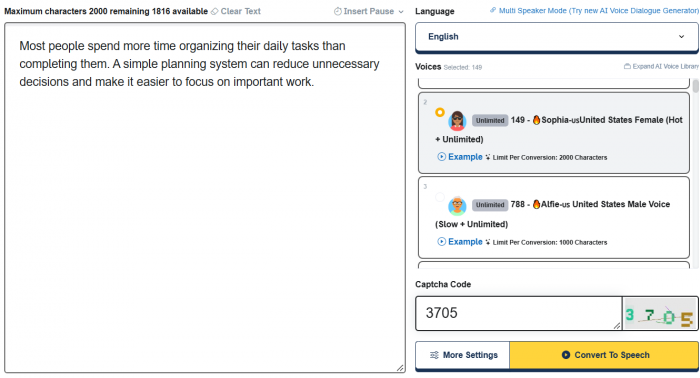
I pasted it into TTSMaker, selected English, and chose a neutral female narration voice. I kept the speed at its default setting and left the other adjustments unchanged. My intention was to hear the original output before experimenting with customization.
The initial result was suitable for understanding the message. The words were clear, and the short sentences worked reasonably well for informational narration. However, the delivery felt more like a prepared announcement than someone explaining an idea naturally.
The second sentence was where I wanted a little more variation. The point about reducing unnecessary decisions needed emphasis, but the neutral delivery did not give it much attention.
Instead of changing the entire script, I divided the paragraph into shorter sentences and added a more deliberate pause between the main ideas.
I also explored TTSMaker's Listen Mode, which converts only the first 50 characters. It was a useful option for comparing voices without repeatedly generating a complete passage.
The first exercise made one thing clear: getting understandable speech is relatively straightforward, but getting the exact delivery I wanted involved more attention to sentence structure and timing.
Trying Different Voices and Speaking Styles
After the first recording, I wanted to see whether changing the voice would make a bigger difference than adjusting the script.
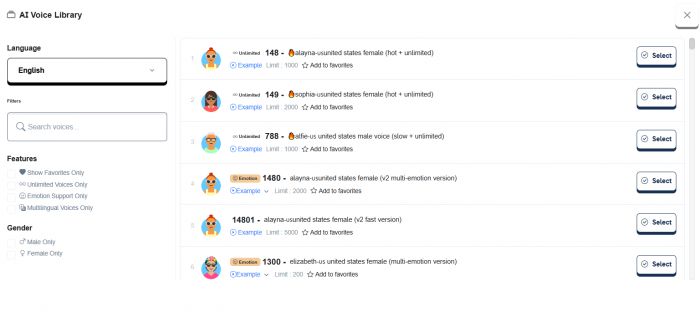
I kept the same text and compared a neutral female English voice with a male narration voice. I was looking for three things: how conversational the delivery felt, whether words were pronounced consistently, and whether the voice matched the tone of the explanation.
The female-style narration was a better fit for the short informational passage because I wanted a lighter delivery. The deeper male-style alternative seemed more appropriate for a formal introduction or documentary-style explanation.
Neither style is automatically better. The distinction became more useful when I considered what I was actually producing.
For a tutorial, I preferred a voice that delivered instructions without excessive drama. For storytelling, I wanted more variation in emphasis. A promotional script needed something with more energy than an ordinary informational reading.
I then adjusted the speaking speed. A slightly faster setting made the passage feel more direct, but pushing the pace further reduced the space between ideas. I eventually preferred keeping the narration close to normal speed and shortening the text where necessary.
Pitch controls provided another way to alter the sound, although they did not fundamentally change the voice's personality.
What I found useful about TTSMaker's selection process was the ability to explore different voices before choosing one for a project. The challenge was knowing when to stop experimenting. With a large voice library, it is easy to spend more time comparing narrators than preparing the actual recording.
How Natural Did the AI Voices Sound?
My next script was designed to expose pronunciation problems rather than simply produce pleasant narration.
I used a business-style sentence containing percentages and abbreviations:
"Our revenue increased by 25% in Q3, while customer acquisition costs declined by 12%."
This type of sentence is common in presentations, reports, and educational content. It also contains several elements that a speech generator needs to interpret correctly.
To make the intended reading more explicit, I rewrote it:
"Our revenue increased by twenty-five percent in the third quarter, while customer acquisition costs declined by twelve percent."
The rewritten version gave the speech engine fewer decisions to make about how numbers and abbreviations should be spoken. It was also easier to control the pacing because the sentence was written closer to how someone would say it aloud.
I paid particular attention to four things:
● Pronunciation: Numbers, abbreviations, and technical terminology needed to sound correct without forcing listeners to work out the intended meaning.
● Sentence rhythm: A continuous reading without appropriate emphasis could make important figures harder to follow.
● Voice consistency: Separately generated passages needed a similar speaking style if I wanted to combine them later.
● Emotional delivery: A neutral voice could communicate the figures clearly, but it did not necessarily make the information sound engaging.
The strongest lesson here was about writing for speech. A sentence that looks perfectly natural in an article may not be the best version to give a voice generator.
For straightforward explanations, this is manageable. For dramatic passages or scripts requiring subtle emotion, pronunciation fixes alone are not enough. The choice of voice and its expressive controls becomes much more important.
Adjusting Speed, Pitch and Pauses
The next part of the process involved experimenting with TTSMaker's settings to see how much they could change a recording.
I returned to the original explainer and made three adjustments separately rather than changing everything at once.
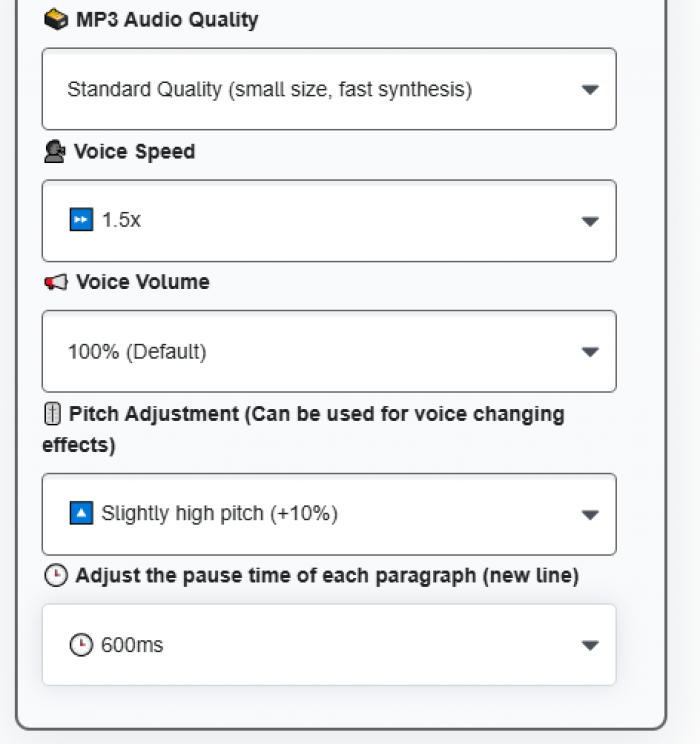
First, I increased the speaking speed. This shortened the delivery, but the resulting pacing was less comfortable for an instructional passage. It reinforced my preference for editing the script before trying to force too many words into a fixed duration.
Next, I explored pitch adjustment. Changing the pitch altered the perceived tone, but it did not make the narration substantially more expressive. A higher or lower pitch is not the same as adding excitement, curiosity, or concern.
The most useful adjustment was inserting pauses.
TTSMaker supports pause commands such as ((⏱️=1000)), which inserts a one-second break. I used the idea of a timed pause to separate an opening statement from the explanation that followed.
For example:
"Good productivity starts with fewer unnecessary decisions. ((⏱️=1000)) A simple planning system can help you focus on what matters."
The pause gives the opening idea more room before introducing the explanation. That is particularly relevant when narration accompanies slides, transitions, or on-screen text.
TTSMaker also provides paragraph pause settings, which can help when a script contains multiple sections.
| Setting | How it affected the workflow |
| Speed | Helped control duration, but required care to preserve clarity |
| Pitch | Changed vocal tone without replacing voice selection |
| Volume | Offered basic output-level adjustment |
| Inserted pauses | Created clearer breaks between ideas |
| Paragraph spacing | Helped organize longer narration |
These controls are useful, but I would not rely on them to fix every problem. Choosing an appropriate voice and writing a clear script made more sense than applying extreme adjustments afterward.
Using TTSMaker for Longer Narration
After exploring short scripts, I turned to a longer educational passage. The goal was different this time. I wanted to understand what happens when a recording needs to maintain the same delivery across several sections.
I prepared an explanation about cloud storage, starting with how files are uploaded and continuing through synchronization, sharing permissions, and basic security.
Rather than treating the entire explanation as one block, I separated it into smaller sections. This made the script easier to review and gave each topic a clear beginning and ending.
The free plan's published 500-character conversion limit was an important consideration. A longer passage could not simply be pasted into one conversion under that limit, even when enough weekly characters remained.
I therefore structured the narration into shorter parts. This approach had a practical advantage: if an explanation contained an awkward sentence, only that section would need to be rewritten and regenerated.
However, assembling several recordings introduces its own work. Pauses need to feel consistent, transitions must be checked, and the files have to be organized in the correct order. For this type of project, I preferred using one voice consistently and avoiding unnecessary changes to pitch or speed between sections.
TTSMaker also offers longer conversion allowances through paid subscriptions. For someone producing extended narration frequently, that difference may matter more than access to additional voices. Long-form production is where TTSMaker starts to feel less like a quick text converter and more like one component of a larger audio workflow.
Creating Audio for Different Projects
I also considered how the same workflow would fit different kinds of content. For an educational explanation, neutral narration made sense because the purpose was to communicate information clearly. I did not need dramatic delivery, but I did need consistent pronunciation and sensible pauses.
An audiobook-style passage presented a different requirement. I used a short story excerpt with descriptive sentences and dialogue to examine how voice selection would affect the listening experience.
The difficulty with this type of content is that a narrator may need to sound calm in one sentence and concerned in the next. A voice that works well for factual explanation may not make those changes convincingly.
For a business presentation, I focused on more direct language. The sample material contained a product description, benefits, and numerical information. Here, accuracy mattered more than personality. An incorrectly pronounced product name would be more distracting than a slightly formal delivery.
TTSMaker's language options also interested me, particularly English and Hindi. For a multilingual recording, the sensible workflow is to prepare the script in each language, select the appropriate voice, and check the resulting pronunciation independently.
The tool generates speech rather than automatically guaranteeing accurate translation. Any translated material still needs to be checked for meaning, terminology, and natural wording.
Across these different examples, I found the script's purpose to be the most useful starting point. Voice selection becomes easier once the required tone and listening experience are clear.
How TTSMaker Fits Social Media Videos
One practical use I wanted to explore was short-form video narration. I wrote a short script for a social media explainer:
“Three common mistakes can make your Instagram profile difficult to understand. The first is an unclear bio. The second is inconsistent content. The third is giving visitors no reason to follow.”
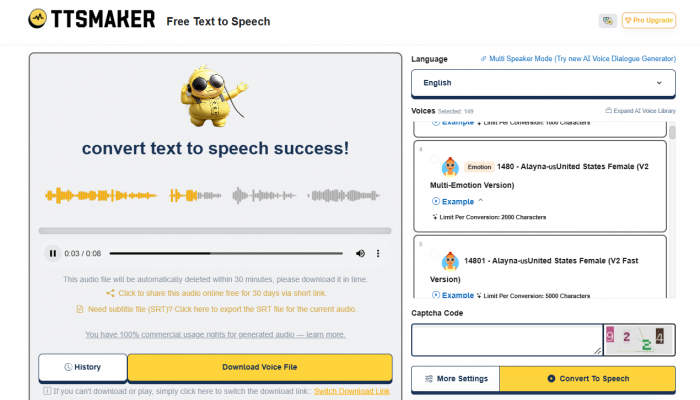
I chose a conversational English voice and treated the script as three separate ideas rather than one continuous paragraph.
My main adjustment was pacing. A short pause after the opening helped separate the introduction from the list, while smaller gaps between the points provided space for visual transitions.
For this kind of content, the recording does not need to sound like a dramatic performance. It needs to be clear enough to follow while the viewer watches the video. YouTube explainers benefit from the same approach, although longer scripts require more attention to sectioning and consistency.
Promotional videos are more demanding. A product announcement may need enthusiasm or urgency that a neutral narrator does not communicate particularly well.
TTSMaker's basic controls can help with pacing, while eligible paid plans provide more advanced emotion features. Those options are worth considering if a project depends on expressive delivery.
The platform allows generated audio to be used commercially under its licensing terms, although publishing and monetization remain subject to individual platform policies.
For informational videos, TTSMaker can reduce the need for manual recording. More personality-driven content still depends heavily on the selected voice and the editing applied afterward.
Downloading and Working With the Audio
Once narration has been generated, the next decision is how to use the file. TTSMaker supports MP3, WAV, OGG, AAC, and OPUS. For a straightforward narration project, I would choose MP3 because it is convenient for playback and compatible with common editing applications.
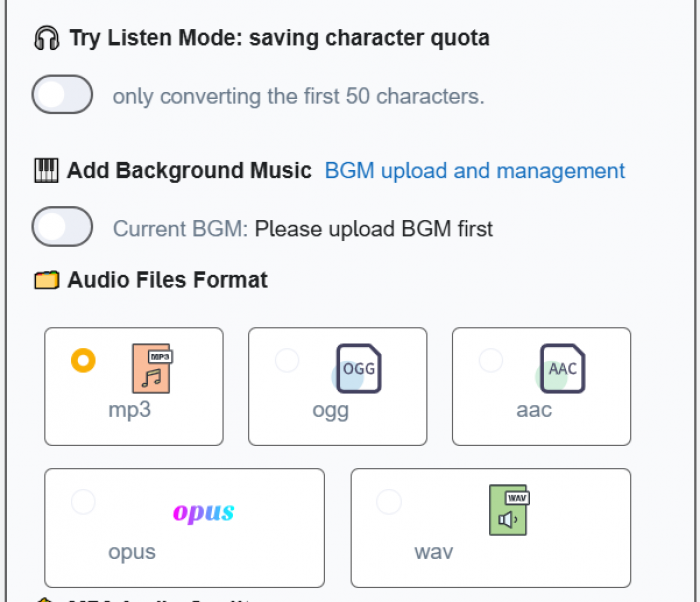
WAV is another option when an uncompressed audio file is preferred. I would also use TTSMaker's SRT subtitle export for projects that need captions. The important step is checking the subtitles after making changes to the audio, particularly if sections are rearranged or pauses are edited.
The platform includes background music functionality, although I would handle detailed music mixing in a dedicated video or audio editor. That makes it easier to adjust music levels independently of the narration.
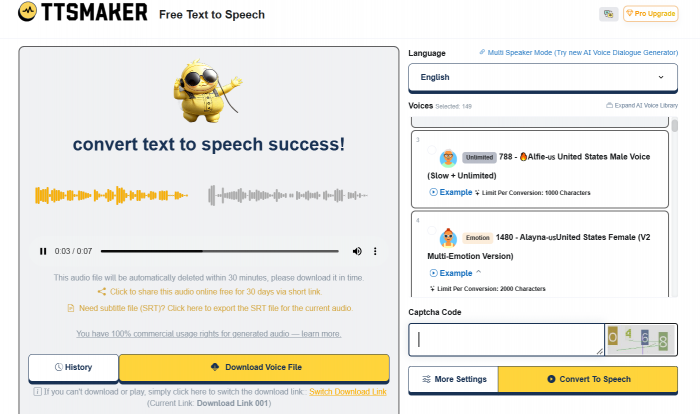
One detail worth remembering is TTSMaker's temporary conversion history. The site indicates that generated audio files should be downloaded promptly because its standard conversion history is retained for only 30 minutes.
For longer projects, I would save recordings immediately and give them descriptive filenames. This avoids confusion when working with several versions of the same script.
TTSMaker Pricing and the Free Plan
The free plan was the main reason TTSMaker interested me initially. It offers 20,000 characters per week, and certain voices are available without counting toward that allowance.
However, there is an important difference between the weekly quota and the amount of text allowed in one conversion.
TTSMaker's published free pricing lists a maximum of 500 characters per conversion. A 1,500-character script would therefore require at least three separate conversions, even if the weekly allowance had barely been used. That restriction is manageable for short announcements, but it becomes inconvenient when producing long recordings regularly.
The paid options are:
| Plan | Monthly price | Character allowance |
| Free | $0 | 20,000 weekly |
| Lite | $13.99 | 300,000 monthly |
| Pro Mini | $23.99 | 600,000 monthly |
| Pro Max | $32.99 | 1,200,000 monthly |
| Studio | $140 | 6,000,000 monthly |
*Note : Prices are based on the published monthly rates checked in October 2026 and may change.
Lite increases the maximum conversion length to 10,000 characters and removes CAPTCHA and advertising interruptions. Pro Mini adds emotional controls, dialogue editing, and API access. Higher plans provide larger allowances for more intensive production.
My preferred approach would be to use the free version for short recordings and occasional narration. The value of upgrading becomes clearer when conversion limits begin creating extra editing work or when advanced voice controls are needed. Repeated corrections can also consume character allowance, making careful script preparation worthwhile even when a paid plan provides a large quota.
Commercial Use and Audio Rights
TTSMaker's commercial licensing is another important part of its appeal. Its terms permit generated audio to be used, modified, reproduced, and distributed for lawful personal and commercial purposes. That can include original advertisements, narrated educational materials, presentations, and videos.
For example, narration created from an original product script can be incorporated into a commercial demonstration without needing a separate voiceover license from TTSMaker. However, that permission does not automatically cover copyrighted scripts, music, or other third-party content.
Turning someone else's book into an audiobook still requires appropriate rights to the underlying work. Similarly, using AI-generated narration on a video platform does not automatically guarantee monetization approval.
TTSMaker retains rights to its underlying technology and voice models, even though its license permits broad use of the generated audio. For commercial projects, I would check both TTSMaker's licensing terms and the publication requirements of the destination platform.
What I Liked About TTSMaker
The aspect I appreciated most about the workflow was how little preparation was needed to begin. I could work from a written script without setting up recording equipment or learning specialized audio software.
The ability to compare voices also gave the process flexibility. I could approach an educational passage differently from a promotional script without changing platforms.
Several parts of the experience stood out:
● The simple conversion process: Preparing a script, choosing a voice, and generating narration involves relatively few steps, making the platform accessible for occasional users.
● The voice selection: Different voices allow users to match narration to educational, business, storytelling, and video content rather than using one default narrator for everything.
● The timing controls: Speed adjustments and inserted pauses provide practical ways to shape narration around the intended listening experience.
● The free and commercial options: The free allowance is useful for getting started, while commercial licensing allows generated audio to be incorporated into lawful professional projects.
I also liked the flexibility of working with separate script sections. When something needed changing, the workflow allowed for a targeted replacement rather than starting the whole project again. For informational recordings, those conveniences may matter more than having an extensive collection of advanced effects.
What Could Be Better?
The free conversion limit is the clearest inconvenience for longer narration. Having to divide a relatively modest script into multiple parts creates additional file management and editing work.
Voice expression is another area where expectations need to be realistic. Speed and pitch controls can alter the delivery, but they do not reliably provide the detailed emotional direction possible with a human narrator.
The large voice library can also slow down decision-making. Finding a suitable narrator requires comparing samples, and a voice that works for one passage may not be ideal for every project. Advertisements and CAPTCHA verification on the free plan may also become frustrating during repeated conversions.
Finally, the generated recording is not automatically a finished production. It can still need corrections, transitions, music mixing, or subtitle synchronization. For short informational audio, these are manageable compromises. For complex audiobooks, dramatic narration, or professional advertising, they deserve greater consideration.
Verdict: Would I Use It Again?
TTSMaker offers a convenient way to create AI narration through its simple interface, voice options, and free allowance. It works particularly well for short explanations, educational content, presentations, and video voiceovers without requiring recording equipment.
However, longer scripts can be inconvenient due to conversion limits, and natural pronunciation and emotional delivery may require additional adjustments. I would use TTSMaker for straightforward narration but consider more advanced options for expressive storytelling or professional voice acting.
Overall, TTSMaker is worth trying, especially with its free plan. It makes converting text into usable audio easier, although more demanding projects may benefit from paid features and additional editing.
Comments