

Creating motion graphics usually involves timelines, keyframes, transitions, and several rounds of editing. Swishy AI approaches the same task differently. Instead of manually animating every element, users can describe what they want and generate animated text, logos, charts, and promotional graphics through AI.
I wanted to explore Swishy beyond its gallery examples and understand how its features fit into a practical content creation workflow. The main questions were straightforward: How much control does it offer? What kinds of animations can it create? And how much work is still needed after generation?
Getting Familiar With Swishy AI
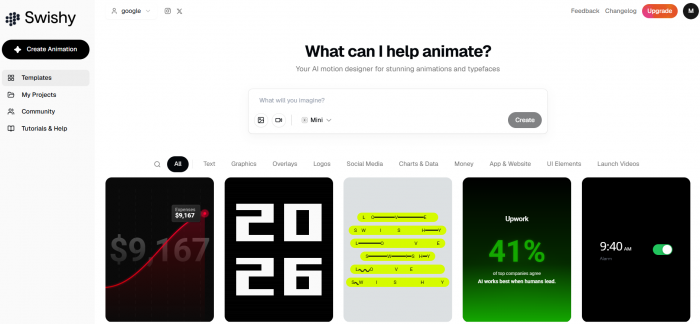
Swishy AI is a browser-based motion graphics tool designed to generate animations from written prompts. Its focus is different from AI video generators that create complete scenes with realistic people, environments, and camera movements.
Here, the emphasis is on individual animated elements. These include kinetic typography, logo reveals, animated charts, promotional graphics, notification effects, and interface animations.
The first place to explore is Swishy's animation gallery. Rather than starting with a completely blank canvas, users can examine examples organized into categories such as Text, Graphics, Logos, Social Media, Charts & Data, Overlays, and UI Elements.
The gallery provides a useful indication of what the platform is designed to handle. A text reveal requires a different approach from an animated chart, and a logo animation has different accuracy requirements from a promotional headline.
Swishy offers three main ways to approach animation creation: starting from an existing example, generating a new animation from a prompt, and editing an animation before exporting it.
For a first project, the template-based approach is a sensible starting point because it provides a visual reference for the intended movement.
Creating a Text Animation From a Prompt
Animated text is one of the most accessible ways to understand Swishy's workflow. It requires relatively few visual elements, making it easier to judge whether the generated motion follows the original instructions.
For the first test brief, I chose a short headline: "Stop Scrolling."
The purpose was to create an animated opening that could work in a short video without requiring additional graphics.
The prompt was:
Create a bold animated headline that says "Stop Scrolling." Use bright yellow text on a black background. Make the words appear one after another with a smooth bounce effect. Keep the movement quick, clean, and easy to read.
The prompt includes four important instructions: the exact wording, visual appearance, animation sequence, and intended pace.
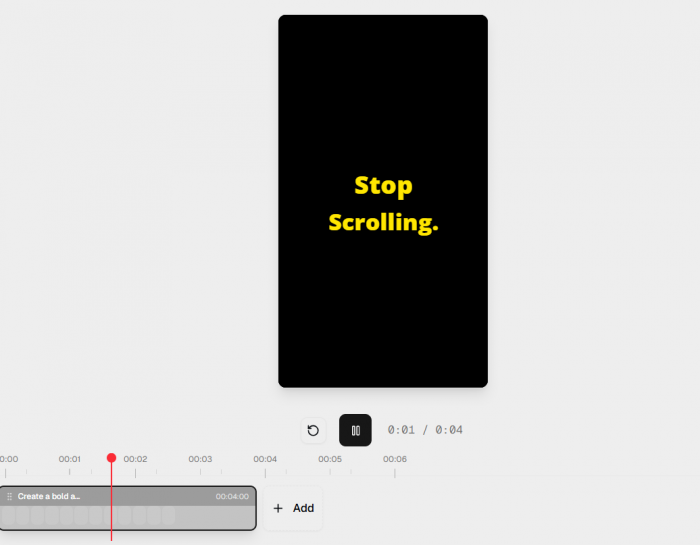
These details matter because a request such as "make animated text" leaves too many creative decisions undefined. Swishy's available typography examples include text reveals and kinetic lettering, making this a suitable starting point for evaluating its generation capabilities.
The key details to inspect in the resulting animation are the spacing between words, the timing of their appearance, and the amount of movement applied.
An animation can appear polished while still being unsuitable for its intended purpose. If the words move too quickly, viewers struggle to read them. If the entrance takes too long, the opening loses its impact.
The most useful outcome would be a short, readable animation that needs little additional editing. Any corrections required to achieve that result should be recorded as part of the test.
Turning a Simple Announcement Into Motion
After the basic headline, the next useful test involves a longer promotional message. A typical announcement contains more than one piece of information. It may need an introductory phrase, the main announcement, and a closing message.
For this example, I used three lines:
● Opening: "Something New Is Coming" introduces the announcement without revealing everything immediately.
● Main message: "New Collection Launching Friday" communicates the information viewers need.
● Closing: "Explore Soon" provides a simple final message without overwhelming the animation.
The animation brief was:
Create a minimal promotional animation with a cream background and dark typography. Start with "Something New Is Coming," transition smoothly into "New Collection Launching Friday," and finish with "Explore Soon." Use subtle movement, balanced spacing, and consistent typography.
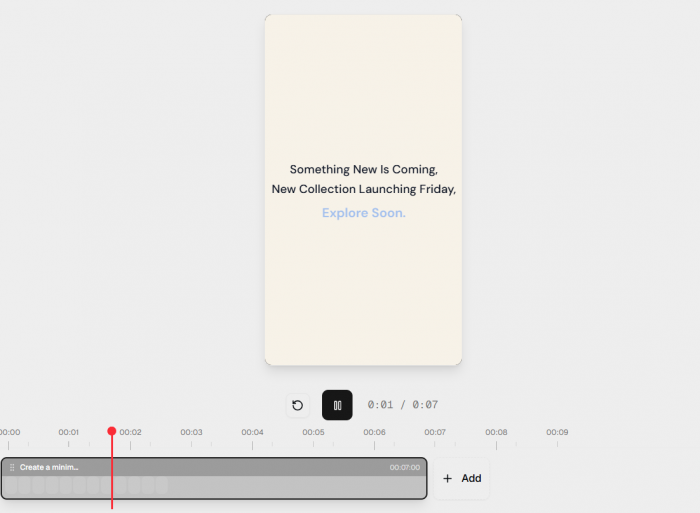
This is more demanding than creating a single animated headline. The tool needs to organize multiple text elements, determine how they transition, and maintain a consistent visual style throughout.
A useful way to evaluate the output is to examine each stage separately. The opening should establish the visual style, the announcement should receive enough screen time, and the closing message should remain visible before the animation ends.
The balance between movement and readability is particularly important here.
Too many effects can make a promotional graphic difficult to follow. On the other hand, a simple transition between well-positioned text elements may communicate the message more effectively.
The practical question is whether the generated animation can be used with minor adjustments or requires a substantial redesign.
Exploring Swishy's Logo Animation Options
Logo animation introduces another level of complexity because the final result needs to preserve an existing visual identity. Swishy's public examples include logo reveals, spinning animations, and other branded motion effects. These are relevant to video introductions, promotional material, presentations, and branded content.
For a practical logo animation test, the starting point should be an existing brand asset rather than a request to invent a new logo.
A suitable instruction would be:
Animate the supplied logo using a smooth fade-in and slight upward movement. Preserve the original typography, proportions, and colors. Hold the completed logo on screen before fading out.
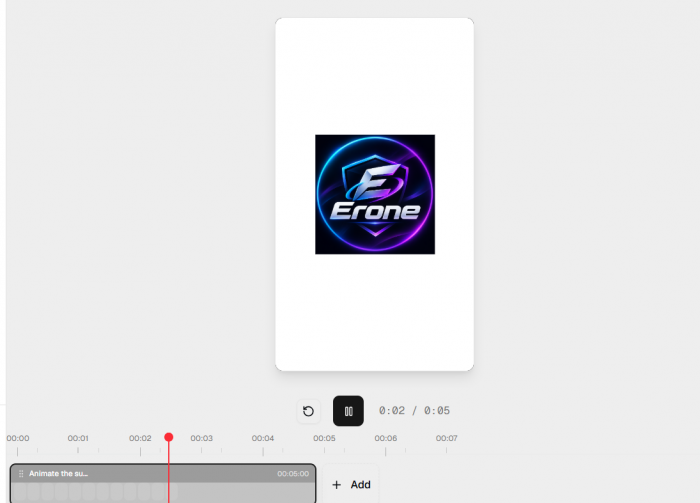
This approach keeps the requested motion simple while making brand accuracy the priority. The challenge with AI-generated logo animation is that an attractive effect does not automatically produce a suitable brand asset.
A useful result must maintain the recognizable details of the original design. Any changes to lettering, proportions, spacing, or colors could make the animation unsuitable for professional use.
The editing process also matters. It should be possible to adjust the movement without unnecessarily changing the underlying design.
For creators producing recurring branded videos, a dependable logo animation is often more valuable than an elaborate effect that cannot be reproduced consistently.
Creating Animated Charts With Swishy
Animated data visualizations are another interesting part of Swishy's feature set. The platform's public gallery includes examples of animated bar charts, counters, percentages, and other numerical graphics. These can be used in educational videos, presentations, performance reports, and marketing content.
For this test brief, I prepared a simple dataset showing follower growth over four months.
| Month | Followers |
| January | 1,000 |
| February | 2,500 |
| March | 4,000 |
| April | 7,000 |
The animation request was to display four vertical bars, with each bar rising into position and its numerical value appearing above it. The instructions also called for a dark background, clear labels, and a consistent animation speed.
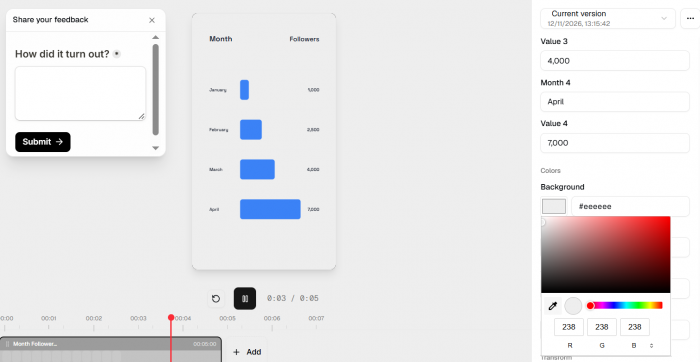
Compared with text or logo animation, charts introduce an additional requirement: data accuracy. The final graphic must represent the supplied values correctly. A smooth transition cannot compensate for incorrect figures or misleading proportions.
Several details are worth examining in the completed animation:
● Numerical accuracy: The displayed values must match the supplied data, with no missing or incorrectly formatted numbers.
● Chart proportions: The bar heights should represent the differences between values consistently rather than exaggerating or minimizing growth.
● Label readability: Each month and numerical value should remain visible long enough to understand.
● Motion timing: The animation should make the progression easy to follow without unnecessary delays or visual distractions.
This is one area where Swishy could offer a useful alternative to manually animating individual chart elements.
However, a generated visualization should always be checked against the source data before being published.
Making Changes After the First Generation
The initial animation is only one part of the workflow. The next question is whether Swishy provides enough control to make corrections without recreating the entire project.
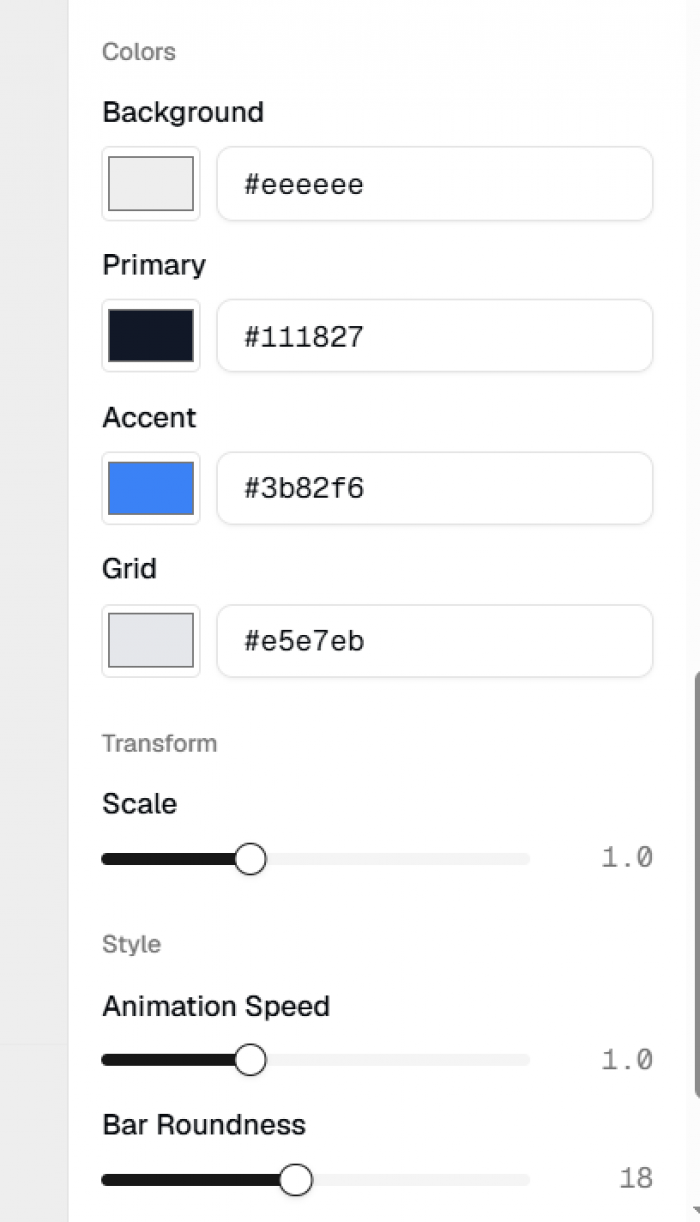
Swishy's public documentation describes editing existing animations and adjusting visual properties such as colors and timing. That flexibility is important because creative requirements frequently change during production.
For example, the original animated headline might use yellow typography, but the final project may require green. A promotional graphic might need different wording, while an animated chart could require a longer pause before the final value appears.
A practical editing test would focus on changing one property at a time. Start by modifying the text or color, inspect the new preview, and then adjust the duration or movement if the available controls permit it.
Testing one change at a time makes it easier to determine whether the editor behaves predictably. A good editor should preserve the parts of the animation that do not need changing. For creators working with regular content schedules, predictable revisions can be more valuable than generating completely new visual concepts.
Testing a More Detailed Animation Prompt
Simple animations provide a useful introduction, but longer instructions are more revealing. To examine how Swishy approaches a multi-part sequence, I prepared a promotional animation brief containing several timed elements.
The prompt was:
Create a 10-second animation. Begin with "Big News" in large white typography. After two seconds, transition to "Our New Course Is Live." Add a subtle purple background glow and finish with "Enroll Today." Keep the typography consistent and use smooth transitions.
This brief includes an opening headline, a timed transition, a background effect, and a closing call to action. Each instruction affects the overall sequence.
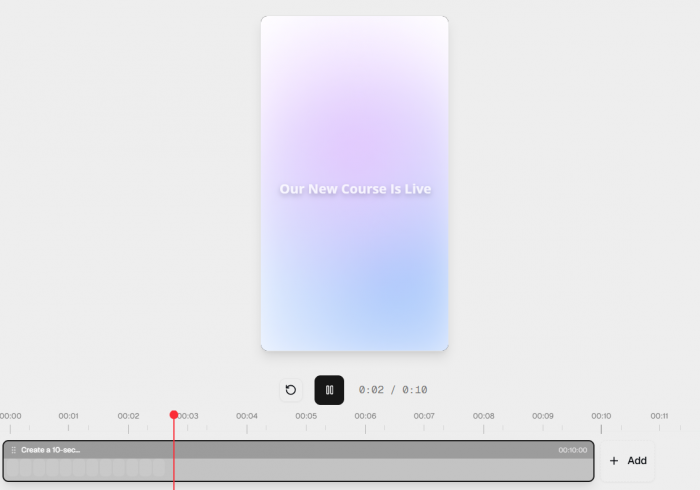
The first thing to examine is whether the messages appear in the requested order. The second is whether the timing feels natural, particularly between the main announcement and the closing message.
The next consideration is visual consistency. All three messages should appear to belong to the same animation rather than separate, unrelated scenes.
If a detailed prompt produces an inconsistent result, a useful revision method is to simplify the instructions. Instead of specifying several effects simultaneously, describe the main composition first and then refine individual movements. Comparing the original prompt with the revised version would help establish how much detail Swishy can interpret reliably in one request.
Exporting the Finished Animations
An animation is not particularly useful if it cannot be incorporated into the intended project.
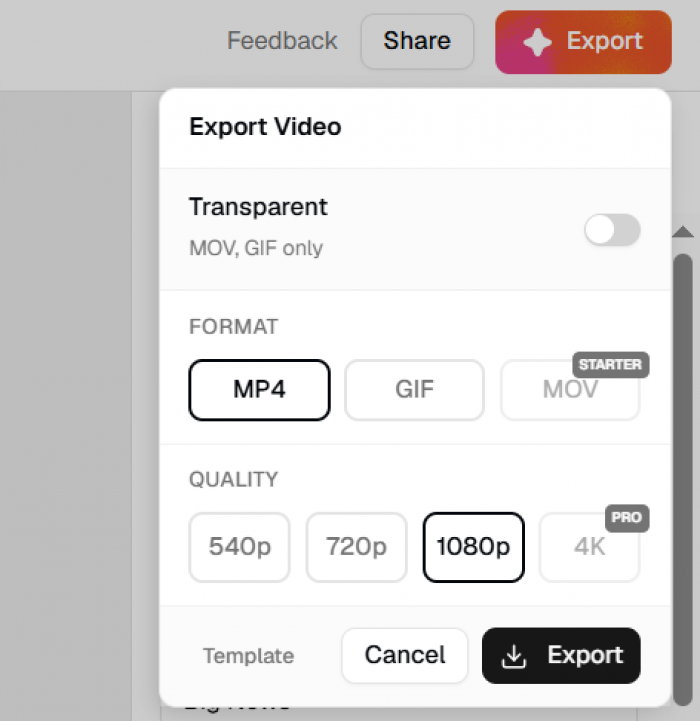
Swishy advertises several export formats, including MP4, MOV, and GIF. The exact export settings and account restrictions should be verified in the editor before production use.
The format matters because different projects require different kinds of assets.
| Export format | Suitable use |
| MP4 | Standalone animated clips and general video content |
| MOV | Motion graphics editing workflows, including transparency where supported |
| GIF | Short looping animations for compatible digital platforms |
There are several details worth checking beyond the file format. Resolution determines how sharp the animation appears after being added to another video. Aspect ratio affects whether the composition fits a vertical, square, or widescreen layout.
Transparency is another consideration for text and logo animations intended to appear over existing footage.
A full-screen promotional graphic can use a solid background, but an animated title added to a video may require a transparent background or additional compositing work.
It is also important to inspect whether the exported file matches the preview. Unexpected compression, changes in timing, or altered text placement could create additional editing work. The final export should therefore be treated as part of the test, not simply the last button in the process.
Comparing the Different Animation Workflows
The four main animation categories serve different purposes and require different levels of creative control.
| Animation type | Main requirement | Important consideration |
| Animated typography | Readable movement | Timing and text placement |
| Promotional graphics | Clear visual messaging | Sequence and composition |
| Logo animation | Brand consistency | Original design accuracy |
| Animated charts | Accurate information | Values, labels, and proportions |
Text animation is the most straightforward starting point because the composition contains fewer elements. Promotional graphics require more attention to sequencing, while logo animation places additional importance on preserving the original artwork.
Charts need the most careful factual verification because even a small numerical mistake can affect the meaning of the finished content.
These differences show why animation quality should not be judged entirely by movement or visual appeal. Each output needs to be evaluated against its intended purpose.
Does Swishy Actually Reduce Editing Work?
The main attraction of a prompt-based animation tool is the possibility of avoiding repetitive manual animation work. In conventional motion graphics software, creating a text reveal may require multiple layers, position adjustments, keyframes, and easing controls.
Swishy approaches these tasks through written descriptions and generated motion. This could reduce the amount of initial setup required for straightforward animations.
However, generation speed is only one part of the production process. The complete workflow includes preparing the prompt, reviewing the preview, making corrections, checking the final composition, and exporting the asset.
If an animation requires several revisions, the total time saved may be smaller than expected. The value also depends on how frequently the same animation style is needed.
For occasional announcements or animated headlines, a prompt-based approach may be convenient. For projects involving strict brand guidelines, complicated sequences, or precise frame-by-frame control, traditional editing software may still be necessary.
The strongest practical test would compare total production time for the same animation in Swishy and a conventional editing tool. Without recording those timings, it would be misleading to claim a specific productivity improvement.
Swishy AI Pricing: What to Check
Swishy offers a free starting option and paid access to additional capabilities. However, its public website does not clearly present a complete, consistently verifiable pricing breakdown with all credit allowances and export restrictions.
For that reason, exact plan prices should be checked inside the platform before subscribing.
A credit-based animation service also needs to be evaluated differently from software with unlimited local editing.
The most relevant questions are how many animations can be generated, whether revisions consume credits, and which export settings are available under each plan.
For occasional users, a limited allowance may be sufficient to create a few animated titles or promotional elements.
For someone producing several animations every week, the number of usable outputs matters more than the advertised number of generations.
It is worth examining whether multiple attempts are required to achieve the desired result. A low generation cost becomes less attractive if each finished animation consumes several attempts.
The practical measure of value is therefore the cost of a usable, completed asset rather than the cost of an individual generation.
What Swishy Does Well and Where It Needs Care
Based on its available tools and documented workflow, Swishy has several qualities that make it worth exploring. Its focus on motion graphics is particularly useful because these elements frequently appear inside larger creative projects.
The gallery also provides visual starting points, making it easier to understand the supported animation styles before writing prompts.
However, the tool should be assessed carefully in areas that require consistency and precision. Brand assets need accurate visual reproduction, charts need correct data, and promotional graphics need dependable editing controls.
The distinction between a visually appealing preview and a production-ready animation is especially important. A useful animation should communicate its message clearly, support the intended format, and require a reasonable amount of editing.
That is ultimately more meaningful than the number of animation styles available in the gallery.
My Final Verdict on Swishy AI
Swishy AI takes an interesting approach to motion graphics by making text prompts and editable examples central to the creation process. Its focus on animated typography, promotional elements, logos, charts, and interface graphics gives it a clearer purpose than many general AI video tools.
The most promising applications are short animations that would otherwise require repetitive manual setup. Text reveals, simple promotional graphics, and animated numerical elements are particularly relevant starting points. However, the quality of the initial generation is only part of the evaluation. Creative control, accuracy, consistency, and export flexibility determine whether the finished asset can be used professionally.
Swishy looks worth exploring for creators who need standalone motion graphics without building every movement from scratch. It should not automatically be treated as a replacement for complete motion design software, particularly for projects requiring advanced compositing or precise frame-by-frame editing. The final purchasing decision should depend on actual output quality, the number of revisions needed, and the cost of producing usable animations. Those are the details that matter most once the novelty of generating motion graphics through a prompt wears off.
Comments