

A YouTube thumbnail has one job: make someone interested enough to click. Yet creating one that looks professional, communicates the video idea, and stands out among competing videos can take longer than expected. AI thumbnail generators can help, but not all of them approach the job in the same way.
Some create complete thumbnails from prompts, others turn video content into designs, while a few focus on researching successful thumbnail concepts. This guide compares eight AI YouTube thumbnail generators based on their creative capabilities, practical workflows, pricing, and limitations so creators can choose a tool that actually fits their channel.
Quick Comparison of the 8 Best AI YouTube Thumbnail Generators
| Tool | Best for | Free access | Starting paid price |
| Canva | Customizable designs | Free plan | $12/mo, billed yearly |
| Pikzels | AI-generated creator thumbnails | Free trial/access | $28/mo, billed yearly |
| vidIQ | YouTube-focused creation | Free plan | $16.58/mo for Boost, billed yearly |
| Adobe Express | Branded thumbnails | Free plan | $9.99/mo |
| Ideogram | Text-heavy AI visuals | No ongoing free tier listed | $15/mo, billed yearly |
| Fotor | Image editing and quick designs | Free plan | $3.33/mo, billed yearly |
| 1of10 | Research-backed thumbnail ideas | Free plan | $15/mo, billed yearly |
| Thumbmagic | Video-to-thumbnail generation | 3 free thumbnails | $17/mo, billed yearly |
*Note : Pricing checked against available plan information in November 2026. Prices are in USD, generally exclude tax, and may vary by region. Annual prices are shown as monthly equivalents.
1. Canva: Best for Customizable AI YouTube Thumbnails

Canva is a practical choice for YouTubers who want AI assistance without losing control over their designs. It combines AI image generation, thumbnail templates, typography tools, and image editing in one workspace. This makes it especially useful for creators who publish regularly and want recognizable visual branding.
How it works for thumbnails
Creators can begin with a YouTube thumbnail template, upload their own images, or generate visuals using Canva AI. The editor allows them to position subjects, adjust backgrounds, add headlines, and customize layouts before exporting the finished design.
Where it performs well
● Flexible design editing: Individual text, images, backgrounds, and graphic elements can be adjusted without rebuilding the thumbnail.
● Channel branding: Brand Kits and reusable templates help maintain consistent fonts, colors, and visual identities across uploads.
● Creative asset library: Stock photographs, illustrations, icons, and AI-generated graphics can be combined for different video categories.
| Quick breakdown | Details |
| Best for | Beginners and creators who prefer manual customization |
| AI capabilities | Image generation, layout assistance, background editing |
| Pricing | Free plan with limited AI usage; Canva Pro starts at $12/month billed annually, or $18 monthly |
Where Canva falls short
Canva is not a dedicated YouTube performance research platform. Its AI-generated layouts can require manual corrections, particularly for thumbnails with multiple subjects or detailed compositions. Frequent use of advanced generation features also consumes the plan's AI allowance.
Creator verdict: Canva is one of the more practical options for creators who want to develop a consistent thumbnail style while retaining control over the final design. Its strength lies in editing flexibility rather than complete automation.
2. Pikzels: Best for AI-Generated Creator Thumbnails

Pikzels takes a more specialized approach to thumbnail generation. Rather than starting with a design canvas, creators can describe a concept and generate a thumbnail around it. Its Persona and Style features also make it relevant to channels that repeatedly feature the same presenter and visual identity.
How it works for thumbnails
Enter a description of the video's subject, visual composition, and desired mood. Pikzels generates thumbnail options that can be refined through text instructions. Creators can also provide a YouTube link as a reference, while the Persona feature uses uploaded photographs to incorporate a recurring presenter.
Where it performs well
● Presenter consistency: Persona training helps creators reuse their appearance across multiple AI-generated thumbnails without arranging new photo shoots.
● Reference-based creation: The Recreate function provides a starting point based on an existing YouTube thumbnail format.
● Thumbnail evaluation: Pikzels Score examines factors such as clarity, curiosity, and emotional impact, while its editing tools support further revisions.
| Quick breakdown | Details |
| Best for | Personality-led and high-volume YouTube channels |
| AI capabilities | Prompt-to-thumbnail, Persona, style training, thumbnail analysis |
| Pricing | Free starting access advertised; Premium starts at $28/month billed annually, or $40 monthly |
Where Pikzels falls short
Generation works through credits, with individual thumbnails generally costing 10–20 credits. Repeated revisions, Persona training, and analysis can therefore reduce the balance available for new designs. Its scoring system is also an automated assessment, not a prediction of actual YouTube click-through rates.
Creator verdict: Pikzels is particularly relevant for creators who appear frequently in their thumbnails and want AI to handle more of the design process. It offers greater thumbnail-specific automation than a general design editor.
3. vidIQ: Best for YouTube-Focused Thumbnail Creation

vidIQ combines AI thumbnail generation with a broader collection of YouTube research and optimization tools. Its appeal comes from connecting visual creation with video topics, titles, audience interests, and channel research rather than treating the thumbnail as a separate design task.
How it works for thumbnails
Creators can open the Thumbnails feature, describe their concept, and provide supporting images or references. After generation, vidIQ offers editing controls for text, stickers, image replacement, and face-related adjustments. The finished design can be refined with additional instructions before downloading.
Where it performs well
● YouTube research tools: Channel insights, topic research, and content ideas provide useful context for deciding what a thumbnail should communicate.
● Presenter personalization: Likeness and face-swap options help creators incorporate their own appearance into generated designs.
● Targeted thumbnail revisions: Text, image assets, and visual details can be adjusted after generation without necessarily starting from a new concept.
| Quick breakdown | Details |
| Best for | Creators managing both video discovery and thumbnail creation |
| AI capabilities | Thumbnail generation, face integration, smart editing |
| Pricing | Free plan with 150 shared AI credits/month; Boost starts at $16.58/month billed annually, or $19 monthly |
Where vidIQ falls short
Its AI credits are shared across multiple tools, including thumbnail generation, scripting, and AI coaching. A thumbnail generation or edit currently costs 22 credits, meaning frequent design revisions can compete with other channel-management activities for the same allowance. Generated subject positioning may also need correction.
Creator verdict: vidIQ makes sense for creators who want thumbnail generation alongside their existing YouTube research workflow. Those interested only in producing images may not need its additional channel-management capabilities.
4. Adobe Express: Best for Branded YouTube Thumbnails
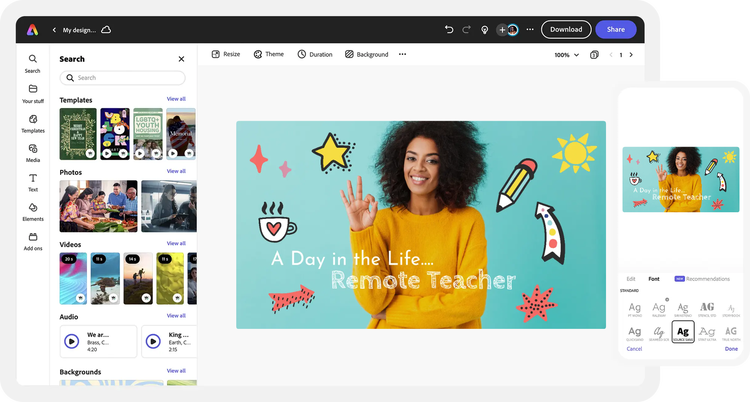
Adobe Express is designed for creators who care about visual consistency and professional presentation. It brings Adobe Firefly image generation, editable templates, stock assets, and brand management into a relatively accessible design environment. It's particularly suitable for educational, business, and technology channels that prefer polished visuals over exaggerated thumbnail effects.
How it works for thumbnails
Choose a YouTube thumbnail template or build a layout using your own photographs and graphics. Adobe Firefly can generate supporting imagery, while editing tools allow creators to remove backgrounds, add typography, and arrange visual elements. Saved brand assets can then be applied to future thumbnail designs.
Where it performs well
● Adobe Firefly integration: Creators can generate custom backgrounds, illustrated scenes, and supporting objects without relying entirely on stock images.
● Typography and layout control: A broad font collection and editable design elements make it suitable for information-heavy thumbnails that need clear visual hierarchy.
● Professional brand management: Brand Kits and reusable assets help teams maintain consistent design standards across different YouTube series.
| Quick breakdown | Details |
| Best for | Educational, business, and branded YouTube channels |
| AI capabilities | Firefly image generation, generative editing, background removal |
| Pricing | Free plan available; Premium starts at $9.99/month with 250 monthly generative credits |
Where Adobe Express falls short
Adobe Express still depends heavily on the creator's design decisions. Generating a visual does not automatically produce an effective thumbnail composition, and the platform has no dedicated system for analyzing competing YouTube thumbnails. Advanced AI tasks can also consume the monthly generative credit allowance, particularly when exploring several design directions.
Creator verdict: Adobe Express is well suited to creators who prioritize clean typography, professional layouts, and consistent brand presentation. It's a stronger design workspace than a fully automated YouTube thumbnail generator.
5. Ideogram: Best for Text-Heavy AI Thumbnail Visuals

Ideogram focuses on generating images from text prompts, with particular attention to typography and visual composition. Unlike conventional thumbnail editors, it can generate scenes that incorporate headline lettering directly into the artwork. This makes it interesting for creators producing storytelling, technology, entertainment, or documentary-style videos.
How it works for thumbnails
Describe the subject, headline, colors, lighting, and composition in a prompt. For instance, a technology creator could request a dark laboratory scene featuring a glowing processor with the words "AI BREAKTHROUGH" in large, bold lettering. Ideogram generates the image, which can then be refined or brought into another editor for final adjustments.
Where it performs well
● Text-focused image generation: Ideogram can render headline-style lettering within generated artwork, reducing the need to build every text element separately.
● Original visual concepts: Creators can produce imaginary environments, dramatic product scenes, and illustrated compositions that would be difficult to photograph.
● Visual style exploration: Different prompts can generate cinematic, realistic, graphic, or illustrated approaches to the same video topic.
| Quick breakdown | Details |
| Best for | Storytelling, technology, and text-led thumbnails |
| AI capabilities | Text-to-image, typography rendering, image editing |
| Pricing | No ongoing free subscription tier listed on the current pricing page; Plus starts at $15/month billed annually, or $20 monthly |
Where Ideogram falls short
Text generated as part of an image is not always as convenient to modify as a separate text layer in a design editor. A small wording change may require additional editing or regeneration. Precise placement of several objects can also be difficult, making Ideogram less practical for thumbnails that need exact product screenshots, diagrams, or factual visual details.
Creator verdict: Ideogram is a good option for generating distinctive artwork and bold, text-led concepts. Creators needing precise layout editing may benefit from pairing it with a dedicated design editor.
6. Fotor: Best for Quick AI Thumbnail Editing
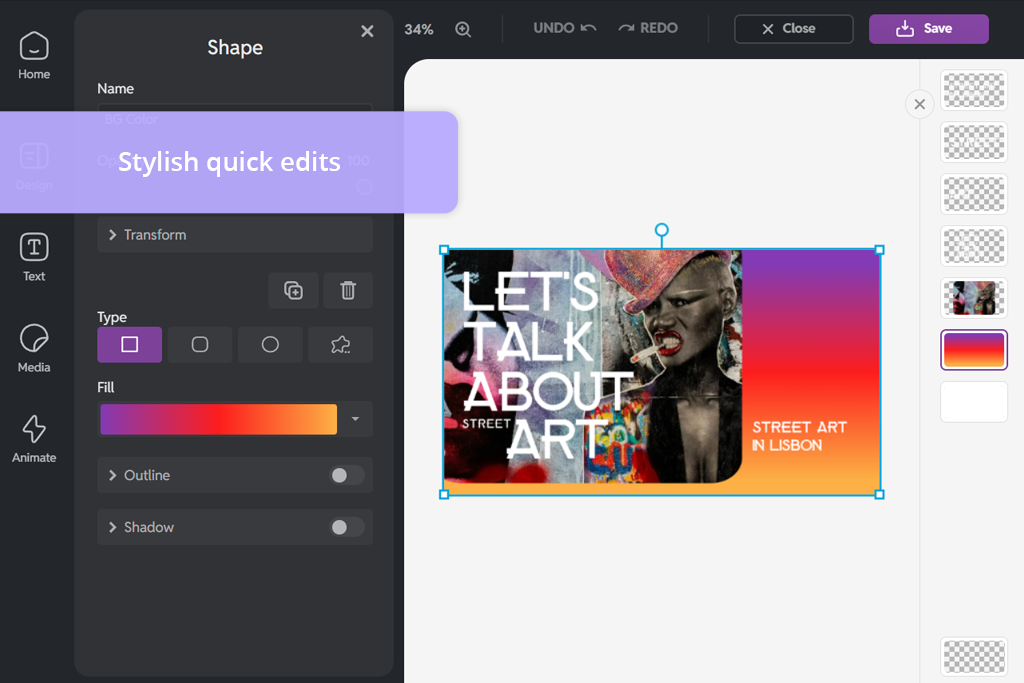
Fotor combines photo editing with AI-powered thumbnail generation, making it particularly useful for creators who already have photographs or video screenshots to work with. Its thumbnail maker supports text prompts, uploaded images, different styles, and AI-assisted modifications, covering both original generation and photo-based designs.
How it works for thumbnails
Upload a photograph or enter a description of the thumbnail concept. Select a visual direction, such as a realistic portrait, gaming graphic, or minimalist tutorial design, and generate multiple variations. The resulting images can be adjusted through editing instructions, including changes to the background, text, or subject appearance.
Where it performs well
● Photo transformation: Creators can turn ordinary portraits or screenshots into more visually distinctive thumbnails through background changes and composition adjustments.
● Style variety: The platform supports thumbnail styles ranging from cinematic and cartoon artwork to clean educational layouts.
● Multiple design variations: Batch generation makes it possible to compare different treatments of the same idea before choosing a final direction.
| Quick breakdown | Details |
| Best for | Vloggers, reviewers, and creators editing existing photographs |
| AI capabilities | Thumbnail generation, photo editing, background replacement |
| Pricing | Free Basic plan with limited AI credits; Pro starts at $3.33/month billed annually, or $8.99 monthly |
Where Fotor falls short
Fotor's paid plans still impose AI credit allowances, and its generated photo transformations may change facial expressions or visual details that creators intended to preserve. This matters for product reviews, tutorials, and other content where the thumbnail should accurately represent a real object or result. Some editing and export options also depend on the subscription tier.
Creator verdict: Fotor works well for creators who prefer to start with their own images and improve them using AI. Its range of editing tools makes it a useful option for producing thumbnails without requiring a complicated design workflow.
7. 1of10: Best for Research-Backed Thumbnail Ideas

1of10 approaches thumbnail creation from a YouTube research perspective. Its platform identifies unusually successful videos, known as outliers, and helps creators study the titles, topics, and thumbnail concepts associated with them. It also includes an AI thumbnail generator, allowing creators to move from research into visual production.
How it works for thumbnails
Start by searching for videos or thumbnail examples related to your topic. Examine successful visual approaches, including subject placement, contrasts, and curiosity-driven concepts. Use these findings to develop an original thumbnail idea, then generate a design with the platform's AI tools.
Where it performs well
● Outlier research: Creators can identify videos performing significantly above their channel's normal level, helping uncover interesting approaches to video packaging.
● Thumbnail discovery: Search tools allow creators to study visual patterns within a niche before committing to a design direction.
● Connected creative workflow: Thumbnail generation, video ideas, and title creation are available within the same research environment.
| Quick breakdown | Details |
| Best for | Growth-focused creators and YouTube strategists |
| AI capabilities | Thumbnail generation, outlier research, title and idea generation |
| Pricing | Free plan with 60 monthly credits; Basic starts at $15/month billed annually, or $19 monthly |
Where 1of10 falls short
The free plan limits research results and adds a watermark to generated thumbnails. More importantly, successful thumbnail patterns do not guarantee similar results for another channel. A concept that performs well for an established creator may depend on audience familiarity, the video's subject, or the channel's existing reputation. Research findings still need interpretation rather than direct imitation.
Creator verdict: 1of10 is particularly valuable for creators who struggle with choosing thumbnail concepts rather than executing designs. Its research features provide useful context, although thumbnail effectiveness still depends on the originality and relevance of the final idea.
8. Thumbmagic: Best for Turning Videos Into Thumbnails
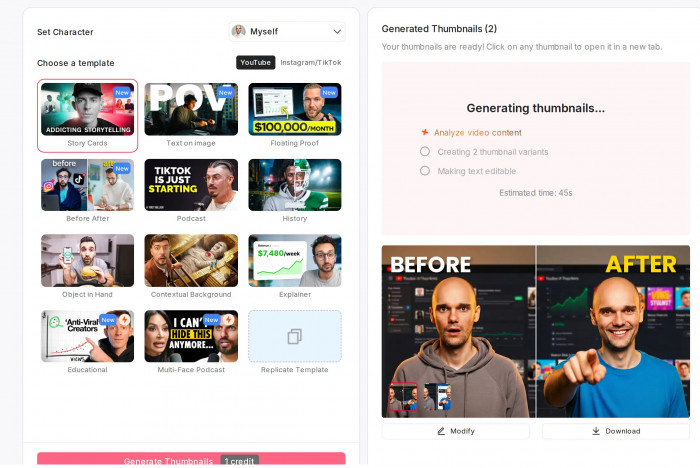
Thumbmagic focuses on reducing the work required to create thumbnails from existing video content. Instead of asking creators to describe every visual element manually, it can use a video, script, or YouTube URL to identify potential thumbnail material. This makes it relevant for vloggers, gaming creators, and channels producing frequent video uploads.
How it works for thumbnails
Upload a video, provide a script, or paste a YouTube link. Thumbmagic analyzes the content and generates thumbnail options using different visual layouts. Creators can then customize elements such as the headline, background, colors, and facial expressions before exporting their preferred design.
Where it performs well
● Video-based generation: The platform can identify material from existing video content, reducing the need to manually extract and arrange screenshots.
● Expression adjustments: Face and style detection features help develop thumbnails that emphasize the presenter or an important reaction.
● Multiple design options: Creators can generate different thumbnail versions for comparison and potential YouTube A/B testing.
| Quick breakdown | Details |
| Best for | Vloggers, gaming creators, and frequent uploaders |
| AI capabilities | Video-to-thumbnail, AI editing, expression adjustments |
| Pricing | 3 free thumbnails without a credit card; Starter begins at $17/month billed annually |
Where Thumbmagic falls short
The Starter plan supports 100 thumbnails per month but permits only one avatar, while additional avatar support requires higher plans. Automated video analysis may also select visually dramatic moments that are not necessarily the clearest representation of the video's central idea. Creators should review the suggested images before publishing, particularly for tutorials or reviews where accuracy matters.
Creator verdict: Thumbmagic suits creators who prefer working from finished video content instead of preparing every thumbnail concept manually. Its video-first workflow is particularly relevant for channels with frequent production schedules.
Which Thumbnail Generator Fits Your Channel?
A useful way to choose between these tools is to consider the type of content being produced rather than comparing feature counts alone. A gaming channel using dramatic screenshots has different thumbnail requirements from a business channel publishing instructional videos.
| Channel type | Suggested tool | Main reason |
| Educational and tutorial | Canva | Clear layouts and editable text |
| Gaming and entertainment | Thumbmagic | Video-based thumbnail options |
| Personal-brand and commentary | Pikzels | Recurring presenter appearance |
| Technology and storytelling | Ideogram | Custom-generated visual concepts |
| Vlogging and lifestyle | Fotor | Photo editing and background changes |
| Business and professional | Adobe Express | Controlled typography and branding |
| Growth-focused YouTube channels | 1of10 | Thumbnail research and concept discovery |
| Channels managing SEO and content research | vidIQ | Thumbnail creation alongside YouTube analytics |
These are practical starting points, not strict categories. A creator may use one platform to research thumbnail ideas and another to produce the finished image.
For example, 1of10 can help identify promising visual patterns, while Canva can be used to create an original design based on those observations.
Common AI Thumbnail Mistakes to Avoid
AI can produce attractive images, but an attractive image is not necessarily an effective YouTube thumbnail. A design also needs to communicate the video topic accurately, remain recognizable at small sizes, and complement the title.
Several issues deserve attention before uploading an AI-generated thumbnail.
Adding too much text: Long headlines become difficult to read on mobile devices. A short phrase that adds context to the video title is generally more useful than repeating the entire title inside the image.
Overloading the composition: Too many faces, arrows, objects, and visual effects make it difficult to identify the central subject. Prioritize one main idea and remove elements that do not support it.
Using misleading AI visuals: Generated products, screenshots, or results may not accurately reflect what appears in the video. This can create expectations the content cannot satisfy.
Ignoring channel consistency: Constantly switching between unrelated thumbnail styles makes a channel harder to recognize. Keep recurring elements such as typography, colors, or presenter placement reasonably consistent.
Treating AI scores as guaranteed performance: Automated thumbnail ratings cannot fully account for audience expectations, topic interest, and competing videos. Actual YouTube performance data provides a better basis for evaluating results.
Final Verdict
The eight tools serve noticeably different creator needs, which is why choosing a single winner would overlook what makes them useful.
Canva is my overall recommendation for creators who want flexibility and reliable design control. It supports a broad range of thumbnail styles and makes it easier to maintain a consistent visual identity. For more automated generation, Pikzels deserves attention, especially for channels that feature the same presenter regularly.
Creators looking beyond visual design should consider 1of10 for researching thumbnail concepts and vidIQ for integrating thumbnail creation into a wider YouTube workflow. Adobe Express suits professional branding, Ideogram offers greater freedom for original visual concepts, Fotor works well for photo-based designs, and Thumbmagic provides a video-first approach.
Ultimately, AI should reduce the time spent producing and revising thumbnails, not replace creative judgment. A strong thumbnail still depends on understanding the video's central idea, representing it accurately, and presenting it clearly enough for viewers to recognize its value.
Comments