

Creating Instagram Reels no longer requires a camera, recording setup, or even your own voice. AI tools can turn scripts, images, articles, and simple ideas into videos with narration, subtitles, music, and animated visuals.
However, not every AI video maker is equally useful for faceless content. Some handle complete video production, while others are better for storytelling, educational explainers, or text-driven Reels. Here are seven tools worth considering, based on what they can produce and how much editing they leave to the creator.
Quick Comparison of the 7 Tools
| AI Tool | Best For | Free Access |
| InVideo AI | Complete faceless videos from prompts | Limited free plan |
| Pictory | Script-based and educational Reels | 14-day trial |
| Fliki | Voiceover-led storytelling | Free plan |
| CapCut | Fast-paced Reels with captions and effects | Free plan |
| Canva | Animated text, quotes, and branded Reels | Free plan |
| VEED | Narrated videos with polished subtitles | Free plan |
| Lumen5 | Turning articles into short videos | Free plan |
1. InVideo AI: For Complete Faceless Reel Production
Best suited to: Educational facts, travel storytelling, narrated listicles, and documentary-style Reels.

InVideo AI works particularly well for creators who have a topic but do not want to manually build the video around it. The platform can generate scripts, select supporting footage, add narration, and arrange scenes from a written prompt. Its main appeal is the ability to move from a basic content idea to a complete first draft within one workspace.
What Goes Into a Reel?
| Production Stage | What InVideo AI Handles |
| Script | Develops narration from a topic or follows a supplied script. |
| Visuals | Combines stock footage and available AI-generated media. |
| Audio | Adds AI voiceovers and supporting music. |
| Finishing | Arranges scenes, subtitles, and transitions for further editing. |
Where it earns its place: A creator could enter "Five Mysterious Places Scientists Still Cannot Fully Explain" and request a 40-second vertical Reel with documentary-style narration. InVideo AI can assemble the initial video, including illustrative footage, music, and spoken commentary.
What you still control: Automatically chosen visuals may not accurately represent locations or scientific subjects. Creators should verify the script, replace unrelated footage, and adjust the opening seconds to establish a stronger hook. AI-generated content also consumes credits.
Pricing: Limited free plan available. Starter pricing has been advertised from $10/month per seat with annual billing. Check the current price and credit allowance before subscribing.
The deciding factor: Choose InVideo AI if the aim is to automate most stages of faceless video production rather than edit individual scenes from scratch.
2. Pictory: For Educational Reels Built Around Scripts
Best suited to: Educational summaries, business tips, historical facts, and structured explainers.
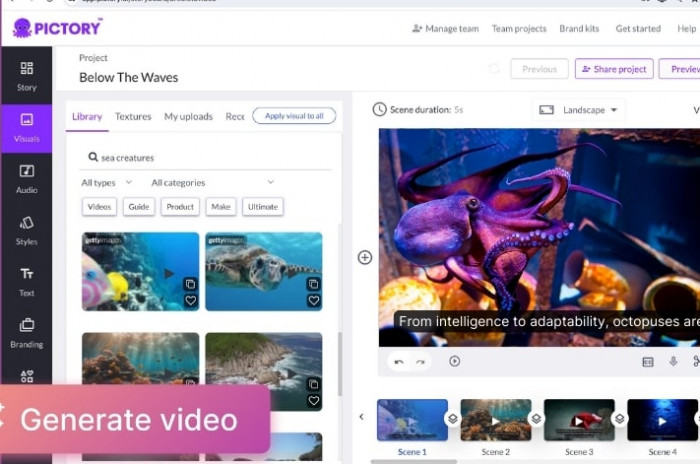
Pictory approaches faceless video production through written content. Instead of relying entirely on a broad creative prompt, it is particularly useful when the creator already has a script, article, or carefully organized information.
The platform breaks written material into scenes, pairs the text with supporting visuals, and provides options for narration and subtitles. This makes it practical for accounts where factual information matters more than elaborate visual effects.
What Does Pictory Automate?
● Script segmentation: Divides longer written explanations into smaller scenes that can be individually reviewed and adjusted.
● Visual selection: Matches text segments with stock photos or footage, reducing the need to search for every supporting clip.
● Narration and subtitles: Supports AI voices and text overlays, allowing creators to produce instructional videos without recording themselves.
A Reel worth making: "Three Common Money Mistakes People Make in Their 20s." Each mistake can appear as a separate scene, supported by financial imagery, a short explanation, and readable captions.
Where manual editing matters: Stock footage can make unrelated subjects look visually similar. The creator must decide which sentences deserve more screen time, remove unnecessary text, and ensure that the visuals support the actual point being discussed.
Pricing: A 14-day free trial is available. Starter has been listed at $25/month with annual billing.
The deciding factor: Pictory makes more sense than a purely prompt-driven generator when the script is already finalized and the goal is to present information clearly.
3. Fliki: For Voice-Driven Faceless Storytelling
Best suited to: Short stories, motivational narration, historical storytelling, and multilingual Reels.
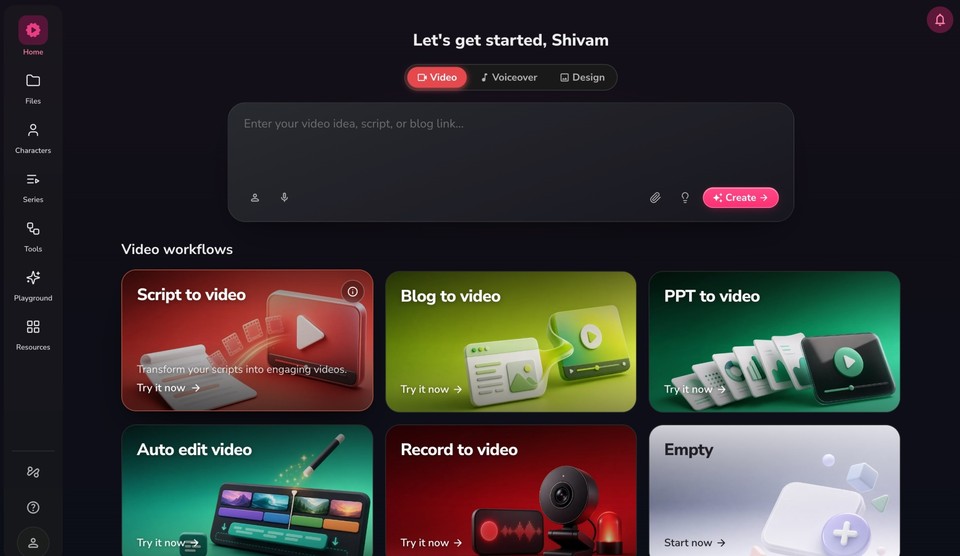
Fliki places considerable emphasis on turning written narration into spoken content. It combines text-to-speech technology with video creation, making it useful for creators whose Reels depend on a strong voiceover.
Creators can start with a written script, select an AI voice, divide the narration into scenes, and attach stock or generated visuals. Voice selection, pronunciation, and speaking rhythm are especially important for storytelling accounts, where narration carries most of the viewer's attention.
How the Production Works
Fliki's workflow centers on two main elements:
● Input: A written story or script containing the narration, scene descriptions, and preferred language. Creators can select an AI voice and adjust how the content is presented.
● Output: A narrated video containing the selected voice, supporting visuals, scene timing, background audio, and captions. Individual scenes can be reviewed and refined before exporting.
Where it earns its place: Consider a Reel titled "The Lighthouse That Stood Empty for 50 Years." Fliki can deliver the narration using a selected AI voice while displaying atmospheric ocean footage, lighthouse images, and short text overlays.
What still needs attention: Emotional storytelling is not simply about choosing a realistic voice. Pauses, pronunciation, and the relationship between visuals and narration require manual review. Fliki also uses credits for several actions, including audio generation and AI video, so repeated revisions affect the available allowance.
Pricing: A limited free plan is available, alongside paid Standard and Premium plans. Pricing and credit allowances should be checked on Fliki's official website.
The deciding factor: Fliki is a suitable choice when voice quality and spoken storytelling matter more than complex scene animation.
4. CapCut: For Fast-Paced Reels With Dynamic Editing
Best suited to: Motivational edits, trending facts, aesthetic videos, and fast-moving text-based Reels.
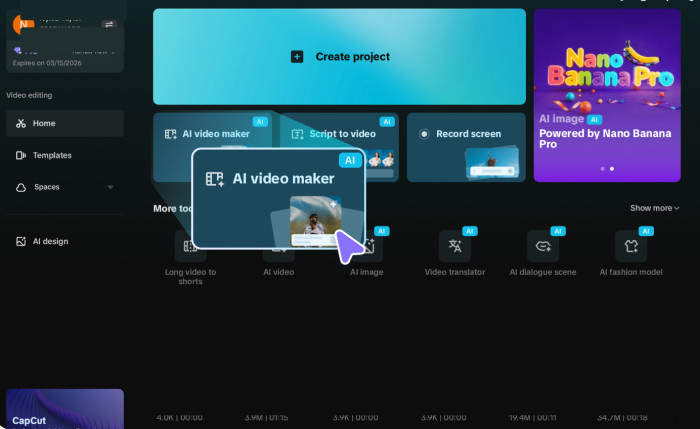
CapCut is different from AI tools that assemble an entire video from a single prompt. Although it offers AI video generation, its main strength for faceless creators is the amount of control it provides over the final edit.
It brings together text-to-speech, automatic captions, effects, transitions, templates, and timeline editing. This is especially useful for Instagram content where rapid cuts, synchronized captions, and visual rhythm are important.
How the Reel Takes Shape
Consider a motivational Reel titled "Three Habits That Quietly Waste Your Time." Rather than relying entirely on automatically assembled footage, the creator can build it around a series of short scenes.
● Opening: Introduce the central idea with a strong text hook, a quick transition, and a relevant background clip.
● Main sequence: Present three habits through separate clips while using AI narration and animated captions to maintain continuity.
● Final edit: Adjust the footage to match the spoken words, balance background music, and reposition captions for Instagram's vertical viewing area.
Where CapCut performs best: It allows creators to correct timing at the frame level, something that matters when text needs to appear in sync with music, narration, or a scene change.
What requires extra effort: CapCut is more hands-on than one-prompt video generators. Footage selection, scene arrangement, and pacing often remain the creator's responsibility. Some AI features also require paid credits or subscriptions.
Pricing: Free plan available. Pro pricing varies by platform and region, with some published prices around $19.99/month.
The deciding factor: CapCut is better suited to creators who want precise editing control than those looking for a completely automated Reel generator.
5. Canva: For Animated Quotes and Branded Reels
Best suited to: Quote pages, productivity tips, inspirational content, and branded educational Reels.

Canva makes sense for faceless Instagram accounts where written messages and graphic design carry the content. Its video templates, animation controls, stock library, AI image tools, and text effects allow creators to produce Reels without relying heavily on recorded footage.
Unlike an AI-first video generator, Canva gives more attention to the visual arrangement of each scene. Fonts, colors, text placement, animations, and graphic elements can be coordinated to create a recognizable style across multiple posts.
What Can You Create?
| Reel Concept | How Canva Fits |
| Daily motivation | Animated quotes over atmospheric visuals or backgrounds. |
| Productivity tips | Short text sequences with icons, transitions, and music. |
| Book recommendations | Moving book covers, ratings, and concise descriptions. |
| Brand announcements | Consistent fonts, colors, logos, and animated messaging. |
A practical Reel idea: "Four Rules for Building Better Daily Habits." Each rule can occupy a separate animated page, with short supporting text and a simple visual. The finished video can use a consistent color palette without showing a presenter.
Where it earns its place: Canva is particularly useful for accounts publishing recurring content series. Instead of redesigning each Reel, creators can reuse a visual layout and change the information, graphics, and timing.
Where the work remains: Canva is not the strongest choice for complex cinematic storytelling. Videos built from repetitive templates can also look more like animated presentations than native Instagram content. AI-generated clips have usage limits, and longer productions usually require manual assembly.
Pricing: Free plan available. Canva Pro has been listed at $144/year in the US, equivalent to $12/month with annual billing.
The deciding factor: Choose Canva when a recognizable visual identity, repeatable designs, and clean animated text matter more than fully automated video production.
6. VEED: For Narrated Reels With Polished Captions
Best suited to: Short explainers, informational Reels, promotional content, and caption-focused storytelling.
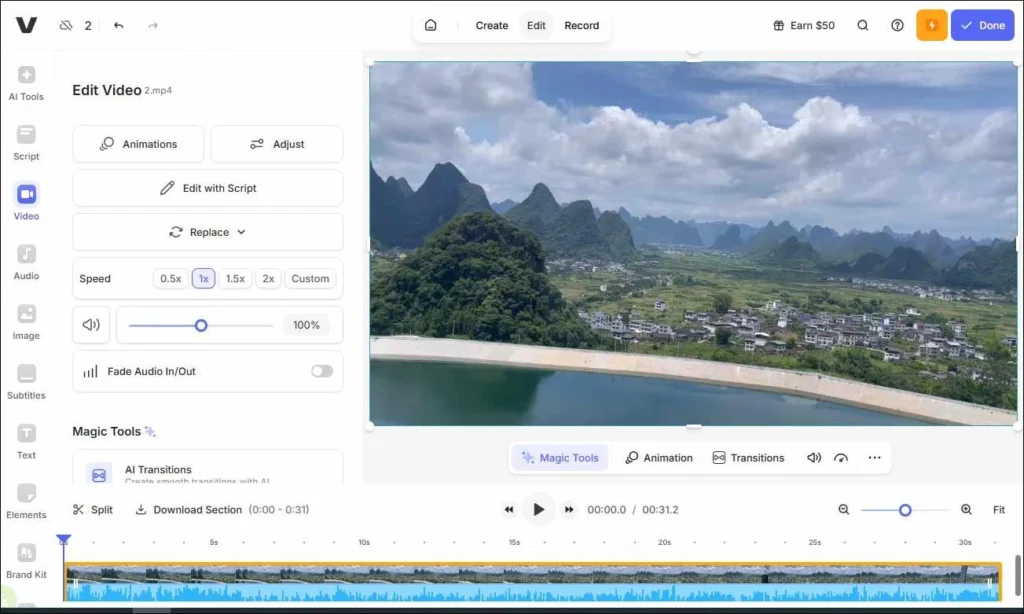
VEED combines AI video generation with a browser-based editor, allowing creators to produce video scenes, add voiceovers, customize subtitles, and refine the result without moving between separate applications.
Its value for faceless content lies in the finishing process. A useful Reel needs more than relevant footage. The narration, visuals, caption timing, and text hierarchy must work together, particularly when viewers watch without sound.
What Does the Workflow Involve?
A creator preparing "Why Your Brain Remembers Some Songs Better Than Others" could generate an initial explainer with music-related visuals, narration, and captions. The editing stage would then involve checking subtitle accuracy, emphasizing important phrases, replacing weak visuals, and adjusting scene lengths.
VEED offers several controls that matter in this process:
● AI-assisted scene creation: Generate video content from a prompt or script, then replace individual visuals rather than regenerating the entire project.
● Caption customization: Edit subtitle wording, styling, and placement to improve readability on smaller screens.
● Audio and visual editing: Combine narration, music, stock footage, generated scenes, and branded elements inside the same editor.
Where it earns its place: VEED is useful when automatic video generation produces an acceptable structure but the final result needs detailed editing before publication.
What you still control: Captions need proofreading, particularly around names and technical terms. Scene changes must also be checked against the narration. Advanced generation uses credits, and free exports carry VEED branding.
Pricing: Free plan available. VEED has published Lite pricing from $9/month with annual billing, although available plans and regional prices may differ.
The deciding factor: VEED fits creators who want AI assistance with video production but still prioritize readable subtitles, accurate editing, and professional-looking exports.
7. Lumen5: For Turning Articles Into Faceless Reels
Best suited to: Blog summaries, industry insights, educational content, and informational social media accounts.
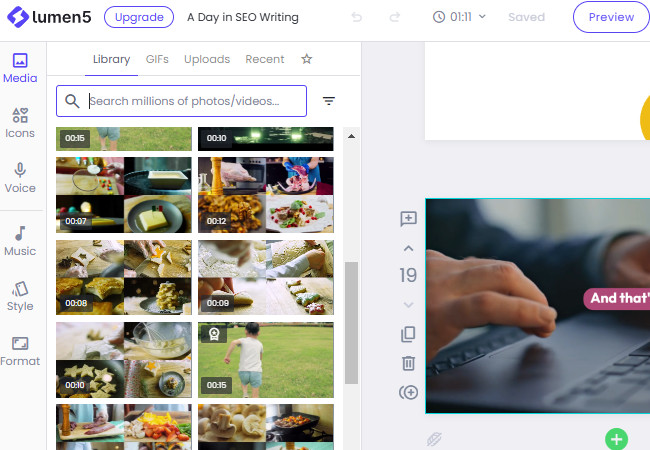
Lumen5 is particularly relevant to creators who already publish written content and want to repurpose it for Instagram. It can transform articles, scripts, documents, and bullet points into video scenes supported by media and text overlays.
Instead of beginning with an entirely new Reel concept, creators can work from existing research or published material. Lumen5 helps organize that information into a visual sequence, making it useful for educational brands, publishers, and professional content accounts.
From Article to Reel
Lumen5 follows a content-repurposing workflow that turns existing written material into short videos suitable for Instagram. The process involves three main stages:
1. Source Material: Start with an existing blog post, article, or written script. For example, an article explaining five emerging technology trends can serve as the foundation for a faceless Reel.
2. Video Draft: Lumen5 organizes the content into shorter scenes, highlights important points, and pairs them with supporting footage, images, and animated text.
3. Instagram Version: Review the generated scenes, shorten lengthy explanations, choose the strongest highlights, and adjust the video to a vertical 9:16 format with a clear opening hook.
This approach allows creators to reuse existing research without developing an entirely new video script for every Reel. However, the final version still needs editing to ensure the information is concise, visually relevant, and engaging for Instagram viewers.
Where it earns its place: An account publishing articles about technology could convert "Five AI Trends Changing Online Shopping" into a 40-second Reel. The video would introduce the central topic, highlight three important findings, and direct viewers toward the full article for additional information.
What needs manual work: An article's most important points are not necessarily its most engaging video moments. Creators should rewrite long sentences, remove supporting details that slow the Reel down, and make sure selected visuals genuinely represent the subject.
Pricing: Free plan available. Basic has been listed at approximately $19/month with annual billing. Check Lumen5's current plans for exact pricing.
The deciding factor: Lumen5 is most useful for creators and businesses converting existing written information into social videos, rather than producing entirely original cinematic footage.
Which AI Tool Matches Your Reel Style?
The right choice depends less on the number of AI features and more on the type of content an account publishes. A motivational quote page, an educational account, and a storytelling channel have different production requirements.
| Content Style | Recommended Tool | Why It Fits |
| Narrated facts and listicles | InVideo AI | Generates a complete initial video from a topic. |
| Structured educational content | Pictory | Builds scenes around a prepared script. |
| Audio-led stories | Fliki | Gives creators more options for AI narration. |
| Fast edits and trending formats | CapCut | Provides detailed control over captions and timing. |
| Animated quotes and tips | Canva | Supports repeatable visual designs and branding. |
| Caption-heavy explainers | VEED | Combines video generation with subtitle editing. |
| Blog and article summaries | Lumen5 | Converts existing written content into video scenes. |
For creators starting from zero, an all-in-one generator such as InVideo AI can reduce the amount of initial production work. Those who already have scripts or footage may find Pictory, Fliki, or CapCut more suitable.
Creating Faceless Reels That People Actually Watch
AI can produce the footage and narration, but the structure of the Reel still determines whether the information is easy to follow. Publishing every generated video without reviewing it often leads to repetitive visuals, weak introductions, and captions that compete with the footage.
1. Build Around One Idea
A short Reel works better when it addresses one clearly defined question or topic. A prompt such as "Create a video about productivity" is too broad to produce a focused result.
A more useful instruction would be: "Create a 30-second vertical video explaining three reasons people struggle to concentrate while working, using short narration, workplace visuals, and readable subtitles."
The second prompt gives the AI a topic, structure, duration, and visual direction. It also makes the output easier to evaluate.
2. Treat the Opening Separately
The first few seconds should communicate why the content is worth watching. Avoid starting every Reel with a generic introduction such as "Today we are going to discuss."
Instead, use effective Reel hooks that establish a specific problem, question, or surprising fact. For educational videos, the first visual should support the hook rather than display unrelated stock footage.
3. Edit for Vertical Viewing
Instagram Reels are built around a vertical 9:16 format, commonly exported at 1080 × 1920 pixels. However, using the correct aspect ratio alone does not guarantee a readable video.
Before publishing, check the following:
● Caption placement: Keep important text away from areas covered by Instagram's interface, including the lower caption area and right-side controls.
● Scene relevance: Replace visuals that appear attractive but do not accurately illustrate the narration.
● Speaking pace: Make sure viewers have enough time to understand each point without stretching the video unnecessarily.
● Audio balance: Keep background music below the narration so that important information remains intelligible.
● Visual consistency: Use a reasonably consistent mix of typography, transitions, colors, and footage styles across the Reel.
4. Avoid Repetitive AI Content
Faceless content does not have to mean generic content. Many AI video generators rely on similar stock libraries, familiar voice styles, and predictable scene arrangements.
Creators can make the output more distinctive by supplying original research, using specific visual instructions, and checking script accuracy. Choosing relevant Instagram Reel hashtags also helps describe the finished content.. It is also worth reviewing stock-media licenses and the commercial-use terms of AI-generated assets before publishing branded or monetized content.
Final Verdict
For someone who wants to turn a topic into a nearly complete faceless Reel, InVideo AI is a sensible starting point. Pictory is better for creators with structured scripts, while Fliki is particularly useful for storytelling accounts that depend on narration.
CapCut and VEED make more sense when editing quality, captions, and pacing are the main priorities. Canva suits visual-first accounts built around quotes, tips, and repeatable templates, while Lumen5 serves publishers who want to turn existing articles into Instagram videos.
The most useful tool is ultimately the one that matches how the content begins. Creators starting with an idea need a generator; those starting with a script need a script-to-video workflow; and those starting with footage need stronger editing controls. Choosing around that distinction can save both production time and unnecessary subscription costs.
Comments