

Creating fresh visuals for social media no longer requires advanced design skills or hours of editing. AI image generators can help turn a simple idea into product photography, promotional graphics, illustrations, or branded content within minutes.
However, not every generator is equally useful for social media. Some are better at creating complete posts, while others specialize in realistic imagery, typography, or artistic designs. Here are six AI image generation tools worth considering, along with their practical uses, strengths, limitations, and pricing.
Best AI Image Generators at a Glance
Before exploring each platform, this comparison highlights where the six tools fit into a social media content workflow.
| AI Tool | Best For | Free Plan | Paid Starting Price |
| Canva AI | Complete social media graphics | Yes | $12/month |
| Adobe Firefly | Brand campaigns and advertising visuals | Yes | $9.99/month |
| Midjourney | Artistic and editorial-style images | No | $10/month |
| Recraft AI | Branded graphics and vector illustrations | Yes | $12/month |
| Ideogram | Typography and promotional posters | Limited | $20/month |
| Leonardo AI | Illustrations and consistent visual styles | Yes | $12/month |
Prices are in USD and may vary by region or billing cycle.
1. Canva AI
Best for: Ready-to-publish social media graphics
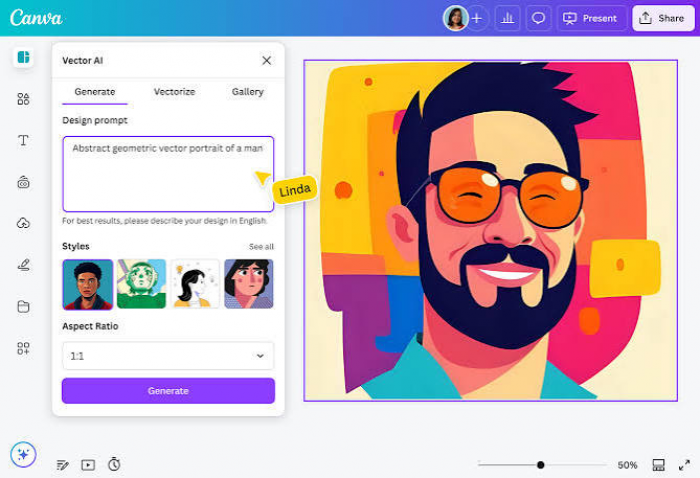
Canva AI suits creators who want to move from image generation to a finished social media design without managing several applications. Its AI tools work within Canva's design environment, allowing generated imagery to sit alongside templates, text elements, logos, and other graphics.
This makes Canva particularly practical for small businesses and social media managers producing regular content. Rather than generating a standalone image and figuring out the layout afterward, users can build the entire post around their visual concept.
What you can create:
● Instagram carousel covers and educational slides with coordinated colors, headings, and graphics.
● Facebook promotional posts combining product photographs, branded layouts, and campaign messages.
● Pinterest pins and Instagram Stories with customized backgrounds and platform-specific dimensions.
Standout advantage: Canva's main strength is its connection between AI generation and everyday design tasks. Users can adjust layouts, apply brand colors, resize designs, and export finished graphics without rebuilding the composition elsewhere.
Limitations: Generated images may require several attempts to match specific visual requirements. Advanced editing tools, premium assets, and higher AI usage allowances are also restricted by subscription level.
Pricing: A free plan is available with limited AI access. Canva Pro costs approximately $12/month when billed annually, while monthly and regional prices vary.
2. Adobe Firefly
Best for: Professional brand campaigns and advertising visuals
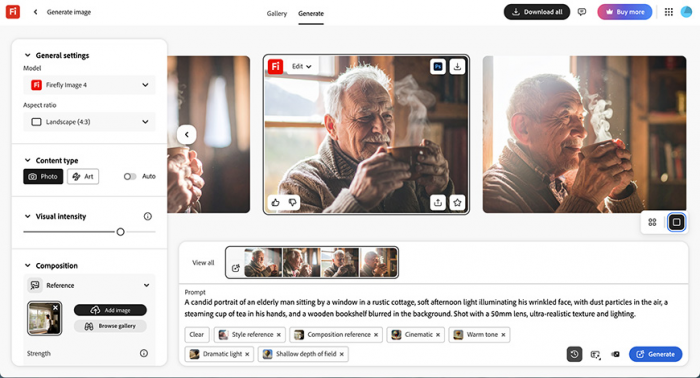
Adobe Firefly takes a more production-oriented approach to AI image generation. It supports text-to-image creation alongside tools for changing individual parts of an image, extending backgrounds, and developing visual concepts.
For social media advertising, this is valuable because an existing campaign asset may need adjustments rather than complete replacement. A product photograph, for example, can be adapted with a different background or additional visual elements to suit a campaign's creative direction.
What you can create:
● Instagram and Facebook advertising visuals with customized product environments.
● Seasonal campaign backgrounds for sales announcements, launches, and promotional content.
● LinkedIn marketing graphics using professionally styled photographic or illustrated elements.
Standout advantage: Firefly's Generative Fill and Generative Expand capabilities allow creators to modify specific areas and extend image compositions. This is useful when adapting campaign artwork for different placements while preserving important visual elements.
Limitations: Firefly does not automatically replace a full social media design workflow. Additional layout work may still be needed, and premium AI models or advanced features consume generative credits.
Pricing: Free access includes limited generations. Firefly Standard starts at $9.99/month, with higher subscriptions providing additional premium credits and capabilities.
3. Midjourney
Best for: Artistic, cinematic, and visually distinctive posts
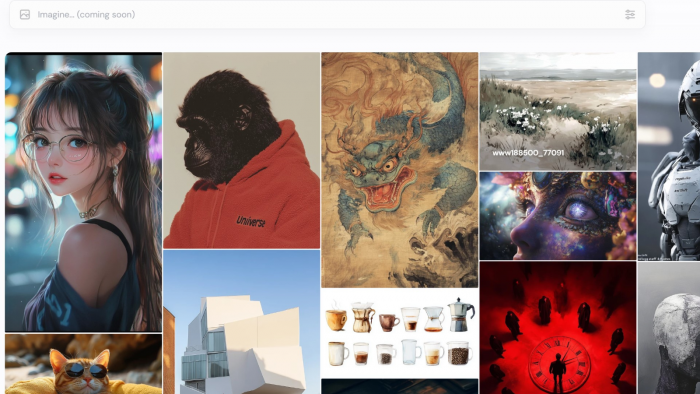
Midjourney is a strong option for creators who want their social media visuals to have a recognizable artistic direction. It can produce stylized photography, surreal compositions, editorial imagery, and detailed illustrations from descriptive prompts.
Its appeal is particularly noticeable in content where visual atmosphere matters more than conventional graphic design. Fashion brands, travel creators, entertainment pages, and lifestyle accounts can use it to explore compositions that would otherwise require elaborate photography or illustration work.
What you can create:
● Cinematic Instagram visuals featuring dramatic lighting, unusual perspectives, and distinctive color treatments.
● Conceptual fashion and lifestyle imagery for mood boards, themed feeds, and creative campaigns.
● Artistic backgrounds and editorial illustrations for storytelling posts or Pinterest collections.
Standout advantage: Midjourney offers substantial creative control through image references, style references, and composition settings. These features help creators develop a visual direction across a collection rather than producing unrelated images for every post.
Limitations: Midjourney is less convenient for assembling complete posts with precise headlines and editable layouts. It also lacks a standard free plan, and private generation is reserved for higher subscription tiers.
Pricing: No regular free plan. The Basic subscription starts at $10/month, while Standard costs $30/month and includes unlimited image generation in the slower Relax mode.
4. Recraft AI
Best for: Branded social media graphics and vector illustrations
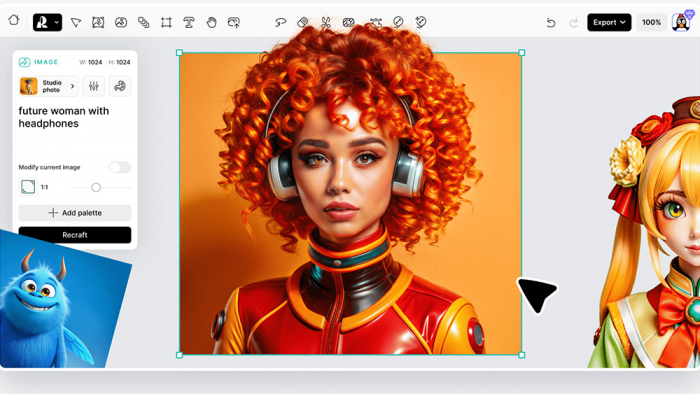
Recraft AI focuses on creating design assets that can be adapted for different publishing needs. It generates photographs, illustrations, vector artwork, and graphic elements through text prompts, with additional controls for visual styles and colors.
For social media creators, one of its most useful applications is producing graphics that follow a recognizable brand identity. A business publishing educational posts, for instance, can develop a custom illustration style and reuse it across different topics without making every graphic look unrelated. Its design-focused workspace also makes it useful for creating individual assets that will later become part of a larger composition.
What you can create:
● Instagram carousel illustrations featuring matching colors, icons, and graphic elements.
● LinkedIn infographics and educational visuals using clean vector artwork.
● Facebook campaign graphics with customized illustrations and reusable brand styles.
Standout advantage: Recraft can generate editable SVG vector artwork directly from prompts. Unlike ordinary raster images, these graphics can be scaled and refined in compatible design software, making them useful for icons, illustrations, and branded content collections.
Limitations: Recraft's free-plan images are publicly visible and are not licensed for commercial use. Its credit system also requires attention because different generation and editing operations consume different amounts. Additional layout work may be necessary for text-heavy posts.
Pricing: A free plan provides 30 daily credits. The Basic plan starts at $12/month or $10/month with annual billing, including private generations and commercial usage rights.
5. Ideogram
Best for: Text-based social graphics and promotional posters
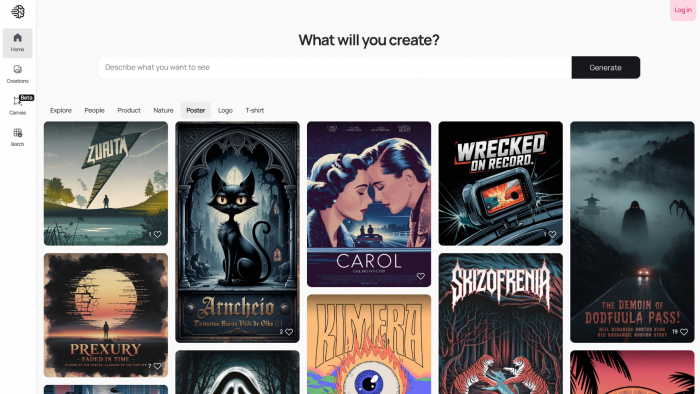
Ideogram deserves attention because social media graphics often need more than an attractive image. A short headline, promotional message, or event title can be the main element viewers notice, particularly in announcement posts and advertising creatives.
Ideogram specializes in incorporating typography into generated compositions. It can combine decorative lettering, background artwork, and illustrative elements, making it suitable for graphic concepts where text is part of the visual design rather than a separate addition.
What you can create:
● Instagram motivational graphics featuring prominent quotes and decorative lettering.
● Facebook event posters with bold titles, themed imagery, and announcement-style compositions.
● Promotional Pinterest graphics highlighting product collections, seasonal themes, or short campaign messages.
Standout advantage: Its text-rendering capabilities make it especially useful for generating artwork in which typography plays a central role. Dedicated editing and reframing tools also help refine compositions.
Limitations: Text accuracy is not guaranteed, particularly with longer phrases or complex arrangements. Free generations are generally public, while private creation and additional editing capabilities require an eligible paid plan.
Pricing: Eligible free users receive limited credits. The Plus plan starts at $20/month or $15/month with annual billing.
6. Leonardo AI
Best for: Custom illustrations and themed content series
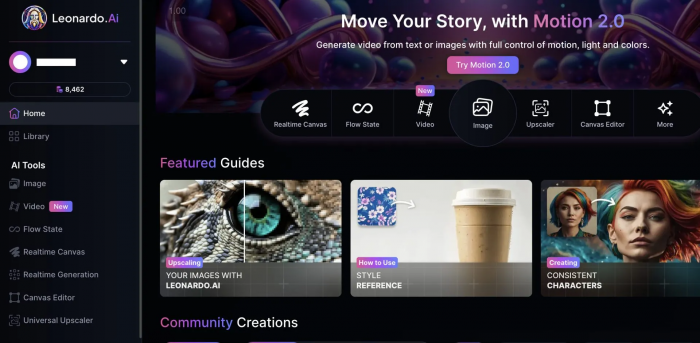
Leonardo AI offers a broad creative environment for producing images in different artistic styles. It is particularly relevant for social media accounts that depend on illustrated characters, themed scenes, fantasy artwork, or recurring visual concepts.
The platform provides access to multiple models, generation settings, and reference-based workflows. This gives creators room to explore different artistic approaches while maintaining more control over the look of a content series. For accounts publishing illustrated stories or recurring educational concepts, Leonardo can be useful for developing a recognizable visual theme.
What you can create:
● Illustrated Instagram storytelling posts featuring recurring characters and themed environments.
● Creative YouTube thumbnail artwork with expressive subjects, dramatic compositions, and stylized backgrounds.
● Pinterest illustrations and visual assets for fantasy, gaming, entertainment, or educational content.
Standout advantage: Leonardo supports custom model training on eligible plans and reference-guided generation. These capabilities can help creators work toward a consistent artistic identity across multiple images.
Limitations: The number of models and settings may feel complicated for beginners who only need occasional social media graphics. Free generations are public, and advanced model access, private images, and higher-quality settings require paid subscriptions.
Pricing: The free plan includes 150 daily tokens. The Essential plan starts at $12/month, with higher tiers offering more tokens and expanded model access.
Which Tool Fits Your Content?
The most suitable AI image generator depends on what the finished social media post needs to communicate. A visually attractive image is not necessarily an effective post if the text is difficult to read or the composition cannot accommodate a headline.
| Content Requirement | Recommended Tool | Why It Fits |
| Regular branded posts | Canva AI | Combines image generation with templates and design tools |
| Product advertising | Adobe Firefly | Supports targeted image editing and background changes |
| Artistic Instagram feeds | Midjourney | Offers detailed styling and visual references |
| Brand illustrations and icons | Recraft AI | Creates editable vectors and reusable visual styles |
| Quote posts and announcements | Ideogram | Focuses on typography within generated artwork |
| Illustrated content series | Leonardo AI | Provides multiple artistic models and reference-based tools |
For beginners, Canva AI is generally the most approachable option for building complete posts. Recraft AI is more suitable when a brand needs customized graphic assets, while Midjourney and Leonardo AI are better suited to creators who want to spend additional time controlling artistic direction.
Create Better Social Media Images
Choosing a generator is only part of the process. The quality of a social media visual also depends on how clearly the prompt describes the intended result and how well the finished image fits the platform.
1. Start with the post's purpose
A product advertisement, carousel, and lifestyle photo each require a different visual approach. Exploring social media post ideas can help creators choose the right format and message. AI prompts should then clearly describe the subject, audience, and design style for better results.
2. Choose dimensions before generating
Creating the right composition from the beginning reduces unnecessary cropping. A square post may look balanced with a centered subject, while a vertical Pinterest graphic needs enough space for text and supporting details.
Here are some useful starting dimensions:
| Social Media Format | Suggested Size |
| Instagram square post | 1080 × 1080 px |
| Instagram portrait post | 1080 × 1350 px |
| Instagram Stories and Reels cover | 1080 × 1920 px |
| Pinterest standard pin | 1000 × 1500 px |
| LinkedIn landscape graphic | 1200 × 627 px |
| YouTube thumbnail | 1280 × 720 px |
These are practical starting sizes rather than universal requirements. Platform display areas and cropping behavior can vary.
3. Protect important design elements
AI generators often fill the entire frame with decorative details, leaving little room for headlines or calls to action. It helps to specify negative space, focal-point placement, and background simplicity in the prompt.
4. Maintain a recognizable visual identity
Using the same palette, lighting direction, illustration treatment, and typography style across posts can make a social media account feel more consistent. For brands, existing design guidelines should take priority over whatever visual style the generator produces by default.
Check Before Publishing
AI-generated images can look convincing at first glance while containing mistakes that become obvious once published. Social media creators should review their visuals as carefully as they would examine a photograph or manually designed advertisement.
Pay particular attention to:
● Text accuracy: Check spelling, punctuation, and numbers in posters, announcements, and promotional graphics. Even minor mistakes can make an advertisement look unreliable.
● Product accuracy: Verify that the generator has not changed packaging, logos, colors, labels, or product features. Actual product photography may be more appropriate when exact representation matters.
● Commercial usage rights: Review the tool's current terms before using generated artwork in advertisements, merchandise, or client campaigns. Subscription access does not automatically resolve every intellectual property concern.
● Visual consistency: Compare the new image with existing posts to ensure its colors, composition, and overall style fit the account's identity.
● Mobile readability: Check the finished graphic at a smaller display size. Headlines, logos, and important details should remain legible without zooming.
It is also important not to present AI-generated people, events, or product results as genuine documentary evidence when they are fictional or materially altered.
Verdict: Which AI Tool Is Best?
There is no single AI image generator that handles every social media requirement equally well. The right choice depends on whether the priority is creating a complete post, developing distinctive artwork, or refining an existing visual.
For everyday social media content, Canva AI is the most practical all-around option because it connects image creation with layout design and publishing-related tools. Recraft AI is a strong alternative for brands and creators who want customized illustrations, editable vectors, and more control over their visual identity.
Adobe Firefly is particularly suitable for marketing assets that need controlled editing, while Midjourney is better suited to accounts built around artistic imagery. Ideogram stands out for text-focused graphics, and Leonardo AI offers flexibility for illustrated content and recurring creative themes.
My preference would be to start with Canva AI for complete post production and use Recraft AI when a project requires more original, reusable visual assets. For highly artistic campaigns, Midjourney would be worth exploring separately. The best AI-generated post is ultimately one that supports the message rather than competing with it.
Comments