

Posting consistently is only half the work. The harder part is understanding why one Reel reaches thousands of people while another barely moves, which topics attract the right audience, and whether engagement is actually turning into growth.
AI social media analytics tools can help answer these questions, but their capabilities vary considerably. Some interpret performance data, others compare competitors, and several combine ordinary analytics with AI-powered content creation.
Here are eight tools worth considering, with a focus on the insights they provide, their limitations, and whether their pricing makes sense for independent creators.
How We Assessed These Analytics Tools
The eight tools were compared based on how effectively they help small creators understand content performance and make informed publishing decisions. The evaluation focused on four practical areas:
| Evaluation Area | What We Looked At |
|---|---|
| Analytics depth | Engagement, audience growth, post performance, and competitor insights |
| AI capabilities | Automated reports, performance insights, and content recommendations |
| Creator usability | Dashboard clarity, reporting options, and ease of navigation |
| Pricing and access | Free plans, account limits, historical data, and paid features |
The assessment draws on official product documentation, published pricing, and feature research. No controlled hands-on testing was conducted using identical social media accounts or datasets, so AI accuracy and reporting performance were not independently benchmarked.
The recommendations prioritize tools that help smaller creators turn performance data into useful content decisions without unnecessary complexity or expense.
AI Analytics Tools Compared
Not every tool uses AI to analyze performance directly. This distinction matters because AI-generated captions and genuinely AI-generated analytics are different capabilities.
| Tool | Strongest analytics use | Starting price |
| Metricool | Cross-platform performance and AI reporting | Free; $20/mo |
| Buffer | AI performance takeaways and engagement | Free; $5/mo |
| Publer | Posting-time, hashtag, and competitor analysis | Free; $10/mo for analytics |
| Predis.ai | AI competitor and content analysis | $19/mo annually |
| Socialinsider | Competitor benchmarking and content strategy | $82/mo annually |
| Later | Content timing and trend discovery | $18.75/mo annually |
| Vista Social | Reporting, audience engagement, and social listening | $99/mo |
| Brand24 | AI sentiment analysis and brand mentions | $199/mo annually |
1. Metricool: Best for Cross-Platform Analytics
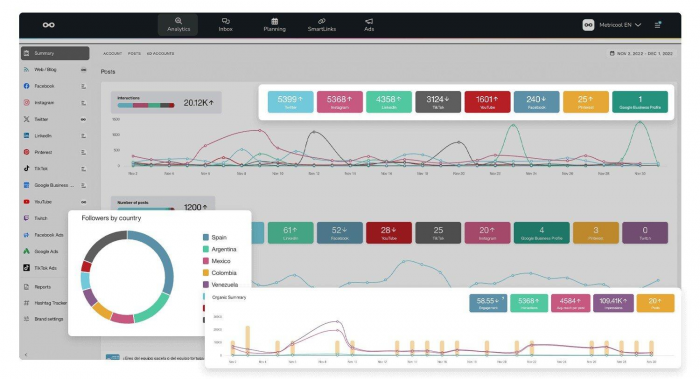
Metricool is the strongest overall starting point on this list. It combines Instagram, TikTok, YouTube, Facebook, and other supported networks in one workspace, making it easier to compare reach, engagement, and post performance across channels.
What particularly interests me is Metricool Studio. Instead of manually assembling charts, creators can request customized data views in natural language. It gives the analytics a practical purpose: comparing formats, examining changes in performance, and finding patterns behind stronger posts. However, Studio is not included in the free plan, and full access requires an analytics add-on.
Creator's Snapshot
● Standout insight: Compare content performance across networks and monitor competitors alongside your own account growth.
● Practical use: Identify which posts deserve repurposing for another platform based on performance patterns.
● Main limitation: The free plan retains 30 days of analytics and excludes LinkedIn and X connections.
Pricing: Free plan available; Starter starts at $20/month with annual billing.
Quick verdict: My top choice for creators managing several platforms who need useful analytics without immediately paying for an expensive reporting platform.
2. Buffer: Best for Understanding What Works
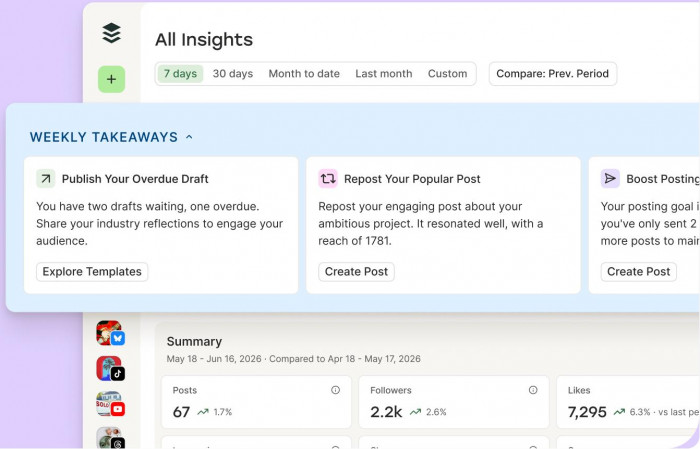
Buffer takes a more approachable route to analytics. Its Insights area brings follower growth, impressions, engagement, and individual post results together with the publishing workflow.
The feature that sets Buffer apart is Takeaways, which uses AI to explain recent performance in plain language. Rather than leaving creators to interpret every chart, it highlights what is working and suggests what deserves attention. These insights can also help refine social media content pillars by identifying which recurring themes consistently attract engagement. I particularly like this approach for smaller accounts because the emphasis is on understanding content decisions rather than producing complicated reports.
Creator's Snapshot
● Standout insight: AI-generated observations help explain performance trends without requiring advanced analytics knowledge.
● Practical use: Review content themes, engagement changes, and recent posts before preparing the next publishing schedule.
● Main limitation: Detailed analytics and longer historical reporting require a paid plan, while AI-generated observations still need human interpretation.
Pricing: Free plan for up to three channels; Essentials starts at $5/month per channel, billed annually.
Quick verdict: One of my preferred options for solo creators who want straightforward performance explanations rather than another dashboard filled with numbers.
3. Publer: Best for Improving Posting Decisions
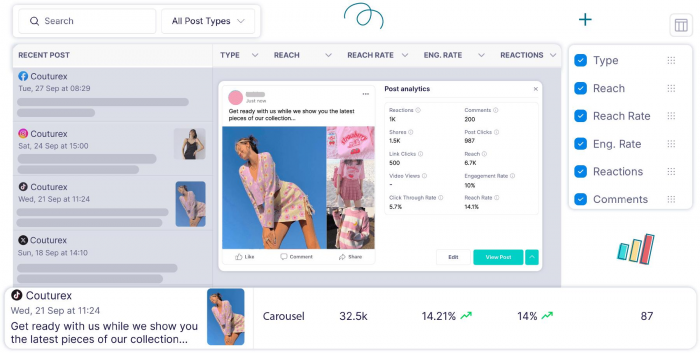
Publer connects publishing decisions with analytics. Its Business plan provides post-performance reports, recommended posting times, competitor analysis, and hashtag analytics, alongside an AI assistant for content preparation.
The useful distinction is that Publer supports decisions before publishing, not only after a post goes live. Creators can examine their posting patterns, identify effective time slots, and consider competitor activity while building the content calendar. Its AI capabilities focus more on content assistance than automatically explaining every analytical result.
Creator's Snapshot
● Standout insight: Combines audience activity, hashtag performance, and competitor research with publishing tools.
● Practical use: Use historical engagement patterns to adjust the timing and distribution of upcoming posts.
● Main limitation: Advanced analytics and competitor tracking are available on Business, not the cheaper Professional tier.
Pricing: Free plan available; Professional starts at $5/month, while Business with analytics starts at $10/month for one social account.
Quick verdict: A sensible low-cost option for creators who want analytics to influence their publishing schedule without maintaining separate tools.
4. Predis.ai: Best for Competitor Content Research
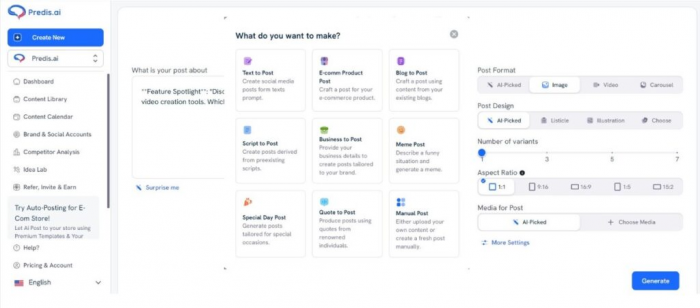
Predis.ai approaches analytics from the perspective of content creation and competitive research. It examines competitors' Instagram and Facebook content, including posting themes, hashtag choices, and performance patterns.
Its real value is in connecting competitive intelligence with AI content generation. The findings can inform creative choices rather than remaining isolated in a report. I would treat Predis.ai primarily as a research and production assistant, though, not as a complete replacement for deep audience or conversion analytics.
Creator's Snapshot
● Standout insight: Examine competing accounts to identify commonly used content themes, formats, and hashtags.
● Practical use: Research successful content approaches within a niche before developing original posts or campaigns.
● Main limitation: Competitor analysis focuses on Instagram and Facebook, and the number of analysis runs is limited by plan.
Pricing: Three-day free trial; Core starts at approximately $19/month with annual billing, although promotional prices vary.
Quick verdict: Best suited to creators who need ideas informed by competitor activity and also want AI-assisted content production.
5. Socialinsider: Best for Competitive Benchmarking
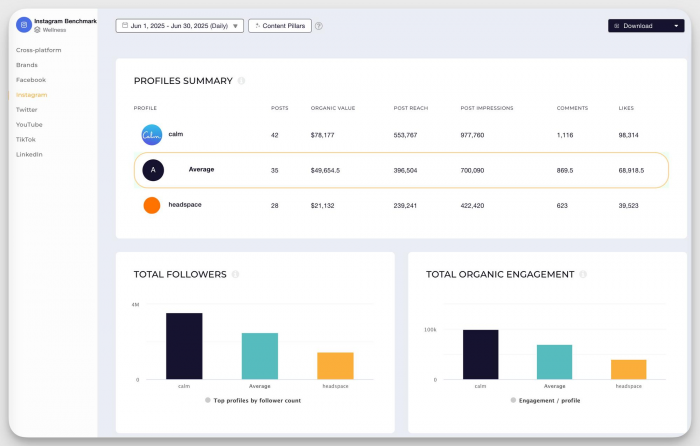
Socialinsider concentrates on deeper performance research. It offers cross-network analytics, competitor benchmarking, historical analysis, and automated reporting.
For me, its strongest use is understanding performance in context. A rising engagement rate looks encouraging, but competitor comparisons can reveal whether it reflects a particularly successful content strategy or wider changes across a niche. That distinction is valuable for creators handling paid partnerships or managing accounts professionally. Socialinsider also offers an MCP connector for accessing analytics through compatible AI tools.
Creator's Snapshot
● Standout insight: Compare account performance with competitors rather than evaluating growth in isolation.
● Practical use: Examine engagement and posting trends across competing accounts to support a more deliberate content strategy.
● Main limitation: The starting price is relatively high for a solo creator, and the entry plan includes only three months of historical data.
Pricing: No permanent free plan; 14-day trial available. Adapt starts at $82/month billed annually.
Quick verdict: Worth considering for established creators, consultants, and small agencies where competitive reporting has genuine business value.
6. Later: Best for Content Timing and Trends
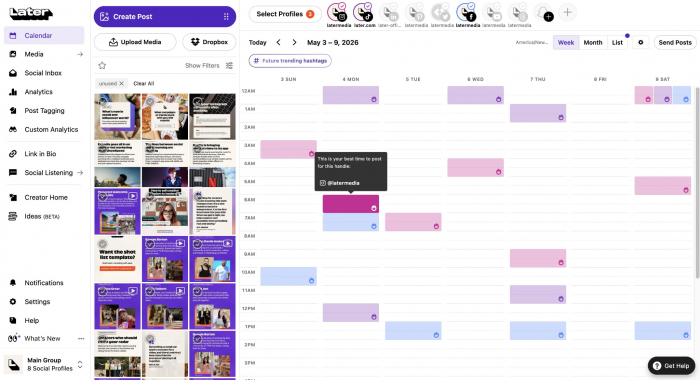
Later is built around the relationship between content planning and performance. Its analytics help creators review post results, while its scheduling recommendations support decisions about when to publish.
What makes Later interesting is its wider set of trend and planning capabilities. Higher plans introduce smarter scheduling and social-listening-based future insights, which examine emerging topics and conversations. However, the most sophisticated trend intelligence is reserved for its Scale plan. The Starter tier is considerably more basic, offering recent performance history and limited AI content-generation credits.
Creator's Snapshot
● Standout insight: Connects publishing times and content planning with recent platform performance.
● Practical use: Review which posting periods and content formats align with stronger engagement before arranging the calendar.
● Main limitation: Competitive benchmarking and future industry insights are restricted to the expensive Scale tier.
Pricing: No permanent free plan; 14-day trial available. Starter begins at $18.75/month billed annually.
Quick verdict: A good choice for visually focused creators who value scheduling and content planning as much as the analytics themselves.
7. Vista Social: Best for Engagement and Reporting
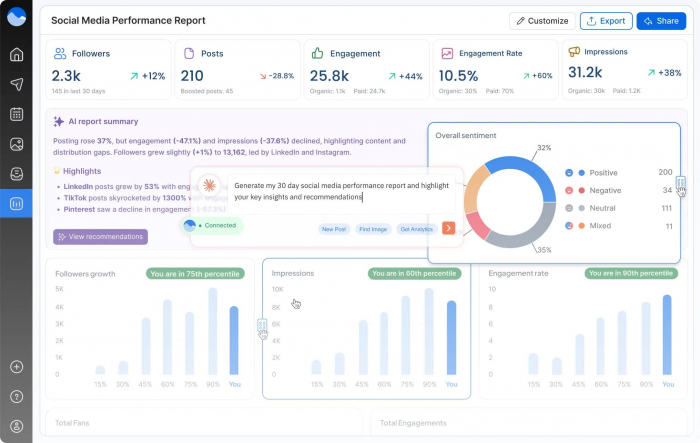
Vista Social brings analytics, reporting, social engagement, and AI-assisted responses into a single system. It supports post-performance reporting, scheduled reports, and monitoring of conversations across connected accounts.
I see its main advantage in connecting audience interactions with content management. Creators can examine performance while also handling comments, messages, and reviews. Its AI tools assist with content and responses, although advanced sentiment analysis and industry benchmarking belong to higher-level offerings.
Creator's Snapshot
● Standout insight: Combines post-performance reporting with engagement monitoring and optional social listening.
● Practical use: Manage community interactions alongside reporting for multiple accounts or creator-led businesses.
● Main limitation: The platform is priced for teams, and broader social listening costs extra.
Pricing: No permanent free plan; 14-day trial available. Professional starts at $99/month, or $950 annually.
Quick verdict: More appropriate for creators running a small business or managing client accounts than for someone publishing on one or two personal profiles.
8. Brand24: Best for Audience Sentiment
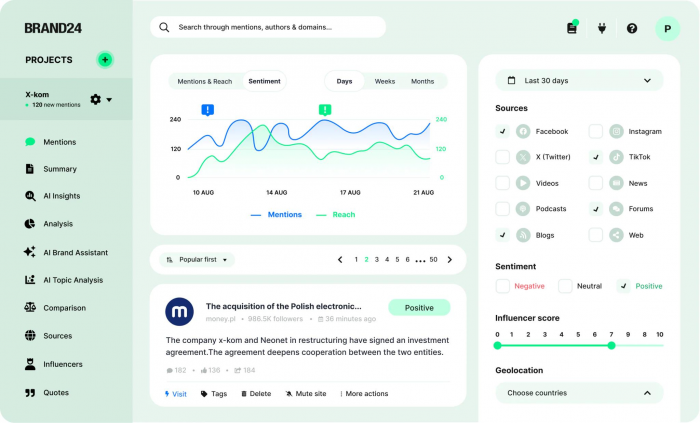
Brand24 measures something different from conventional social analytics: what people say about a name, brand, or topic across publicly accessible online sources.
Its AI sentiment analysis helps categorize positive, negative, and neutral mentions, providing context beyond ordinary likes and comments. Higher plans add an AI Brand Assistant that can answer questions using monitored discussions and historical mention data. This makes Brand24 particularly relevant to creators whose personal brands generate conversations outside their own social profiles.
Creator's Snapshot
● Standout insight: Track online mentions, sentiment, and conversations occurring beyond your own published posts.
● Practical use: Monitor reactions to collaborations, product launches, public mentions, and personal-brand campaigns.
● Main limitation: It is expensive for small creators, and the conversational AI Brand Assistant requires the Pro plan or higher.
Pricing: No permanent free plan; 14-day trial available. Individual starts at $199/month billed annually; Pro starts at $399/month annually.
Quick verdict: Valuable for established personal brands that need reputation monitoring, but excessive for creators whose main concern is improving post reach.
What Actually Matters in Creator Analytics?
After comparing the tools, I would prioritize actionable performance signals over the number of charts or AI features advertised. Understanding social media content ROI also helps separate engagement that looks impressive from results that contribute to actual growth or revenue. A dashboard becomes useful when it helps determine what content deserves repeating, revising, or abandoning.
| Metric | What it tells creators |
| Reach and impressions | Whether content is reaching new people or mostly circulating within an existing audience. |
| Saves and shares | Which posts provide enough value for people to keep or recommend them. |
| Engagement rate | How strongly an audience responds relative to exposure or audience size, depending on the calculation used. |
| Follower conversion | Whether attention from individual posts results in sustained audience growth. |
| Link clicks | Whether content encourages people to visit a website, portfolio, or storefront. |
| Audience sentiment | How people respond to a creator or brand beyond simple interaction counts. |
There are also two details worth checking before paying for an analytics subscription.
First, historical data matters more than it initially appears. Thirty days of analytics can show recent winners, but it is insufficient for identifying seasonal patterns or evaluating changes over several months.
Second, not every AI assistant can analyze account data. Some tools use AI mainly for captions, hashtag generation, or scheduling suggestions. If the goal is understanding performance, prioritize products that explain trends or allow meaningful queries against actual account metrics.
How I Would Choose
For smaller creators, I would narrow the options by the particular decision they need help making rather than by the longest feature list.
● For a creator on a tight budget: Start with Metricool or Buffer. Both offer free plans, and their paid options remain relatively accessible.
● For improving posting consistency: Publer is worth considering because its Business plan combines scheduling with posting-time and hashtag analysis.
● For researching competing creators: Predis.ai offers a relatively affordable entry point, while Socialinsider provides a deeper benchmarking environment at a much higher cost.
● For creators earning through partnerships or products: Consider whether competitive reports, link tracking, or brand monitoring would justify the additional cost of specialized tools.
A useful evaluation method is to review the same content category across several weeks, compare its reach, engagement, and conversion results, then check whether the tool helps explain the differences. If the insights do not change any publishing decisions, the additional analytics subscription may not be necessary.
Final Verdict
Metricool is my overall recommendation for small creators because it offers a balanced combination of cross-platform analytics, competitor tracking, and AI-powered reporting capabilities at a comparatively accessible price.
Buffer comes close, particularly for creators who prefer plain-language performance explanations. Publer is appealing for those who want publishing and analytics together, while Predis.ai has a more specific role in competitor research and AI content production.
Socialinsider, Vista Social, and Brand24 offer valuable specialized capabilities, but their subscription costs make more sense once social media becomes a significant business operation. The best analytics tool is not necessarily the one that collects the most information. It is the one that helps a creator recognize what is working, understand what needs changing, and make better decisions before publishing the next post.
Comments