

Social media polls and quizzes help creators understand audience preferences, collect feedback, and encourage participation. AI tools can reduce the work involved in writing questions, organizing answers, and building interactive experiences. However, some tools generate simple quizzes, while others provide complete publishing, scoring, and response-tracking systems.
This article compares eight AI tools using a consistent content brief, examining their creation process, output formats, editing controls, social media compatibility, and pricing.
How I Compared These Tools
To keep the comparison consistent, I prepared one prompt for evaluating the tools' quiz-generation capabilities.
Prompt I used:
"Create an interactive social media quiz about content creation habits. Include five multiple-choice questions covering posting frequency, preferred platforms, content formats, audience engagement, and planning methods. Keep the language conversational, provide four answer options per question, and make the quiz suitable for Instagram, Facebook, and LinkedIn audiences."
The comparison focuses on four areas:
● Question generation: Whether the platform supports specific questions with clear and relevant answer choices.
● Editing flexibility: How much control users have over questions, layouts, branding, scoring, and results.
● Publishing options: Whether completed quizzes can be shared through social media links or embedded on websites.
● Free-plan restrictions: How response limits, publishing restrictions, and paid features affect regular use.
Quick Comparison of the 8 Best AI Poll and Quiz Tools
| Tool | Best use | Starting price |
| Opinion Stage | Interactive polls and quizzes | Free; $25/month |
| involve.me | Personalized quizzes and lead generation | Free; $29/month |
| forms.app | AI-generated quizzes and surveys | Free; $19/month |
| Jotform | Structured quizzes and assessments | Free; $34/month |
| Typeform | Conversational quizzes | Free; $28/month |
| Interact | Personality quizzes and lead capture | Free; $27/month |
| Outgrow | Marketing polls and recommendation quizzes | $25/month for quiz-capable plan |
| Quizgecko | Knowledge-based quizzes | Free; $9/month |
Prices are in USD and reflect annual billing where applicable. Pricing may change.
1. Opinion Stage
Best for: Creating interactive polls, personality quizzes, and audience engagement campaigns.
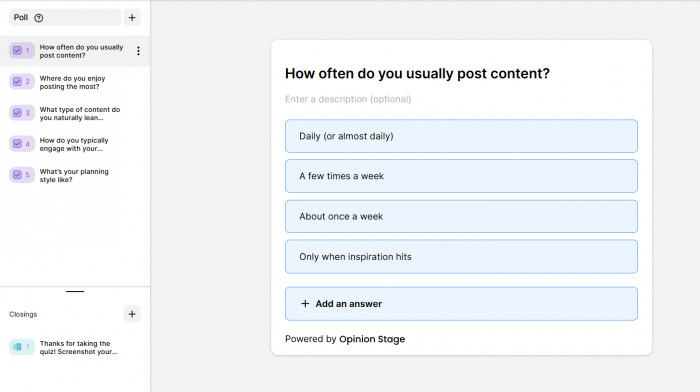
Opinion Stage is an AI-powered poll and quiz builder that combines question generation, customizable designs, and response tracking. Unlike native Instagram or LinkedIn polls, it creates hosted interactive content that can be shared through links or embedded on websites.
How It Creates Polls and Quizzes
Users can enter a topic, select a template, or generate a draft using AI. Questions, answer choices, images, and layouts can be edited before publishing. Conditional logic is also available for personalized quiz experiences.
What you can create:
● Interactive polls: Collect audience opinions using customizable voting questions.
● Personality quizzes: Generate questions that lead to personalized results.
● Knowledge quizzes: Test audience understanding with scored questions.
● Product quizzes: Recommend products based on participants' answers.
Where It Works Best
| Platform | Practical use |
| Share quiz links through Stories or profile links. | |
| Publish poll links to encourage participation. | |
| Share industry quizzes and professional surveys. | |
| Websites | Embed quizzes and collect responses directly. |
What to Know Before Using
Opinion Stage provides response analytics and lead capture options, making it useful for tracking participation beyond simple vote counts. However, quizzes open through external links rather than native social media poll features. The free plan also limits users to 25 responses per month.
Pricing: Free plan available. Paid plans start at $25/month billed annually, or $32/month with monthly billing.
2. involve.me
Best for: Building personalized quizzes with lead collection and automated follow-ups.
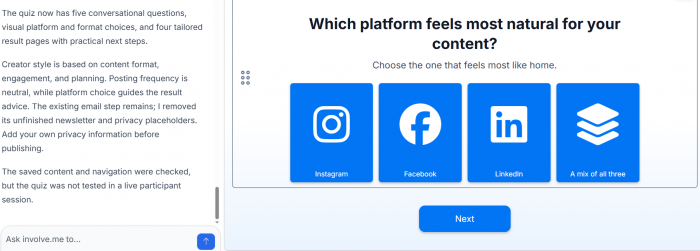
involve.me combines AI-generated quizzes with interactive landing pages and marketing workflows. Its main advantage is the ability to connect participant responses with customized results, contact forms, and follow-up actions.
How It Creates Polls and Quizzes
The AI builder accepts written instructions or website information to prepare a multi-step quiz. Users can modify the generated questions, set scoring conditions, customize result screens, and apply conditional logic to control the question flow.
What you can create:
● Assessment quizzes: Evaluate participants using predefined scoring rules.
● Recommendation quizzes: Match answers with specific products or services.
● Feedback surveys: Collect audience preferences through structured questions.
● Lead-generation quizzes: Capture contact information alongside quiz results.
Where It Works Best
involve.me works well with Instagram and Facebook campaigns that direct participants to a dedicated quiz page. It also supports website embedding and email marketing integrations, making it suitable for campaigns that continue beyond the initial interaction.
What to Know Before Using
The platform includes more marketing features than a basic social media poll requires. Its free plan allows 50 submissions and 500 visits monthly, while advanced integrations and automation options require paid subscriptions.
Pricing: Free plan available. Paid plans start at $29/month billed annually, or $49/month billed monthly.
3. forms.app
Best for: Generating customizable quizzes and audience surveys from written instructions.
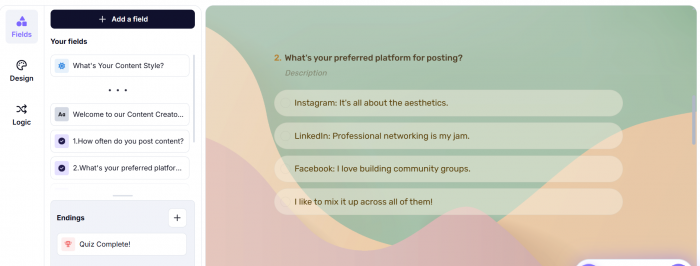
forms.app offers a flexible AI quiz generator with multiple question formats, scoring options, and a visual editor. It is useful for creators who need to turn one topic into different types of interactive questions without building everything manually.
How It Creates Polls and Quizzes
Users describe the quiz topic or provide existing content through text, documents, images, or links. The AI creates an editable question set, and the form builder allows changes to the structure, answer options, and design.
What you can create:
| Format | Available functionality |
| Multiple-choice quizzes | Questions with selectable answers and scoring |
| Personality quizzes | Questions linked to different result outcomes |
| Audience surveys | Feedback forms with response collection |
| Knowledge tests | Correct-answer scoring and result messages |
Where It Works Best
Completed quizzes can be distributed through Instagram, Facebook, or LinkedIn using shareable links. They can also be embedded on websites, while the editor makes it possible to adapt question types for different audiences.
What to Know Before Using
The generated questions and scoring rules should be reviewed before publishing, particularly for knowledge-based assessments. The free plan is limited to five forms, and higher usage limits require a subscription.
Pricing: Free plan available. Paid plans start at $19/month billed annually, or $29/month billed monthly.
4. Jotform
Best for: Creating structured quizzes from prompts, documents, and educational content.
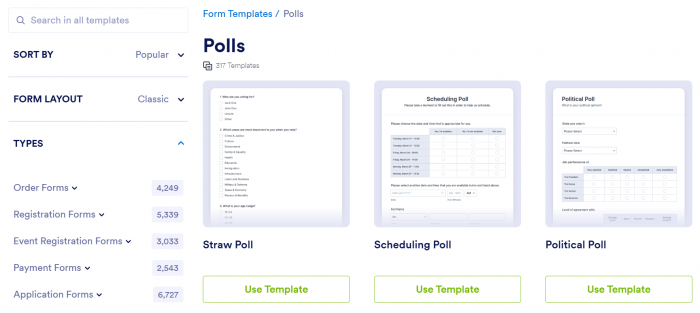
Jotform provides an AI Quiz Generator alongside its wider form-building platform. It is particularly useful for producing assessments from existing information because questions can be generated from uploaded documents as well as written instructions.
How It Creates Polls and Quizzes
Users provide a prompt or upload source material, then specify the language, question count, and preferred question format. Jotform generates an editable quiz with options for customizing questions, answers, and scoring.
What you can create:
● Trivia quizzes: Multiple-choice questions with correct answers and scores.
● Educational assessments: Question sets based on uploaded learning materials.
● Knowledge tests: Interactive assessments covering specific subjects.
● Feedback forms: Structured questions for gathering opinions and suggestions.
Where It Works Best
Jotform is suitable for LinkedIn educational posts, community knowledge challenges, and quizzes shared through social media links. Its embedding options also support websites that publish regular assessments.
What to Know Before Using
Jotform is more focused on structured assessments than visual social media content. Although the AI can generate the initial questions, branding and presentation may require additional editing. The free plan includes five forms and 100 monthly submissions.
Pricing: Free plan available. Paid plans start at $34/month billed annually.
5. Typeform
Best for: Creating conversational quizzes with an engaging question-by-question layout.
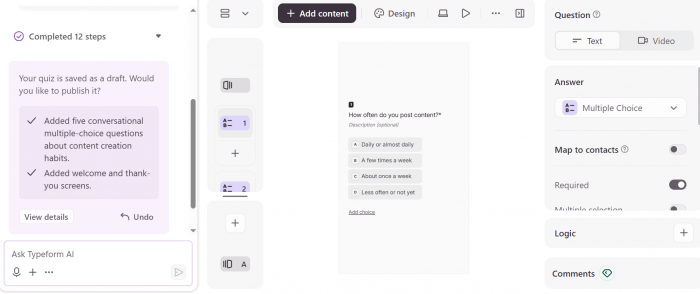
Typeform presents quizzes through a guided interface rather than displaying every question at once. Its AI builder supports question generation, scoring, and outcome-based experiences, making it useful for short quizzes that depend on participant interaction.
How It Creates Polls and Quizzes
Users enter a topic and describe the purpose of the quiz. Typeform AI can generate questions, suggested answers, scoring rules, and logic paths. The content remains editable, including question order, visuals, and result screens.
What you can create:
● Interactive assessments: Score answers and provide participants with results.
● Audience research quizzes: Collect preferences through guided questions.
● Personality quizzes: Connect response patterns to different outcomes.
● Lead capture quizzes: Combine interactive questions with contact collection.
Where It Works Best
| Platform | Practical use |
| Direct followers to quizzes using Story or profile links. | |
| Share professional assessments and audience surveys. | |
| Include conversational quizzes in marketing campaigns. | |
| Websites | Embed quizzes within landing pages. |
What to Know Before Using
The question-by-question layout is suitable for short quizzes, but longer assessments require participants to navigate multiple screens. Response limits are another consideration, with the Basic paid plan including 100 monthly responses.
Pricing: Free plan available. Paid plans start at $28/month billed annually, or $39/month billed monthly.
6. Interact
Best for: Creating personality quizzes with customized results and email capture.
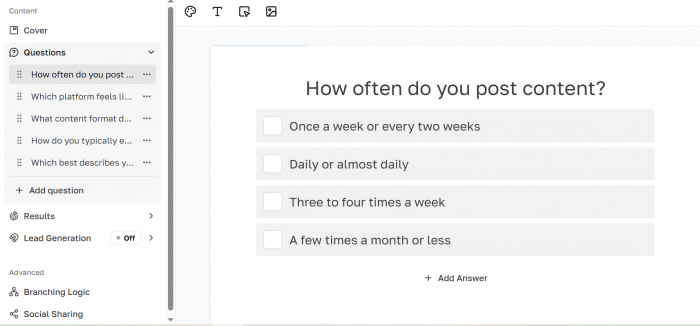
Interact focuses on quizzes that assign participants to different outcomes based on their answers. Its AI-assisted builder supports question creation and result development, while its marketing features help creators collect leads and segment their audiences.
How It Creates Polls and Quizzes
Users can provide website information, a quiz title, and intended outcomes to generate an initial quiz structure. Questions, results, and designs can then be customized to match the intended audience.
What you can create:
● Personality quizzes: Categorize participants based on their response patterns.
● Scored quizzes: Assign points and display results based on performance.
● Assessment quizzes: Evaluate participants against defined criteria.
● Lead magnet quizzes: Collect email addresses through interactive results.
Where It Works Best
Interact is relevant to Instagram creators, coaches, and newsletter publishers who want to connect quiz participation with email marketing. Its outcome-based structure also supports personalized content recommendations.
What to Know Before Using
Interact is not designed primarily for one-question polls. It works better with multi-question experiences that lead to specific results. Its free plan allows two quizzes and 100 monthly completions but excludes analytics and third-party integrations.
Pricing: Free plan available. Paid plans start at $27/month billed annually, or $39/month billed monthly.
7. Outgrow
Best for: Building interactive marketing polls, assessments, and recommendation quizzes.
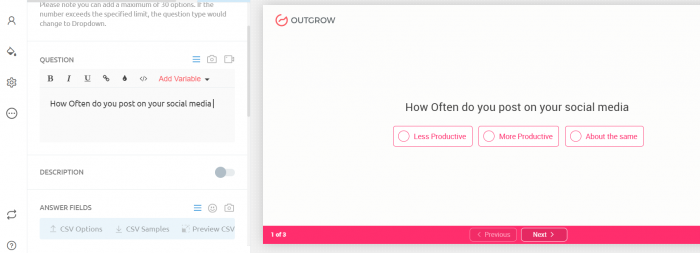
Outgrow provides multiple interactive content formats, including polls, outcome quizzes, assessments, and product recommendations. Its focus is on collecting audience responses and connecting them to measurable marketing activities.
How It Creates Polls and Quizzes
The platform provides structured builders and templates for organizing questions, answers, results, and visual designs. Users can configure scoring, outcome mapping, and response collection according to the selected content format.
What you can create:
| Content format | Main function |
| Audience polls | Collect votes and opinions |
| Outcome quizzes | Display personalized results |
| Assessments | Score responses and provide feedback |
| Recommendation quizzes | Connect answers with suitable recommendations |
Where It Works Best
Outgrow works well for social campaigns that direct users to dedicated interactive pages. Its reporting and segmentation features are particularly relevant when quiz participation is connected to marketing goals.
What to Know Before Using
Outgrow requires more configuration than a basic question generator, especially for result mapping and campaign tracking. Pricing also varies by content type. The entry-level Freelancer Limited plan does not include the full quiz and poll functionality, making Freelancer Pro the more relevant option.
Pricing: Freelancer Limited starts at $14/month annually for limited content formats. Quiz-capable Freelancer Pro starts at $25/month billed annually, or $45/month billed monthly.
8. Quizgecko
Best for: Generating knowledge-based quizzes from text and educational materials.
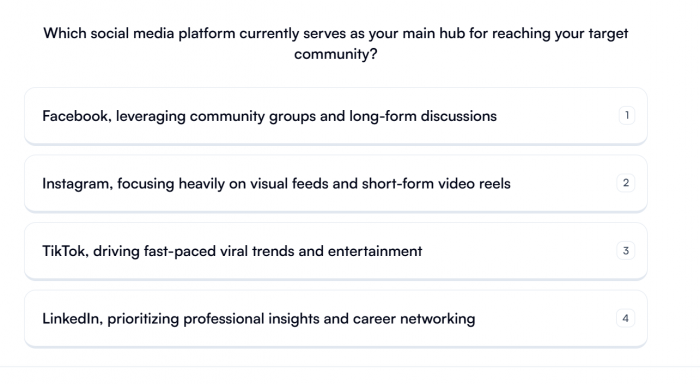
Quizgecko is an AI quiz generator focused on turning information into multiple-choice questions, assessments, and study resources. Unlike marketing-oriented quiz builders, it prioritizes question creation and knowledge testing over audience segmentation and lead generation.
How It Creates Polls and Quizzes
Users enter a topic or provide source material, and the AI generates related questions. The resulting quiz can be reviewed and adjusted before being used as an assessment or shared learning activity.
What you can create:
● Multiple-choice quizzes: Generate structured questions with selectable answers.
● Knowledge assessments: Test understanding of a specific topic or document.
● Revision quizzes: Convert educational material into shorter question sets.
● Study resources: Create related flashcards and learning activities.
Where It Works Best
Quizgecko is relevant to educational creators, industry educators, and accounts publishing knowledge-based content. Its question sets can support LinkedIn quizzes, community challenges, and educational social media posts.
What to Know Before Using
Quizgecko is not primarily built for collecting social media opinions or creating marketing funnels. Its strengths are factual question generation and learning assessments, so it is less suitable for personality quizzes or product recommendation campaigns.
Pricing: Free plan available. Paid plans start at $9/month billed annually, or $16/month billed monthly.
Which AI Poll and Quiz Tool Should You Choose?
Choosing a tool depends on the type of interaction you want to create and what you need to do with the responses.
| Requirement | Recommended tools | Reason |
| Interactive audience polls | Opinion Stage, Outgrow | Poll formats and response tracking |
| Personalized quizzes | Interact, involve.me | Customized outcomes and lead capture |
| General-purpose quizzes | forms.app, Jotform | Flexible question generation and editing |
| Conversational quizzes | Typeform | Guided question presentation |
| Educational quizzes | Quizgecko | Content-based question generation |
Native Polls vs. Hosted Quizzes
Most tools in this list create hosted quizzes rather than native Instagram Story stickers or LinkedIn polls. This difference affects both participation and publishing.
Native polls allow followers to vote directly within a social platform, making them suitable for quick questions and simple feedback collection. Hosted quizzes require users to open a separate page but provide additional features such as scoring, personalized results, multiple questions, and response analytics. For more inspiration, these Instagram poll ideas can help creators develop engaging questions for their Stories.
For creators publishing occasional Instagram polls, a full quiz builder may be unnecessary. However, multi-question quizzes, educational assessments, and audience research campaigns benefit from the additional flexibility of hosted tools.
What Matters Before Publishing
AI-generated questions still require editorial review. A technically complete quiz does not automatically make a useful social media experience.
Three details deserve attention:
● Question relevance: Questions should address the intended audience directly, while answer choices must be clear and sufficiently different from one another.
● Response limits: Free subscriptions often restrict monthly submissions, analytics, integrations, or branding. These limitations can affect quizzes that receive substantial traffic. Creators can also use AI analytics tools to track broader engagement and content performance.
● Results and scoring: Knowledge quizzes require correct answers, while personality quizzes need consistent result mapping. Both should be reviewed before publication.
Final Verdict
Opinion Stage is a suitable starting point for interactive audience polls, while forms.app provides flexibility for building different quiz formats. Typeform stands out for its conversational presentation, and Jotform is useful for structured assessments based on existing content.
For creators focused on personalized quiz outcomes and lead collection, Interact and involve.me offer more specialized functionality. Outgrow is better aligned with interactive marketing campaigns, while Quizgecko is a practical choice for producing educational quizzes from written material.
The right AI tool depends on whether the goal is quick audience participation, knowledge testing, personalized recommendations, or collecting measurable responses. Question generation matters, but editing control, publishing options, and response limits determine how practical the tool will be for regular social media use.
Comments