

Open your Instagram messages and look at the row of small circles sitting above your chats. Those little text bubbles stuck to people's profile pictures are Notes, and most people scroll straight past them without ever thinking about who put them there, or who is quietly reading theirs.
Notes look simple, but the rules behind them are not obvious. This guide breaks down exactly who sees your Note, what Instagram chooses not to tell you, and how to actually use the feature instead of leaving it blank.
Notes in One Line
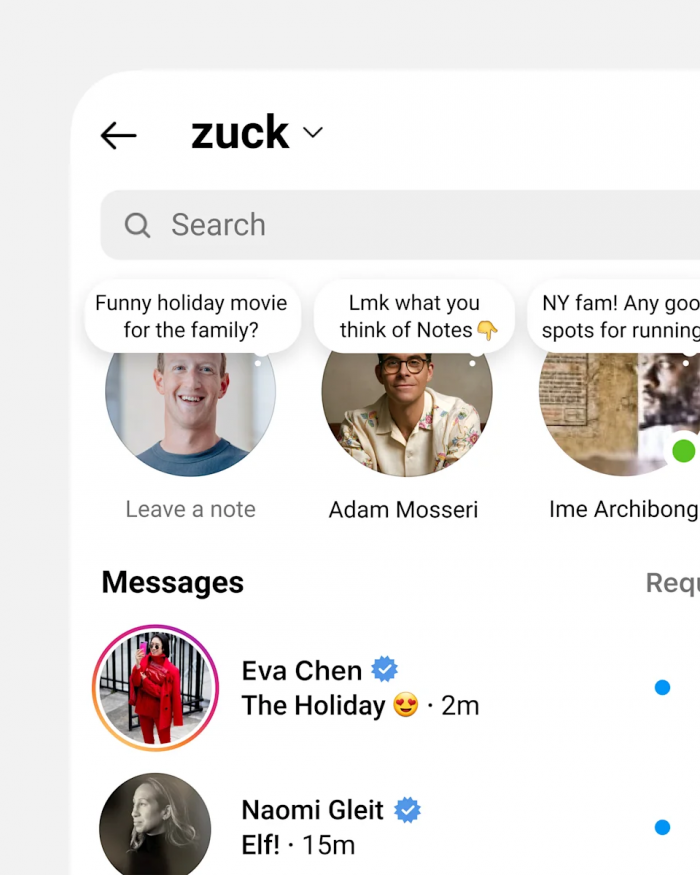
A Note is a short status, up to 60 characters, that sits at the top of your Instagram inbox for 24 hours and then disappears on its own.
The part people get wrong is where it lives. A Note is not a Story, and it does not appear in the feed. It belongs to the messages section, and that one detail explains almost everything else about how the feature behaves.
Why Notes Live in Your Inbox
Instagram could have put Notes anywhere. It chose the one screen people open when they want to talk to someone specific, not broadcast to a crowd.
That placement sets the mood. The inbox is a smaller, quieter space than the feed, so a Note feels less like a public post and more like leaving a sticky note on a friend's desk. You are not performing for thousands of strangers, you are nudging the handful of people who already message you.
It also rewards a different kind of writing. A Story competes with video and polish. A Note competes with nothing except the chat list underneath it, so one plain line of text is enough to get noticed.
Who Actually Sees Your Notes
When you write a Note, Instagram gives you two audience choices and nothing in between:
● Followers you follow back: this is the default. Only people you follow who also follow you, your mutuals, can see the Note. Someone who follows you but gets no follow back in return will not see it at all.
● Close Friends: the same list you already use for private Stories. Everyone on it sees the Note, and they do not strictly have to be a mutual, though in practice the overlap is usually high.
The follow-back rule is the one that trips people up. Your Note is tied to mutual connection, not raw follower count, so a creator with 90,000 one-way followers might be showing a Note to only a few hundred people.
There is no public option. You cannot post a Note that the whole internet, or even all of your followers, can see. The small audience is built into the feature, not something you switch on.
The Privacy Illusion
Because Notes live in the inbox and feel like a message, people treat them like one. That is the trap.
A Note is not a private message. It is a small broadcast. Whichever audience you picked, mutuals or Close Friends, every single one of them sees the same line at the same time. Writing something you only meant for one person means the whole circle reads it too.
The sense of privacy comes from the size of the audience, not from any real restriction. A tight group still talks, and screenshots still exist. The safest way to think about a Note is as something you are fine with your entire circle seeing, because that is exactly what it is.
What Instagram Chose Not to Show You
The most searched question about Notes is whether you can see who viewed yours. The short answer is no, and the longer answer is more interesting.
| Can you... | Answer |
| See a list of who viewed your Note | No |
| See a view count | No |
| Know if one specific person read it | No, unless they reply |
| See who liked your Note | Yes |
| See who replied | Yes, it arrives as a DM |
| Tell whether someone muted your Note | No |
Instagram built Notes with almost no analytics, and that looks deliberate. There are no read receipts in either direction, so you cannot tell who saw yours, and other people cannot tell that you saw theirs.
The only real signal is a reply. When someone answers your Note, it does not show up under the Note itself, it opens a normal DM thread. That keeps the pressure low. Nobody is counting views and nobody is being watched, which is a big part of why people post Notes they would never post as a Story.
Everything You Can Put in a Note
Notes started as plain text and stayed that way for a while, which is why a lot of older guides still describe them as a simple 60 character text box. That description is out of date. A Note can now hold:
• Text: still the core of the feature, capped at 60 characters, which forces you to be short and specific rather than wordy.
• Music: a short clip of a song attached to your Note, used to set a mood or just share whatever you have had on repeat lately.
• Photo or video: a small looping visual instead of, or alongside, text, for a Note that says a bit more than a line can.
• Prompts: a question you post so friends can answer it directly, which turns a flat status into a small conversation starter.
• Mentions: tag another account with an @mention inside the Note to pull that person into it.
Translations also work quietly in the background. If a Note is written in another language, a See translation option lets you read it in your own, which matters more than it sounds for accounts with an international following.
One thing you can no longer do is leave a Note on someone's post or Reel. Instagram tested that, then removed it in early 2025, so Notes now live only where they began, at the top of the inbox.
How People Reply and React
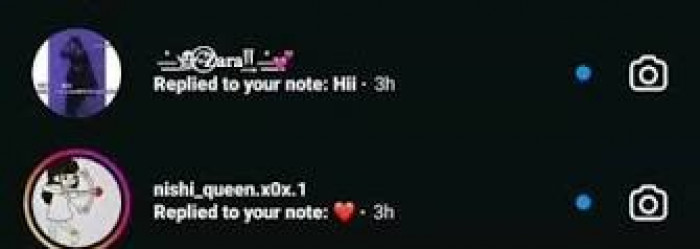
Interaction on a Note is deliberately light. There are two things someone can do with yours:
• Like it: a double tap or the heart icon drops a like, the same quick reaction used everywhere else on Instagram. It is the low effort way to say I saw this without starting a chat.
• Reply to it: tapping the Note opens a message box, and whatever they send lands in your DMs as a normal conversation thread.
Prompts are where the feature gets wasted. Instead of posting a status, you post a question, something like name a song you have on repeat, and the answers come back to you. Many of the same principles behind effective Instagram poll questions apply here, particularly keeping questions specific and easy to answer. For anyone trying to start conversations rather than announce a mood, a prompt does far more work than a plain line of text.
Only you can see who engaged with your Note. The likes and replies are yours alone, they are not displayed to the rest of your audience, which keeps the whole thing feeling personal rather than public. And if someone else's Notes are not something you want to see, holding down their Note lets you mute them quietly, with no notification sent to them.
The 24-Hour Clock
Every Note expires 24 hours after you post it. There is no archive, no history, and no way to pull an old one back to look at later. Once it is gone, it is gone.
You can cut that short whenever you like. Deleting your Note removes it immediately, and posting a new one automatically replaces the old, since you are only allowed one active Note at a time.
The short lifespan changes how people behave. Because nothing sticks around, the cost of posting drops to almost nothing. People fire off throwaway lines, inside jokes and half thoughts they would never commit to a feed post, precisely because it all clears out by tomorrow.
Notes vs Stories vs Broadcast Channels
Notes are one of several ways to share on Instagram, and the easiest way to understand them is to see what they are not.
| Feature | Where it appears | Audience | Lifespan | Best for |
| Notes | Top of the DM inbox | Mutuals or Close Friends | 24 hours | Quick status or soft nudge |
| Stories | Top of feed and profile | All followers or Close Friends | 24 hours | Visual daily moments |
| Broadcast Channels | Inside DMs, one to many | Anyone who follows the channel | Ongoing | Longer announcements to fans |
The split is really about reach and intent. A Story is a more visual format for reaching followers, with plenty of Instagram Story ideas built around everyday updates, questions, and behind-the-scenes moments. A Broadcast Channel is a one-way space for announcements, aimed at people who opted in.
A Note is the opposite of both. It is small, plain and pointed at the people already closest to you in the app. Choosing the right one comes down to a simple question: are you updating a crowd, or poking a circle?
Who Uses Notes Well
Different groups have quietly worked out different uses for the same little text box.
• Younger users treat Notes as a running status line, closer to the away messages of old chat apps than to a social post. It is where they signal a mood, their availability, or an inside reference only their friends will get.
• Creators use Notes as a reply magnet. A line sitting at the top of the inbox gets noticed where a Story gets swiped past, so a question or a tease posted there often pulls more direct messages than a polished feed post does.
• Brands and small businesses use them for presence. A Note that says restock is live or we are open late keeps the account visible in the one place followers open with real intent, the messages tab.
The common thread is that Notes work best when they sound like a person, not an announcement. The format is too small and too casual to carry marketing language, and the audience sits too close to fall for it.
What Not to Put in a Note
Since your whole circle sees a Note, a few things are worth keeping out of it:
• Anything meant for one person. A Note feels like a private message but reaches everyone in your chosen audience, so a message for a single friend belongs in an actual DM.
• Sensitive or private details. Your location in real time, your plans, personal information, anything you would not want a wide group screenshotting and holding on to.
• Things you will regret in an hour. The 24 hour timer feels forgiving, but anyone in your audience can screenshot a Note long before it ever expires.
None of this makes Notes risky, it just means they are more public than they look. The simple rule: if you would hesitate to say it out loud to the whole room, do not put it in a Note.
When You Can't See Notes at All
Some people land on a guide like this because their own Notes row is missing, or they cannot see anyone else's. A few things cause that:
• App version. Notes rely on a reasonably current version of Instagram, so an outdated app may simply not show the feature. Updating from your app store usually sorts it out.
• Regional rollout. Instagram releases and tweaks features in waves, and availability has varied by country and by account over time.
• Account type or age. Some features behave differently on certain account types, or for younger accounts that run on tighter defaults.
• An empty or muted circle. If you follow very few people back, or you have muted their Notes, the row can look empty even when nothing is actually broken.
If Notes still do not appear after updating and checking, it is usually a rollout matter rather than a setting you can force. Waiting it out, or reinstalling the app, tends to be the only real fix.
Where Lightweight Status Is Heading
Notes are easy to dismiss as a minor feature, a leftover text box in an app built for video. That read misses what they are actually doing.
The feature quietly brings back the status line, the away message and the mood update that older chat apps ran on, rebuilt for an audience that now lives in the inbox rather than the feed. It is Instagram admitting that not everything needs to be a performance, and that sometimes people just want to tell a small group what is going on.
The verdict is simple. Notes will not grow your account on their own, and they were never built to. What they do well is keep you present with the people who already care, in the one corner of the app where a single plain sentence still gets read. Used that way, with a light hand and an honest line, they are one of the most underrated tools Instagram has.
Comments