

AI video has moved beyond abstract animation and distorted faces. Current models can create convincing camera movement, natural lighting, spoken dialogue, environmental sound and scenes that initially resemble recorded footage. The harder question is not whether AI can make realistic video, but which tool can produce the type of realism a project requires.
Google Veo 3.1 currently offers the strongest overall package for cinematic scenes with sound. Runway Gen-4.5 gives creators more production control, Kling VIDEO 3.0 handles structured multi-shot sequences, and HeyGen remains better suited to realistic presenters. The right answer changes with the video being made.
The Quick Answer
For cinematic footage generated from a written prompt, Google Veo 3.1 is the strongest overall choice. It combines realistic visual generation with native dialogue, sound effects and ambient audio, removing the need to build the soundtrack separately. Google also supports image-based references and extended creative controls, making Veo useful for advertisements, short narrative scenes and concept footage.
However, Veo is not automatically the best tool for every creator. Runway Gen-4.5 is more suitable when individual shots need to be developed, regenerated and controlled inside a larger production workflow. Kling VIDEO 3.0 is a strong option for longer multi-shot generations with several characters. HeyGen Avatar IV is the more practical choice for a realistic person delivering a script.
Adobe Firefly deserves a separate mention because it is becoming a multi-model production environment. It provides its own Firefly Video model while also offering access to Veo 3.1, Runway Gen-4.5, Kling 3.0 and several Luma models from one interface.
The best answer, therefore, is:
● Choose Veo 3.1 for realistic cinematic scenes with synchronized sound.
● Try Runway Gen-4.5 for greater control over shot development and iteration.
● For structured, multi-shot clips with recurring subjects, choose Kling VIDEO 3.0.
● Choose HeyGen for presenters, instructors and digital spokesperson videos.
● Firefly is the best option when the generated footage must continue into an Adobe editing workflow.
What Makes an AI Video Look Real?
Realism is often confused with sharp resolution. A clip can be rendered in 1080p or 4K and still look artificial because the subject moves incorrectly, reflections do not match the action or facial details change between frames.
A realistic AI video must hold several elements together at the same time.
● The subject must remain physically stable throughout the shot. Facial structure, clothing, fingers, body proportions and smaller accessories should not change as the person turns or moves closer to the camera.
● Motion must follow understandable physical rules. Footsteps should carry weight, fabric should respond to movement, objects should remain in the subject’s hands and liquids should flow in a believable direction.
● Lighting must remain connected to the environment. Shadows, reflections and highlights should react to the position of the subject and camera instead of appearing as decorative effects placed over the image.
● Camera movement must feel intentional. A tracking shot should follow a consistent path, while handheld movement should resemble a camera operator rather than random shaking or stretching.
● Sound must correspond with the visible action. Dialogue should match lip movement, footsteps should occur at the correct moment and background noise should make sense for the location.
● Identity must survive changes in angle and distance. A character who looks convincing in a close-up is not useful if their face, age or clothing changes in the next shot.
The strongest AI video models perform well across several of these areas. Weaker generators may create an impressive first frame but lose coherence once the scene becomes more complicated.
Real Video Means Different Things
The phrase “real video” covers several separate production needs. A cinematic generator, an avatar platform and an AI editing system should not be judged as though they perform the same job.
| Type of AI video | What the viewer expects | Most suitable tools |
| Cinematic scene | Realistic locations, people, movement, lighting and camera direction | Veo, Runway or Kling |
| Talking presenter | Natural speech, facial expressions, gestures and accurate lip-sync | HeyGen |
| Product or advertising footage | Controlled objects, clean composition and editable brand assets | Firefly, Runway or Veo |
| Reworked live footage | A real performance transformed into a different environment or visual treatment | Luma Ray3.2 |
| Multi-shot narrative | The same characters and locations maintained across several connected shots | Kling VIDEO 3.0 or Veo |
This distinction matters. A HeyGen presenter can look more believable than a fully generated person in a complex Veo scene because the avatar operates within a narrower, more controlled setup. That does not make HeyGen a stronger cinematic model. It makes it better at a specific type of human video.
Similarly, Luma Ray3.2 is built around directing and transforming existing source footage. It is not simply another text-to-video generator competing with Veo on identical terms.
A Fair Way to Compare Them
AI video demonstrations are usually selected from the best generations. They rarely show how many failed attempts were discarded before the final clip appeared.
A useful comparison should test each tool with the same production challenges:
1. A human close-up involving speech, head movement and visible hands.
2. A full-body subject walking through a detailed environment.
3. Physical interaction such as pouring a drink or picking up an object.
4. Moving camera that changes the distance or angle during the shot.
5. A sequence in which the same character appears in more than one shot.
The result should then be examined for facial stability, hand movement, physical accuracy, prompt adherence, sound synchronization and character continuity.
Generation efficiency also matters. A tool that produces one excellent clip after twelve unusable attempts may be less practical than a model that delivers slightly less dramatic footage but produces dependable results more consistently. Credit consumption, rendering time and the ability to revise a specific shot all affect the real production cost.
1. Google Veo 3.1 : Best for Cinematic Realism
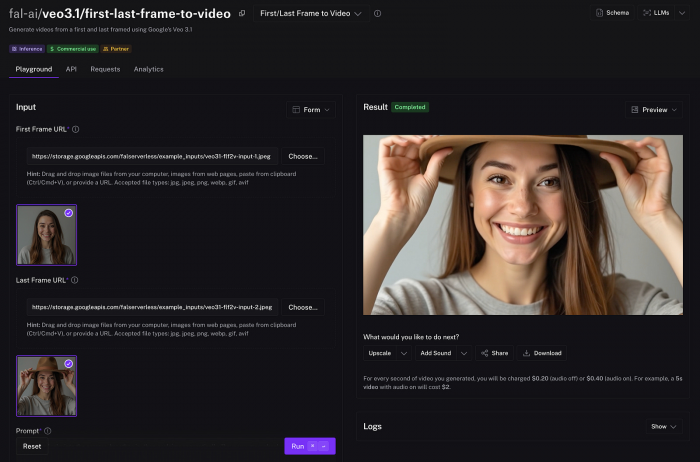
Veo 3.1 is the closest option to a complete text-to-scene generator. It can create video and native audio together, including dialogue, sound effects and environmental noise. This allows a prompt to describe not only what the camera sees but also what should be heard.
Google’s prompting guidance encourages creators to specify the subject, action, visual style, camera movement and audio cues. A prompt can request distant traffic, footsteps on gravel or a line of dialogue alongside the visual description.
Its main advantage is the relationship between image, motion and sound. A rainy street can contain matching rainfall audio, moving vehicles and reflections rather than looking like a silent visual effect. Veo is particularly strong for atmospheric advertisements, establishing shots, short dramatic scenes and realistic environments.
The limitation appears when a prompt demands too much continuity. Several people speaking, handling objects and moving through multiple camera angles can still introduce visual or audio errors. Native sound is useful, but generated speech may require several attempts before tone, timing and lip movement feel natural.
Best suited to: Cinematic advertisements, short films, realistic B-roll, social campaigns and visual concepts that need sound from the start.
2. Runway Gen-4.5 : Best for Production Control
Runway Gen-4.5 focuses on motion quality, visual fidelity and prompt adherence through both text-to-video and image-to-video generation. It currently supports clips of up to ten seconds, with several aspect ratios available through Runway’s developer and creative platforms.
The reason to choose Runway is not simply the appearance of its best clips. Its broader platform is designed around iteration. A creator can develop a starting image, generate movement, compare variations and continue the selected material through additional editing or transformation tools.
This makes Runway useful for projects where individual shots must fit an existing visual direction. An agency could begin with an approved product image, animate it, adjust the camera movement and regenerate only the weak shots instead of repeatedly prompting for an entire sequence.
Gen-4.5 is still capable of errors during complex physical interactions. Two people exchanging an object, for example, creates more opportunities for fingers, contact points and proportions to break. It also consumes credits according to clip length, so careless experimentation can become expensive. Runway currently lists Gen-4.5 at 12 credits per generated second.
Best suited to: Agencies, filmmakers, designers and creators who want to build and refine shots rather than accept a one-click result.
3. Kling VIDEO 3.0 : Best for Multi-Shot Scenes
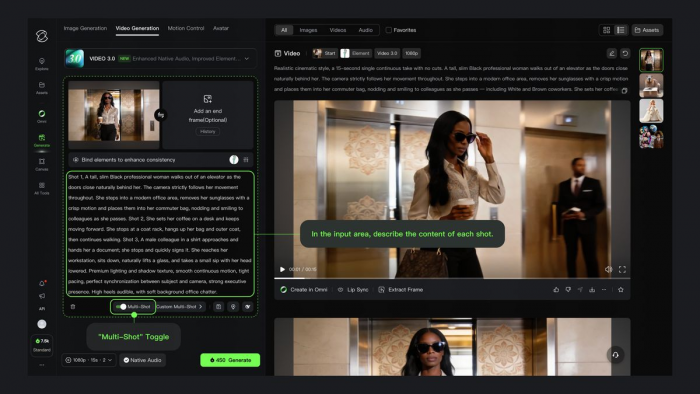
Kling VIDEO 3.0 is designed for creators who want more than an isolated five-second visual. Its documented capabilities include text-to-video, image-to-video, start-and-end-frame generation, native audio, multi-shot creation and references for recurring characters or objects. It can generate up to 15 seconds and supports several spoken languages.
Its multi-shot structure is the most interesting feature. Instead of describing an entire sequence in one dense paragraph, the creator can define separate shots and assign an action to each one. Adobe’s implementation of Kling 3.0 allows up to five shots in one generation and supports reusable elements based on reference images.
That approach can improve narrative clarity. A character can enter a room in the first shot, approach a table in the second and appear in a closer composition in the third.
Kling can still struggle when several characters overlap or interact with small objects. Multi-shot generation also does not guarantee perfect continuity. It creates a better structure for consistency, but reference images and carefully limited actions remain necessary.
Best suited to: Story-driven advertisements, action sequences, social videos and short narratives requiring multiple connected shots.
4. Luma Ray3.2 : Best for Transforming Existing Footage
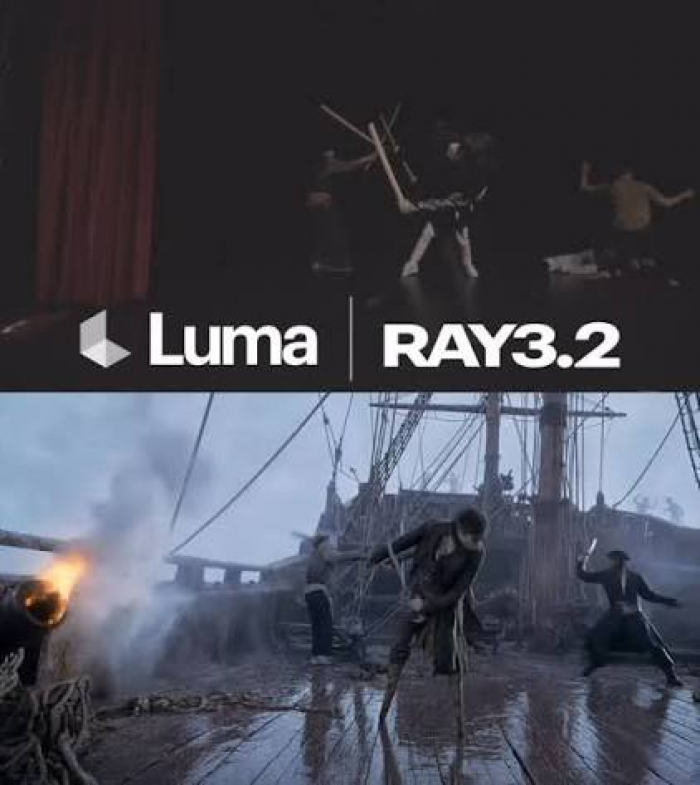
Luma Ray3.2 differs from the other leading options because it begins with a source video. It returns a reimagined version of the same clip while preserving its duration and underlying performance. The environment, material, visual treatment or subject appearance can be changed without generating the movement entirely from scratch.
This approach has an important realism advantage. Since the source contains actual camera movement, body motion and timing, the model has a stronger physical foundation than a generator working only from text. A recorded actor can be placed into another environment while retaining the original performance.
Ray3.2 is therefore useful for visual effects, concept development and scene transformation. It can also help directors explore different settings or styles without reshooting the original action.
It is not the best first choice for someone who only has a written prompt and wants a finished scene. The creator must provide footage, and the quality of the result depends partly on the clarity, movement and composition of that source.
Best suited to: Filmmakers, visual-effects teams and creators who want to restyle or rebuild recorded footage while preserving its motion.
5. Adobe Firefly Video : Best for Commercial Workflows
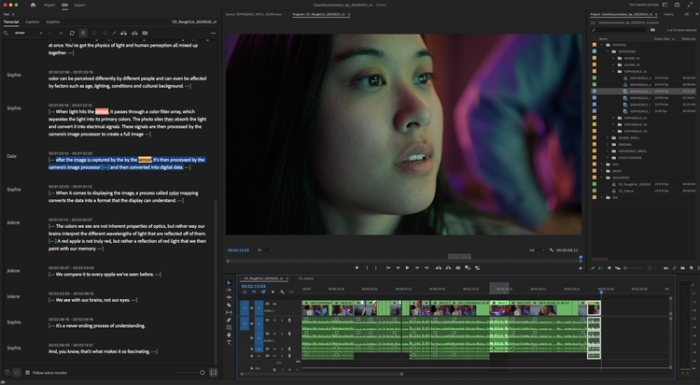
Adobe Firefly Video can generate footage from text, keyframe images and camera instructions. It supports first and last frames, shot-size controls, camera angles, motion references and composition references. A creator can upload a short video containing a pan, zoom or tilt and use its camera movement to guide a new generation.
Firefly’s real strength is its position inside a wider production system. Generated clips can move into Adobe’s browser-based video editor and other Creative Cloud processes instead of remaining disconnected files.
The platform also gives users a choice of models. Alongside Firefly Video, its current partner list includes Veo 3.1, Runway Gen-4.5, Kling 3.0, Sora 2 and several Luma Ray versions. The available controls change according to the selected model.
Firefly Video may not always produce the most dramatic cinematic result, but it is a practical choice for product clips, controlled brand footage, storyboards and marketing assets that require further editing.
Best suited to: Marketing teams, Adobe users, agencies and businesses that value integration, camera references and commercially oriented workflows.
6. HeyGen Avatar IV : Best for Talking Presenters
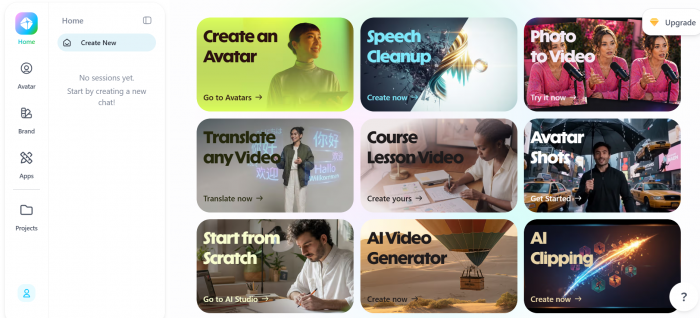
HeyGen should be judged as a presenter platform, not as a direct replacement for Veo or Runway. Its strength lies in converting scripts, photographs or captured likenesses into speaking-avatar videos.
Avatar IV supports realistic lip-sync, facial movement, expressive gestures and custom styling. HeyGen can also turn an uploaded photograph into a speaking subject and provides voices across more than 175 languages and dialects.
This makes the platform useful when the video requires an instructor, salesperson, presenter or localized spokesperson. A company can create one presentation and adapt it for different audiences without recording the speaker repeatedly.
The result is most convincing when the presenter remains within a controlled composition. Long pauses, intense emotions, unusual body movement or detailed interaction with nearby objects can expose the artificial nature of the avatar. A talking head may look believable, while a full scene involving walking and physical interaction may not.
Best suited to: Training, explainers, product presentations, internal communication and multilingual marketing.
What About Sora?
OpenAI discontinued the standalone Sora web and app experiences on April 26, 2026. The Sora API is scheduled to remain available only until September 24, 2026.
Sora 2 can still appear through integrated services. Adobe, for example, currently lists Sora 2 and Sora 2 Pro among its Firefly partner models. That access should not be confused with a continuing standalone Sora product.
Because its long-term availability is limited, Sora is difficult to recommend as the foundation of a new video workflow. Existing users may still encounter it through third-party platforms, but creators choosing a primary tool would be better served by a model with clearer ongoing availability.
The Main Tools Compared
| Tool | Strongest area | Audio capability | Production control | Main limitation |
| Google Veo 3.1 | Cinematic scenes with atmosphere and sound | Native dialogue, effects and ambience | High | Complex continuity can still break |
| Runway Gen-4.5 | Controlled shot creation and iteration | Depends on the wider workflow | Very high | Credit use increases during experimentation |
| Kling VIDEO 3.0 | Multi-shot storytelling and recurring subjects | Native synchronized audio | High | Crowded interactions can become unstable |
| Luma Ray3.2 | Transforming real source footage | Source-dependent | High over visual direction | Requires an existing video |
| Adobe Firefly Video | Commercial footage and editing integration | Available through Firefly tools and selected models | High | Native output may be less cinematic |
| HeyGen Avatar IV | Realistic scripted presenters | Integrated voices and lip-sync | High for avatar delivery | Limited cinematic scene generation |
The table does not produce one universal winner because the tools solve different production problems. Veo has the most complete cinematic package, while Runway offers a stronger environment for refining individual shots. HeyGen wins a narrower category that the others do not handle as efficiently.
Choose the Tool by Project
A realistic result begins with selecting the correct type of generator. Using the wrong tool creates unnecessary work even when the underlying model is powerful.
● Veo 3.1 works best for cinematic product advertisements, realistic location shots and dramatic scenes where environmental sound needs to be generated alongside the visuals.
● Runway Gen-4.5 is the better fit when the project already has an approved image, storyboard or established visual identity that each shot must follow closely.
● For ideas involving connected shots, recurring characters or a more structured short narrative, Kling VIDEO 3.0 offers the most suitable workflow.
● Luma Ray3.2 makes more sense when a real performance has already been recorded and the aim is to change its setting, materials, atmosphere or overall visual treatment.
● Adobe Firefly suits projects in which generated footage must continue into a broader brand, editing or Creative Cloud production process.
● HeyGen is the practical choice when the video centres on a presenter, instructor or spokesperson delivering information directly to the viewer.
A complete campaign may use several tools. A brand could generate an atmospheric opening with Veo, animate controlled product images through Runway, create the presenter segment in HeyGen and assemble the material in Firefly or another editor. The best workflow does not need to depend on one model.
Where AI Realism Still Breaks
Current generators are convincing when the scene is short and the action is controlled. Their weaknesses become more visible as the number of moving subjects, objects and camera changes increases.
Common failures include:
● Fingers changing length while a person holds a cup, phone or tool.
● Reflections showing a different position from the visible subject.
● Clothing patterns, jewellery or facial details changing during movement.
● Background people merging, disappearing or walking through objects.
● A character’s appearance shifting between wide and close camera angles.
● Dialogue continuing after the mouth stops moving.
● Objects losing weight, changing shape or passing through a hand.
● Signs and labels becoming distorted as the camera approaches them.
Long scenes multiply these problems. A seven-second shot of one person walking through a corridor is far easier than a 30-second restaurant conversation with two speakers, tableware, reflections and several camera angles.
The practical solution is not to demand a complete finished film from one prompt. Generate separate shots, keep each action manageable and edit the strongest results together.
How to Generate More Realistic Video
A strong prompt should direct the scene like a compact production brief. It needs to tell the model what is happening, where it occurs and how the camera should record it.
A useful structure is: Subject + action + location + lighting + camera position + camera movement + visual treatment + audio
A weak prompt might say: Create a realistic video of a chef preparing food.
A more useful prompt would say:
A middle-aged chef places a ceramic plate on a stainless-steel counter in a quiet restaurant kitchen at dawn. Medium close-up from shoulder height, slow forward camera movement, soft window light, natural skin texture and subtle steam rising from the food. Audio: distant ventilation, a quiet stove flame and the ceramic plate touching the counter.
The second prompt gives the model one clear action, a defined camera position and an audio environment. Google’s Veo prompt guidance similarly recommends describing framing, movement, style and sound rather than relying on a broad request.
Several practices improve the chance of obtaining usable footage:
● Keep each clip focused on one central action. Asking a character to enter a building, greet someone, sit down, open a laptop and begin speaking creates too many opportunities for continuity errors.
● Separate subject movement from camera movement. State whether the person, the camera or both are moving so the model does not invent an unclear combination.
● Use reference images when identity matters. A defined face, outfit or product image gives the model a visual anchor that text alone cannot provide.
● Describe physical contact precisely. Mention which hand holds an object, where it is placed and how the subject interacts with it.
● Generate individual shots rather than entire sequences. Editing four controlled clips together usually produces a stronger result than requesting one complicated continuous scene.
● Include audio direction only when the model supports it. Specify dialogue, ambient sound and effects separately so they do not compete inside one vague sentence.
● Review the full clip rather than judging the opening frame. Many generations begin convincingly and break during the final seconds.
Realistic Does Not Mean Authentic
A synthetic video can resemble camera footage without documenting an event that actually occurred. That distinction matters when the content includes public figures, customer testimonials, news events or an identifiable person’s face and voice.
Creators should obtain permission before cloning a person’s appearance or speech. Synthetic presenters should not be framed as real customers, employees or experts when they are not. Advertisements should also avoid presenting generated product behaviour as evidence of a feature that the real product cannot perform.
Platforms are increasingly adding provenance information and content credentials to generated media. Adobe states that Firefly outputs include metadata indicating whether material was generated or edited with AI, although the creator remains responsible for deciding whether a model and its output are appropriate for commercial use.
Realism should be treated as a production quality, not as permission to mislead the viewer.
Verdict: Which AI Makes the Most Real Videos?
Google Veo 3.1 is currently the best overall option for creating realistic cinematic video from a prompt. Its combination of visual quality, camera direction and native sound gives it an advantage when the goal is to create a complete scene rather than a silent moving image.
Runway Gen-4.5 is the stronger choice for creators who need control and iteration. It fits more naturally into shot-based production where references, variations and repeated refinements matter.
Kling VIDEO 3.0 is particularly useful for multi-shot narratives, while HeyGen remains the most practical choice for realistic speaking presenters. Adobe Firefly is best viewed as a production environment, especially for teams that want to generate, compare and edit footage without leaving the Adobe ecosystem.
The most believable result rarely comes from selecting a model and accepting its first generation. It comes from choosing the correct tool, limiting each shot to a manageable action, using visual references and assembling several controlled clips into one finished video.
Comments