

Facebook Pages and Professional Mode both help people build an audience, publish content, and access professional features. However, they serve different purposes. A Page creates a separate public identity, while Professional Mode adds creator tools to an existing personal profile.
The choice affects more than how an account looks. It determines how followers connect, how content is managed, who controls the account, and how a public presence can develop over time. Understanding these differences helps creators, professionals, and businesses choose a setup that supports their actual goals.
Facebook Page vs Professional Mode at a Glance
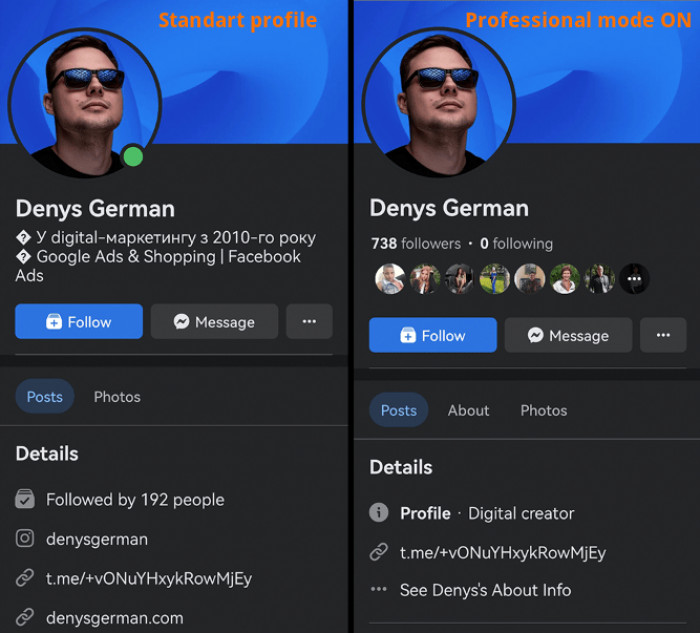
The biggest difference is the account structure. A Facebook Page operates as a separate public presence managed through personal accounts, whereas Professional Mode works within an existing Facebook profile.
Both support public content and audience engagement, but their management capabilities are not identical.
| Feature | Facebook Page | Professional Mode |
| Account type | Separate public presence | Existing personal profile |
| Primary purpose | Business, brand, organization, or creator | Individual creator or public figure |
| Public identity | Page name and category | Personal profile identity |
| Audience | Followers | Friends and followers |
| Privacy controls | Primarily public-facing content | Personal post audience controls remain |
| Analytics | Page insights and professional tools | Professional Dashboard |
| Monetization | Available to eligible Pages | Available to eligible profiles |
| Advertising | Business advertising tools | More limited promotional options |
| Team access | Supports delegated access | Primarily managed by the individual |
| Business management | Meta Business Suite integration | Creator-focused dashboard |
Neither option requires a subscription simply to create a Page or enable Professional Mode. Additional charges may apply to advertising, verification subscriptions, or other paid services. The following differences matter most when deciding how an account should operate beyond its initial setup.
How Each Account Works
A Facebook Page is a distinct public presence associated with a business, organization, brand, public figure, or creator. It has its own name, profile image, posts, and audience. Although a personal Facebook account is generally needed to manage it, visitors interact with the Page rather than the administrator's personal profile.
Facebook Professional Mode takes a different approach. It adds professional features to an existing Facebook profile without requiring the person to create a Page. The profile continues to support personal connections while gaining public follower capabilities, professional insights, and access to eligible creator tools.
This distinction changes how relationships are organized.
A personal profile supports friend connections, which are mutual relationships. Following is different because someone can subscribe to public updates without becoming a friend.
With Professional Mode, these relationships coexist. Someone can remain connected to friends while publishing public content for a broader audience.
Pages, meanwhile, are built around followers rather than personal friendships. This makes them suitable for identities that should exist independently of an individual's social relationships.
Personal Identity vs Brand Identity
Account identity becomes particularly important when personal and professional activities overlap.
Professional Mode retains the identity of a personal Facebook profile. The person's name, profile information, and public activity contribute to how followers recognize them. This arrangement suits creators whose work is closely associated with their identity, personality, or expertise.
Facebook Pages provide greater separation between the public presence and the individuals managing it. A business can publish under its registered or trading name, display its category, and provide official contact information without presenting the owner's personal profile as its primary identity.
Privacy is another important distinction.
Enabling Professional Mode does not automatically make every personal post public. Users retain audience-selection controls for eligible posts, including sharing with friends or publishing publicly. However, public profile information, interactions, and content still require attention because the same profile serves personal and professional purposes.
A Page avoids much of this overlap by keeping business publishing within a separate identity.
This does not make Pages completely anonymous. Meta still associates Page management with real accounts, and some Page transparency information may be visible publicly.
For professionals who want their individual reputation to remain central, Professional Mode offers a direct connection between identity and content. For organizations seeking a consistent identity independent of their staff, a Page provides a clearer structure.
Followers, Reach and Audience Growth
Both Facebook Pages and Professional Mode can attract followers beyond an existing personal network. Neither, however, receives guaranteed additional reach simply because of its account type.
Professional Mode has a particular advantage for people who already maintain an active personal profile. It allows them to develop a public audience without abandoning their existing profile history and social connections.
A Page starts with its own audience. Even when its administrator has thousands of personal connections, those people do not automatically become Page followers.
This difference affects early audience development, but it should not be confused with an algorithmic advantage. A consistent Facebook content strategy remains important for building reach and engagement, regardless of the account type.
Facebook's recommendation systems evaluate content using several signals, including relevance, engagement, originality, and recommendation eligibility. Public content from both Pages and professional profiles can reach people who do not already follow the account.
In March 2026, Meta further emphasized original content in its Facebook distribution and monetization guidance, explaining that unoriginal or minimally modified content may receive reduced distribution.
Follower growth also needs to be interpreted carefully. A large audience does not necessarily translate into strong engagement or meaningful business results.
For creators, repeat viewers and engaged followers often provide more useful indicators of audience quality. Businesses may place greater value on inquiries, website visits, and customer interactions. The useful distinction is not which account can collect more followers, but which audience relationship supports the purpose of the account.
Content Creation and Publishing Tools
Both options support common Facebook publishing formats, including photos, text posts, Reels, and videos. Live broadcasting is also supported for accounts that meet Facebook's applicable requirements.
The differences become more noticeable when managing content consistently. Professional Mode includes creator-focused tools through the Professional Dashboard. Creators can review their published content, examine individual post performance, and access available creative features without operating a separate Page.
A Facebook Page offers a more business-oriented publishing environment through tools such as Meta Business Suite. Depending on the account and available features, this includes creating posts, scheduling content, managing messages, and coordinating publishing across connected Facebook and Instagram accounts.
The distinction matters for different publishing workloads. Professional Mode keeps content creation close to the individual's profile and established audience. A Page is better structured for planned publishing, particularly when a business needs an organized content calendar or multiple contributors.
One important limitation: Not every publishing feature is available identically across both account types. Scheduling options, creative tools, and third-party integrations can differ by account, device, region, and product updates.
Accounts should be evaluated according to their required publishing workflow rather than assuming that every tool available to a Page also works with Professional Mode.
Insights and Analytics Compared
Both Pages and professional profiles provide performance information, but the reporting environment reflects how each account is intended to operate.
Professional Mode brings creator analytics into the Professional Dashboard. Depending on feature availability, this can include content reach, engagement, follower growth, audience information, and video performance.
Video-specific reporting may include retention information, replay activity, and comparisons between content viewed by followers and non-followers.
These measurements help identify whether individual posts attract new viewers, maintain attention, or encourage further engagement.
Page administrators can access Page insights and reporting through Meta's business and professional tools. This allows them to examine content performance alongside metrics relevant to the Page's activity, including audience interactions and certain business actions.
The practical difference lies in how the information is used.
A creator reviewing Reels performance may focus on audience retention, distribution, and follower conversion. A business can combine engagement reporting with inquiries, advertising outcomes, and other customer-facing activity.
For useful performance reviews, three measurements deserve particular attention:
● Reach compared with engagement: High reach with weak interaction can indicate that content attracted initial distribution without creating sustained audience interest.
● Follower growth compared with returning engagement: A growing follower count matters more when people continue interacting with subsequent content.
● Content performance compared with account objectives: Video views may be valuable for a creator, while message inquiries or website actions may matter more for a service business.
Analytics access does not mean every account receives identical metrics. Reporting interfaces, data availability, and measurement definitions can change over time.
Monetization Options and Eligibility
Monetization is one of the most common reasons creators compare Facebook Pages with Professional Mode. Both can qualify for Facebook monetization opportunities, but enabling either account type does not automatically activate earnings.
Facebook Content Monetization has become a central part of Meta's creator earnings system. It brings eligible content formats under a broader monetization program, with earnings determined by qualifying content performance and applicable program requirements.
Additional features, such as Stars and subscriptions, may be available depending on the account's eligibility and location.
| Monetization option | Facebook Page | Professional Mode |
| Facebook Content Monetization | Eligible Pages can participate | Eligible profiles can participate |
| Stars | Available to qualifying Pages | Available to qualifying creators |
| Subscriptions | Available where eligible | Available where eligible |
| Brand partnerships | Can support partnerships | Can support partnerships |
| Business sales and inquiries | Dedicated business features | Possible through public content and available contact options |
Actual availability depends on Meta's current program rules, account standing, regional support, and eligibility checks.
As of November 2026, access to some monetization programs may still depend on invitations, enrollment availability, or specific qualification requirements. Older guides describing separate Reels bonuses or in-stream advertising programs should not be treated as universally current.
Originality is particularly important. Republishing other creators' content without meaningful transformation can create both copyright and monetization problems.
Earning potential is not determined by account format alone. Eligible content performance, audience engagement, monetization policies, and available programs have a much greater influence.
Creators should check the Monetization section of their Professional Dashboard or Meta Business Suite for account-specific eligibility instead of relying on follower counts alone.
Advertising and Customer Engagement
Facebook Pages are more closely integrated with Meta's business advertising infrastructure. Businesses can use Pages as public identities for advertising campaigns, connect them to appropriate business assets, and manage advertising activities through Meta's advertising tools.
Page features can also support customer communication through contact information, messaging, and available calls to action.
Professional Mode is primarily designed for growing an individual's public presence. It may offer promotional features for eligible content, but this should not be confused with the full advertising and asset-management capabilities associated with Pages.
The difference is especially relevant to businesses measuring commercial outcomes. An organization running campaigns needs more than public visibility. It may need advertising account access, campaign management, customer communications, and reporting that can be shared with different team members.
A professional profile can help an individual attract attention and establish credibility. However, businesses that depend on systematic advertising and customer operations generally benefit from maintaining a Page.
Team Management and Account Control
One of the strongest reasons to choose a Facebook Page is its support for delegated management.
Pages can be managed by multiple authorized people with different access permissions. Under Meta's Page and business asset systems, permitted responsibilities can include publishing content, handling messages, moderating interactions, managing advertising, and analyzing performance.
This allows organizations to distribute work without requiring everyone to sign in using one person's Facebook credentials. Professional Mode does not provide the same Page-style system for granting multiple people direct control of the professional profile. That limitation becomes significant when responsibilities expand beyond one person.
A Page also provides greater continuity when employees or external agencies change. Authorized access can be reassigned while the public identity and its content remain associated with the Page.
However, Page administrators still need to manage ownership and permissions carefully. Full-control access should be limited to trusted individuals, and organizations should maintain appropriate recovery and security arrangements.
The distinction is between an individually managed public identity and a business asset designed for shared administration.
Restrictions and Hidden Trade-Offs
Both options have limitations that are easy to overlook when comparing visible features.
Professional Mode Limitations
● Personal and public activity require ongoing separation. Users need to manage post audiences, profile details, and public interactions carefully because the same profile supports personal relationships and creator activity.
● Collaboration is less flexible. A professional profile does not offer the same delegated Page access arrangements for content teams and agencies.
● Business identity remains connected to an individual. This makes Professional Mode less suitable as the sole public account for organizations with multiple staff members or changing ownership responsibilities.
Facebook Page Limitations
● A Page needs its own audience development. Personal friends and followers do not automatically transfer to a newly created Page.
● Administration requires additional management. Page permissions, business assets, and connected accounts introduce responsibilities beyond ordinary profile publishing.
● Organic visibility is not guaranteed. Creating a Page does not automatically improve content distribution, customer engagement, or follower growth.
These limitations are not necessarily disadvantages for everyone. They become relevant when the chosen account structure conflicts with how the account is actually used.
Switching, Migrating and Managing Both
Facebook allows eligible users to enable Professional Mode on their existing profiles. The feature can also be turned off through the available profile settings.
Turning Professional Mode off does not create a Page or transfer the account's audience elsewhere. The underlying personal profile remains, although access to certain professional features and associated tools may change.
Creating a Facebook Page is a separate process. A new Page receives its own identity, content history, and followers. It should not be assumed that Facebook will automatically move personal friends, professional followers, published posts, or monetization status from a profile to that Page.
Before changing an established account strategy, three precautions are useful:
● Review existing account insights and follower activity to understand which audience is already established.
● Check monetization eligibility and connected services before disabling professional features or changing publishing arrangements.
● Plan how followers will discover the new public presence because publishing activity on another account does not automatically transfer the existing audience.
Maintaining both is also possible. A creator can use Professional Mode for personal expertise and audience relationships while operating a separate Page for a business, organization, or commercial brand.
The two accounts should have distinct purposes. Maintaining duplicate accounts that publish identical material without a clear reason increases management work and can divide audience engagement.
A practical arrangement gives each account a recognizable role rather than treating one as a backup copy of the other.
Which Option Should You Choose?
The better choice depends on whether the public presence represents an individual, an organization, or both.
| User type | Recommended option | Main reason |
| Individual content creator | Professional Mode | Builds on an existing personal identity |
| Influencer or public personality | Professional Mode | Keeps personal reputation central |
| Freelancer or consultant | Professional Mode or both | Supports individual expertise and a separate business presence |
| Local business | Facebook Page | Provides a dedicated customer-facing identity |
| Established company | Facebook Page | Supports branding and shared administration |
| Marketing agency | Facebook Page | Enables structured access and account management |
| Creator with a separate business | Both | Separates personal content from business operations |
For independent creators, Professional Mode often offers a simpler way to develop an audience without maintaining another public account. It is particularly relevant when followers are interested in the person's knowledge, personality, or creative work.
For businesses, Pages generally provide a more appropriate foundation because their purpose extends beyond publishing content. Customer communication, advertising, account continuity, and team access all become important operational requirements.
The decision also depends on how the account is expected to develop. A personal creator profile can remain effective for years, while an organization may need a Page from the beginning to establish a separate and transferable public identity.
Using both is reasonable when the personal identity and business identity serve genuinely different audiences or objectives.
Final Verdict
Facebook Pages and Professional Mode are not competing versions of the same account. They offer different ways to establish and manage a public presence on Facebook.
Professional Mode is generally the better fit for individuals building an audience around their expertise, personality, or creative content. It preserves the personal profile while adding professional publishing and analytics capabilities.
Facebook Pages are generally better suited to businesses and organizations that need a distinct identity, advertising infrastructure, customer communication, and shared management.
Neither option guarantees better reach or higher monetization earnings. The stronger choice is the one that matches who the account represents, how its audience interacts, and who needs to manage it over time.
Comments