

Instagram can keep recommending content you stopped caring about months ago. Your Explore page fills with outdated interests, Reels repeat similar topics, and finding something relevant takes more scrolling than it should.
Instagram's Reset suggested content feature lets you refresh these recommendations without deleting posts or losing followers. However, it only changes the content recommended to you, not how Instagram distributes your posts to others. Here is how to reset it correctly and make the new recommendations more relevant.
What an Instagram Algorithm Reset Actually Changes
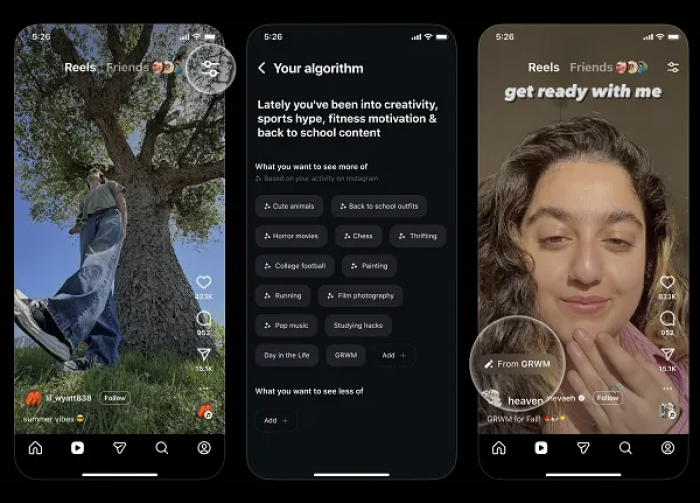
Instagram uses different ranking systems for Feed, Explore, Reels, and Stories. These systems consider signals such as viewing activity, interactions, and relationships with accounts.
The Reset suggested content feature refreshes personalized recommendations across Explore, Reels, and suggested Feed posts. Instagram then starts personalizing recommendations again based on subsequent activity.
| Instagram feature | What happens after resetting |
| Explore page | Suggested content is refreshed |
| Reels | Recommendations start personalizing again |
| Suggested Feed posts | Recommendations receive a fresh start |
| Followers and following | Existing connections remain unchanged |
| Published content | Posts and Reels remain intact |
| Post reach | No automatic improvement is guaranteed |
The distinction matters for creators. Resetting your personal recommendations does not reset the ranking of your published content or guarantee better engagement.
Signs You Need an Instagram Algorithm Reset
A few irrelevant Reels do not necessarily mean your recommendations need resetting. Instagram regularly introduces unfamiliar content to help users discover new interests.
A reset becomes more useful when irrelevant suggestions dominate multiple sections of the app.
Look for these signs:
● Outdated Explore topics: Subjects you previously followed or searched for still occupy much of your Explore page despite changes in your interests.
● Repetitive Reels: Similar videos, creators, and topics appear continuously, making it difficult to discover different content.
● Irrelevant Feed suggestions: Recommended posts from unfamiliar accounts consistently have little connection to your current interests.
● Ineffective content feedback: Marking individual posts as Not interested has not noticeably improved your recommendations.
Before resetting, review around 20 Explore posts and note how many match your interests. Repeat this with recommended Reels.
If most suggestions are irrelevant, a complete reset is reasonable. If the issue involves only one topic, individual recommendation controls may be sufficient.
How to Reset Your Instagram Algorithm Step by Step
Instagram provides a built-in reset option, so there is no need to create another account, reinstall the application, or use external services.
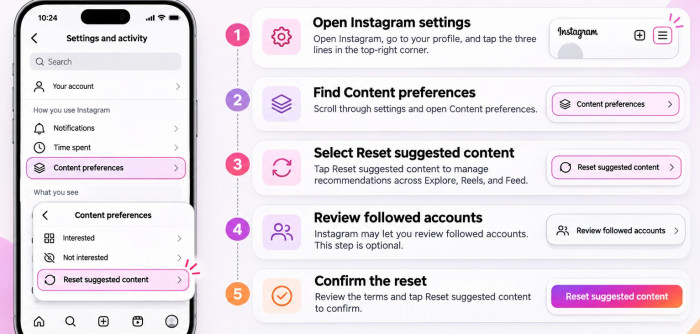
Step 1: Open Instagram settings
Launch Instagram, visit your profile, and tap the three horizontal lines in the upper-right corner.
Step 2: Find Content preferences
Scroll through the settings menu and open Content preferences. This section contains options for managing recommended content.
Step 3: Select Reset suggested content
Tap Reset suggested content and read Instagram's explanation of the feature. It covers recommendations across Explore, Reels, and Feed.
Step 4: Review followed accounts
Instagram may offer the option to review accounts you follow. This step is optional, and you can continue without unfollowing anyone.
Step 5: Confirm the reset
Review the on-screen terms and confirm Reset suggested content. Instagram will begin personalizing recommendations again as you interact with content.
The menu wording may vary slightly depending on your Instagram app version.
What happens after confirming?
Explore and Reels recommendations receive a fresh start. You may initially see a broader mixture of topics while Instagram learns from your activity.
There is no official timeline guaranteeing that recommendations will become relevant within a certain number of hours or days.
What Happens to Your Followers and Posts?
The reset does not automatically remove followers, unfollow accounts, delete posts, or change your profile information.
Your existing audience and published content remain available. The optional account review simply gives you an opportunity to reconsider who you follow.
For creators, there is no reason to delete old posts, switch account types, or modify their posting schedule as part of the reset.
It is also important to distinguish follower count from visibility. Although your followers remain, Instagram continues ranking content based on several signals. The reset does not guarantee that a larger percentage of followers will see your future posts.
Instagram Algorithm Reset vs Declining Reach
Many creators search for an algorithm reset after noticing fewer Reel views or reduced engagement. However, Reels performance depends on content and audience behavior, while Instagram's recommendation reset is not designed to repair declining account performance.
The correct action depends on the problem.
| Problem | Recommended action |
| Explore shows unwanted topics | Reset suggested content |
| Reels repeatedly show irrelevant videos | Use Not interested or reset |
| Posts receive fewer likes | Review content and audience engagement |
| Reels have low non-follower reach | Check recommendation eligibility and performance |
| Story views are declining | Examine follower activity and Story interactions |
| Reach dropped after a niche change | Compare performance across content topics |
Instagram's Recommendation Guidelines determine whether certain content is eligible to appear in recommendations to people who do not follow an account.
For eligible professional accounts, Account Status can help identify restrictions affecting recommendation eligibility.
If your own posts are underperforming, investigate these areas rather than repeatedly resetting your personal Explore page.
How to Change Recommendations Without Resetting Everything
Instagram includes smaller controls for users who want to improve specific recommendations without starting over.
1. Use Interested and Not Interested
Open a suggested post, tap its three-dot menu, and select Not interested when available. Instagram uses this feedback to reduce similar recommendations.
You can also select Interested on supported suggested posts to indicate content you would prefer to see. This method is useful when only certain topics are causing problems.
2. Filter unwanted words
Instagram's Hidden Words settings can help reduce recommended content containing specific words, phrases, or hashtags.
The limitation is that filtering depends on the words used in posts. Content discussing the same subject without those terms may still appear.
3. Organize Following and Favorites
The Following view focuses on posts from accounts you follow, while Favorites prioritizes selected accounts in the main Feed.
You can also mute accounts whose posts or Stories you no longer want to see without unfollowing them. These controls are more suitable for adjusting your regular Feed experience than restarting all personalized suggestions.
How to Retrain Instagram Recommendations After Resetting
Instagram starts learning from your activity again after the reset. The content you watch, interact with, and follow influences what appears next. Rather than deliberately liking large numbers of posts, focus on making normal activity reflect your actual interests.
Three actions are particularly useful:
● Explore relevant topics deliberately. Search for subjects you currently enjoy, visit related creator profiles, and browse posts that genuinely interest you.
● Interact with useful content. Save informative posts, follow relevant accounts, and engage naturally instead of trying to meet an artificial daily interaction target.
● Reduce unwanted viewing patterns. Avoid repeatedly watching irrelevant videos simply because they are surprising or annoying. Use Not interested when the recommendations do not match your preferences.
There is no official requirement to like a certain number of posts or watch a fixed number of Reels to retrain Instagram. Focus on the relevance of your interactions rather than their quantity.
A Seven-Day Instagram Algorithm Reset Plan
A short review period helps you assess whether recommendations are improving instead of resetting the feature repeatedly.
The following plan is a practical routine, not an official Instagram recovery schedule.
| Day | Action | What to observe |
| Day 1 | Record current topics and reset recommendations. | Note the initial changes in Explore and Reels. |
| Day 2 | Search for relevant topics and creators. | Check whether preferred subjects appear more often. |
| Day 3 | Mark unrelated recommendations as Not interested. | Look for fewer repeated unwanted topics. |
| Day 4 | Browse Reels and engage naturally with relevant content. | Review video relevance and variety. |
| Day 5 | Organize Favorites and mute irrelevant accounts. | Check whether your Feed feels more useful. |
| Day 6 | Browse normally without resetting again. | Identify persistent unwanted recommendations. |
| Day 7 | Compare recommendations with Day 1. | Evaluate improvement in relevance and variety. |
For a consistent comparison, review a similar number of recommended posts on the first and final days. Avoid making unnecessary changes to your following list or forcing additional engagement simply to influence the results.
How Creators Can Protect Engagement During a Reset
Creators should separate changes to personal recommendations from decisions about their publishing strategy. If reach has declined, Instagram Insights provides more useful evidence than the appearance of Explore.
Review the performance of your last 10 to 15 comparable posts. Look for patterns instead of judging the account from one underperforming Reel. Comparing engagement signals such as saves, shares, and likes can help identify how audiences respond to different content.
Pay particular attention to:
● Follower and non-follower reach: Identify whether the decline affects existing followers, new audiences, or both.
● Watch time and retention: Check whether viewers continue watching Reels after the opening seconds.
● Saves and shares: Determine which content people consider valuable enough to revisit or share.
● Profile visits and follows: Examine whether content discovery is leading to meaningful audience growth.
A Reel with reasonable reach but poor retention requires a different improvement from one that attracts engaged viewers but limited non-follower distribution.
Creators can also review Instagram's Professional Dashboard for account-specific guidance and use Trial Reels, where available, to evaluate new content with non-followers. These methods address content performance directly rather than relying on an unrelated recommendation reset.
Common Instagram Algorithm Reset Mistakes
Some popular reset suggestions are unnecessary or based on misunderstandings of how Instagram works.
1. Deleting old posts: Removing existing content is not required. Valuable posts may continue attracting profile visits and engagement long after publication.
2. Clearing search history instead of resetting: Removing recent searches does not perform the same function as Reset suggested content. Instagram can still personalize recommendations using other activity.
3. Reinstalling Instagram: Deleting and reinstalling the app does not replace the official recommendation reset. Clearing the app cache is also not equivalent to refreshing personalized suggestions.
4. Mass unfollowing accounts: The reset does not require reducing your following count. Remove accounts only when you genuinely no longer want to follow them.
5. Using third-party reset services: Applications promising to erase Instagram's algorithm history or guarantee restored reach are unnecessary. Avoid services requesting login credentials for such claims.
6. Expecting immediate engagement growth: A recommendation reset does not promise increased likes, followers, or Reel views. Those outcomes depend on separate account and content factors.
The safest approach is to use Instagram's official controls and avoid unrelated account changes.
How to Check Whether Your Instagram Reset Worked
Instagram does not provide a reset success score. You can, however, measure whether the recommendations you receive have become more relevant. Review a sample of 20 suggested Explore posts and classify them as relevant, somewhat relevant, or irrelevant.
Repeat this after several days of normal browsing. For instance, if 6 of 20 recommendations matched your interests before resetting and 14 of 20 matched afterward, the relevant share in that sample increased from 30% to 70%.
This is an illustration of the measurement method, not a claimed testing result.
Also examine whether Explore introduces more relevant creators, whether unwanted topics appear less frequently, and whether Reels offer a broader selection of useful content.
One irrelevant recommendation does not indicate failure. Look at the overall pattern across several browsing sessions.
Because Instagram continually updates recommendations, results can vary between sessions. A small comparison is useful for tracking your experience, but it does not reveal the platform's internal ranking decisions.
Final Verdict: Is Resetting Your Instagram Algorithm Worth It?
Instagram's Reset suggested content feature is worth using when Explore, Reels, and Feed recommendations no longer match your interests. It refreshes suggested content while preserving your followers, published posts, and account connections.
The results depend on how you interact with Instagram afterward. Relevant browsing activity and recommendation feedback help the platform learn your current preferences.
For creators facing declining reach, the better approach is to review content performance, audience behavior, and recommendation eligibility. Resetting recommendations improves the content you discover, but it is not a shortcut to higher views or follower growth.
Comments