

You need to create an employee training program, but you don’t have an instructional design team. This guide walks you through a lean approach (one role, one measurable outcome, one pilot group) and proves it works. We’ll reuse what you already have, add hands-on practice, involve managers, and track real results through the eyes of a brand-new customer-support rep. Ready? Open a blank page, and let’s run a rapid needs check.
Run a rapid training-needs check
Gather evidence from four places
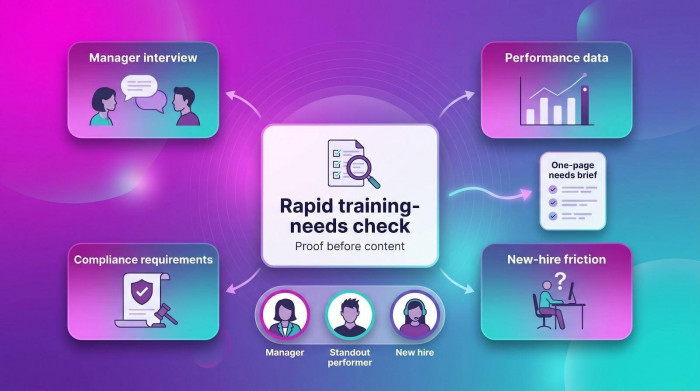
Every strong program starts with proof. Collect perspective, not guesses, from four angles:
1. Manager interview. Ask the person who owns the metric, “What’s going wrong, and what does great work look like?”
2. Performance data. Pull error logs, ticket notes and missed deadline reports (anything that shows where the gap hurts most).
3. New-hire friction. Recent recruits remember the stumbling blocks veterans forget. Note repeated questions and rescue moments.
4. Compliance requirements. List any laws, standards or certifications that dictate content, timing or record-keeping.
Aim to hear from three voices: the manager, a standout performer and a still-learning new hire. This mix prevents a narrow view.
Decide whether training is the cure
Before building a single slide, ask one question: If everyone knew the right move, would the problem still exist? Training only fixes knowledge or skill gaps. Compare what you found with common non-training barriers:
● unclear expectations
● broken process
● missing resources
● conflicting incentives
● weak follow-up
If any barrier appears, address it first or alongside training, otherwise the course will spotlight the real issue instead of solving it. (The CDC’s Quality Training Standards start with the same sanity check.)
Capture a one-page needs brief
Summarize your findings on a single page to guard scope:
● Business problem and current metric
● Target outcome and deadline
● Roles affected
● Behaviors to change
● Evidence gathered
● Non-training barriers
● Success metric
● Program owner and sponsor
● Review date
Treat the brief as a living contract. When someone asks, “Can we add advanced billing?” point to the goal on page one. Once the brief is locked, you are ready to turn that business goal into crisp learning objectives.
Write measurable objectives that tie back to the job
Start with the business result, then zoom in on behavior
Training only succeeds when it changes on-the-job behavior, and that behavior must move a number the business already tracks. Picture a single chain:
Business result → required behavior → learning objective → assessment
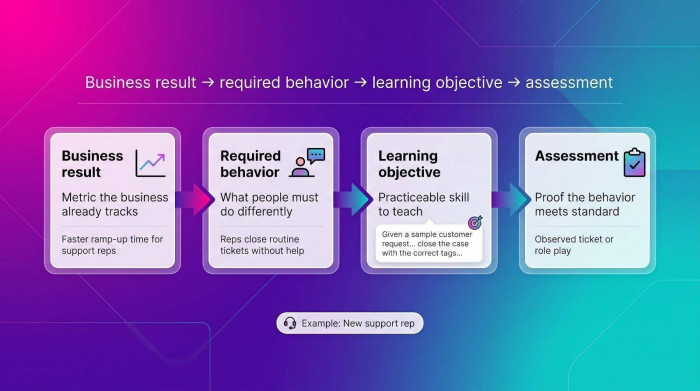
In our support-rep example, the call-center manager wants to shorten ramp-up time for new hires. That hinges on one behavior: reps consistently diagnose, document and close routine tickets without help.
A learning objective must target that behavior, not a wish like “know the ticketing system.” A sharper version reads:
Given a sample customer request and the ticket checklist, close the case with the correct tags and escalation decision.
Your assessment, an observed ticket or role play, then proves that the behavior meets the standard and supports the ramp-up metric.
Use a plain-language objective formula
CDC’s Quality Training Standards call for SMART (or LSMART) objectives that are specific and measurable. A simple frame works:
See the difference:
Weak: “Understand the refund policy.”
Strong: “Given a sample refund request and the policy checklist, decide to approve or escalate correctly in four of four scenarios.”
Match the assessment verb to the objective verb. If learners must decide, stage a judgment call. If they must assemble, have them build the item while you check fit and safety.
Draft three to five objectives now; they will steer every content choice that follows.
Build, reuse, or turn it into a job aid
Use a four-way content decision
Not every skill gap needs a brand-new course. Sort each topic into one of four places:
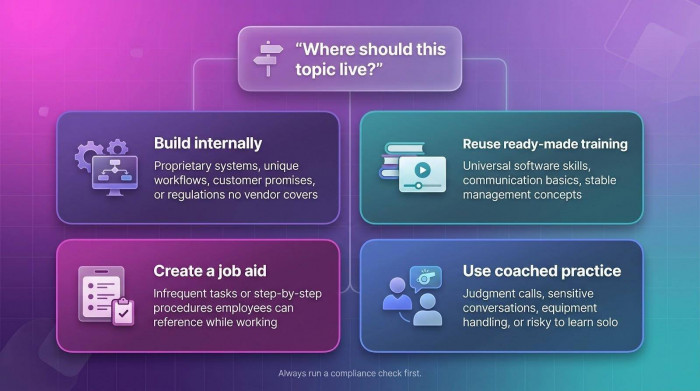
| Decision | When it fits best |
| Build internally | Proprietary systems, unique workflows, customer promises or regulations no vendor covers |
| Reuse ready-made training | Universal software skills, communication basics, stable management concepts |
| Create a job aid | Infrequent tasks or step-by-step procedures employees can reference while working |
| Use coached practice | Judgment calls, sensitive conversations, equipment handling or anything risky to learn solo |
Always run a compliance check first. If a regulation lists required content, credentials or proof of attendance, confirm the off-the-shelf option meets every clause before you click Assign.
Teams often pay to build training material they already own in another form, such as an SOP, a deck or a vendor course. That is why a reuse gate prevents waste.
Mark each topic in your needs brief. Anything labeled Build moves to the next step: turning raw sources into practice-first learning.
Turn raw material into practice-first training
Your build pile might include slide decks, SOPs and recorded calls. Most of what you need is already there; you just have to extract the useful parts.
1. Spot the task. Skim each source and highlight the single action or decision employees must perform.
2. Strip the extras. Remove background stories, obsolete screenshots and edge cases employees can look up later.
3. Write one objective. Plug the task into the objective formula from the previous section.
4. Keep the source as a job aid. Long policy? Link it. Complex flowchart? Print it for reference.
5. Add a real example. Clip a clean call or build a scenario that mirrors daily work.
6. Let the learner try. Have them diagnose, tag or assemble while you observe.
7. Coach immediately. Compare the attempt with the standard and redo until it meets the mark.
8. Send to the SME once. Ask for accuracy tweaks, not a rewrite, to keep version control clear.
A small team can speed this cycle with employee training software like GoSkills, which bundles an AI builder and a library of hundreds of courses, including new additions from Madecraft. Reuse the general skills there, then focus your energy on the company-specific steps you just refined.
Follow this sequence for every high-priority task. Soon the messy content stash will become a tight set of practice-driven lessons, each aimed at one objective and one measurable improvement.
Match the training format to the task and add practice
Choose formats by purpose, not “learning style”
People master skills by doing them, not by matching a self-reported style. The CDC Quality Training Standards advise selecting a method that supports the task, then adding practice with feedback.
Think of each format as a tool. Pick the one built for the job:
| Format | Best use |
| Micro-lesson | One narrow objective or quick refresher |
| Short video | Demonstrating a physical or on-screen step |
| Checklist / job aid | Steps employees can reference while working |
| Shadowing | Letting learners watch real-world workflow |
| Reverse shadowing | Learner performs while a mentor coaches |
| Live session | Discussion, role play or sensitive topics |
| On-the-job practice | Performing the real task under supervision |
| Self-paced module | Stable knowledge everyone must complete |
Use micro lessons as seasoning, not the main course; they reinforce a single step but collapse under a full role’s worth of skills.
Build the explain > show > practice > feedback loop
No format stands alone. Embed a quick cycle inside every lesson:
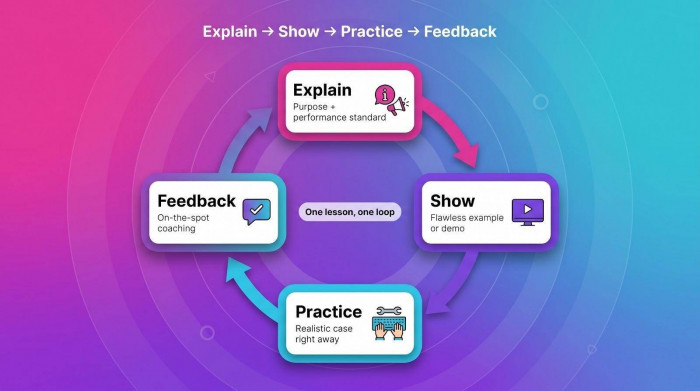
1. Explain the purpose and the performance standard.
2. Show a flawless example, such as a video clip, live demo or annotated screenshot.
3. Practice right away on a realistic case while a coach observes.
4. Feedback on the spot, compare effort to the standard and repeat until it sticks.
This loop mirrors CDC guidance to engage learners, provide hands-on rehearsal and offer timely coaching. We are not chasing seat time. Only proven capability counts. Bake the cycle into every lesson so learners move from “I get it” to “I can do it” in one sitting.
A lightweight five-step build process
Training pros call it ADDIE: analysis, design, development, implementation and evaluation. ATD notes it is still the most widely used framework in talent development, even when teams remix the steps for speed. (td.org)
Here is the same workflow, trimmed to five plain-language moves a busy manager can follow:
1. Ask what must change. Pin down the business problem and the behavior behind it. If ramp-up time is too long, isolate the ticket steps that slow new reps.
2. Sketch the path and the proof. Map the learner’s journey from day one to “independent rep,” then choose the evidence (observed ticket, signed checklist or manager review) that will show progress.
3. Build the smallest useful version. Draft one lesson, one practice activity and one feedback loop. Skip polish; a quick prototype exposes missing information faster than a month of slides.
4. Try it with real employees. Pilot that slice with a handful of learners. Watch where they hesitate and how long each step takes; their friction points guide your next edit.
5. Review results, then improve. Compare pilot data with the target metric. If ramp-up days shrink, scale the lesson. If they do not, tweak content, timing or coaching until numbers move.
In short, you cycle through ADDIE’s core questions without ever saying “ADDIE.” Build, test and refine. Then roll the stronger version to the full cohort.
Use two one-page templates to keep scope tight
You do not need a 30-slide deck. A pair of single-page templates will hold the project steady without extra paperwork.
1. Design brief (copy these headings into a doc and complete them in plain language):
● Problem and business metric
● Target audience
● Required job tasks
● Three to five objectives
● Key source material
● Format and practice method
● Assessment approach
● SME and approver names
● Pilot group and date
● Update owner and next review date
One page, one glance. That is the contract.
2. Lesson snapshot (each lesson gets its own micro-plan):
● Objective
● Why the task matters
● Example or demo link
● Learner practice step
● Feedback or answer key
● Job aid location
● Assessment or sign-off method
● Source, version and review date
Print the brief and tack the snapshot beside it. Any manager, SME or new hire can see the plan in under a minute, keeping scope honest and updates painless.
Run a focused SME interview
Subject-matter experts know how the work really happens, but their calendars are tight. A short, well-framed interview pulls out only what you need.
Start with context: state the business problem, the target behavior and the draft objective. Setting the frame up front prevents detours into system history or rare edge cases.
Ask six questions that surface performance-critical details:
1. What does great performance look like in one sentence?
2. Which steps trip new hires most often?
3. Where does seasoned judgment matter more than written rules?
4. What can employees safely look up instead of memorize?
5. Which mistakes cost the most time, money or goodwill?
6. How will a manager know a rep is truly ready?
Record the demo or workflow walk-through (with permission). Afterward, draft the lesson, mark any items that need verification and send one consolidated document for accuracy review. SMEs can correct faster, and version control stays clean.
With those insights captured, you have what you need to finish a pilot-ready module and schedule delivery.
Create the training plan and delivery schedule
A good plan shows who learns what and when, so there are no surprises or last-minute scrambles. Build it in three passes.
Build a role-based training matrix
Objectives, content and practice are ready; now you need one grid that shows who learns what and when. A role-based matrix keeps everything on a single page.
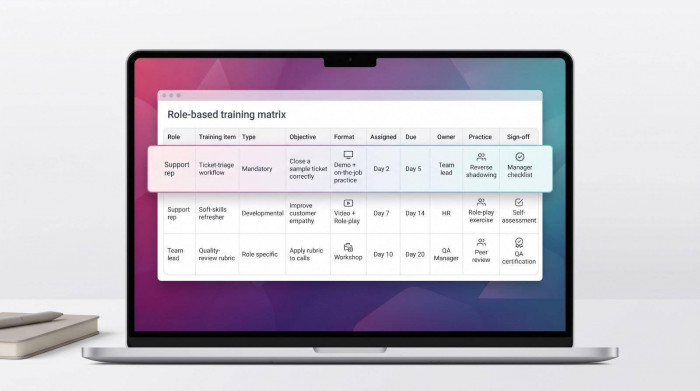
| Role | Training item | Type | Objective | Format | Assigned | Due | Owner | Practice | Sign-off | Renewal | Record |
| Support rep | Ticket-triage workflow | Mandatory | Close a sample ticket correctly | Demo + on-the-job practice | Day 2 | Day 5 | Team lead | Reverse shadowing | Manager checklist | - | LMS |
| Support rep | Soft-skills refresher | Developmental | Defuse an upset caller in three steps | Micro lesson + role play | Week 3 | Week 4 | L&D | Role play | Peer rating | Annual | Video file |
| Team lead | Quality-review rubric | Role specific | Score tickets within ±1 of standard | Self-paced module | Day 10 | Day 15 | Ops manager | Sample scoring | Quiz + observed review | 2 yrs | SharePoint |
Fill the sheet until every objective has a date, an owner and a sign-off. CDC’s Quality Training Standards call for matching delivery methods to learner access and documenting evidence of competence, and this matrix does both. Save it as the single source of scheduling truth before you translate the dates into an onboarding timeline.
Turn the matrix into a phased onboarding path
A grid shows what must be learned, but new hires experience when. Convert the dates into a clear journey so information reaches them just before they need it.
A 30-60-90 day outline works for most support roles:
● Day 1: logins, workspace tour, urgent compliance and one guided “quick-win” ticket
● Week 1: core-tool walkthrough, low-risk ticket practice, short daily huddles
● Weeks 2-4: shadow a veteran, then switch to reverse shadowing with real-time coaching
● Day 30: manager observes and signs off on the standard ticket workflow
● Days 60-90: handle complex scenarios, polish soft skills, complete a quality-review exercise
● Ongoing: monthly refreshers, policy updates, optional development modules
Spacing learning events this way taps the spacing effect, which research links to stronger long-term retention than single massed sessions. (td.org)
Make managers part of delivery, not spectators
Training sticks when the learner’s boss stays in the loop. Build three manager checkpoints into every plan.
1. Before training: The manager sets the stage in a two-minute desk-side chat that explains why the skill matters and what “good” looks like on live tickets. A clear purpose boosts effort.
2. Within 24 hours: The learner tackles a real, low-risk task that matches the lesson objective while the manager reminds them to use the new checklist. Immediate use blunts the forgetting curve.
3. After application: The manager observes the work, gives specific feedback and signs off once performance meets the objective. A calendar or LMS reminder keeps this follow-through from slipping.
These micro-interventions cost minutes, not hours, yet Gallup finds that 70% of the variance in team-level engagement is determined by the manager. Add the three checkpoints to your matrix so accountability is visible, not assumed.
Measure whether training changed the work
Translate Kirkpatrick’s four levels into plain English
Track impact the way the pros do. The Kirkpatrick model asks four questions, answered in order:
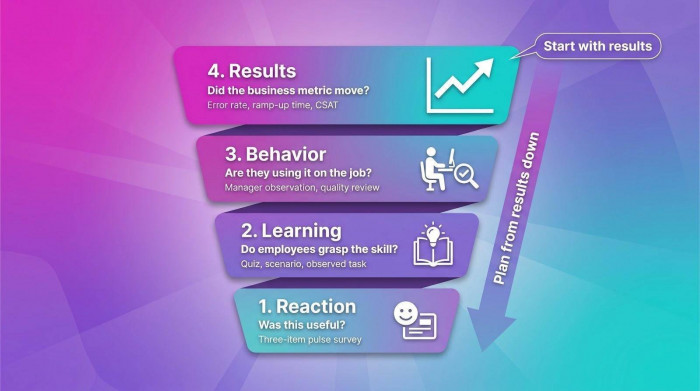
| Level | Question to answer | Quick check |
| 1. Reaction | Was this useful? | Three-item pulse survey |
| 2. Learning | Do employees grasp the skill? | Short quiz, scenario or observed task |
| 3. Behavior | Are they using it on the job? | Manager observation or quality review |
| 4. Results | Did the business metric move? | Error rate, ramp-up time, CSAT |
Kirkpatrick Partners now advise starting with the result and then working backward to behavior, learning and reaction. Decide the metric first (for example, days to independent ticket handling) so every other check points at that goal.
Think of the four levels as a funnel: reaction shows the session landed, learning proves knowledge, behavior shows transfer and results confirm the payoff. Pick one clear measure at each level and record it consistently.
Pick lean metrics any small team can track
You do not need a BI warehouse; most small teams have Excel, an LMS report and limited time. Many small teams find it hard to measure training impact well, often because they try to track too much at once. Start with a handful of indicators that map directly to the behavior you just trained:
● Completion rate: who finished versus who was assigned. Good for nudging laggards but not for proving skill.
● Knowledge check score: five to seven targeted questions that confirm basic understanding.
● Practical competence: employees who meet the performance standard ÷ employees observed. This is the manager sign-off you built into onboarding.
● Time to productivity: calendar days from start date until the rep closes a standard ticket unaided.
● Error or rework rate: tickets reopened because of tagging mistakes or missing notes, expressed as a percentage of total handled.
● Customer satisfaction (CSAT): the post-interaction score tied to each rep after they work solo.
● Retention signal: for larger programs, compare six-month churn for participants against a prior cohort, noting other factors that influence turnover.
Write the operational definition for each metric, decide how often you will collect it and capture the baseline before launch. One disciplined habit turns anecdotes into numbers leadership can trust.
Plot an evaluation calendar everyone can follow
Even the best metrics fail if no one reviews them. Schedule checkpoints before launch.
● Before training: record the baseline for every chosen metric (for example, current ramp-up days and ticket-error counts).
● Immediately after: run a short reaction survey and learning check; five minutes at the end of the session keeps response rates high.
● Two to four weeks later: managers observe live work and score the behavior checklist, giving learners time to apply the skill on real tickets. CDC’s Quality Training Standards suggest a delayed or follow-up evaluation once learners have had time to apply what they learned.
● Quarterly or at project milestones: pull the business metric you tied to the program, such as average ramp-up days, error rate or CSAT.
● Whenever a process changes: if the ticketing system or policy shifts, flag the related lesson for same-week review. On its own, a completion rate proves little when the lesson no longer matches the current procedure.
Post these dates on a shared calendar or inside the LMS to keep evaluation visible and timely.
Estimate the time and budget for a small-team pilot
Build a four-week minimum viable program
Scope creep is the enemy of speed. Anchor the first rollout to one focused month:
Week 1: needs and objectives
Lock the one-page brief, draft three to five objectives and hold quick SME chats (≈ 8 builder hours).
Week 2: content audit and prototype
Label existing material build, reuse or job aid, then create one practice-first lesson (≈ 10 builder hours + 2 SME hours).
Week 3: pilot with three employees
Run the lesson, gather reaction and learning data, note every learner question (≈ 4 builder hours + 3 manager-observation hours).
Week 4: revise and launch
Tighten directions, load the lesson into your platform and set manager reminders (≈ 6 builder hours).
Total builder time ≈ 28 hours. Add SMEs, managers and learner time for a clear, no-surprises schedule.
Show a transparent worked budget
Time is money. Replace the placeholder rates with your own:
| Role / activity | Hours | Loaded hourly rate* | Cost |
| Builder (design, development, launch) | 24 | $40 | $960 |
| SME accuracy review | 4 | $60 | $240 |
| Manager setup and follow-up | 4 | $45 | $180 |
| Learners (20 × 1.5 h) | 30 | $40 | $1,200 |
| Total internal labour | 62 | $2,580 |
*Use actual payroll data for precision. Add any licences, platform fees, external trainers or venue costs to finish the picture.
Put professional benchmarks in perspective
ATD’s 2026 State of the Industry reported average direct learning spend of $846 per employee and 16.7 formal learning hours.
Your four-week pilot costs roughly $125 per learner (about one-seventh of that benchmark) because you focus on practice, manager follow-up and reuse of existing content instead of polished animations. Lean prototypes beat perfection on day one; save production extras for version two, after the numbers prove value.
Avoid the mistakes that make training fail
Nine traps to watch for
Even a well-planned program can stumble. Here are nine issues that appear in many organizations:
1. Teaching everything at once. Packing in “nice-to-know” facts buries the few actions that move the metric.
2. Copy-pasting a slide deck into a course. Reading bullets is not practice; employees still need to do the work.
3. Relying on passive content alone. Videos and PDFs rarely change behavior without hands-on rehearsal and feedback.
4. Treating a quiz as proof of skill. Multiple-choice answers show recall, not performance. Use observation for tasks instead.
5. Leaving managers out. Without follow-up, new habits fade by Monday morning.
6. Measuring only completion. A 100 percent finish rate looks fine until error rates stay flat.
7. Skipping the baseline. Improvement is invisible if you never captured “before.”
8. Training to cover process problems. Broken tools, unclear roles or clashing incentives will defeat the best course.
9. Building the whole curriculum before piloting. Fix the first module, then scale; early feedback is cheaper than a rewrite.
Give every training item an update owner
Content ages fast. A policy changes, software updates or a regulation shifts, and last year’s module can spread bad advice. Keep material current with a miniature governance log:
| Item | Content owner | Reviewer | Last review | Next review | Trigger events |
| Ticket-triage lesson | L&D | Support SME | Apr 2026 | Oct 2026 | New ticket tags, workflow change |
| Refund-policy job aid | Ops | Legal | Jan 2026 | Jan 2027 | Policy update, legal ruling |
Link each entry to a person, not a department. When a trigger fires, the owner revises or retires the content before learners feel the impact. CDC’s Quality Training Standards call for an expiration date to review and update or retire each training, and for content to be updated or removed in a timely manner.
Frequently asked questions
1. What should an employee training program include?
A complete program links a real business need to measurable objectives, fit-for-purpose content or job aids, hands-on practice, a delivery schedule, named owners, clear assessments, accurate records and a review cycle. Think of it as a mini operating system for performance.
2. What is the difference between a training program and a training plan?
The program is the strategy (needs, objectives, content library and governance). A plan zooms into execution for a role or cohort: dates, format, practice and sign-offs.
3. What are the five stages of developing employee training?
Analyze the need, design the path and proof, develop the smallest useful version, implement with a pilot, and evaluate results. This is our plain-language take on ADDIE plus SAM.
4. How long does it take to create a program?
A narrow pilot (one role, three objectives) fits into four focused weeks. A multi-department rollout with custom e-learning and translation can run for months. Start small, prove impact, then scale.
5. How long should employee training last?
Only as long as needed to meet the defined standard. Deliver urgent skills near day one, space higher-level topics as real tasks appear, and use short refreshers instead of day-long marathons.
6. Who should own training when there is no L&D team?
Appoint one operational owner for updates and metrics, with managers for follow-up and SMEs for accuracy. Ownership means driving results, not writing every slide.
7. Can SOPs and recorded calls become training?
Yes. Strip each source to the core task, write a clear objective, add a realistic example, create practice with feedback, and keep the full document as a reference job aid.
8. Does a small business need an LMS?
Spreadsheets work when learner numbers are tiny. Once assignments, reminders or renewals become hard to track, a lightweight LMS saves hours and reduces compliance risk.
9. How do you measure whether training worked?
Combine a quick reaction survey, a learning check, an on-the-job observation and one business metric such as error rate or ramp-up days. This mirrors the slim Kirkpatrick chain.
10. How often should training be updated?
Update whenever the process, tool or policy changes and at a scheduled review point (often yearly for low-risk content and sooner for fast-moving regulations). Name an owner and trigger events so nothing slips.
Conclusion
One outcome, one pilot, one proof point: that is the playbook. You do not need studio-quality courses or a full-time L&D team to move a business metric; you need a clear gap, a practice-first lesson and managers who close the feedback loop. Start by finishing the one-page needs brief, then schedule your SME interview. Complete the pilot, measure the result and refine. Small, focused, measurable wins beat grand plans left on paper, every time.
Comments