

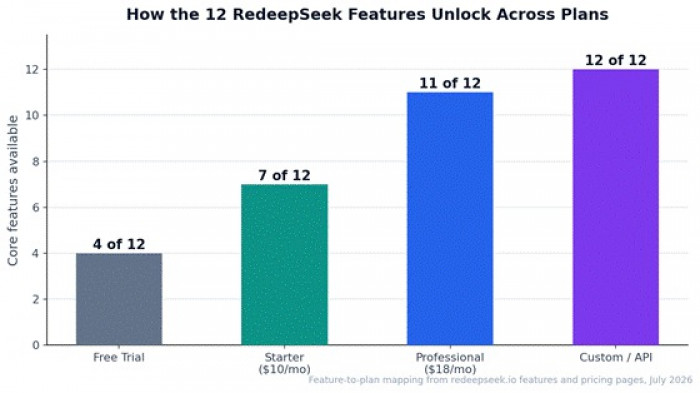
RedeepSeek markets itself with a simple promise: everything you need, nothing you don't. Behind that line sits a feature set of twelve distinct capabilities, from a context-aware chat assistant and brand-voice content generation to SOC 2 enterprise security and scheduled workflow automation. Some are available the moment you open the free tier; others unlock on the $18/month Professional plan or the enterprise Custom tier.
This guide explains every one of those twelve features properly: what it actually does, how it behaves in real workflows, which plan you need for it, and where its limits are. Everything here is drawn from the platform's own feature and pricing documentation as of July 2026, grounded with adoption data showing why each capability matters.
The Full Feature Map at a Glance
Twelve features sounds like a lot to hold in your head, so here's the organising insight: they cluster into five working groups, writing & SEO, research & analysis, design & visual work, developer tools, and team/enterprise infrastructure, all sitting on one foundation, the AI chat assistant, which is the interface through which everything else operates.
| Feature | What it does in one line | Minimum plan |
| AI Chat Assistant | Context-aware conversation, the interface for everything | Free |
| Content Generation | Blogs, emails, ads, social, product copy in your voice | Free (basic) / Starter (full suite) |
| Code Assistant | Write, debug, explain code in 30+ languages | Free (basic); 50+ languages on Pro |
| Web Search Integration | Real-time answers with cited, verifiable sources | Starter; advanced citations on Pro |
| Image Understanding | Analyze, describe, and extract data from uploads | Professional |
| Multi-Language Support | Create, translate, localize in 50+ languages | Starter |
| Advanced Reasoning | Step-by-step chains for math, logic, strategy | All plans (depth scales) |
| Document Analysis | Summarize, compare, and report on PDFs/Word/sheets | Professional |
| API Access | REST API + SDKs to embed RedeepSeek in your apps | Custom |
| Enterprise Security | SOC 2, end-to-end encryption, RBAC, audit logs | Platform-wide; full controls on Custom |
| Team Collaboration | Shared workspaces, prompt library, admin controls | Professional (up to 5 seats) |
| Workflow Automation | Prompt chains, templates, scheduled operations | Professional / Custom |
Writing & SEO Features
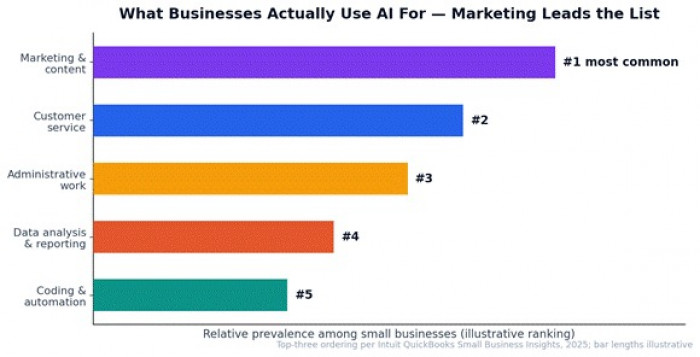
Marketing and content is the number-one thing businesses use AI for, Intuit QuickBooks' 2025 research ranks it above customer service and admin work, and it's where RedeepSeek concentrates the most firepower. Three features combine here: content generation, web search with citations, and multi-language support.
Content Generation
What it does
The content engine produces the full commercial writing stack: blog posts, email sequences, ad copy, social media content, and product descriptions with output tailored to your brand voice rather than generic AI-speak. On the free tier you get basic generation; Starter unlocks the full content suite; Professional adds custom AI personas and templates, which is where brand voice becomes a saved, reusable asset instead of something you re-explain every session.
How it works in practice
The platform's own live demo shows the working pattern: describe the deliverable and the tone ('a product launch email for our AI analytics dashboard, professional but exciting'), get a structured draft with subject line and body, then refine conversationally. Because the assistant keeps context through the session, iteration is where it earns its keep, 'make it shorter', 'add a statistic', 'now write the follow-up for non-openers' all build on the same thread.
Best use cases
• Blog and article production: outline first, then draft section by section for better structure than one-shot generation.
• Email marketing: launch sequences, newsletters, cold outreach variants for A/B testing.
• E-commerce: product descriptions at catalog scale, each in consistent brand voice.
• Social calendars: a week of platform-specific posts from one content brief.
Web Search Integration
What it does
Available from Starter up (with advanced search and citations on Professional), this feature gives the assistant live access to the web and the differentiator, returns answers with cited sources you can verify. For anyone producing content professionally, that distinction is everything: uncited AI claims are a liability, while cited ones are usable research.
Why it matters for SEO specifically
Modern SEO content lives or dies on accuracy and freshness, stale statistics and unverifiable claims are exactly what both readers and search quality systems punish. Cited live search lets you fact-check statistics before publishing, research what currently ranks for a target query, verify product details and pricing in comparison content, and pull current data into articles instead of the model's training-data memory. Combined with content generation, it forms a complete research-to-draft pipeline in one thread:
Best use cases
• Topic research with sources for data-backed articles and statistics roundups.
• Content refresh audits: checking which claims in an old post have gone stale.
• Competitive and SERP awareness while outlining.
• Any client deliverable where 'source?' is a question you must be able to answer.
Multi-Language Support
What it does
From Starter up, RedeepSeek works fluently in 50+ languages, not just translation, but generation, localization, and conversation. The demo's 'now translate it to Spanish and French' moment is the feature in miniature: one deliverable becomes multiple market-ready versions without leaving the thread.
Why it matters for writers and international SEO
Localized content is one of the most underused SEO levers: most competitors publish in one language, so a well-localized version of a strong article often faces dramatically thinner competition in other-language SERPs. For freelancers, language coverage is a rate-card expander, the same deliverable sold into multiple markets. And for platforms' fastest-growing user base (Asia-Pacific drives roughly 71% of global AI-app downloads), local-language capability isn't a bonus feature, it's the product.
Best use cases
• Translating and localizing pillar content for international SERPs (localization adapts idiom and examples, not just words).
• Serving multilingual clients or customer bases from one tool.
• Language practice and checking for non-native writers publishing in English or vice versa.
Research & Analysis Features
Advanced Reasoning
What it does
The reasoning feature handles the work where a plausible-sounding answer isn't good enough: complex math, logic problems, research analysis, and strategic planning, worked through step-by-step reasoning chains rather than single-pass answers. The visible chain matters as much as the answer, you can inspect how the conclusion was reached and catch faulty assumptions before they reach a client or a submission.
How it works in practice
Reasoning quality shows up in the prompts that break simpler assistants: 'compare these three pricing strategies for a SaaS with 40% margins and model year-one revenue for each', or a multi-step statistics problem, or 'find the flaw in this argument'. It's also the quiet engine behind better outputs everywhere else, an outline built with reasoning about search intent beats an outline pattern-matched from generic templates.
Best use cases
• Business analysis: pricing models, scenario comparison, strategy trade-offs.
• Students: worked solutions for quantitative coursework with steps you can learn from, not just final answers.
• Research synthesis: reconciling conflicting findings across sources.
Document Analysis
What it does
A Professional-tier feature: upload PDFs, Word documents, and spreadsheets, then summarize them, extract insights, compare versions, and generate reports from their contents. It converts the assistant from a writing tool into a reading tool, and for most professionals, reading load exceeds writing load.
How it works in practice
The working patterns: 'summarize this 40-page report into one page of decisions and numbers'; 'compare these two contract versions and list every changed clause'; 'extract all pricing data from this spreadsheet and flag outliers'; 'turn these three research PDFs into a literature-review section'. The platform's testimonial from a graduate researcher, hours saved weekly on literature reviews, describes exactly this loop.
Best use cases
• Contract and proposal review before the expensive humans see them.
• Research literature processing for students and analysts.
• Report generation from raw spreadsheet data.
• Client-document intake for freelancers: brief ingestion without an afternoon of reading.
Image Understanding
What it does
Also on Professional: upload images for analysis, description, data extraction, and visual question-answering. The platform pitches it for documents, charts, and screenshots, the visual material real work actually produces, rather than art appreciation.
How it works in practice
Three patterns dominate. Data extraction: photograph or screenshot a table, invoice, or chart and pull the numbers out into usable text. Visual Q&A: 'what does this analytics dashboard say about mobile conversion?' Interpretation: turning a whiteboard photo, org chart, or process diagram into structured notes. It pairs naturally with document analysis, together they mean almost any file a client sends becomes something the assistant can read.
Best use cases
• Extracting data from scanned invoices, receipts, and forms.
• Reading charts and dashboards into written summaries.
• Converting whiteboard sessions and diagrams into documentation.
Design & Visual Work: How Designers Use RedeepSeek
RedeepSeek is not an image generator, it doesn't produce logos or renders. What it offers designers is arguably more useful day-to-day: a visual analyst and a writing partner for every text surface a design contains. Three features combine into the design workflow.
Design feedback via Image Understanding
Upload a screenshot of a landing page, app screen, or email design and interrogate it: 'what's competing with the primary CTA here?', 'critique the visual hierarchy of this pricing section', 'is this form asking too much above the fold?'. A second set of eyes on demand, useful precisely at the freelance and small-team scale where design review otherwise means asking the client.
UX copy and marketing surfaces via Content Generation
Every design ships full of words, microcopy, empty states, error messages, onboarding sequences, CTAs. The content engine drafts and iterates these in the product's voice, and on Professional a saved persona keeps that voice consistent across a whole project.
Design-role personas on Professional
Custom AI personas let you configure a standing 'design consultant', instructed with your design principles, accessibility standards, and brand guidelines, so critique and copy both come back through that lens every time, instead of re-briefing a generic assistant per session.
Honest limits
No image generation, no file-format handoff to Figma or design tools, no pixel manipulation. Designers still need their design stack; RedeepSeek slots in as the analysis-and-language layer around it.
Developer Features
Code Assistant
What it does
Write, debug, and explain code across 30+ programming languages, expanding to 50+ on Professional, spanning quick scripts up to architecture guidance. The three verbs matter equally: generation gets the headlines, but explanation (paste unfamiliar code, understand it) and debugging (paste the error, find the cause) are where daily time savings live.
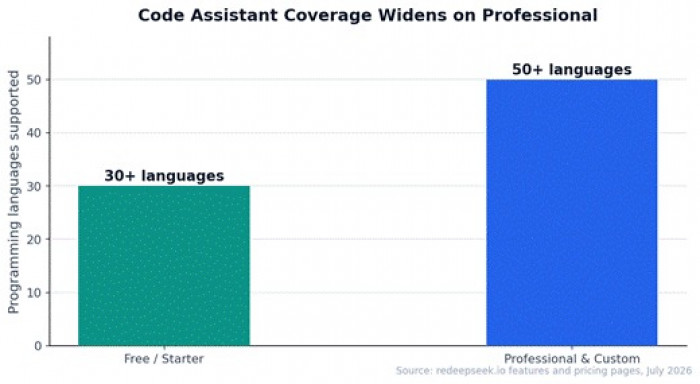
Figure 5: Language coverage steps up from 30+ to 50+ on the Professional plan.
Best use cases
• Freelance developers: client scripts, bug fixes, and code review support.
• Non-developers who occasionally need code: spreadsheet formulas, WordPress snippets, automation scripts.
• Students: error-message translation and concept explanation as free CS tutoring.
API Access
What it does
On the Custom tier, RedeepSeek opens a RESTful API with SDKs and documentation, plus webhook and automation support, custom rate limits, SLAs, and even on-premise deployment. Strategically, this is the graduation path: a business that starts with five chat seats can later embed the same AI inside its own products, support systems, or internal tools without changing vendors.
Best use cases
• Embedding AI assistance inside your own SaaS or internal tools.
• Automated content pipelines feeding a CMS.
• Support and triage automation via webhooks.
Workflow Automation
What it does
Custom AI workflows and templates: chain prompts into repeatable multi-step operations, and schedule recurring tasks. Where the chat assistant answers questions, automation packages your best sequences — brief → outline → draft → social variants, say, into a reusable machine, run on demand or on a schedule.
Best use cases
• Recurring content operations: weekly newsletter drafts, monthly report skeletons.
• Standardized client onboarding: the same intake-analysis-summary chain per new client.
• Batch tasks: applying one refined prompt sequence across many inputs.
Team & Enterprise Features
Team Collaboration
What it does
Professional includes a shared team workspace for up to five users, shared conversation history, a custom prompts library, and admin controls. The prompts library is the sleeper feature: the moment one person perfects the product-description prompt or the client-report template, it becomes the whole team's asset rather than a private trick.
Best use cases
• Agencies and content pods keeping brand-voice prompts consistent across writers.
• Small businesses running marketing, support, and ops through one shared account structure.
• Any team tired of pasting prompts into group chats.
Enterprise Security
What it does
The platform states SOC 2 compliant infrastructure with end-to-end encryption, data isolation, role-based access control, and audit logging, with SSL and GDPR compliance included on every plan, and SSO/SAML integration plus on-premise deployment available at the Custom tier. In practice: the free tier is fine for drafting a blog post; the audit-and-access stack exists for organisations that need to answer a security questionnaire before adopting anything.
Best use cases
• Companies with vendor-security review processes (the SOC 2 + audit logging combination is what those reviews ask for).
• Regulated or privacy-sensitive teams needing role-based access and data isolation.
• Enterprises requiring single sign-on and deployment control.
The Foundation: AI Chat Assistant
Every feature above is operated through one surface: a natural, context-aware conversation. That design choice is itself a feature. Context retention means a session can flow from research (web search) to outline (reasoning) to draft (content generation) to translation (multi-language) without re-explaining anything, the five-step SEO workflow in Figure 4 is one thread, not five tools. The onboarding promise is equally deliberate: ten-second signup, no credit card, free credits immediately, and results you refine by talking rather than by learning an interface. For a platform whose pitch is replacing several point tools, making the single interface effortless is the whole ballgame.
Which Plan Do You Need for Which Features?
| If the feature you care most about is | You need | Cost (annual billing) |
| Chat, basic content, basic code, reasoning | Free Trial | $0 — 50 messages/day |
| Full content suite, web search, 50+ languages | Starter | $8/month ($96/year) |
| Documents, images, personas, automation, team of 5 | Professional | $14.40/month ($172.80/year) |
| API, SSO/SAML, SLAs, fine-tuning, on-premise | Custom / API | Quoted |
The pattern across the ladder is consistent: the free tier proves the interface, Starter unlocks the individual professional's daily stack (writing, search, languages), Professional unlocks everything involving files, teams, and repeatability, and Custom unlocks the platform as infrastructure.
Getting the Most From the Feature Set: Five Tips
• Be specific about deliverables. 'Write a 200-word product description for a stainless-steel water bottle aimed at hikers' beats 'write product copy' every single time, specify length, audience, and format.
• Chain features in one thread. Research with citations, then outline, then draft, then localize, context carries, and each step improves the next.
• Build personas once, reuse forever (Pro). Encode each client's or brand's voice, banned phrases, and formatting rules into a persona instead of re-briefing per session.
• Verify factual claims. Even with cited search, confirm critical statistics at the source before publishing, standard practice with any AI tool, and the citations make it fast.
• Turn winning prompts into automation. When a prompt sequence works three times, make it a workflow template, that's the compounding step most users skip.
The Bottom Line
RedeepSeek's twelve features read less like a feature list and more like a deliberate coverage map of modern knowledge work: the writing-and-SEO stack serves the single biggest AI use case, the analysis stack handles the reading load, the design and developer features extend the same interface into visual and technical work, and the team and enterprise layer makes it deployable beyond one browser tab. The architecture rewards users who chain features, research into drafting into localization, one thread, one tool, and the plan ladder maps cleanly onto how deep you go: free to try the interface, Starter for a working individual's daily stack, Professional for anything involving files, teams, or repetition, and Custom when the assistant becomes infrastructure. The free tier's 50 daily messages make testing that map on your own workload cost exactly nothing.
Comments