

BeArt AI has quietly become my default tab whenever I need to bend reality a little for content. It runs entirely in the browser, skips the usual watermark shenanigans, and lets you pull off face swaps that look far more “studio” than “mobile filter” all without locking you into a subscription. For meme pages, short‑form editors, streamers, and brand social teams, that combination is rare enough that it genuinely changes your workflow, not just your curiosity.
What BeArt AI is (and who it’s really for)
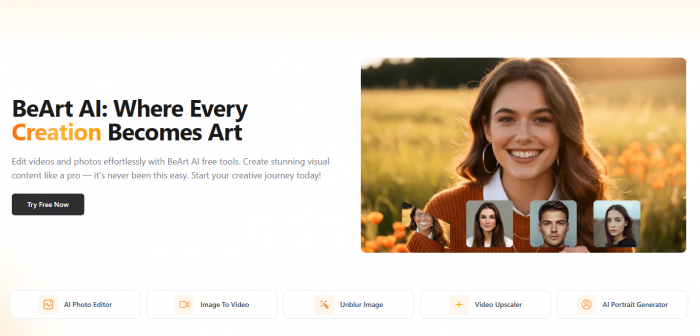
At its core, BeArt AI is a web‑based face‑swap and image‑enhancement toolkit. You open a URL, feed it photos, videos, or GIFs, tell it which face belongs where, and it rebuilds the media so the new face looks like it was there from the start. On top of that, it can unblur soft photos, upscale and enhance them, remove backgrounds, and restyle images with a simple image‑to‑image engine.
You never install anything. For most use cases you don’t even have to create an account to get started. That means it fits naturally into the way creators already work: bouncing between browser tabs, cloud drives, and social platforms.
Who it’s built for in practice:
● People running meme and GIF accounts who need fast swaps without a watermark ruining the punchline.
● TikTok, Reels, and Shorts editors who want to drop themselves (or a recurring character) into clips without learning After Effects.
● Streamers and YouTubers who want occasional face‑swap bits, reaction skits, or multi‑character scenes.
● Casual users who just want to see themselves in a movie still, swap their friends into fandom edits, or fix a group photo.
It does not try to be a full non‑linear editor or a secret deepfake lab. It’s a focused, creator‑grade playground that still has enough technical depth to keep more serious editors happy.
How BeArt actually behaves, feature by feature
1. Photo face swap: first contact
The first thing most people do in BeArt is drop a photo in just to see if it works. You upload one or more images, and within a moment or two the tool outlines every face it finds. You pick which ones to replace and assign a “source” face to the face you want to insert.
From there it stops feeling like a toy. Instead of pasting a flat cut‑out, BeArt looks at facial landmarks, eyes, nose, mouth, jawline and rebuilds the new face so it matches the original pose, lighting, and skin tone. If the subject is turned three‑quarters away under side lighting, the swapped face is also three‑quarters away under side lighting, not a front‑facing sticker.
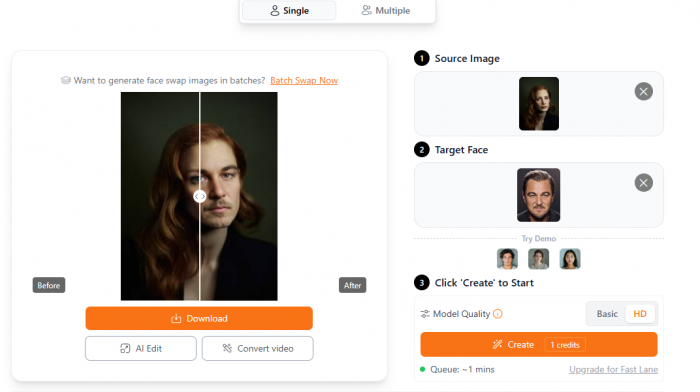
In group photos, it does a surprisingly good job of respecting hairlines, jaw contours, and neck transitions. That’s usually where cheap apps fall apart; here, the edits are often good enough that people will scroll past on their phones without immediately clocking that it’s an edit. For family jokes, party pictures, “put me on this album cover” experiments, or swapping celebrities into stills, the results regularly cross the “good enough to fool at a glance” line.
Face-swap quality can vary noticeably once lighting, head angle, and image resolution change. Some similar tools like Pica AI handles many of the same photo-based tasks, which makes the differences in processing and final-image consistency easier to see across similar inputs.
2. Video face swap: designed for short‑form
Video is where BeArt stops being a gimmick and starts behaving like a real tool in a creator’s stack. You upload an MP4, MOV, or similar, pick the face you want to replace, and let it process.
Under the surface, it’s tracking the target face frame by frame: every head tilt, blink, jaw movement, and eyebrow twitch. The new face rides on top of that motion, so as the subject turns or laughs, the swap stays glued in place instead of jittering or sliding around. On decent 30 fps footage with normal lighting, the result looks surprisingly like native footage. For reaction clips, movie snippets, stitched skits, or “what if I were in this scene?” edits, it’s more than convincing enough for TikTok, Reels, Shorts, and YouTube.
Video swaps are a slightly different test because consistency has to hold across multiple frames rather than a single image. Tool like VidMage AI works across video, GIF, and photo swaps, so it provides a useful reference point for how similar tools deal with movement and changing facial angles.
The catch is cost, and it shows up exactly where you’d expect: longer, higher‑frame‑rate, lip‑synced clips. BeArt uses a credit system. Standard 30 fps video roughly consumes one credit per second. Double the frame rate to 60 fps and you’re paying closer to two credits per second. Turn on AI lip‑sync to get the mouth motion really locked to a new audio track and you can jump to four–ten credits per second.
If your clips live in that 10–30 second sweet spot that dominates social feeds, the economics make sense. If you keep trying to run full multi‑minute, 60 fps edits every day, the platform will quietly teach you that it’s designed to be your short‑form sidekick, not your 20‑minute film engine.
3. Multi‑face swap: organized chaos
One of the more powerful parts of BeArt is how many faces it can juggle at once. It will detect up to five faces in a single image or video frame and let you swap each of them in one pass.
You see a group shot; the tool sees individual targets. You can replace everyone with the same face, mix and match different replacements, or build an entire cast out of a few reference photos. It then processes all of them together, taking care of overlaps, partial occlusions, and interactions.
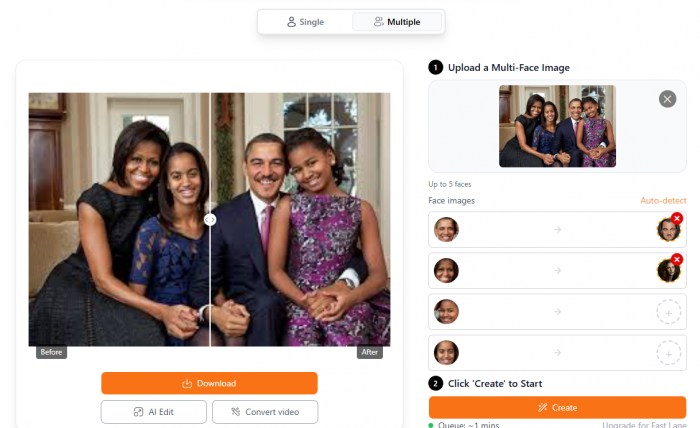
For multi‑person scenes, movie moments, reaction group GIFs, photo collages this is what turns a “maybe if I had an hour in a desktop editor” idea into a “I can do this before my coffee cools” reality. You’re not constantly re‑rendering new passes for each person.
4. GIF face swap: your reaction library, upgraded
GIFs feel almost purpose‑built for BeArt. You upload a reaction or meme GIF, tell the tool whose face belongs there, and it treats the animation like a short video: tracks the face over the frames and redraws it with your chosen identity.
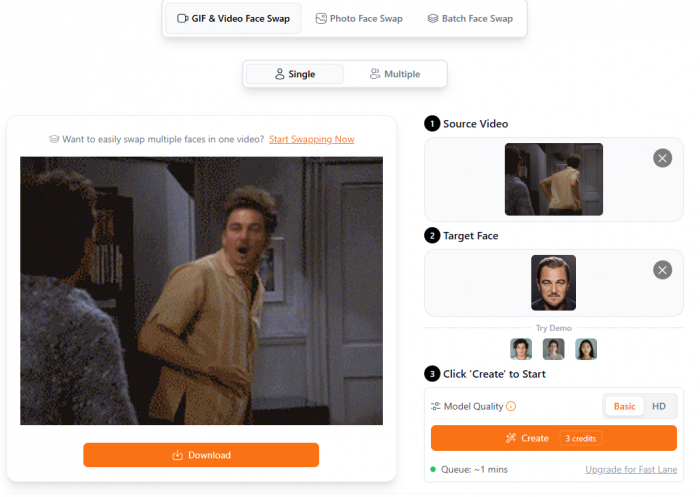
Because GIFs are naturally short and low‑resolution, they’re forgiving targets. You end up with your own face (or your mascot, or your in‑joke character) anchored into all the classic reaction formats you already know. For Discord servers, online communities, and meme‑driven brands, this alone can make BeArt worth leaving pinned in your browser.
5. Unblur and enhancement: rescuing almost‑great images
BeArt is also a quiet fixer. The unblur tool is meant for all those “this would be perfect if it weren’t slightly soft” shots.
Instead of simply cranking up contrast, it uses an AI model to reconstruct edges and texture, reducing motion trails and general muddiness. A face that was a bit soft from a quick phone snap can regain enough structure to work as a profile picture, thumbnail, or social asset. Combined with the enhancer and upscaling options, you can pull frames out of slightly shaky video, clean them up, and reuse them as static graphics in titles, covers, or ads.
6. AI photo editor and image‑to‑image: repurpose, don’t redo
Beyond face swapping, BeArt’s editor and image‑to‑image tools let you transform and tidy up your visuals without bouncing into a heavyweight editor.
You can strip out backgrounds, fix exposure and color, upscale low‑res images, and then restyle them with prompts (for example “make this look like a watercolor painting” or “turn this into a neon cyberpunk scene”). The engine keeps the composition and subject while changing the aesthetic, which is exactly what you want when you’re trying to create multiple on‑brand looks from a single shoot.
It’s not trying to replace Lightroom plus Photoshop plus a big generative art suite. It sits in that middle ground where most daily content work lives: “I have an image, I know roughly how I want it to look, I want it in minutes, not hours.”
Once face swapping becomes part of a larger editing workflow, the surrounding tools start to matter almost as much as the swap itself. Remaker AI follows a similar all-in-one structure, combining face swaps with upscaling, background removal, and other image-processing features.
7. Batch face swap: industrial mode
When you’ve got more ambition than time, the batch face‑swap feature matters. You define one face to insert, upload a set of photos, and BeArt cycles through them, swapping the target face into each image.
That’s ideal for:
● Running themed campaigns where one persona appears everywhere.
● Feeding a fan page with multiple edits in one style.
● Creating entire packs of social assets based on a single influencer, character, or avatar.
Because each swap consumes credits, batch runs are where you feel the economic side most. But in return you get a workflow that would otherwise require either a human assistant or a lot of repetitive clicking.
Complete Feature List
| Feature | Description | Cost |
| Photo Face Swap | Replace faces in static images with 98% accuracy, matching lighting, skin tone, and expressions | 1 credit/image |
| Video Face Swap | Frame-by-frame face tracking in videos up to 100MB, maintaining expressions and lip movements | 1 credit/sec (30fps) |
| Multi-Face Swap | Swap up to 5 faces simultaneously in photos or videos | Variable |
| Batch Face Swap | Process multiple images simultaneously for efficiency | 1 credit/image |
| Unblur Image | AI-powered image restoration using reconstruction techniques vs. simple sharpening | Free (limited) |
| Video Upscaler | Enhance video resolution to HD/4K using AI upscaling | Variable |
| AI Lip Sync | Synchronize lip movements to audio tracks | Credits vary |
| AI Photo Editor | Prompt-based image editing (background removal, color adjustments, object removal) | Free |
| GIF Face Swap | Create face-swapped animated GIFs for memes and social content | Variable |
| Sora Watermark Removal | Remove watermarks from AI-generated Sora videos | Free |
| AI Portrait Generator | Generate AI headshots and character images | Credits vary |
Pricing and credits: what “free” actually feels like
On paper, BeArt’s model looks simple. In practice, it genuinely changes how you use it.
There’s no subscription. At all. Instead:
● You get a weekly allowance of free credits (roughly 100 per week) just for being a user.
● When those are gone, you can buy credit packs that never expire.
● Paid credits only start being used after your weekly free pool is empty.

A rough sense of the economics looks like this:
| Operation | Typical credit use | What that means in real life |
| Photo face swap | Low | Your free weekly pool covers a lot of still images. |
| GIF face swap | Low–medium | Most reaction GIFs are cheap to process. |
| Video swap, 30 fps | ≈1 credit per second | A 20‑second clip costs ~20 credits. |
| Video swap, 60 fps | ≈2 credits per second | Double the burn: longer high‑fps clips add up. |
| AI lip‑sync | 4–10 credits per second | Great for short, punchy segments, not whole episodes. |
If you’re a casual or mid‑volume creator focused on photos, GIFs, and short vertical clips, you can do a surprising amount in the “free + occasional top‑up” zone. You don’t add another line item to your monthly SaaS budget; you just buy credits when you need to push harder and keep them until they’re gone.
Day‑to‑day performance: quality, speed, and where it says “no”
How clean are the swaps?
With decent input, the swaps look far better than you’d expect from a free, browser‑based tool. Photo replacements often pass the phone‑screen test without drawing attention to themselves. Video swaps, especially at 30 fps with normal lighting, feel like the face really belongs in the scene. Multi‑face edits keep each face locked tightly enough that jokes land because of the idea, not despite the execution.
The weak spots line up with common sense: low‑resolution, highly compressed, or badly lit footage just doesn’t have enough signal for the model to reconstruct a believable face. When you feed it that kind of input, you don’t get miracles and you shouldn’t design a workflow that depends on them.
How fast is it?
The workflow is intentionally barebones: upload, mark faces, swap. There’s no timeline to manage, no hand‑masking, no plugin hell.
Photos are done in seconds. GIFs and short clips follow quickly. Longer, multi‑face videos take more time but stay in the realm of “I can check my phone, not go make dinner.” That frictionless feeling is a big part of why it’s easy to adopt BeArt as a habit: the time cost is low enough that you start experimenting by default.
How does it handle bad inputs?
This is where BeArt has a very clear personality: when it doesn’t think it can produce a good‑enough result, it often simply refuses.
If a face is mostly turned away, hidden by hair, tiny in frame, or smeared by motion and compression, the system may decline to generate a swap instead of pushing out a distorted mess. On first contact that can feel like the tool is being overly picky (“just give me something”), but it’s actually acting as a quality filter. It would rather protect your content from cursed outputs than blindly obey every request.
Once you understand that tendency, you adjust: you become pickier about what you feed it, and the overall quality of your swaps improves as a side effect.
Where it shines and where it deliberately doesn’t
The strong side
The big win is the combination of “no watermark” and “no subscription.” You get to post clean content without tagging every clip as “made with X,” and you don’t have to carry another recurring payment just to keep using it.
Add to that:
● A genuinely useful range of tools: photo, video, GIF, multi‑face, unblur, editing, batch all in one place.
● A credit model that fits bursty creative workflows instead of punishing them.
● Multi‑face support up to five faces in one scene and realistic blending that holds up under casual scrutiny.
For meme pages, parody accounts, agency social teams, and solo creators, that combination is near perfect.
The trade‑offs
The obvious trade‑off is long‑form, high‑end video. BeArt isn’t lying about its capabilities; it can process longer or higher‑fps clips. But the credit economics and time cost together nudge you hard toward short‑form. If you’re trying to run a 10‑minute, 4K, 60 fps short film through it with lip‑sync, you’re using the wrong tool for the job.
There’s also the matter of input quality. BeArt’s insistence on decent source material means you can’t just feed it anything and expect gold. If you treat it as a magic button for terrible footage, you will be disappointed.
And because it’s still relatively young, it doesn’t yet sit on pages and pages of Trustpilot or enterprise software reviews. That doesn’t show up while you’re using it, but if you’re an agency trying to vet tools on paper, you’ll notice that the public “paper trail” is thinner than older, more corporate platforms.
Ethics, privacy, and using it like an adult
There’s no way to talk honestly about a high‑quality face‑swap tool without talking about what people can do with it.
BeArt positions itself as a creator tool: memes, fan edits, skits, brand content. That’s where it belongs. The same mechanics can be pointed in darker directions: impersonation, harassment, disinformation if someone chooses to. The responsibility for staying on the right side of that line is on the user.
On the privacy side, the service is set up to process your uploads, return a result, and then flush what it doesn’t need rather than hoarding your media indefinitely. That, combined with the lack of attached accounts in many workflows, keeps the footprint of your experiments relatively small.
The practical guideline is simple: treat BeArt the way you’d treat Photoshop or a camera. Use it with consent, use it for humor and creativity, and don’t use it to hurt or deceive people.
Competitive Analysis
The AI face swap market is crowded with established players. Here's how BeArt AI compares to major competitors:
| Platform | Pricing Model | Watermarks | Account Required | Key Differentiator |
| BeArt AI | Pay-per-use credits | None (even free) | Optional | No watermarks, no signup needed |
| DeepSwap | Subscription | Free tier has watermarks | Yes | 150M+ users, most popular |
| Reface | Subscription | Free tier has watermarks | Yes | Mobile-first app experience |
| FaceSwapper.ai | 100% free (recently) | None | No | Simplest interface |
| FaceFusion | Freemium + paid tiers | None | Yes | 95.8% accuracy, 4K output |
| Vidnoz AI | Free + premium | Free tier has watermarks | Optional | Specialized for marketing videos |
Competitive Positioning
BeArt AI occupies a middle position in the market:
• More accessible than DeepSwap/Reface: No watermarks on free tier, no mandatory account
• Less technically advanced than FaceFusion: Lower claimed accuracy (98% vs 95.8%), lower max resolution
• More feature-rich than FaceSwapper.ai: Includes video upscaling, lip sync, portrait generation beyond basic face swaps
Who Should Use BeArt AI
Recommended For:
• Social media content creators needing quick, watermark-free face swaps
• Casual users who want to experiment without subscriptions or software installation
• Meme creators and hobbyists
• Budget-conscious freelancers with occasional face swap needs
NOT Recommended For:
• Commercial studios requiring clear licensing and company accountability
• High-volume professional users (credit costs will exceed subscriptions)
• Developers needing API access or automation
Overall Rating: 7.8/10
| Category | Score | Notes |
| Features & Capabilities | 8.5/10 | Comprehensive toolkit beyond basic face swaps |
| Output Quality | 8.0/10 | Strong results with good inputs; struggles with poor quality |
| Ease of Use | 9.5/10 | Exceptionally simple; no learning curve |
| Value for Money | 8.5/10 | Generous free tier; fair credit pricing |
| Trust & Transparency | 5.0/10 | Major weakness; unclear company info and licensing |
| Customer Support | 6.0/10 | Limited visibility; appears email-only |
Bottom Line
BeArt AI delivers impressive face-swapping capabilities wrapped in an exceptionally user-friendly package. The watermark-free free tier and no-account-required workflow make it the most accessible option in its category. Output quality is strong when working with good inputs, and the credit-based pricing model offers genuine value for casual and moderate users.
However, the platform's lack of transparency around company ownership, commercial licensing, and long-term viability raises legitimate concerns for professional use. The absence of presence on established review platforms and limited customer support infrastructure further compound these trust issues.
For casual content creation and personal use, BeArt AI represents excellent value and convenience. For commercial projects requiring legal clarity and corporate accountability, consider more established alternatives with transparent business models.

Jude Donaldson
Aug 25, 2026★★★★☆ The reaction GIF was the part that sold me. I dropped in a clear selfie expecting at least a few weird frames but the face stayed surprisingly natural through the movement and I ended up replaying it a few times because it was actually fun to watch😄. The photo tools were nice too for quick little fixes without turning it into a whole editing project. BeArt just feels easy to pick up and enjoyable to mess around with.
Login To Reply ↪