

An Instagram bio has very little room to work. It must explain who the account belongs to, what visitors can expect and why they should follow, click or contact the person behind it.
A free Instagram bio generator can make that compression easier, but not every generator solves the same problem. Some focus on tone, others prioritize character limits, and a few provide controls for calls to action, hashtags or account categories.
The six tools below were compared by looking at their available inputs, free-access limits, customization controls and usefulness for different account types.
The Bio Writing Problem
Instagram limits the main bio field to 150 characters, including spaces, emojis and special characters. That means a bio cannot hold an entire personal story or business pitch. It needs to communicate the most useful information first.
A good bio usually answers three questions:
● It tells visitors who the person, creator or business is.
● It explains what the account publishes or provides.
● It gives visitors a reason to follow, click or take another action.
Many weak bios fail because they try to include hobbies, qualifications, slogans, locations, services and several emojis at once. The result may look active but still leave visitors unsure about the account.
A bio generator is most useful when it helps users prioritize information rather than simply decorating generic phrases.
Quick Tool Comparison
| Tool | Strongest Capability | Free Access | Best Suited To |
| Smartpostly | Detailed profile personalization | Free core generator without login | Creators, professionals and small businesses |
| Buffer | Character-limit control | Five suggestion sets per day | Users who want concise, Instagram-ready bios |
| Hootsuite | Platform and CTA customization | Free standalone generator | Brands managing several social platforms |
| Ahrefs | Multiple variants and style controls | Free generator | Users comparing different creative directions |
| Mention | Large tone selection | Free with unlimited generations | Personal and personality-led profiles |
| SocialPilot | Fast repeated generation | Free without signup | Creators experimenting with several bio styles |
1. Smartpostly Bio Generator
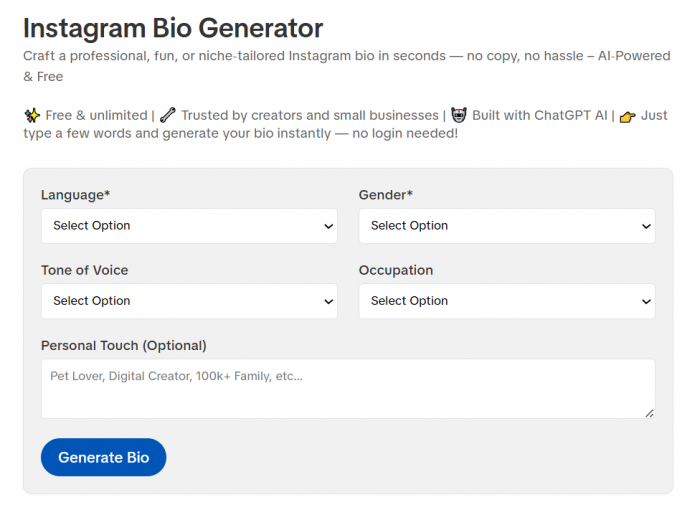
Smartpostly Instagram Bio Generator helps users create bios around specific profile details rather than relying on one broad description box. The tool includes controls for language, gender, tone of voice, occupation and an optional personal detail.
Its core generator is presented as free, unlimited and available without login. A separate Pro version adds more advanced options, including CTA suggestions, emoji recommendations, saved presets and export formats.
Tool Overview
| Detail | Information |
| Main purpose | Creating personalized Instagram bios |
| Primary inputs | Language, gender, tone, occupation and personal details |
| Free access | Free core generator without login |
| Advanced option | Pro version available |
| Best for | Creators, professionals and small businesses |
Key Features
● Users can select a language before generating the bio, making the tool more practical for profiles that do not publish exclusively in English.
● Occupation and tone controls help separate professional profiles from casual or personality-led accounts.
● The optional personal-touch field gives users room to add an interest, quality or distinctive detail.
● The core tool can be used without creating an account, which makes quick experimentation easier.
● Smartpostly also provides related tools for captions, hashtags, usernames, hooks and other social profile content.
Advantages and Limitations
| Advantages | Limitations |
| It collects several profile-specific details before generating a bio. | CTA and emoji suggestions are listed as Pro features. |
| The free generator does not require an account. | Users should still check the final character count manually. |
| It works for both professional and personal profile styles. | Highly specific brand language may require editing. |
| Language and occupation controls improve personalization. | Generated bios should not be copied without reviewing their accuracy. |
Best For
Smartpostly is best for users who want more guidance than a blank prompt box provides. It is especially suitable for creators, freelancers and small businesses that need to communicate both personality and professional focus.
The occupation selector is useful when the bio must quickly establish a role, while the personal-touch field can keep the result from sounding like a standard job description.
Final Take
Smartpostly ranks first because its free generator collects several useful signals before producing the bio. Language, tone, occupation and personal details address different parts of profile identity, giving the generator more context to work with.
The free version may still need a manually added CTA, but it offers a practical balance of personalization, speed and low-friction access.
2. Buffer Instagram Bio Generator
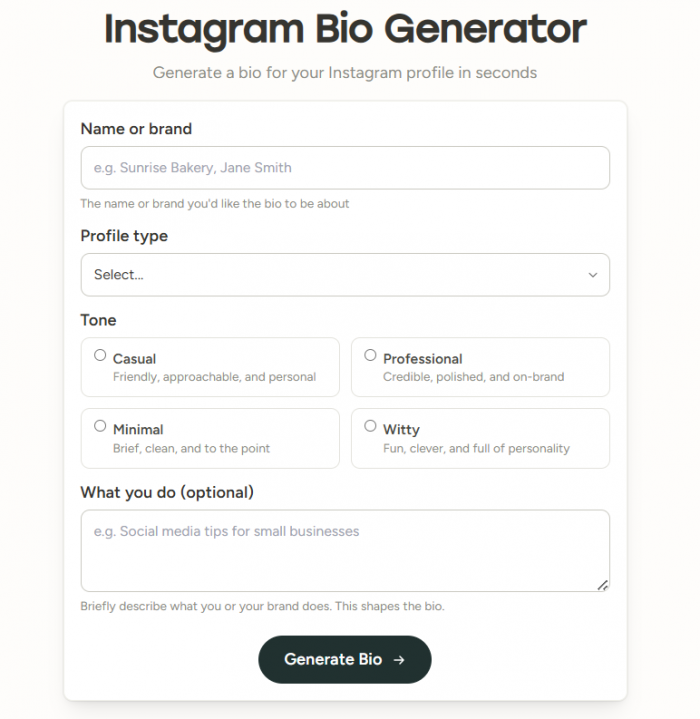
Buffer takes a more structured approach to bio writing. Users enter a name or brand, choose a profile type, select a tone and optionally explain what they do.
The available tones are casual, professional, minimal and witty. Buffer generates two or three bio options and displays character counts to help users remain within Instagram’s 150-character limit. The free generator currently provides up to five sets of suggestions per day.
Tool Overview
| Detail | Information |
| Main purpose | Creating concise Instagram bios |
| Primary inputs | Name, profile type, tone and activity description |
| Number of options | Two or three per generation |
| Free limit | Up to five suggestion sets daily |
| Best for | Brands and users concerned about bio length |
Key Features
● Every suggestion is designed around Instagram’s 150-character restriction.
● Character counts are displayed beside the results, reducing the need to check them elsewhere.
● Users can choose between casual, professional, minimal and witty styles.
● The optional description field lets a business or creator explain what the profile provides.
● Generated ideas can be connected with Buffer’s wider scheduling and publishing workflow.
Advantages and Limitations
| Advantages | Limitations |
| It creates bios specifically for Instagram’s character limit. | Free generation is limited to five sets per day. |
| Character counts are visible with the suggestions. | Only four tone options are available. |
| Users receive several alternatives at once. | There is no dedicated CTA input field. |
| Its form is straightforward for both people and brands. | Complex positioning may require a more detailed prompt tool. |
Best For
Buffer is best for users who frequently generate bios that sound good but turn out to be too long. Its visible character counts make it easier to compare complete options without repeatedly pasting them into Instagram.
The minimal tone is particularly useful for professional profiles that need to communicate a clear role or service without filling every available character.
Final Take
Buffer is the strongest option for character discipline. It treats the 150-character limit as part of the writing process rather than leaving users to shorten the result afterward.
Its free daily limit and small tone selection reduce experimentation, but the output structure is practical for people who want profile-ready options instead of long drafts.
3. Hootsuite Bio Generator
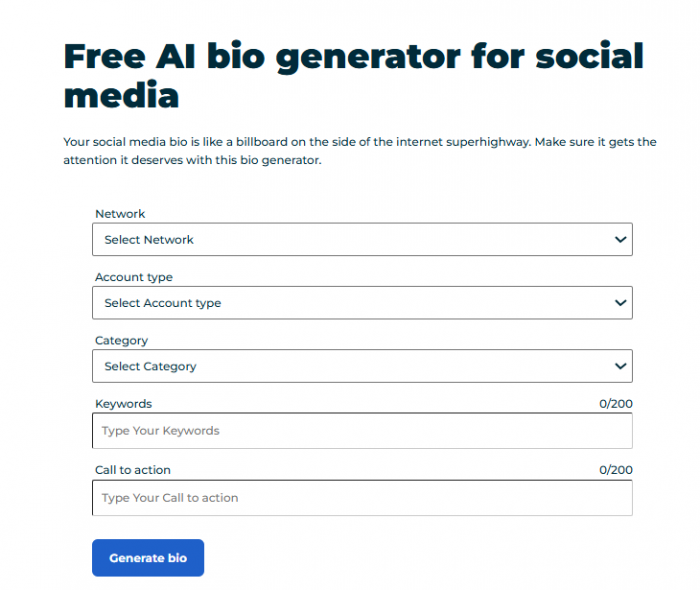
Hootsuite’s tool is broader than an Instagram-only generator. It lets users select a network, account type and category before adding keywords and a call to action.
The generator supports more than 15 networks, including Instagram, TikTok, Facebook, LinkedIn, X, Threads and several community or gaming platforms. Users can also use keywords to indicate a location, niche, personality or preferred style.
Tool Overview
| Detail | Information |
| Main purpose | Generating bios for multiple platforms |
| Primary inputs | Network, account type, category, keywords and CTA |
| Platform coverage | More than 15 networks and communities |
| Free access | Free standalone generator |
| Best for | Brands and multi-platform social teams |
Key Features
● The network selector adapts the bio to different social platforms.
● Account-type and category fields provide basic audience and industry context.
● A dedicated CTA field lets users state the action they want visitors to take.
● The keyword field can include niche terms, locations, interests or tone directions.
● The tool can be reused when creating related bios for several platforms.
Advantages and Limitations
| Advantages | Limitations |
| It includes a dedicated call-to-action field. | It is not focused exclusively on Instagram. |
| Platform selection supports cross-channel profile writing. | The final Instagram version may still need shortening. |
| Category controls help establish industry context. | There is no separate tone dropdown in the visible form. |
| It works for business and personal account types. | Broad keywords can lead to predictable wording. |
Best For
Hootsuite is best for a brand or creator maintaining profiles on several networks. The user can keep the central positioning consistent while adjusting the platform selection, category and CTA for each account.
It is also useful for local businesses because location and service terms can be added through the keyword field rather than squeezed into a vague general description.
Final Take
Hootsuite offers the strongest brief-building process in this list. Its CTA field is especially valuable because many generators focus heavily on personality but forget the action the bio should encourage.
Its cross-platform design is an advantage for social teams, although users creating only an Instagram bio may find some of its broader controls unnecessary.
4. Ahrefs Instagram Bio Generator
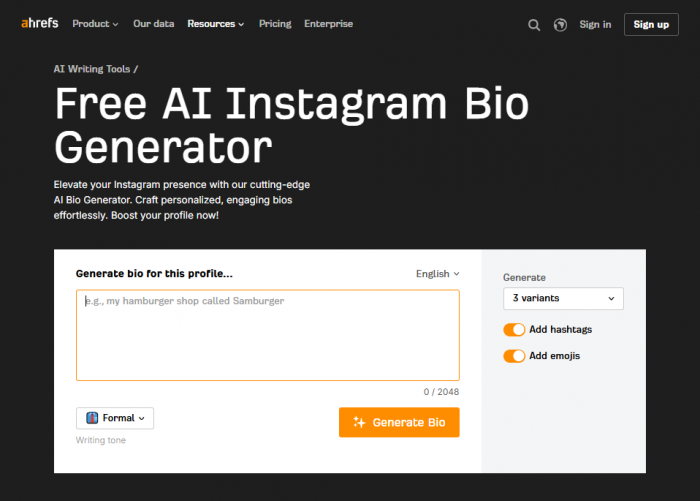
Ahrefs provides a large prompt field where users can describe the profile in detail. It also includes controls for language, writing tone, hashtags and emojis.
The generator produces three variants, allowing users to compare different ways of presenting the same account. The input field supports up to 2,048 characters, giving users room to provide their niche, expertise, audience, goals and other relevant information.
Tool Overview
| Detail | Information |
| Main purpose | Generating several creative bio variations |
| Primary inputs | Detailed profile prompt, language and tone |
| Output options | Three variants |
| Additional controls | Hashtags and emojis |
| Best for | Users exploring different bio directions |
Key Features
● A large description field supports more context than most short-form generators.
● Three variants are produced, making comparison easier.
● Users can decide whether the result should contain hashtags.
● Emoji controls provide more influence over the visual style of the bio.
● Language and writing-tone settings support different audiences and profile identities.
Advantages and Limitations
| Advantages | Limitations |
| It generates three alternatives from one prompt. | A long prompt can encourage an overloaded bio. |
| Users can control hashtags and emojis separately. | The strongest result may still need substantial trimming. |
| The large input field supports detailed context. | Hashtags and emojis consume limited bio characters. |
| Language and tone controls improve flexibility. | It does not provide a dedicated CTA field. |
Best For
Ahrefs is best for users who are not yet sure how their profile should sound. The three-variant format makes it possible to compare a professional direction against a more creative or personality-led version.
It can also help experienced creators test different positioning ideas, such as leading with expertise, audience benefits or content themes.
Final Take
Ahrefs is useful as an idea-development tool rather than a final copy-and-paste solution. Its larger prompt field and three-result format encourage exploration, but users must still decide which information deserves the limited bio space.
The separate hashtag and emoji controls are helpful, although neither should be enabled automatically. A clear phrase is usually more valuable than a decorative symbol that does not add meaning.
5. Mention Instagram Bio Generator
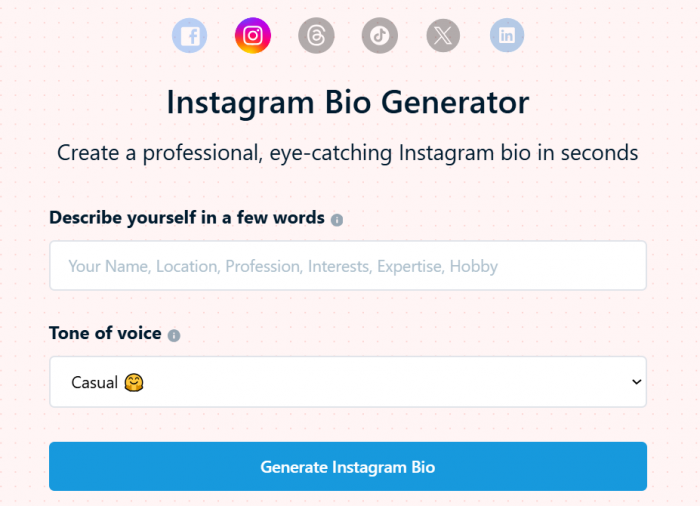
Mention keeps its form simple. Users describe themselves using details such as their name, location, profession, interests, expertise or hobbies, then choose a tone of voice.
Its main strength is tone variety. Available choices include casual, professional, conversational, friendly, humorous, authoritative, sarcastic, emotional, storytelling, creative, engaging and inspirational. Mention states that the generator is free and does not restrict the number of bios users can create.
Tool Overview
| Detail | Information |
| Main purpose | Creating personality-focused Instagram bios |
| Primary inputs | Personal details and tone |
| Tone selection | Twelve listed styles |
| Generation limit | No stated restriction |
| Best for | Personal profiles and individual creators |
Key Features
● The free-text input supports personal and professional details in one place.
● Twelve tone choices cover serious, humorous, emotional and creative styles.
● Users can generate more options without a stated generation restriction.
● Results can be copied directly from the page.
● The tool works well for interests, professions, hobbies and expertise-led profiles.
Advantages and Limitations
| Advantages | Limitations |
| It provides one of the widest tone selections. | There is no dedicated CTA field. |
| Unlimited generation supports experimentation. | Account type and industry are not separate controls. |
| The input form is quick and uncomplicated. | Users may need to verify the character count manually. |
| It is useful for personality-led bios. | Tone selection cannot fix vague source information. |
Best For
Mention is best for personal accounts, artists, lifestyle creators and professionals whose profiles depend heavily on voice. Someone choosing between a friendly, authoritative or humorous identity can generate several versions without being restricted by a small daily allowance.
It is less suitable for businesses that need structured fields for audiences, offers and calls to action.
Final Take
Mention is a strong choice when the central problem is tone rather than information. Its options make it easier to move away from the neutral, polished style produced by many AI writing tools.
However, users still need to supply a clear identity and purpose. Choosing “creative” or “humorous” will not make a generic description more specific.
6. SocialPilot Bio Generator
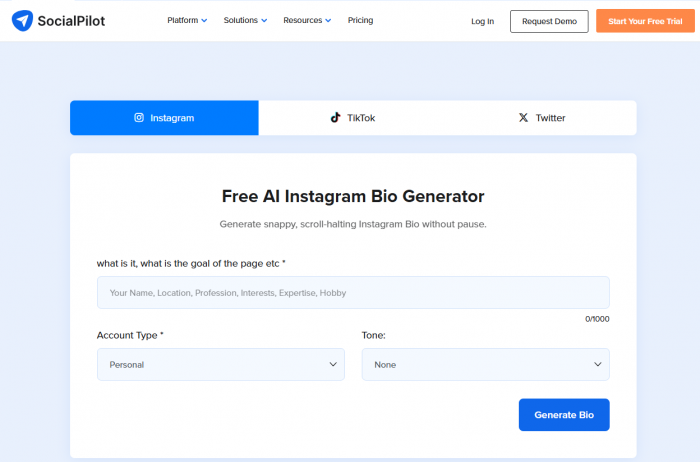
SocialPilot combines a large description field with account-type and tone controls. Users can provide up to 1,000 characters of information about their name, profession, location, interests, expertise and profile purpose.
The tool offers 12 tone options and lets users generate additional ideas after receiving the first result. Its generator is presented as free and available without signup.
Tool Overview
| Detail | Information |
| Main purpose | Rapid Instagram bio experimentation |
| Primary inputs | Description, account type and tone |
| Input allowance | Up to 1,000 characters |
| Tone selection | Twelve options |
| Best for | Creators who want several quick alternatives |
Key Features
● The large description box allows users to provide detailed background information.
● Users can specify whether the account is private or public.
● Twelve tones include professional, witty, casual, dramatic and curious styles.
● The Generate More option supports repeated idea exploration.
● The tool can be used for personal profiles, creators, businesses and promotional accounts.
Advantages and Limitations
| Advantages | Limitations |
| It offers a generous input allowance. | Private versus public is less useful than personal versus business. |
| Twelve tones provide substantial style control. | There is no separate CTA field. |
| Users can repeatedly generate new ideas. | Detailed inputs may produce bios that require trimming. |
| Signup is not required for the free tool. | Some tone choices may prioritize style over clarity. |
Best For
SocialPilot is best for creators who want to explore numerous directions before selecting a bio. Its tone range and Generate More option make it suitable for experimentation without repeatedly rewriting the prompt.
It can also help users compare whether a professional, casual or witty identity fits their existing content more naturally.
Final Take
SocialPilot is flexible, accessible and useful for repeated generation. It does not provide the structured CTA and business-category controls found in Hootsuite, but it offers more tone variety than Buffer.
Its results should be treated as raw options. The best final bio may combine the clearest opening from one result with the strongest closing from another.
Better Inputs, Better Bios
The quality of a generated bio depends heavily on the information given to the tool. Entering “traveler, coffee lover and dreamer” does not provide enough context to create a distinctive result because thousands of profiles could use the same description.
A stronger input identifies the account, its audience, its repeatable value and its desired action.
For example:
Sustainable travel creator helping first-time solo travelers plan affordable trips across Southeast Asia. Friendly, practical tone. Encourage visitors to follow for weekly itineraries.
This prompt gives the generator several useful decisions to make. It identifies the niche, target visitor, geographic focus, content promise and tone.
A simple input formula can improve most tools:
Role or identity + audience + specific value + proof or personality + desired action
Not every element must appear in the final bio. The purpose of the prompt is to give the generator enough information to choose the strongest details.
Editing the Generated Bio
A generated bio should be reviewed as carefully as any other public profile text. Before publishing, remove phrases that could belong to anyone else in the same niche.
Expressions such as “living life to the fullest,” “turning dreams into reality” or “helping you become your best self” consume space without providing much evidence or clarity.
The editing process should focus on four areas:
● Replace broad labels with a specific subject, service or content promise.
● Remove emojis that repeat information already communicated by words.
● Confirm that qualifications, locations, statistics and claims are accurate.
● Make sure the final line gives visitors a useful next step.
Business and creator accounts should also avoid placing every contact detail inside the main bio. Instagram provides separate fields for links, contact buttons and account categories, allowing the main bio to focus on positioning.
Choosing the Right Tool
Smartpostly is the most balanced starting point because it combines profile-specific controls with free, no-login access. Its occupation, language, tone and personal-detail fields help users create a clearer brief without writing a long prompt.
Buffer is the better choice when character compliance is the priority. Hootsuite stands out for multi-platform profiles and CTA control, while Ahrefs is useful for comparing several creative directions.
Mention works well for users who care most about personality and tone. SocialPilot is suitable for repeated experimentation with several writing styles.
The best generator is not necessarily the one that produces the cleverest first result. It is the one that helps users decide what their profile should communicate and then provides a draft that can be refined without losing that purpose.
A bio may contain only 150 characters, but those characters should make the account easier to understand, not merely more decorated.
Comments