

PicLumen and SeaArt both look attractive if you want a free AI image generator, but they are not built for the same kind of user. PicLumen feels cleaner and more direct. SeaArt feels larger, busier, and more flexible. To compare them fairly, I tested both with three prompts: a realistic portrait, a product-style image, and an anime fantasy scene.
Quick Verdict
| Category | Winner | Why |
| Beginner experience | PicLumen | The workflow feels cleaner and easier to follow |
| Realistic image test | PicLumen | It produced the more usable first result |
| Product-style image | PicLumen | The cleaner layout worked better for blog and ad-style visuals |
| Anime and fantasy art | SeaArt | Stronger model variety and more stylized output |
| Free plan value | SeaArt | Its free tier allows more image creations per day |
| Advanced control | SeaArt | Better for users who want models, LoRA, ControlNet, and deeper settings |
| Best overall for quick use | PicLumen | Better for beginners, bloggers, and simple visuals |
| Best overall for creators | SeaArt | Better for style testing, anime, fantasy, and advanced workflows |
PicLumen is better if you want a quick, clean image without spending much time on settings. SeaArt is better if you enjoy testing models, changing styles, and exploring a large creative community.
How I Tested Both Tools
I did not judge the tools from one random prompt. I used the same three prompts in both PicLumen and SeaArt and looked at the first usable result from each. I checked prompt accuracy, visual quality, ease of use, free-plan limits, editing options, and whether the final image felt ready for a blog or social post.
| Test Rule | What I Did |
| Same prompts | I used identical prompts in both tools |
| Free workflow first | I checked what a free user can do before looking at paid plans |
| No heavy editing | I judged the generation result, not a heavily fixed version |
| Practical use | I focused on images that could work for blogs, posts, thumbnails, or creative projects |
| Final score | I scored each tool on quality, accuracy, usability, and creative control |
This matters because AI image tools can look impressive in galleries but feel different when you actually need one usable image for real work.
Free Plan and Pricing
PicLumen says it gives users 10 free Lumens every day, and those Lumens can be used for image or video creation. Its paid plans start with Lite at $6.09/month when billed yearly, followed by Standard at $19.99/month, Pro at $37.49/month, and Elite at $134.99/month on annual billing. PicLumen’s pricing table also shows the Basic free plan, watermarking on free output, limited commercial rights, and paid tiers with more Lumens, faster modes, relax generation, and higher project limits.
SeaArt uses Credits and Stamina. Its pricing page says free users get 21 image creations, while Beginner, Standard, Professional, and Master SVIP users get higher daily Stamina allowances that translate into around 50, 116, 350, and 583 image creations respectively. SeaArt’s pricing page also explains that most standard image generations use 6 Credits, although cost can vary by model or tool.
| Tool | Free Allowance | Starting Paid Plan | Notes |
| PicLumen | 10 free Lumens daily | Lite at $6.09/month, billed yearly | Cleaner for simple generation, but free output is more limited |
| SeaArt | 21 image creations for free users | Beginner at $5.99/month | More generous free testing and stronger model variety |
SeaArt has the stronger free-plan value on raw generation count. PicLumen feels easier, but if you are testing many styles in one sitting, SeaArt gives more room before you hit the limit.
First Impression: Clean Tool vs Creative Studio
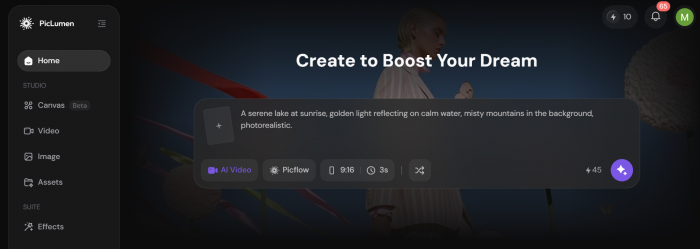
PicLumen AI made the better first impression for a beginner. The interface feels more direct: choose a model, enter a prompt, generate, and download. The platform presents itself as an all-in-one creative tool for image generation, video generation, and community sharing, but the image workflow still feels simple enough for a first-time user.
SeaArt AI feels more like a full AI creative studio. It has image generation, video generation, AI characters, community creations, templates, model pages, and advanced tools. That gives it more power, but it also adds more decisions. SeaArt’s app listing mentions text-to-image, image-to-image, LoRA, ControlNet, partial repainting, background removal, character repair, sketch-to-image, AI filters, and more.
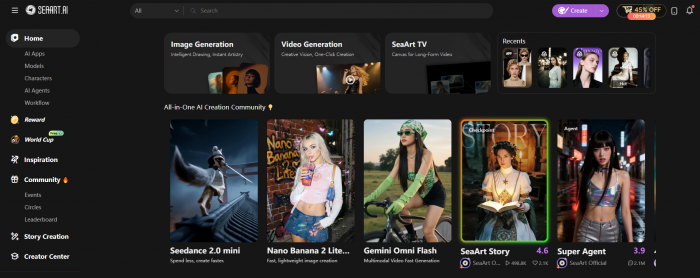
The difference is clear from the first few minutes. PicLumen is easier to start. SeaArt gives you more to explore.
Test 1: Realistic Portrait
Prompt used:
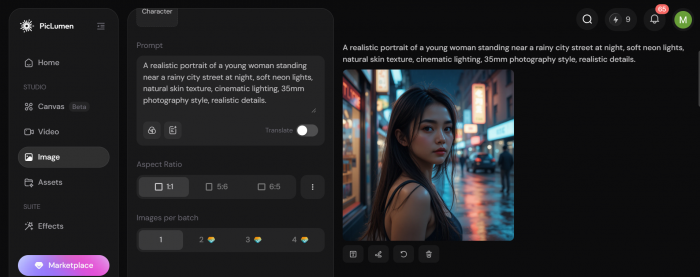
A realistic portrait of a young woman standing near a rainy city street at night, soft neon lights, natural skin texture, cinematic lighting, 35mm photography style, realistic details.
This test checks the things AI image generators often get wrong: skin, eyes, expression, lighting, hair detail, and the overall “does this look like a real photo?” feeling.
| Area Checked | PicLumen | SeaArt |
| Face quality | Cleaner and more natural | More stylized |
| Lighting | Softer and more controlled | More dramatic |
| Prompt accuracy | Followed the rainy neon mood well | Followed the mood but pushed the style harder |
| Usability | Easier to use as a blog or thumbnail image | Better if you want a cinematic art look |
PicLumen gave the more practical portrait result. The face looked cleaner, the lighting was easier on the eyes, and the final image needed less correction.
SeaArt’s image had more mood and visual drama, but it felt more like a stylized render than a natural portrait.
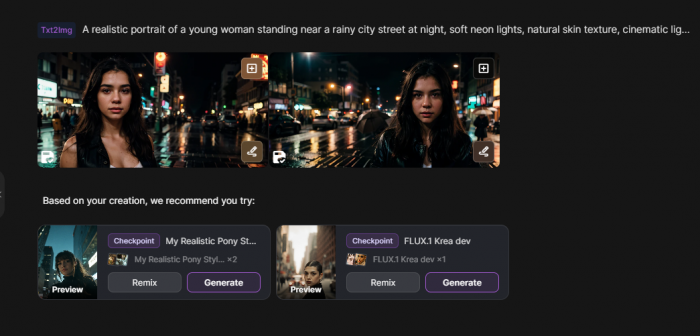
This is where PicLumen’s simpler approach helped. It did not try to overcomplicate the scene. For a realistic portrait, that worked in its favor.
Winner: PicLumen
Test 2: Product-Style Image
Prompt used:
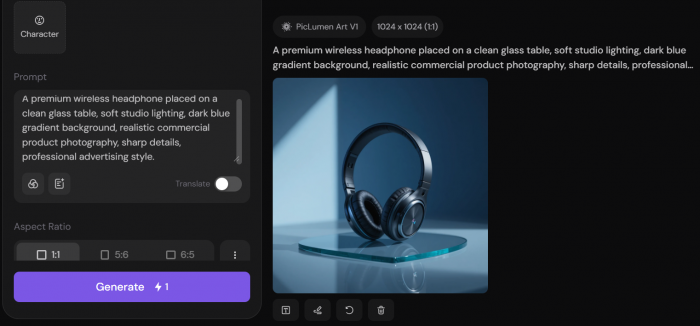
A premium wireless headphone placed on a clean glass table, soft studio lighting, dark blue gradient background, realistic commercial product photography, sharp details, professional advertising style.
This was the most practical test for blog owners, marketers, and social media creators. A product-style image needs clean composition, correct object shape, natural shadows, and enough empty space for a title or layout.
| Area Checked | PicLumen | SeaArt |
| Product shape | More stable and clean | More detailed but slightly busier |
| Background | Simple and usable | More artistic |
| Commercial feel | Better for blog covers and ads | Better for creative product art |
| Editing needed | Less editing needed | May need rerolls for cleaner composition |
PicLumen again gave the more usable first result. The headphone shape looked cleaner, the background was less distracting, and the image felt easier to place into a blog cover or social media card.
SeaArt produced a more stylish result, but the extra visual energy was not always useful for commercial-style imagery.
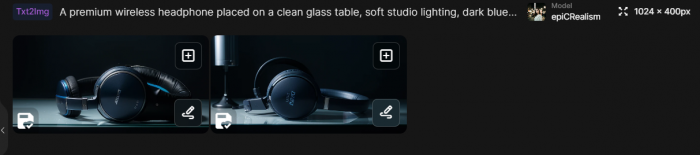
This test showed an important difference. The more creative output is not always the better output. For product-style visuals, clarity matters more than decoration.
Winner: PicLumen
Test 3: Anime and Fantasy Art
Prompt used:
A fantasy warrior standing in a glowing forest, detailed silver armor, magical blue light, cinematic anime style, highly detailed background, dramatic atmosphere, sharp focus.
This is where SeaArt felt more comfortable. SeaArt gives access to a very large model ecosystem, including community models and options such as FLUX, SD 3, SDXL, and LoRA-style workflows. Its model page says the platform has 700k+ AI image models and supports different model types for realism, fantasy, anime, and other visual styles.
| Area Checked | PicLumen | SeaArt |
| Anime style | Good but safer | Stronger and more expressive |
| Character design | Clean | More detailed |
| Background detail | Usable | Richer and more atmospheric |
| Creative control | Simple | Much deeper |
SeaArt won this test clearly. The fantasy image had stronger character styling, better armor detail, and a more dramatic environment.
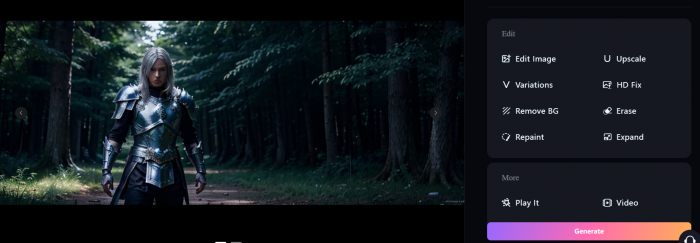
PicLumen created a clean image, but SeaArt felt better suited for users who care about anime, fantasy, character art, and style-specific results.
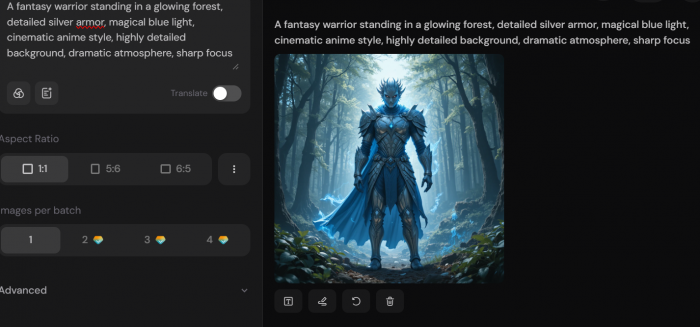
The main reason is control. SeaArt gives users more model and style choices, so the same prompt can be pushed in many different directions. For creators who like testing variations, that is a real advantage.
Winner: SeaArt
Final Test Scores
| Test | PicLumen Score | SeaArt Score | Winner |
| Realistic portrait | 8.5/10 | 7.5/10 | PicLumen |
| Product-style image | 8.5/10 | 7/10 | PicLumen |
| Anime/fantasy art | 7.5/10 | 9/10 | SeaArt |
PicLumen won two of the three practical tests because it gave cleaner first outputs. SeaArt won the creative style test because it has stronger model variety and better room for experimentation.
Editing and Extra Tools
PicLumen covers the basics well. Its pricing page lists AI image editing, upscale, colorize, describe, edit, inpaint, and outpaint among its feature set. It also supports canvas projects and different generation modes depending on the plan.
SeaArt is stronger when you look beyond simple text-to-image generation. It supports image-to-image, LoRA, ControlNet, partial repainting, background removal, character repair, sketch-to-image, AI filters, and video tools. That makes it more useful for people who want to build a workflow around AI image creation instead of only generating single images.
| Editing Area | Better Tool |
| Simple generation and download | PicLumen |
| Advanced image control | SeaArt |
| Model-based experimentation | SeaArt |
| Beginner-friendly editing | PicLumen |
| Character and style workflows | SeaArt |
SeaArt wins this part because it gives more room to adjust, remix, and experiment. PicLumen is better when you do not want to spend time learning advanced settings.
Output Quality: Clean vs Flexible
PicLumen’s strength is consistency. Its outputs felt more controlled in the realistic and product tests. That matters for users who need images for blog thumbnails, article covers, social posts, product mockups, or quick design ideas.
SeaArt’s strength is range. It can produce stronger stylized images when the right model is selected, especially for anime, fantasy, concept art, character design, and experimental visuals. The downside is that results can vary more because the platform gives you many model and setting choices.
This is the core difference:
| Need | Better Choice |
| Quick blog image | PicLumen |
| Clean product-style visual | PicLumen |
| Realistic portrait with less editing | PicLumen |
| Anime character art | SeaArt |
| Fantasy concept art | SeaArt |
| Testing many models | SeaArt |
| Learning advanced AI image control | SeaArt |
Commercial Use and Ownership
PicLumen says users own the rights to images and videos they generate with their own prompts, but commercial use depends on the subscription plan. Its current FAQ states that Basic plan users do not have commercial rights and that commercial usage is tied to qualifying paid plans.
SeaArt’s pricing FAQ says the intellectual property rights of content generated by users belong to them and that the platform does not prohibit commercial use of generated works, while warning that using other people’s works requires authorization and carries user responsibility.
For casual testing, both tools are fine. For client work, ads, product images, or paid publishing, check the latest license terms before using the output commercially.
PicLumen Pros and Cons
| Pros | Cons |
| Cleaner interface for beginners | Free users get fewer daily generations than SeaArt |
| Strong for realistic and product-style images | Less exciting for anime and deep style testing |
| Good for blog covers and social images | Advanced users may want more model control |
| Output often feels usable without heavy editing | Commercial use depends on the plan |
SeaArt Pros and Cons
| Pros | Cons |
| Better model variety and creative control | Interface can feel crowded at first |
| Stronger for anime, fantasy, and stylized art | Output quality depends heavily on model choice |
| More generous free image creation count | Beginners may need time to understand the workflow |
| Includes advanced tools like LoRA, ControlNet, repainting, and background removal | Simple tasks can feel slower because there are more options |
Which One Should You Choose?
Choose PicLumen if you want a simple free AI image generator for blog covers, product visuals, realistic portraits, social posts, and quick design ideas. It is the better tool when you want to type a prompt, get a clean result, and move on.
Choose SeaArt if you want more control, more models, anime styles, fantasy art, character workflows, and advanced editing tools. It is not as simple as PicLumen, but it gives serious creators more space to test different looks.
Final Verdict
PicLumen wins for beginners and practical image creation. It gave better results in the realistic portrait and product-style tests because the images looked cleaner and easier to use without extra work.
SeaArt wins for creative control. It performed better in the anime and fantasy test, and its model library, LoRA support, ControlNet tools, repainting, background removal, and community workflow make it stronger for users who want to experiment.
If I had to choose one tool for everyday blog visuals, I would pick PicLumen. If I wanted to create anime art, fantasy scenes, character concepts, or test different AI models, I would choose SeaArt.
Overall winner: PicLumen for quick free image generation, SeaArt for advanced creative work.
Comments