

SeaArt and Leonardo AI both promise free AI image generation, but they do not feel like the same kind of product once you start using them seriously. SeaArt is more open, community-heavy, and generous for casual visual exploration. Leonardo AI feels more controlled, cleaner, and better suited for users who want polished creative output with fewer distractions.
The real question is not simply which tool creates better images. The better question is: which free plan gives you more usable results before you run into limits?
Quick Verdict
SeaArt is the better free tool if you want more casual experimentation, anime-style images, community models, character visuals, and a wider creative playground. Leonardo AI is the better free tool if you want a cleaner interface, better production control, more predictable image quality, and stronger editing options.
For a casual creator, SeaArt feels more generous. For a blogger, marketer, designer, or small brand user, Leonardo AI feels safer and more structured.
| Category | Better Choice | Why It Wins |
| Free daily generation | SeaArt | It allows 21 image creations per day for free users, according to its pricing FAQ. |
| Output control | Leonardo AI | Its token system gives clearer control over models, quality settings, editing, and post-processing. |
| Anime and character art | SeaArt | Its community model culture and style variety make it stronger for character-heavy visuals. |
| Brand and content visuals | Leonardo AI | It produces cleaner, more controlled images for thumbnails, blog covers, product concepts, and social posts. |
| Beginner experience | Leonardo AI | The workspace feels more organized and less crowded. |
Free Plan Comparison
The free-plan difference is the first thing users should understand. SeaArt and Leonardo AI both use resource limits, but they explain and apply those limits differently.
SeaArt AI free users receive 21 image creations per day. Its pricing page also explains that SeaArt uses two resources: Credits and Stamina. Stamina is valid only for the current day, while Credits can be bought or earned through platform activity. The same page says most models consume 6 Credits for a standard image, although actual costs can vary by model and task.
Leonardo AI’s free plan works through tokens. Its pricing page lists 150 fast tokens per day for free users, public creation access, basic quality settings, presets, and one personal collection. The same pricing page shows that free users do not get private generations or personal AI model training.
This difference matters because SeaArt’s free plan is easier to understand at a casual level. You get a daily creation allowance and can use it for visual exploration. Leonardo AI gives more detailed control, but users need to watch token costs. A default 768x768 image can cost 1 token, but stronger features increase the cost quickly. For example, Leonardo lists 5 tokens for upscalers, 2 tokens for background removal, 8 to 16 tokens for Alchemy depending on settings, and 1 token for Canvas or free image guidance.
That means Leonardo AI’s 150 daily tokens can go far if you create simple images. But if you use Alchemy, upscaling, image guidance, or editing tools repeatedly, the free balance drops much faster.
Image Quality
Leonardo AI has the edge for clean, polished, and commercially usable visuals. It is especially strong when the prompt needs structure: a product-style image, a professional blog cover, a realistic portrait, a clean object shot, or a marketing graphic. The platform feels like it wants users to move from idea to usable asset, not just from prompt to random artwork.
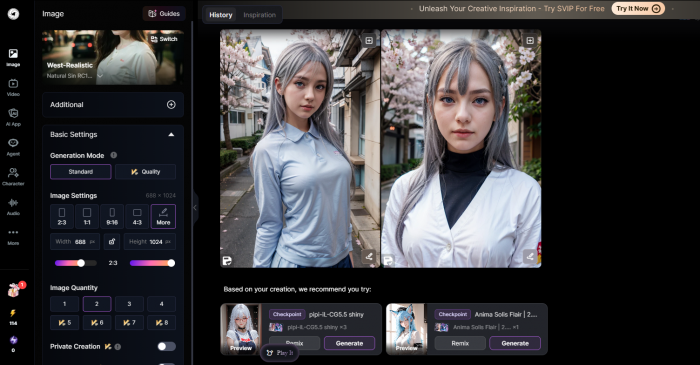
SeaArt can also create impressive images, especially in stylized categories. It is particularly interesting for anime, fantasy, character concepts, digital art, 3D-inspired visuals, and expressive portraits. Its app listing describes support for text-to-image, image-to-image, LoRA, ControlNet, partial repainting, background removal, character repair, sketch-to-image, and AI filters.
The difference appears when you judge output by usefulness rather than beauty. SeaArt often gives visually exciting results, but it can feel more unpredictable. Leonardo AI tends to feel more consistent when you need a cleaner image for a real content workflow.
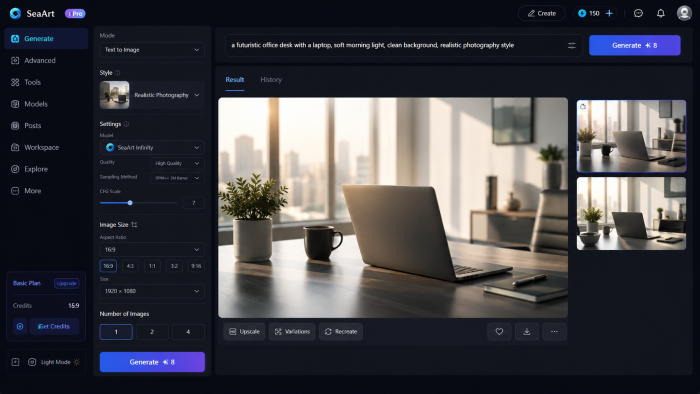
For example, if the prompt is “a futuristic office desk with a laptop, soft morning light, clean background, realistic photography style,” Leonardo AI is more likely to deliver something suitable for a blog header or landing page mockup.
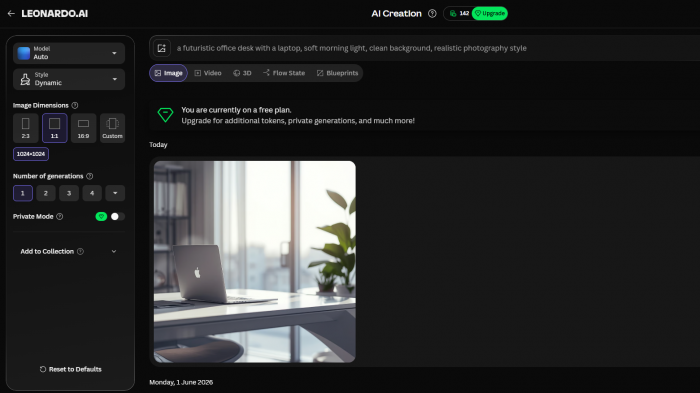
SeaArt may produce a more dramatic or artistic image, but the result may need more filtering before it feels brand-ready.
For anime or character-focused prompts, the balance changes. SeaArt’s wider community-driven style culture gives it a stronger creative range. If the prompt is about a fantasy warrior, cyberpunk character, anime student, game avatar, or stylized poster, SeaArt often feels more flexible and fun.
Prompt Control
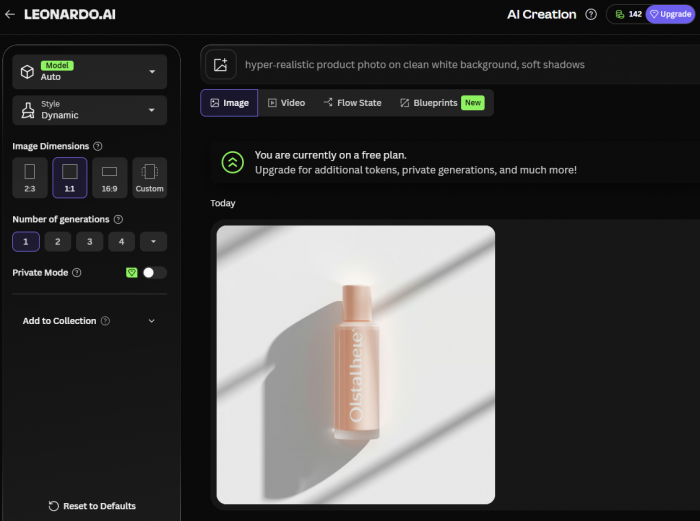
Leonardo AI is better for users who care about prompt control and repeatable results. The free plan includes access to platform models and third-party models, while features such as image generation, video generation, Flow State, presets, limited Elements, limited Realtime Canvas, and limited Realtime Generation are listed under the free tier.
This matters because Leonardo does not feel like a simple prompt box. It feels like a creative workspace where users can adjust the output direction with settings, references, presets, quality choices, and editing tools. That makes it more useful for people who want to produce multiple images in the same visual direction.
SeaArt gives users a different kind of control. Its strength is model variety, community inspiration, cloning, remixing, and style exploration. The Google Play listing describes a “Clone & Try” workflow where users can browse community creations and recreate styles or workflows with one tap.
That is useful for beginners because they do not need to understand every model setting from the start. They can look at what others created, copy the style, and adjust the idea. But the same community-heavy experience can also feel crowded. Users who want a simple, professional workspace may find Leonardo easier to manage.
Editing and Post-Generation Tools
This is one of Leonardo AI’s strongest areas. The platform is not only about generating a first image. It also gives users tools to improve, expand, remove, upscale, or guide an image after the first result.
Leonardo’s token usage table lists costs for features such as remove background, upscalers, Canvas, image guidance, Prompt Magic, and Alchemy. The important point is not just that these tools exist. The important point is that they are part of the same workflow. A user can generate a visual, improve the quality, remove the background, or make controlled edits without starting from zero every time.
SeaArt also includes several editing-style features. Its app listing mentions background removal, partial repainting, character repair, sketch-to-image, AI filters, image-to-image, and ControlNet. This makes SeaArt more powerful than a basic AI art generator, especially for creative users who like experimenting with different looks.
The difference is workflow clarity. Leonardo feels more organized for editing and refinement. SeaArt feels broader, but also busier. If you enjoy exploring tools and models, SeaArt gives you a lot to play with. If you want to fix an image quickly and move it into a content project, Leonardo is easier to trust.
Ease of Use
Leonardo AI feels more polished from a user experience point of view. The interface is clearer, the generation process is more structured, and the tool categories are easier to understand. It is not perfect, but it feels designed for people who want a controlled production space.
SeaArt feels more like a creative community mixed with an AI studio. That has advantages and disadvantages. The platform can feel exciting because there are many models, styles, characters, templates, and community examples. But it can also feel more crowded for users who only want to create a clean image quickly.
This is where the article’s “free tool” angle becomes important. Free users have limited attempts. A confusing interface can waste those attempts. A clean interface can save them. Leonardo AI does better for users who want fewer decisions and more direction. SeaArt does better for users who enjoy browsing, remixing, and testing different visual styles.
Community and Style Variety
SeaArt wins in community-led discovery. It is built around inspiration, cloning, models, and creative exploration. This makes it especially useful for users who do not yet know how to write strong prompts. Instead of starting from a blank box, they can browse what others are making and use that as a starting point.
SeaArt’s pricing FAQ also says LoRA training is available to all users, with Credits deducted based on training complexity and duration. That gives advanced creators a path to more personalized styles, although free users still need to think carefully about resource limits.
Leonardo AI also supports models and fine-tuning, but its pricing page shows personal AI model training starts from paid plans, not the free tier. The same page says users can train a model by uploading a small collection of images, usually 10 to 20, to recreate a style, theme, or subject.
So, SeaArt feels more open for community-style exploration. Leonardo feels more professional, but some of its deeper personalization tools sit behind paid plans.
Commercial Use and Ownership
This section matters for anyone using AI images in blogs, ads, YouTube thumbnails, ecommerce mockups, or client work.
SeaArt’s pricing FAQ says the intellectual property rights of content generated by the user belong to the user. It also says SeaArt does not prohibit users from using their own or others’ works commercially, but users need authorization from owners when using other people’s works and must take responsibility for commercial risks.
Leonardo AI has a more specific free-plan condition. Its pricing page says free-tier users receive a non-exclusive, royalty-free license to use generated content commercially, but Leonardo AI holds rights to use, reproduce, modify, and distribute images created by free users. Paid users retain full ownership and intellectual property rights for generated images.
This does not automatically make Leonardo AI unsuitable for free commercial use, but it does mean users should understand the difference between free and paid ownership terms. For serious brand work, paid plans are usually safer because private generations, clearer ownership terms, and higher quality controls matter.
Mobile Experience and Public Feedback
Both tools have mobile apps, but the public app-store experience is mixed.
SeaArt’s Google Play listing shows it as an AI photo and video maker with more than 5 million downloads, a Mature 17+ rating, and mixed user feedback. The listing highlights AI video, text-to-image, image-to-image, LoRA, ControlNet, background removal, character repair, and community remixing. It also shows that the app may collect personal info, financial info, and other data types, with data encrypted in transit and a deletion request option.
Leonardo AI’s Google Play listing describes it as an AI image and video generator with image editing, upscaling, templates, and support for multiple models. It also claims a community of more than 60 million creative minds and more than 2 billion AI generations.
For users who mainly work on desktop, Leonardo feels better as a serious creative workspace. For users who like mobile-first inspiration, character browsing, and community remixing, SeaArt can feel more active and playful.
Where SeaArt Is Better
SeaArt is better for users who want a broad creative playground without paying immediately. It is especially useful for stylized images, anime looks, fantasy art, character ideas, visual experiments, and community-led inspiration.
SeaArt is also the better choice when the user wants to create many different visual directions quickly. The daily free creation allowance makes it easier to test ideas without thinking about token math every few minutes.
SeaArt works best for:
● Creators who want to explore anime, character art, fantasy visuals, and stylized image ideas.
● Beginners who like remixing community examples instead of building every prompt from scratch.
● Users who care more about visual variety than a perfectly controlled workspace.
● Hobby users who want a free AI art tool for daily experimentation.
Its biggest weakness is that the experience can feel crowded. The platform has many features, community elements, and model options, which can be exciting for some users and confusing for others.
Where Leonardo AI Is Better
Leonardo AI is better when the output needs to look polished, controlled, and ready for use in a real content workflow. It is stronger for blog covers, social media graphics, product concepts, clean portraits, brand visuals, and marketing-style images.
The free plan is more limited in some ways, but it gives users a more professional environment. The token system also makes costs easier to understand once users learn how different features consume tokens.
Leonardo AI works best for:
● Bloggers, marketers, and content creators who need clean visual assets.
● Designers who want stronger control over image quality, references, and editing.
● Users who prefer a structured workspace over a community-heavy interface.
● Creators who want to improve or refine images after generation instead of endlessly regenerating.
Its biggest weakness is that advanced features can reduce the free token balance quickly. A user who only creates basic images may get plenty of value from the free plan. A user who uses Alchemy, upscaling, image guidance, and editing tools repeatedly may hit the limit faster than expected.
Final Verdict
SeaArt is the better free AI image generator for exploration. It gives users more room to play with styles, community ideas, character art, anime visuals, and daily creative testing. If your goal is to experiment, remix, browse models, and create many different ideas, SeaArt feels more generous and more fun.
Leonardo AI is the better free AI image generator for controlled output. It feels cleaner, more organized, and more useful for creators who want images they can actually use in blogs, thumbnails, brand mockups, and social posts. Its free plan requires more token awareness, but the results often feel more production-ready.
The winner depends on what “better” means to you. If better means more creative freedom on a free plan, choose SeaArt. If better means cleaner results and a more professional workflow, choose Leonardo AI.
For most serious content creators, Leonardo AI is the stronger free tool. For casual creators and AI art explorers, SeaArt is the more enjoyable free tool.
Comments