

The web did not become fast simply because internet connections improved. Speed came from removing small delays at every stage: deciding how data should travel, preventing network overload, avoiding repeated downloads, shortening physical distance and helping browsers process pages more efficiently.
The most important ideas were often invisible to users. They worked underneath the page, cutting out requests, reducing wasted bytes and deciding which work needed to happen first.
The Eight Ideas Compared
| Tech idea | Bottleneck it removed | Core mechanism | What users experienced | Main limitation |
| Packet switching | Inefficient dedicated connections | Divided data into independently routed packets | Many users could share networks efficiently | Packets could arrive late, out of order or not at all |
| Congestion control | Network collapse under heavy traffic | Adjusted sending speed according to network conditions | More stable transfers during busy periods | Conservative recovery could temporarily reduce speed |
| Persistent connections and multiplexing | Repeated connection setup and request queues | Reused connections and carried several streams together | Complex pages assembled sooner | Heavy pages could still create too much work |
| Data compression | Excessive transfer size | Encoded files using fewer bytes | Faster downloads and lower data use | Compression itself requires processing |
| Caching | Repeated downloads of unchanged content | Reused stored responses and validated stale copies | Return visits and repeated navigation felt faster | Poor rules could serve outdated content |
| CDNs and edge delivery | Long physical routes and overloaded origin servers | Stored and processed content closer to visitors | More consistent global performance | Dynamic and personalised content is harder to cache |
| Faster browser engines | Slow code execution and rendering | Optimised parsing, compilation, layout and painting | Web applications became smoother and more capable | Excessive JavaScript could still block the page |
| Priority and progressive loading | Too much work during the first load | Loaded critical content first and deferred the rest | Pages became useful before everything finished | Incorrect priorities could delay important elements |
1. Packet Switching Made Shared Networks Practical
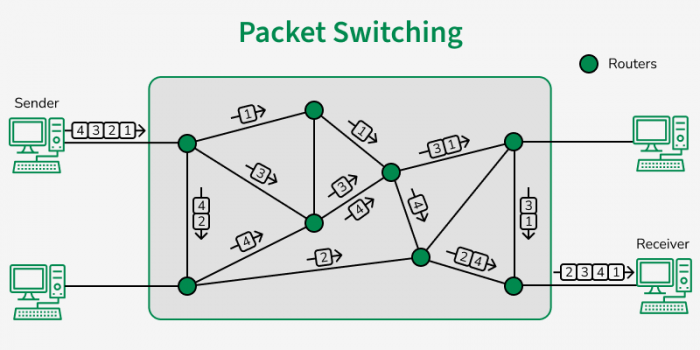
Before the web could become fast, the internet needed an efficient way to move information between computers. Traditional telephone systems were built around circuit switching. A dedicated communication path was reserved for the duration of a call, even during moments when neither person was speaking. That model worked for continuous voice conversations, but it was wasteful for computer communication, which often happens in short bursts.
A browser may request a file, wait while the server prepares it, receive the response and then remain quiet until another request is needed. Reserving an entire route for that exchange would leave network capacity unused.
Breaking Data Into Packets
Packet switching divided information into smaller units called packets. Each packet carried enough addressing information to travel through the network and reach the correct destination.
The packets did not necessarily follow the same route. One could travel through one group of routers while another took a different path. The receiving computer then placed them back into the correct order.
This approach allowed many users and services to share the same network links. Capacity could be used wherever demand existed rather than being locked to one conversation.
Why It Improved Speed
Packet switching did not guarantee that every packet would arrive quickly. Its strength was flexibility. If one route became unavailable or congested, packets could be directed through another. Network links could carry traffic from thousands of unrelated exchanges instead of remaining reserved for individual sessions.
The idea made the internet scalable enough to support the web. Without it, connecting millions of people to millions of services would have required a far more rigid and expensive network.
The Hidden Cost
Packets can arrive out of order, become duplicated or disappear. Other technologies had to detect these problems and reconstruct a reliable stream. Packet switching created an efficient transport system, but reliability and traffic management still needed to be solved.
2. Congestion Control Prevented Speed From Becoming Collapse
A faster sender is not always a faster network. If computers transmit more data than routers and links can handle, packets begin to queue. Once those queues fill, packets are dropped and must be sent again. The extra retransmissions add even more traffic, making the congestion worse.
Early networks demonstrated that uncontrolled sending could reduce useful throughput rather than improve it.
Speed Based on Feedback
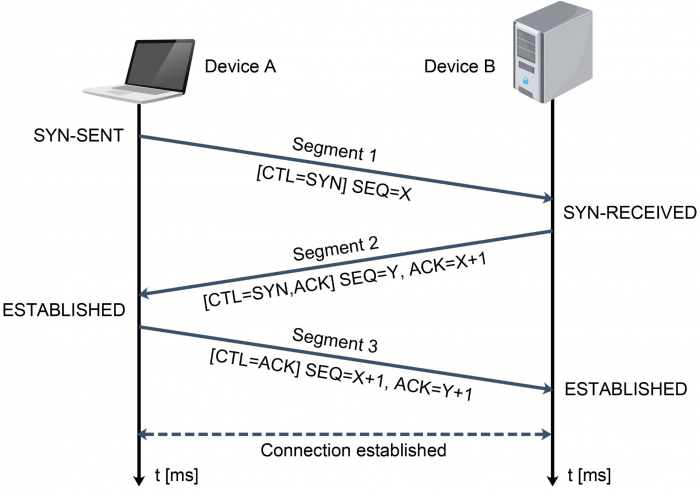
TCP congestion control introduced a feedback-driven approach. A sender did not assume that the network could accept unlimited data. It increased its sending rate gradually and watched for signs of trouble.
Successful acknowledgements suggested that more data could be placed in transit. Packet loss or growing delays suggested that the path was becoming overloaded. The sender then reduced its rate and tested the available capacity again.
This process involves several related techniques:
● Slow start increases the amount of data in flight cautiously rather than flooding the path immediately.
● Congestion avoidance continues increasing the rate more carefully once the connection has found a reasonable level.
● Loss detection treats missing acknowledgements or timeouts as evidence that the path may be overloaded.
● Fast retransmission replaces missing data without always waiting for a long timeout.
Why This Was a Speed Idea
Congestion control may appear to slow a connection because it sometimes instructs the sender to transmit less. In practice, it protects useful speed.
A network filled with duplicate transmissions and dropped packets delivers less usable information. By adapting to conditions, congestion control helps many connections share capacity without repeatedly pushing the network into failure. It also explains why download speed is not fixed throughout a transfer. A connection often begins cautiously, increases its rate and adjusts whenever conditions change.
The Larger Insight
Bandwidth alone does not determine performance. A network also needs rules for sharing that bandwidth. Congestion control turned speed from an aggressive race into a managed system.
3. HTTP Removed Repeated Connection Costs
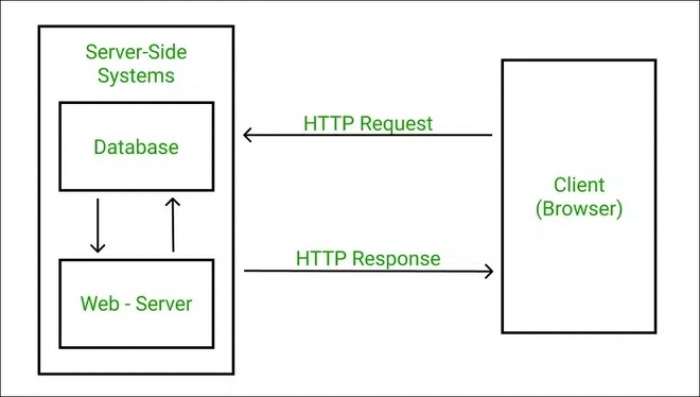
A web page may look like one item, but the browser usually builds it from many separate resources. It requests HTML, stylesheets, JavaScript, fonts, images, icons and data from APIs.
On early versions of the web, each request could carry a noticeable setup cost.
The Handshake Tax
Before useful data can move, the browser and server may need to establish a connection. Secure websites also require cryptographic negotiation.
Repeating this process for every small file creates unnecessary delay. A 5 KB icon may be quick to transfer, yet setting up the connection needed to request it can take longer than downloading the icon itself.
Persistent connections reduced that cost by allowing several requests to reuse the same connection. HTTP/1.1 made persistent connections standard, but browsers still faced a queuing problem. Requests on one connection were commonly handled in order. If an early response was delayed, later responses could be forced to wait.
Browsers worked around this by opening several parallel connections, but that added extra handshakes and increased competition for network capacity.
Multiplexing Changed the Queue
HTTP/2 divided communication into streams. Several requests and responses could share one connection and make progress without being treated as one simple line.
This was especially valuable for pages containing many small files. The browser could ask for a stylesheet, several scripts and multiple images without creating a separate connection for each one.
HTTP/2 also compressed headers. Web requests repeatedly include information such as cookies, accepted formats and browser details. Reducing that repeated overhead made each exchange lighter.
HTTP/3 moved HTTP onto QUIC, which runs over UDP and handles streams independently. Under TCP, a missing packet can temporarily delay all data following it on that connection, even when some of that data belongs to unrelated requests. QUIC limits that form of head-of-line blocking by containing loss within the affected stream.
What Users Actually Gained
The benefit was not necessarily a dramatic increase in raw download speed. The browser became better at coordinating many small transfers. That distinction matters. A page can have a fast server and small files but still load poorly if its requests are organised inefficiently. Modern HTTP reduced the time lost between those files.
4. Compression Made Every Connection Carry More
Increasing connection speed is one way to load a page faster. Sending less data is often cheaper and more immediate. A stylesheet may contain repeated property names. An HTML document may repeat tags and phrases. JavaScript files often include recurring patterns. Sending every repeated sequence in full wastes bandwidth.
Compressing Text Responses
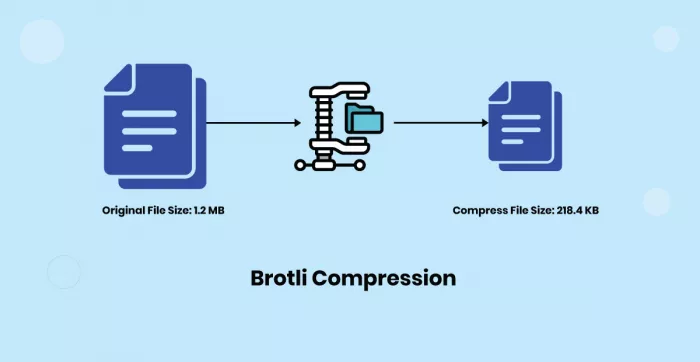
Compression systems such as Gzip and Brotli identify recurring patterns and represent them more compactly. The server compresses the response, the browser downloads fewer bytes and then reconstructs the original content.
Brotli is particularly effective for web content because its design and built-in dictionary work well with patterns commonly found in HTML, CSS and JavaScript.
The result can be understood through a simple distinction:
| Without compression | With compression |
| Every repeated pattern is transmitted in full | Repeated patterns can be represented using shorter references |
| More bytes cross the network | Fewer bytes cross the network |
| Transfer time increases on limited connections | The same page arrives sooner |
| Bandwidth costs are higher | Servers and visitors exchange less data |
Images Needed Different Methods
General text compression is not the main solution for photographs and graphics because formats such as JPEG are already compressed.
Image performance improved through better codecs, responsive delivery and resizing. A website does not need to send a 2,400-pixel photograph to a phone that displays it at 400 pixels wide. Responsive image markup lets the browser select a suitable file based on screen size and pixel density.
Formats such as WebP and AVIF can store images more efficiently than older formats in many situations. The gain depends on the type of image, chosen quality and browser support, so format selection still requires testing rather than automatic conversion.
Compression Has a Cost
Smaller files require processing to encode and decode. Extremely high compression settings can consume significant server time while saving only a small number of additional bytes. The useful target is not the smallest possible file. It is the best balance between transfer size, encoding cost and visible quality.
5. Caching Made “Already Downloaded” a Speed Feature
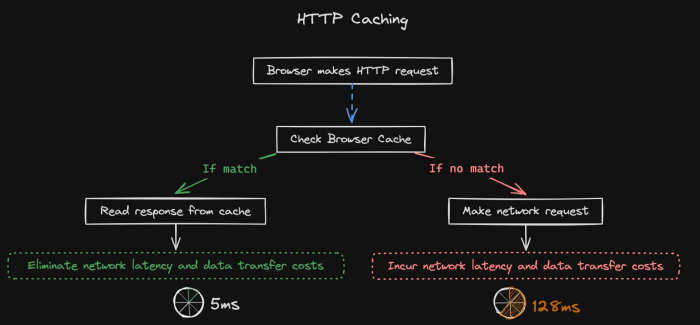
The fastest request is the one the browser does not have to make. Websites contain many files that remain unchanged across visits. Logos, fonts, icons and versioned scripts may be identical for weeks or months. Downloading them every time would add delay without providing newer information.
Caching allows a browser, CDN or intermediary server to store a response and reuse it later.
Freshness Is the Real Challenge
Saving files is easy. Deciding whether a saved file is still valid is the more important problem. HTTP caching uses rules that tell the browser how long a response can be treated as fresh. A file with a suitable max-age value can be reused without contacting the server until that period expires.
Once a cached response becomes stale, the browser does not always need to download the complete file again. It can send a conditional request using a validator such as an ETag or Last-Modified date.
The server can then answer in one of two ways:
● The resource has changed, so the server sends the new version.
● The resource is unchanged, so the server returns a small 304 Not Modified response and the browser reuses its existing copy.
That second outcome still requires a network trip, but it avoids retransmitting the entire resource.
Versioned Files Solved a Difficult Trade-Off
Long cache periods are useful until a website needs to update a file. A common solution is content fingerprinting. The file name includes a hash or version value, such as app.4fd81c.js. When the code changes, the file receives a different name. The old file can be cached for a long period because any new version will be requested through a new URL.
This separates two goals that appear to conflict:
● Keep unchanged files for as long as possible.
● Deliver updates immediately when a file changes.
Where Caching Goes Wrong
Caching personalised pages can expose private information if shared incorrectly. Caching HTML too aggressively can leave visitors with outdated content. Setting every response to bypass the cache removes much of the speed benefit.
Good caching is not simply “store more”. It is a policy for deciding what can be reused, by whom and for how long.
6. CDNs Reduced the Cost of Distance
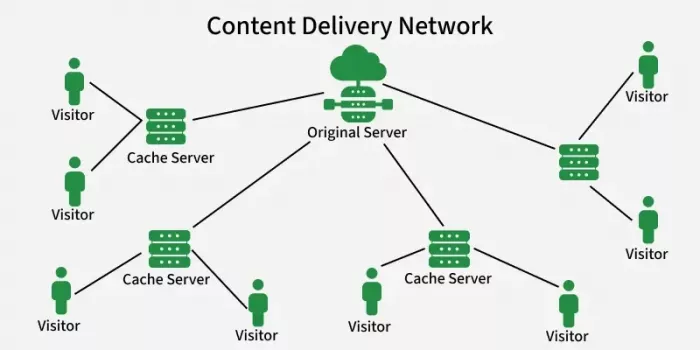
Data travels quickly through fibre, but physical distance still matters. A request from Delhi to a server in California must cross several network segments before the server can respond. Even when the requested file is tiny, each round trip adds latency.
A content delivery network reduces that distance by placing copies of content at edge locations closer to visitors.
The Origin and the Edge
The origin server contains the website’s primary content. Edge servers are distributed across regions and cache selected responses from that origin.
When a visitor requests a cacheable file, the CDN checks whether a nearby edge location already has a valid copy. A cache hit can be served immediately from the edge. A cache miss requires the CDN to retrieve the file from the origin, store it and then deliver it. Later visitors in that region may receive the cached version. The first request may still be slow. The repeated requests become much cheaper.
Anycast Improved Routing
Large CDN networks often use Anycast routing. Multiple data centres announce the same IP address, and the network directs the visitor towards an appropriate location based on routing conditions.
“Nearest” does not always mean the shortest geographical distance. It usually means the location that the network can reach through the most suitable route at that moment. This distinction is valuable because internet paths do not follow straight lines on a map.
Edge Delivery Became More Dynamic
CDNs began with static files such as images, CSS and JavaScript. Modern edge platforms can also run code, personalise selected responses, validate authentication and assemble content closer to the visitor.
Dynamic content remains more difficult because it may depend on account data, inventory, location or real-time information. Serving it safely from the edge requires careful cache keys and rules.
For example, a shopping page must not accidentally serve one customer’s basket to another. The CDN needs to understand which parts are shared and which parts are private. The major insight behind CDNs was that speed depends on placement. A fast server is less useful when every visitor must reach it across a long route.
7. Browser Engines Turned Downloaded Files Into Usable Pages
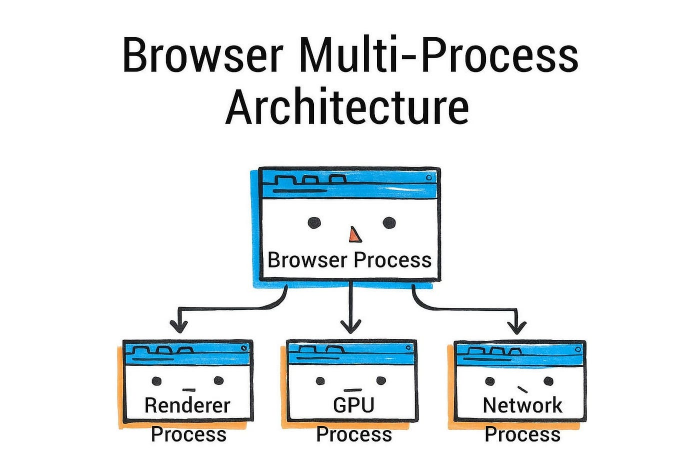
Network speed only determines how quickly resources reach the device. The browser still has to turn those resources into a working page. That process can be expensive.
The Rendering Pipeline
A simplified browser workflow looks like this:
1. HTML is parsed into a document structure.
2. CSS is parsed into style rules.
3. The browser combines structure and styling to calculate the layout.
4. Elements are painted into visual layers.
5. Those layers are composited onto the screen.
6. JavaScript can modify the page and trigger parts of the process again.
A page may arrive quickly but remain unresponsive if JavaScript occupies the main thread. Long-running scripts delay clicks, typing, scrolling and visual updates.
JavaScript Engines Became Adaptive
Modern JavaScript engines do not execute every line in the same way. Code may begin in an interpreter so it can run quickly without a long compilation delay. Functions that execute frequently can then be compiled into faster machine code. The engine observes runtime behaviour and optimises code based on the types and patterns it encounters.
If those assumptions later become incorrect, the engine may discard the optimised version and fall back to a safer path. This adaptive approach allowed browsers to run applications far more complex than early scripts.
Rendering Improvements Mattered Equally
Browser teams also improved layout calculation, painting, graphics acceleration and memory management.
Some visual work could be moved to the GPU. Independent layers could be updated without repainting the entire page. Off-main-thread processing reduced the amount of work competing with user input.
These changes made online maps, document editors and design applications possible, but they did not eliminate performance mistakes. A site that sends several megabytes of JavaScript can still overwhelm a low-powered phone. Faster engines raised the ceiling. They did not remove the need for disciplined code.
8. Priority Loading Changed the Definition of “Finished”
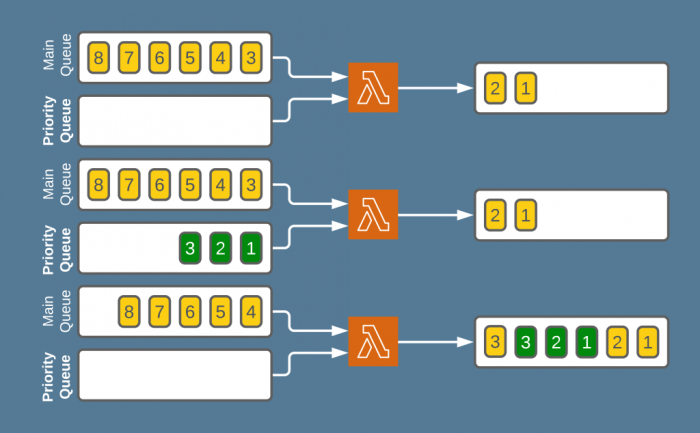
A page does not need every file before it can become useful. The browser may need the heading, main stylesheet and opening image immediately. It does not need a photograph near the bottom of the article, code for a settings panel or an embedded video the visitor has not opened. Priority loading improved speed by separating urgent work from optional work.
The Critical Rendering Path
The critical rendering path is the sequence of resources the browser needs before it can display the first useful view.
A stylesheet can block rendering because the browser needs it to know how the page should look. A synchronous script can pause HTML parsing while it downloads and executes. A large hero image may become the biggest visible element, making its timing important.
Performance work therefore asks a practical question: which files are preventing the first screen from becoming complete? The answer is not always “download everything sooner”. It may be “remove this file from the critical path”.
Lazy Loading and Code Splitting
Lazy loading postpones images, frames or modules until they are close to being needed. Code splitting divides an application into smaller bundles. A visitor opening the homepage receives the homepage code rather than also downloading code for account settings, reporting tools and administrative screens.
Dynamic imports allow those sections to be requested when the visitor opens the relevant feature.
This reduces three types of initial work:
● fewer bytes are downloaded;
● less code is parsed and compiled;
● fewer tasks compete for the browser’s main thread.
Perceived Speed Became a Real Metric
A page can technically continue loading in the background while already feeling ready. Skeleton screens, progressive image rendering and immediate text display all improve perceived speed because the visitor receives useful feedback instead of staring at an empty area.
These techniques should not be used to disguise a genuinely slow service. A loading animation does not compensate for an API that takes ten seconds to respond. The strongest implementations combine early visual progress with real reductions in critical work. Priority loading changed the target from “everything has finished” to “the important part is ready”.
Why These Ideas Worked Together
Each idea removed a different kind of delay. Packet switching made shared networks efficient. Congestion control kept those networks stable. Modern HTTP reduced setup and queuing costs. Compression lowered the number of bytes in each transfer. Caching removed transfers that did not need to happen. CDNs shortened the route to popular content. Browser engines processed pages more quickly, while priority loading ensured that urgent work happened first.
Consider a visitor opening an online store:
● DNS locates the service.
● A nearby edge server accepts the request.
● HTTP/3 carries several streams through one secure connection.
● Cached fonts and scripts are reused.
● Brotli reduces the size of new text files.
● Responsive images prevent the phone from receiving desktop-sized photographs.
● The browser executes the essential code first.
● Product images below the visible area wait until the visitor scrolls.
No single stage explains why the page feels fast. The result comes from removing delay across the entire chain.
The Idea Behind the Faster Web
The web became quicker when engineers stopped assuming that speed meant sending data at a higher rate. Sometimes the better answer was to send fewer bytes. Sometimes it was to avoid the request, reuse the connection, move the server closer or delay work that the visitor did not yet need.
That is the lasting value of these eight ideas. They treated waiting as a collection of specific problems rather than one vague limitation. Once each delay could be identified, it could be compressed, cached, rerouted, reorganised or removed.
Comments