

Flick is useful because it puts caption creation, hashtag research, scheduling and analytics in one social media workspace. But that breadth can also be unnecessary if your everyday problem is much smaller: you need a good caption, a relevant set of hashtags and a quick way to get both without adding another paid platform to your stack.
That is where free Flick alternatives become interesting. The best option is not necessarily the tool with the longest feature list. It is the one that handles the part of Flick you actually need with less friction.
Flick Sets a High Bar
Before replacing Flick, it helps to understand what you are replacing. Flick is more than a hashtag generator. Its paid platform includes hashtag search, collections, suggested hashtags, advanced metrics, hashtag tracking, scheduling and Instagram analytics. Its Solo plan currently starts at £11 per month when billed yearly, with a seven-day trial.
Flick also offers free standalone hashtag and social-post generation tools, so switching purely because you want to generate one free caption does not automatically make sense. The alternatives below become more compelling when you want different controls, a lighter no-login workflow, stronger hashtag discovery, design integration or a different path from generation to publishing.
| Tool | Best For | Captions | Hashtags | Free Access |
| SmartPostly | Best overall free alternative | Yes | Yes | Free tools, no signup |
| Predis.ai | Hashtag discovery and context | Yes | Yes | Free standalone tools |
| OneUp | Captions with hashtags in one step | Yes | Yes | Free standalone tools |
| Ahrefs | Simple text generation | Yes | Yes | Free writing tools |
| Buffer | Generation plus publishing | Yes | Yes | Free tools + free plan |
| Canva | Visual-first social workflows | Yes | Yes | Free with usage limits |
1. SmartPostly: Best Overall Free Alternative
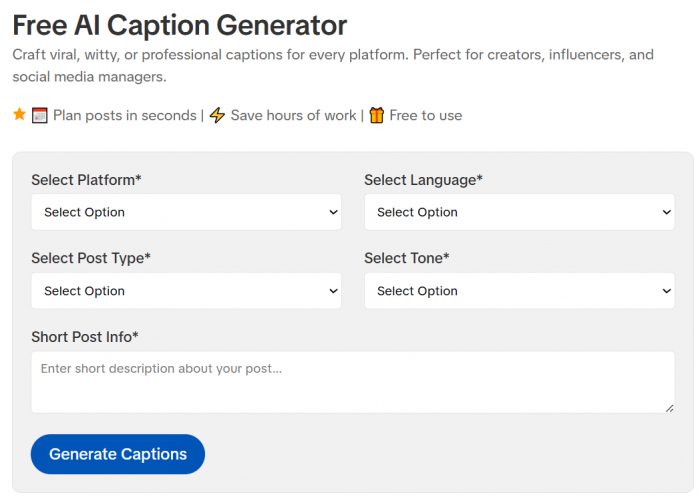
SmartPostly is the most straightforward option on this list for someone specifically trying to replace Flick's everyday caption and hashtag generation rather than its entire analytics and scheduling platform. Its Caption Generator and Hashtag Generator operate as separate focused tools, so you can generate the copy you need without first creating a social media workspace.
The caption generator lets you choose the platform, language, post type and tone before adding information about the post. It currently returns multiple caption options, while the hashtag tool lets you select a platform and language and then generate tags around a topic or niche. Both can be used without signing up.
What You Actually Get
● Caption controls are useful enough to change the direction of the output. Platform, language, post type and tone give the generator more context than tools that ask for nothing beyond a keyword.
● Hashtags are generated separately around the actual niche or post topic. This is useful when you already have a caption and do not want another tool rewriting the entire post.
● The workflow is deliberately lightweight. You can generate, copy and continue working in Instagram, Meta Business Suite or your existing scheduler without connecting social accounts.
Why It Works as a Flick Alternative
SmartPostly works best when your use of Flick begins and ends with “help me write this post and give me hashtags for it.” It removes the surrounding analytics and management layer rather than trying to reproduce it.
That narrower scope is an advantage for creators, freelancers and small businesses that already have a publishing workflow and simply need help turning an idea into usable social copy.
Where It Falls Short
Flick goes considerably deeper in hashtag management. It offers search, collections, advanced hashtag metrics, tracking and Instagram performance analysis, areas that a simple generator cannot replace. SmartPostly therefore makes more sense as a content-generation replacement than a full Flick replacement.
Free Access
SmartPostly currently describes its hashtag generator as free forever with no signup required, while its caption generator is also free to use without an account. Advanced Pro versions are available for users who want additional functionality.
Final Take
SmartPostly is the best overall choice if you mainly want free captions and hashtags with minimal setup. It gives enough controls to make generation useful without making you adopt another complete social media platform.
2. Predis.ai: Best for Hashtag Discovery
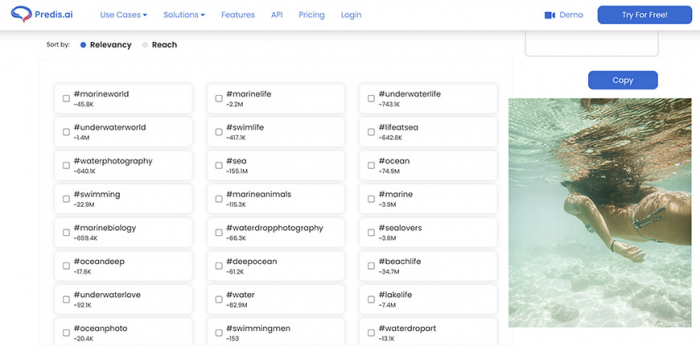
Predis.ai deserves a high position because its hashtag tool goes further than simply turning a keyword into a random-looking list. You can search using keywords or upload an image, and the tool exposes options to sort hashtags around relevancy or reach. Its separate caption generator also supports tone, language, hashtags and emojis.
This makes Predis.ai especially interesting for visual creators. If you are unsure how to describe a photo well enough to research tags manually, image-based hashtag generation removes part of that guesswork.
What You Actually Get
● Hashtags can be generated from keywords, phrases or an uploaded image, giving you more ways to describe the post.
● Reach and relevance information adds context to hashtag selection instead of treating every generated tag as equally useful.
● Caption generation includes practical controls for tone and language, with optional hashtags and emojis built into the output.
Why It Works as a Flick Alternative
Predis.ai is a better fit than a basic AI generator when the hashtag side of Flick is what you care about most. It gives you more information for choosing among hashtags instead of merely producing a block to paste beneath the caption.
Where It Falls Short
Its broader product extends into complete AI-generated posts, videos, carousels and scheduling. That can be useful, but it also means Predis.ai can become more platform than you need if the goal is simply generating a few lines of copy.
Free Access
Predis.ai currently offers standalone Instagram caption and hashtag generators for free, including a no-login social caption tool.
Final Take
Choose Predis.ai when hashtag selection matters more than absolute simplicity. The ability to work from images and compare hashtags using relevance or reach gives it a stronger research angle than most lightweight generators.
3. OneUp: Best for Captions and Tags Together
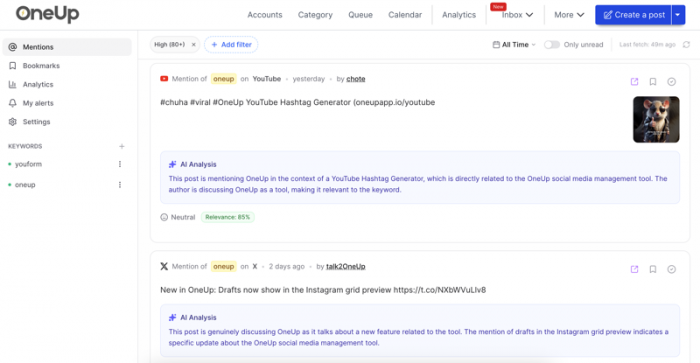
OneUp takes a slightly different approach. Its free Instagram Caption Generator lets you describe the post, choose a tone, select a post length and specify how many hashtags should appear in the generated caption. That makes it convenient when you would rather produce the entire text block in one pass.
There is also a separate hashtag generator when you need tags without rewriting the caption. It can currently generate up to 30 hashtags from a description or keyword set.
What You Actually Get
● Tone, length and hashtag quantity are controlled from the same caption-generation screen, which makes the output easier to shape before copying.
● Hashtags can be generated independently when the caption is already finished.
● The free caption generator currently states that there is no generation limit, making it attractive for people producing a large number of rough caption drafts.
Why It Works as a Flick Alternative
OneUp is particularly good for speed. Instead of generating a caption, opening another tool and then deciding how many hashtags to include, you can handle the basic post copy in one operation.
It also has a natural upgrade path into OneUp's scheduler if your needs later move beyond generation.
Where It Falls Short
The hashtag experience is more generation-oriented than research-oriented. If you want deeper metrics explaining why one tag may be more useful than another, Flick or Predis.ai provides a more analytical workflow.
Free Access
OneUp says both its Instagram caption and hashtag generators are free standalone tools, and the caption generator does not require signup.
Final Take
OneUp is a strong choice for creators who want to enter a post idea and leave with a nearly complete caption-and-hashtag package. It prioritizes production speed over deep hashtag analysis.
4. Ahrefs: Best Lightweight Generator
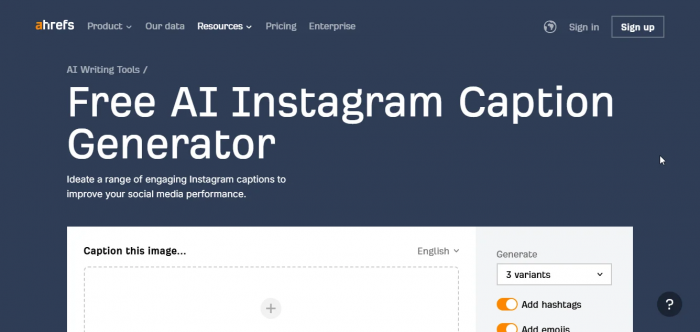
Ahrefs is better known for SEO, but its free AI Writing Tools collection includes dedicated Instagram Caption Generator, Instagram Hashtag Generator, Social Media Caption Generator and Social Media Hashtag Generator tools.
The appeal here is simplicity. You are not entering a social media management dashboard or connecting an Instagram profile. These are standalone writing utilities designed to solve a narrow problem quickly.
What You Actually Get
● Separate Instagram-specific caption and hashtag generators make it easy to work on each part independently.
● Broader social media generators are available as well, which is useful if the same content needs to move beyond Instagram.
● The interface stays focused on text generation, rather than surrounding a basic caption request with publishing and analytics features.
Why It Works as a Flick Alternative
Ahrefs is useful when you do not actually want a social media platform. You want a writing utility, you use it, and then you return to your normal workflow.
That distinction matters for occasional users who may generate social copy only a few times each week.
Where It Falls Short
The simplicity also limits it. Ahrefs' writing tools do not reproduce the deeper hashtag tracking, collections and Instagram analytics that make Flick valuable to users running an ongoing hashtag strategy.
Free Access
Ahrefs currently lists these generators within its free AI Writing Tools collection.
Final Take
Ahrefs is the practical pick when you want a clean standalone generator and little else. It is easy to recommend for occasional caption and hashtag work, but less suitable for anyone trying to measure hashtag performance over time.
5. Buffer: Best for Publishing Too
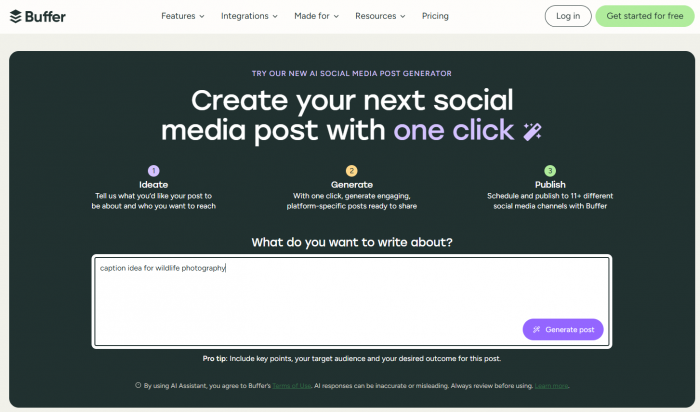
Buffer sits closer to Flick in overall workflow than the standalone generators above. Alongside its social publishing platform, Buffer offers a free AI hashtag generator and social media post creator. Its hashtag tool does not require a Buffer account and tailors results to the target platform rather than returning the same type of list everywhere.
Buffer's AI post tools can also help generate and reshape captions, including changing tone, length and style.
What You Actually Get
● The standalone hashtag generator is free without signup and is designed to return a mix of broad, niche and community-oriented tags.
● AI writing extends beyond first-draft generation, with options for adapting social copy to different styles and channels.
● Publishing is available in the same ecosystem, so you can move from writing into scheduling if your workflow grows.
Why It Works as a Flick Alternative
Buffer is the strongest option here for someone who initially wants free generation but may eventually need generation and publishing in one place.
Its free plan currently supports up to three social channels with basic publishing tools, giving it more operational depth than a standalone caption generator.
Where It Falls Short
Buffer's broader strength is publishing rather than Flick-style Instagram hashtag analytics. Users whose main requirement is detailed hashtag performance tracking may still find Flick more specialized.
Free Access
The standalone hashtag generator is free without a Buffer account, and Buffer also maintains a free platform plan.
Final Take
Choose Buffer if free caption and hashtag assistance is only the beginning of your workflow. It becomes more attractive when you also want to organize and publish the resulting content.
6. Canva: Best for Visual-First Creators
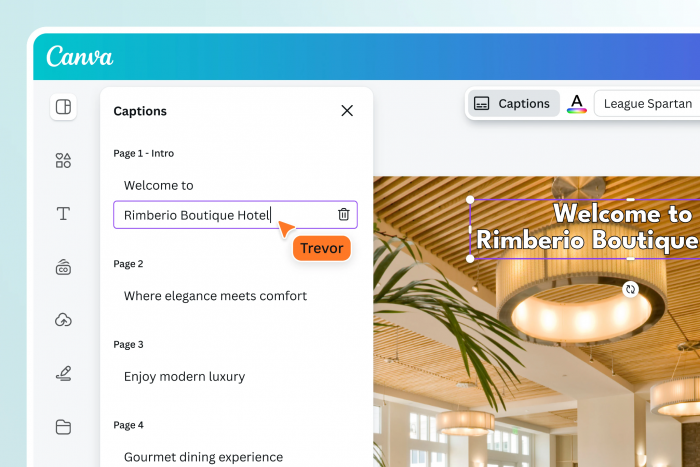
Canva approaches the problem from the opposite direction. Instead of beginning with hashtag research, it starts where many Instagram creators already work: the visual.
Its AI Caption Generator can produce Instagram caption ideas from a prompt, while its Instagram Hashtag Generator uses Magic Write to generate tag suggestions. Those tools sit alongside Canva's design environment, so copy and creative can be developed in the same workspace.
What You Actually Get
● Captions and hashtags sit close to the design workflow, which reduces the need to jump between a graphics tool and separate copy generators.
● Magic Write can generate more than captions, making it useful for adapting an idea into supporting social copy.
● The same environment can handle the actual Instagram visual, which is Canva's clearest advantage over dedicated hashtag generators.
Why It Works as a Flick Alternative
Canva makes sense when your workflow begins with an image, carousel or campaign design rather than hashtag research. A creator can develop the visual and then generate supporting copy without moving the project elsewhere.
That is a different proposition from Flick, but for design-led teams it can be the more convenient one.
Where It Falls Short
Canva is not built around deep Instagram hashtag analytics. Its hashtag generator helps with ideas, while Flick provides a much more specialized system for tracking and managing hashtag performance.
Free Access
Canva says free users can access Magic Write with a limited number of queries, currently up to 50 free uses, while additional usage is available through paid plans.
Final Take
Canva is the best fit when captions and hashtags are supporting pieces of a visual-content workflow. If hashtag research itself is the main job, other options on this list are more focused.
Generation and Research Are Different
One reason free hashtag tools are difficult to compare is that they do not all solve the same problem.
A hashtag generator answers, “What tags are related to this post?” Give it a description such as home workout for beginners and it can quickly produce relevant ideas.
A hashtag research tool attempts to answer harder questions: Which tags fit the account? How competitive are they? Which ones have worked before? Is the account actually ranking for them?
Flick is stronger in the second category because its paid platform includes advanced hashtag metrics and performance tracking. Predis.ai sits somewhere in the middle by adding reach and relevance information to its suggestions, while SmartPostly, OneUp, Ahrefs and Buffer are more useful when speed and idea generation are the priority.
Do not pay for research depth you will never use, but do not mistake a generated list for a complete hashtag strategy either.
Caption Quality Needs Context
Caption generators have a similar problem. Producing grammatically correct text is easy. Producing text that matches a specific post is harder. The useful question is therefore not simply “Does it generate captions?” Look at how much information you can give the tool before generation. Even a good AI-generated draft usually needs a stronger hook, cleaner pacing, and a more natural CTA. The same principles behind Instagram captions that earn more comments, saves and shares still matter once the generator has done its part.
If you can specify the platform, tone, post type, length, language or desired hashtag use, you have more ways to push the output toward the intended result. SmartPostly, Predis.ai and OneUp stand out here because their free tools expose several of these controls directly.
Even then, generated copy should be treated as a draft. The strongest caption usually contains something the generator cannot know unless you provide it: a real observation, specific product detail, customer language, location, opinion or piece of context unique to the post.
That final human edit is often what separates a usable caption from one that sounds interchangeable with a thousand others.
Which Flick Alternative Fits You?
The ranking becomes much easier once you decide what you are trying to replace.
● Choose SmartPostly if you want the best balance of free caption and hashtag generation without signup or a complicated dashboard.
● Predis.ai is better if hashtag discovery is the priority and you want additional context such as relevance, reach or image-based suggestions.
● OneUp for creating a caption and choosing the number of hashtags in the same generation step.
● If you want lightweight standalone writing tools and have no interest in another social management platform, choose Ahrefs.
● Choose Buffer if generating content is likely to lead into scheduling and publishing across several accounts.
● Try Canva if your Instagram workflow begins with designing the post and you want AI copy tools close to the visual itself.
The key is not finding the product with the most checkmarks. It is finding the one that removes the most work from your actual posting process.
What Free Tools Do Not Replace
Free generators are surprisingly capable at solving a blank-page problem. They can suggest hooks, produce caption drafts and build a usable starting list of hashtags within seconds.
What they generally do not replace is feedback from your own account.
Knowing that #smallbusiness is related to your post is different from knowing whether that tag contributes anything to your specific Instagram strategy. Flick's deeper value appears in areas such as hashtag tracking, advanced metrics, collections and post-level performance analysis.
For a creator publishing occasionally, that may be unnecessary overhead. For a social media manager running multiple accounts and actively analyzing discovery performance, it can be exactly what makes a paid platform worthwhile. Free is therefore not automatically better. Free is better when the additional paid information would not change what you do next.
The Best Free Pick
For people specifically searching for a free Flick alternative for hashtags and captions, SmartPostly is our top overall recommendation. It concentrates on the two tasks at the center of this comparison, gives users practical controls over the generated copy and currently allows both tools to be used without signup.
Predis.ai is the more interesting choice when hashtag research matters and reach or relevance data can influence what you select. OneUp is excellent for fast combined caption-and-hashtag generation, while Buffer and Canva become stronger when publishing or design is part of the same workflow.
Flick itself remains the more complete option if hashtag tracking, scheduling and Instagram analytics are central to how you work. But if those features sit unused while you mostly open the platform to write captions and find tags, a smaller free tool can be the more sensible choice.
The best alternative is not the one that copies Flick most closely. It is the one that lets you stop paying, configuring or clicking through features that have nothing to do with the job you opened the tool to complete.
juliana phil
Aug 28, 2026Reader Testimonial: Lessons From an Online Investment Scam I am sharing my experience in the hope that it may serve as a cautionary example for other investors. I lost more than $740,450 after becoming involved with an online investment opportunity that I later came to believe was fraudulent. The financial loss was substantial, but the experience was also emotionally difficult and left me uncertain about what steps I could take next. After discovering the problem, I sought guidance from Kristina Hooper. I explained what had happened and provided the information I had relating to the transactions and the platform involved. They assisted me in understanding the recovery process and guided me through the steps I needed to take. I recently received my funds back, which was a considerable relief after what had been a very stressful period. Looking back, my experience has reinforced the importance of conducting independent checks before investing online. Investors should verify the identity and legitimacy of a company, be cautious about promises of unusually high returns, and carefully investigate any request for additional payments or personal information. I am sharing this account as my personal experience rather than as a recommendation or guarantee regarding any particular company or recovery service. Anyone wishing to ask about my experience may contact me at kristina hooper24 @ gmail. Dco com
Login To Reply ↪