

Short answer: A Channel broadcasts to followers, a Group is a two-way chat where everyone talks and sees each other, and a Community bundles many Groups under one announcement feed.
Three tools, one app, and a comparison that trips up even heavy WhatsApp users. The reason is that Channels, Groups and Communities overlap on the surface and split hard underneath. Each one reaches a set of people, yet each was built for a different job.
The confusion carries a cost. A business runs a crowded Group when a Channel would do the same work quietly, or a creator launches a Channel when the audience wanted a room to talk in. The real differences sit in four places: who gets to speak, who can see whom, how far a message spreads, and how loudly it arrives. This comparison works through each of those, format by format.
The Three Formats at a Glance
The quickest read on the difference is the direction a message travels. A Channel broadcasts, a Group converses, and a Community stacks one on top of the other. The table below sets the headline differences side by side before the detail.
| Format | Message flow | Who can post | Audience size | Best suited for |
| Channel | One-to-many broadcast | Admins only | Unlimited followers | Public updates with no replies |
| Group | Many-to-many chat | Everyone, by default | Up to 1,024 members | Real discussion in a known circle |
| Community | Broadcast plus chat | Admins broadcast; members chat in sub-groups | Up to 100 linked Groups | One body running many related Groups |
Each row hides a deeper split. The sections that follow take the formats two and three at a time, so the contrast stays in view rather than getting lost in feature lists.
What a Whatsapp Channel Is
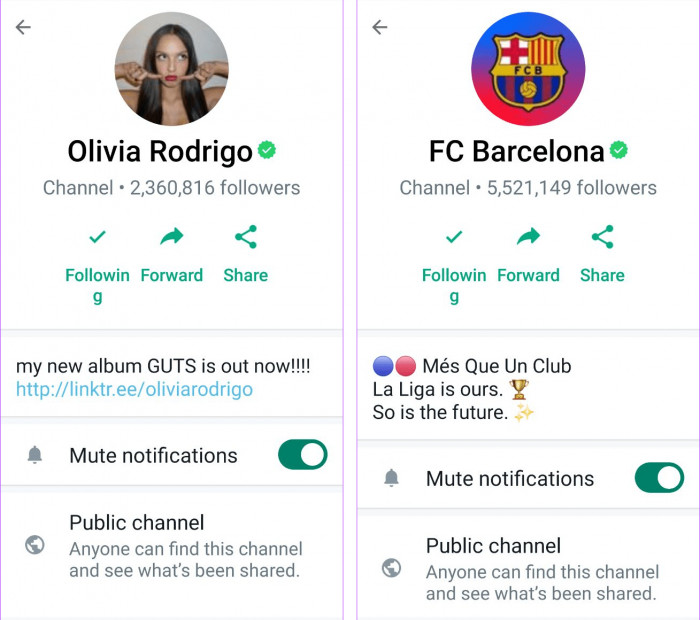
What separates a Channel from the other two is blunt: nobody can talk back. It is a one-way broadcast feed where only admins post and followers read. People who follow can react with an emoji or answer a poll, but they cannot reply in the feed or open a thread. Updates sit in a separate Updates tab, clear of personal chats.
The follower model is the second break from the rest of WhatsApp. No contacts are involved and no one is mutually visible. A follower never sees who else follows, and an admin never sees a follower's number or name unless that person is already saved as a contact. Admin identity stays hidden from followers too, and admins can go further by restricting who is allowed to follow or by blocking screenshots from the feed.
Scale is effectively open. A Channel can hold an unlimited number of followers, which is why newsrooms and public figures lean on the format. Up to 16 admins can share posting, and any admin can edit or delete an update for up to 30 days after it goes out.
The difference: A Channel trades conversation for reach and privacy.
What a Whatsapp Group Is
A Group is the mirror image of a Channel: everyone talks, and everyone is visible. It holds up to 1,024 members, and by default each of them can post freely and see the full member list. That openness is the whole value when the goal is discussion, and the whole problem once the group outgrows the size where conversation stays readable.
Admin tools give a Group more reach than it first appears. Admins can hold new members in an approval queue before they join, or flip the group into an admins-only posting mode that turns it into a read-only board. That setting imitates a Channel on the surface, with one gap covered later, every member can still see every other number.
Groups spread by invitation only. People are added directly or through a shared link, and no public directory exists for a stranger to find one. Reach stays inside the circle that already holds the link.
The difference: A Group keeps the conversation but exposes its members and cannot grow past the link.
What a Community Is
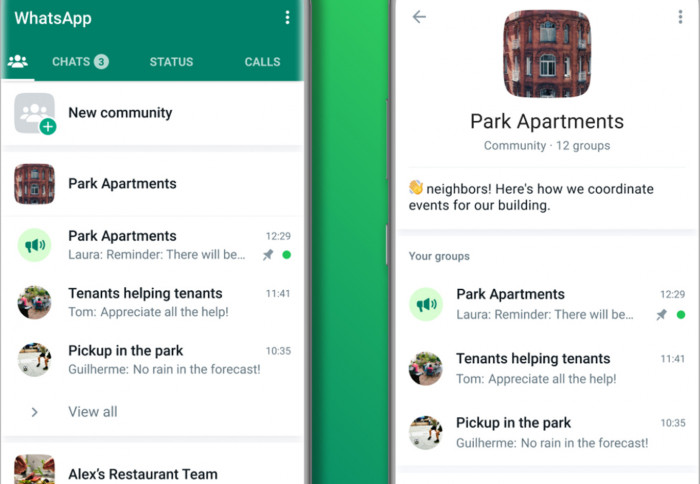
A Community is not a bigger Group, it is a layer above several of them. The format links related Groups under one roof and places a single announcement group on top. Picture a school that runs a separate Group for each class and then needs one place to reach every parent at once.
Creating a Community automatically adds a Community Announcements group. Every member belongs to it, only admins can post there, and it behaves like a Channel aimed at the whole Community. Members can react to an announcement or vote in a poll, yet the thread is not built for back-and-forth. The linked Groups underneath stay independent for daily conversation, and people join only the ones relevant to them.
A Community can link up to 100 Groups, each still bound by the 1,024-member cap, with total membership counted across every sub-group. Control runs on two tiers. Community admins manage the structure and send announcements, while individual Group admins run their own rooms.
The difference: A Community borrows broadcasting from Channels and conversation from Groups, then keeps them in separate rooms.
Communication Direction
Set the feature lists aside and the three formats separate cleanly by one trait, the way messages move.
· A Channel is one-to-many. The admin speaks and the audience listens, with reactions as the only signal coming back. Nothing a follower does shows up in the feed.
· A Group is many-to-many. Any member can open a conversation and any other member can join it, which makes the Group the only true discussion space of the three.
· A Community is layered. Its announcement group runs one-to-many like a Channel, while the Groups beneath it run many-to-many like ordinary chats.
This one distinction predicts most of what follows. Both the privacy rules and the noise each format makes come straight out of whether people are meant to answer.
Privacy and Identity
Privacy is where the gap between the formats is widest, and it turns on a single question, who can see a phone number.
A WhatsApp Group offers the least cover. Every member can see every other member's number, saved contact or not. Among friends that is fine. While WhatsApp usernames introduce another way to connect without immediately sharing a number, they do not erase numbers already exposed to group members. In a 900-person interest group full of strangers, it means a phone number may already be in hundreds of unknown hands.
A Channel sits at the far opposite end. Followers are anonymous to the admin and to each other, and the admin's own number stays hidden. It is the only format on WhatsApp where a large audience can gather without anyone giving up a contact detail.
Whatsapp Community lands between the two by design. Members in one Group cannot see the numbers of people in Groups they have not joined, which caps exposure next to one giant Group. Inside any single sub-group, though, the ordinary rule returns and numbers are visible to everyone in that room.
Channel hides the whole audience, Group reveals it, Community limits the damage to one room at a time.
Member Limits and Scale
Raw capacity decides which format can even hold the intended audience. The figures below reflect WhatsApp's current limits.
| Format | Audience capacity | Structure notes |
| Channel | Unlimited followers | No cap, built for mass reach |
| Group | Up to 1,024 members | A single chat with a hard ceiling |
| Community | Up to 100 linked Groups | Membership counted across all sub-groups |
The jump from a Group to a Community is less about a larger number and more about shape. A Group hitting its ceiling has nowhere to go but a second, disconnected Group. A Community answers the same wall by linking many Groups under one announcement channel, which is why large organizations outgrow Groups and move up rather than simply spin up more of them.
Posting and Control
Who is allowed to speak sets the character of each format more than any other control.
In a Channel, posting is locked to admins from the first message, and the only question left is which admins can post, capped at 16. There is no setting that lets a follower into the feed.
A Group starts open and is tightened through settings. Admins hold three main levers:
· Limit posting to admins only, turning the Group into an announcement board while its membership stays intact.
· Approve or reject join requests before a new member reaches the chat.
· Remove members and restrict who is allowed to change the group's name or photo.
A Community adds a tier on top. Community admins govern the structure, decide which Groups are linked, and alone can post in the announcement group, while Group admins keep authority over their own rooms. Moderation reaches further here as well, since a Community admin can lift out a single member or an entire Group in one move.
Discovery and Reach
How people find each format is the difference that matters most to anyone trying to grow.
Channels are the only one of the three built for discovery. They sit in a searchable directory, can be found by name, and admins can drop a follow link anywhere. A complete stranger can find and follow a Channel with no introduction, which is what makes it a real tool for building an audience from zero.
Groups and Communities both run on invite links and appear in no public directory. Nobody searches their way in. That makes them stronger for closed or known audiences and weaker for growth, since every new member has to be handed a link by someone already inside.
Notifications and Noise
The lived experience of each format is set by how much it interrupts people, and the design intent shows most clearly here.
Channels are muted by default. A new follow produces no alerts until the follower chooses to unmute, which suits a feed where missing a post costs little. Unlike personal updates shared through WhatsApp Status, Channel posts are designed for followers who choose to receive updates from a particular source. They wait quietly in the Updates tab.
Groups are the loudest by nature. Every reply pings every member who has not muted the chat, and in an active group of hundreds that becomes the reason people mute it or walk away. The openness that makes a Group good for talk is the same thing that makes it draining at scale.
A Community is partly a fix for that fatigue. By pushing announcements into their own admin-only group, it splits the messages meant for everyone from the chatter inside each sub-group, so members stay reachable for the important updates without living inside every noisy room.
Choosing the Right One
The right format falls out of the goal, not the size of the audience. Three common situations make the call obvious.
· To push updates to a large or public audience with no need for replies, a Channel fits. A shop announcing drops or a creator posting news wants reach and calm, not a debate.
· For genuine discussion among a defined set of people, a Group fits. A project team or a club needs everyone able to speak, and the member list becomes a feature instead of a liability.
· For one organization running many related Groups that all need the same notices, a Community fits. A school or a residential society keeps its sub-groups independent while broadcasting across the whole.
The error to avoid is forcing a format onto the wrong intent. A Community built for an audience of fifty adds a structure nobody needs, and a Group used only for announcements wastes the one thing a Group does well while exposing every number for no reason.
Where They Overlap and Where People Go Wrong
The formats blur at the edges, which is why the mix-ups keep happening. An admins-only Group looks like a Channel. A Community's announcement group acts like a Channel pointed at members. A Channel with a busy reaction culture can feel like a loose Group, even though no one can actually reply. The surface overlaps, the model never does.
The most common error is reaching for scale when the goal is intimacy, or the reverse. A brand with 50,000 followers has no use for a Group, because 50,000 people talking over each other is noise, not community. A close team of twelve has no use for a Channel, because muting eleven of them defeats the point of a team.
Under every feature comparison sits one trade-off that settles the rest, reach and intimacy pull against each other. A Channel buys enormous reach by deleting the conversation. A Group protects the conversation by surrendering reach and privacy. A Community tries to hold both by stacking a broadcast layer over smaller rooms, the closest WhatsApp comes to resolving the tension and the reason it is the most demanding of the three to run well.
The Verdict
The three are not rival versions of one tool, they are answers to different questions. A Channel broadcasts to an open audience. A Group carries a conversation inside a known circle, and a Community serves an organization juggling many Groups that all need the same announcements.
The fastest way to settle any real case is to ask who should be able to speak and who should be able to see whom. Those two answers point to one format almost every time, and getting them right at the start saves the awkward migration that comes from building the wrong one.
Comments