

A TikTok caption generator should do more than attach a trendy phrase, three emojis and a stack of hashtags to whatever you type into it. A useful one should understand the point of the video, give you control over tone and produce a copy that needs less rewriting before you post.
For this list, “caption generator” means the text that accompanies a TikTok post, not automatic video subtitles. I also prioritized tools you can genuinely use for free in 2026 rather than filling the ranking with products that only provide a short paid-plan trial.
Quick comparison
| Rank | Tool | Free access | Main strength | Best for |
| 1 | SmartPostly | 50 free requests | Focused social caption controls | Regular TikTok creators |
| 2 | Planable | Free, no login | TikTok-specific customization | Fast caption variations |
| 3 | Hootsuite | Free standalone tool | Keywords and platform controls | Search-aware captions |
| 4 | Buffer AI Assistant | Free plan | Writing inside publishing workflow | Creators who also schedule |
| 5 | QuillBot | Free basic version | Flexible prompt-based generation | Casual and occasional use |
| 6 | Ahrefs Caption Generator | Free standalone tool | Simple multi-variant generation | Quick caption brainstorming |
The ranking considers how much context each generator accepts, how useful its free access actually is, whether it understands social-platform requirements and how much manual editing you are likely to need afterward. A tool with twenty AI features did not automatically rank above a simpler generator that does captions better.
1. SmartPostly: Best Overall for Focused TikTok Caption Writing
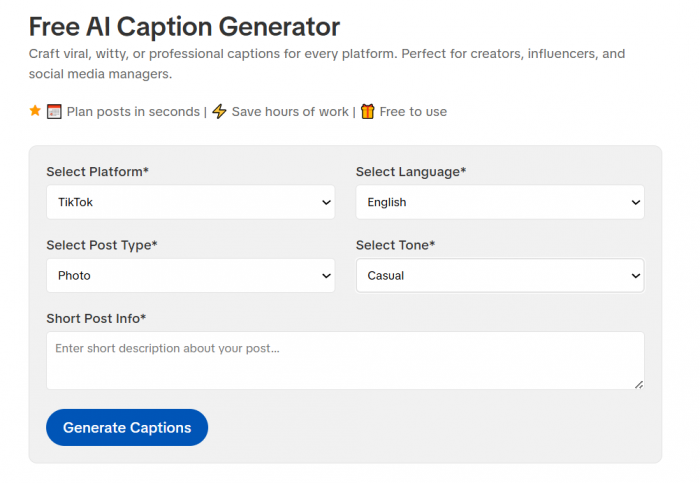
SmartPostly Caption Generator takes the first position because caption generation sits at the center of its social writing toolkit rather than being an afterthought inside a large marketing platform. You can provide information about the post and adjust variables such as platform, language, post type and tone before generating copy. That extra context matters on TikTok, where the same video could need a funny one-line caption, an explanatory description or a keyword-led caption depending on the goal.
What using it feels like
SmartPostly works best when you already know what your video is trying to say but have not settled on the wording around it. Instead of asking for “a caption about skincare,” you can describe the specific tip, audience and intended tone and use the generated variations as different starting directions.
The multiple-output approach is useful because caption writing is often less about finding a sentence and more about finding the right opening. You can compare versions, take the strongest hook from one and combine it with the clearer explanation from another rather than treating the first result as finished copy.
Where it stands out
● Pre-generation controls give the AI useful boundaries. Selecting platform, language, tone and content type reduces the chance of receiving generic promotional copy that could have been written for any social network.
● The supporting tools fit the same workflow. Separate generators for hashtags, hooks, bios, Reel scripts and other social copy mean you do not have to force one caption generator to perform every writing task.
● The free plan is large enough to test properly. Fifty requests provides more than a one-generation demo and should cover several weeks of experimentation for an individual creator.
Where it falls short
SmartPostly is focused more on generating content than managing accounts. If you want your caption writer sitting beside a scheduling calendar, approval system, social inbox and analytics dashboard, Buffer or Planable offers a more complete operational workflow.
The output also depends heavily on the brief. Short prompts can still produce familiar AI patterns, particularly broad hooks and generic calls to action. Giving the generator the actual angle of the video makes a noticeable difference.
Pricing and free value
The Starter plan is $0 per month with 50 requests. Creator costs $9 per month for 500 requests, while Professional costs $16 per month for 5,000 requests. A caption, bio, tagline or other generation counts as one request, and every plan includes access to SmartPostly's tools.
For a creator posting several times per week, the free allowance is genuinely usable. Agencies producing multiple variations across many accounts will reach it much faster.
Best fit
SmartPostly suits TikTok creators, freelancers and smaller social teams that already know how they want to publish and mainly want to speed up captions, hooks and supporting copy.
Final take
SmartPostly ranks first because it stays close to the actual task. It gives enough control to change the direction of a caption before generation and does not require users to adopt an entire social-management system just to write a post. Its narrower scope becomes a weakness only when scheduling and analytics matter as much as the writing itself.
| Area | Rating |
| Caption usefulness | 4.7/5 |
| Customization | 4.7/5 |
| Free value | 4.6/5 |
| Ease of use | 4.8/5 |
| Overall | 4.7/5 |
2. Planable: Best for Detailed TikTok Caption Controls
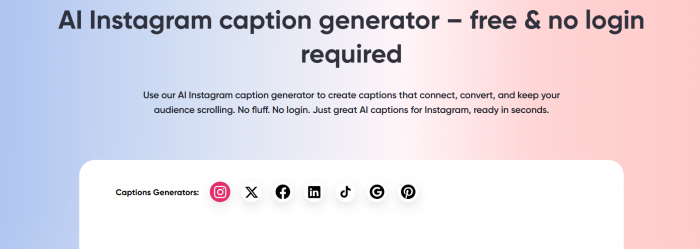
Planable has one of the more convincing free options because it provides a dedicated TikTok Caption Generator rather than adapting an Instagram writer and calling it multi-platform. The standalone generator requires no login and lets you choose the post purpose, writing style, caption length, number of variations and whether emojis or hashtags should be included.
That combination makes it particularly useful when you want to test different approaches to the same video.
What using it feels like
The workflow is more structured than a simple prompt box. You can mark the post as actionable, inspiring, introspective or promotional, then choose styles ranging from casual and informative to witty or empathetic. You can also request one, three or five versions and choose shorter or longer output.
Those settings are helpful because they separate what the caption needs to accomplish from how it should sound. A promotional post can still be casual, while an educational video can be witty without losing its informational purpose.
Where it stands out
● It is genuinely TikTok-specific, which means the interface is designed around TikTok captions rather than generic marketing copy.
● Purpose and tone are separate controls, giving users more precise direction than generators that offer only a single tone menu.
● Hashtags and emojis can be switched on or off, which is useful if you prefer to handle discoverability separately instead of letting the AI decorate every caption automatically.
Where it falls short
The generator gives you many controls, but it does not know your established brand voice unless you provide enough information in the prompt. The standalone tool is therefore better at generating directions than maintaining a highly specific voice across dozens of posts.
Planable's full product solves more of that workflow problem, but once you move beyond the free generator, you are entering a much broader collaboration and publishing platform.
Pricing and free value
The TikTok Caption Generator itself is free and does not require a login. Planable's main platform separately lets users create their first 50 posts free with no time limit or credit card requirement. Its current Basic plan starts at $33 per workspace per month, while Pro starts at $49 per workspace per month.
Best fit
Planable is particularly good for creators who want to experiment with tone, caption length and several variants without signing up for another tool.
Final take
Planable comes close to the top spot because its standalone generator gives users unusually clear control over the type of caption they are requesting. Its biggest advantage is not that it generates more text; it makes it easier to ask for meaningfully different text.
| Area | Rating |
| Caption usefulness | 4.6/5 |
| Customization | 4.8/5 |
| Free value | 4.8/5 |
| Ease of use | 4.7/5 |
| Overall | 4.7/5 |
3. Hootsuite: Best for Keyword-Aware TikTok Captions
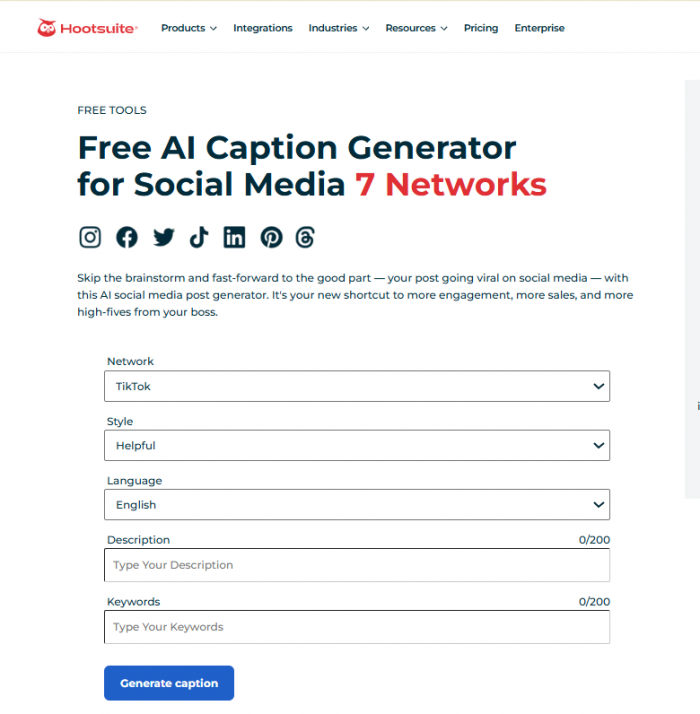
Hootsuite's free caption generator is surprisingly useful even if you have no intention of subscribing to the full Hootsuite platform. TikTok is available as a specific network, and the generator asks for a style, language, description and keywords before writing the caption. Hootsuite also maintains a separate free TikTok SEO tool built around generating captions using a target keyword.
That keyword field is what makes it different from many basic AI caption writers.
What using it feels like
You begin by selecting TikTok rather than leaving the AI to guess which platform it is writing for. You then describe the video, choose a style and add words or phrases that should appear in the result.
This is useful for informational TikToks where the caption needs to reinforce what the video is about. For example, a creator posting a beginner indoor-plant video could give the generator “indoor plant care” instead of hoping the model happens to include the phrase naturally.
Where it stands out
● TikTok can be selected directly as the target network, so the tool is not relying solely on prompt wording to understand the destination.
● A dedicated keyword field separates subject matter from writing instructions, which is useful when you want the caption to include a specific searchable phrase.
● Language and style controls make quick variations easy, particularly for marketers handling content across different markets.
Where it falls short
The standalone tool is intentionally simple. It does not learn your previous captions or maintain a detailed brand profile, so highly distinctive creator voices will still require editing.
There is also a major difference between the free web generator and Hootsuite's complete platform. The former is an accessible writing utility; the latter is a full social-management product with a much higher price.
Pricing and free value
The standalone social caption and TikTok SEO generators are free. Hootsuite's paid platform is separate: Standard currently starts at $99 per month, Professional at $199 and Advanced at $399, with trials available for the paid plans.
You therefore do not need a $99 subscription just to use the basic caption generator.
Best fit
Hootsuite is strongest for creators and marketers who want keywords explicitly built into the caption brief rather than adding them manually afterward.
Final take
Hootsuite ranks third because its free tool handles one of the more useful caption-writing details well: giving searchable terms their own input rather than burying them inside a long prompt. The output still needs personality added by the creator, but the underlying workflow is sensible.
| Area | Rating |
| Caption usefulness | 4.5/5 |
| Customization | 4.6/5 |
| Free value | 4.8/5 |
| Ease of use | 4.7/5 |
| Overall | 4.6/5 |
4. Buffer AI Assistant: Best if You Also Schedule TikToks
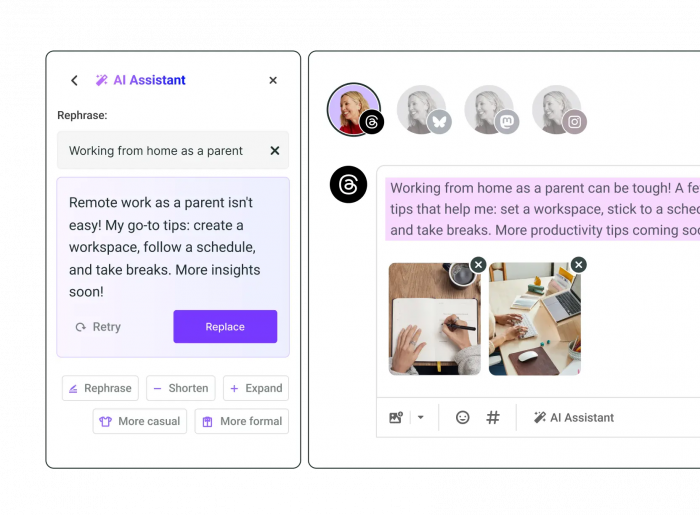
Buffer approaches caption generation differently. Its AI Assistant lives inside the content composer rather than existing only as a standalone caption webpage. You can start with a prompt, generate a social post, then rephrase, shorten, expand or shift the tone before inserting the result into your draft.
That makes Buffer less specialized as a TikTok caption generator but more useful once caption writing is part of a repeatable publishing routine.
What using it feels like
The editing controls are the strongest part of Buffer's workflow. If the first caption is roughly right but too formal, too long or poorly phrased, you can modify it without rebuilding the prompt from scratch.
For creators who publish across TikTok and other networks, that can be more efficient than using one standalone caption generator and then moving everything into a separate scheduler.
Where it stands out
● Generation and rewriting happen inside the publishing workflow, reducing the amount of copying between tools.
● Rephrase, Shorten, Expand, More Casual and More Formal controls make it easy to refine a workable draft rather than constantly generating replacements.
● The AI Assistant is included on Buffer's free plan with unlimited AI credits, which makes it unusually generous for users who already want a scheduler.
Where it falls short
Buffer gives you fewer up-front caption-specific controls than Planable. There is no elaborate menu for caption purpose, length and hashtag behavior before every generation. You get the best results by putting those instructions directly into your prompt.
It is also unnecessary overhead if all you want is one caption every few weeks.
Pricing and free value
Buffer's Free plan costs $0, connects up to three channels and allows 10 scheduled posts per channel at a time. It includes AI Assistant. The Essentials plan starts at $5 per month for one channel when billed annually, adding unlimited scheduled posts and more advanced features.
Best fit
Buffer is best for creators who want AI caption help but also need somewhere to organize and schedule their TikTok content.
Final take
Buffer is not the most detailed pure caption generator here, but it becomes much more attractive when writing and publishing are treated as one job. It saves more workflow steps than a standalone generator, which can matter more than having another five tone options.
| Area | Rating |
| Caption usefulness | 4.5/5 |
| Customization | 4.4/5 |
| Free value | 4.7/5 |
| Ease of use | 4.6/5 |
| Overall | 4.5/5 |
5. QuillBot: Best for Flexible Prompt-Based Captions
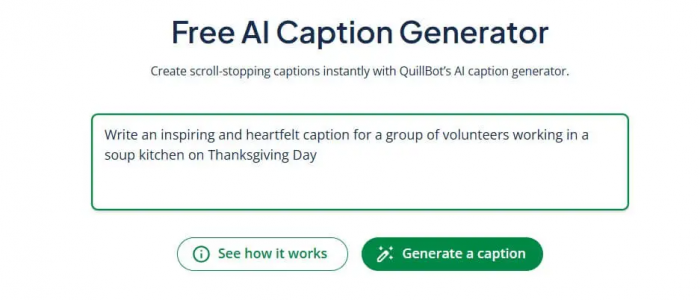
QuillBot's free AI Caption Generator is broader than a dedicated TikTok tool, but TikTok is explicitly supported alongside Instagram, Facebook, LinkedIn and other social formats. You describe the post or desired vibe, then refine the generated ideas with additional instructions. The tool can also work from an uploaded image, which gives it another source of context when the TikTok is built around a visual subject.
The approach is straightforward: instead of many fixed menus, most of the control comes from what you tell it.
What using it feels like
QuillBot is good at quick iteration. A specific prompt can include the audience, desired reaction, keyword and tone in one instruction, then you can ask it to move in another direction without starting again.
This flexibility is helpful for people comfortable writing prompts. It is less helpful for someone who prefers visible controls that remind them what information to provide.
Where it stands out
● The generator supports TikTok directly and can produce several caption ideas from a conversational brief.
● Image input can provide additional context, which is useful when the visual itself contains most of the information the caption needs.
● The basic caption generator is free, and QuillBot says it can be used for different social platforms and multiple languages.
Where it falls short
QuillBot is a general writing platform, so the caption generator does not feel as specifically designed around TikTok strategy as Planable's tool. You need to tell it whether you want a short hook, keyword inclusion, CTA or hashtag treatment rather than expecting those choices to be surfaced for you.
Pricing and free value
The basic QuillBot caption generator is free. QuillBot also has a $0 Free writing plan, while Premium pricing varies by billing option and region. The current Premium page lists annual pricing at $8.33 per month when billed annually, though checkout pricing can vary.
Best fit
QuillBot works well for occasional creators who want a flexible generator without adopting a dedicated social-media platform.
Final take
Its strength is freedom rather than structure. If you know how to describe exactly what you want, QuillBot can be an effective caption brainstorming partner. If you want the interface itself to guide you toward TikTok-specific choices, the tools above it are easier to direct.
| Area | Rating |
| Caption usefulness | 4.4/5 |
| Customization | 4.4/5 |
| Free value | 4.7/5 |
| Ease of use | 4.5/5 |
| Overall | 4.5/5 |
6. Ahrefs Social Media Caption Generator: Best for Fast, No-Fuss Ideas
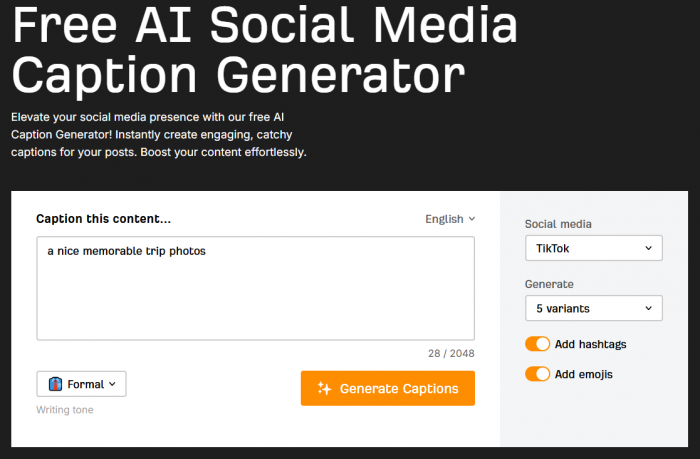
Ahrefs is better known for SEO software, but its free writing-tools collection includes a standalone Social Media Caption Generator. You can provide up to 2,048 characters of context, select a writing tone, choose a social network and request up to five variants. Hashtags and emojis can also be added as optional elements.
It earns a place here because it is quick and genuinely free, not because it offers the deepest TikTok workflow.
What using it feels like
Ahrefs has very little setup. You describe the content, choose the tone and generate several versions. That makes it useful when the problem is simply getting past an empty caption field.
The ability to request several variants is important because a single AI response often gives users no reference point. Five options make it easier to see whether the model has found an interesting angle or is merely repeating the same idea with slightly different wording.
Where it stands out
● The writing tools do not require an Ahrefs paid subscription, so you do not need to buy SEO software to use the caption generator.
● Users can request multiple variants in one generation, which makes the tool useful for comparing hooks quickly.
● Hashtag and emoji options are optional, allowing you to keep the output clean if you prefer to add those elements yourself.
Where it falls short
Ahrefs gives you fewer TikTok-specific choices than Planable or Hootsuite. The tool understands the selected social platform, but you will need to put more strategic information into the description yourself.
There is no meaningful reason to buy Ahrefs' main SEO subscription solely for this generator either. The free writing tool is the relevant product here.
Pricing and free value
The standalone AI writing tools, including the caption generator, are available without an Ahrefs subscription. Ahrefs does offer separate paid SEO plans, but those plans are not required for this tool.
That makes its free value straightforward: use the generator for captions and ignore the broader subscription unless you already need Ahrefs for SEO.
Best fit
Ahrefs is a good choice for someone who needs occasional caption ideas quickly and does not need scheduling, brand-memory features or a detailed TikTok-specific workflow.
Final take
Ahrefs finishes sixth because it solves the basic writing problem reliably but gives the user less guidance than the higher-ranked options. For quick brainstorming that is not necessarily a weakness. For repeat TikTok publishing where tone, intent and keyword choices need to stay controlled, more specialized tools offer a stronger workflow.
| Area | Rating |
| Caption usefulness | 4.3/5 |
| Customization | 4.2/5 |
| Free value | 4.8/5 |
| Ease of use | 4.7/5 |
| Overall | 4.5/5 |
What “Free” Should Mean
The word free gets stretched considerably in software comparisons. A seven-day trial of a $30 subscription is not the same thing as a generator you can continue using without paying.
The tools above fall into two more useful categories:
● Standalone free generators such as Planable, Hootsuite and Ahrefs let you generate captions without buying their larger social or marketing products. These are particularly good for occasional use because you are not paying for scheduling or analytics you may never open.
● Free-plan tools such as SmartPostly and Buffer give you ongoing access inside an account but introduce limits elsewhere, such as generation requests, connected channels or scheduled-post capacity.
Neither model is automatically better. The question is whether the restriction gets in the way of your real posting frequency.
A creator publishing four TikToks per week may find 50 monthly AI requests comfortable. An agency testing six caption versions for ten clients will view the same allowance very differently.
What the Generator Cannot Know
The biggest mistake with AI captions is assuming more generated versions automatically mean better captions.
The tool sees the information you give it. It does not automatically understand which moment in a 30-second TikTok is surprising, which phrase your audience already associates with you or whether the real purpose of the post is to generate comments rather than explain the video.
Before generating, give the tool four pieces of information:
● Explain what actually happens in the video rather than providing only the broad topic. “Three mistakes I made buying my first mechanical keyboard” gives the generator considerably more direction than “keyboard video.”
● Identify who the post is for. A caption for complete beginners should not assume the vocabulary you would use with experienced followers.
● State what the caption needs to do. Ask for curiosity, explanation, a question, search visibility or a soft product mention instead of leaving the objective undefined.
● Tell it what to avoid. If you dislike emojis, dramatic hooks, phrases such as “you won't believe this,” or blocks of hashtags, saying so before generation saves more time than cleaning them out afterward.
That is also a better way to judge these tools. The winner is not necessarily the generator that produces the most polished first sentence from a vague prompt. It is the one that responds predictably when you give it a specific brief.
The Conclusion
SmartPostly is the best overall free TikTok caption generator in this group if caption writing itself is the main problem you are trying to solve. Its controls, related social-writing tools and 50-request free tier create a practical middle ground between a one-off web generator and a full publishing suite.
Planable is the strongest alternative for users who want a completely free, no-login TikTok-specific generator with unusually detailed controls. Hootsuite is particularly useful when keyword inclusion matters, while Buffer makes more sense for creators who want AI writing inside a scheduling workflow. QuillBot and Ahrefs are both strong lightweight options when you need quick ideas rather than a complete social content system.
There is one useful test that matters more than any rating table: how much editing is left after generation. If a free tool gives you ten captions but every one needs its voice, hook and unnecessary hashtags repaired, it has not saved much time. The better generator is the one that gets close enough to your intention that editing becomes the final step rather than the real writing job.
juliana phil
Aug 28, 2026Reader Testimonial: Lessons From an Online Investment Scam I am sharing my experience in the hope that it may serve as a cautionary example for other investors. I lost more than $740,450 after becoming involved with an online investment opportunity that I later came to believe was fraudulent. The financial loss was substantial, but the experience was also emotionally difficult and left me uncertain about what steps I could take next. After discovering the problem, I sought guidance from Kristina Hooper. I explained what had happened and provided the information I had relating to the transactions and the platform involved. They assisted me in understanding the recovery process and guided me through the steps I needed to take. I recently received my funds back, which was a considerable relief after what had been a very stressful period. Looking back, my experience has reinforced the importance of conducting independent checks before investing online. Investors should verify the identity and legitimacy of a company, be cautious about promises of unusually high returns, and carefully investigate any request for additional payments or personal information. I am sharing this account as my personal experience rather than as a recommendation or guarantee regarding any particular company or recovery service. Anyone wishing to ask about my experience may contact me at kristina hooper24 @ gmail. Dco com
Login To Reply ↪