

Yodayo AI is a creative platform that brings image generation, video creation, music production, AI character chat, and image editing into one workspace. Although the platform is particularly popular for anime artwork and character creation, its tools also support content production for Instagram, TikTok, and YouTube.
I explored Yodayo from a social media creator's perspective, focusing on four features: Image Generation, Video Generation, Music Generation, and Image Presets. My goal was to develop content around a consistent anime travel character named Mika, including a portrait, an animated scene, a themed costume board, and an original music track.
The experience highlighted Yodayo's strength in character-based visuals, its flexible creative tools, and the different levels of control available for each content format. Here is a breakdown of the inputs, visible results, and practical findings.
How I Tested Yodayo AI
I approached the platform with a connected content concept rather than generating unrelated images and audio. Mika, a fictional 24-year-old anime travel creator with black hair, green eyes, and a teal jacket, served as the main character.
This gave the visual tests a consistent subject and made it easier to evaluate how Yodayo handles character details, storytelling, and different content formats.
| Feature | My testing task | Intended social media use |
| Image Generation | Create Mika on a Tokyo street | Instagram character post |
| Video Generation | Develop a nighttime Tokyo walking scene | Reels and Shorts |
| Music Generation | Produce an emotional indie-pop song | Background music and storytelling |
| Image Presets | Design four Halloween costumes | Carousel and character content |
I concentrated on prompt handling, visual quality, composition, creative flexibility, and the amount of editing required for social media.
Image Generation: My First Result
I started with Yodayo's Art generator to create the central character for my content concept. The objective was a polished anime portrait suitable for an Instagram post, with enough background detail to establish a recognizable travel setting.
What I entered
My prompt described Mika as a 24-year-old anime travel creator with shoulder-length black hair, emerald-green eyes, and an oversized teal jacket over a white shirt. I placed her on a peaceful Tokyo street during cherry blossom season.
I also requested golden-hour sunlight, detailed Japanese storefronts, falling pink petals, cinematic lighting, a pastel palette, and a centered composition without text or watermarks.
For the canvas, I selected a custom resolution of 896 × 1152 pixels, giving the image a vertical composition.
How the Image Turned Out
The generated portrait followed the central character description closely. Mika appeared with black hair, bright green eyes, and a teal jacket over a white shirt. The character was placed on a Japanese street, with storefronts, cherry blossoms, and warm sunlight establishing the location.
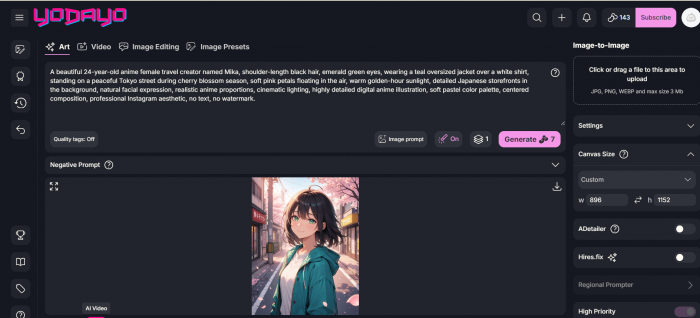
The most successful part was the composition. Mika occupied the foreground while the street extended behind her, adding visual depth without competing with the main subject.
The image also maintained a consistent anime illustration style. Facial features were clean, the color palette was cohesive, and the soft lighting complemented the cherry blossom setting.
There were two notable differences between the requested description and the output. First, the framing was closer to a character portrait than a detailed environmental scene, leaving less space to showcase Tokyo itself. Second, the result leaned toward a polished illustrated appearance rather than realistic anime proportions.
Neither issue prevented the image from working as a character-focused Instagram visual, but both matter when evaluating prompt accuracy.
Was It Suitable for Instagram?
The portrait was visually strong enough to serve as a standalone anime character post. Its vertical layout also made it suitable for adapting into a carousel or character introduction.
I would still add a caption or other branding elements separately because the generated image intentionally contained no text.
My assessment: Image Generation was the strongest option for establishing Mika's visual identity. It handled clothing, facial details, scenery, and color effectively, although the final framing gave more attention to the character than the Tokyo environment.
Image Presets: Creating a Halloween Costume Board
Next, I moved to Image Presets. Instead of producing another character portrait, I wanted to develop a themed visual that could be used as an Instagram carousel or seasonal character-design post.
I selected the Halloween Costume Board preset, which is designed to place four costume concepts for one character on a single sketch page.
What I Created
I used the costume-board preset with an additional instruction to turn the character into a Halloween costume design board featuring four outfits.
The generated result contained four labeled designs:
● Kitsune: A Japanese-inspired costume with fox ears, multiple tails, red-and-white clothing, and traditional decorative elements.
● Witch Student: A dark school-inspired costume with a pointed witch hat, cape, and magical accessories.
● Vampire Noble: A gothic outfit featuring a dark dress, red cape, and decorative lantern.
● Candy Ghost: A playful pastel-colored ghost costume with candy accessories and a softer appearance.
Unlike the original Tokyo portrait, this output presented the character as a collection of costume concepts rather than a single finished scene.
What Stood Out in the Result
The preset produced a well-organized four-panel design sheet. Each costume had its own visual identity, while the character retained recognizable features across the illustrations.
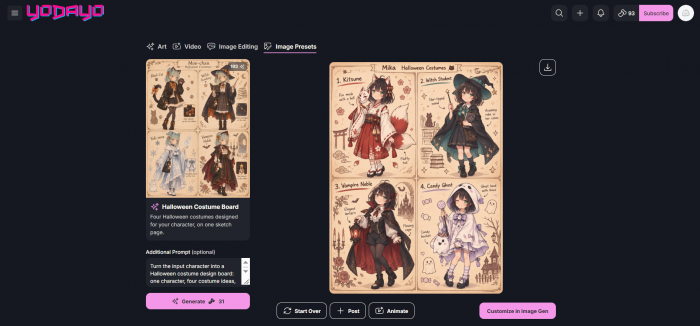
The parchment-style background, decorative sketches, and handwritten-style labels made the design resemble a completed character concept sheet. This was more useful than simply placing four unrelated costume images beside each other.
The generated labels were also mostly understandable, which helped communicate the intended costume themes. However, the smaller annotations would need checking and possible correction before being used in a polished publication.
How Useful Was It?
I found the preset particularly suitable for themed social media content. The four costume designs could be separated into individual carousel slides or published together as a character-design collection.
Its main advantage was the ready-made layout. Rather than separately designing four outfits and arranging them into a comparison graphic, the preset handled the overall presentation.
The limitation was flexibility. The output followed the selected costume-board format, making it less suitable for creators who need complete control over each panel's arrangement or typography.
My assessment: Image Presets offered a practical way to turn one character concept into a themed visual collection. The Halloween board was cohesive and detailed, with minor text corrections being the main visible issue.
Video Generation: Creating a Tokyo Night Scene
After generating Mika's portrait, I moved to Yodayo's Video Generation tool to develop a short anime-style scene for Instagram Reels and YouTube Shorts. I kept the same character but changed the setting from a peaceful cherry blossom street to a neon-lit Tokyo street at night.
What I Did
I entered a detailed prompt describing Mika walking slowly through Tokyo, with shoulder-length black hair, emerald-green eyes, and an oversized teal jacket. I requested glowing neon storefronts, colorful reflections on wet pavement, gentle hair movement, and smooth cinematic camera tracking.
I also specified consistent facial features, natural walking motion, a vertical composition, and no sudden camera movements. The selected generation configuration displayed a cost of 46 YoBeans.
The Video Result
The video result shown in the interface presents Mika on a brightly illuminated Tokyo street, surrounded by colorful storefronts and reflections across the pavement. Her black hair, green eyes, and teal jacket remain recognizable, connecting the scene visually to the original character portrait.
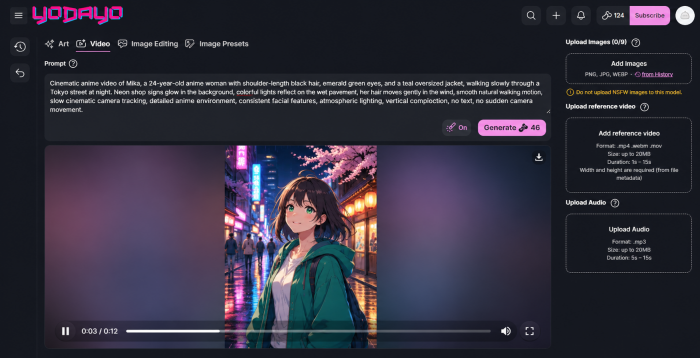
The composition works particularly well for short-form content. Mika occupies the foreground, while neon signs, illuminated buildings, and pedestrians establish the busy nighttime environment. The pink and blue lighting creates a strong cinematic atmosphere without making the character difficult to distinguish.
The result is displayed in a vertical video player with a 12-second duration, matching the short-form concept I wanted to develop. The frame also shows Mika's hair extending naturally to one side, giving the scene a sense of movement.
The visible frame establishes the character design, lighting, and overall composition. However, it does not establish whether the walking animation remains smooth or the facial features stay consistent throughout the full clip.
How Useful Was It for Social Media?
The scene has a clear visual direction for an anime travel Reel. Its vertical format, recognizable main character, and vibrant nighttime setting make it suitable for a short character-focused sequence.
For publishing, I would pair the scene with atmospheric background audio and a short caption. The neon colors provide enough visual interest without requiring large text overlays or additional graphic elements.
My assessment: Yodayo's Video Generation workflow was effective for developing a detailed anime scene with a consistent character design and cinematic environment. The displayed result captures the intended nighttime Tokyo aesthetic, although full motion quality cannot be judged from a single preview frame.
Music Generation: Creating an Indie-Pop Track
After working with visual content, I tested Yodayo's Music Generation feature using an original song concept.
My objective was a soft, emotional indie-pop track that matched the atmospheric style of Mika's travel content. Instead of requesting generic background music, I supplied lyrics and a detailed music description.
The Lyrics and Music Direction
I entered original lyrics about memories, city lights, relationships, and nostalgia. The song was organized into verses, a pre-chorus, a repeated chorus, and an outro.
The chorus included:
Underneath the midnight sky,
We're like stars that learned to fly.
For the music prompt, I requested a warm male vocal, soft piano melodies, acoustic guitar, atmospheric synthesizers, and subtle electronic drums.
I set the intended tempo at approximately 85 BPM, with quiet verses building toward a melodic chorus. The requested mood was romantic, peaceful, and slightly bittersweet.
This provided a defined musical structure instead of relying on a short genre instruction.
The Generated Output
Yodayo generated a playable audio track lasting 2 minutes and 18 seconds. The result appeared in the music workspace with playback controls, showing that the request produced an audio file rather than only lyrics or a text response.
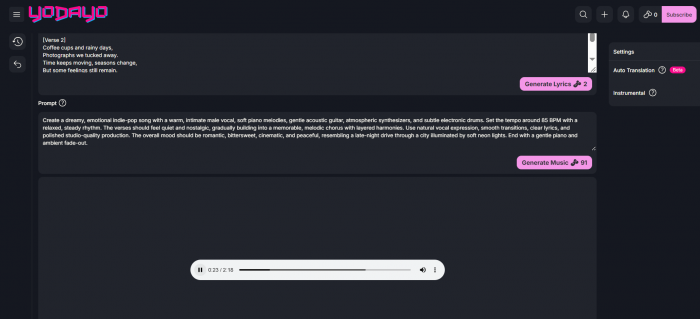
The duration was substantial enough for a standalone musical composition. For a short Instagram Reel, however, the full track would be longer than necessary, so a suitable section would need to be selected during editing.
The audio player also made it possible to access the generated recording within the same workspace.
The screenshot does not establish whether the vocals were clear, whether the tempo matched 85 BPM, or whether the instruments followed the requested arrangement exactly. Those qualities require listening to the actual recording rather than judging the player interface.
What I Found Useful
Music Generation accepts both written lyrics and production instructions, giving creators control over the song's intended message and overall sound.
This is useful for building original music around a particular content theme. The completed track could serve as source audio for a creator's video project, subject to confirming the output quality and applicable usage rights.
The main editing consideration is duration. A full song and a short-form soundtrack serve different purposes, so the best section needs to be selected based on the video.
My assessment: The feature successfully produced a playable 2:18 audio track from structured lyrics and a detailed music prompt. Its suitability for publication depends on listening quality and the rights associated with the generated audio.
Which Outputs Were Ready for Social Media?
The four tools addressed different parts of a creator's production workflow. Image Generation and Image Presets produced visible artwork, while Music Generation returned an audio file and Video Generation provided a detailed animation setup.
| Tool | Result | Publishing assessment |
| Image Generation | Completed anime travel portrait | Suitable as an Instagram visual with optional branding |
| Image Presets | Four-panel Halloween costume board | Suitable for a themed post after checking small text |
| Video Generation | Nighttime animation prompt and settings | Suitable for short reels |
| Music Generation | Playable 2:18 song | Audio review and editing required |
The clearest results came from the two image-based tools. Both produced finished visuals with recognizable subjects and coherent compositions, although the intended uses were different.
Image Generation worked better for a single character-focused post, while Image Presets was more appropriate for a multi-concept design.
For music and video, publishing readiness requires checking the actual audio and motion rather than relying only on the submitted instructions.
Yodayo AI Pricing
Yodayo AI uses YoBeans, a credit-based system for generating images, videos, music, and other AI content. Users can purchase credits through one-time packs, while PRO and PREMIUM subscribers can receive additional YoBeans for the same purchase price.
The platform also offers a first-time purchase deal of 349 YoBeans for $1.99.
Here are the one-time YoBeans packages displayed on Yodayo's pricing page:
| YoBeans | Price (USD) | Bonus |
| 349 | $1.99 | First-time offer |
| 1,600 | $12 | 23% |
| 3,750 | $24 | 25% |
| 10,200 | $60 | 27% |
| 22,000 | $120 | 29% |
| 110,000 | $600 | 29% |
During my testing, Image Generation displayed a cost of 7 YoBeans, Image Presets required 31 YoBeans, Video Generation showed 46 YoBeans, and Music Generation required 91 YoBeans. These costs depend on the selected models and generation settings.
For social media creators, the credit system makes individual generation costs visible before creating content. However, producing multiple variations or combining images, videos, and music can increase overall spending.
What Worked and What Didn't
The testing showed that Yodayo provides several ways to develop creative content around a recurring character. Its strongest demonstrated results were in character illustration and preset-based visual design.
What Worked Well
● Character appearance: The generated Tokyo portrait followed Mika's main visual description, including her hairstyle, eye color, clothing, and overall anime appearance.
● Image composition: The portrait had a clear foreground subject and a detailed background, giving it a complete visual presentation.
● Preset design: The Halloween Costume Board organized four distinct outfits into one coherent image without requiring manual layout work.
● Music creation: The music tool accepted structured lyrics and detailed production instructions, returning a playable song lasting over two minutes.
● Creative workflow: The separate workspaces made it possible to develop image, animation, and music concepts around the same fictional character.
Where It Fell Short
● Limited framing control: The Tokyo portrait emphasized Mika more strongly than the surrounding travel environment.
● Small generated text: The costume board's annotations were not consistently suitable for final publication without checking.
● Different generation costs: Image, video, music, and presets used different credit amounts, making the cost of a larger content project dependent on its mix of formats.
● Additional production work: Generated artwork still needed captions or branding, while music required appropriate editing for short-form use.
These observations suggest that Yodayo is better approached as a creative production toolkit than an automatic social media publishing solution.
Is Yodayo AI Worth Using for Social Media?
Yodayo AI offers a useful collection of creative tools for creators working with anime characters, themed illustrations, video concepts, and original music. The Tokyo portrait demonstrated strong character rendering and visual composition, while the Halloween preset produced a detailed, organized costume board. Music Generation also completed an original song request and returned a playable audio file.
For social media creators, Image Generation and Image Presets were the most convincing parts of the demonstrated workflow. They delivered usable visuals with clear applications for Instagram posts and character-focused content. Video and music add broader creative possibilities, but their final quality must be assessed through playback.
Overall, Yodayo is worth exploring for anime-focused creators who want to build recognizable characters and produce different types of content within one platform. Its value comes from creative flexibility, while final editing, quality checks, and publishing decisions remain part of the creator's work.
Comments