

Most Instagram features fight for attention inside a crowded feed. A broadcast channel does the opposite, dropping a message straight into a follower's direct inbox with no algorithm deciding who sees it.
That single difference is why creators treat it as a private line to their most engaged audience. The setup takes a couple of minutes, but the accounts that get real value from it are the ones that understand what the tool is for before they ever tap create.
Who Can Create One
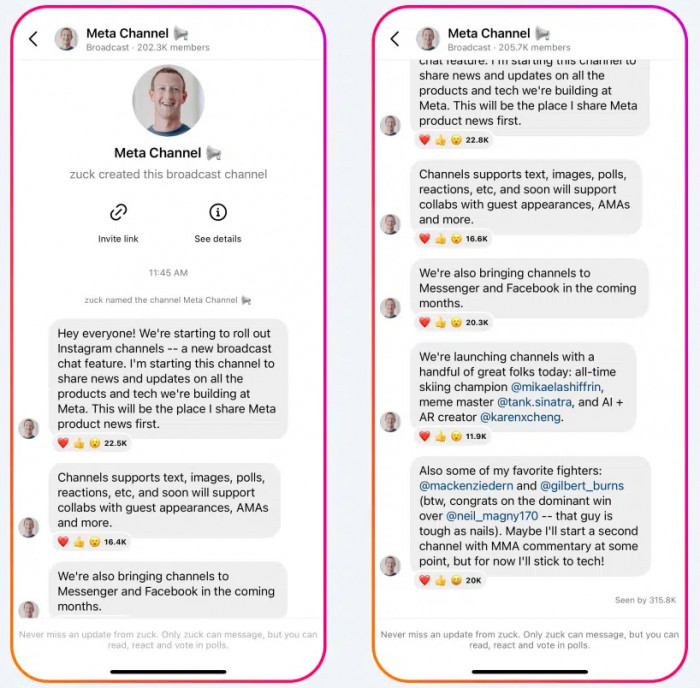
Instagram launched broadcast channels in early 2023 behind a strict gate that required a verified creator account with a large following. That gate has loosened repeatedly since, and the requirement most older guides still quote is out of date.
As of 2026, access is tied to having a professional account, meaning a Creator or Business profile rather than a personal one. The old 10,000-follower minimum has been lifted across most supported regions, though some accounts still report seeing it, which points to how unevenly the rollout has spread.
Two things matter more than raw follower count. The account type has to be professional, and the feature has to have reached the account's region and app version. When the create option is missing despite a healthy following, the blocker is almost always one of those two rather than the size of the audience.
• The account is still set to personal and needs switching to a Creator or Business profile in settings.
• The app is running an older version that has not yet pulled the latest feature set.
• The feature has not finished rolling out in that country, since Instagram ships these changes in waves.
• The account carries a recent restriction that limits its messaging features.
Creating a Broadcast Channel Step by Step
The whole process lives inside the direct message section of the mobile app. Broadcast channels cannot be created from the desktop site, so a phone running a current version of the app is the starting point.
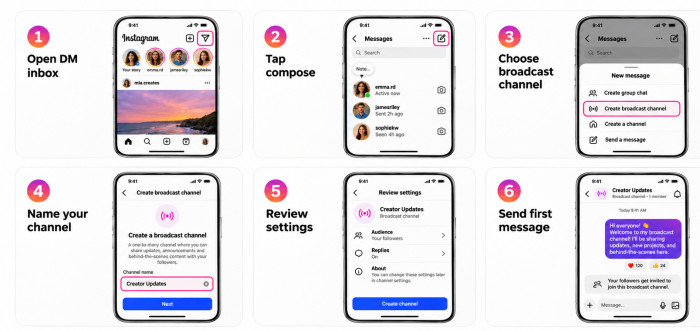
1. Open Instagram and go to the direct message inbox by tapping the messenger or paper plane icon at the top right of the home feed.
2. Tap the pencil or compose icon at the top right of the inbox, the same button used to start a new message.
3. Select the option to create a broadcast channel from the list that appears. On a qualifying account it sits alongside the usual new message choices.
4. Give the channel a name that signals what subscribers are joining, since this is the first thing a follower reads on the invite.
5. Review the audience and reply settings, then confirm the creation.
6. Send the first message. The moment it goes out, Instagram pushes a one-time invite to followers so they can join.
Once created, the channel sits near the top of the inbox and stays there as a permanent space rather than a thread that disappears after a conversation ends.
Naming and Setting the Channel Promise
The name field looks minor during setup, and it is the decision that quietly decides whether anyone joins. A channel labelled with the account's own handle tells a follower nothing about why the notification is worth keeping switched on.
A sharper name describes the payoff. Something like "Launch alerts first" or "Weekly editing tips" sets a clear expectation, and that expectation becomes a promise the channel has to keep. Subscribers who signed up for one thing and received something unrelated are the first to mute and leave.
It helps to settle the channel's single job before naming it. A channel built around early product drops behaves very differently from one built around daily behind-the-scenes notes, and trying to serve both inside one space is how the promise gets muddy.
Setting Up Controls and Privacy
Broadcast channels are one-way by default. The owner posts, and subscribers can react with emojis or vote in polls, but they cannot push messages back into the main channel. That structure is deliberate and keeps the space free of the noise a group chat collects.
A few controls are worth setting on purpose at the start rather than discovering later:
• Replies and reactions can be limited, so a channel runs either as pure announcements or with light emoji feedback depending on the goal.
• Moderators or admins can be added on supported accounts to help manage larger channels and remove anything that breaks the rules.
• An expiry date can be set on some channels, which suits a time-boxed use such as a product launch or an event countdown.
• The channel can be deleted or the owner can leave, which removes it for everyone subscribed.
Subscribers join quietly, and the owner does not browse a public list the way a follower list works. The relationship is closer to an email list than a social graph, which changes how the audience is best treated.
Sending Your First Broadcast
The first message does more work than any later one, because it fires the invite that most followers act on in the opening days. A dead or generic first post wastes that one spike of attention.
A strong opener usually does two things at once. It welcomes people and immediately hands them something they could not get from the regular feed, whether that is an early look at a project or a straight answer to a question the audience keeps asking.
Setting the tone early also sets the frequency expectation. A channel that opens with a calm, useful note trains subscribers to expect signal, while one that opens with a hard sell trains them to brace for spam.
What You Can Send
Broadcast channels are intentionally basic. The format mirrors a direct message rather than a polished post, and that stripped-back feel is part of why the content reads as personal.
The supported formats cover most of what a casual DM would carry:
• Text messages, including links, which makes the channel a clean way to push traffic without fighting the single link-in-bio limit.
• Photos and short videos shared straight into the thread.
• Voice notes, which land as something unusually intimate for a broadcast and tend to draw strong reactions.
• Polls and prompts, the main way subscribers take part given they cannot reply in the main channel.
Reactions sit under each message, so even a one-way channel produces useful engagement signals. Creators can also use Instagram poll questions to understand audience preferences and decide which topics deserve more attention. Music and audio still fall under Instagram's usual copyright rules, so licensed or original sound remains the safer choice.
Broadcast Channel vs Other Instagram Tools
Part of the confusion around broadcast channels comes from Instagram offering several overlapping ways to reach an audience. Each one suits a different intent, and the table below lines them up side by side.
| Tool | Direction | Reach | Best for |
| Broadcast channel | One-way, owner posts | Opted-in subscribers, direct to inbox | Announcements and a direct line to superfans |
| Close Friends | One-way Stories | A hand-picked list | Semi-private Stories for a small circle |
| Group chat | Two-way, everyone posts | A small invited group | Active back-and-forth conversation |
| Stories | One-way, public | Followers, ranked by the algorithm | Broad daily reach and casual updates |
The practical line is that a broadcast channel trades reach for certainty. Stories may touch more people on a good day, but a channel message reaches the inbox of everyone who subscribed, every single time.
Why Channels Go Quiet
Most brand and creator channels are busy for a week and silent by the second. The pattern is common enough that it is worth planning against before launch rather than after the drop-off has already happened.
The cause is rarely the tool. It is the missing reason to keep posting once the novelty fades. A channel opened on impulse, with no decision about what it delivers or how often, has nothing to fall back on when the first burst of excitement passes.
The channels that survive treat it as a small standing commitment with a fixed rhythm. A set cadence, even a modest one such as a single message each week, gives the channel a job and gives subscribers a reason to keep notifications on.
Content That Keeps Subscribers
The content that works in a channel is the content that feels like it belongs nowhere else. Reposting the same feed caption into the channel hands people a reason to leave, since they have already seen it.
Different account types find different angles. The table below maps a few that consistently hold attention.
| Account type | Content that works | Why it holds |
| Creator or coach | Early access to lessons and raw, unfiltered thoughts | Feels like insider access rather than public content |
| Ecommerce brand | First look at new drops and subscriber-only discount codes | Turns the channel into a reason to buy, not just follow |
| Local business | Event reminders and limited offers for regulars | Rewards the people who care enough to subscribe |
| Media or publisher | Breaking updates and links before they hit the feed | Speed and priority access become the draw |
Across all of them, the common thread is exclusivity paired with usefulness. A subscriber tolerates a notification only when the channel reliably gives something the feed does not.
Growing Your Subscriber Count
Growth on a channel is quieter than growth on the main profile, because the channel does not surface in Explore or through hashtags. The one-time invite card that Instagram pushes at creation is the single biggest spike most accounts ever get, so launching with that moment in mind matters.
Beyond the launch, subscribers come from deliberate promotion. A handful of routes work better than hoping followers wander in:
• Mentioning the channel in Stories with the join link, repeated occasionally rather than only once.
• Referencing it inside regular posts and reels whenever the channel content ties to the topic at hand.
• Teasing what subscribers get that the feed does not, which gives a concrete reason to tap join.
The honest trade-off is that a channel grows slowly without active promotion. High engagement is the reward, but the audience has to be pointed toward the door each time rather than finding it alone.
Mistakes to Avoid
Most channel failures trace back to a small set of avoidable habits rather than anything technical.
• Treating the channel like a second feed and reposting identical content, which removes any reason to subscribe in the first place.
• Opening it with no fixed promise or cadence, so posting turns random and then stops altogether.
• Over-messaging in the first week out of excitement, which trains the most interested followers to mute early.
• Selling in every message, which turns a trust channel into an ad feed people quietly exit.
• Ignoring the poll and reaction signals, which are the only feedback the format offers and the clearest hint of what to post next.
Measuring If It Is Working
A broadcast channel has no like count and no public follower number, which unsettles accounts used to judging everything by visible metrics. The signals it does offer are quieter and arguably more useful.
Reactions per message show which topics land. Poll participation shows how alive the audience is. The slow drift of people joining or muting over time shows whether the promise is being kept.
Not every engagement signal appears in a standard dashboard, so tracking performance requires attention to individual messages. For shared URLs, Instagram link tracking adds another useful measure by showing whether subscribers take action beyond reacting or voting. Reviewing these signals over several weeks helps distinguish an active channel from one that members have quietly stopped engaging with.
The Verdict
A broadcast channel is not a growth tool and was never built as one. It is a retention tool, a way to keep the people who already care close enough to hear from directly. Accounts that judge it by reach walk away disappointed, while accounts that judge it by depth of connection tend to keep it running.
The setup is the easy part and takes minutes. The decision that carries weight is whether there is something worth saying, on a steady rhythm, to the followers who opted in. When that answer is yes, few features on Instagram pay the effort back as directly.
Comments